Financial Services Consulting Professional Website Template
Leverage is a single-page landing page template built for financial services growth consultants. It pairs an animated metrics header with scroll-driven comparison tables and named partner profiles to establish authority fast. The design uses a deep slate and sky blue palette, and every section moves a senior financial services buyer toward one clear action: scheduling a confidential consultation.
by Rocket studio
Quick summary
Leverage is a precision-built landing page template for financial services growth consultancies. It opens with animated performance metrics, builds credibility through named partner profiles and before-and-after comparison tables, and closes with a progressive lead capture form. The entire layout is tuned for senior buyers at banks, registered investment advisers, and fintech firms.
Who this template is for
This template is designed for consultancies that work at the senior level inside financial institutions. If your clients are making decisions that affect hundreds of millions in assets, this layout speaks their language.
- Growth consultants serving mid-market registered investment advisers (RIAs), regional banks, and insurance platforms
- Financial services advisory firms whose senior partners have verifiable credentials and named client outcomes
- Boutique consultancies targeting chief executives and board-level stakeholders in fintech and wealth management
What problem this template solves
Senior financial services buyers are skeptical by default. A generic consulting page with vague value propositions will not move them. These buyers want evidence, not promises.
- Most consulting templates rely on abstract claims rather than specific, measurable outcomes tied to real people
- Prospects at the chief executive level need to see credentials, prior firm names, and quantified results before they trust a firm enough to book a call
- Standard lead forms feel transactional; this template uses a two-step progressive form that earns the click by showing outcomes first
What you get with this template
This template delivers a complete, single-page layout with every section configured for high-trust financial services positioning. Nothing is generic or interchangeable.
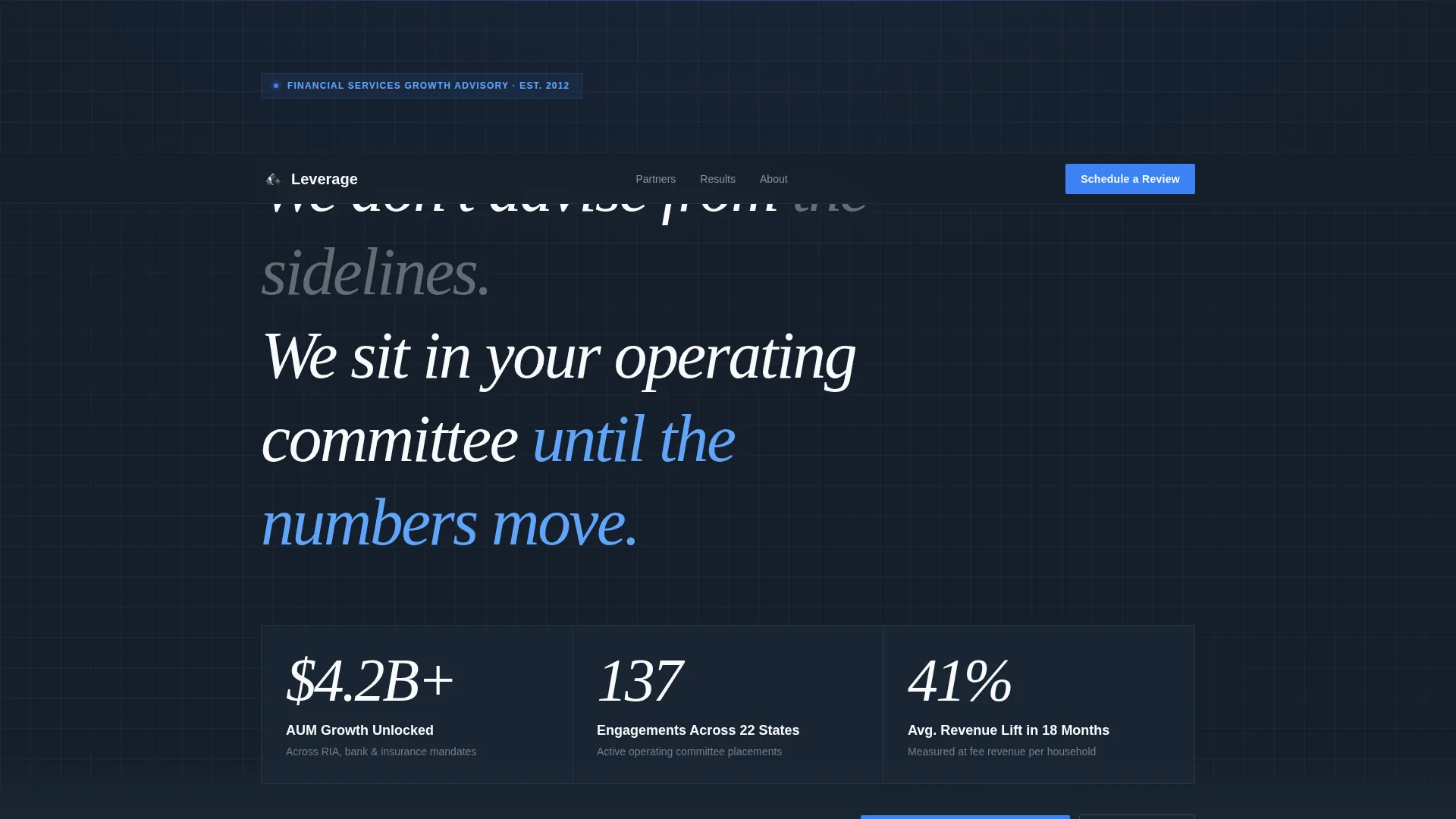
- An animated stats header displaying three oversized performance figures that count upward on page load
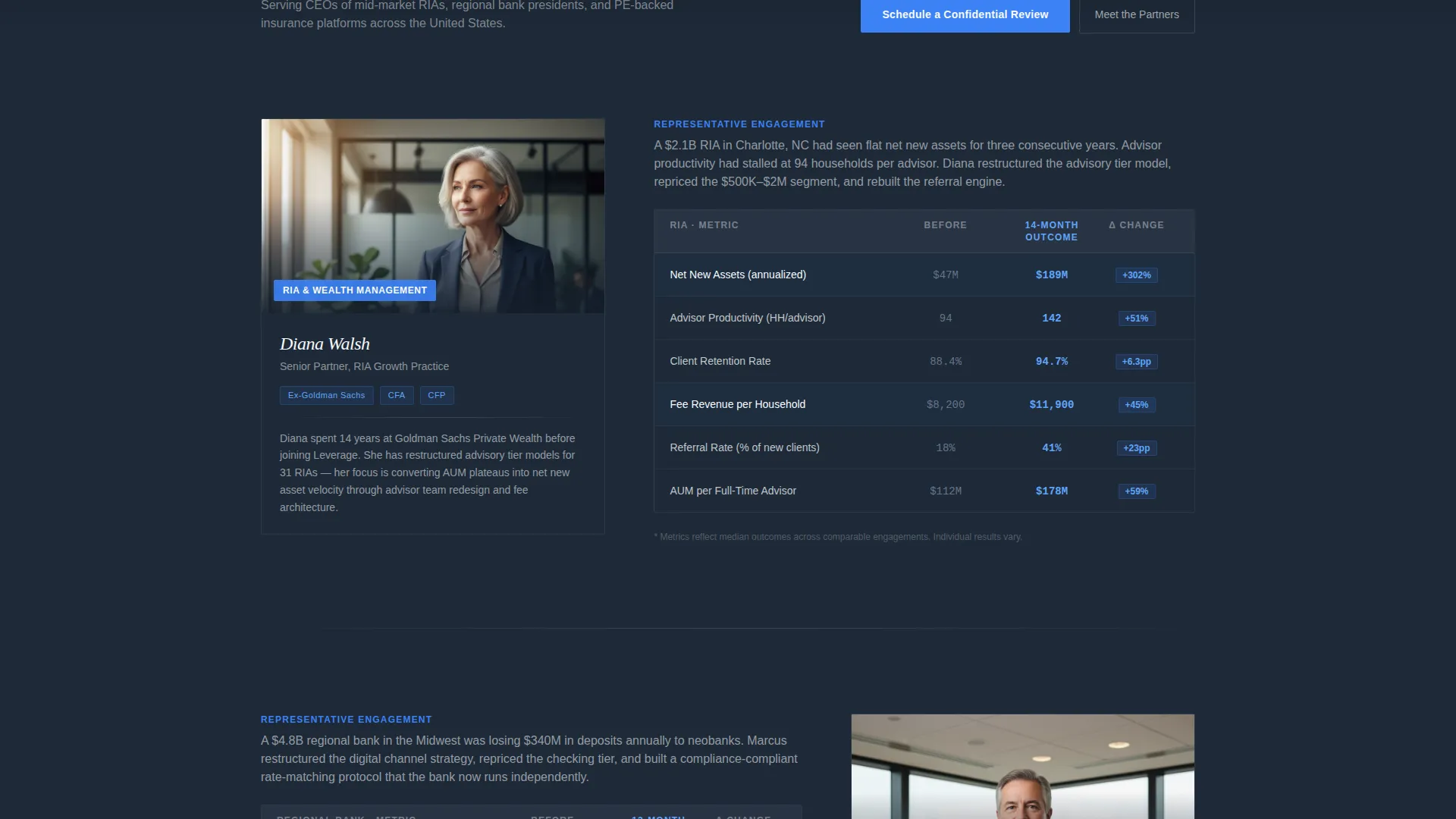
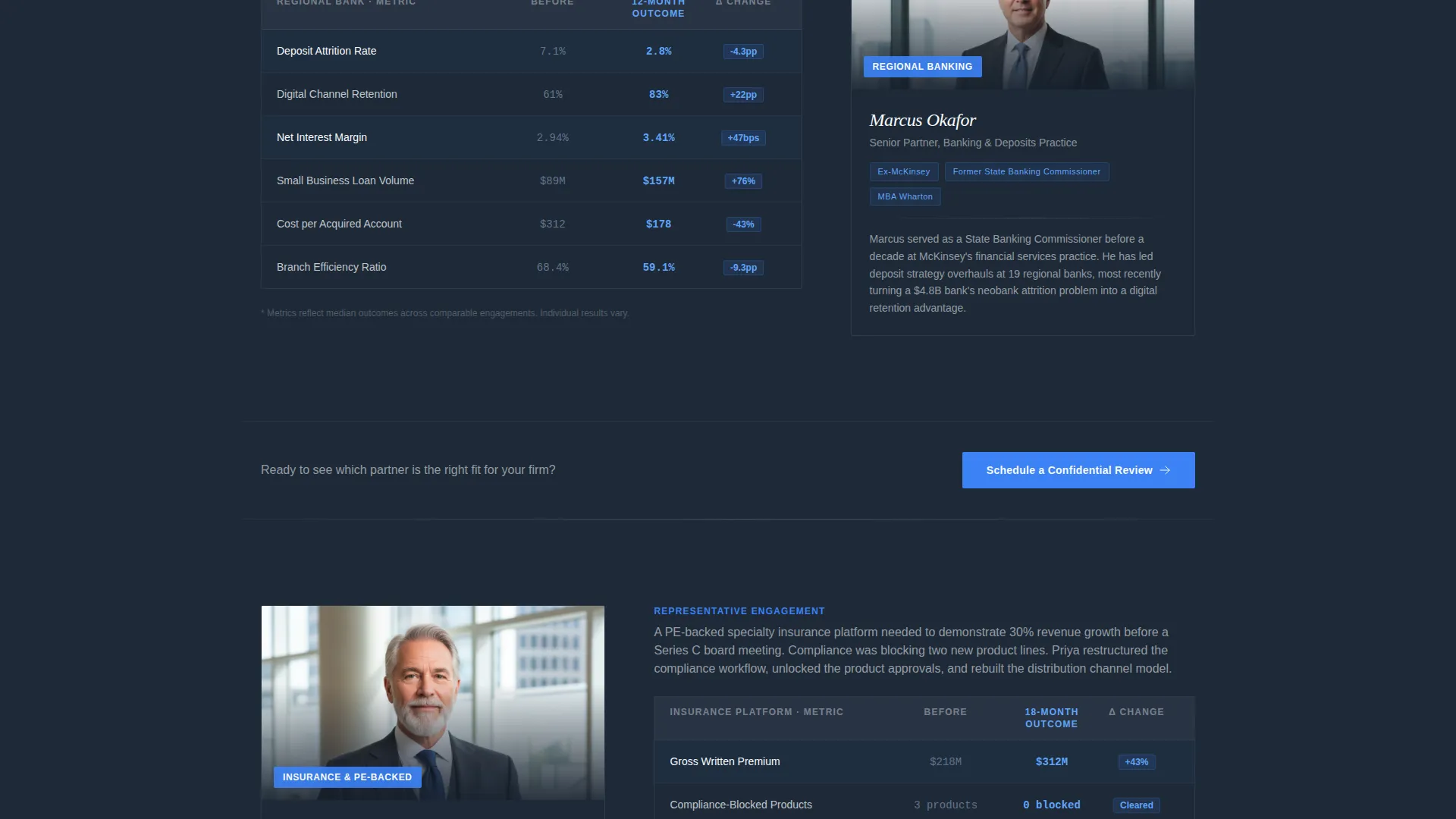
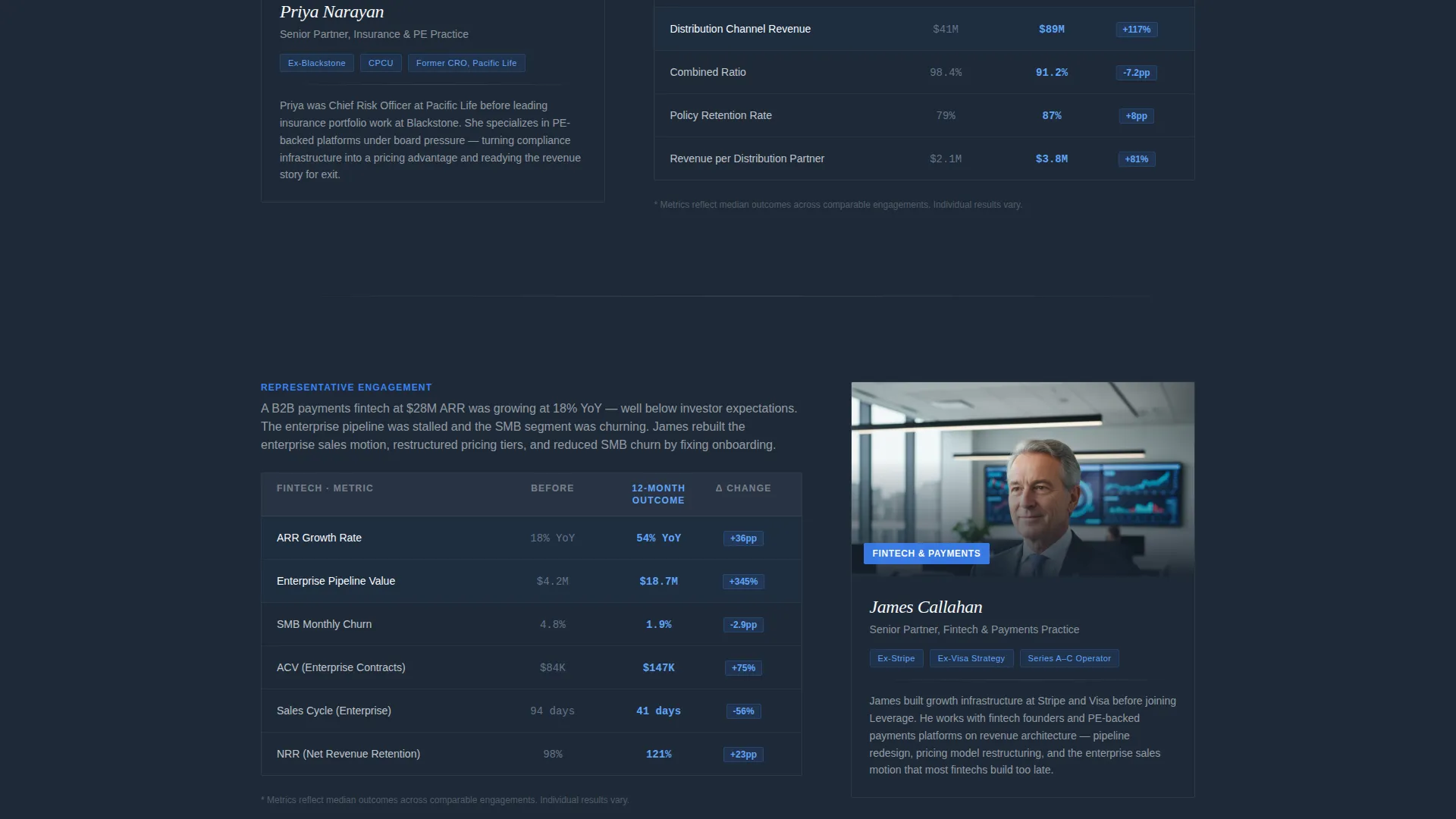
- Scroll-driven team sections pairing named senior partner profiles with side-by-side comparison tables showing before-and-after client results
- A two-screen progressive lead capture form and a secondary gated PDF download path, both anchored to clear calls to action
Feature list
This template includes purpose-built components that work together to move a skeptical senior buyer toward a booked consultation.
Animated Metrics Header
Three oversized figures count upward from zero on page load, referencing specific outcomes such as assets under management (AUM) growth, total client engagements, and average revenue lift. The animation mimics a financial data terminal, immediately signaling that this firm tracks numbers rigorously.
Before and After Comparison Tables
Each named partner section includes a structured table contrasting client metrics before an engagement versus after twelve months. Measured dimensions include net new assets, advisor productivity, client retention rate, and fee revenue per household. The tables make outcomes concrete and scannable.
Named Senior Partner Profiles
Each scroll section introduces a real senior partner with a photo, credentials, and the specific client outcomes they led. This design choice replaces abstract authority claims with the accumulating weight of specific humans who have done exactly this work.
Progressive Two-Step Lead Form
The primary call to action uses a two-screen form. The first screen collects firm type and current AUM range via dropdown menus. The second screen asks for the single biggest growth constraint and a preferred meeting window. This sequence reduces friction while qualifying the lead.
Gated PDF Download Path
A secondary conversion path offers a downloadable benchmark report. Visitors provide their name, title, and email to access it. This gives prospects who are not ready to book a call a lower-commitment way to engage with the firm.
Repeating Sky Blue Call-to-Action Blocks
The primary call to action, "Schedule a Confidential Review," appears after every second comparison table. Its sky blue background against the deep slate canvas creates a consistent visual anchor that draws the eye without interrupting the content flow.
Page sections overview
| Section | Purpose |
|---|---|
| Animated Metrics Header | Opens with three counted performance figures to establish scale and credibility immediately |
| Tagline Body Copy | Delivers the firm's positioning statement directly below the metrics |
| Partner Profile One | Introduces the first named senior partner with credentials and a comparison table |
| Primary call to action Block | Prompts the visitor to schedule a confidential review after the first partner section |
| Partner Profile Two | Introduces the second named senior partner with credentials and a comparison table |
| Secondary call to action Block | Repeats the consultation call to action after the second partner section |
| Partner Profile Three | Introduces the third named senior partner with credentials and a comparison table |
| PDF Download Block | Offers the gated benchmark report as a secondary conversion path |
| Progressive Lead Form | Captures firm type, AUM range, growth constraint, and meeting preference in two steps |
Design & branding system
The visual identity follows a Corporate Precision theme built on the Slate and Sky color system. The palette feels like the top floor of a Class A office tower at early morning: steel-gray surfaces, floor-to-ceiling glass, and a clean strip of sky at the horizon.
- Deep charcoal slate (#1E2A38) covers roughly seventy percent of the canvas as the primary background, with mid-tone gunmetal (#4A5568) used for secondary panels
- Open-sky blue (#3B82F6) appears on calls to action, data highlights, and key figures, used sparingly so every instance commands attention
- Cloud white (#F8FAFC) is used for body text and negative space, keeping the layout readable and uncluttered against the dark backgrounds
Mobile & speed optimization
The layout is structured for clean rendering across screen sizes, keeping the comparison tables and form steps legible on smaller viewports without losing the premium feel of the desktop experience.
- Comparison tables are designed to stack or scroll horizontally on narrow screens, preserving data readability for mobile visitors
- The progressive form flow is built as discrete screen steps, which works naturally on touch devices and reduces cognitive load on any screen size
How this template helps you convert
The page is engineered so that every scroll builds toward a single, logical next step. By the time a visitor reaches the lead form, trust is already established.
- The animated metrics header creates immediate credibility before the visitor reads a single word of body copy, anchoring the firm's track record in specific numbers
- The scroll-driven partner profiles and comparison tables accumulate evidence incrementally, so the visitor arrives at the call-to-action block already persuaded rather than still skeptical
Other information about this template
This template is part of a broader set of professionally themed layouts designed for high-trust, high-consideration service categories. It is well suited for consultancies that compete on reputation and results rather than on price or volume.
- The template style is a Comparison Table layout, which is particularly effective in financial services consulting because it lets prospects evaluate change in concrete, quantitative terms
- The header concept is a Stats and Metrics wall, a format familiar to financial executives who read Bloomberg terminals and board decks daily
- The creative direction is Team and People, which research consistently shows drives higher trust in professional services contexts than abstract brand messaging
- The lead generation direction means every design decision is oriented toward capturing a qualified inquiry, not maximizing page views
Theme
Corporate Precision
Creative direction
Team & People
Color system
Slate & Sky
Style
Comparison Table
Direction
Lead Generation
Page Sections
Animated Stats and Metrics Header
Before and After Comparison Tables
Named Senior Partner Profiles
Progressive Two-step Lead Form
Gated PDF Download Path
Repeating Sky Blue Call to Action Anchors
Related questions
What type of consulting firm is this landing page template designed for?
Can I customize the comparison table metrics for my firm's actual results?
How does the progressive lead form work?
What is the gated PDF download section used for?
Do I need design experience to edit this template?



