Government Agency & Department Specialist Privacy Policy Website Template
Levy is a single-column flow landing page template built for government revenue authorities and tax compliance portals. It guides taxpayers through their filing obligations using a structured checklist layout, a progressive lead-generation form, and an authoritative Slate & Sky visual identity. The design communicates exactly what is owed, when it is due, and what happens if a deadline is missed.
by Rocket studio
Quick summary
Levy is a compliance-focused landing page template designed for revenue and tax authorities. It combines an Icon Grid hero, a scrollable checklist compliance journey, and a three-step progressive form to collect taxpayer data efficiently. The Institutional Authority visual style uses deep government slate, sky blue, and compliance green to project clarity, trust, and urgency without panic.
Who this template is for
This landing page template is built for organizations that collect tax revenue, enforce filing obligations, or support taxpayers through complex regulatory processes. It fits equally well as a public-sector portal and as a compliance-facing product page for RegTech or professional services teams building government-adjacent tools.
- Small and medium enterprise owners filing quarterly Value Added Tax (VAT) or navigating Pay As You Earn (PAYE) deductions who need a clear, step-by-step guide to their obligations
- Corporate finance teams and c suite stakeholders preparing annual assessments who require structured data collection and confirmed submission paths
- Revenue authority communications teams and government digital teams who need a landing page that projects regulatory authority while remaining approachable to first-time filers
What problem this template solves
Taxpayers often arrive at compliance portals confused, anxious, and unsure which obligation applies to them. A cluttered or impersonal landing page increases compliance risks for both the taxpayer and the authority. Non compliance rises when the process is unclear, and reputational damage follows when filers feel unsupported. Levy solves this by making every obligation visible, every deadline explicit, and every next step frictionless.
- Filers who do not understand the regulatory landscape face penalty exposure that could have been avoided with clear guidance upfront
- Revenue teams struggle to collect the right data from the right taxpayer category when forms are generic and undifferentiated
- Organizations managing high filing volumes need a landing page that handles data collection efficiently while maintaining user trust at every stage of the process
What you get with this template
This landing page template ships as a fully structured single-column flow. Every section is purpose-built for the compliance journey, from the first authority signal in the hero to the confirmed submission path at the footer. The template gives compliance teams adequate resources to launch a professional, conversion-ready page without building from scratch.
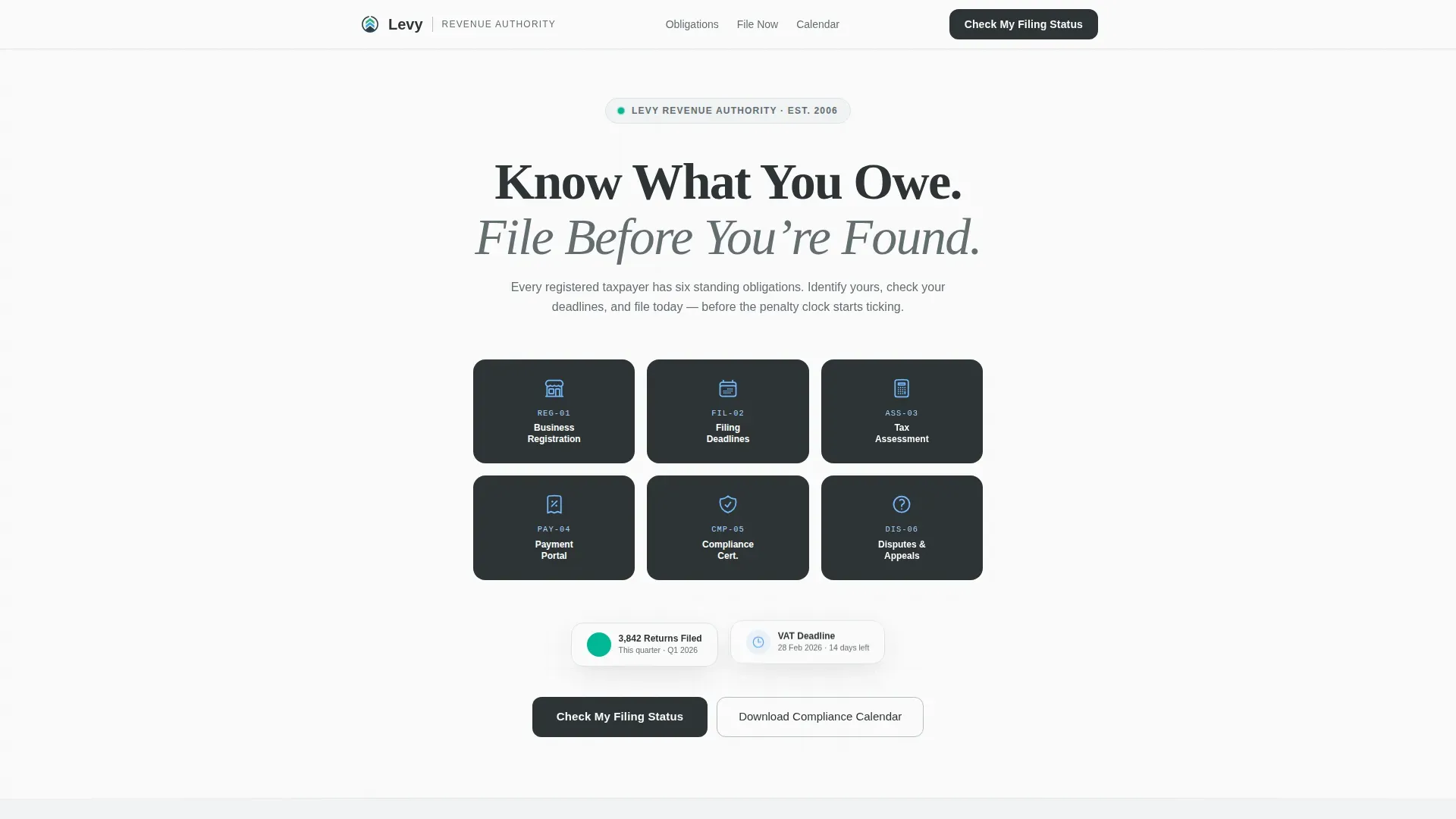
- A six-tile Icon Grid hero with a serif authority headline, plus a floating compliance badge that signals verified status immediately on load
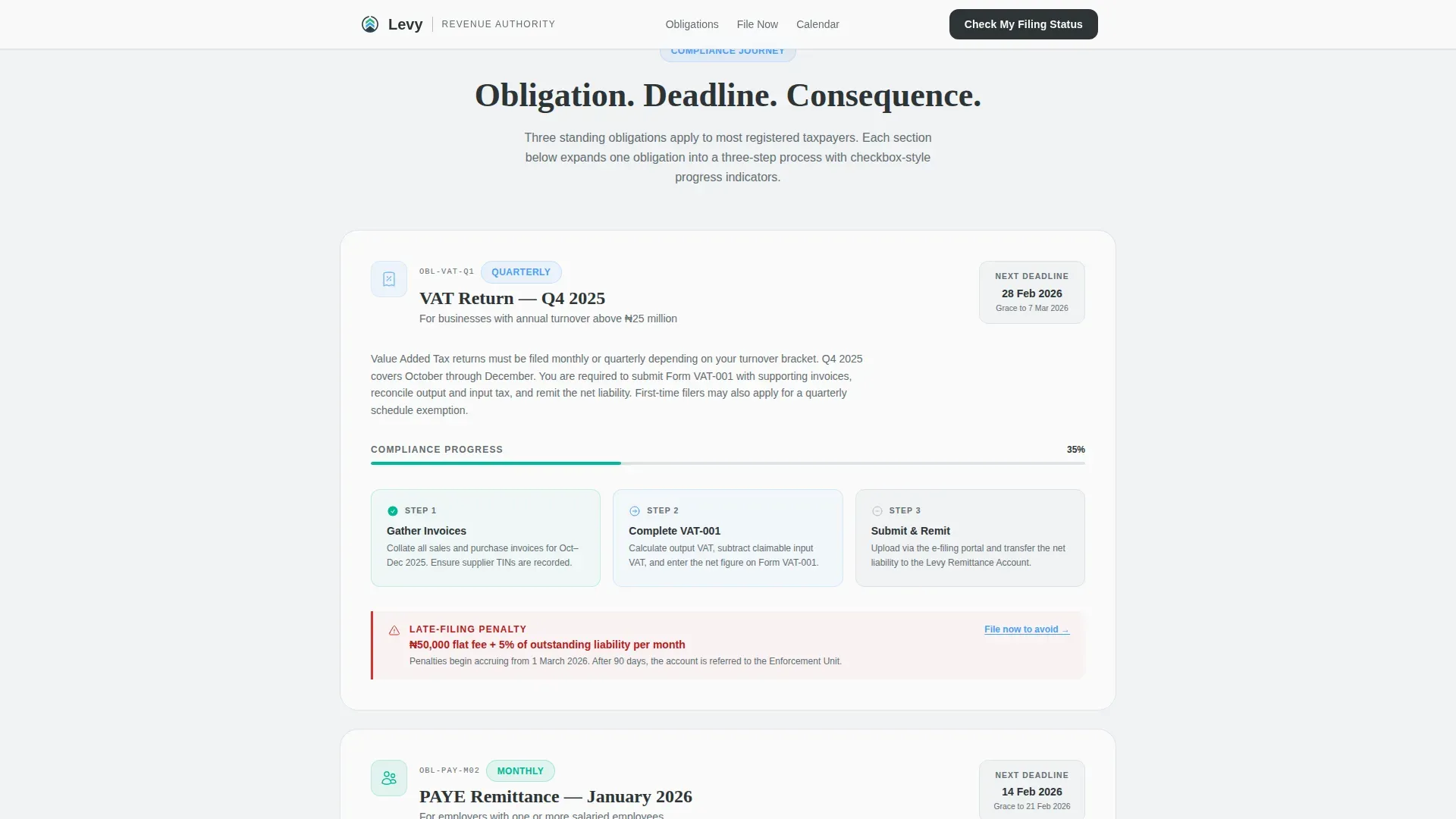
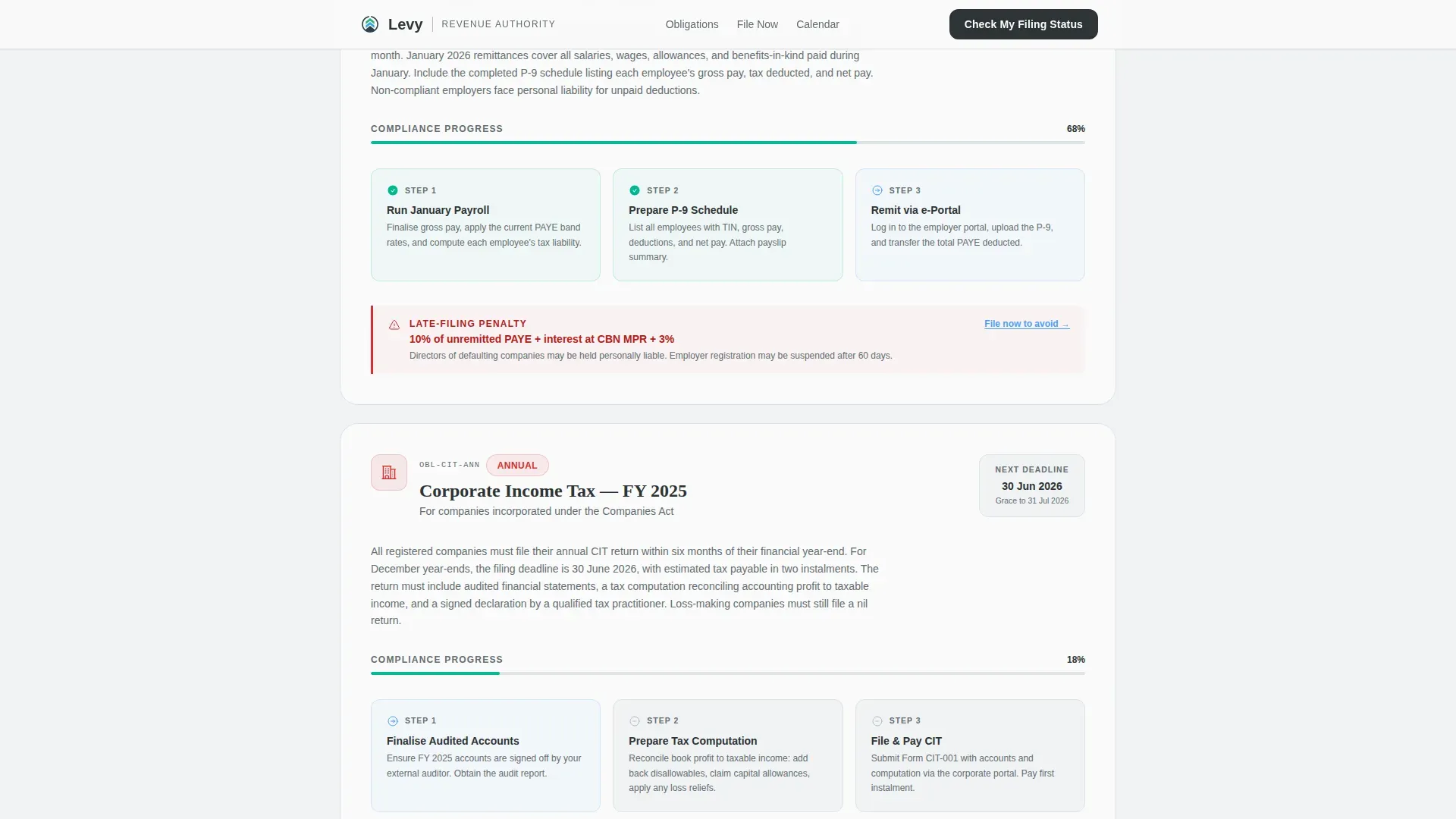
- Three obligation sections covering VAT, PAYE, and Corporate assessments, each with checkbox-style scroll progress indicators and real penalty figures and grace-period dates
- A dual conversion path: a three-step progressive form for filing status checks and a PDF calendar download gated by email capture only
Feature list
This landing page template is built around a tightly scoped feature set drawn from the compliance journey briefed for Levy. Every feature supports the core goal of turning a confused filer into a confirmed, compliant taxpayer.
Icon Grid Obligation Header
The hero opens with six rounded slate tiles arranged in a two-row, three-column grid. Each tile carries a simple authoritative icon representing a distinct taxpayer obligation: business registration, filing deadlines, tax assessment, payment, compliance certification, and disputes and appeals. The headline "Know What You Owe. File Before You're Found." is set in heavy Fraunces serif type above the grid, delivering a strong, benefit-driven message that immediately communicates the page purpose. A floating compliance badge reinforces authority and builds user trust before the visitor reads a single line of body copy.
Checklist Compliance Journey
Scrolling down transforms the icon grid context into a sequential compliance journey. Each of the three obligation sections (VAT, PAYE, Corporate) expands into a three-step process with checkbox-style progress indicators that visually fill as the visitor reads. The rhythm is deliberate: obligation, deadline, consequence. Each section ends with a real penalty figure and a real grace-period date. This structure supports effective compliance communication by making the cost of non compliance concrete and personal, not abstract. Compliance teams can use this section to demonstrate compliance expectations clearly without resorting to legal jargon.
Progressive Lead-Generation Form
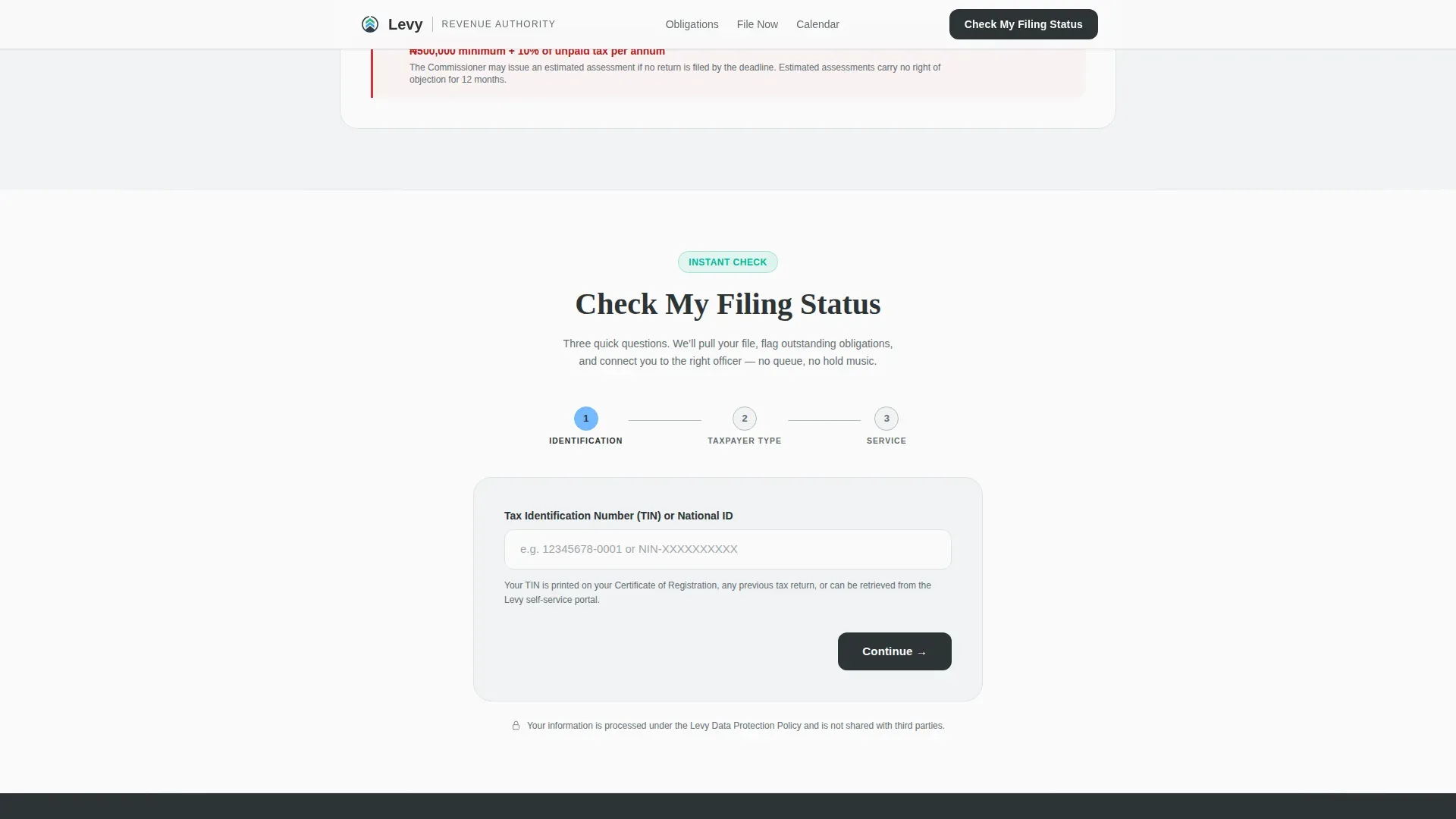
The primary call to action, "Check My Filing Status," appears after the third obligation section and repeats at the page bottom. It opens a short three-step progressive form: Taxpayer Identification Number (TIN) or national identity document first, then taxpayer category (individual, SME, or corporate), then a dropdown for the specific service needed. The services available include new registration, overdue filing, dispute resolution, and payment plan. This minimalist intake approach simplifies data collection by requesting only necessary information, reducing friction and improving conversion rates. A confirmation step follows submission, giving users a clear timeline for next steps.
Compliance Calendar PDF Gate
A secondary conversion path offers a downloadable compliance calendar as a Portable Document Format (PDF) file. This gate requires only an email address, making it a low-commitment entry point for visitors not yet ready to submit a full filing form. The calendar supports ongoing monitoring of key dates, helping taxpayers manage their regulatory requirements across the year. This feature is especially useful for supporting SME owners and first-time filers who need a portable reference for day to day operations.
Trust Bar and Authority Signals
A dedicated trust bar section displays verified badges, compliance statistics, and taxpayer count metrics. These signals are placed strategically to reassure visitors that the authority behind the landing page is credible and well-resourced. High-quality compliance templates include these authority indicators to support user trust and demonstrate that the organization takes data security and governance seriously. The trust bar gives compliance teams a direct line to communicate credibility without lengthy text.
Institutional Slate & Sky Visual Identity
The visual identity follows an Institutional Authority theme built on a four-color Slate & Sky system. Deep government slate (#2D3436) dominates headers and footers, civil-service charcoal (#636E72) anchors body text, open-sky blue (#74B9FF) marks action points and status indicators, and document white (#FAFAFA) provides generous breathing room. Compliance green (#00B894) is reserved exclusively for checkmarks, verified badges, and completed-state indicators. Fraunces serif handles headlines and DM Sans handles body copy, creating a typographic pairing that reads like a freshly issued government notice.
Page sections overview
| Section | Purpose |
|---|---|
| Icon Grid Hero | Opens with obligation tiles, authority headline, and compliance badge |
| VAT Obligation Block | Expands VAT filing steps with checkbox progress, deadline, and penalty figure |
| PAYE Obligation Block | Walks through PAYE deduction steps with deadline and consequence data |
| Corporate Assessment Block | Covers corporate filing steps with grace-period date and penalty escalation |
| Filing Status Form | Collects TIN, taxpayer category, and service type via three-step progressive form |
| Calendar PDF Gate | Captures email address in exchange for downloadable compliance calendar |
| Trust Bar Section | Displays verified badges, compliance statistics, and taxpayer count metrics |
| Footer Row | Presents linear single-row footer with direct links to privacy policy and terms |
Design & branding system
The Levy landing page template uses a precise four-color palette applied with institutional discipline. Color has functional meaning here: every hue signals a specific type of information rather than decorating the page. The typography pairing of Fraunces serif for headlines and DM Sans for body text creates an authoritative yet readable hierarchy that suits both desktop and mobile reading environments.
- Slate (#2D3436) and charcoal (#636E72) anchor headers, footers, and body text, giving the page the weight of a formal government document without feeling hostile
- Sky blue (#74B9FF) draws attention to calls to action, status indicators, and interactive form elements, supporting strategic alignment between visual focus and conversion goals
- Compliance green (#00B894) activates only on completed states, checkmarks, and verified badges, so the color itself becomes a reward signal that encourages the visitor to keep reading and filling in forms
Mobile & speed optimization
This landing page template is built desktop-first to serve corporate finance teams and c suite users who review compliance data on large screens. The single-column flow adapts cleanly to mobile viewports, ensuring that SME owners and individual taxpayers filing from smartphones can access every section without friction. The template is designed to be responsive, ensuring usability across different devices.
- Scroll-triggered checkbox fills and fade-up reveals are implemented at a medium animation intensity, keeping the page engaging without creating performance drag on lower-powered mobile devices
- The progressive form is structured as a wizard-style flow so that mobile users step through one question at a time, reducing user error and confusion during data submission
- Server Components handle static content sections, keeping JavaScript minimal and ensuring that the page loads quickly even on slower mobile connections
How this template helps you convert
The Levy landing page template is engineered around a single conversion logic: the visitor should feel, section by section, that they have already missed something important and that the fix is one click away. This approach turns passive readers into active filers without resorting to alarm or aggression. Effective compliance landing pages earn the click by making the value of acting now obvious.
- The checklist compliance journey builds cumulative urgency by showing real penalty figures and grace-period dates after each obligation block, so that by the time the "Check My Filing Status" call to action appears, the visitor has a concrete financial reason to act immediately rather than defer
- The dual conversion path gives visitors two entry points at different commitment levels: the progressive filing form for those ready to engage now, and the PDF calendar download for those who need more time, ensuring compliance efforts capture leads at both stages of the decision process
- The trust bar and verified badges placed before the footer resolve final-moment hesitation by confirming that the authority is credible, that collected data is handled responsibly, and that the process has clear next steps after submission
Other information about this template
The Levy landing page template sits within a growing category of government-facing compliance templates that must balance regulatory authority with accessible, human-centered design. Building a compliance program is about establishing good habits early, and organizations that invest in clear public-facing compliance tools signal to stakeholders that they value data security and transparency. A PwC survey found that 44% of organizations are planning to increase their compliance spending on technology, which reflects a broader shift in how compliance teams approach digital transformation.
Effective compliance programs are not static documents. They require ongoing monitoring, regular risk assessment, and the kind of clear communication this template is built to support. A regulatory compliance program is a set of policies, controls, training, and monitoring activities a company uses to follow applicable laws, regulations, and industry standards. Businesses today face more new regulations and a more aggressive enforcement environment than ever before. The costs of non compliance are significantly higher than the costs of compliance, and reputational damage compounds those financial losses over time.
- This template is ideal for compliance teams who need to meet regulatory requirements for public-facing data collection, including explicit consent mechanisms and clearly labeled direct links to privacy policy and terms pages
- The template supports the principle that effective compliance processes should be visible and auditable: the checklist layout creates a natural audit trail for monitoring activities and documents the obligation path for every visitor who completes the form
- Organizations that build compliance capabilities into their digital presence early gain a competitive advantage: they attract more user trust, reduce compliance issues related to unclear messaging, and demonstrate to internal and external stakeholders that governance is taken seriously
- The Levy template is suited to regulatory reporting contexts where the authority needs to communicate new regulations clearly to a broad audience of taxpayers across different categories
- Non compliance penalties shown in each obligation section are editable, allowing compliance teams to update figures as applicable regulations change without redesigning the page
- The page structure supports data privacy best practices by collecting only the data required for each user pathway, reflecting the principle that simplifying data collection practices improves both conversion rates and user privacy
- Compliance landing pages that prioritize ensuring compliance with GDPR and CCPA must include explicit consent mechanisms for data collection and cookie consent; this template includes placeholder sections for those legal disclosures
- The template supports allowing organizations to present their compliance capabilities in a structured, credible format that meets the expectations of c suite reviewers and external auditors
- Jotform offers structured intake templates for legal compliance flow as a parallel reference point; the Levy template takes a purpose-built approach tailored specifically to government revenue authority use cases rather than generic form builders
- The Comply regulatory compliance management landing page template is another reference in this category, designed for RegTech businesses; Levy differs by focusing on the taxpayer-facing public portal experience rather than a B2B software product page
- Internal policies and procedures governing how collected data is stored, accessed, and deleted should be documented separately from this landing page and referenced in the footer privacy disclosures
- Adequate resources for maintaining this template include a developer familiar with the Fraunces and DM Sans font stack and a compliance officer who can review penalty figures and grace-period dates before launch
Theme
Institutional Authority
Creative direction
Checklist & Audit
Color system
Slate & Sky
Style
Single Column Flow
Direction
Lead Generation
Page Sections
Icon Grid Obligation Hero
Checklist Compliance Journey
Progressive Three-step Form
Compliance Calendar PDF Gate
Trust Bar and Verified Badges
Slate & Sky Visual Identity System
Related questions
Can I update the penalty figures and filing deadlines shown in each obligation section?
Does the progressive form support secure data collection?
Who supplies the PDF content for the compliance calendar download?
Is Levy suitable for a private-sector compliance portal, not just a government agency?
How does the dual call-to-action path improve lead generation outcomes?



