Expert Auction Platforms & Types Pre-Launch & Coming Soon Website Template
The Lien landing page template is built for foreclosure and bank auction marketplaces. It combines a cinematic full-bleed hero, a tiled property grid organized by auction type, and a branching quiz that matches investors to active listings. The design uses a deep ledger-black and warm parchment palette, giving every bid button and countdown timer the weight of a printed legal notice.
by Rocket studio
Quick summary
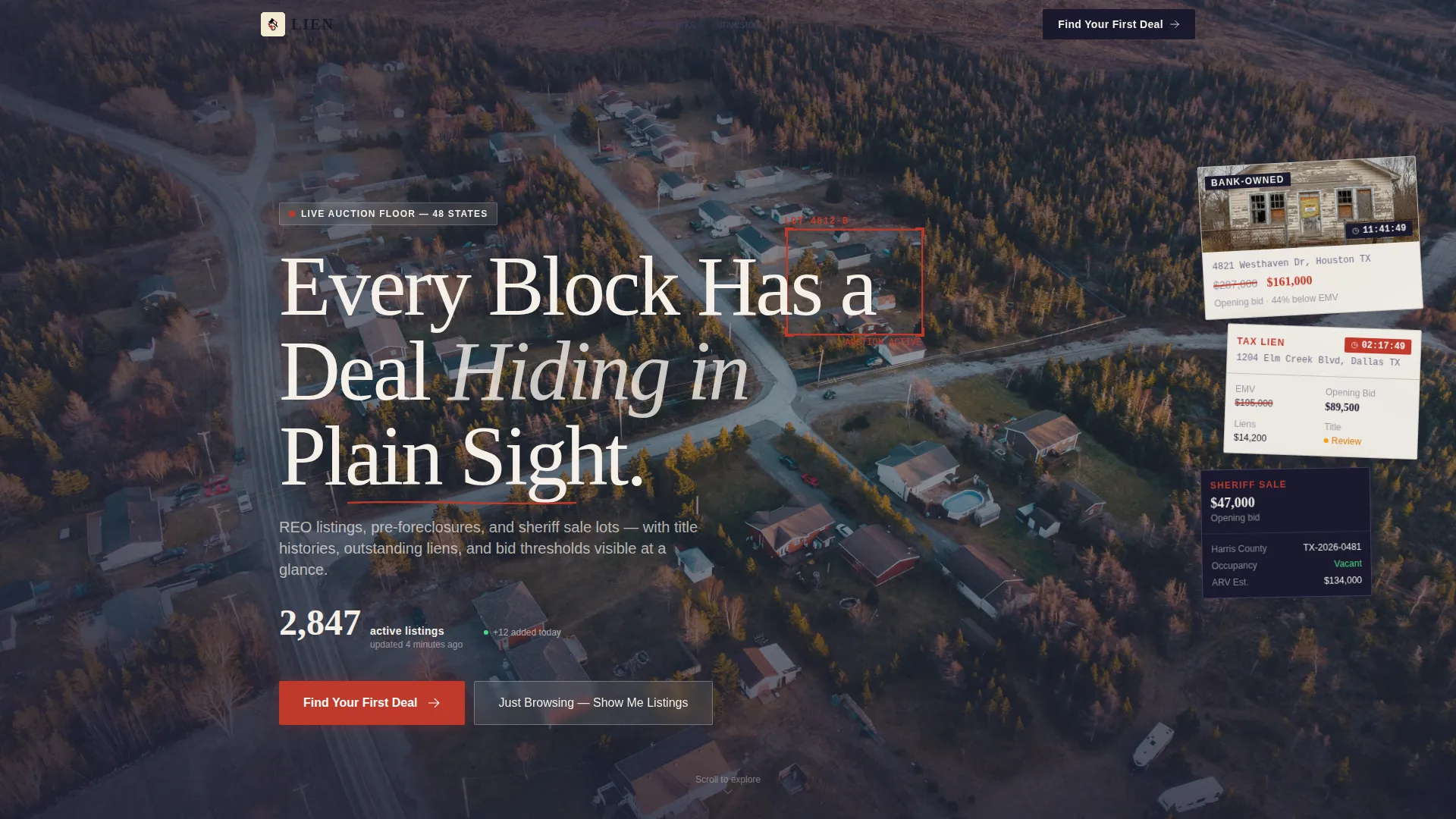
Lien is a single-page foreclosure auction marketplace template. It opens with a drone-shot hero, drops into a filterable property grid, and closes with a personalized quiz that gates full results behind an email sign-up. Every section moves a buyer from curiosity to committed action, whether they are a seasoned cash investor or a first-time bargain hunter.
Who this template is for
This template speaks directly to marketplace operators who list distressed properties and need to convert both expert and beginner buyers. It supports multiple audience tracks without feeling cluttered.
- Cash-ready investors who run comparable sales at midnight and need data-dense property cards fast
- House flippers calculating after-repair value against repair budgets before committing to a bid
- First-time bargain hunters who need educational context before they can trust the auction process
What problem this template solves
Foreclosure auction pages often fail in two opposite directions. They either overwhelm newcomers with raw data or bore experienced investors with vague listings that hide the numbers that matter.
- Seasoned buyers leave because title status, lien history, and opening bid thresholds are buried or missing
- Beginners bounce because nothing explains how the bidding process works or what the risks are
- Operators lose leads because there is no structured path to capture intent from browsers who are not ready to bid yet
What you get with this template
This template delivers a complete single-page auction experience, from hero to lead capture, without requiring you to stitch together separate tools or sections.
- A full-bleed aerial hero with an animated live-listing counter and a serif headline
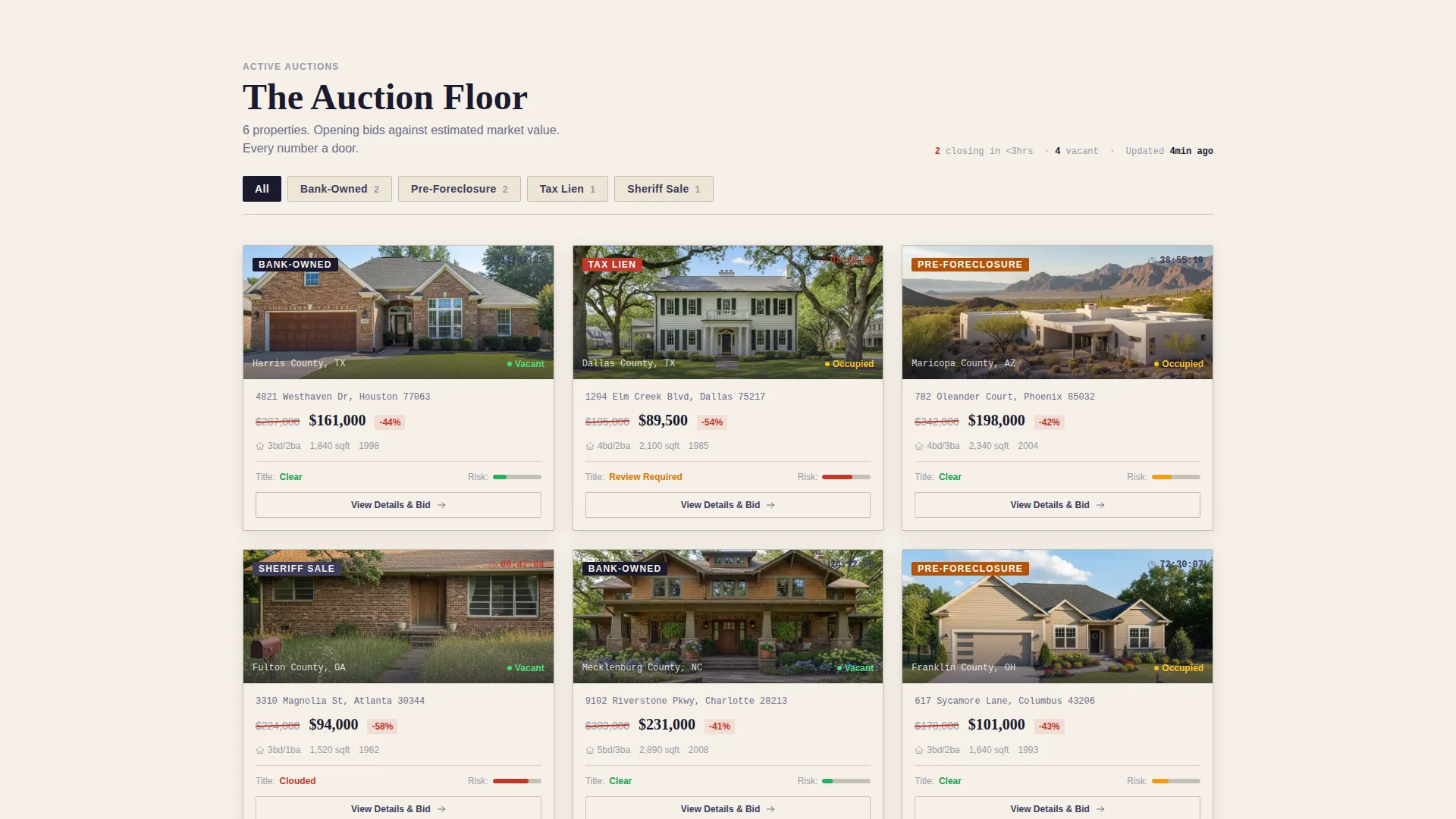
- A tiled property grid with auction-type filters, countdown clocks, and slide-open detail panels
- A branching quiz conversion flow that segments visitors and gates personalized results behind contact details
Feature list
This template packages seven distinct functional layers into one cohesive page flow. Each layer is designed to carry a specific type of buyer one step closer to submitting a bid or signing up for alerts.
Full-Bleed Aerial Hero
The header uses a drone photograph of a suburban neighborhood at golden hour. A single property is outlined in auction-flag red like a surveyor's markup. A bold serif headline fades in over the image, and a small animated counter displays the number of active listings in real time.
Auction-Type Property Grid
After the hero, the page drops into a tiled grid of property cards. Cards are organized by auction type: bank-owned, pre-foreclosure, tax lien, and sheriff sale. Each card shows a property photo, an estimated market value crossed out beside the opening bid, and a countdown clock.
Slide-Open Detail Panel
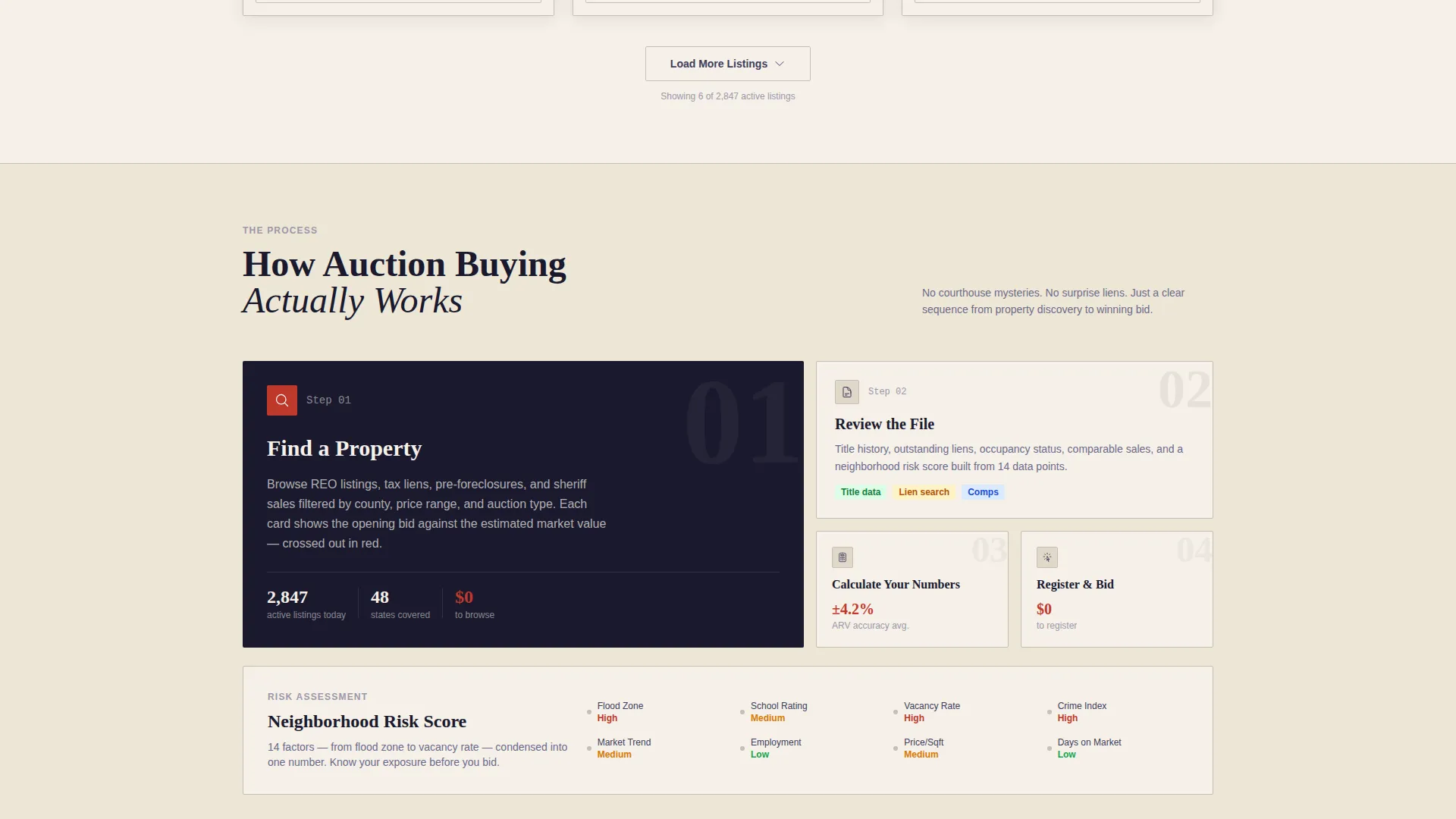
Clicking any property card opens a detail panel without leaving the page. The panel surfaces title status, occupancy details, comparable sales data, and a neighborhood risk score, giving investors everything they need to run a quick analysis in one place.
Branching Quiz Conversion Flow
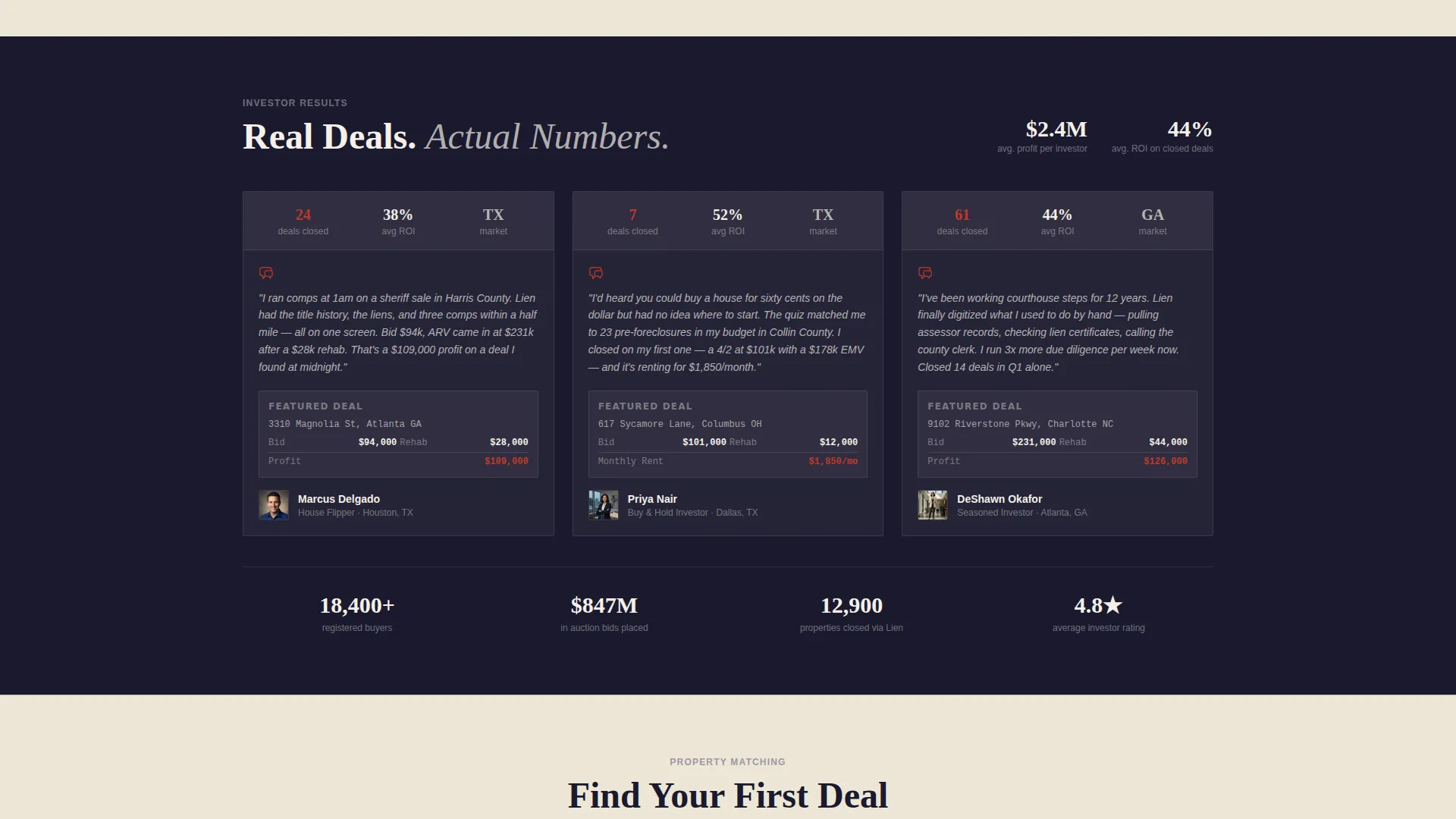
The primary call to action, labeled "Find Your First Deal," launches a short quiz. It opens with a single question about investing experience, then branches into budget range, target property type, preferred auction format, and home state. The final screen delivers a personalized match count and gates full results behind an email address and phone number.
Sticky Bottom Call-to-Action Bar
After the visitor scrolls past the hero, a sticky bottom bar appears carrying the "Find Your First Deal" prompt. This keeps the primary conversion path visible throughout the entire browsing session without interrupting the content.
Educational Confidence Layers
Below the property grid, the page introduces an explainer on how auction bidding works, a risk-assessment infographic, and investor testimonials that include actual return-on-investment numbers. These sections build credibility section by section before the quiz becomes the natural next step.
Page sections overview
| Section | Purpose |
|---|---|
| Full-bleed hero | Establish urgency and showcase active listing count |
| Animated listing counter | Ground the cinematic shot in real marketplace activity |
| Property grid | Surface filterable auction listings with key bid data |
| Card detail panel | Deliver title, occupancy, and comparable data on click |
| Bidding explainer | Educate newcomers on how the auction process works |
| Risk assessment infographic | Help buyers evaluate property and neighborhood risk |
| Investor testimonials | Build trust through real return-on-investment examples |
| Quiz assessment flow | Segment visitors and capture leads through personalization |
| Sticky call to action bar | Keep the primary conversion prompt visible on every scroll |
| Browse listings path | Capture intent from visitors not ready for the quiz |
Design & branding system
The visual identity follows a Marketplace Grid layout built on an Ink and Paper color system. Every color choice reinforces the authority and clarity of a printed legal document.
- Deep ledger black (#1A1A2E) and warm parchment (#F5F0E8) form the primary page canvas, with ruling-line gray (#C4BFB6) for borders and column separators
- Auction-flag red (#C0392B) is reserved exclusively for countdown timers, bid buttons, and urgent status badges to prevent visual noise
- Typography uses bold serif faces for headlines, echoing the weight of a courthouse legal notice pinned to a bulletin board
Mobile & speed optimization
The template is structured so that its data-heavy layout remains readable and usable on smaller screens. Property cards, detail panels, and the quiz flow are all designed with a compact mobile presentation in mind.
- The tiled grid adapts to a single-column stack on narrow viewports, keeping property photos and bid data legible without horizontal scrolling
- The sticky bottom bar is particularly effective on mobile, where thumb reach naturally lands at the bottom of the screen
- Countdown timers and status badges remain prominent at any screen width, preserving auction urgency across devices
How this template helps you convert
The page is built around two conversion tracks that run in parallel, so no visitor leaves without a capture opportunity.
- The quiz track segments buyers immediately, delivers a personalized property match count, and gates the full list behind an email and phone number, turning curiosity into a qualified lead in a few taps.
- The browse track lets hesitant visitors enter the grid directly via "Just Browsing, Show Me Listings," then captures intent through property saves and listing alert sign-ups rather than forcing a form.
Other information about this template
This template sits within the Auction and Collectibles category, under the Auction Platforms and Types subcategory. It is purpose-built for foreclosure marketplace operators who need both investor-grade data presentation and beginner-friendly onboarding in the same page.
- The Curated Collection creative direction ensures content builds confidence progressively, with educational layers arriving after the grid rather than interrupting it
- The quiz branches across five dimensions: investing experience, budget range, target property type, preferred auction format, and home state, making the personalized match screen feel genuinely relevant
- A secondary opt-out path, "Just Browsing, Show Me Listings," reduces bounce for visitors who resist the quiz, converting passive browsers into trackable alert subscribers
- The template suits operators running bank-owned real estate listings, pre-foreclosure inventories, tax lien auctions, and sheriff sale catalogs under one roof
Theme
Neo-Retro
Creative direction
Unboxing Experience
Color system
Sunset Gradient
Style
Overlap/Layered
Direction
Click-Through
Page Sections
Full-bleed Aerial Hero with Live Counter
Tiled Property Grid by Auction Type
Slide-open Property Detail Panel
Branching Quiz with Personalized Match Screen
Sticky Bottom Conversion Bar
Educational Confidence Layers
Related questions
Who is the primary audience for this template?
Can this template display multiple auction types at once?
How does the quiz capture visitor information?
What happens if a visitor does not want to take the quiz?
Is this a single-page template or a multi-page site?