Transparent Garagedoor | Free Website Template | Rocket
Liftgate is a single-page landing page template built for Miami garage door repair services. It leads with stacked testimonial cards, walks visitors through a transparent comparison table and five-step service process, and closes with a lead-capture form. Every section is designed to replace industry fog with clear prices, real timelines, and verified proof.
by Rocket studio
Quick summary
Liftgate is a transparency-first landing page template for local garage door repair businesses in Miami. It opens with oversized testimonial cards, moves into a side-by-side competitor comparison table, then guides visitors through a five-step service process before delivering a focused lead-capture form. The design makes honest pricing feel like the obvious choice.
Who this template is for
This template is built for service businesses that compete on trust, not discounts. It suits repair crews and service operators who want their pricing and process to do the convincing.
- Garage door repair companies serving Miami homeowners, including neighborhoods like Coral Gables and Kendall
- Property managers handling maintenance across multiple residential or commercial units
- Small business owners with roll-up steel doors who need fast, verifiable same-day service
What problem this template solves
Most local service landing pages either bury the price or replace real information with vague checkmarks. Potential customers leave because they can't tell what they'll actually pay or how long the job will take. This template solves that distrust by making transparency the visual structure of the page itself.
- Replaces vague marketing claims with specific numbers in every comparison cell
- Shows the full five-step process with time and cost ranges at each phase
- Builds credibility before the form even appears, so the lead is already warmed
What you get with this template
The template delivers a complete, single-page layout that takes visitors from skepticism to submission. Each section is designed to strip away one more layer of uncertainty before asking for contact details.
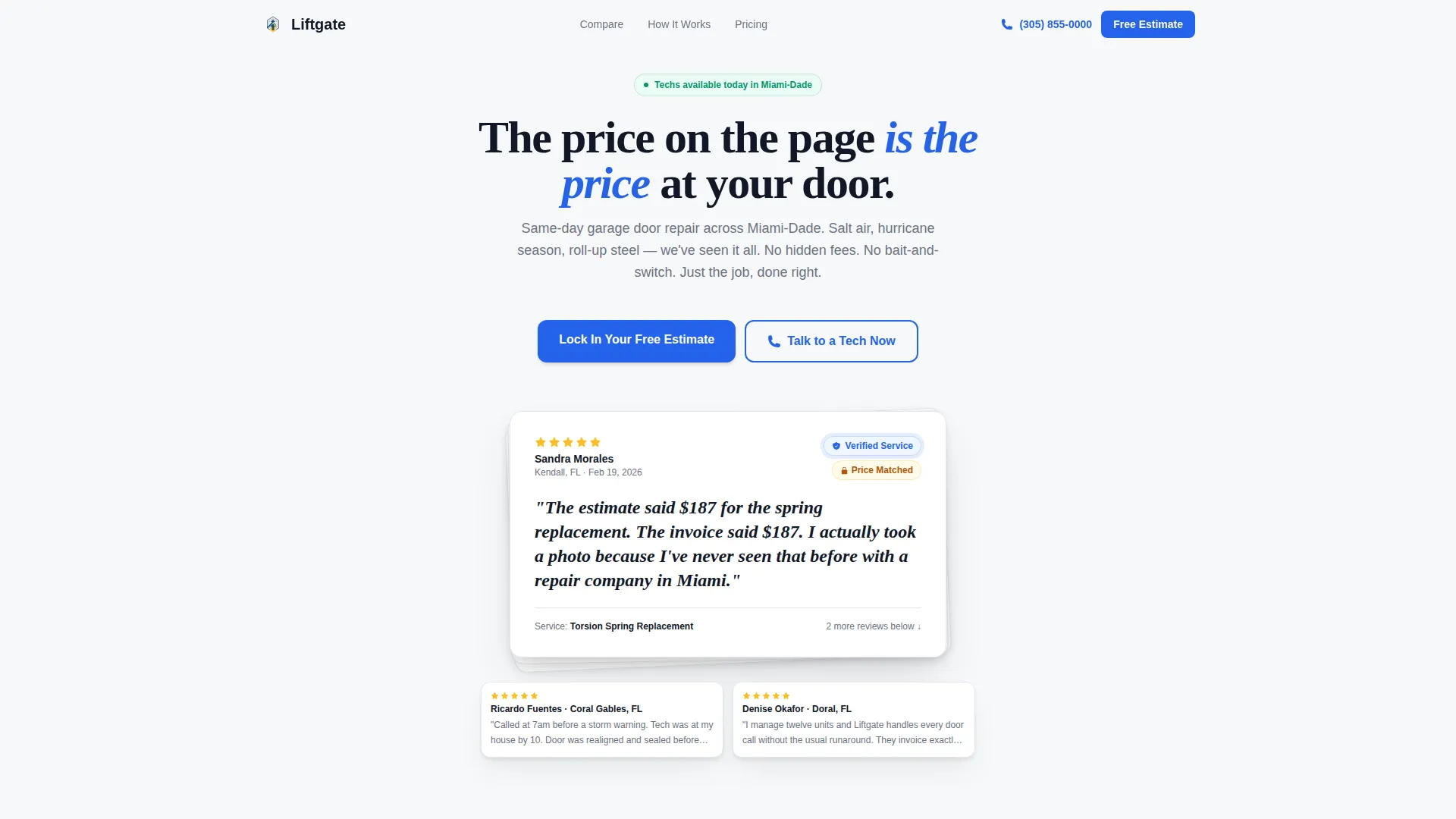
- A stacked testimonial card header with a verified-service badge, named reviewer, and recent timestamp
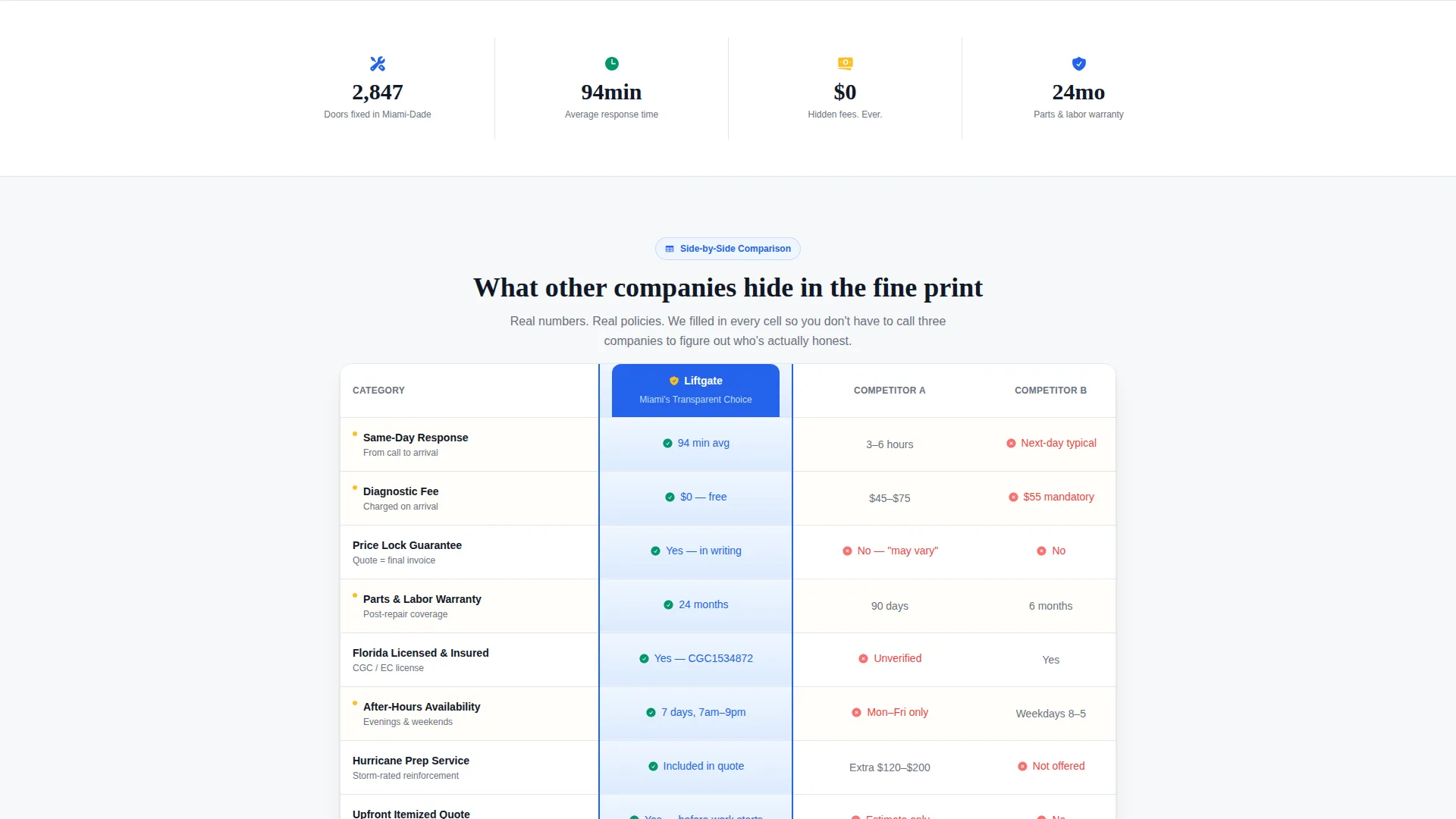
- A three-column comparison table covering response time, hidden fees, warranty length, and licensing status
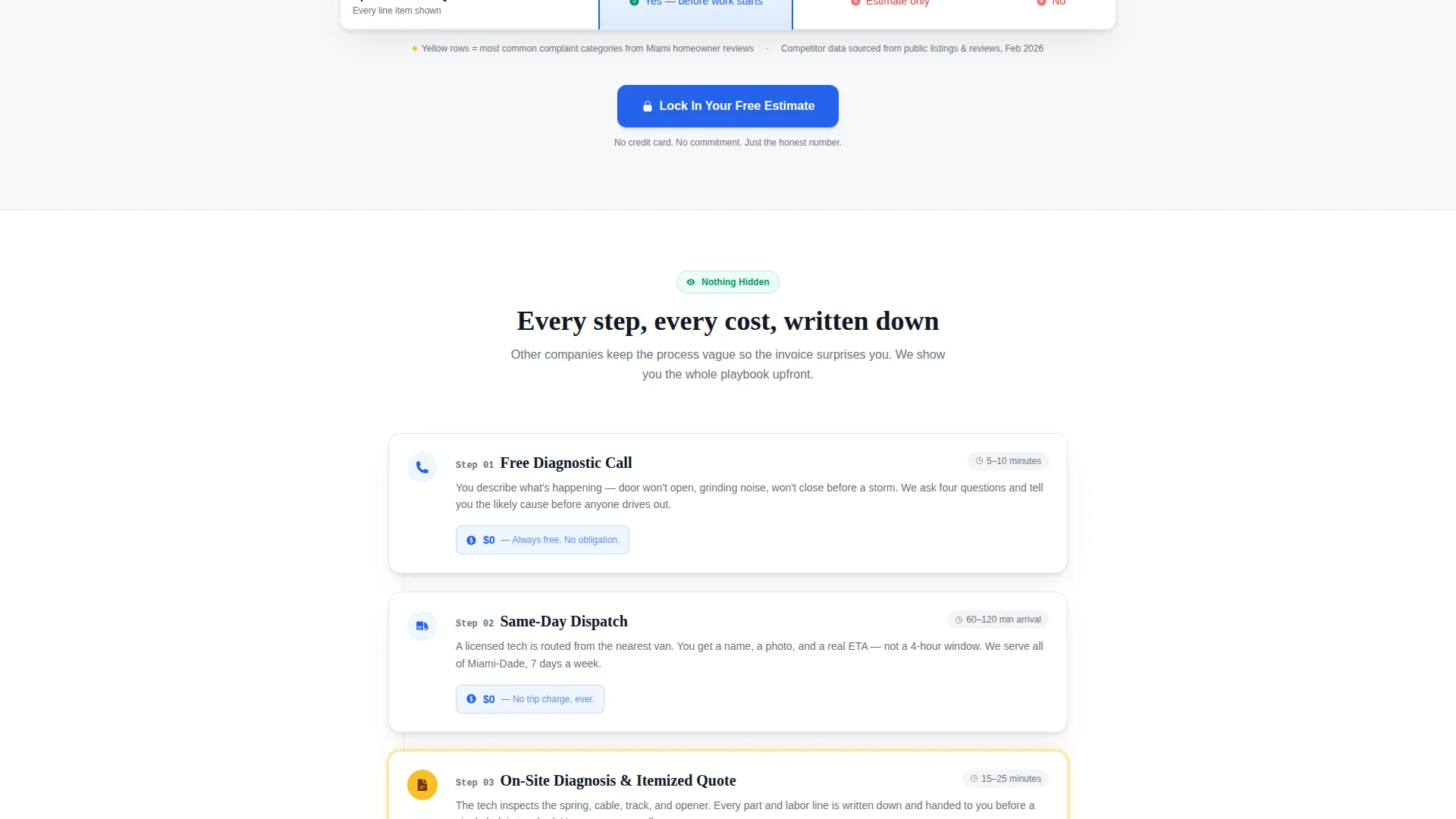
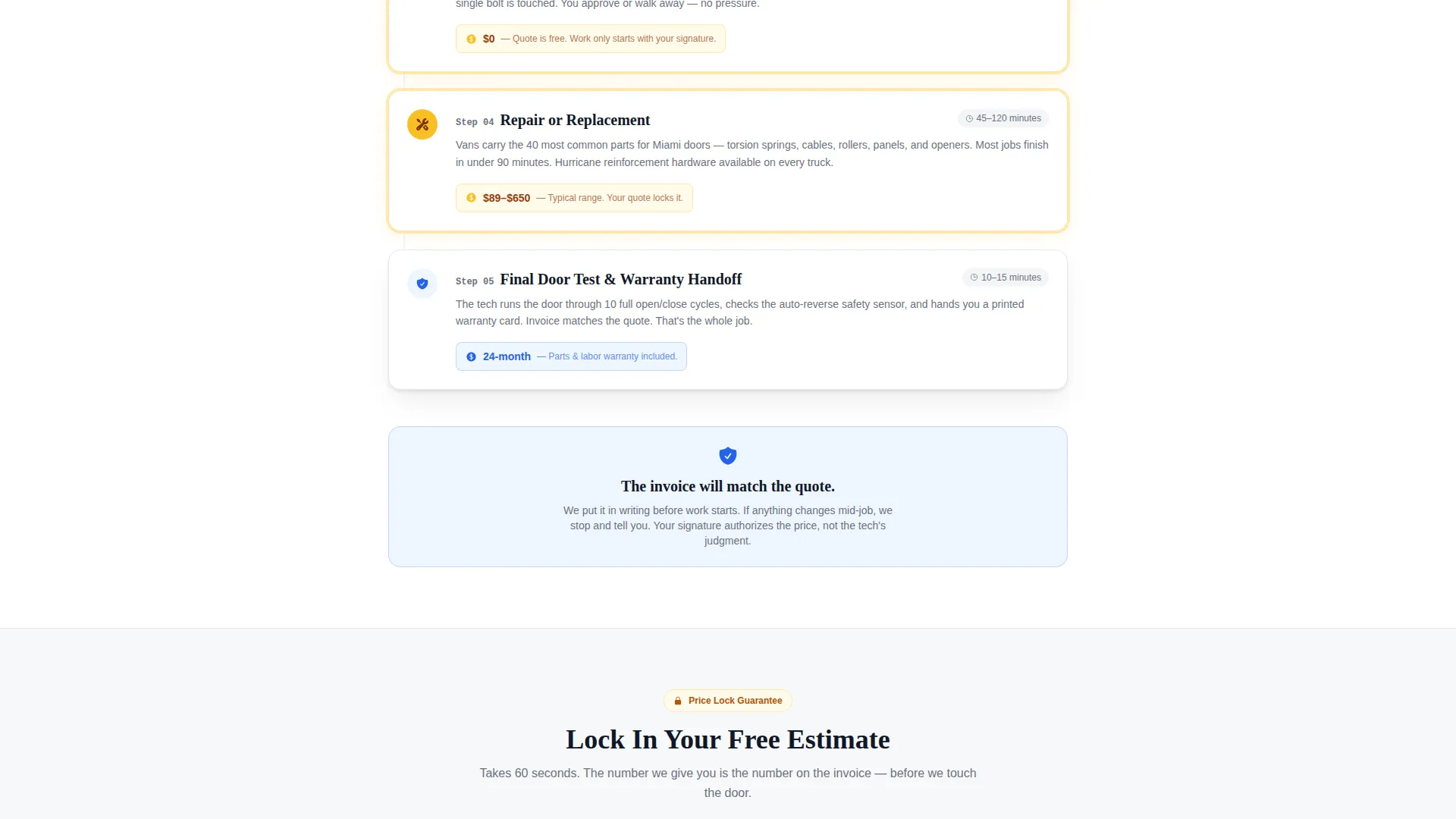
- A five-step service process section with time estimates and cost ranges per phase
- A lead-capture form with zip code, door type selector, description field, and phone number input
- A mobile-pinned click-to-call button labeled "Talk to a Tech Now" for fast mobile conversions
Feature list
This section covers the core built-in components that make Liftgate work as a conversion-focused landing page for garage door repair services.
Stacked Testimonial Card Header
The header opens with a single oversized testimonial card floating on a clean white field. It displays a five-star review from a named homeowner, their quote in large serif type, a verified-service badge, and a recent timestamp. Two additional cards peek out beneath it, suggesting a larger body of proof without cluttering the top of the page.
Three-Column Competitor Comparison Table
The comparison table shows this service against two unnamed competitors across four key criteria: response time, hidden fees, warranty length, and licensing status. Every cell contains a specific number or status rather than a generic checkmark, making it immediately clear where the advantage lies.
Five-Step Service Process Section
Each step in the process reveals what happens, how long it takes, and what it costs. The sequence runs from the free diagnostic call through to the final door test. Visitors can read the entire service arc before committing to anything.
Transparent Pricing Lead Form
The lead-capture form opens with zip code first, then asks for door type from a selector covering single, double, roll-up, and custom options. A description field labeled "What's happening with your door?" invites natural language input before the phone number field closes the form.
Mobile-Pinned Click-to-Call Button
On mobile, a secondary call-to-action button labeled "Talk to a Tech Now" stays pinned to the footer as the visitor scrolls. This gives users a fast path to contact without requiring them to find the form.
Legal Shield Visual Theme
The Legal Shield design theme applies a structured, document-like visual logic to every section. Color, spacing, and typography are calibrated to feel like a printed estimate rather than a promotional flyer, which reinforces the transparency message at a glance.
Page sections overview
| Section | Purpose |
|---|---|
| Testimonial Card Header | Opens with stacked proof cards and a verified-service badge |
| Competitor Comparison Table | Shows specific numbers across response time, fees, warranty, and licensing |
| Five-Step Service Process | Walks through each phase with time and cost ranges |
| Lead Capture Form | Collects zip code, door type, description, and phone number |
| Mobile Click-to-Call | Pins a fast-contact button to the mobile footer |
Design & branding system
The template uses a Legal Shield visual theme paired with a Cloud Canvas color palette. The overall feeling is a freshly printed estimate under clear light: every number is readable, every section is defined, and nothing is hidden in the margins.
- Contract white (#F7F8FA) as the page background, clause-gray (#6B7280) for body text, trust-blue (#2563EB) on buttons and verification badges
- Highlight yellow (#FBBF24) reserved for warranty callouts and price-lock indicators
- Large serif type for testimonial quotes, structured layout for the comparison table, and consistent spacing that communicates order and reliability
Mobile & speed optimization
The layout is built with mobile service customers in mind. A homeowner staring at a broken door before a storm warning is almost certainly on a phone, and the template accounts for that urgency.
- The click-to-call button stays pinned to the mobile footer throughout the scroll, keeping direct contact one tap away
- The lead form is sequenced to reduce friction: zip code first, then door type, then description, then phone number
How this template helps you convert
The page is structured so that trust is built before the ask is made. By the time a visitor reaches the lead form, they have already seen verified reviews, compared this service against competitors on specific metrics, and read exactly what will happen during the visit.
- The stacked testimonial header establishes proof immediately, before any scrolling begins, so first impressions are grounded in real customer experience.
- The comparison table and five-step process section do the heavy lifting of pre-qualifying the lead, so the form submission represents genuine intent rather than casual curiosity.
Other information about this template
Liftgate is built specifically for the Miami garage door repair market, where salt air corrosion and hurricane season create recurring, urgent demand. The template's tone and structure reflect the real conditions that drive service calls in South Florida.
- The prompt-driven content reflects Miami-area service realities: same-day response, storm-season urgency, and roll-up steel door repair for commercial clients
- The Legal Shield theme is a deliberate design choice to signal that pricing terms are as clear as a signed contract
- The template is suited for operators who want their landing page to function like a pre-sales conversation rather than a generic service advertisement
- This landing page template can support service areas beyond Miami when the form fields and testimonial content are updated to reflect a different market
Theme
Legal Shield
Creative direction
Testimonial Mosaic
Color system
Charcoal & Amber
Style
Split Screen (50/50)
Direction
Content/Resource
Page Sections
Stacked Testimonial Card Header
Three-column Competitor Comparison Table
Five-step Service Process Section
Transparent Pricing Lead Form
Mobile-pinned Click-to-call Button
Legal Shield Visual Theme
Related questions
Can I update the comparison table with my own competitor data?
Is the lead form connected to any booking system?
Can I change the color scheme to match my brand?
Does the mobile click-to-call button work automatically?
Is this template suitable for commercial garage door clients?



