Translation & Localization FAQ Website Template
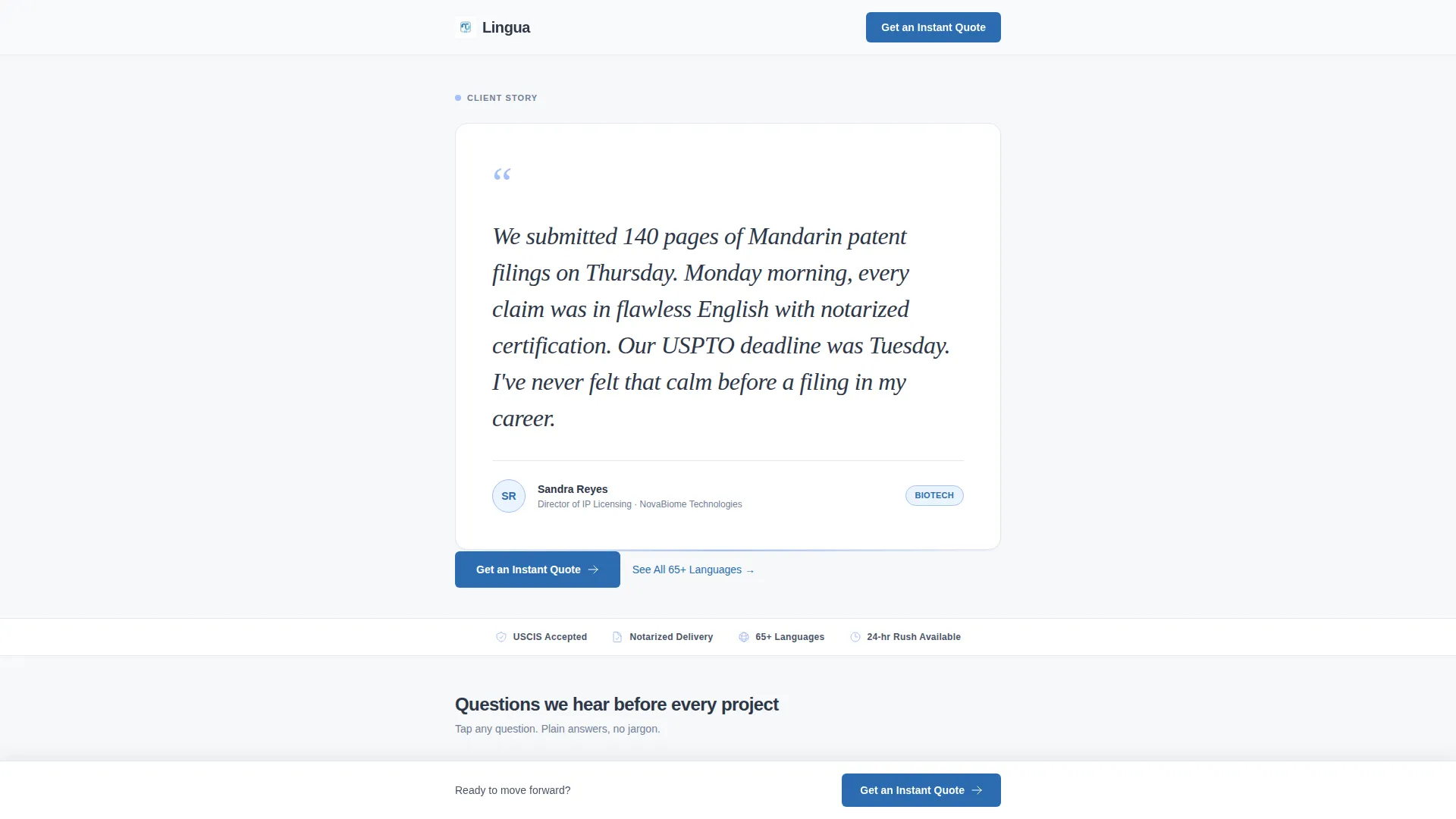
Lingua is a single-column click-through landing page template built for certified translation agencies. It opens with an oversized client testimonial, then walks visitors through a stacked FAQ section that dissolves hesitation one question at a time. The primary call to action routes to a quote calculator, with no forms on the page itself.
by Rocket studio
Quick summary
Lingua is a clean, single-column landing page template for professional translation agencies. It leads with a bold client testimonial card, follows with a conversational FAQ section, and drives visitors toward a single action: requesting an instant quote. The layout is direct, trust-first, and built to convert hesitant buyers into confident clicks.
Who this template is for
This template is designed for translation agencies and freelance translation professionals who serve clients with high-stakes document needs. It works especially well when your audience arrives with specific urgency and needs reassurance before they act.
- Immigration attorneys and legal professionals who need certified translations for court filings or asylum cases
- Biotech and life sciences companies submitting regulatory documents across borders under tight deadlines
- E-commerce brands localizing product content for international marketplaces ahead of peak sales seasons
What problem this template solves
Most translation service pages bury trust signals under generic service lists. Visitors arrive with real, specific questions about turnaround, legal acceptance, and language coverage. They leave without answers, and without converting.
- Visitors need proof before they act, not a list of service features they have to interpret themselves
- Buyers are unsure whether certified translations meet official requirements for immigration or regulatory use
- Potential clients hesitate at the quote step because they do not know what to expect from the process
What you get with this template
You get a focused, single-page layout that does one job: turn a skeptical visitor into a quote request. Every section is purpose-built to remove a specific objection before the click.
- An oversized testimonial card at the top of the page, formatted to feel like a personal recommendation rather than a marketing asset
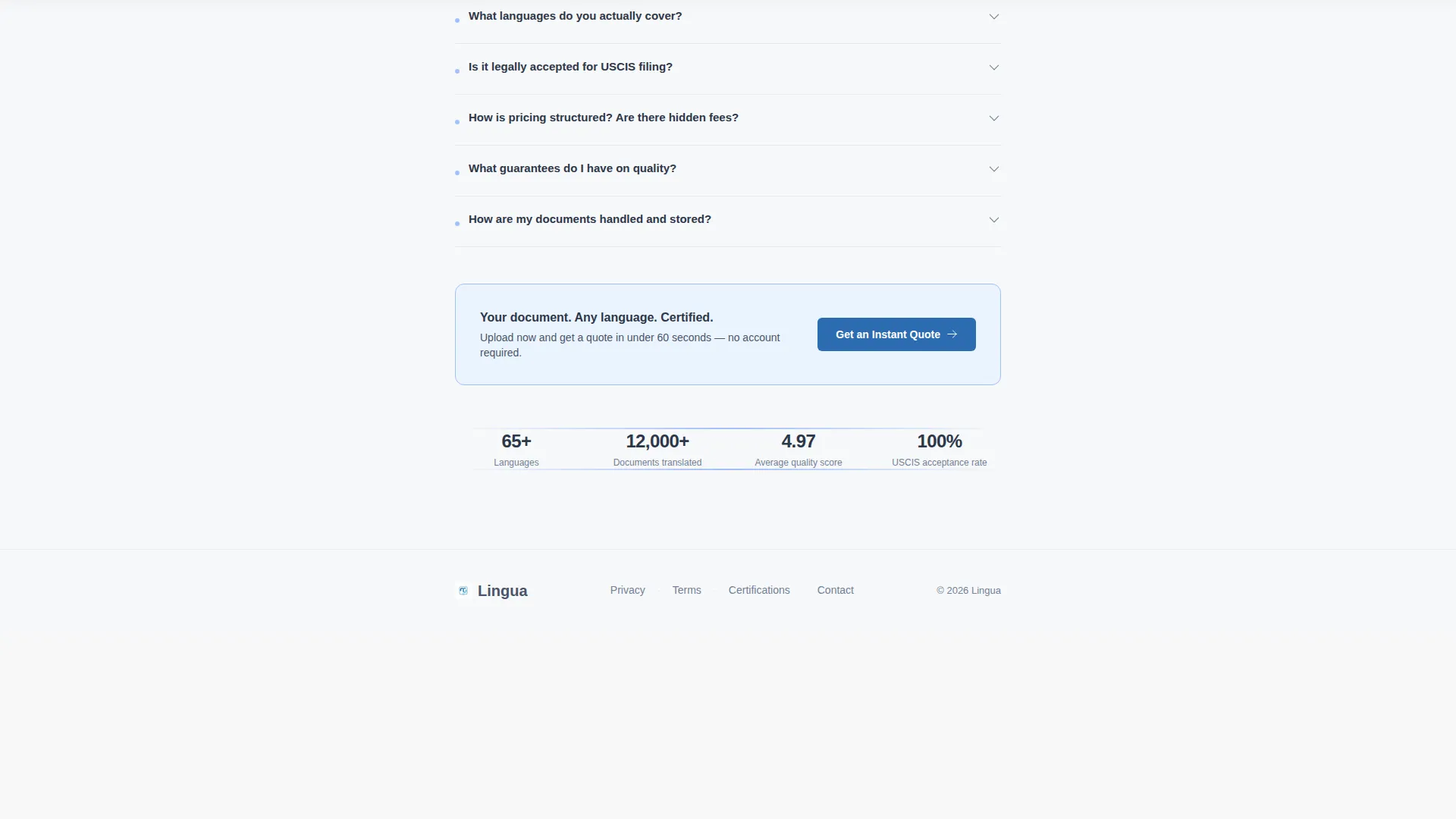
- A stacked, expandable FAQ section that addresses turnaround time, language coverage, legal acceptance, pricing transparency, and data security in sequence
- A persistent bottom call-to-action bar that appears after the third FAQ, keeping the quote step visible without interrupting the reading flow
Feature list
This template includes a focused set of components drawn directly from the brief. Each one is designed to serve a specific conversion role.
Oversized Testimonial Card Header
The page opens with a single centered card in white with a faint slate border. It displays a real client quote in large serif type, paired with a name, title, and small company logo below. There is no hero image and no illustration. The quote carries the full weight of the opening impression.
Stacked Expandable FAQ Section
Questions appear one after another in a vertical stack, each opening into a concise answer with a subtle expand animation. The sequence moves from logistics to trust: turnaround time, language coverage, legal acceptance, pricing, and data security. Each answer is written in plain, jargon-free language.
Dual-Placement Primary Call to Action
The "Get an Instant Quote" button appears twice: once directly beneath the testimonial card, and again as a persistent bottom bar after the third FAQ. Both placements route to a dedicated quote calculator on the next page. There are no form fields anywhere on this page.
Secondary Research Anchor Link
A text link reading "See All 60+ Languages" sits mid-page for visitors who are still comparing options. It gives research-mode visitors a clear next step without pulling them away from the main conversion path.
Cloud Canvas Color System
The palette uses soft cloud white for backgrounds, reliable slate for body text, quiet sky blue for section dividers and icon fills, and a single action-blue accent reserved exclusively for buttons and links. The result is a visually calm, professional layout with no decorative noise.
Single-Column Scroll Flow
The entire page runs in one continuous column with no sidebars or split layouts. The reading flow is linear and intentional, guiding visitors from social proof through education and into action without visual distraction.
Page sections overview
| Section | Purpose |
|---|---|
| Testimonial Card Header | Opens with a single bold client quote to establish immediate credibility |
| Primary call to action Button | Prompts the first quote click directly below the testimonial |
| FAQ Stack Section | Addresses key buyer questions in a conversational, expandable format |
| Language Anchor Link | Captures research-mode visitors with a mid-page secondary link |
| Persistent call to action Bar | Keeps the quote action visible after the third FAQ without interrupting scroll |
Design & branding system
The visual identity follows a Service Utility theme using the Cloud Canvas color system. The palette is intentionally minimal, built to feel like a well-organized working document rather than a polished marketing brochure.
- Backgrounds stay in the soft cloud white range (#F7F8FA), with reliable slate (#4A5568) carrying all body text for strong, comfortable contrast
- Quiet sky blue (#A3BFFA) marks section dividers and fills icon elements, creating gentle visual structure without decoration
- Action-blue (#2B6CB0) appears exclusively on buttons and links, so every interactive element is instantly recognizable without competing with content
Mobile & speed optimization
The single-column layout adapts cleanly to smaller screens without any structural changes. The vertical scroll flow used on desktop translates directly to mobile reading behavior.
- The persistent bottom call to action bar is especially effective on mobile, keeping the quote action in reach at all times during scroll
- The expandable FAQ format reduces visible page length on small screens while keeping all content accessible on tap
How this template helps you convert
The entire page is structured as a trust-building sequence, not a feature showcase. Each element is placed to reduce hesitation at the exact moment it arises.
- The testimonial card leads with a specific, credible outcome rather than a generic headline, so visitors feel confident from the first second on the page
- The FAQ section mirrors the real questions buyers carry into the page, answering each one in plain language before doubt becomes a reason to leave
- The dual-placement call to action ensures the quote step is visible both for visitors who are ready immediately and for those who need to read through first
Other information about this template
This template is built specifically for professional translation and localization service providers. It suits agencies handling legal, medical, and technical document translation where trust and compliance clarity are essential to winning business.
- The FAQ-driven creative direction is well suited to translation services where buyers have specific procedural questions before committing
- The click-through landing page structure, with no on-page forms, keeps the page focused on education and trust rather than data capture
- The quote calculator routing model separates the trust-building step from the pricing step, which is a common best practice for high-consideration service purchases
- This template works within the Professional Services category and Translation & Localization subcategory, making it relevant to interpretation service providers as well


Theme
Service Utility
Creative direction
Case Study Narrative
Color system
Slate & Sky
Style
Sidebar Companion
Direction
Lead Generation
Page Sections
Oversized Testimonial Card Header
Stacked Expandable FAQ Section
Dual-placement Quote Call to Action
Secondary Language Anchor Link
Cloud Canvas Color System
Single-column Scroll Layout
Related questions
Does this template include a quote calculator?
Can I replace the sample testimonial with my own client quote?
Is there a contact form included on this landing page?
Who is this landing page template best suited for?



