Virtual Consultation Landing Page Template
A single-page landing page built for audiologist virtual consultation services. It guides hearing-loss-aware adults through a self-recognition checklist, a side-by-side comparison table, and a clear three-step booking flow. Calm teal and warm amber work together to make hesitant visitors feel seen, informed, and ready to book their first online hearing assessment.
by Rocket studio
Quick summary
This landing page template is designed for audiologists offering virtual consultation services. It opens with a cinematic testimonial card, moves visitors through a self-recognition checklist and a virtual-versus-in-clinic comparison table, then closes with a clear call to action. Every section is built to reduce hesitation and move action-resistant adults toward booking an online hearing assessment.
Who this template is for
This template is built for hearing care providers and teleaudiology practices that want to convert hesitant adults into booked virtual consultations. It speaks directly to the emotions and quiet doubts that prevent people from seeking help.
- Adults in their 50s and 60s who suspect hearing loss but have not yet acted
- Adult children researching options on behalf of a parent
- Remote workers who struggle to follow video calls without captions
What problem this template solves
Many people who suspect hearing loss delay action for months or years. They normalize the problem, avoid the conversation, and feel unsure about where to start. This template addresses that gap with empathy-led design and clear evidence.
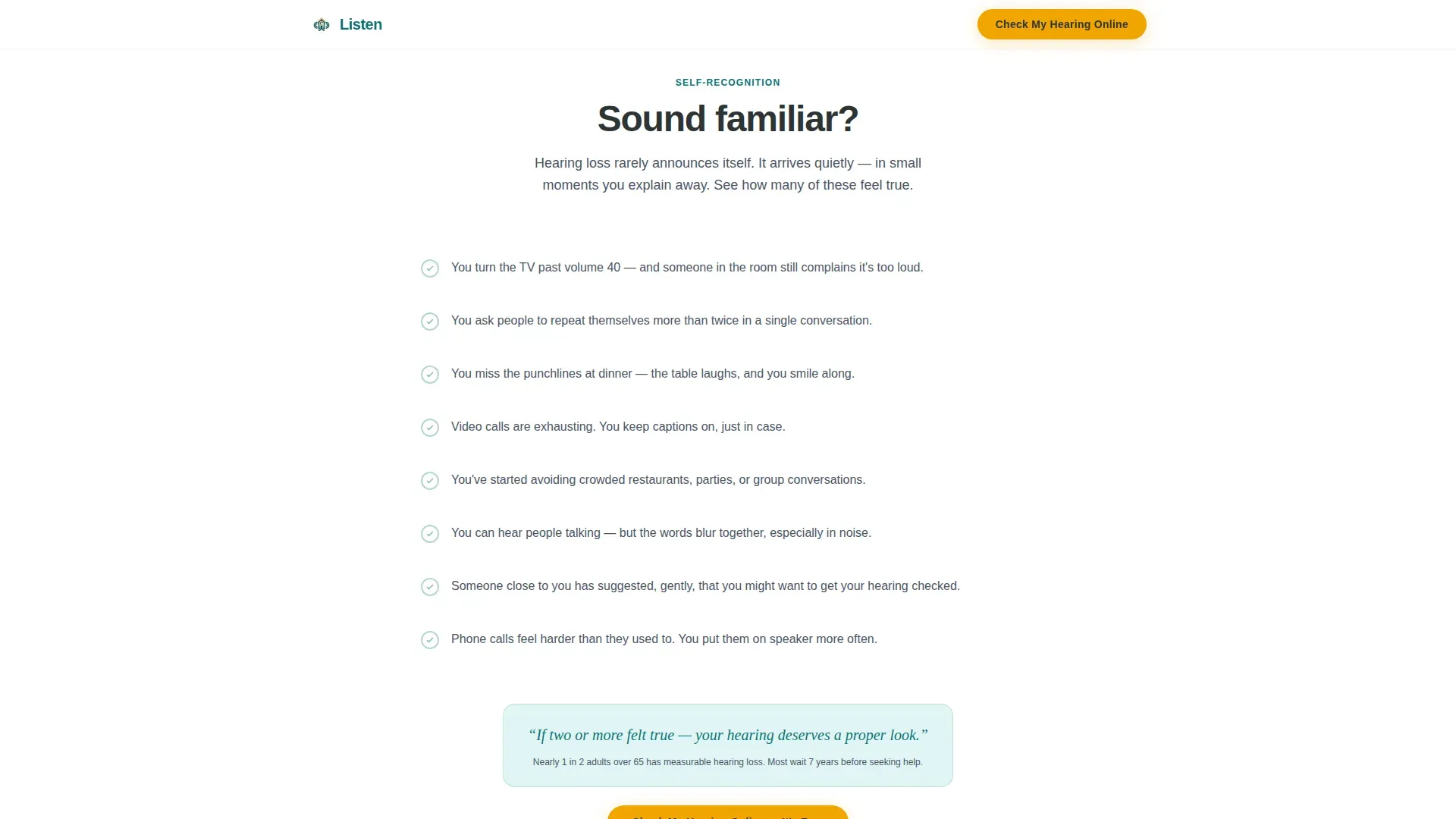
- Visitors feel quietly seen through a self-recognition checklist with hover interactions
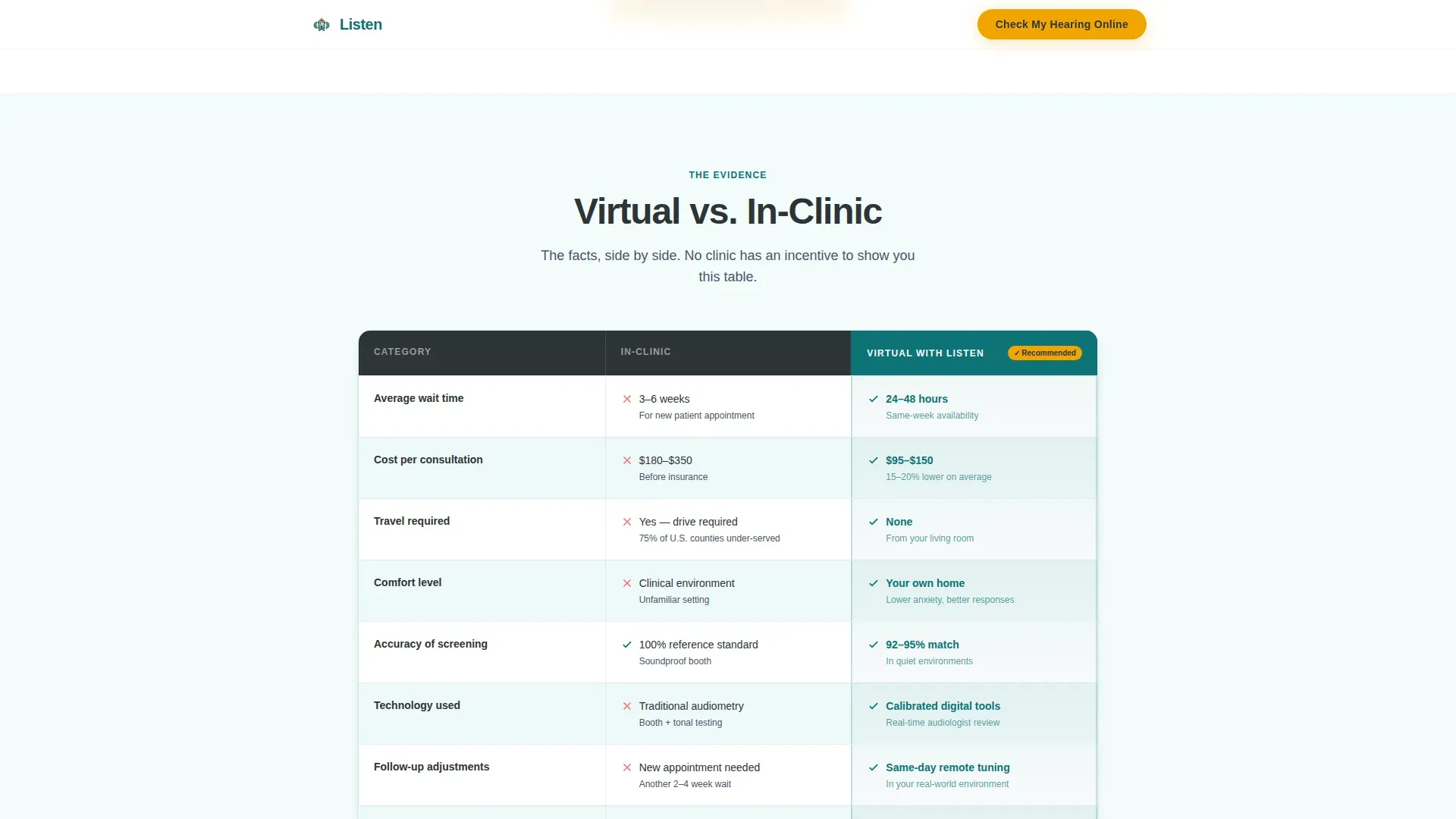
- The comparison table removes doubt by showing virtual care as faster and more accessible than in-clinic visits
- A sticky call-to-action bar keeps the booking prompt visible without being pushy
What you get with this template
You get a fully structured, single-page landing page with five distinct content sections and a linear footer. Every section has a defined visual role, from opening trust to closing the booking decision.
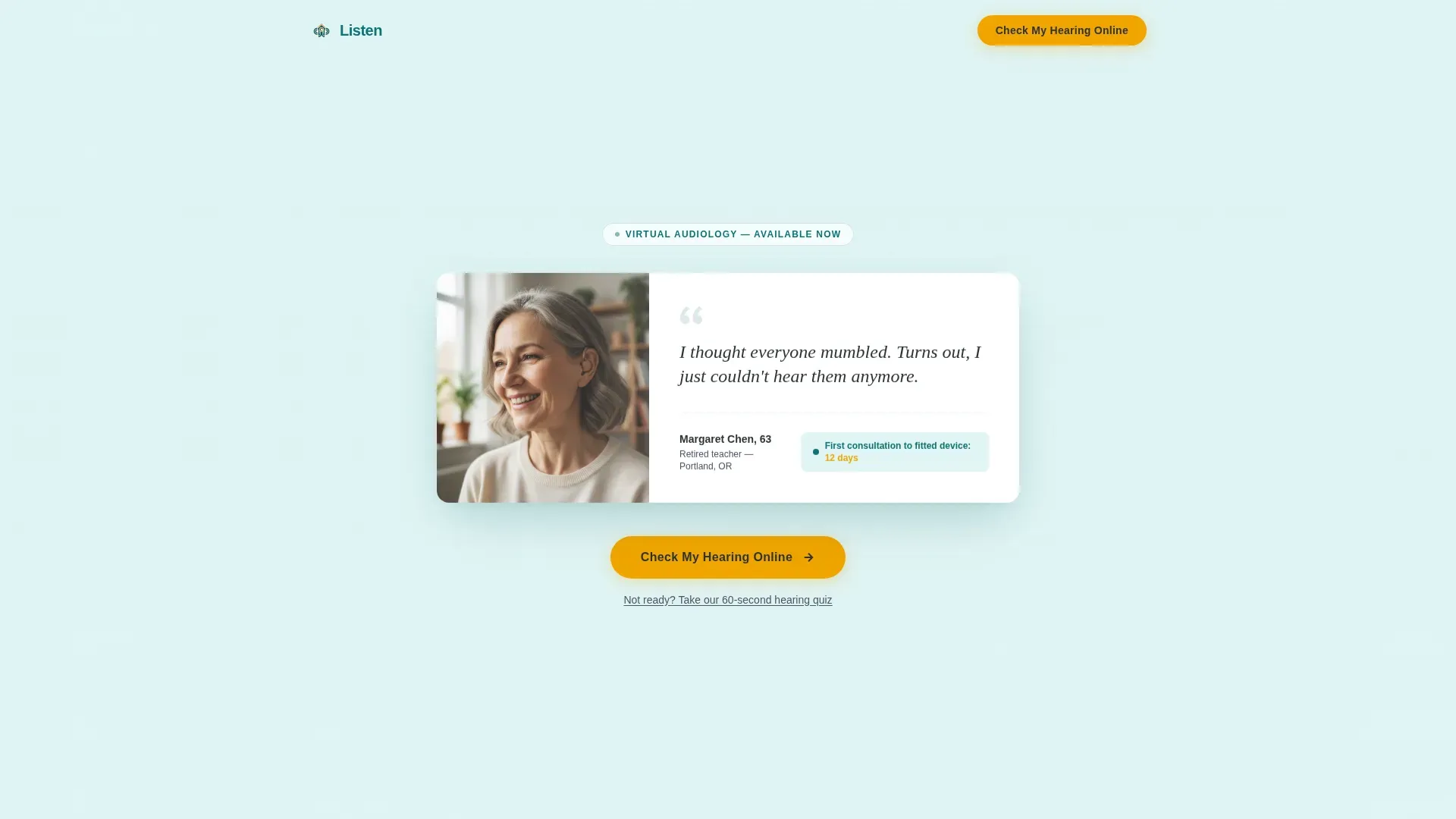
- A hero section with a floating testimonial card, patient portrait, and primary call to action
- A self-recognition checklist, a comparison table, a three-step timeline, and a social proof section
- A sticky bottom call-to-action bar and a secondary email nurture text link for hesitant visitors
Feature list
This template includes six purpose-built components that work together to guide a hesitant visitor from quiet self-recognition to a confirmed booking.
Floating Testimonial Hero Card
The page opens with an oversized card set against a soft seafoam background. It features a patient portrait, a handwritten-style quote in Fraunces serif typography, the patient's name and age, and one key metric: "First consultation to fitted device: 12 days." No navigation competes with this card.
Amber-Activated Self-Recognition Checklist
A scrollable checklist presents relatable hearing-loss scenarios. Each line lights up in warm amber when hovered, creating a moment of quiet recognition for visitors who see their own experience reflected back at them.
Virtual versus. In-Clinic Comparison Table
A structured table compares virtual and in-clinic consultations across five dimensions: wait time, cost, comfort level, technology used, and follow-up speed. The virtual column is subtly highlighted in deep teal, making the better choice visually clear without aggressive persuasion.
Three-Step Horizontal Timeline
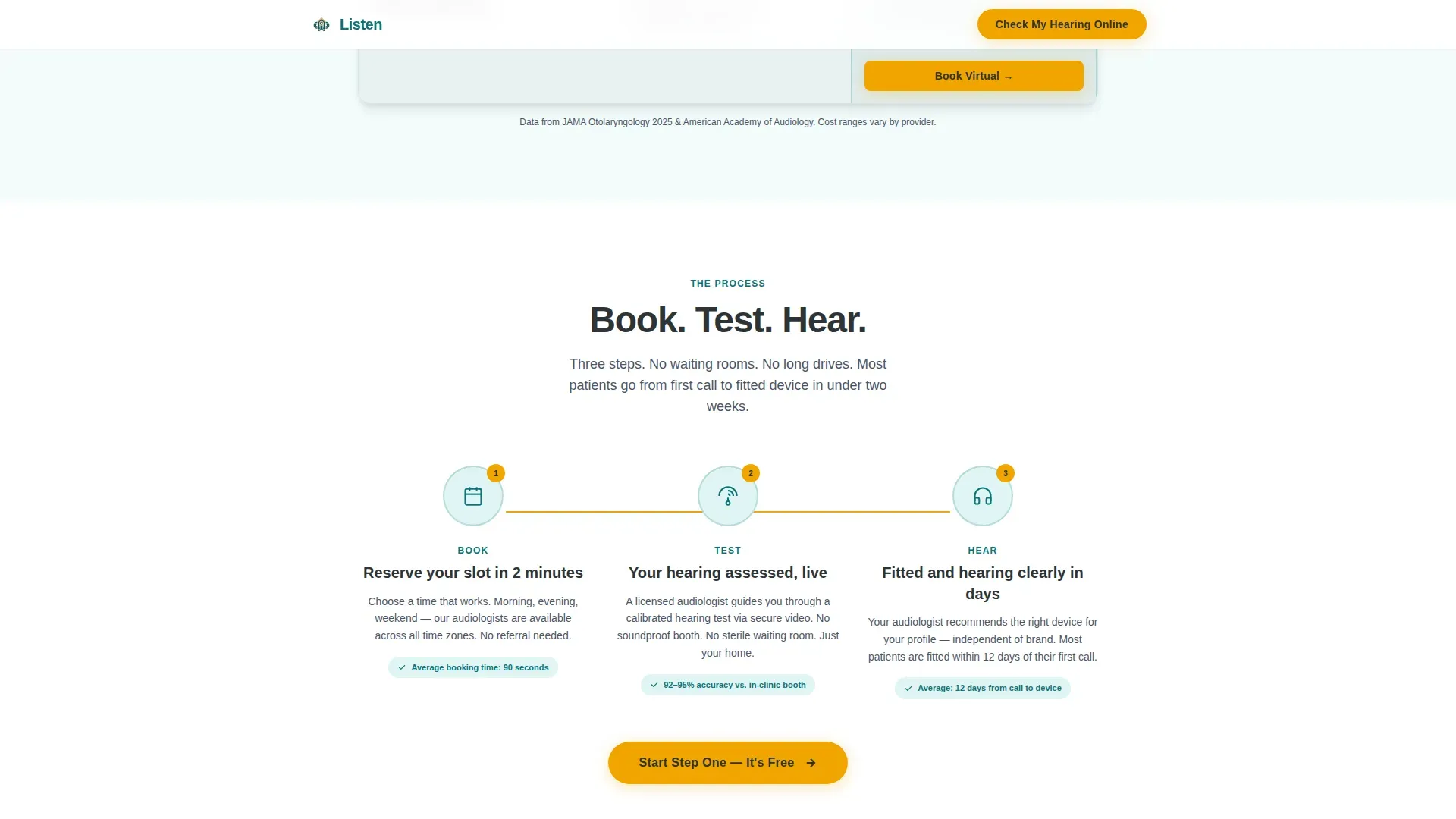
A visual "Book, Test, Hear" timeline unfolds horizontally with an amber accent line connecting each step. It reduces the unknown by showing exactly how the process works from first click to fitted device.
Dual Call-to-Action System
The primary call to action, "Check My Hearing Online," appears in amber on charcoal beneath the hero card and again as a persistent sticky bottom bar after the comparison table. A secondary text link, "Not ready? Take our 60-second hearing quiz," captures hesitant visitors for email nurture.
Social Proof and Stats Section
A dedicated section presents credibility metrics and clinical statistics alongside patient testimonials. It reinforces trust with evidence before the final call to action, rather than asking visitors to act on faith alone.
Page sections overview
| Section | Purpose |
|---|---|
| Hero Testimonial Card | Opens with patient trust and primary call to action |
| Self-Recognition Checklist | Creates personal connection through relatable scenarios |
| Virtual versus. In-Clinic Table | Compares consultation formats across five dimensions |
| How It Works Timeline | Shows the three-step booking and fitting process |
| Social Proof and Stats | Reinforces credibility with metrics before the final call to action |
| Linear Single-Row Footer | Closes the page with minimal distraction |
Design & branding system
The template uses an Educational Guide theme with a Teal Catalyst color system. The palette is calm enough to feel clinical and warm enough to feel welcoming, which is precisely the emotional register a teleaudiology service needs.
- Deep teal (#0D7377) anchors the primary visual identity, with soft seafoam (#E0F5F5) washing across section backgrounds
- Warm amber (#F0A500) is reserved exclusively for calls to action, hover states, progress indicators, and the timeline thread
- Plus Jakarta Sans is used for body text; Fraunces serif is used for pull quotes and testimonial typography
Mobile & speed optimization
The template is designed desktop-first, reflecting the primary audience of adults aged 55 to 65 who are more likely to browse on a laptop or desktop computer. It is also fully responsive for smaller screens.
- GSAP scroll reveal animations provide medium-weight motion without heavy scripting
- Checklist hover states, table row highlights, and the sticky call-to-action bar are built as interactive client-side components
- Static server components handle non-interactive sections to keep client-side JavaScript minimal
How this template helps you convert
The page is structured as a Problem-to-Solution arc. Every scroll tightens the narrative from "maybe I have a problem" to "this is exactly how I solve it."
- The testimonial hero opens with social proof and a direct call to action before the visitor has scrolled a single pixel, reducing early bounce.
- The checklist and comparison table do the convincing work together, so the call to action at the bottom feels like a natural next step rather than a sales push.
- The dual call-to-action system captures both ready buyers and hesitant visitors, ensuring no motivated visitor leaves without a clear next path.
Other information about this template
This template is designed for the teleaudiology and virtual hearing care space. It suits any practice looking to modernize its patient acquisition approach with a clean, conversion-focused single-page layout.
- The template is built for English (United States) audiences, with USD pricing format and MM/DD/YYYY date formatting
- The footer follows a linear single-row pattern to keep the close of the page distraction-free
- The checklist and comparison table are the core persuasion engine; the page is intentionally light on hard-sell copy and heavy on self-guided discovery
- The color system and typography choices reflect the calm authority of a modern hearing clinic rather than a generic medical website
Theme
Educational Guide
Creative direction
Problem→Solution Arc
Color system
Teal Catalyst
Style
Comparison Table
Direction
Click-Through
Page Sections
Floating Testimonial Hero Card
Amber-activated Checklist Section
Virtual Versus. In-clinic Comparison Table
Three-step Booking Timeline
Dual Call-to-action System
Social Proof and Stats Section
Related questions
Who is this landing page template best suited for?
Can I update the checklist questions and comparison table content?
Does the sticky call-to-action bar connect to a booking platform?
What is the secondary hearing quiz link for?
Is the testimonial card content editable?



