Property Listing & Portal Professional Website Template
A gallery-plus-detail landing page built for commercial real estate marketplaces. It showcases Class A office towers, retail corridors, and industrial parks with real financial data front and center. The Executive Suite visual theme, dark emerald color system, and map-based hero give brokers, institutional investors, and tenant reps everything they need to move from search to letter of intent fast.
by Rocket studio
Quick summary
This is a high-conviction commercial property listing landing page. It opens with a dark-mode interactive map hero, transitions into an architectural gallery of featured properties, and expands each listing into a full detail panel with floor plates and financial summaries. Cap rates, square footage, and vacancy data are visible before any form appears, so qualified buyers arrive at the call to action already confident.
Who this template is for
This template is designed for professionals operating in fast-moving commercial real estate markets. It suits anyone who needs to present serious inventory to serious buyers without friction.
- Commercial brokers managing multi-property portfolios who need listings to move quickly
- Institutional investors scanning market inventory for yield-driven acquisitions
- Tenant representatives browsing sublease opportunities across multiple submarkets
What problem this template solves
Commercial property portals often bury the numbers behind inquiry walls, forcing buyers to request basic data before they can even qualify their interest. That friction kills momentum. This template puts cap rates, square footage, and vacancy percentages in plain view, so visitors can self-qualify before a single form field is filled.
- Listings that hide financial data lose buyers before a conversation starts
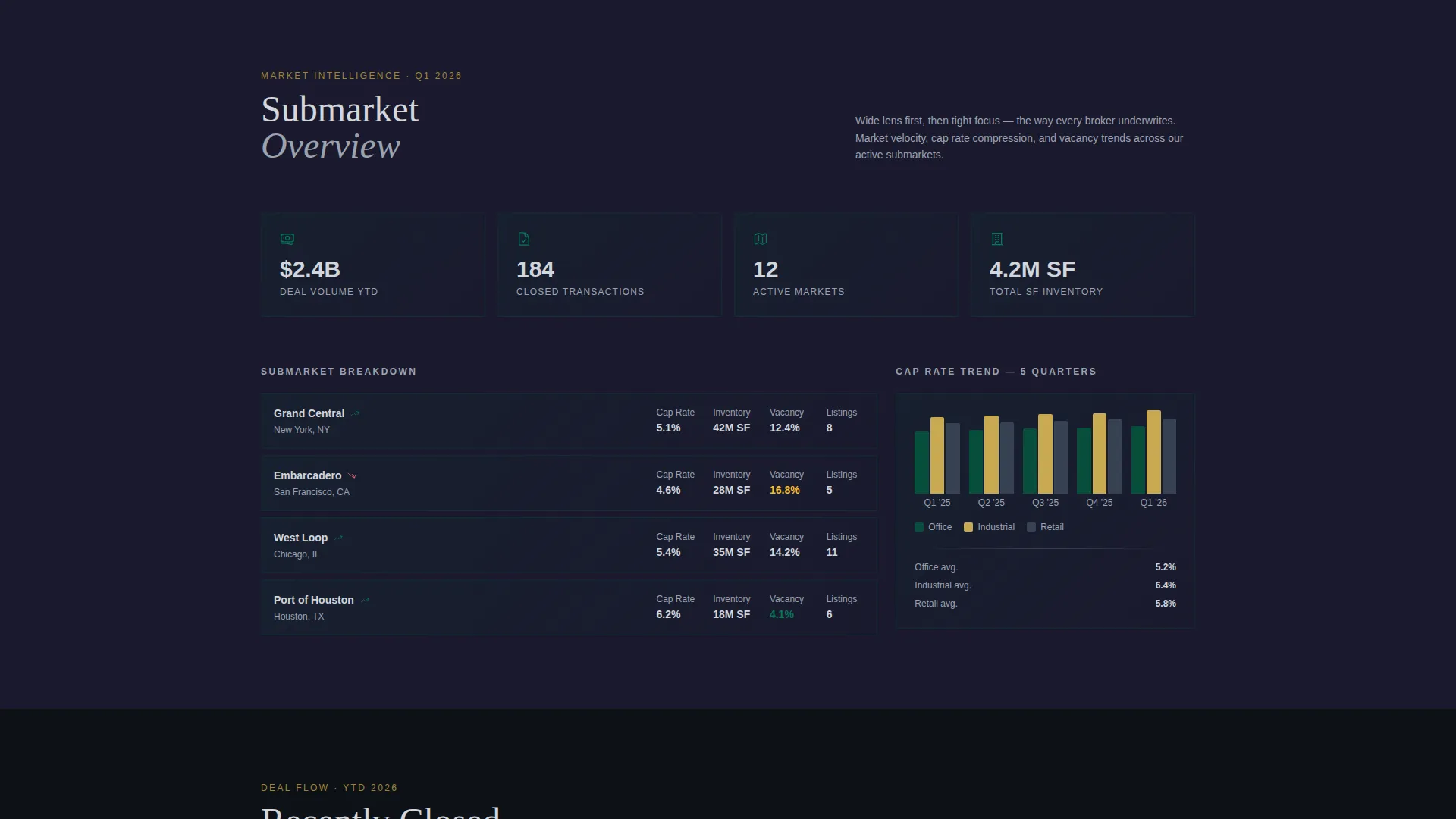
- Portals without submarket context make it hard to compare assets at scale
- Generic forms ask too little or too much, qualifying no one effectively
What you get with this template
You get a single-page commercial listing portal built around spatial storytelling and direct sales. Every design decision mirrors the way a broker actually underwrites a deal: wide market overview first, then submarket context, then individual asset detail.
- A map-based hero viewport with commercial zone clusters and individual property pins
- An expanding card gallery where each listing opens into a full detail panel without page navigation
- Two conversion paths: a four-field qualifying form and a calendar-linked market tour scheduler
Feature list
This template ships with a focused set of components, each serving a specific role in the deal-discovery flow.
Interactive Map Hero Viewport
A dark-mode map fills the entire opening viewport at a slight isometric angle. Commercial zones glow in emerald clusters and individual listings pulse as gold pins. A floating search bar accepts asset class, square footage range, and market inputs, so visitors begin filtering from the first second on the page.
Expandable Listing Detail Panels
Each property card in the gallery expands in place rather than navigating to a new page. Floor plates slide in from the left and financial summaries cascade on the right. A miniature submarket map pins the asset in its local context. Visitors stay inside the same spatial flow for every listing they review.
Transparent Financial Data Display
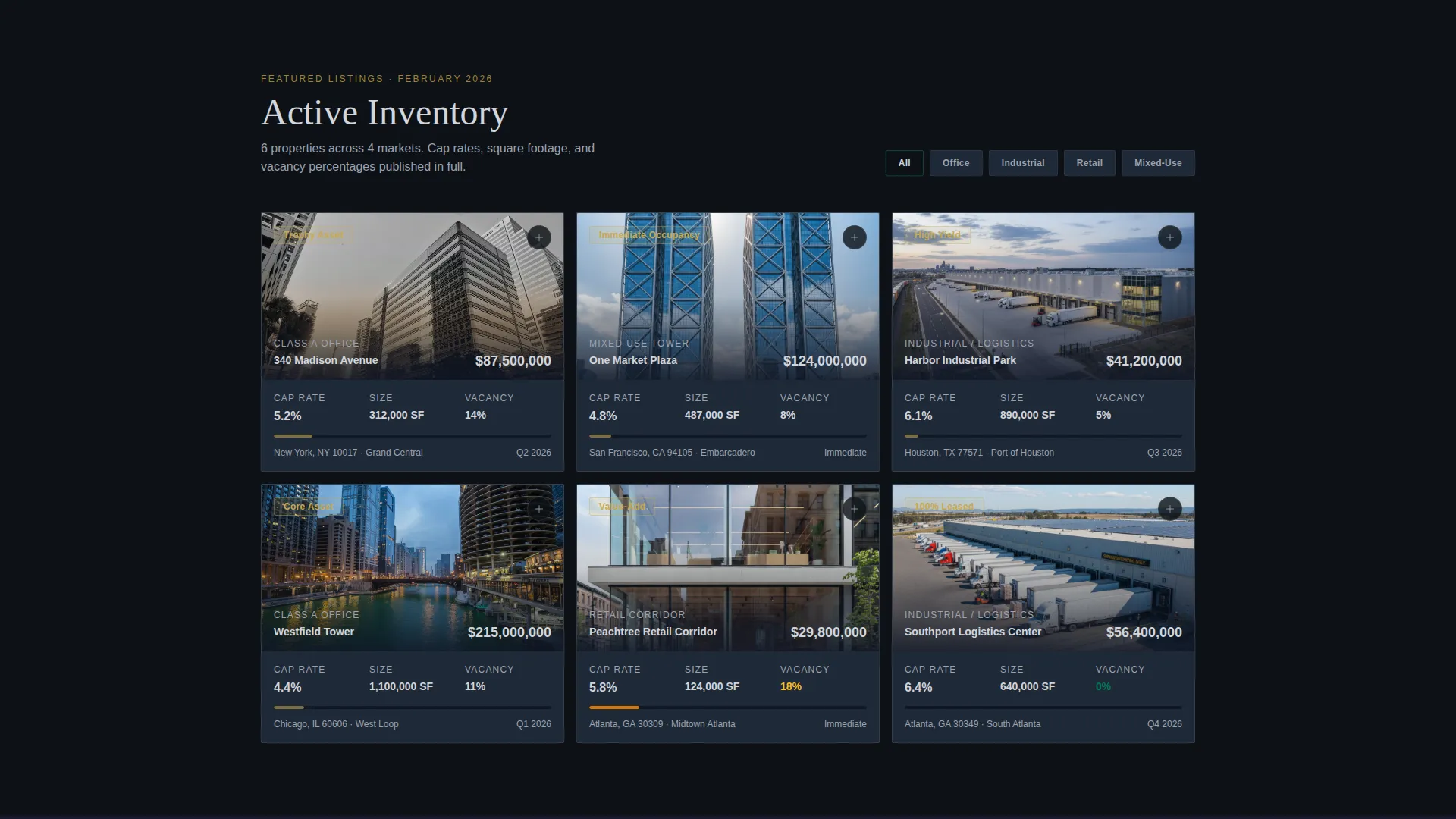
Cap rates, square footage, and vacancy percentages are visible on each card before any interaction. Showing real numbers upfront means visitors arrive at the call to action already informed. This design choice reflects how experienced buyers actually evaluate inventory.
Dual Conversion Path Design
The primary call to action, "Request Offering Memorandum," appears inside each expanded detail panel and again as a persistent bottom bar that activates after the first card interaction. A secondary path offers "Schedule a Market Tour" for tenant reps without a specific target asset. Both paths use minimal, targeted form fields.
Qualifying Lead Capture Form
The offering memorandum request form collects full name, firm name, asset classes of interest, and acquisition budget range. Four fields qualify the lead without feeling like an interrogation. The form appears only after the visitor has already seen real inventory and real data.
Spatial Scroll Narrative Structure
The page is structured to narrow progressively: from a market overview at the top, through submarket context in the middle, down to individual asset detail at the bottom. This mirrors a broker's underwriting process and gives the scroll a purposeful, walkthrough quality rather than a passive reading experience.
Page sections overview
| Section | Purpose |
|---|---|
| Map Hero Viewport | Opens with interactive dark-mode city map and floating search bar |
| Featured Listings Gallery | Architectural card grid showing properties with visible financial data |
| Expanded Listing Detail | In-place panel with floor plates, financials, and submarket map |
| Submarket Context Band | Narrows focus from broad market to specific corridor or district |
| Offering Memorandum Form | Four-field qualifying form embedded inside expanded listing view |
| Persistent call to action Bar | Sticky bottom bar activating after first card interaction |
| Market Tour Scheduler | Calendar embed for tenant reps without a specific target asset |
Design & branding system
The Executive Suite theme uses a four-color system built to feel like a private equity firm's corner office. Every color has a specific job, and none of them overlap.
- Boardroom emerald (#064E3B) dominates the hero and top-third surfaces; black walnut (#1A1A2E) anchors the deeper scroll sections
- Brushed platinum (#D1D5DB) handles all typography, data labels, and divider lines, keeping financial figures razor-legible against dark backgrounds
- Deal-close gold (#C8A951) appears exclusively on calls to action, price tags, and favorited-star icons, so every gold element signals a financial decision point
Mobile & speed optimization
The landing page layout is built to maintain its spatial hierarchy across screen sizes. The map hero, card gallery, and expanding detail panels are each structured to reflow cleanly on smaller viewports.
- The isometric map hero adapts its viewport fill and search bar placement for touch-first navigation
- Expanding detail panels reorder their floor plate and financial summary columns into a vertical stack on narrow screens
- The persistent call to action bar remains anchored at the bottom of the viewport on both desktop and mobile, keeping the primary conversion path always reachable
How this template helps you convert
The conversion strategy is built on earned trust rather than forced clicks. Visitors see real data first and reach the form only after they have already self-qualified.
- Transparent financial data on every card removes the uncertainty that usually stalls commercial buyers, so leads who submit the form are already serious
- The dual-path design captures both active acquirers ready to request an offering memorandum and early-stage tenant reps who need a market tour first, widening the qualified pipeline without adding form complexity
- The persistent bottom bar keeps the primary call to action visible throughout the scroll without interrupting the spatial narrative, reducing drop-off at the moment of decision
Other information about this template
This template is positioned specifically for commercial real estate listing portals operating at an institutional or upper-market level. It is not designed for residential listings or single-family property search tools.
- The card grid layout supports multi-property portfolios and is suited to markets where Class A office, retail corridor, and industrial park assets are listed simultaneously
- The template's creative direction follows a spatial and architectural visual language, with low-angle exterior photography and geometry-led compositions as the intended image treatment
- Golden hour photography is specified as the standard for listing imagery, reinforcing the premium positioning of every asset shown
- The four-field lead form is intentionally minimal to qualify without creating friction, reflecting a direct sales approach rather than a high-volume lead generation model


Theme
Atelier Studio
Creative direction
Interactive Explorer
Color system
Warm Stone
Style
Card Grid (Modular)
Direction
Quiz/Assessment
Page Sections
Interactive Map Hero Viewport
Expandable Listing Detail Panels
Transparent Financial Data Display
Dual Conversion Path Design
Qualifying Lead Capture Form
Spatial Scroll Narrative Structure
Related questions
Can I show multiple asset classes on the same page?
How does the expanding listing detail panel work?
What does the lead capture form ask for?
Is this template suitable for tenant reps as well as investors?
Can the financial data shown on listing cards be customized?



