REO Inspection Landing Page Template for Asset Managers
Lockbox is a dark-emerald landing page built for foreclosure and REO (Real Estate Owned) inspection professionals. It combines an address-entry header, interactive Before/After photo-report sliders, and a progressive lead capture form to help asset managers, loss mitigation attorneys, and servicing companies schedule property access or download a sample inspection report fast.
by Rocket studio
Quick summary
Lockbox is a single-page lead generation template for REO and foreclosure property inspection services. It opens with a command-style address bar, walks visitors through alternating photo-and-report section pairs, and closes every section pair with a clear call to action. The design is institutional, unflinching, and built entirely around the workflows of asset managers and property servicing teams.
Who this template is for
This template is purpose-built for inspection professionals who work in the foreclosure and REO property pipeline. If your clients think in parcel numbers rather than curb appeal, this page speaks their language directly.
- Foreclosure and REO home inspectors serving regional banks and asset management firms
- Loss mitigation attorneys who need condition reports for court filings and property disposition
- Property servicing companies dispatching preservation crews to vacant or bank-owned homes
What problem this template solves
Most inspection service pages are built for homebuyers and look the part. Asset managers and loss mitigation teams need something else entirely. They need immediate confidence that the inspector understands access protocols, code violation documentation, and portfolio-scale assignments.
- Generic inspection pages fail to signal fluency with REO workflows and bulk property orders
- No structured intake path for volume clients who need to route dozens of assignments at once
- Condition report credibility is hard to establish without showing real findings and severity grades
What you get with this template
You get a complete, ready-to-customize landing page structured specifically for the foreclosure inspection market. Every section has a defined job, from first address entry to final report download.
- A full zigzag alternating layout with Before/After inspection sliders and report excerpts in each section pair
- A progressive three-step lead form covering address and property type, access instructions, and volume tier selection
- A secondary conversion path offering a gated sample REO report download behind email and company name
Feature list
This template includes purpose-built components that reflect the real operational needs of REO inspection clients.
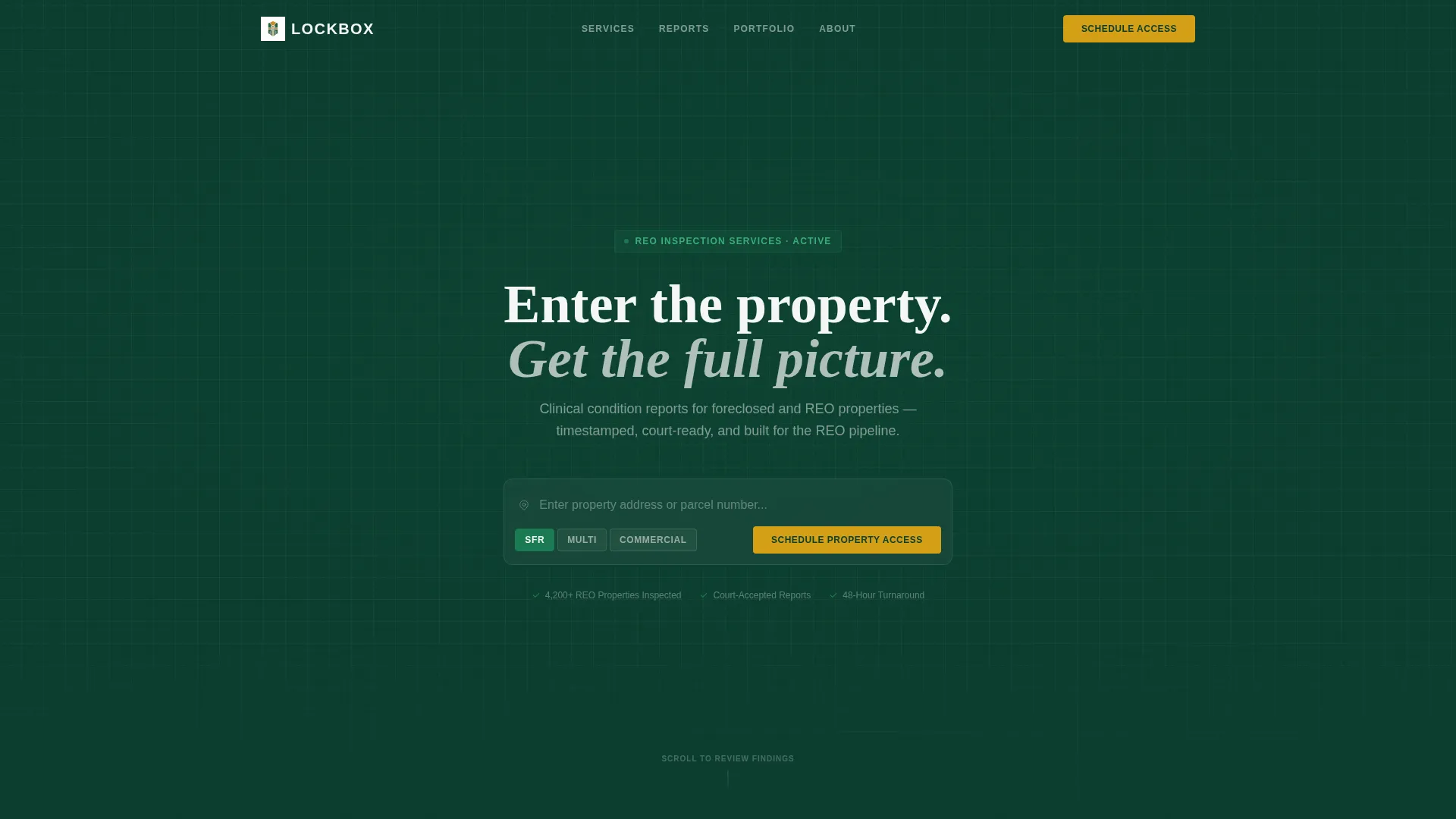
Address-Entry Command Header
The header opens with a dark emerald input field dominating the viewport. Visitors enter a property address and select a property type toggle covering single-family residence (SFR), multi-unit, or commercial. The line "Enter the property. Get the full picture." frames the input as a professional tool, not a contact form.
Interactive Before/After Inspection Sliders
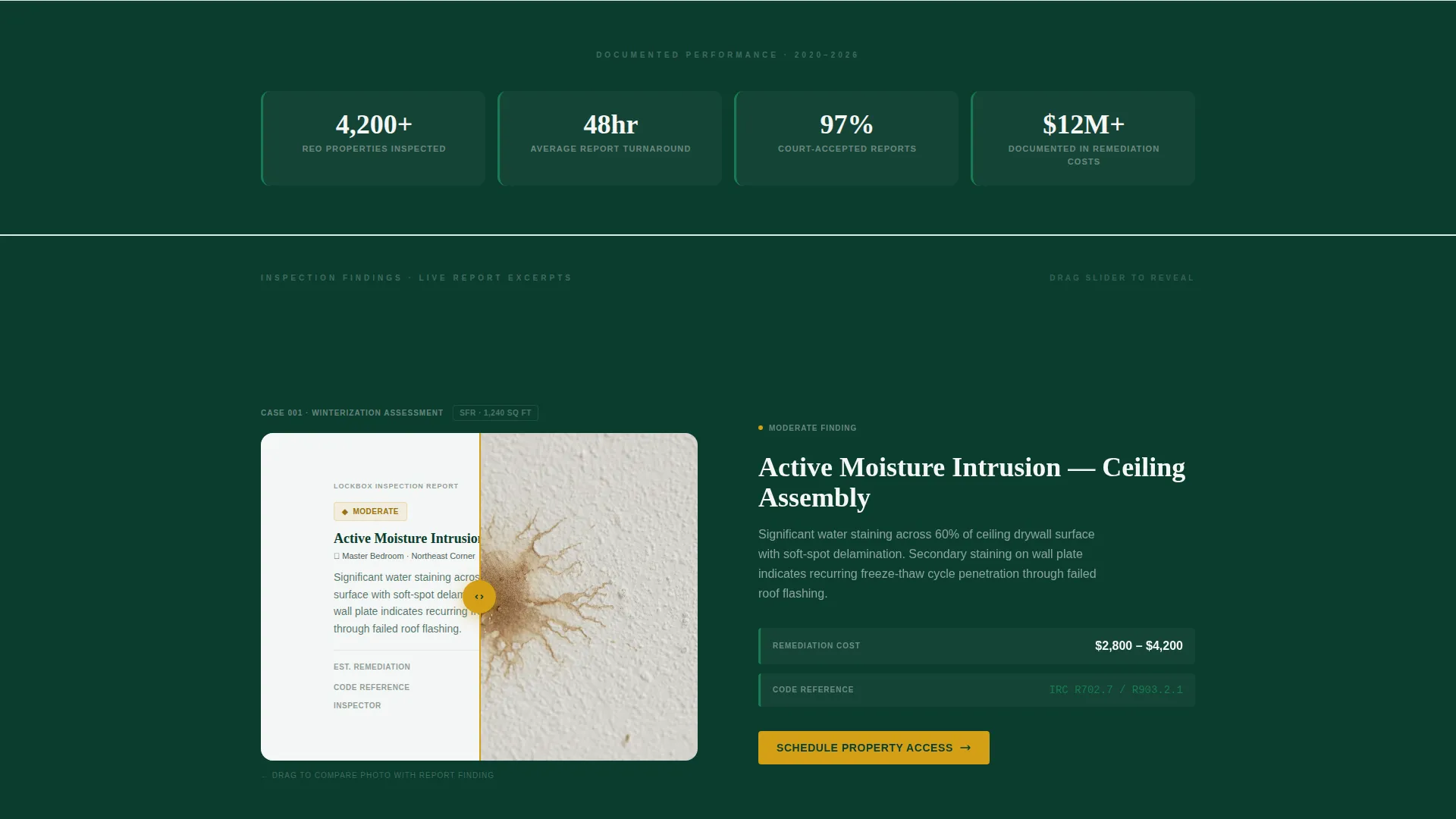
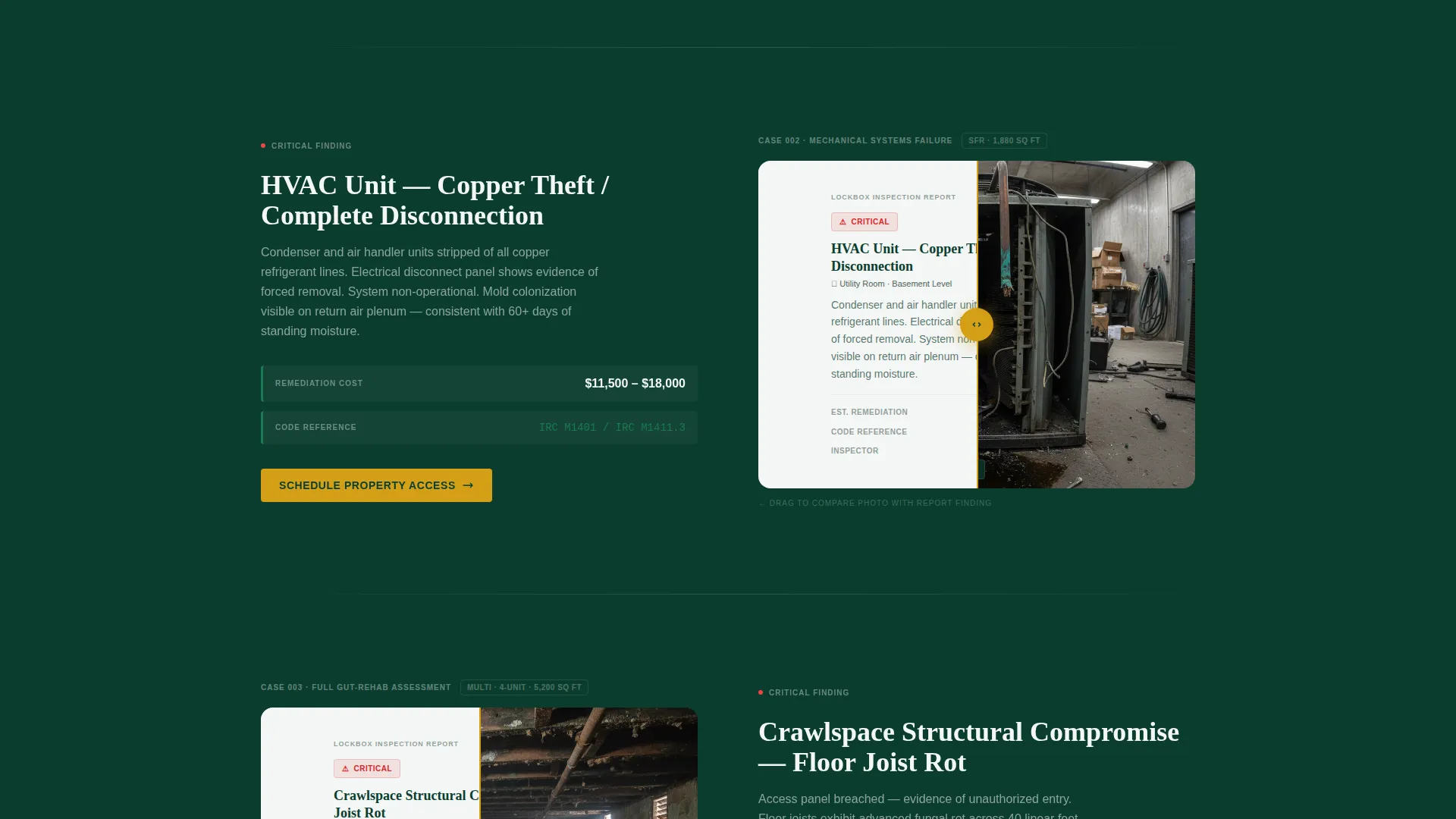
Each zigzag section pairs a raw, timestamped inspection photograph with a formatted report excerpt. An interactive drag slider moves between the photo side and the finding side, which displays a severity grade, an estimated remediation cost range, and the relevant code reference. Sections escalate from a basic winterization check to a full gut-rehab assessment as the visitor scrolls.
Progressive Lead Capture Form
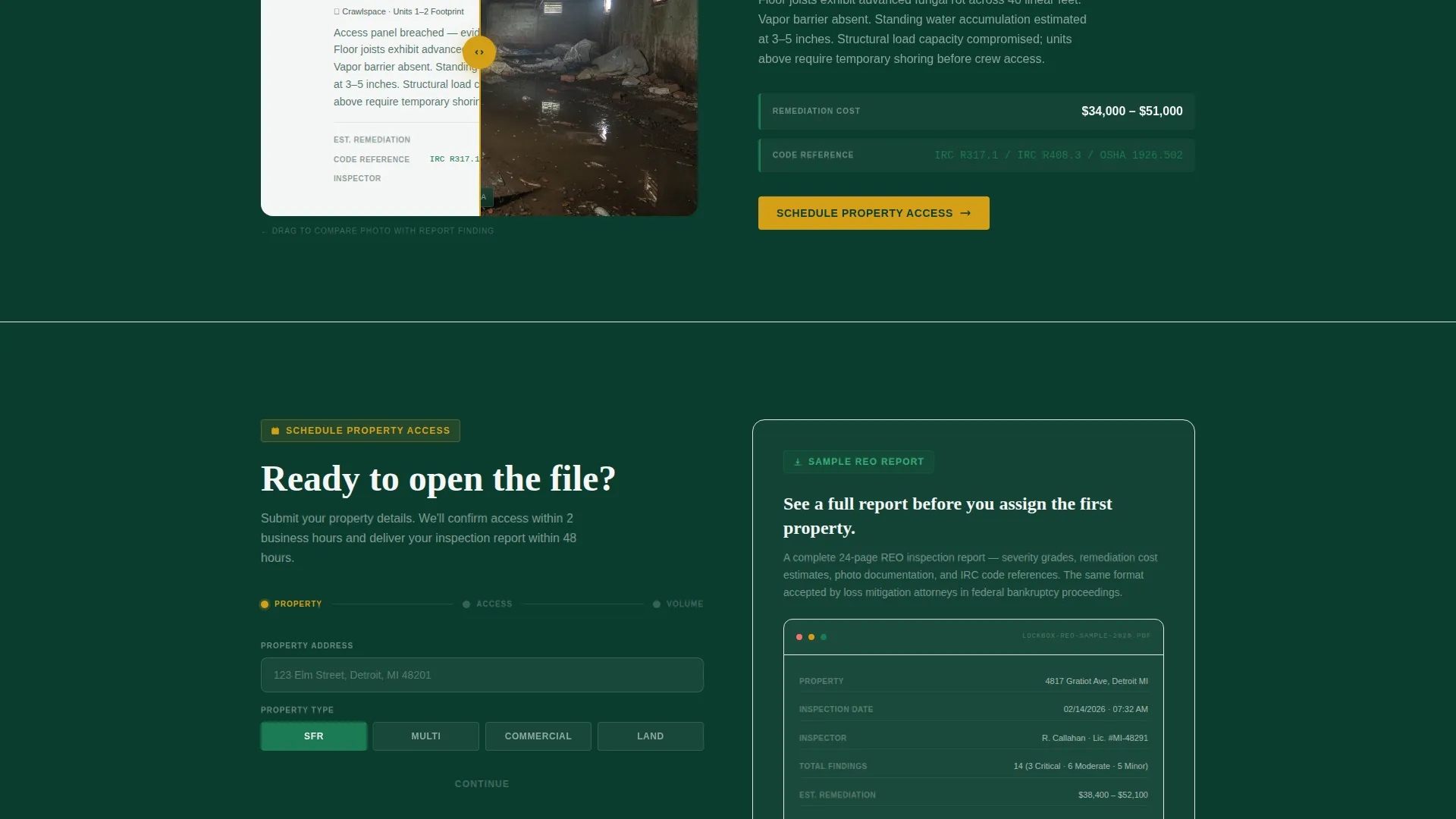
The scheduling form is built in three logical steps. Step one collects the property address and type. Step two gathers occupancy status and access instructions, including lockbox codes, broker contacts, or vacant-open notes. Step three lets the client self-select a volume tier: single property, portfolio of ten or more, or a bulk standing order arrangement.
Gated Sample Report Download
A secondary conversion path sits alongside the primary scheduling flow. Visitors can download a sample REO inspection report by submitting their email address and company name. This gives asset managers the documentation proof they need before routing their first assignment.
Violation-Flag Amber calls to action
Every call-to-action element, including the primary "Schedule Property Access" button, uses violation-flag amber (#D4A017) as its dedicated color. This color appears nowhere else in the layout, so the eye always knows where to act. The button anchors both inside the header and at the bottom of each zigzag section pair.
Escalating Section Complexity
The zigzag sections are ordered by inspection complexity. The sequence moves from a simple winterization check through mid-complexity condition assessments up to a full gut-rehab scope. This progression demonstrates depth of service capability without relying on generic claims.
Page sections overview
| Section | Purpose |
|---|---|
| Address Entry Header | Captures property address and type; initiates the inspection request flow |
| Property Type Toggle | Lets visitors select SFR, multi-unit, or commercial before proceeding |
| Winterization Check Pair | First zigzag section showing a basic inspection finding with slider and call to action |
| Mid-Scope Condition Pair | Second zigzag showing moderate damage documentation and report excerpt |
| Gut-Rehab Assessment Pair | Third zigzag demonstrating full-complexity inspection capability |
| Progressive Lead Form | Three-step scheduling form with access instructions and volume tier fields |
| Sample Report Download | Gated secondary call to action collecting email and company name for report access |
| Anchored Schedule call to action | Amber "Schedule Property Access" button repeated after each section pair |
Design & branding system
The visual identity follows a Corporate Precision theme built on a Dark Emerald color system. Every color has a defined role, and none are used interchangeably.
- Institutional green (#0B3D2E) and asset-ledger white (#F4F6F5) alternate as section backgrounds across the zigzag layout, with emerald (#1B7A53) reserved for status badges and progress indicators
- Violation-flag amber (#D4A017) is used exclusively for calls to action and alert callouts, keeping visual hierarchy tight and action signals unambiguous
- The header background uses a desaturated aerial rooftop texture to give the address input an almost abstract, command-terminal quality rather than a residential real estate feel
Mobile & speed optimization
The layout is structured to remain scannable and functional at any screen size. Inspectors and asset managers access assignments on the move, so the template is built with field-use in mind.
- The zigzag alternating layout collapses cleanly into a stacked single-column view on smaller screens, preserving the photo-to-report pairing and call to action placement
- The progressive form flow is designed to work as a step-by-step sequence on mobile, reducing the visual load of the full three-step form appearing at once
How this template helps you convert
The conversion logic of this page is layered and deliberate. Every design decision serves the goal of moving a qualified asset manager from first visit to scheduled assignment.
- The address-entry header acts as an immediate qualifier: visitors who enter a property address self-identify as active clients with a live assignment, placing them one step inside the scheduling funnel before they read a single line of copy.
- The Before/After sliders build documented credibility by showing real inspection findings with severity grades and code references, giving loss mitigation attorneys and servicing managers the evidentiary confidence to assign work.
- The dual-path conversion structure captures both ready-to-schedule clients and research-phase asset managers, using the gated sample report download to collect company-level contact data from prospects who are not yet ready to book.
Other information about this template
This template is designed as a standalone landing page for a single inspection service offering in the foreclosure and REO market. It does not include multi-page navigation or blog components.
- The template style follows a Card Grid (Modular) structure, making individual section pairs straightforward to reorder or replace based on the specific inspection services you offer
- The creative direction draws on a Gallery Walk approach, using the sequential Before/After slider sections to guide visitors through a curated progression of inspection scenarios
- The header concept is grounded in a Photo Grid Mosaic treatment, with the desaturated aerial rooftop texture functioning as an abstract visual backdrop rather than a literal property photograph
- This template is suited for inspectors building a dedicated REO inspection service page separate from a general home inspection website
Theme
Corporate Precision
Creative direction
Gallery Walk
Color system
Dark Emerald
Style
Card Grid (Modular)
Direction
Lead Generation
Page Sections
Address-entry Command Header
Interactive Before/after Inspection Sliders
Progressive Three-step Lead Form
Gated Sample REO Report Download
Violation-flag Amber Call to Action System
Escalating Inspection Complexity Sections
Related questions
Who is this landing page template designed for?
How does the Before/After slider work in the zigzag sections?
What does the progressive lead form collect?
What is the gated sample report download?
Can I customize the property type options and volume tiers?



