Self-Storage & Mini-Storage Professional Website Template
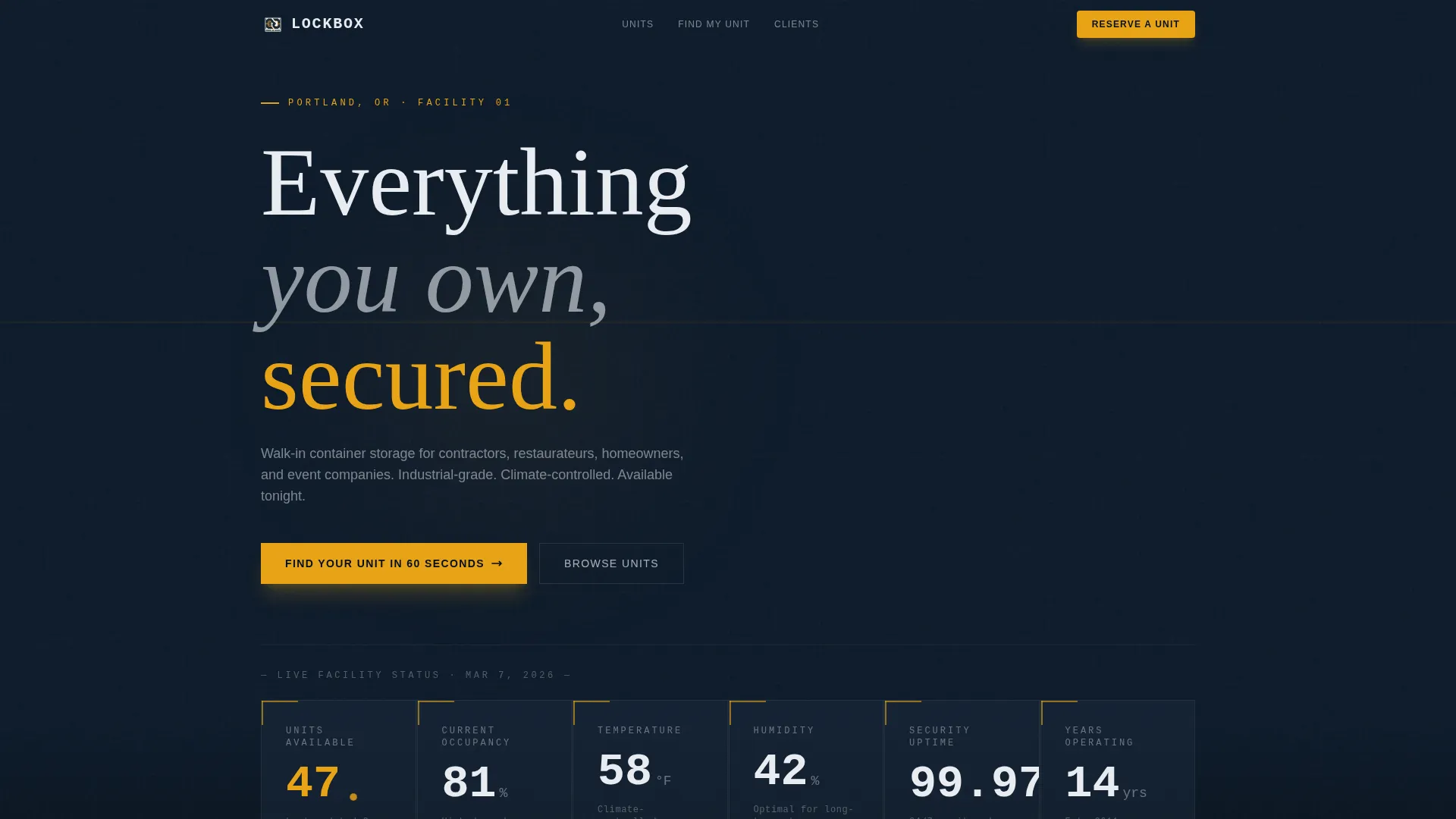
Lockbox is a dark immersive landing page template built for container storage facilities. It opens with a live stats dashboard, flows into a doorway-framed gallery of unit types, and drives conversions through a three-step quiz funnel. The design uses a cinematic midnight blue and hazard amber palette that feels like a secure storage yard after hours.
by Rocket studio
Quick summary
Lockbox is a gallery and detail landing page template for container storage unit facilities. It combines a real-time metrics header, a scrolling doorway-framed unit gallery, and a three-step interactive quiz that matches visitors to the right storage unit size. The dark industrial aesthetic and amber accent system give the page an immediately credible, operational feel.
Who this template is for
This template is built for storage facility operators who serve a mixed customer base of businesses and individuals. If your yard holds anything from personal lockers to 40-foot commercial containers, Lockbox gives you a page that communicates scale and reliability at a glance.
- Small business owners who need overflow inventory storage
- Homeowners mid-renovation, families between moves, and event companies managing seasonal gear
- Facility operators who want to capture both decisive reservers and exploratory walk-through bookers in a single page flow
What problem this template solves
Most storage facility pages show a price table and a phone number. That approach fails the visitor who does not know what size they need or why they should trust a particular yard. Lockbox addresses both gaps directly.
- Visitors feel uncertain about unit size, so the quiz funnel guides them visually with recognizable object comparisons
- Generic photo galleries do not communicate scale, so the doorway-framed gallery builds a sense of real facility depth
- Prospective customers want proof of operational competence before they commit, so the live stats dashboard shows occupancy, uptime, and conditions upfront
What you get with this template
You get a fully structured single-page layout with five distinct content sections, each serving a specific conversion role. The template is desktop-first with mobile parity and is designed for high interactivity throughout.
- A stats dashboard hero, a scrollable gallery with expandable detail panels, and a three-step quiz funnel with a results screen
- A social proof section with industry-specific testimonials and a dual-path final call to action
- A linear single-row footer rounding out the page structure
Feature list
This template is built around four core functional areas that work together to move a visitor from curiosity to reservation.
Live Facility Stats Dashboard
The hero section displays total units available, current occupancy percentage, temperature and humidity readings, and a 24/7 security uptime counter. All figures render in oversized monospaced numerals against the deep hull blue background. The amber accent pulses gently on the availability count, signaling live data at a glance.
Doorway-Framed Gallery with Detail Panels
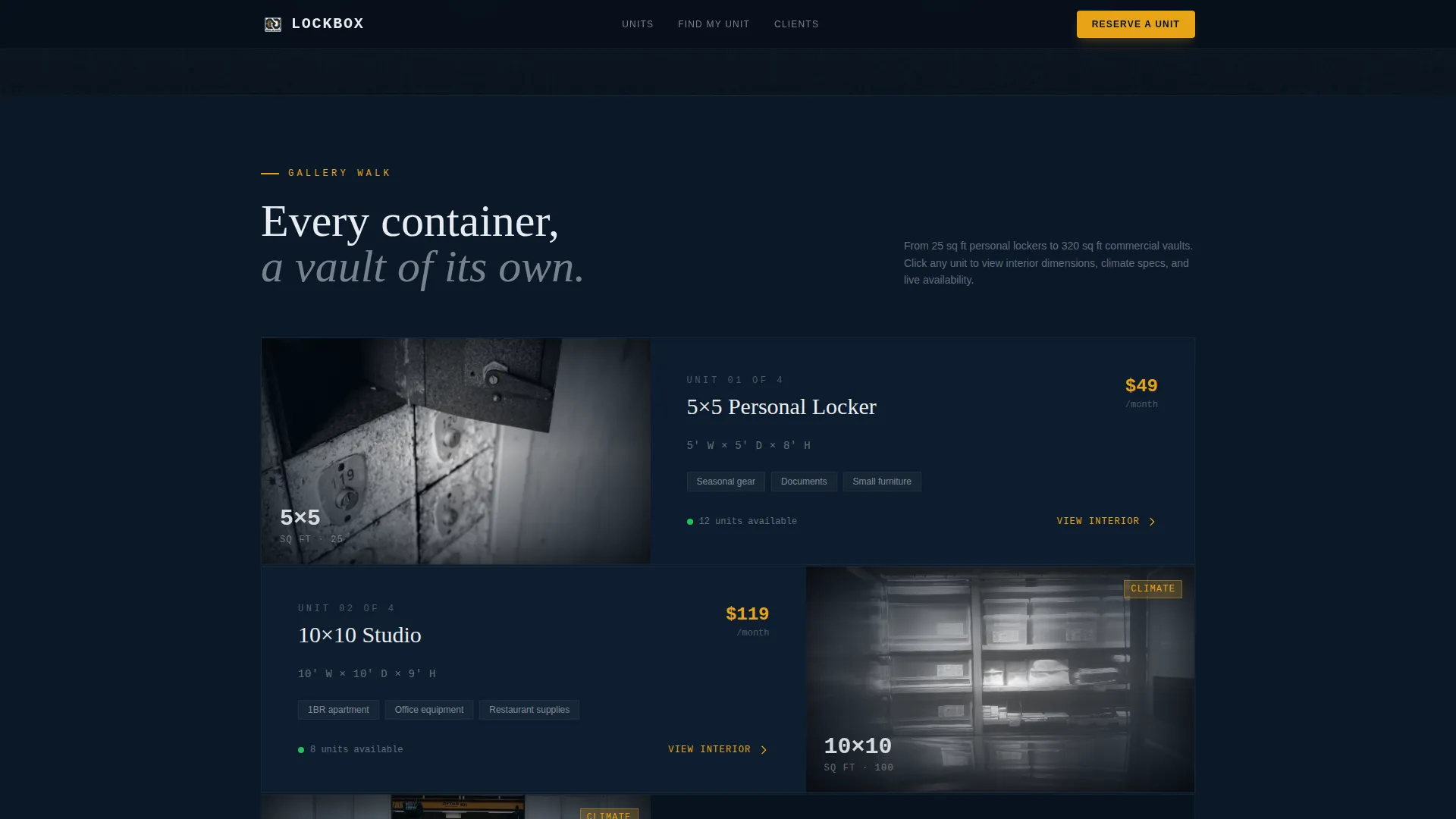
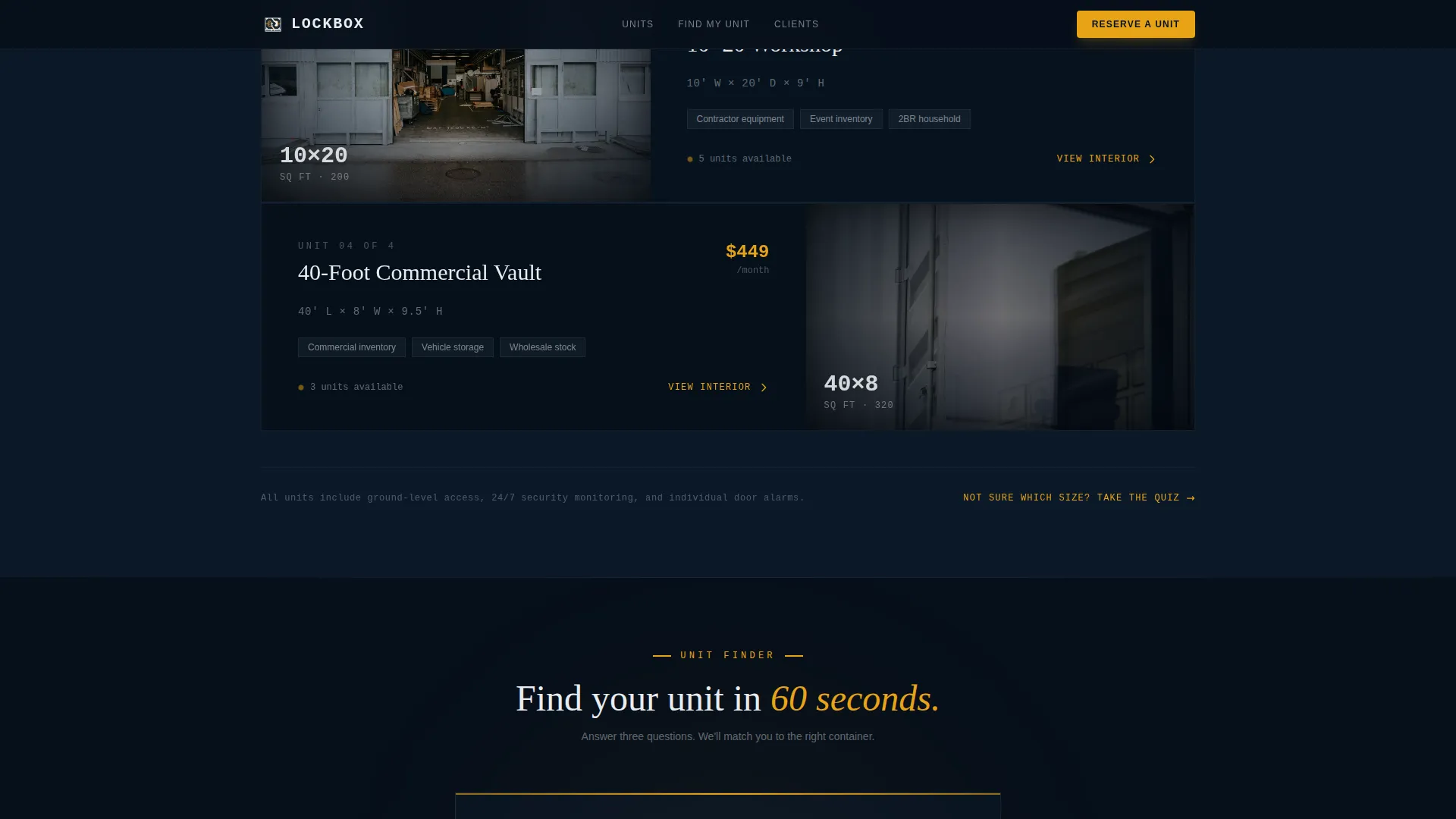
The gallery section presents each container type photographed from inside looking out, with the doorway acting as a natural frame. Clicking any unit expands into a detail panel showing interior dimensions, a 360-degree photo, climate specifications, and access hours. Units are arranged from smallest personal lockers up to massive 40-foot commercial containers, building a sense of escalating scale as the visitor scrolls.
Three-Step Interactive Quiz Funnel
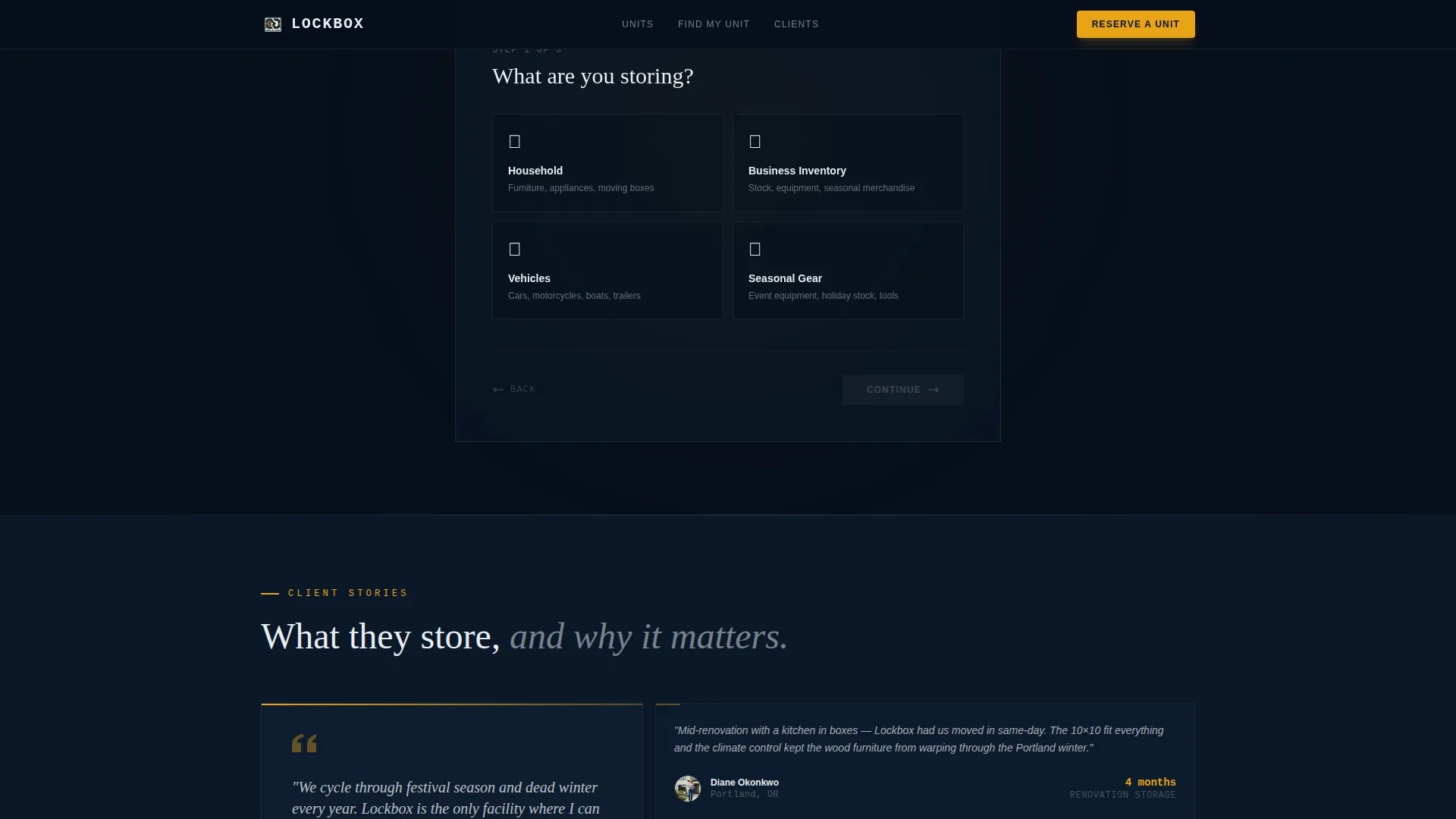
The primary call to action launches a guided assessment that takes roughly 60 seconds to complete. Step one asks what the visitor is storing, using illustrated icons for household goods, business inventory, vehicles, and seasonal gear. Step two uses a visual slider showing container sizes filled with recognizable objects. Step three asks for the storage duration needed. The result screen shows a recommended unit, live availability, monthly cost, and a reservation button.
Dual-Path Conversion Result Screen
The quiz result screen serves two visitor types at once. A decisive visitor can tap "Reserve This Unit" immediately. An exploratory visitor can choose "Not sure? Book a free walkthrough" instead. Both paths are captured within the same flow, reducing exit friction without requiring a separate page.
Social Proof with Industry-Specific Testimonials
The testimonials section features client quotes paired with names, roles, and specific outcomes. The copy is written for the actual customer types the facility serves: contractors, restaurateurs, homeowners, and event companies. This grounds the social proof in recognizable scenarios rather than generic praise.
Scroll-Driven Animation System
The template uses amber pulse effects on availability indicators, scroll reveal animations across sections, gallery expand transitions, and smooth multi-step quiz transitions. These animations reinforce the industrial aesthetic while keeping the page feel responsive and premium.
Page sections overview
| Section | Purpose |
|---|---|
| Stats Dashboard Hero | Show live facility metrics in oversized monospace numerals to establish operational credibility immediately |
| Doorway Gallery Walk | Present container types framed by their own doorways, expandable into full detail panels |
| Quiz Funnel | Guide visitors through a three-step assessment and deliver a personalized unit recommendation |
| Social Proof | Reinforce trust with testimonials from recognizable customer types and specific outcomes |
| Final Call to Action | Offer a reservation button and a free walkthrough booking path side by side |
| Linear Footer | Close the page with a clean single-row footer |
Design & branding system
The visual identity is built around a dark immersive industrial aesthetic. The palette evokes a storage yard lit by sodium overhead lights at dusk, with deep blues as the environment and amber as the signal color.
- Colors: deep hull blue (#0B1929) for full-bleed backgrounds, reinforced steel gray (#3A4553) for card surfaces and dividers, signal white (#E8ECF1) for body text, and hazard amber (#E8A317) exclusively for calls to action, interactive hotspots, and capacity indicators
- Typography: JetBrains Mono for stats and numerical displays, Fraunces for headings, and DM Sans for body copy
Mobile & speed optimization
The template is designed desktop-first to support facility browsing on larger screens, with full mobile parity built in. Interactive components are structured to maintain usability across device sizes.
- The gallery expand panels, quiz slider, and stats dashboard all adapt to smaller viewports without losing functionality
- Static sections use server components while the quiz funnel and gallery interactions are handled on the client side for smooth performance
How this template helps you convert
Every section in this template is oriented toward one of two conversion outcomes: a direct reservation or a walkthrough booking. The layout is designed so neither visitor type hits a dead end.
- The live stats dashboard creates immediate credibility, so visitors arrive at the gallery already trusting the facility rather than questioning it
- The quiz funnel removes the most common barrier to conversion, which is not knowing what size unit to choose, and delivers a personalized recommendation with live pricing and availability
- The dual-path result screen captures both committed and undecided visitors in a single flow, presenting "Reserve This Unit" and "Book a free walkthrough" side by side so no lead is left unconverted
Other information about this template
Lockbox is categorized under Real Estate and Property, specifically within the self-storage and mini-storage niche, with a focus on container storage units. It is built for businesses operating in the USA market, using USD pricing, 12-hour time format, and imperial measurements throughout. The template style is Gallery and Detail, the theme is Dark Immersive, and the creative direction follows a Gallery Walk pattern. The header concept is Stats and Metrics, and the landing page conversion direction is Quiz and Assessment. The intersection match score for this niche combination is 13, indicating strong alignment between the template structure and the container storage use case.
- Localization: USD pricing, 12-hour time format, imperial measurements (square feet, cubic feet)
- Animation level: high, including amber pulse, scroll reveals, gallery expand, and quiz step transitions
- Interactivity level: high, with expandable gallery panels, a multi-step quiz, and a visual size-comparison slider
Theme
Dark Immersive
Creative direction
Gallery Walk
Color system
Midnight Blue
Style
Gallery + Detail
Direction
Quiz/Assessment
Page Sections
Live Facility Stats Dashboard
Doorway-framed Gallery with Detail Panels
Three-step Interactive Quiz Funnel
Dual-path Conversion Result Screen
Scroll-driven Animation System
Related questions
Who is this landing page template designed for?
Can I use this template without a tech background?
How does the quiz funnel work for visitors?
Does the gallery support different container sizes?
What makes the stats dashboard useful on a storage landing page?



