Pilot Professional Resume Landing Page Template
Logbook is a dark, immersive landing page template built for a pilot professional resume service. It pairs a floating-photo parallax header with a masonry scroll layout, a waitlist signup form with live counter, and a lead-magnet secondary call to action. Every detail serves pilots who need their career story told with precision and confidence.
by Rocket studio
Quick summary
Logbook is a single-page, waitlist-focused landing page template for a pilot professional resume service. It uses a dark glass-cockpit visual identity, a masonry scroll layout, and two conversion touchpoints: a primary waitlist form and a secondary lead-magnet download. The template is built to feel authoritative from the first scroll.
Who this template is for
This template is built for founders and creators launching a premium resume service aimed squarely at the aviation community. If your offer helps pilots package their credentials and compete for seat upgrades, this page communicates that offer at the right altitude.
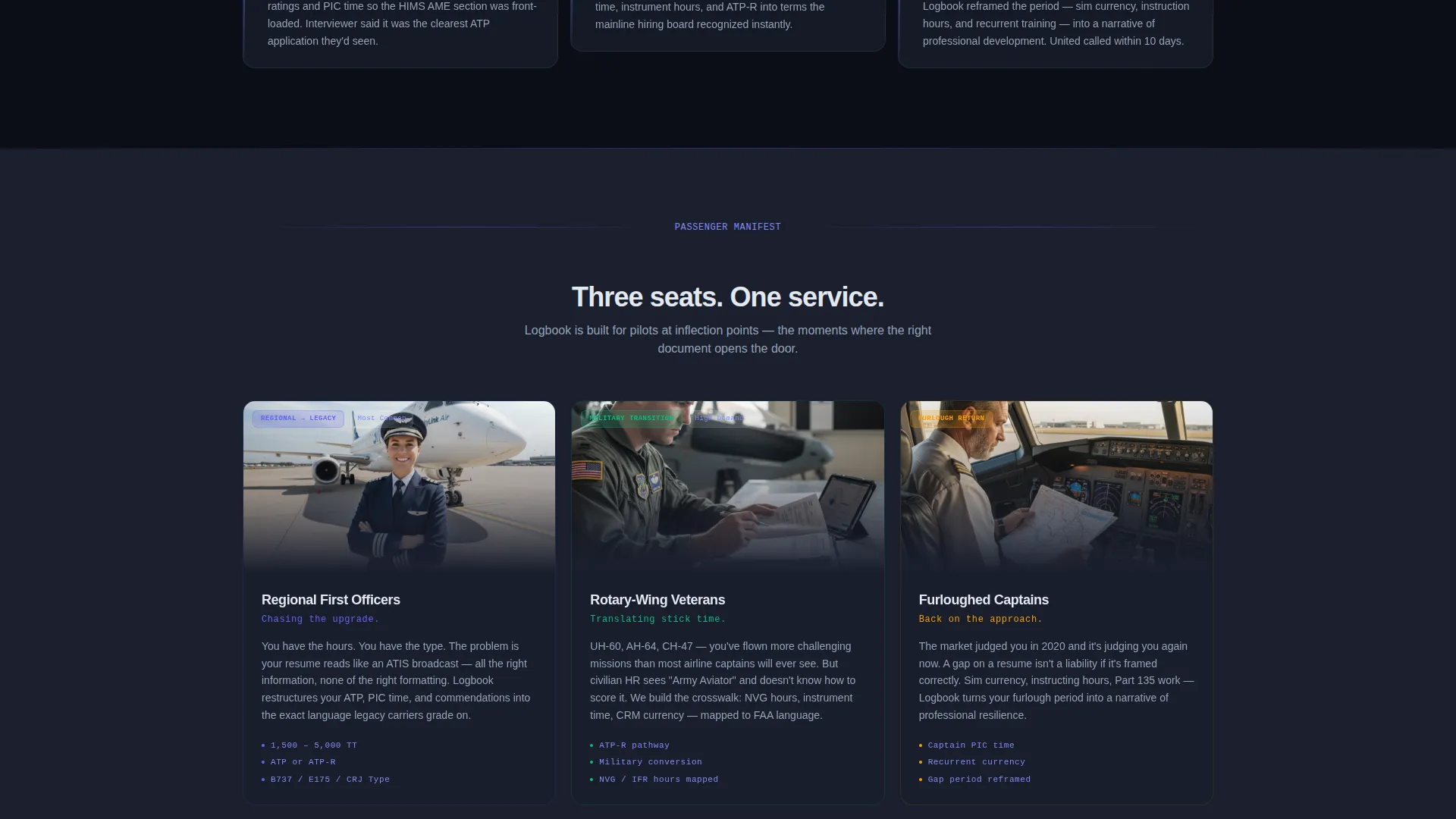
- Regional first officers pursuing legacy carrier upgrades
- Military rotary-wing pilots translating flight experience into civilian credentials
- Furloughed captains re-entering a hiring market that judges a resume in seconds
What problem this template solves
Pilots carry impressive careers, but a generic resume fails to translate type ratings, flight hours, route networks, and commendations into language that gets attention. This template gives a resume service a page that matches the precision its clients expect.
- Visitors arrive skeptical; the design and copy must earn trust instantly
- A coming-soon page without scarcity signals loses sign-ups before they happen
- Two different buyer types need two different conversion paths on the same page
What you get with this template
You get a fully designed, single-page layout ready to represent a high-stakes professional resume service. The structure balances immersive visual storytelling with practical conversion mechanics.
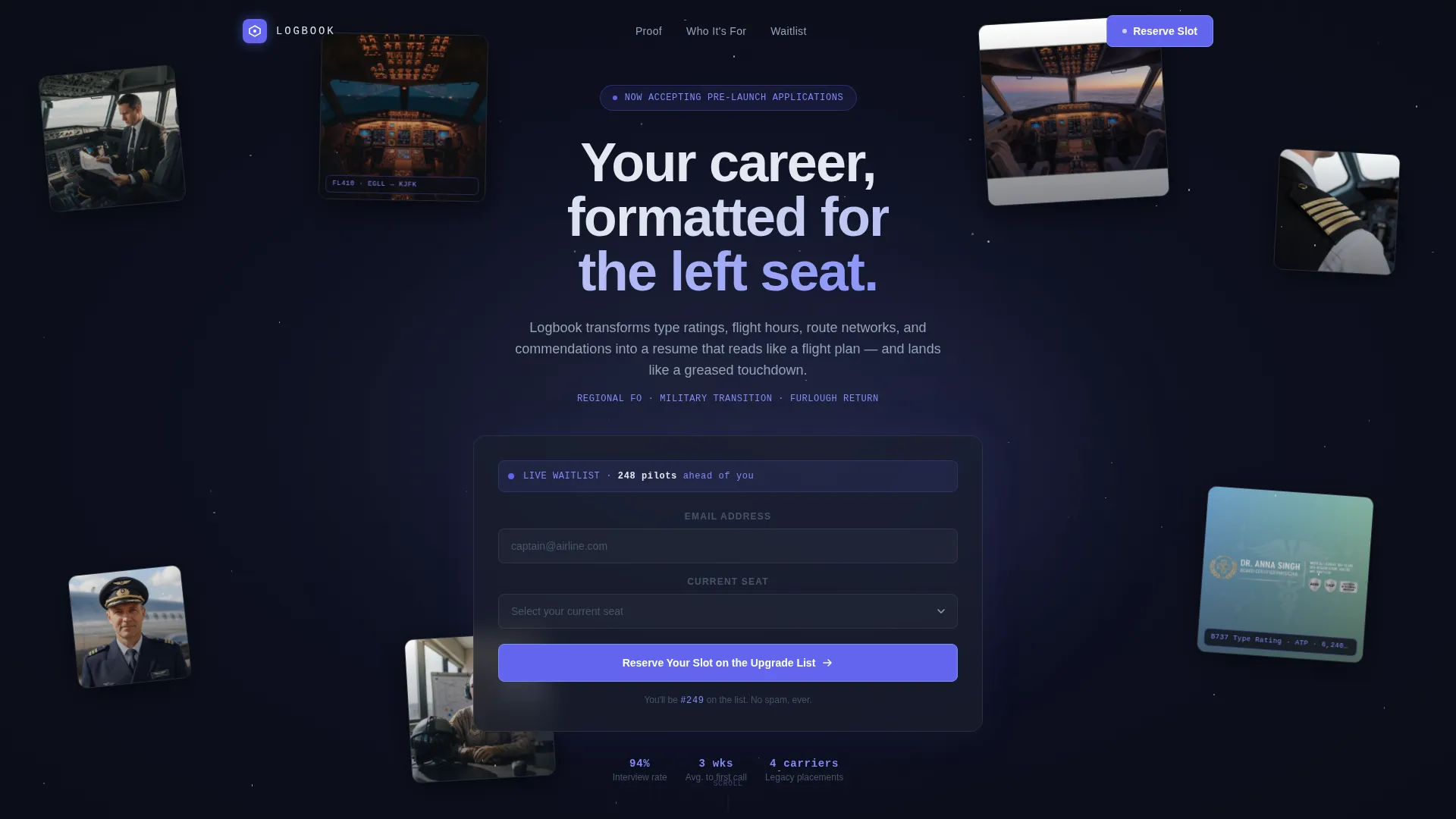
- A parallax floating-photo header with pilot headshots, cockpit perspectives, and resume fragments drifting in subtle parallax layers
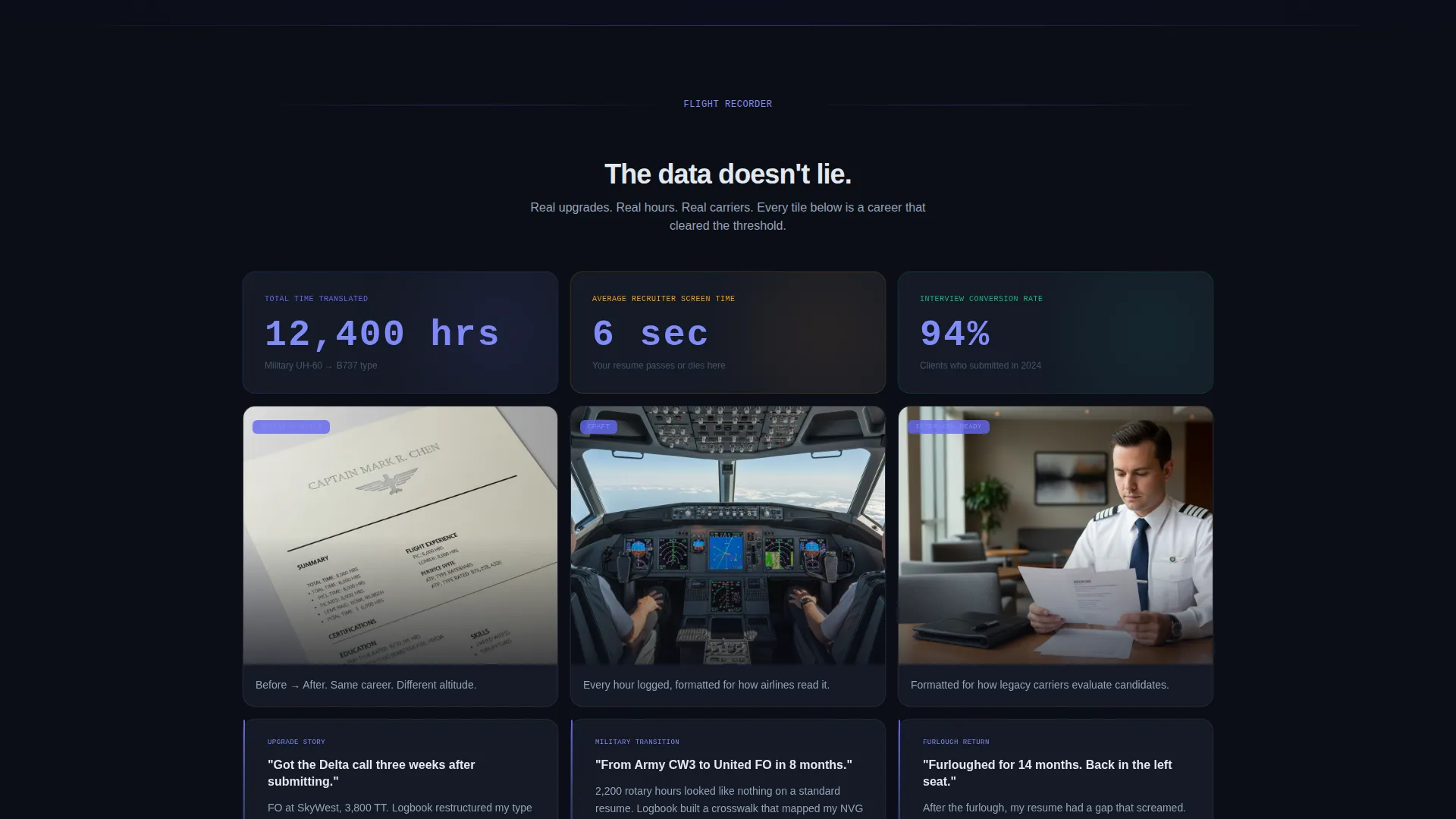
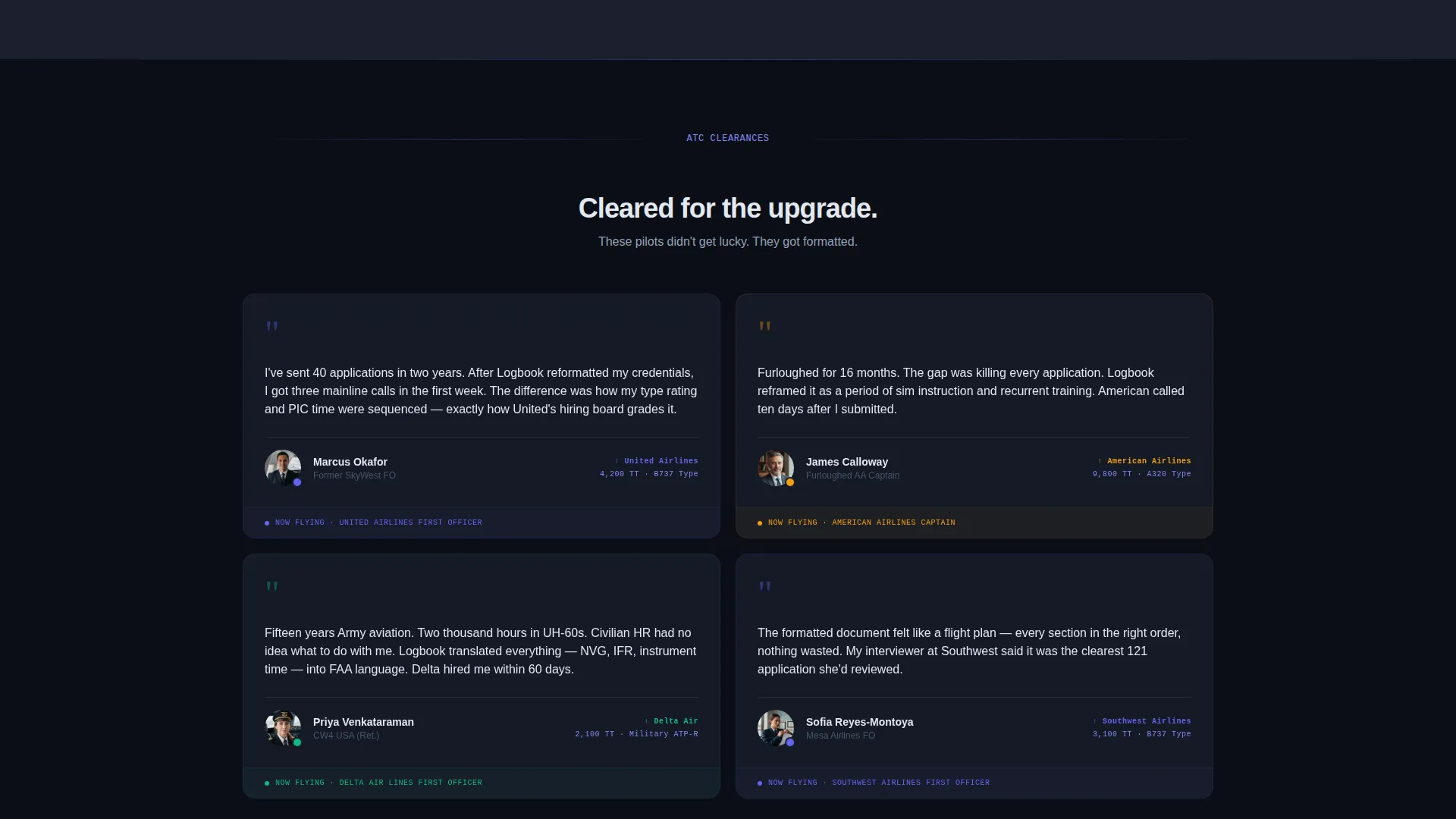
- A masonry scroll body where resume before-and-after snapshots, client testimonials, and animated statistics compound as visitors scroll
- A primary waitlist form with email field, seat-role dropdown, and live position counter, plus a secondary lead-magnet call to action below the fold
Feature list
The template delivers several tightly scoped components, each grounded in the source brief.
Floating Parallax Header
Pilot headshots, cockpit point-of-view shots, uniform details, and formatted resume fragments drift in parallax layers against a void-black background. Tiles rotate subtly as if in gentle turbulence. One center image slowly resolves from silhouette into a sharp portrait, giving the header a cinematic opening beat.
Masonry Scroll Layout
The page body uses a masonry grid where tiles vary in size and density. Content materializes from darkness as the visitor scrolls, moving from sparse proof at the top to a dense, compelling accumulation below. The rhythm mirrors a controlled descent through cloud layers.
Animated Statistics Tiles
Select masonry tiles display climbing animated numbers, such as total flight hours counting upward like an altimeter. These live counters add kinetic energy to the social proof section without requiring external data sources.
Waitlist Signup Form
The primary call to action captures an email address alongside a dropdown menu where visitors select their current role: Student, Certified Flight Instructor, Regional First Officer, Narrow-body Captain, or Military Transitioning. A live counter displays the visitor's projected waitlist position to create genuine, honest scarcity.
Lead Magnet Secondary Call to Action
Below the fold, a second conversion block offers a downloadable pre-interview resume checklist as a PDF lead magnet. This captures email addresses from visitors who are interested but not yet ready to join the waitlist, widening the top of the funnel without weakening the primary offer.
Dark Immersive Visual Identity
The entire template is styled around a glass-cockpit aesthetic: deep cockpit black backgrounds, instrument-panel charcoal section dividers, electric indigo accents on hover states and lines, and contrail white typography. Every visual element serves a functional purpose in the layout.
Page sections overview
| Section | Purpose |
|---|---|
| Floating Photo Header | Opens with orbital parallax pilot imagery |
| Hero Waitlist Form | Captures email and current seat role |
| Live Position Counter | Displays honest scarcity with numbered slot |
| Masonry Proof Grid | Builds trust through career snapshots |
| Animated Stats Tiles | Shows climbing flight-hour counters |
| Client Testimonial Tiles | Delivers pilot upgrade social proof |
| Before and After Snapshots | Visualizes resume transformation results |
| Lead Magnet Block | Offers checklist PDF for softer conversion |
| Secondary Email Capture | Collects contacts not yet ready to commit |
Design & branding system
The visual language is drawn from the glass cockpit at cruise altitude: every color and glow has a job to do. Nothing is decorative.
- Deep cockpit black (#0B0E17) as the base background, instrument-panel charcoal (#1A1F2E) for section dividers, electric indigo (#6366F1) pulsing across hover states and accent lines, and contrail white (#E2E8F0) for all body and heading typography
- Tile motion effects include slight rotations, motion blur on some images, and a slow silhouette-to-portrait resolve on the hero center tile
- The scroll pacing accelerates from sparse at the top to dense and proof-heavy lower on the page, matching the psychological momentum of a buyer moving toward commitment
Mobile & speed optimization
The masonry layout and parallax header are structured to adapt gracefully to smaller viewports without losing the immersive quality that defines the template's identity.
- Floating photo tiles restack into a readable column flow on mobile screens
- Parallax depth effects are designed to scale back on touch devices where excessive motion reduces clarity
- The waitlist form and lead-magnet block remain prominent and accessible at every viewport width
How this template helps you convert
The page is built around two distinct conversion moments, both grounded in genuine value rather than pressure tactics.
- The primary waitlist form pairs a role-specific dropdown with a live position counter, so every visitor sees a real, numbered slot. This makes the scarcity concrete and honest, which raises the perceived cost of leaving without signing up.
- The secondary lead-magnet block extends your reach to visitors who are curious but cautious. By offering a downloadable pre-interview resume checklist, you capture their email address and stay in their inbox while they make up their mind.
Other information about this template
This template is part of a broader personal resume and pilot profile category, designed specifically for the aviation niche where professional presentation carries career-defining weight.
- The template style is Masonry and Pinterest-inspired, making it visually distinctive compared to standard resume service pages
- The Dark Immersive theme and Electric Indigo color system position the service as premium and precise, not generic
- The Waitlist and Coming Soon landing page direction means the template is optimized for pre-launch momentum rather than a live transactional checkout flow
- The Floating Photos header concept is the centerpiece differentiator that separates this page from flat, text-heavy resume service competitors
Theme
Dark Immersive
Creative direction
Immersive Visual
Color system
Electric Indigo
Style
Masonry/Pinterest
Direction
Waitlist/Coming Soon
Page Sections
Floating Parallax Photo Header
Masonry Scroll Layout
Animated Statistics Tiles
Waitlist Form with Role Dropdown
Lead Magnet Secondary Block
Dark Glass-cockpit Visual System
Related questions
Can I change the dropdown options in the waitlist form?
Does the live waitlist counter update automatically?
Can this template work for a service that is already live, not just coming soon?
How does the lead magnet section work?
Can the masonry grid display real client resume samples or photos?



