Textile Artist Portfolio Landing Page Template
Loom is a horizontal scroll landing page built for textile artists who work at studio scale. It guides visitors through a curated sequence of project panels, from raw fiber to finished installation, and closes with a commission form. The Atelier Studio aesthetic uses a warm, natural palette that feels as considered as the craft it represents.
by Rocket studio
Quick summary
Loom is a single-page, horizontal scroll portfolio template built for fiber artists who create wall-scale tapestries and sculptural textile works. It walks visitors through your process, from raw material to installed piece, then invites them to commission work or download a lookbook. The design feels handmade before it feels digital.
Who this template is for
This template is built for working textile artists who take on serious commissions and need a page that earns client trust before a conversation starts.
- Solo fiber artists and studio weavers creating large-format, hand-dyed, or hand-woven works for placement
- Interior designers and architects browsing for statement pieces will recognize the professional presentation immediately
- Gallery curators and hospitality buyers evaluating bespoke acoustic textile panels or exhibition fiber art
What problem this template solves
Most portfolio formats are built around grids and thumbnails. That format flattens handmade work into small squares and strips out all sense of scale, material, and labor. Textile art needs room to breathe and a structure that communicates how long something takes to make.
- Visitors leave generic portfolios without understanding the weight or dimensions of a piece
- There is no clear path from appreciation to inquiry, so interested buyers drop off before contacting you
- The craft story goes untold, leaving a bespoke commission looking indistinguishable from mass-produced decor
What you get with this template
You get a fully structured, horizontal scroll landing page designed around the rhythm of a weaving studio. Every section has a defined purpose, and the layout moves the visitor forward at a pace that matches the craft.
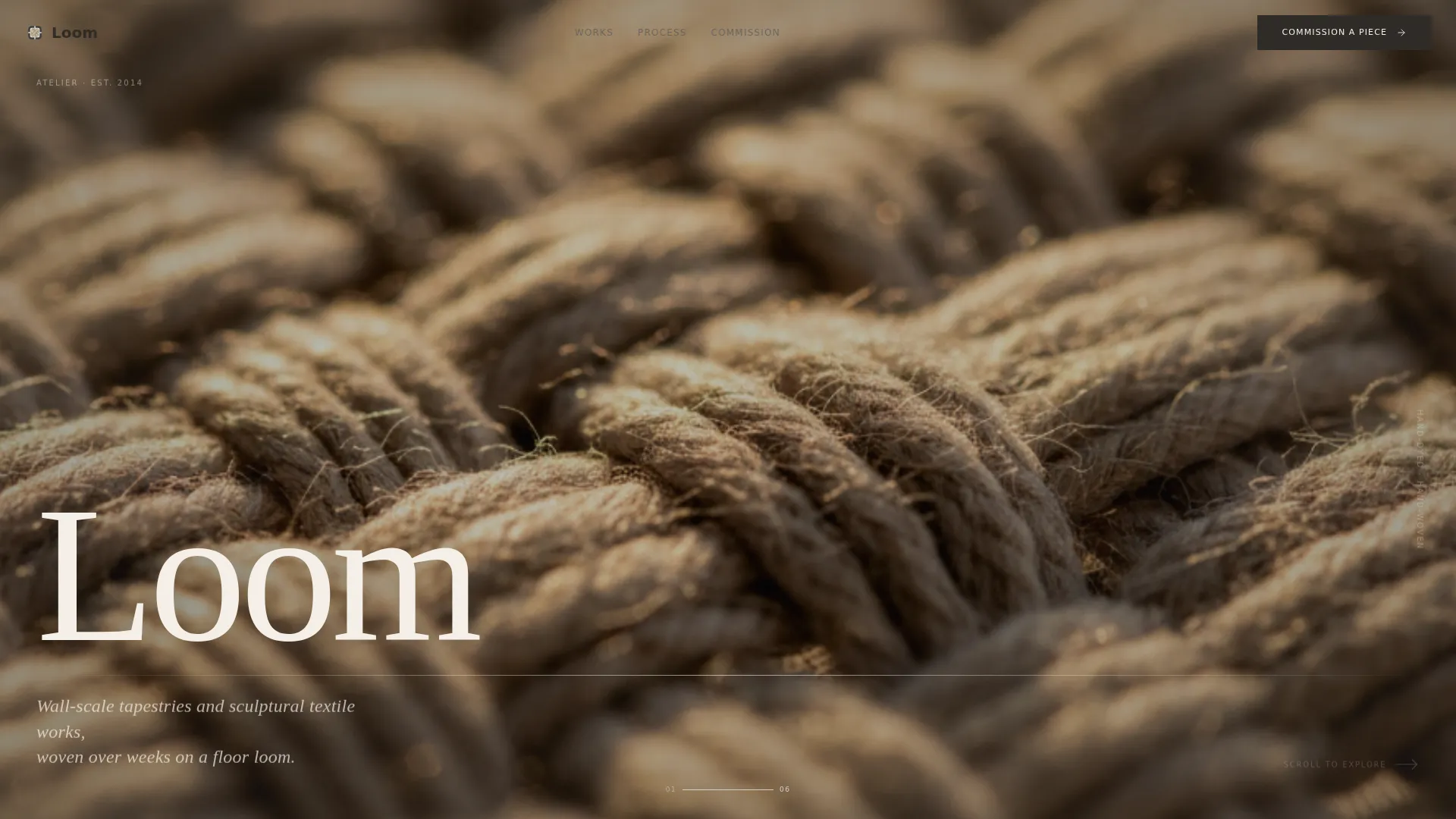
- A Type Over Image header with a close-up woven texture photograph and a high-contrast serif title
- A horizontal scroll sequence of project panels that move from raw fiber imagery to installed work, with breathing panels between pieces
- A lead generation closing panel with a commission form and a secondary lookbook download path
Feature list
A single paragraph introduces what makes this feature set coherent: every element below serves the same goal of letting the craft communicate before the form appears.
Type Over Image Header
The artist's name is set in a generous serif directly over a macro-shot photograph of woven texture. Warm sidelight and shallow depth of field make individual warp threads visible. A thin horizontal rule beneath the type draws the eye toward the first scroll cue.
Horizontal Scroll Project Panels
Each project occupies its own full panel and opens with raw material, a close-up of hand-dyed fiber or a skein of yarn, before panning rightward to the finished work photographed in situ. The scroll motion feels physical, and parallax layers shift at different speeds so foreground texture moves independently from background architecture.
Breathing Panels Between Projects
Between each project sequence, a minimal panel shows only a detail swatch and a single sentence covering material, dimensions, and production duration. These panels give the eye a pause and communicate scale without interrupting the visual flow.
Commission Form with Project Qualifier
The closing panel holds a short form asking for project type (residential, hospitality, or gallery), approximate dimensions, and a preferred contact method. The call to action reads "Commission a Piece" and appears only after the visitor has moved through the full studio walk-through.
Studio Lookbook Download Path
A secondary conversion option, "Download the Studio Lookbook," captures an email address from visitors who are interested but not yet ready to commit to a commission. This gives you a second audience to follow up with at your own pace.
Atelier Studio Color and Type System
The Cloud Canvas palette runs from unbleached muslin (#F5F0E8) through shadow fold gray (#B8B0A4), with kiln-fired clay (#A0785A) warming hover states and accent lines. Charcoal selvedge (#2E2A26) anchors all type. The result is a visual identity that feels like a weaving studio at midmorning rather than a generic creative portfolio.
Page sections overview
| Section | Purpose |
|---|---|
| Type Over Image Header | Establishes artist identity with macro woven texture and serif title |
| First Project Panel | Opens with raw fiber close-up before revealing installed work |
| Breathing Panel | Provides scale context with a material swatch and one-line detail |
| Second Project Panel | Continues the studio walk-through with a second commission piece |
| Breathing Panel | Repeats the pause-and-inform pattern between projects |
| Third Project Panel | Deepens the labor narrative through a third installed work |
| Fourth Project Panel | Builds accumulative appreciation of craft before the call to action |
| Fifth Project Panel | Completes the studio journey and leads directly into the closing section |
| Commission Form Panel | Captures project inquiries with a short qualifier form |
| Lookbook Download Path | Collects emails from visitors not ready to commission yet |
Design & branding system
The visual identity follows an Atelier Studio theme that references the physical environment of a weaving practice. Every color and typographic decision reflects something found in the studio itself, wooden bobbins, undyed cotton, terracotta, hand-printed labels.
- The Cloud Canvas color system uses four values: unbleached muslin (#F5F0E8) and shadow fold gray (#B8B0A4) for backgrounds, kiln-fired clay (#A0785A) for hover states and accent lines, and charcoal selvedge (#2E2A26) for all type and interface elements
- Typography is led by a generous high-contrast serif for display use, grounding the page in the quiet authority of hand-printed studio labels
- The Immersive Visual creative direction uses parallax layering so foreground fiber detail moves at a different rate than background architecture, reinforcing the tactile quality of the work
Mobile & speed optimization
The horizontal scroll layout is designed for intentional viewing, and the template accounts for how visitors interact with that format across devices. The scroll behavior and image treatment are structured to maintain the experience even on smaller viewports.
- Parallax layering and macro photography are handled through the template's built-in layout so the visual depth reads clearly without requiring custom development
- The minimal text load per panel keeps each section light and fast to render, even when the photography is dense and full-bleed
- The commission form and lookbook download path are placed in a single closing panel, reducing interaction steps for mobile users reaching the end of the scroll
How this template helps you convert
The horizontal journey is the conversion strategy. By the time the form appears, the visitor has already moved through five project panels and several breathing pauses. They arrive at the form informed, not cold.
- The studio walk-through format builds trust incrementally, each panel adds to the visitor's understanding of your process, labor, and material choices, so the commission request feels natural rather than premature.
- The project qualifier form (residential, hospitality, or gallery) pre-qualifies inquiries, meaning the leads you receive are already matched to the type of work you do.
- The lookbook download gives a second conversion path for visitors who need more time, capturing their contact details without requiring an immediate commitment.
Other information about this template
This template was built for the intersection of fine craft and professional client acquisition. A few additional details worth knowing before you start customizing.
- The template is a one-page portfolio, meaning all content lives within a single horizontal scroll experience rather than across multiple linked pages
- It is designed specifically for the Textile Artist Portfolio subcategory within the broader Portfolio and Agency template category
- Photography is central to the template's impact; the brief calls for macro-distance images with warm sidelight, so the template is best used with high-quality studio or in-situ photography
- The "Commission a Piece" call to action and the "Download the Studio Lookbook" path are the two defined conversion points, no other contact or navigation flows are part of the built structure
- This template suits practices working with interior designers on residential commissions, architects specifying bespoke acoustic textile panels, and gallery curators building fiber art exhibitions



Theme
Atelier Studio
Creative direction
Immersive Visual
Color system
Cloud Canvas
Style
Horizontal Scroll
Direction
Lead Generation
Page Sections
Type Over Image Header
Horizontal Scroll Project Panels
Breathing Panels Between Projects
Commission Form with Project Qualifier
Studio Lookbook Download Path
Cloud Canvas Color and Type System
Related questions
What kind of artist is this template built for?
Do I need a lot of copy to fill this template?
What photography style works best with this layout?
Can I use this template if I only have a few finished projects?
What are the two conversion points in this template?



