Industrial Textile OEM Supplier Landing Page Template
Loom is a dashboard-style landing page template built for industrial textile OEM suppliers. It uses a raw, data-forward layout to position your mill against competitors through sortable spec tables, widget-style evidence cards, and two targeted conversion paths. The design speaks directly to sourcing managers, technical buyers, and private-label brands evaluating suppliers on hard numbers.
by Rocket studio
Quick summary
Loom is a single-page template designed for textile manufacturers that sell on specifications, not marketing language. It leads with an ultra-wide production floor photograph, flows through sortable capability tables and comparison grids, and closes with two conversion paths built for buyers who are already mid-evaluation. Every section earns attention with data, not decoration.
Who this template is for
This template is built for textile OEM suppliers that need to speak to technically informed buyers. It works equally well for large-scale woven fabric producers, technical textile manufacturers, and private-label mills handling high-volume orders.
- Sourcing managers at mid-market apparel brands comparing supplier specifications
- Technical textile buyers specifying requirements such as GSM range, dye method, and weave type for applications like automotive upholstery
- Private-label startups needing minimum order quantities with certification documentation ready to review
What problem this template solves
Most textile supplier websites bury their strongest proof points in PDF brochures or buried product pages. Buyers comparing mills across multiple tabs need structured, scannable data fast.
- The template replaces brochure-style copy with sortable data tables and dashboard-style evidence widgets
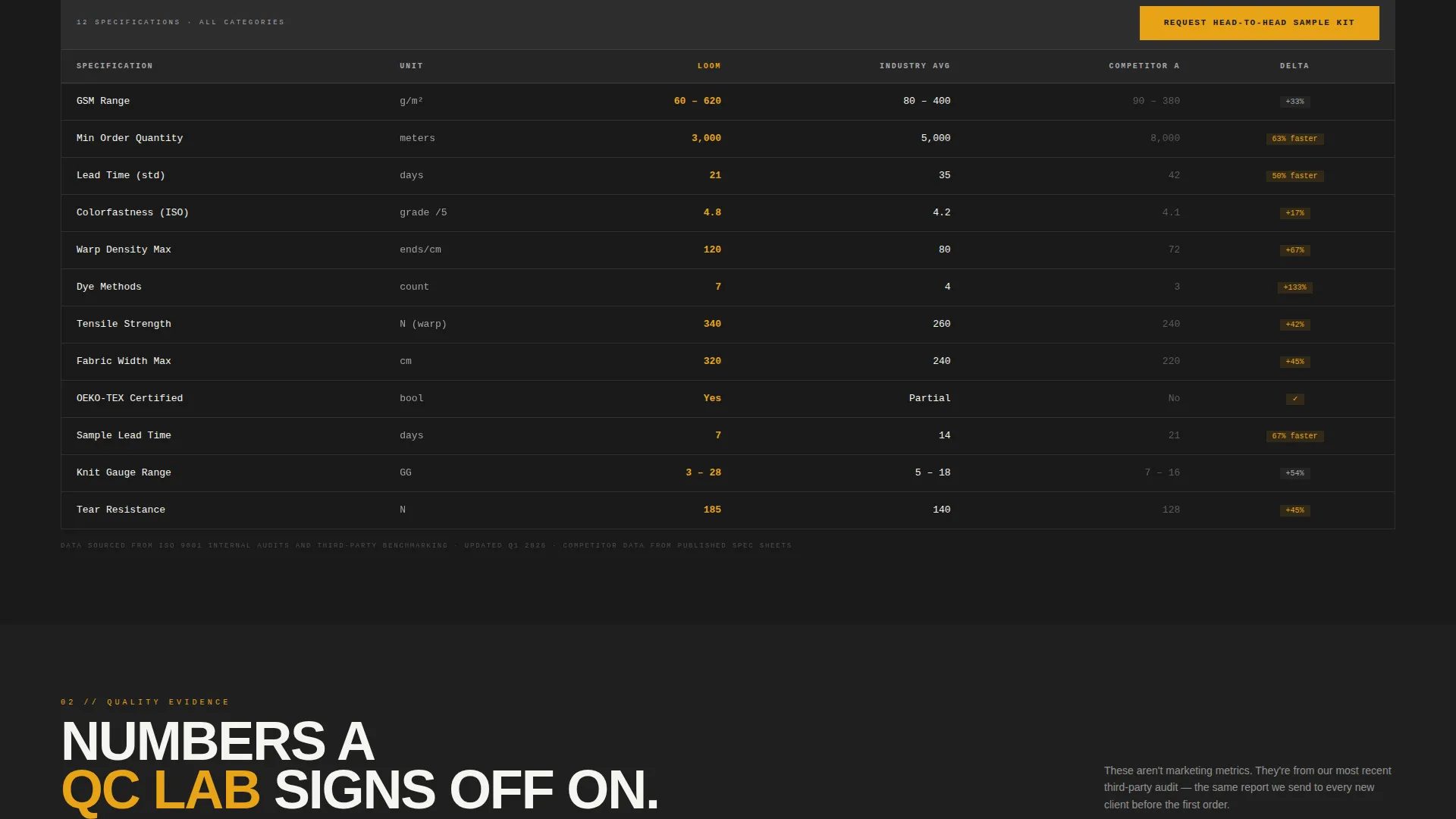
- It removes friction from the comparison stage by placing your specs directly alongside a grayed-out competitor column
- It gives buyers two entry points, a sample kit request and a downloadable capability matrix, so no qualified lead leaves empty-handed
What you get with this template
You get a complete, single-page layout that functions like a procurement tool as much as a marketing page. Every visual decision supports one goal: making a technically informed buyer confident enough to act.
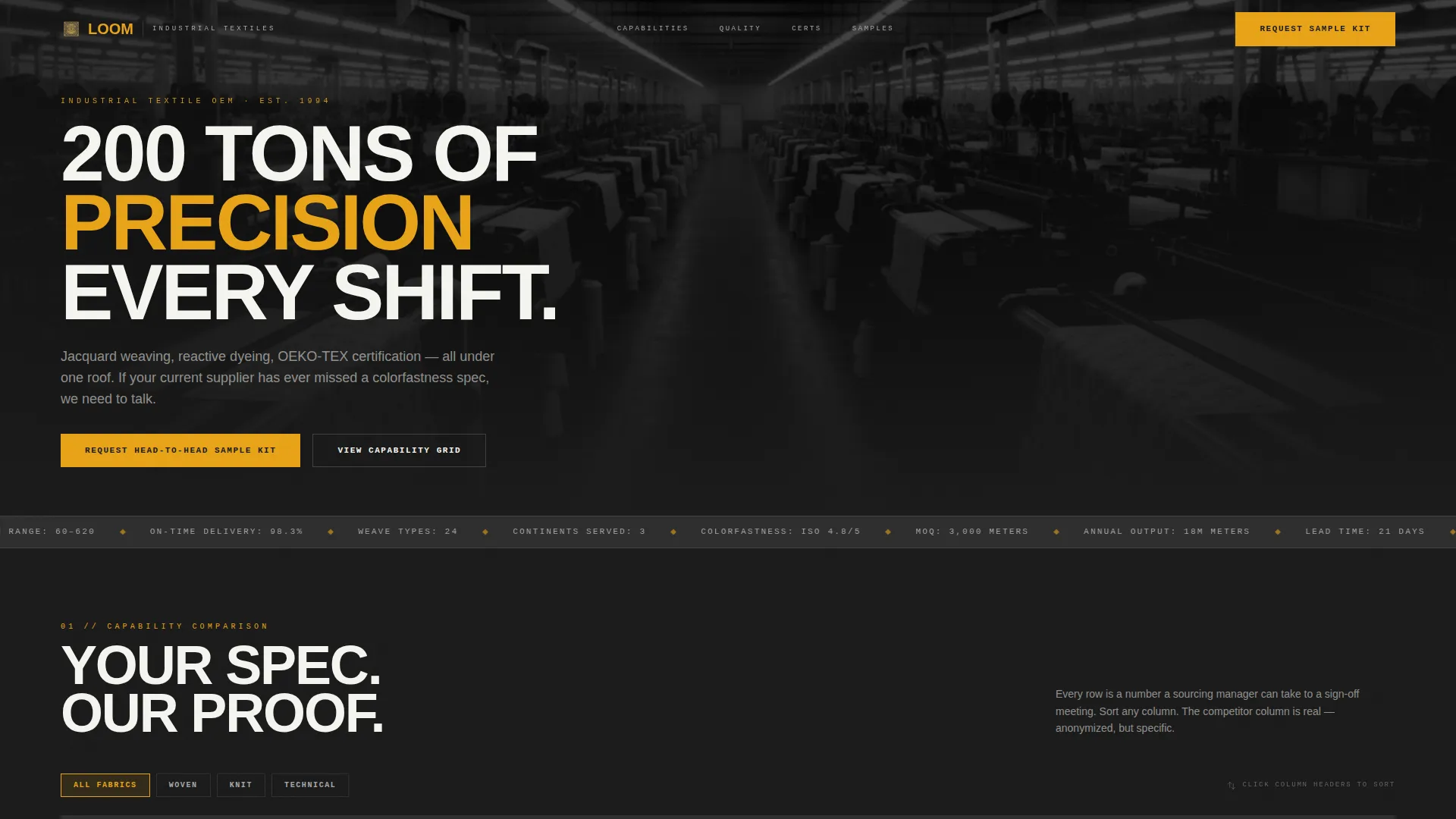
- A panoramic 21:9 production floor header with a scrolling data ticker showing annual output, lead time, and certification count
- A live-style capability comparison grid and a competitor versus column, plus a full set of dashboard widgets displaying test scores, delivery data, and tensile-strength charts
- Two conversion components: a detailed sample kit request form and an email-gated downloadable PDF capability matrix
Feature list
This section describes the functional components built into the Loom template.
Panoramic Production Floor Header
The header uses a 21:9 ultra-wide photograph taken from the catwalk above the production floor. Rows of looms recede toward a vanishing point under repeating fluorescent light. A thin data ticker scrolls across the bottom edge, displaying key stats such as annual output of 18 million meters, a 21-day lead time, and seven active certifications.
Sortable Capability Data Grid
The first major content section presents your mill's capabilities in a live data-table format. Buyers can sort and filter rows covering GSM range, dye methods, weave types, and minimum order quantity flexibility. This format matches how procurement professionals actually evaluate suppliers, not how suppliers usually present themselves.
Competitor Comparison Column
Directly inside the capability grid, a second column shows an anonymized competitor benchmark. The competitor data is grayed out but specific enough to make the contrast meaningful. This gives buyers the side-by-side view they would otherwise build themselves in a spreadsheet.
Dashboard Evidence Widgets
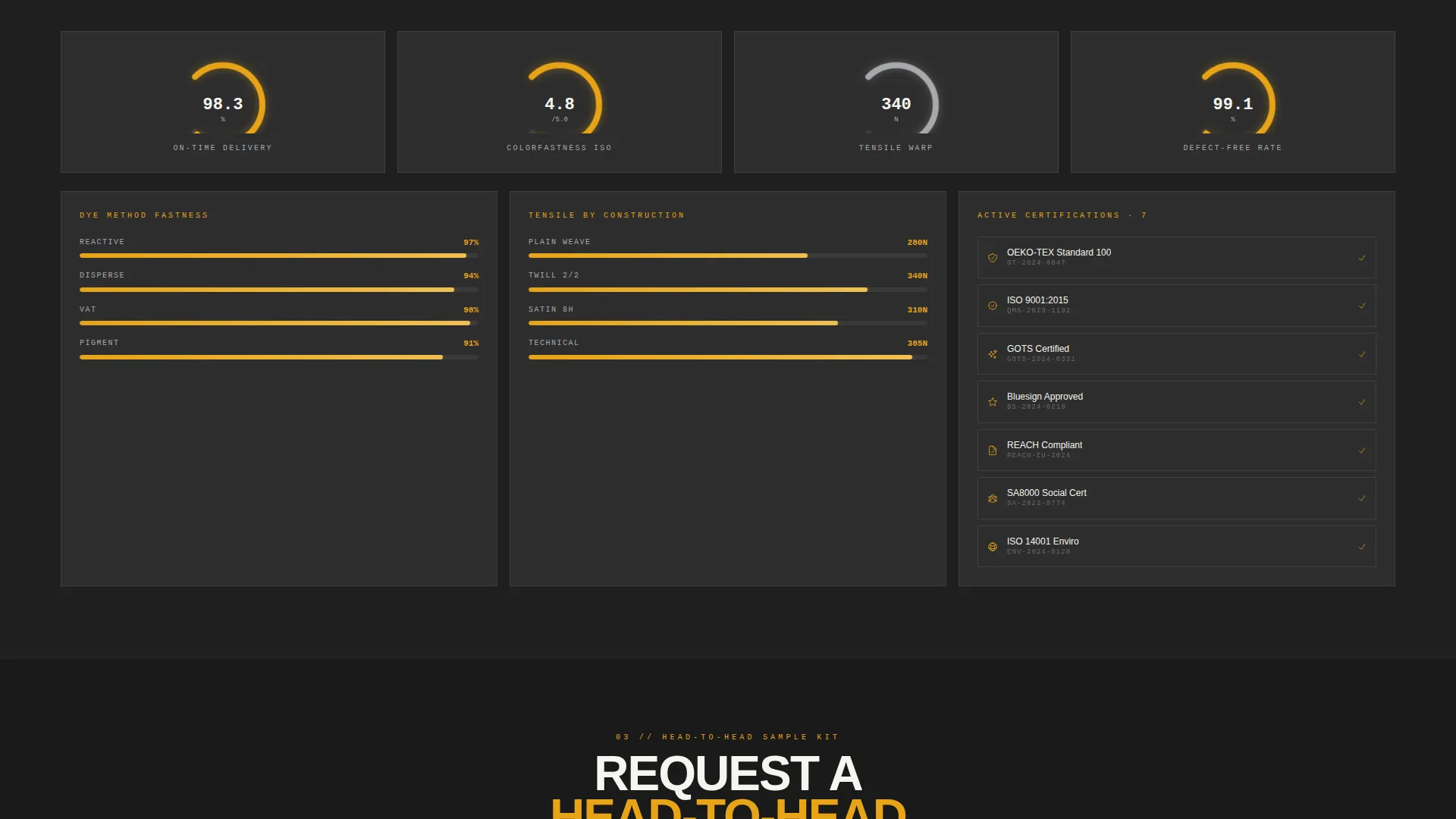
Evidence sections are rendered as widget cards rather than paragraph copy. Each card displays one data point: a colorfastness score, a tensile-strength chart, an on-time delivery percentage, or a test certificate reference. The layout escalates in technical depth as the buyer scrolls deeper.
Dual Conversion Path System
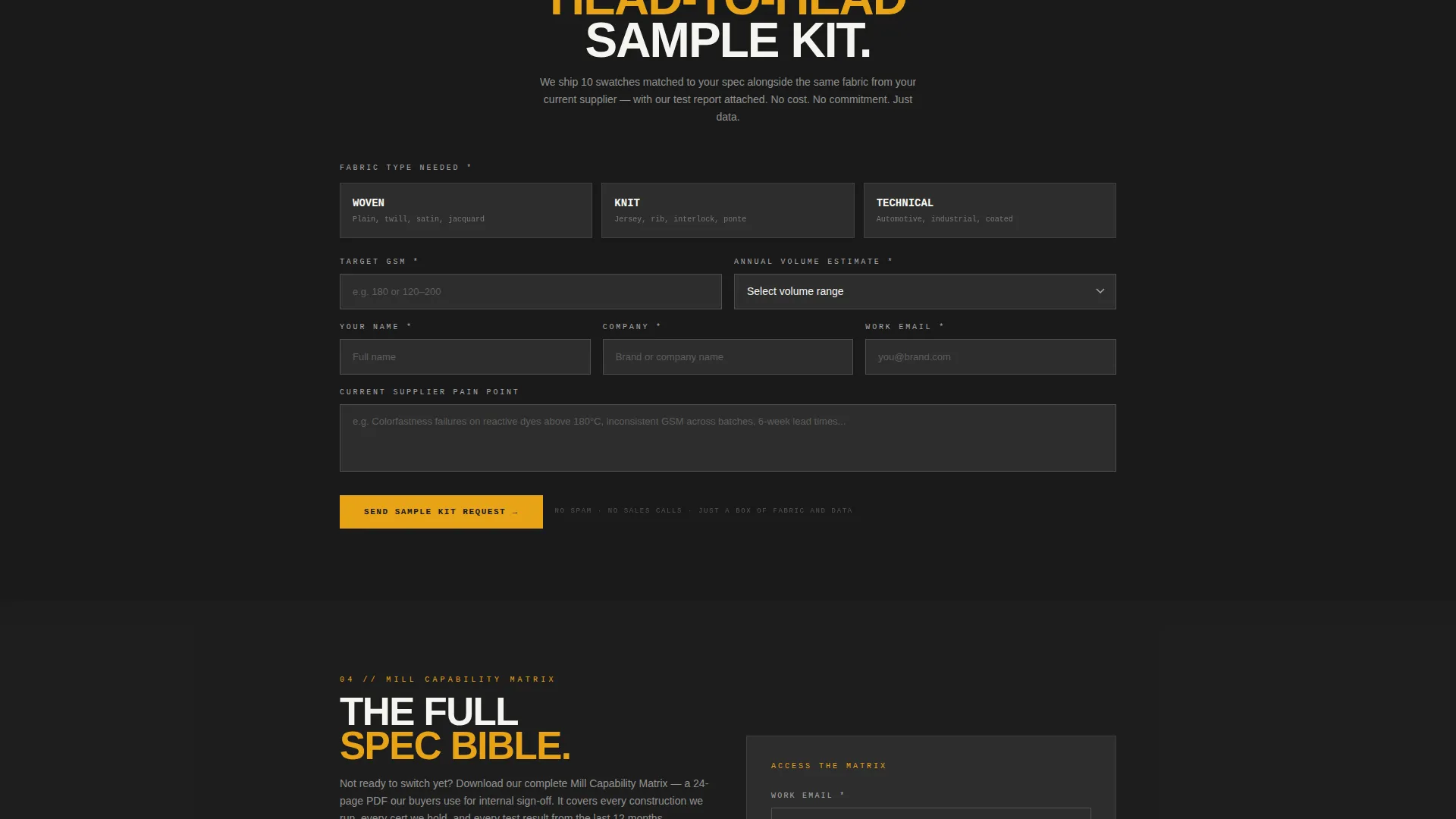
Two distinct calls to action serve buyers at different stages. The primary call to action, "Request a Head-to-Head Sample Kit," appears pinned in the data grid header and again at the page bottom. A secondary path offers a downloadable PDF capability matrix gated behind email address and company name only.
Sample Kit Request Form
The primary form collects four inputs: fabric type needed (woven, knit, or technical), target GSM, annual volume estimate, and a free-text field labeled "Current Supplier Pain Point." This structure gives your sales team qualified context before the first conversation.
Page sections overview
| Section | Purpose |
|---|---|
| Production Floor Header | Establishes scale with a 21:9 panoramic photograph and scrolling data ticker |
| Live Capability Grid | Lets buyers sort and filter your specs by GSM, dye method, weave type, and MOQ |
| Competitor Versus Column | Positions your specs against an anonymized benchmark to accelerate decisions |
| Dashboard Evidence Cards | Displays test certificates, colorfastness scores, and delivery data as widget cards |
| Sample Kit call to action (pinned) | Captures high-intent buyers directly from the data grid header |
| Tensile and Test Charts | Renders strength and quality data visually without relying on prose claims |
| Page Bottom call to action | Repeats the primary call to action after the full spec comparison is complete |
| Capability Matrix Gate | Offers PDF download in exchange for email and company name |
Design & branding system
The template uses an Industrial Raw theme built on a Carbon Fiber color system. Every color decision references the physical environment of a working mill, not a polished showroom.
- Core palette: deep mill black (#1A1A1A) as the base, machine-oil charcoal (#2D2D2D) for card and grid backgrounds, and shuttle silver (#A8A9AD) for secondary text and inactive states
- Saffron (#E8A317) is reserved exclusively for interactive states, calls to action, and live data callouts, ensuring it always reads as a signal rather than decoration
- Hover states on data cards cast a faint saffron glow, rewarding buyers who explore the grid
Mobile & speed optimization
The template is structured so that its data-heavy layout remains usable at smaller screen sizes. Dashboard widgets and comparison columns are designed to reflow cleanly on narrower viewports.
- The data grid and competitor comparison column stack vertically on mobile, preserving readability without hiding content
- Dashboard evidence cards are sized and spaced for touch interaction, so buyers reviewing specs on a phone or tablet can still navigate each widget clearly
How this template helps you convert
The Loom template is built around a comparison-stage buyer who is already evaluating suppliers. Every layout decision pushes that buyer toward a confident next step.
- The sortable capability grid answers the exact questions a sourcing manager or technical buyer asks before shortlisting a supplier, putting your specs in the format they already use to compare options.
- The dual conversion path means a buyer who is not ready to request samples can still download your full capability matrix, keeping your mill on their comparison sheet until they are ready to move.
Other information about this template
Loom is part of a Manufacturing and Industrial template category, with a specific focus on the Textile OEM Supplier niche within Textile Manufacturing. It is designed as a single landing page and is not a multi-page site.
- The Spatial and Architectural creative direction treats each scroll section as a distinct room inside the facility, with sections widening and narrowing like corridors to create a sense of physical progression
- The template style is Dashboard and Data Grid, which means content is organized as structured data outputs rather than editorial narrative
- The header concept is Panoramic and Wide, using the 21:9 aspect ratio to communicate production scale before a single word is read
- The conversion direction is Comparison and Versus, meaning the layout is optimized for buyers who are already mid-evaluation and need a direct side-by-side view
Theme
Industrial Raw
Creative direction
Spatial & Architectural
Color system
Carbon Fiber
Style
Dashboard/Data Grid
Direction
Comparison/Versus
Page Sections
Panoramic Production Floor Header Full
Sortable Capability Data Grid
Competitor Versus Column
Dashboard-style Evidence Widgets
Dual Conversion Path System
Qualification-ready Sample Kit Form
Related questions
What kind of supplier is this template designed for?
Can I use this template if my product line covers multiple fabric types?
What information does the sample kit request form collect?
Do buyers need to complete the full form to access anything?
Is the competitor comparison column editable?



