Garment Factory Landing Page Template
Loom is a single-column flow landing page template built for garment factories targeting mid-market fashion brands. It combines an isometric factory header, animated production data callouts, and a Comparison/Versus scroll structure to position your facility against the pain points of underperforming manufacturers. Every section moves a brand buyer closer to booking a production audit.
by Rocket studio
Quick summary
Loom is a garment factory landing page template designed around a Data Command theme and Warm Stone color system. It guides brand buyers through an immersive factory walk-through, using side-by-side metric comparisons and concrete production numbers to build trust before the call to action arrives.
Who this template is for
This template is built for precision garment factories that sell their capacity to fashion brands rather than end consumers. It speaks directly to the buyers those factories need to reach.
- Design directors at mid-market fashion brands managing tight delivery windows
- Sourcing managers coordinating production across multiple factories and continents
- Direct-to-consumer founders scaling past a first contract manufacturer that keeps missing specification
What problem this template solves
Fashion brand buyers do not trust factory marketing copy. They have been burned by vague promises and missed deadlines, so they need auditable numbers, not adjectives. This template solves the credibility gap head-on.
- Factories struggle to communicate operational precision in a format brand buyers can actually evaluate
- Generic manufacturer pages offer no comparison point, leaving buyers with no reason to switch
- Production details get buried in PDFs instead of being displayed as a compelling, scrollable argument
What you get with this template
You get a fully structured single-column landing page that turns factory floor data into a persuasive buyer journey. Every section is pre-architected to do specific conversion work.
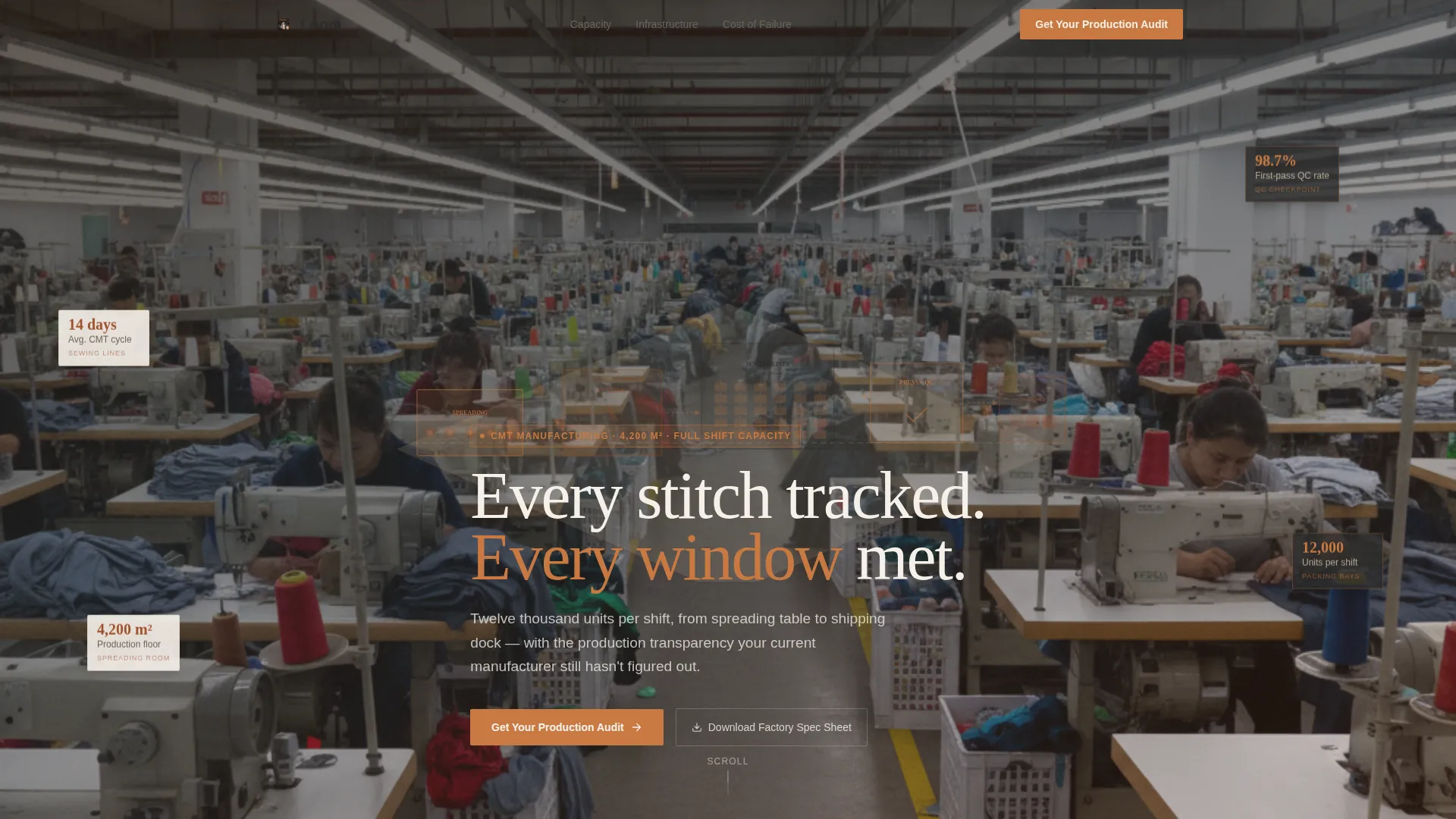
- An isometric factory header with animated zone callouts showing capacity, cycle times, and quality rates
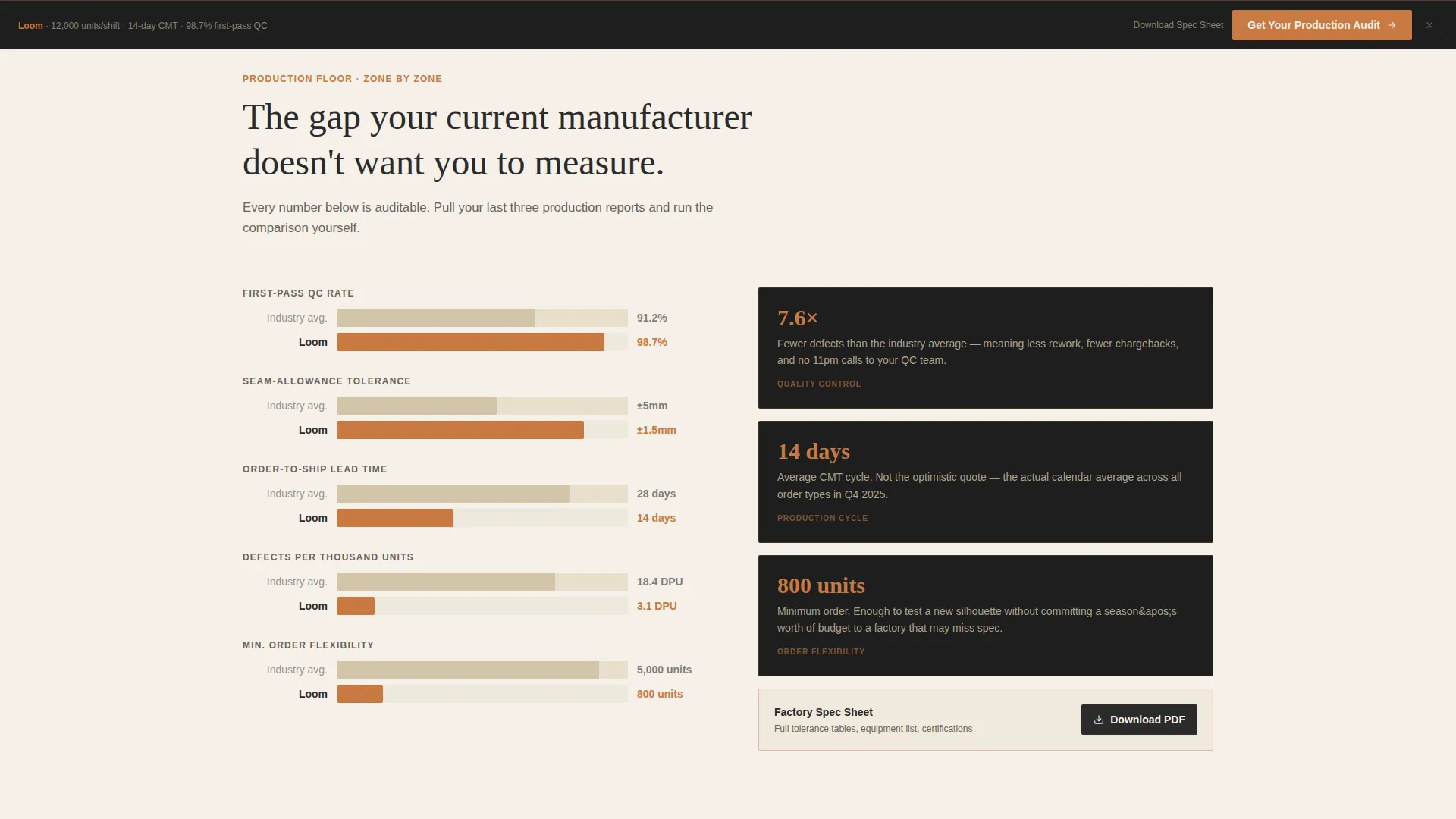
- A Comparison/Versus scroll structure with sliding bar animations that pit your metrics against industry benchmarks
- A fixed sticky call-to-action button and a three-field sequential intake form for production audit requests
- A gated secondary path offering a downloadable factory spec sheet for research-stage visitors
Feature list
This section walks through the core built-in capabilities that make Loom work as a conversion tool for garment factories.
Isometric Factory Header with Live Data Callouts
The header renders the entire production floor as a clean architectural isometric illustration. Zones span from the spreading room through cutting, sewing, pressing, quality-control checkpoints, and packing bays to the loading dock. Subtle animations cycle needle bars, rotate fabric rolls, and lift steam from press heads. Floating data callouts give visitors an immediate god-view of capacity before they read a single line of body copy.
Comparison/Versus Section Architecture
Each scroll section zooms into one production zone as a full-width architectural cross-section. A versus panel places the industry-standard benchmark in a charcoal column on the left and the factory's own metric in spool copper on the right. A sliding bar animates the gap between the two figures. Metrics covered include spreading accuracy, seam-allowance tolerance, order-to-ship lead time, defect rate per thousand units, and minimum order flexibility.
Sticky Production Audit call to action
After the first scroll, a fixed button reading "Get Your Production Audit" locks to the bottom of the viewport in spool copper. The button stays visible throughout the entire page journey, so the conversion action is always one tap away regardless of where the visitor is reading.
Sequential Three-Field Intake Form
The audit request form asks for three fields in order: monthly unit volume, primary garment category (knits, wovens, outerwear, or mixed), and current average lead time. The sequential layout reduces friction and pre-qualifies each inquiry before it reaches the factory team.
Gated Spec Sheet Secondary Path
A secondary conversion path offers a downloadable factory spec sheet for visitors still weighing their options. This captures research-stage buyers who are not yet ready to book an audit but are actively comparing facilities.
Data Command Visual Panels
Charcoal data panels interrupt the warm linen and quarry sand backgrounds like production dashboards mounted directly to factory walls. These panels carry the metric-heavy comparison content and reinforce the Data Command theme throughout the scroll.
Page sections overview
| Section | Purpose |
|---|---|
| Isometric Factory Header | Establish capacity and precision at first glance |
| Production Zone Comparisons | Benchmark factory metrics against industry standards |
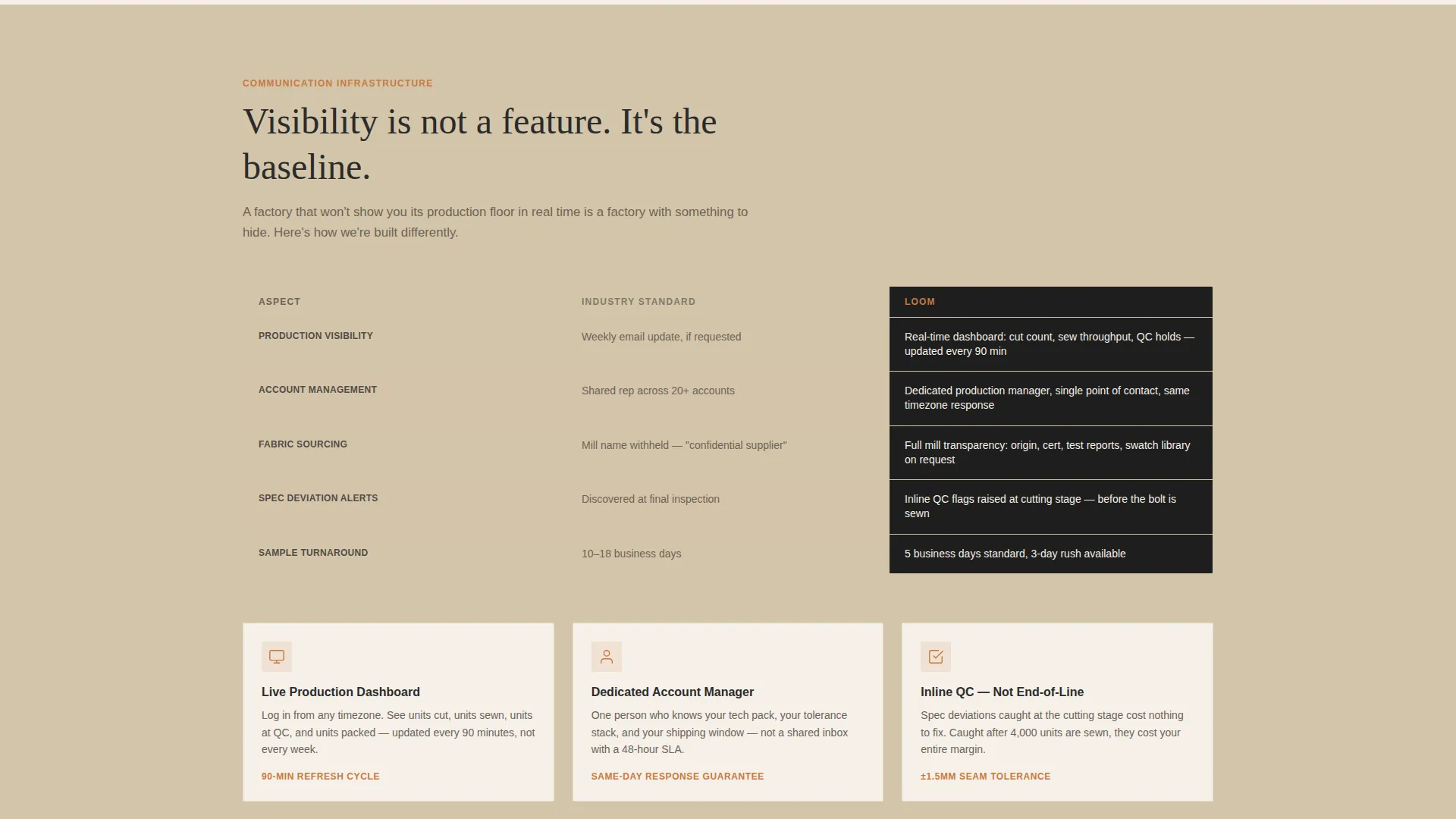
| Communication Infrastructure | Compare account management and dashboard access |
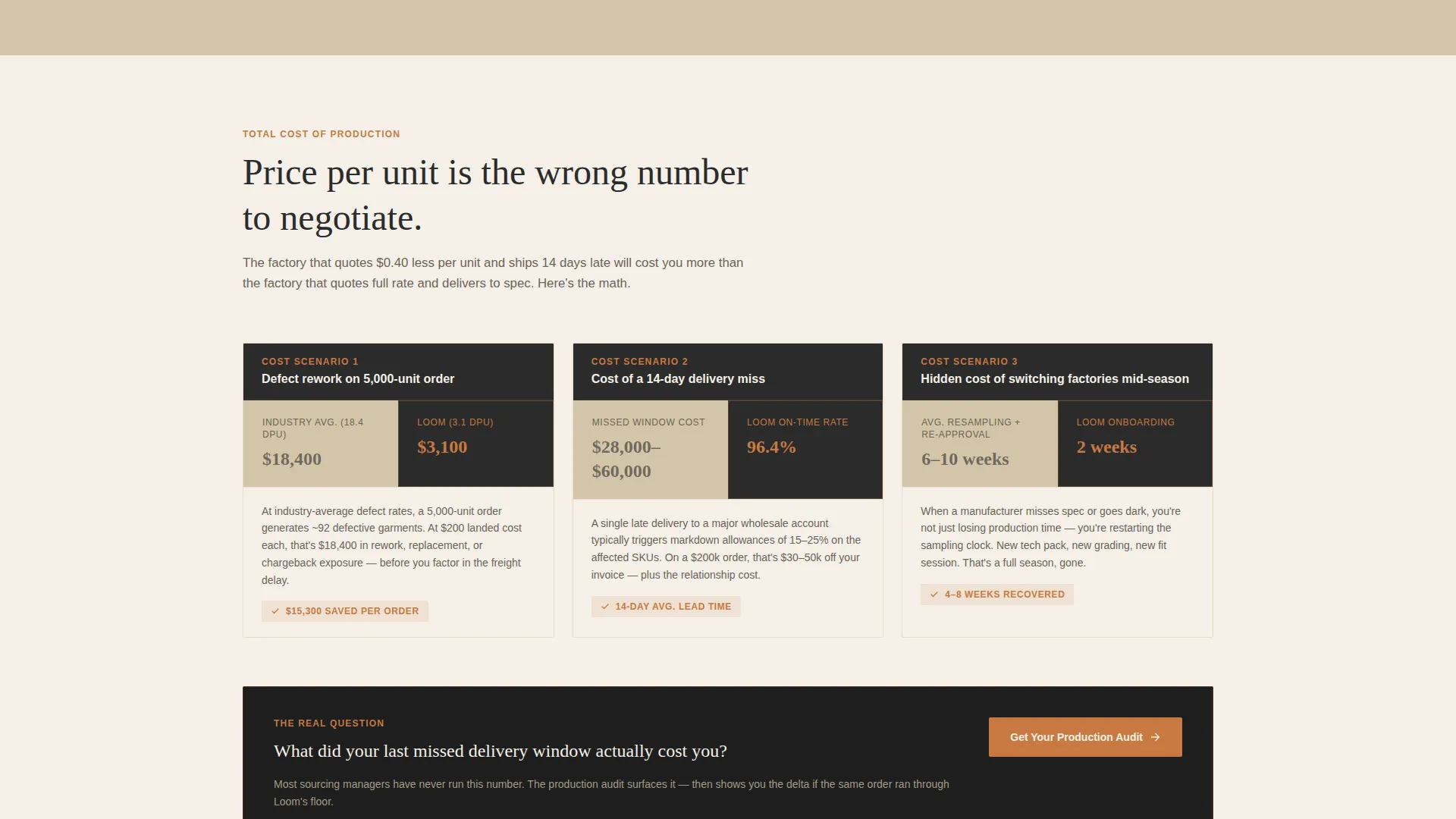
| Cost of Failure Section | Reframe price-per-unit as cost of rework and delays |
| Sticky Audit call to action | Keep conversion action visible at all times |
| Sequential Intake Form | Qualify leads by volume, category, and lead time |
| Spec Sheet Download | Capture research-stage visitors via gated PDF |
Design & branding system
The Warm Stone palette gives the page an earthy, honest character that still carries the tension of industrial precision. Color choices feel material rather than digital, which reinforces the factory's physical credibility.
- Core palette: quarry sand (#D4C5A9), kiln-fired clay (#A0522D), undyed linen (#F5F0E8), and deep charcoal (#2B2B2B) for data overlays and primary text
- Accent color spool copper (#C87941) activates on hover states, progress bars, and interactive metric elements
- Backgrounds alternate between undyed linen and quarry sand sections to create a breathing scroll rhythm, while charcoal panels punch through as production dashboard moments
Mobile & speed optimization
The single-column flow structure adapts naturally to smaller screens without requiring a separate mobile layout. Scroll-triggered animations and comparison panels are designed to remain legible and functional at phone widths.
- Isometric header illustration and floating data callouts scale to fit mobile viewports without losing their spatial hierarchy
- Sticky call to action button and sequential form fields are sized and spaced for comfortable thumb interaction on touch screens
How this template helps you convert
The entire page is structured as an accumulated evidence argument. By the time a visitor reaches the call to action, they have already seen your factory outperform industry benchmarks across multiple categories.
- The isometric header establishes scale and precision immediately, so buyers arrive at the body copy already primed with concrete numbers rather than skepticism.
- The Comparison/Versus sections replace vague claims with auditable side-by-side figures, making it easy for sourcing managers and design directors to build an internal case for switching manufacturers.
- The cost-of-failure framing in the final sections reframes the conversation from price-per-unit to the real business risk of delays and rework, making the audit call to action feel like a practical next step rather than a sales push.
Other information about this template
Loom is built specifically for the garment manufacturing sector and carries design decisions that match the expectations of fashion industry buyers. A few additional points are worth noting.
- The template style is Single Column Flow, meaning content reads in one uninterrupted vertical sequence with no tabbed or sidebar navigation to distract the buyer
- The Spatial and Architectural creative direction turns each scroll section into a production zone walk-through, giving the page a physical sense of scale that generic manufacturer templates cannot replicate
- The Data Command theme positions the factory as a facility that measures everything, which is exactly the signal that sourcing managers and compliance-conscious brand buyers respond to
- The template is suited for factories operating at scale, with prompt references to a twelve-thousand-unit-per-shift capacity, a fourteen-day average cut-make-trim cycle, and a four-thousand-two-hundred square meter production floor as example data points to replace with your own figures
- The versus panel structure never names a competitor; it names the operational pain the competitor causes, which keeps the messaging compliant with professional sourcing relationships while still being maximally persuasive
Theme
Data Command
Creative direction
Spatial & Architectural
Color system
Warm Stone
Style
Single Column Flow
Direction
Comparison/Versus
Page Sections
Isometric Factory Header with Data Callouts
Comparison/versus Scroll Sections
Sticky Production Audit Call to Action Button
Sequential Three-field Intake Form
Gated Spec Sheet Download Path
Data Command Charcoal Panels
Related questions
What kind of factory is this template designed for?
Can I replace the example production numbers with my own factory data?
Who is the production audit form designed for?
What is the purpose of the gated spec sheet download?
Does the page work for factories producing multiple garment categories?



