Nursery Renovation Advanced Booking Website Template
Lumens is a gallery and detail landing page template built for nursery lighting specialists. It opens with a Before/After Slider that shows a room transformed by better light, then walks visitors through real case studies, installed fixture galleries, and measurable outcomes. A pinned booking form and a gated checklist download make every visit actionable.
by Rocket studio
Quick summary
Lumens is a single-page template designed for nursery lighting specialists who need to prove their expertise before asking for a booking. It leads with a dramatic slider, builds trust through case study narratives, and closes with a clear call to action. The result is a page that earns the click by showing the work first.
Who this template is for
This template was designed for tradespeople and specialists who work specifically with nursery and early years environments. It suits anyone who needs to convert cautious, compliance-driven buyers into scheduled appointments.
- Nursery owners who have failed or are preparing for an Ofsted lighting audit
- Childminders converting spare rooms into registered childcare settings
- Facilities managers retrofitting listed or older buildings where young children now learn
What problem this template solves
Many nursery lighting specialists struggle to communicate the real value of their work online. A generic services page does not show what changed, why it matters, or what the result looked like. This template solves that gap directly.
- It replaces vague service descriptions with room-by-room case study evidence
- It gives compliance-focused buyers the proof they need before committing to a survey visit
- It captures leads at two levels: ready-to-book visitors and those who need more time
What you get with this template
You get a fully structured landing page that moves a visitor from curiosity to conversion through a logical, evidence-led scroll. Every section serves a specific role in building trust and reducing hesitation.
- A Before/After Slider header with a fade-in tagline and real room transformation visuals
- Scrollable case study sections with floor plan overlays, fixture galleries, and outcome data
- A pinned floating booking button and a secondary gated PDF download path
Feature list
This template includes six purpose-built components that work together to guide a specialist services buyer from first impression to confirmed booking.
Before/After Slider Header
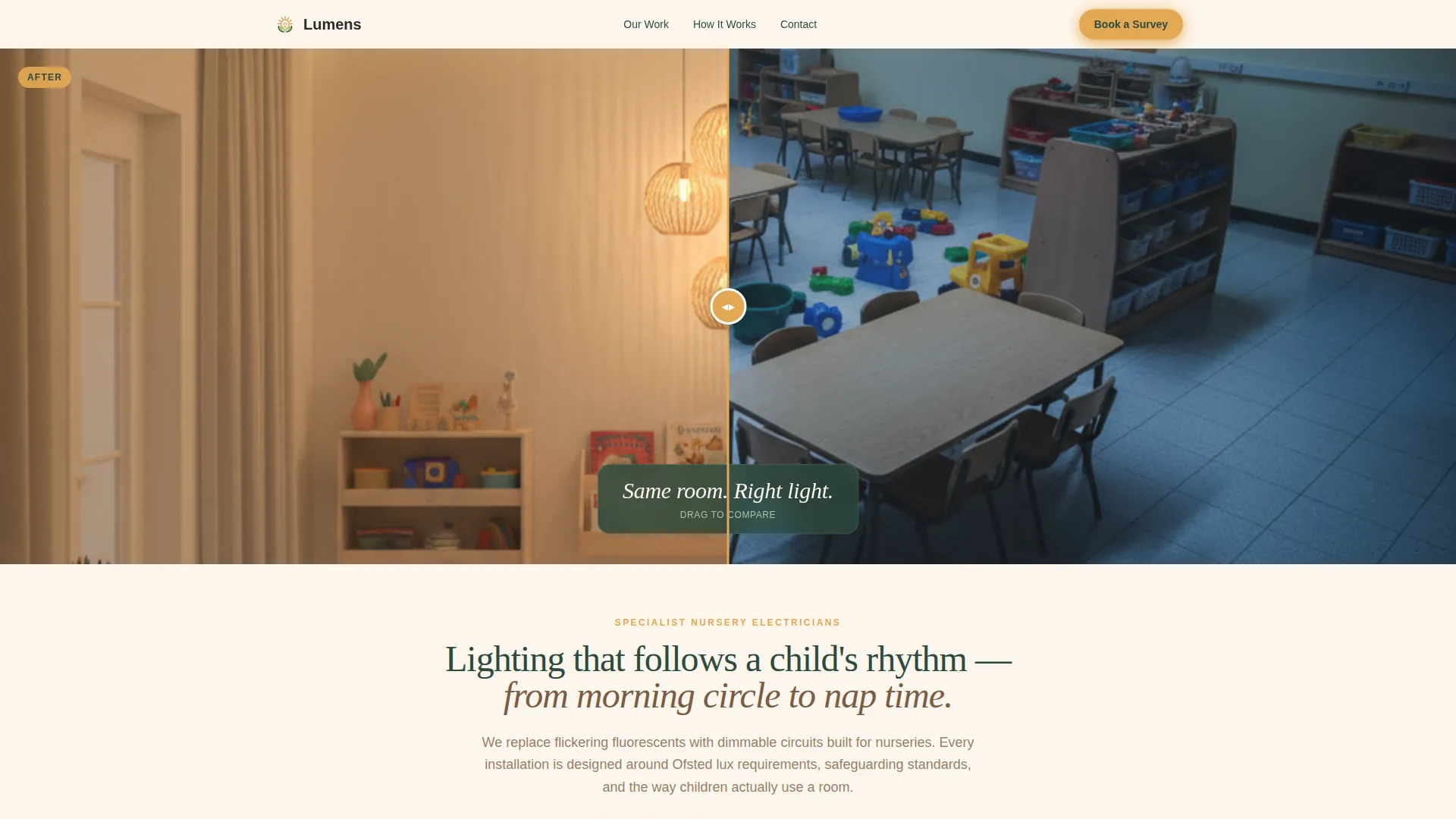
The page opens with a draggable slider. The left side shows a nursery under harsh fluorescent strip lighting. The right side shows the same room after rewiring, with recessed warm LEDs, a dimmable pendant, and sensor-triggered baseboard night lights. A single line fades in beneath: "Same room. Right light."
Scrollable Case Study Sections
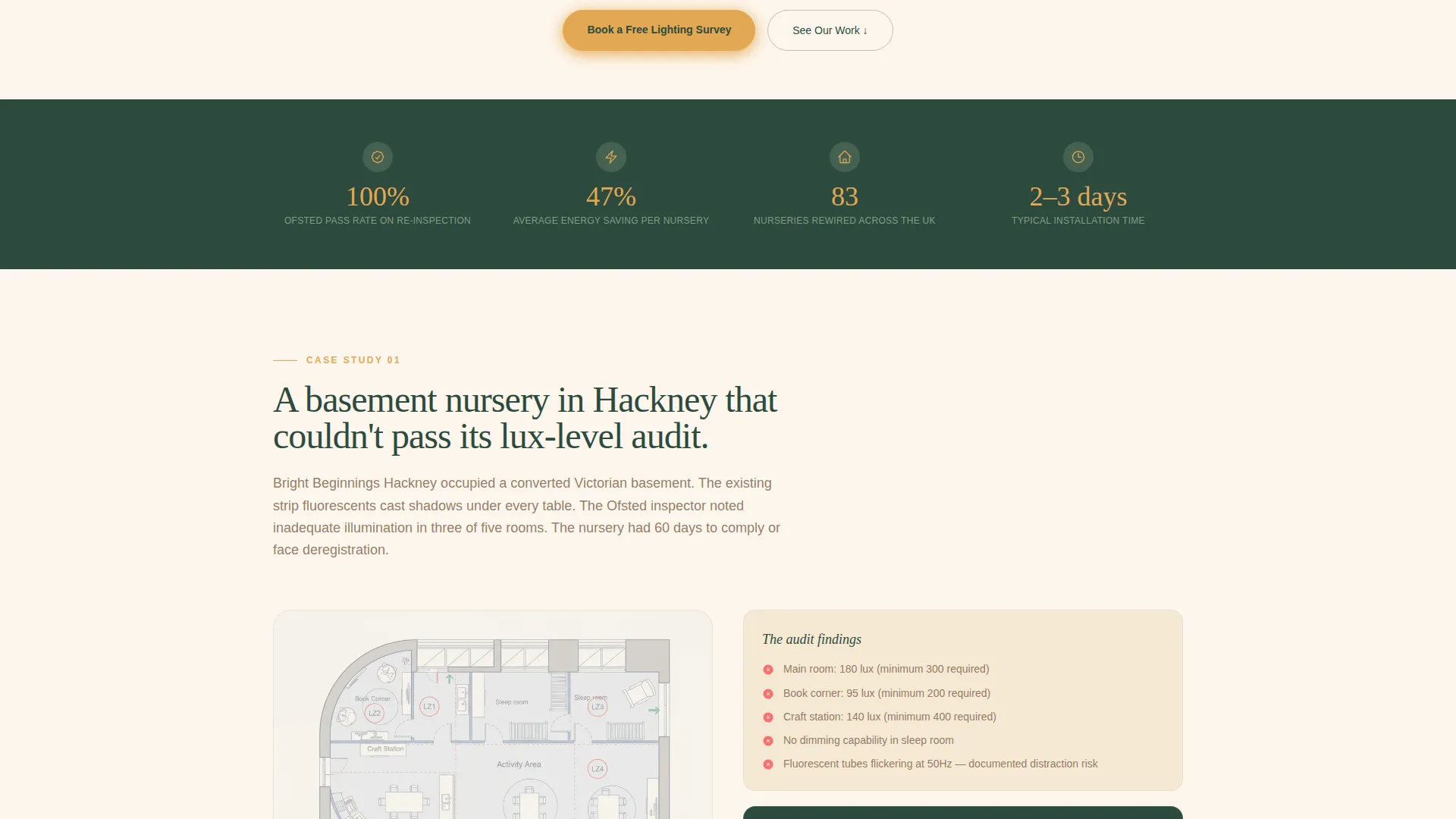
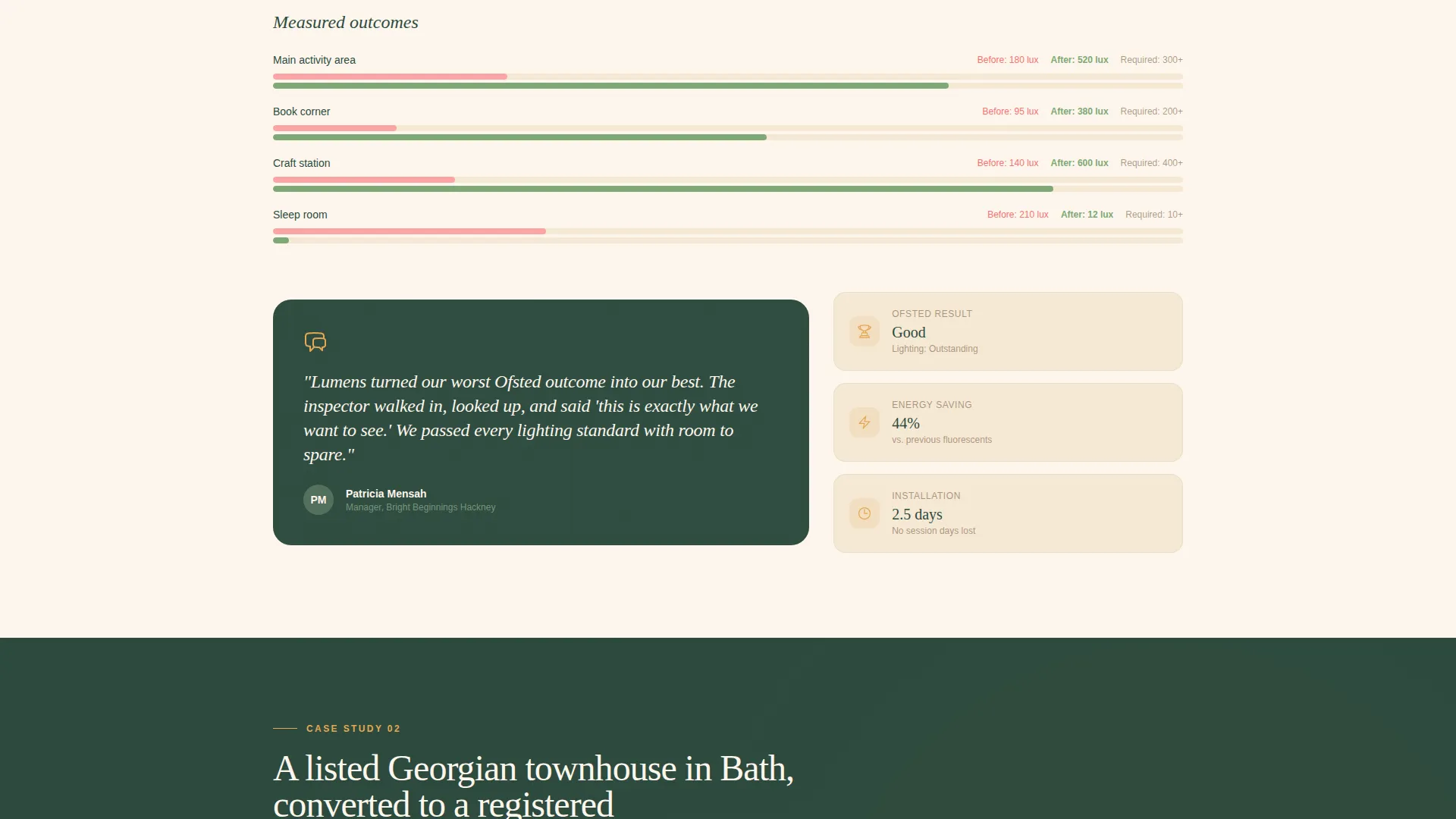
Each scroll section tells one project as a short story. It names the problem, shows the lighting plan overlaid on the floor layout, and presents a gallery of installed fixtures. Every case study closes with a quote from the nursery manager and measurable outcomes including lux readings, energy savings, and Ofsted result.
Installed Fixture Gallery
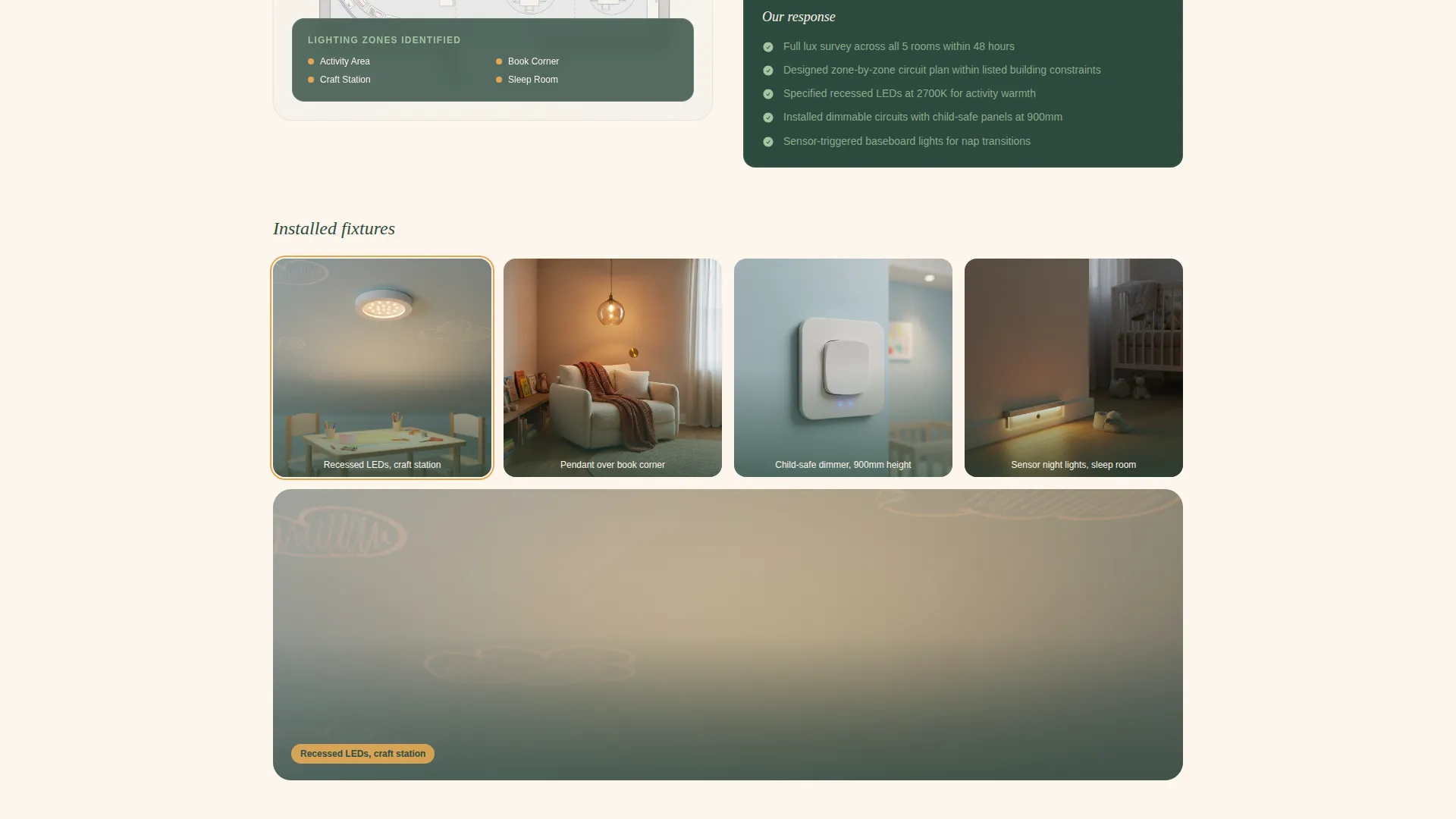
The gallery section includes close-up photography of dimmer panels positioned at child-safe height, colour-temperature strips fitted behind shelving, and blackout-compatible circuits in the sleep room. The layout is detail-led and designed to show craftsmanship at a glance.
Pinned Booking Call to Action
A floating "Book a Lighting Survey" button stays visible as the visitor scrolls. It links to a short form asking for nursery name, postcode, number of rooms, and a preferred visit date via a calendar picker. The form appears after the first case study so that visitors have seen evidence before they are asked to commit.
Gated Checklist Download
A secondary conversion path offers a downloadable nursery lighting checklist as a gated PDF. Visitors provide their email address and nursery type to access it. This captures leads from buyers who are not yet ready to book a survey visit.
Forest Trust Visual System
The entire page uses a cohesive colour palette rooted in deep pine, warm bark, soft fern, and nursery cream. Interactive elements use a reassuring amber. The result feels considered and calm, not corporate, which is exactly right for a buyer making decisions about children's environments.
Page sections overview
| Section | Purpose |
|---|---|
| Before/After Slider | Opens with room transformation |
| Fade-in Tagline | Anchors the key message |
| Case Study One | Names the problem clearly |
| Floor Plan Overlay | Shows the lighting design |
| Fixture Detail Gallery | Proves installation quality |
| Manager Quote Block | Adds human credibility |
| Outcome Metrics Row | Displays measurable results |
| Booking Survey Form | Captures ready-to-book leads |
| Checklist Download Gate | Captures early-stage leads |
| Floating Book Button | Keeps the call to action always visible |
Design & branding system
The visual identity follows a Service Utility theme using the Forest Trust colour system. Every colour choice reinforces trust and calm, which matters when buyers are thinking about children's safety and regulatory compliance.
- Core palette: deep pine (#2D4A3E), warm bark (#7A5C44), soft fern (#A8C5A0), and nursery cream (#FDF6EC) across backgrounds and text
- Interactive elements styled in reassuring amber (#E4A853) for buttons, hover states, and form highlights
- The overall feel is unhurried and trustworthy, like a wooden toy shelf where afternoon sun lands on a reading rug
Mobile & speed optimization
The template is structured so that its most important elements work clearly on smaller screens. The case study scroll flow and the pinned booking button are both designed for mobile visitors who may be reviewing the page between site visits or during an Ofsted preparation window.
- The Before/After Slider is touch-friendly, allowing mobile visitors to drag the handle with a finger
- The floating booking button remains pinned and accessible at all scroll depths on mobile viewports
- The gated checklist form is compact and straightforward, reducing friction on smaller screens
How this template helps you convert
The page is built around a deliberate sequence. It shows proof before it asks for anything, which is exactly how a compliance-aware buyer needs to be approached.
- The Before/After Slider creates an immediate visual argument for the specialist's work, giving visitors a reason to keep scrolling before reading a single word of copy.
- The case study narrative builds trust room by room, presenting real outcomes including lux readings, energy savings, and Ofsted results so that buyers feel informed rather than sold to.
- The dual conversion paths, one for ready-to-book visitors and one for those still researching, mean the page captures leads at both stages of the decision process without pressuring either group.
Other information about this template
This template is part of a broader gallery and detail format designed for specialist trade and renovation services. It is well suited to use alongside a wider nursery renovation or construction services offering.
- The template style is Gallery and Detail, which suits any specialist whose work is best understood visually
- The Case Study Narrative creative direction makes it straightforward to add new projects over time by following the same section structure
- The Booking and Scheduling direction means the primary goal is always a confirmed survey appointment, with the checklist download as a supporting lead capture
- The Forest Trust colour system was chosen specifically to align with the trust signals that childcare and early years buyers respond to
Theme
Service Utility
Creative direction
Case Study Narrative
Color system
Forest Trust
Style
Gallery + Detail
Direction
Booking/Scheduling
Page Sections
Draggable Before/after Slider
Scrollable Case Study Narrative
Installed Fixture Detail Gallery
Pinned Floating Booking Button
Gated Checklist Download Path
Forest Trust Colour System
Related questions
Can I add more case studies to this template?
Does the booking form include a calendar picker?
Are the two conversion paths independent of each other?
Who is this landing page template designed for?
Can the Forest Trust colour palette be updated to match a different brand?



