Expert Warehouse & Factory Construction Professional Website Template
Mainline is a hero-dominant landing page template built for industrial plumbing contractors serving warehouses and factory floors. It combines an Engineering Blueprint visual theme with a Problem→Solution content arc, a location-input hero, and a three-step progressive lead form, giving facility managers and plant engineers a fast, credible path to request a site assessment.
by Rocket studio
Quick summary
Mainline is a single-page template designed for warehouse and factory plumbing contractors. It opens with a full-viewport location input, walks visitors through a visual Problem→Solution Arc, and closes with a persistent lead-capture form. The Charcoal and Amber color system keeps every section on-brand and visually deliberate, matching the mechanical precision these clients expect.
Who this template is for
This template is built for industrial plumbing contractors who work on active facilities, not residential jobs. If your crew handles emergency pipe repairs, process water line installs, and design-build retrofits for commercial and industrial properties, this page speaks your language.
- Facility managers handling emergency backflow calls and compliance shutdowns
- Plant engineers specifying process water lines and drainage systems for new equipment
- Property owners converting warehouses into food-grade or pharmaceutical-ready spaces
What problem this template solves
Generic contractor websites fail industrial buyers. A facility manager at 2 a.m. does not have time for a brochure. They need to know immediately whether your crew can reach their site and whether you understand their problem. This template addresses that gap directly.
- No visual structure to move a stressed buyer from pain to solution to contact
- No geographic qualification upfront, wasting both sides' time
- No clear conversion path for both emergency callers and planned-project leads
What you get with this template
You get a fully structured landing page designed around one outcome: turning facility contacts into qualified leads. Every section has a defined role, from the location-input hero to the three-step progressive form at the bottom of the page.
- A full-viewport location-input hero that qualifies geography before anything else loads
- Blueprint-style diagram panels showing three industrial failure scenarios and their remediated solutions
- A persistent bottom-of-viewport call-to-action bar with a progressive three-step lead form and a click-to-call dispatch option
Feature list
This section covers the core built-in components and design decisions that make Mainline work for industrial plumbing lead generation.
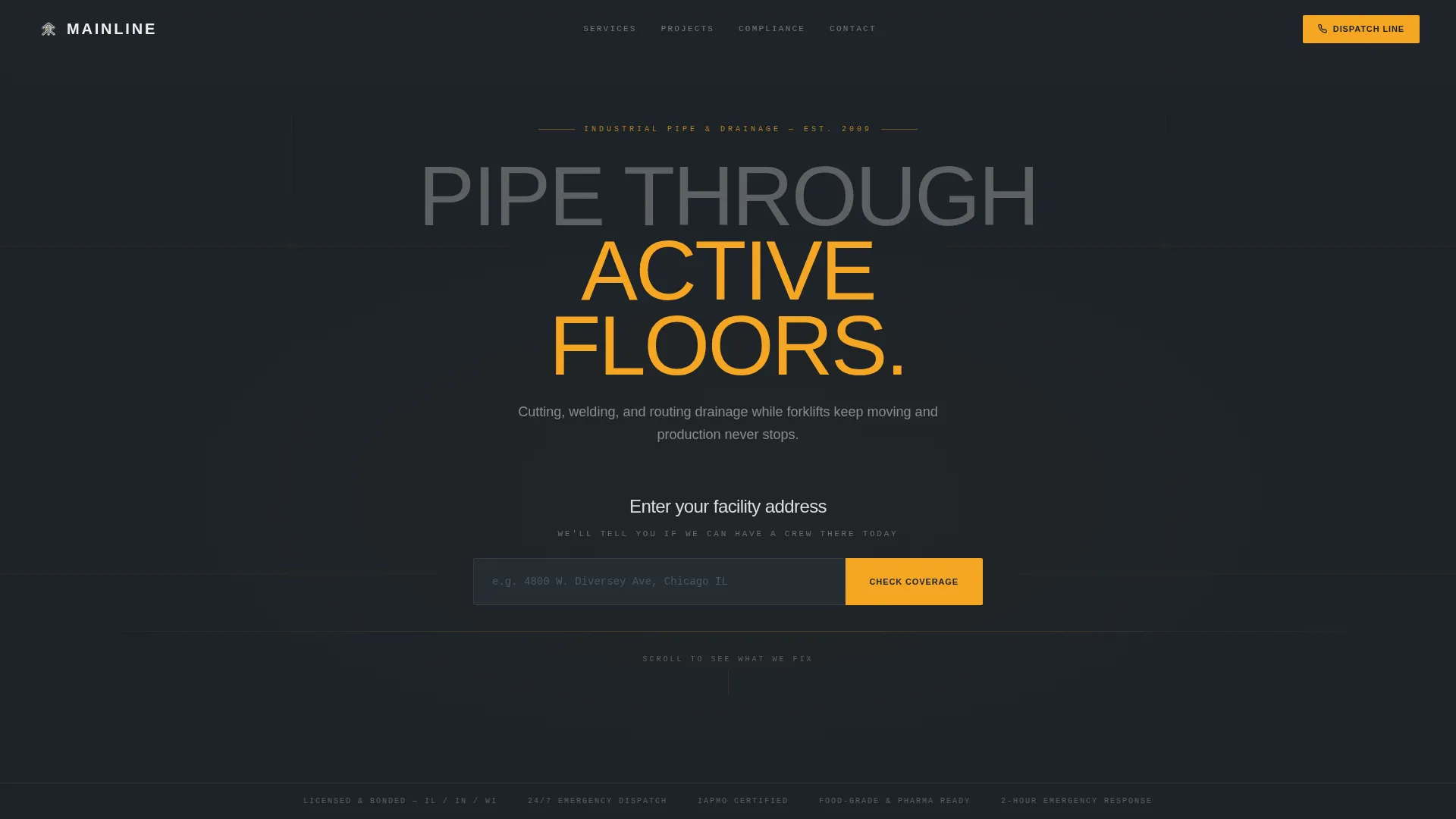
Full-Viewport Location Input Hero
The header fills the entire screen with a single oversized input field asking visitors to enter their facility address. A subline reads "We'll tell you if we can have a crew there today." The input glows amber on focus, and a faint blueprint grid pattern appears in the background, turning the first interaction into a geography qualifier.
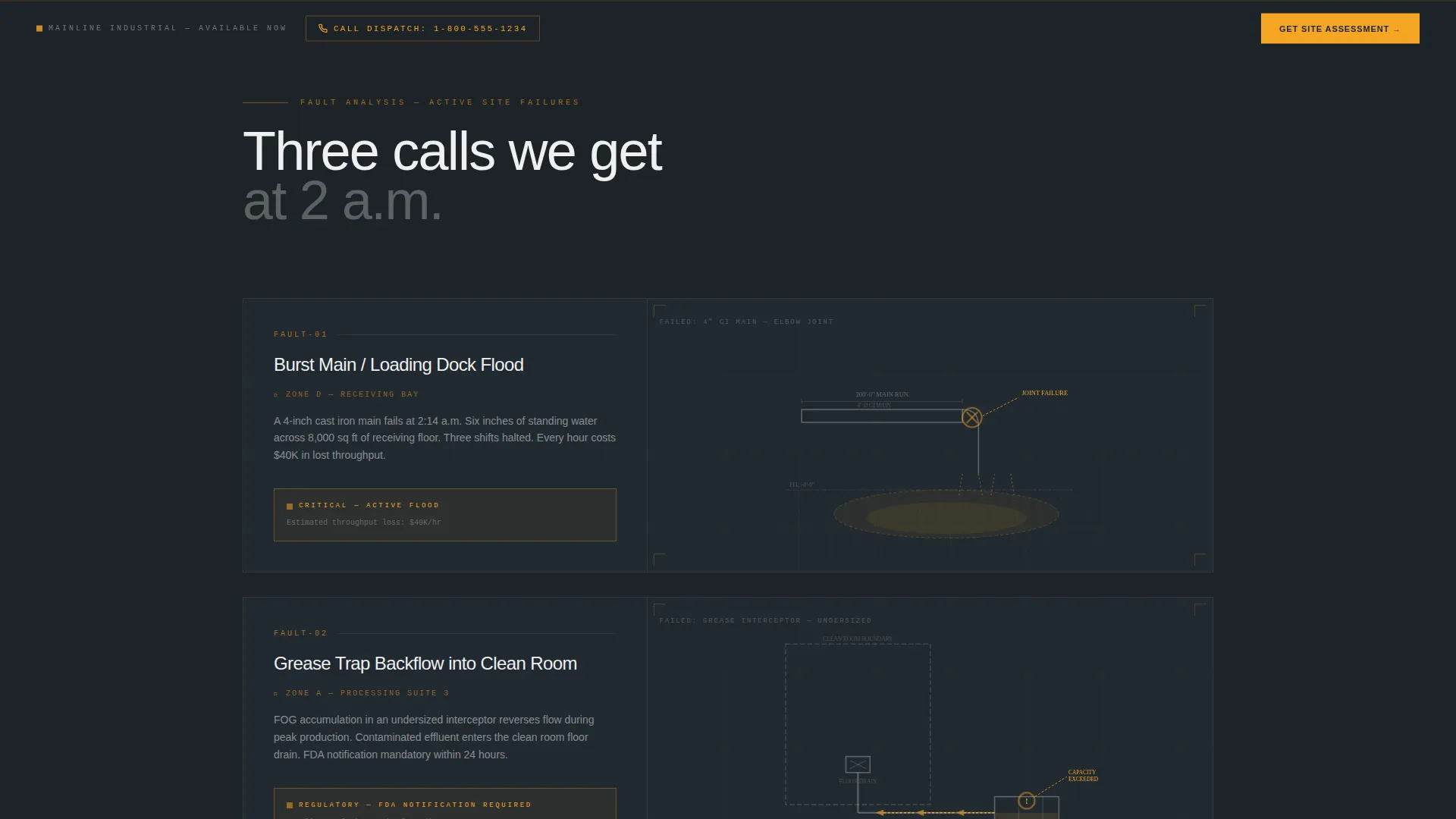
Blueprint-Style Problem Panels
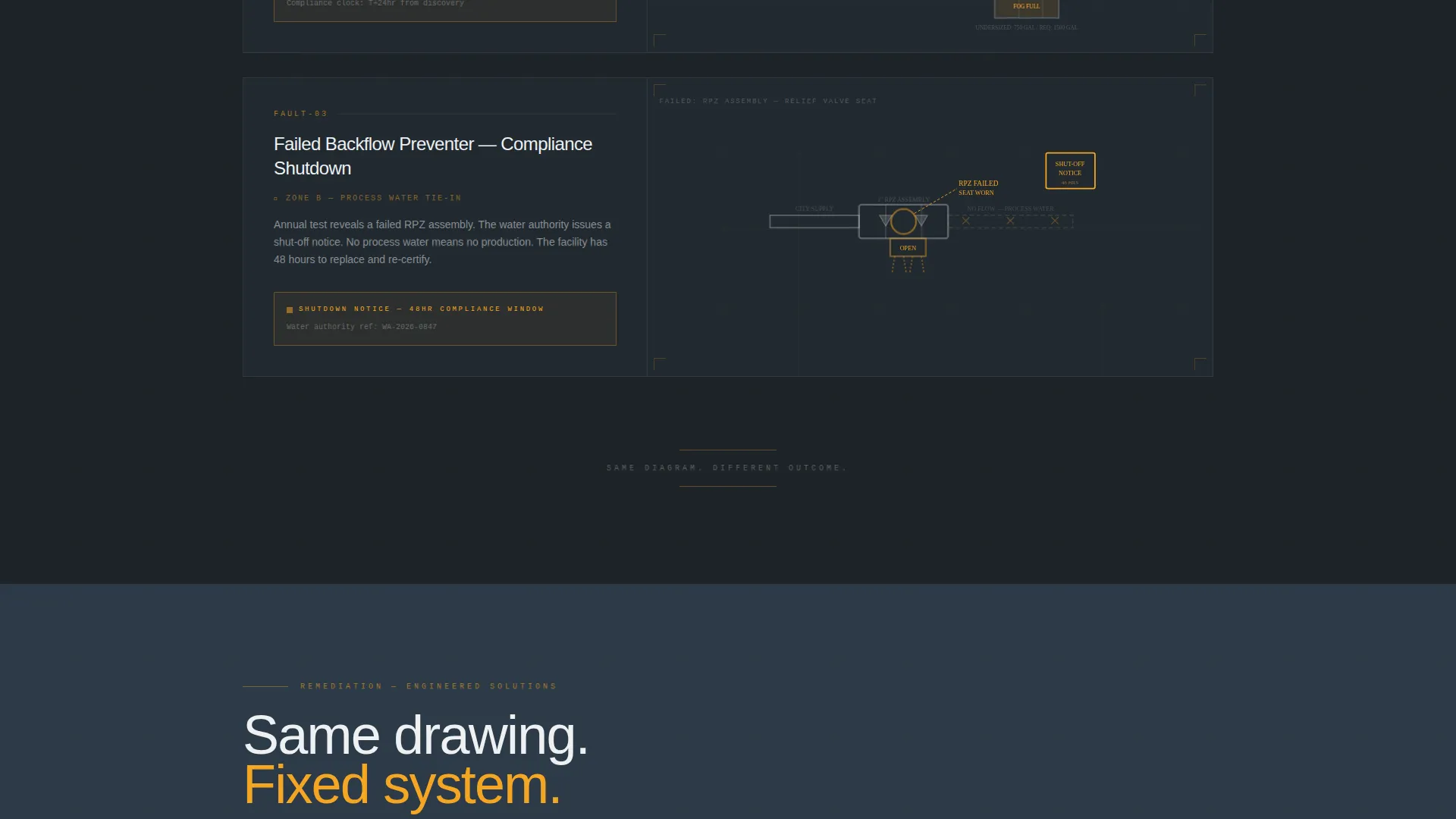
Three industrial nightmare scenarios are presented as blueprint-style diagrams with amber danger callouts. Each scenario covers a real failure type: a burst main flooding a loading dock, a grease trap backing into a clean room, and a failed backflow preventer triggering a compliance shutdown.
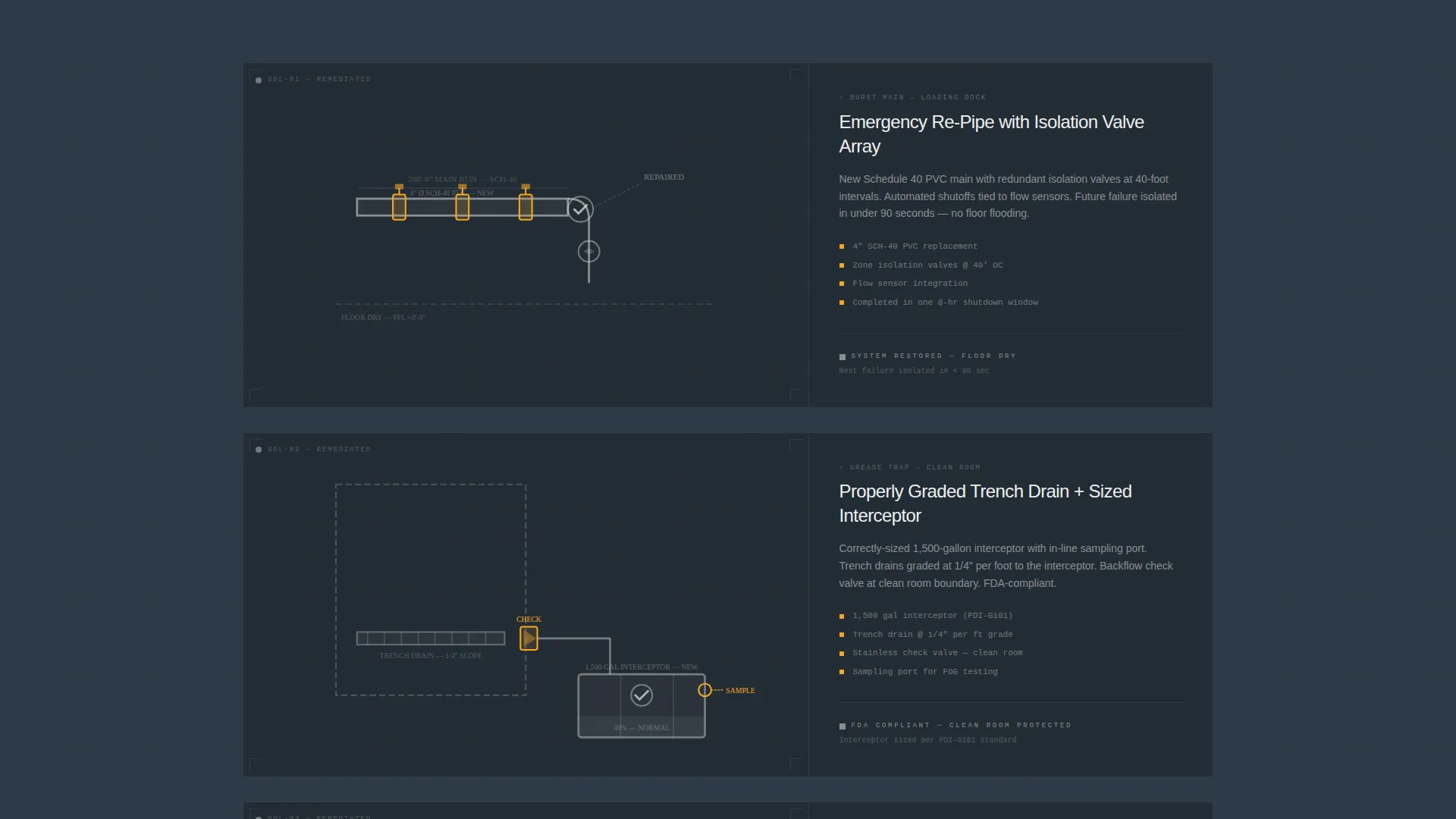
Problem-to-Solution Panel Wipe
Each problem diagram panel wipes left to reveal its corresponding solution panel. The remediated view shows the fixed system, the redundant valve, and the properly graded trench drain. This visual sequence builds the contractor's authority by showing engineering-level thinking, not just labor.
Persistent Lead-Capture Bar
After the visitor scrolls past the first problem panel, a "Get a Site Assessment" call-to-action bar locks to the bottom of the viewport. It stays visible throughout the rest of the page, ensuring the conversion path is never more than one click away.
Three-Step Progressive Lead Form
The lead form breaks qualification into three focused steps. Step one captures facility type and square footage range. Step two identifies whether the need is emergency, scheduled maintenance, or new construction. Step three collects name, phone number, and preferred contact window.
Click-to-Call Dispatch Option
A secondary conversion path sits alongside the main form. A "Call Our Dispatch" button with a click-to-call phone number gives the facility manager whose floor is already flooding an immediate, no-friction way to reach the crew.
Page sections overview
| Section | Purpose |
|---|---|
| Location Input Hero | Qualifies visitor geography before page content loads |
| Problem Diagram Panels | Presents three industrial failure scenarios with amber danger callouts |
| Solution Reveal Panels | Wipes left to show each remediated system and fixed layout |
| Persistent call to action Bar | Keeps "Get a Site Assessment" locked to the viewport bottom |
| Progressive Lead Form | Collects facility type, project scope, and contact details in three steps |
| Dispatch Call Option | Provides a click-to-call path for urgent, in-progress emergencies |
Design & branding system
The visual identity follows an Engineering Blueprint theme. The palette is built around two anchor colors that reference a working shop floor after hours: dark concrete surfaces lit by overhead sodium lights, with white-stenciled pipe markings running the walls. Amber appears sparingly, which makes it land harder every time.
- Deep graphite (#1E2328) and blueprint-dark slate (#2C3A47) form the background layer across all sections
- Caution amber (#F5A623) is reserved for interactive elements, callouts, the input focus glow, and danger markers on diagram panels
- Clean chalk white (#EDF0F2) handles all body text, diagram labels, and form field copy for legibility on dark backgrounds
Mobile & speed optimization
The template is structured so that the most critical conversion elements load and display cleanly on smaller screens. The full-viewport hero, the persistent call to action bar, and the click-to-call button are all built with mobile use cases in mind, since a facility manager calling from a plant floor is a likely scenario.
- The full-viewport location input is touch-friendly and remains the dominant element on mobile viewports
- The persistent bottom call to action bar adapts to mobile screen sizes, keeping the lead form and click-to-call button accessible throughout scrolling
- Blueprint diagram panels are laid out to remain legible on narrow screens without losing the problem-solution visual sequence
How this template helps you convert
The page is engineered to move an industrial buyer from first visit to qualified lead without requiring them to hunt for a contact form or trust a wall of text. Every structural decision supports one outcome.
- The location input hero qualifies the visitor immediately, filtering out out-of-service-area requests before they waste anyone's time and setting a tone of operational competence from the first second.
- The Problem→Solution Arc builds trust by naming the exact failures these buyers live with, then showing a resolved system, which shifts perception of the contractor from a repair service to an industrial engineering partner.
- The persistent call to action bar and the three-step progressive form reduce drop-off by keeping the conversion path always visible and by breaking a potentially intimidating form into three simple, low-friction steps.
Other information about this template
This template is a strong fit for contractors who want to position themselves as technical specialists, not commodity labor. The Engineering Blueprint theme reinforces that positioning at every touchpoint without requiring custom illustration work. A few additional points worth noting:
- The hero-dominant layout (90 percent hero, 10 percent supporting sections) keeps the visual weight on interaction and qualification, not on photography or testimonials
- The Problem→Solution Arc is structured to escalate naturally from emergency repair to planned retrofit to full design-build, which widens the contractor's perceived scope of work
- The template is built as a single landing page, not a multi-page website, making it fast to deploy and easy to test different offers or service areas
- Facility types addressed by the form's first step include warehouse, manufacturing, food processing, and cold storage, covering the core segments a warehouse and factory plumbing contractor typically serves
- The amber color token on every interactive element creates a consistent visual cue across the input hero, the danger callouts, and the form, training the eye to associate amber with action throughout the page
Theme
Engineering Blueprint
Creative direction
Problem→Solution Arc
Color system
Charcoal & Amber
Style
Hero-Dominant (90/10)
Direction
Lead Generation
Page Sections
Full-viewport Location Input Hero
Blueprint-style Problem Diagram Panels
Problem-to-solution Panel Wipe
Persistent Bottom-of-viewport Call to Action Bar
Three-step Progressive Lead Form
Click-to-call Dispatch Button
Related questions
Who is this landing page template designed for?
Can I use this template for both emergency and planned-project leads?
What does the location input hero actually do?
Does the page include a way for urgent callers to skip the form?
Is this a single landing page or a full website?



