Sports Facility Plumbing Contractor Landing Page
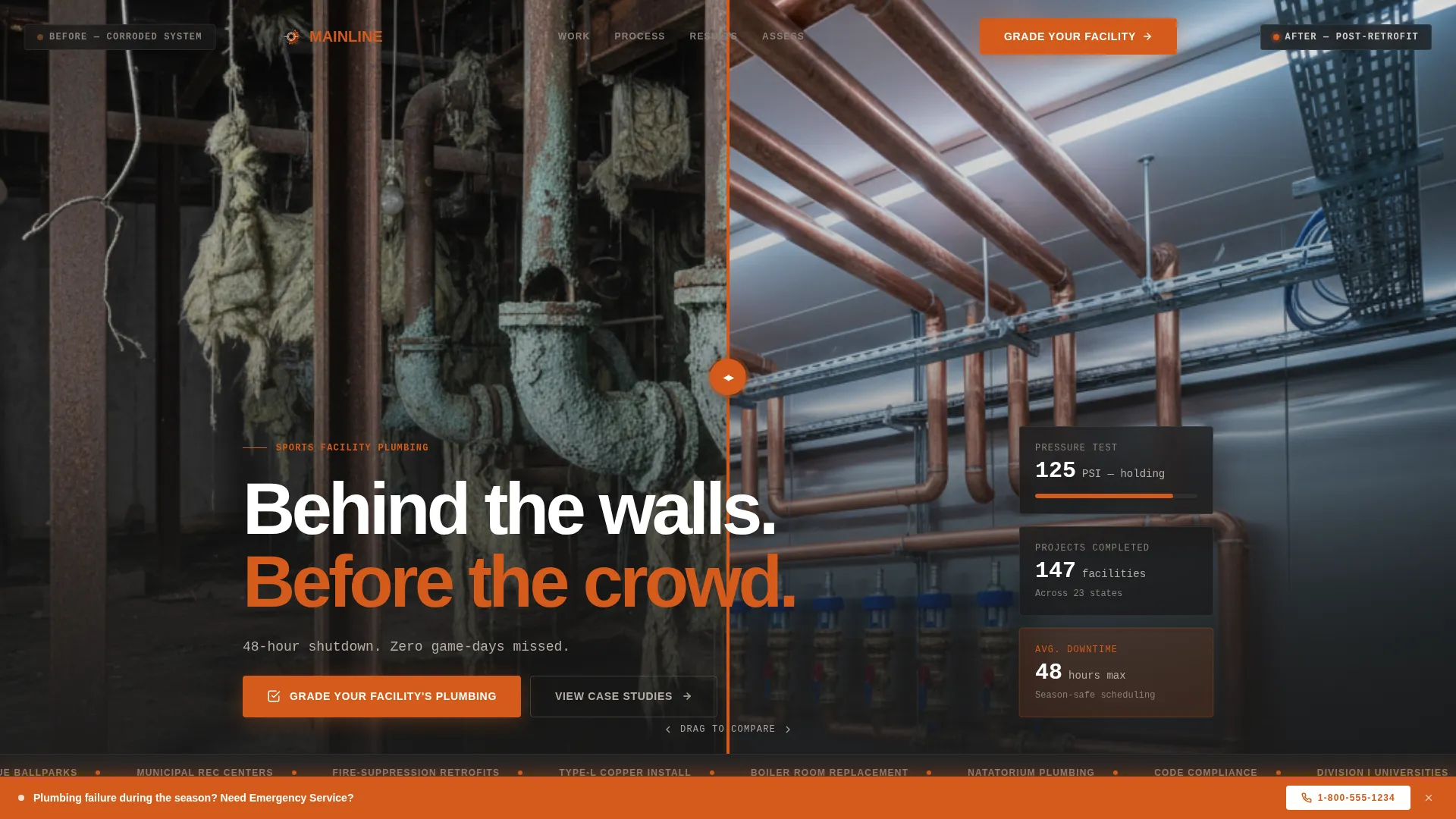
Mainline is a hero-dominant landing page template built for sports facility plumbing contractors. It leads with a draggable before-and-after case study header, advances a real project narrative through each scroll section, and converts visitors with an interactive five-step facility diagnostic quiz that scores risk and delivers a personalized plumbing grade.
by Rocket studio
Quick summary
Mainline is a single-page template designed for plumbing contractors who work inside stadiums, arenas, natatoriums, and recreation centers. It opens with a full-viewport before-and-after retrofit visual, walks visitors through a real project case study, and closes with a quiz-driven assessment that scores each facility's plumbing risk and captures qualified leads.
Who this template is for
This template is built for plumbing and mechanical contractors whose clients are institutional sports facility operators. If your projects happen under pressure and on tight seasonal schedules, this page speaks your language.
- Facilities directors at Division I universities managing aging mechanical infrastructure
- Municipal recreation center managers dealing with hot-water and pressure complaints
- Operations staff at minor-league ballparks and arenas scheduling work between homestands
What problem this template solves
Most contractor websites look like general service directories. They do not communicate the complexity of sports facility work or the trust required to hand over a mechanical room during an active season. This template solves that credibility gap directly.
- Clients cannot tell whether a contractor has handled their specific facility type before
- Generic contact forms do not qualify leads or communicate scope before the first call
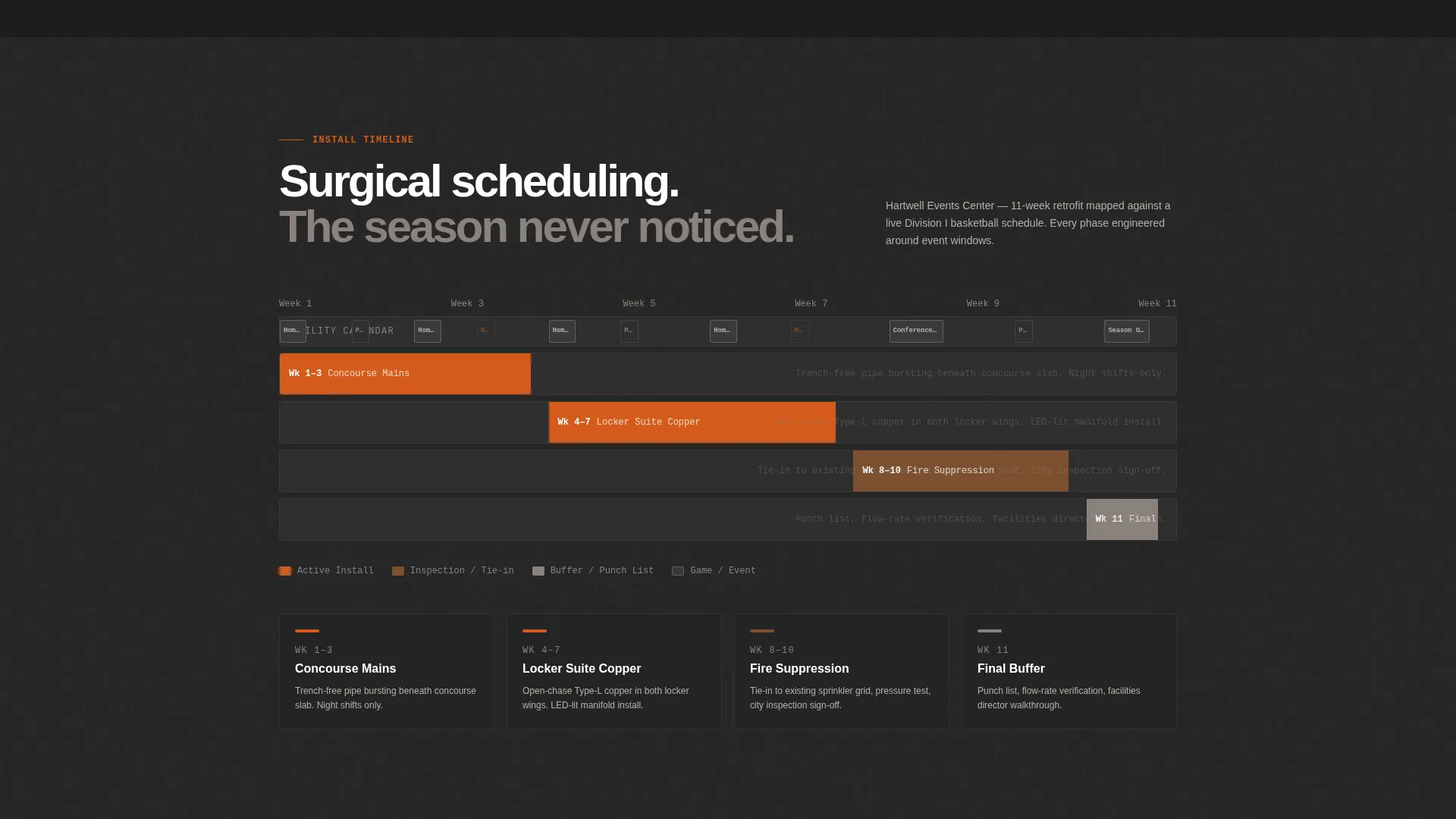
- There is no clear way to show scheduling precision alongside technical capability
What you get with this template
You get a structured, single-page layout that builds trust through real project evidence and converts visitors through a guided self-assessment. Every section has a defined purpose and a clear visual role.
- A full-viewport hero with a draggable before-and-after case study slider
- A scrollable case study narrative progressing from discovery to post-install data
- An interactive five-step facility plumbing diagnostic quiz with a visible risk-score gauge
Feature list
This template includes purpose-built components that reflect how sports facility plumbing projects are actually sold and evaluated.
Draggable Before-and-After Hero Slider
The header occupies ninety percent of the viewport and splits the screen between a gutted mechanical chase and a finished retrofit. Visitors drag a center slider to compare both states. A single concrete-gray line below the fold reads: "48-hour shutdown. Zero game-days missed."
Scrollable Case Study Narrative
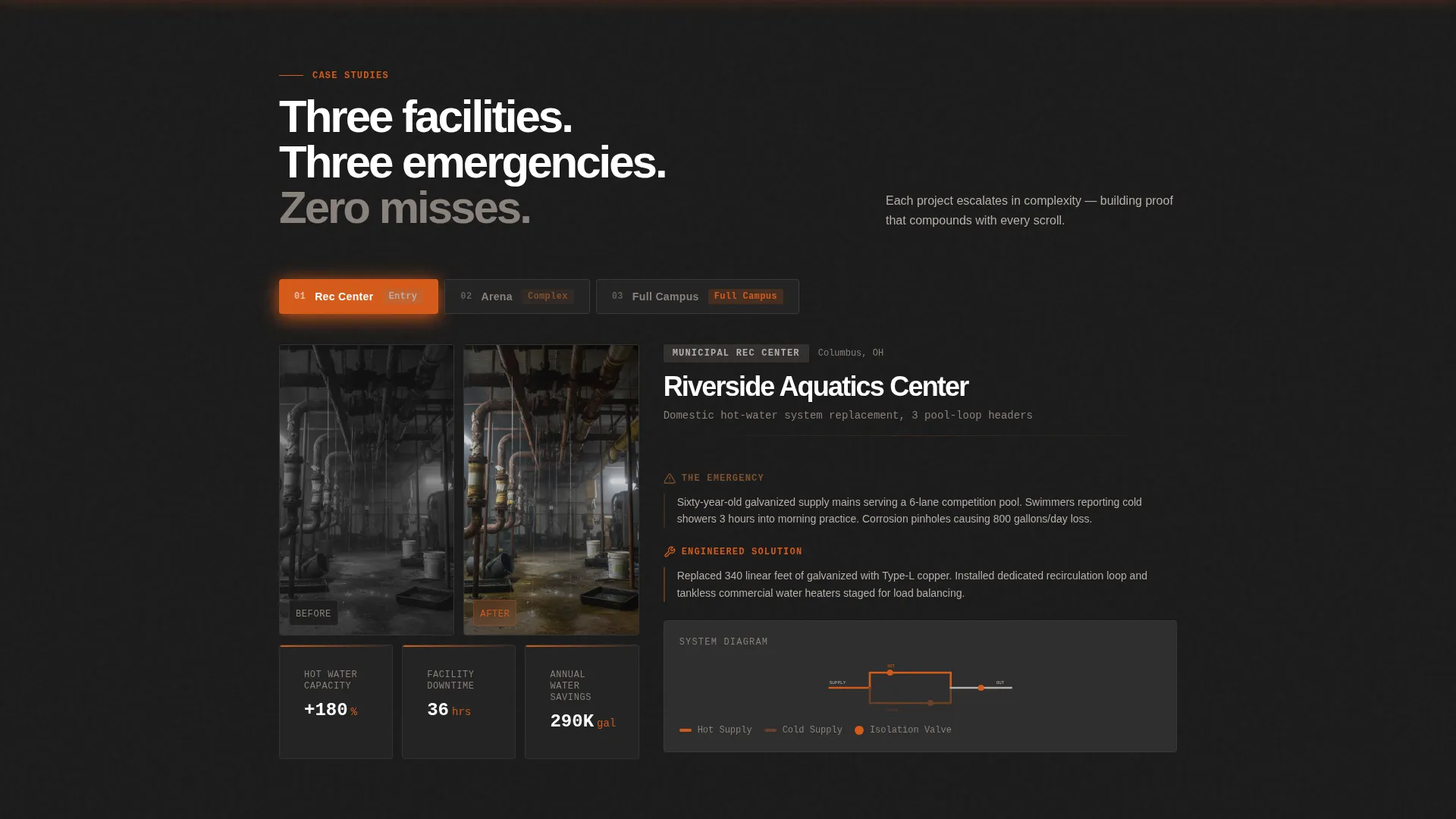
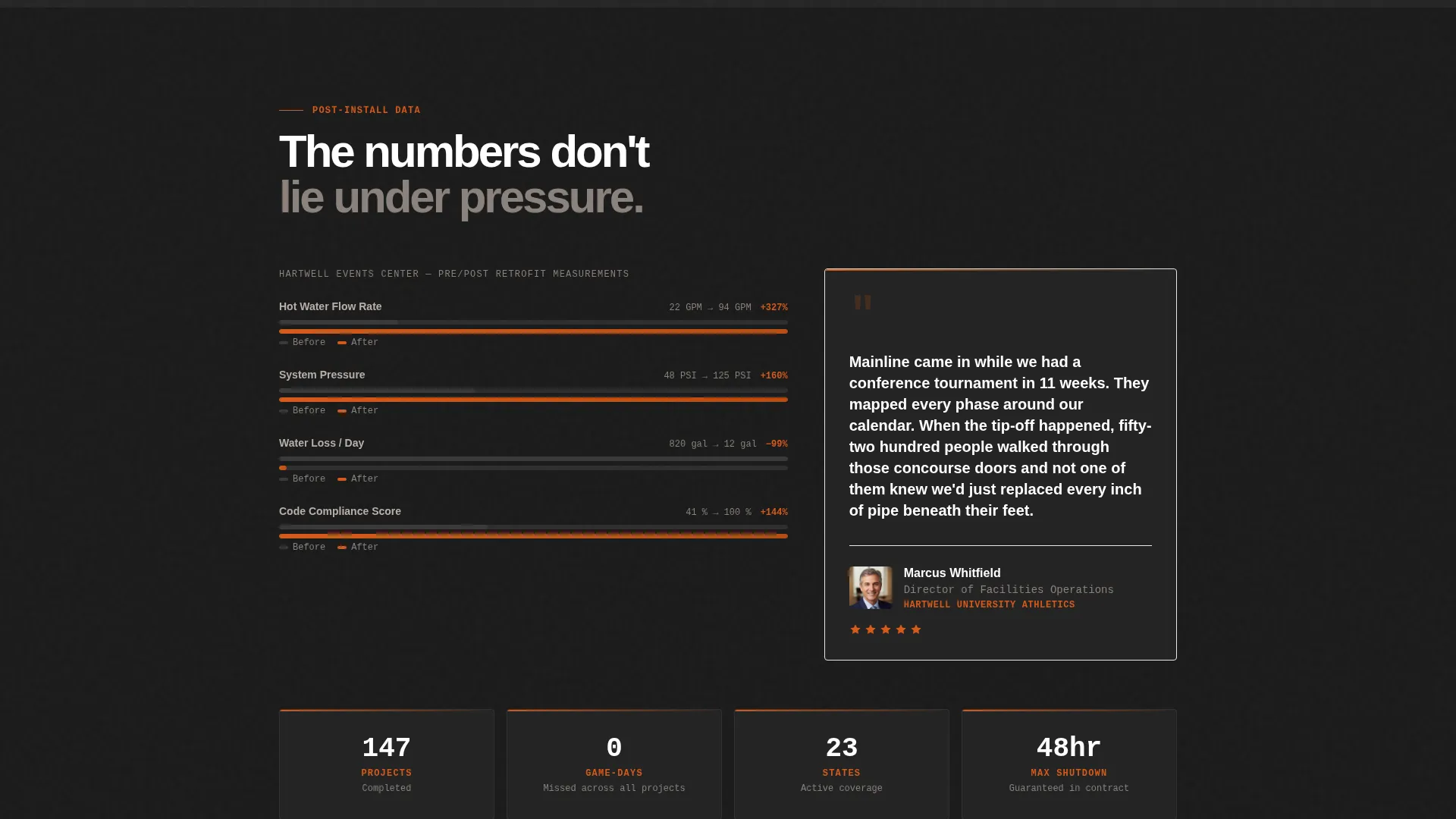
Each section below the hero advances one real project through its full lifecycle. The sequence moves from the emergency call and scope photos, through an engineered solution with isometric pipe diagrams, to an install timeline overlaid on the facility's event calendar, and finally to post-install flow-rate data and a facilities director quote.
Five-Step Facility Diagnostic Quiz
The primary call-to-action launches a guided assessment. Visitors select their facility type, building age range, last major plumbing work, current pain point, and upcoming off-season window. Each answer adjusts a visible risk-score gauge in real time, ending with a letter grade from A through F and a recommended scope summary.
Gated Assessment Report
After the quiz delivers a facility grade, the full written report is gated behind a short form requesting a name, facility name, and email address. This creates a natural lead capture moment tied to immediate, personalized value rather than a generic contact request.
Sticky Emergency Service Bar
A persistent bottom bar stays visible throughout the page. It carries a "Need Emergency Service?" prompt linked to a direct-call button, giving urgent visitors a fast exit path without interrupting the main conversion flow.
Escalating Complexity Case Studies
The case study sections are structured to build proof progressively. The first project is a recreation center, the second is an arena, and the third is a full stadium campus. Each project raises the stakes and demonstrates the contractor's range.
Page sections overview
| Section | Purpose |
|---|---|
| Hero Slider Header | Displays before-and-after retrofit visual with draggable midpoint slider |
| Shutdown Proof Line | Reinforces scheduling credibility with a single bold result statement |
| Emergency Call Section | Opens the case study narrative with scope photos and discovery context |
| Engineered Solution Section | Shows the technical plan with isometric pipe diagrams |
| Install Timeline Section | Overlays the project schedule on the facility's event calendar |
| Post-Install Results Section | Presents flow-rate data and a facilities director quote |
| Diagnostic Quiz Section | Guides visitors through a five-step facility plumbing assessment |
| Risk Score Gauge | Dynamically updates as each quiz answer is selected |
| Gated Report Form | Captures name, facility, and email to deliver the full assessment report |
| Sticky Emergency Bar | Provides a persistent direct-call path for urgent service needs |
Design & branding system
The visual identity follows an Industrial Raw theme built on a Fire and Earth color system. Every color choice references the physical environment of a working mechanical room.
- Torch-tip orange (#D45A1B) for calls-to-action and the risk-score progress indicator
- Forge-black (#1A1A1A) across section backgrounds, evoking soot-darkened steel
- Wet-clay brown (#6B4226) for secondary type and divider lines, and exposed-concrete gray (#B8AFA9) for body text fields and card surfaces
Mobile & speed optimization
The layout is designed with mobile visitors in mind, recognizing that facilities staff often access resources from a phone on the floor of a mechanical room.
- The hero slider is touch-friendly, allowing swipe interaction on mobile screens
- Section backgrounds and card surfaces use flat color fills that keep the layout clean and legible at smaller sizes
- The sticky emergency bar remains accessible on all screen sizes without overlapping primary content
How this template helps you convert
This template is engineered around two distinct visitor paths: the deliberate researcher who wants to evaluate your track record, and the operations manager who needs help right now.
- The case study narrative builds layered proof across three escalating project types, giving deliberate researchers the technical credibility and scheduling evidence they need before reaching out.
- The diagnostic quiz creates a personalized, low-friction reason to share contact details, converting curious visitors into qualified leads by delivering a facility grade and a scope recommendation in exchange for a name and email.
Other information about this template
This template is ready to be populated with your own project photography, facility data, and quiz copy. It is a purpose-built starting point for sports facility plumbing contractors who need a professional web presence that matches the seriousness of their work.
- The Industrial Raw theme and Fire and Earth color palette are fully documented in the design system, making it straightforward to align your brand
- The case study structure supports three project tiers out of the box, and each tier can be customized with your own facility types, client quotes, and flow-rate results
- The quiz logic and risk-score gauge are included as template components, ready for your specific diagnostic questions and scoring criteria
- This template is listed under the Construction and Home category, specifically within the Sports Facility Construction subcategory, making it easy to find for contractors in this niche
Theme
Industrial Raw
Creative direction
Case Study Narrative
Color system
Fire & Earth
Style
Hero-Dominant (90/10)
Direction
Quiz/Assessment
Page Sections
Draggable Before-and-after Hero Slider
Scrollable Case Study Narrative
Five-step Facility Diagnostic Quiz
Gated Assessment Report
Sticky Emergency Service Bar
Escalating Complexity Case Studies
Related questions
What type of contractor is this template designed for?
How does the facility diagnostic quiz work?
Can I use my own project photos in the before-and-after hero?
Is there a way for urgent visitors to reach out without going through the quiz?
How many case study sections does this template include?



