Expert Insurance Consulting | Free Website Template | Rocket
Plow is a single-page comparison table landing page built for Lagos snow removal services. It opens with stacked trust badges, walks visitors through a transparent tier-by-tier breakdown, and closes with a pinned "Lock In Your Route" call to action. Every section is designed to answer buyer questions before they have to ask.
by Rocket studio
Quick summary
Plow is a conversion-focused landing page template for Lagos snow removal contractors. It leads with credential badges, centers on a transparent service-tier comparison table, and guides visitors through a clear storm-response timeline. The primary call to action passes the selected tier directly to an enrollment page, reducing friction and eliminating the back-and-forth that costs contracts.
Who this template is for
This template is built for snow removal businesses that serve commercial and residential clients in high-demand markets. If your prospects are comparing multiple contractors and need hard facts before they commit, this page gives them exactly that.
- Property managers handling multi-lot portfolios who need documented service levels
- HOA board members fielding resident complaints and looking for reliable seasonal coverage
- Small business owners who need parking lots cleared before their first customers arrive
What problem this template solves
Most snow removal pages leave prospects guessing. They show a photo of a truck and a phone number, and nothing in between. That ambiguity pushes buyers to call three companies and choose whoever sounds most organized on the phone.
- Visitors cannot compare service tiers without calling or emailing for a quote
- Buyers do not know trigger depth, response windows, or what salt application costs
- There is no clear path from "I'm interested" to "I'm enrolled" without friction
What you get with this template
This template delivers a fully structured, single-page layout that maps every service detail to a visual element. Nothing is left vague. Every section answers a question your prospect is already forming.
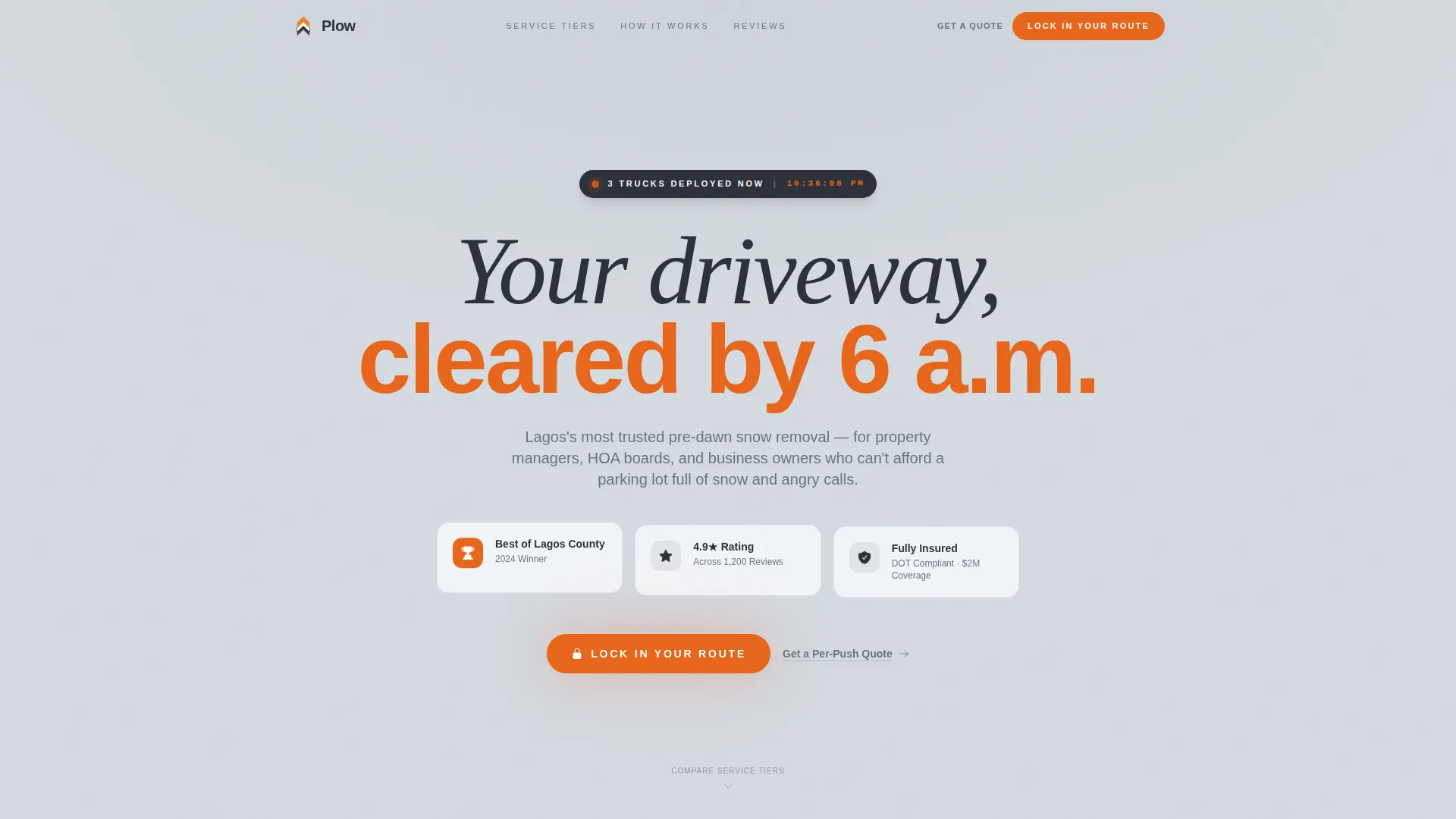
- A credential badge cluster in the header with trust signals and a live "Trucks Deployed Now" indicator
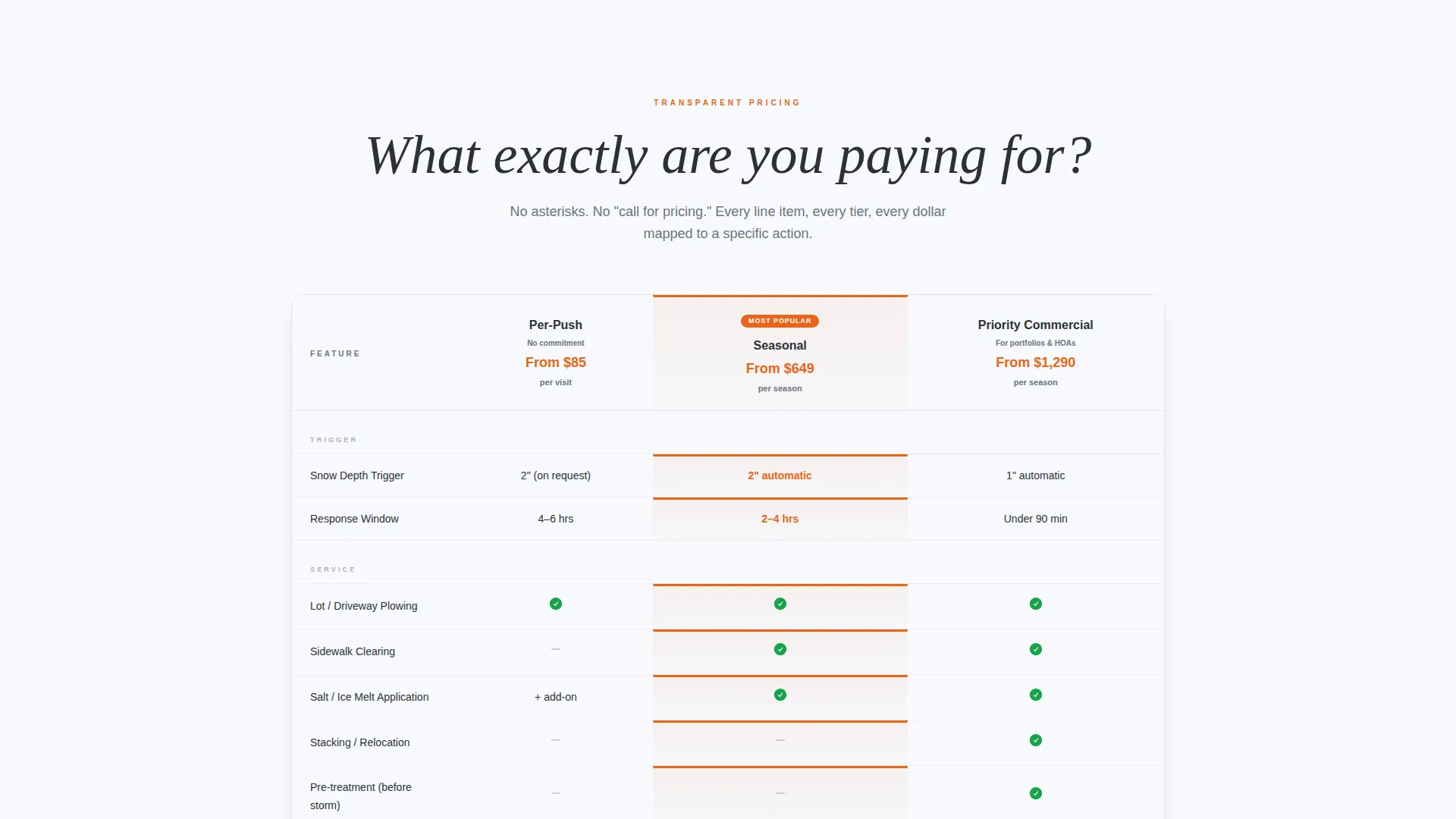
- A side-by-side comparison table covering three service tiers with line-item detail
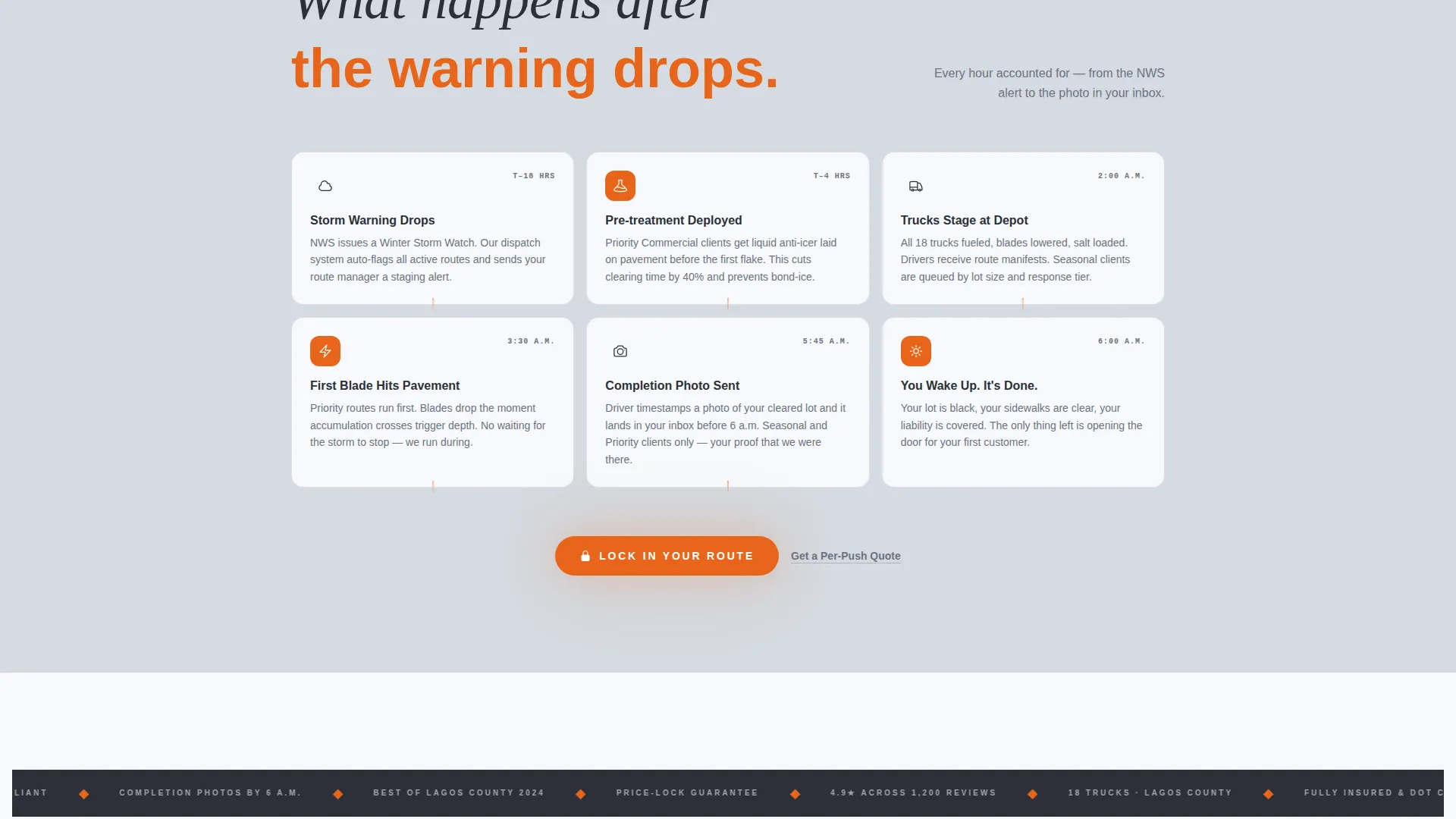
- A storm-response visual timeline and two distinct calls to action that route visitors to enrollment
Feature list
This template is built around a small set of high-impact components. Each one serves a specific conversion purpose tied to how snow removal buyers actually make decisions.
Stacked Trust Badge Header
The header displays four credential badges arranged like a municipal seal wall. Badges include "Best of Lagos County 2024," a 4.9-star rating across 1,200 reviews, full insurance and DOT compliance confirmation, and a real-time "Trucks Deployed Now" timestamp. There is no hero image. Just proof, front and center.
Three-Tier Comparison Table
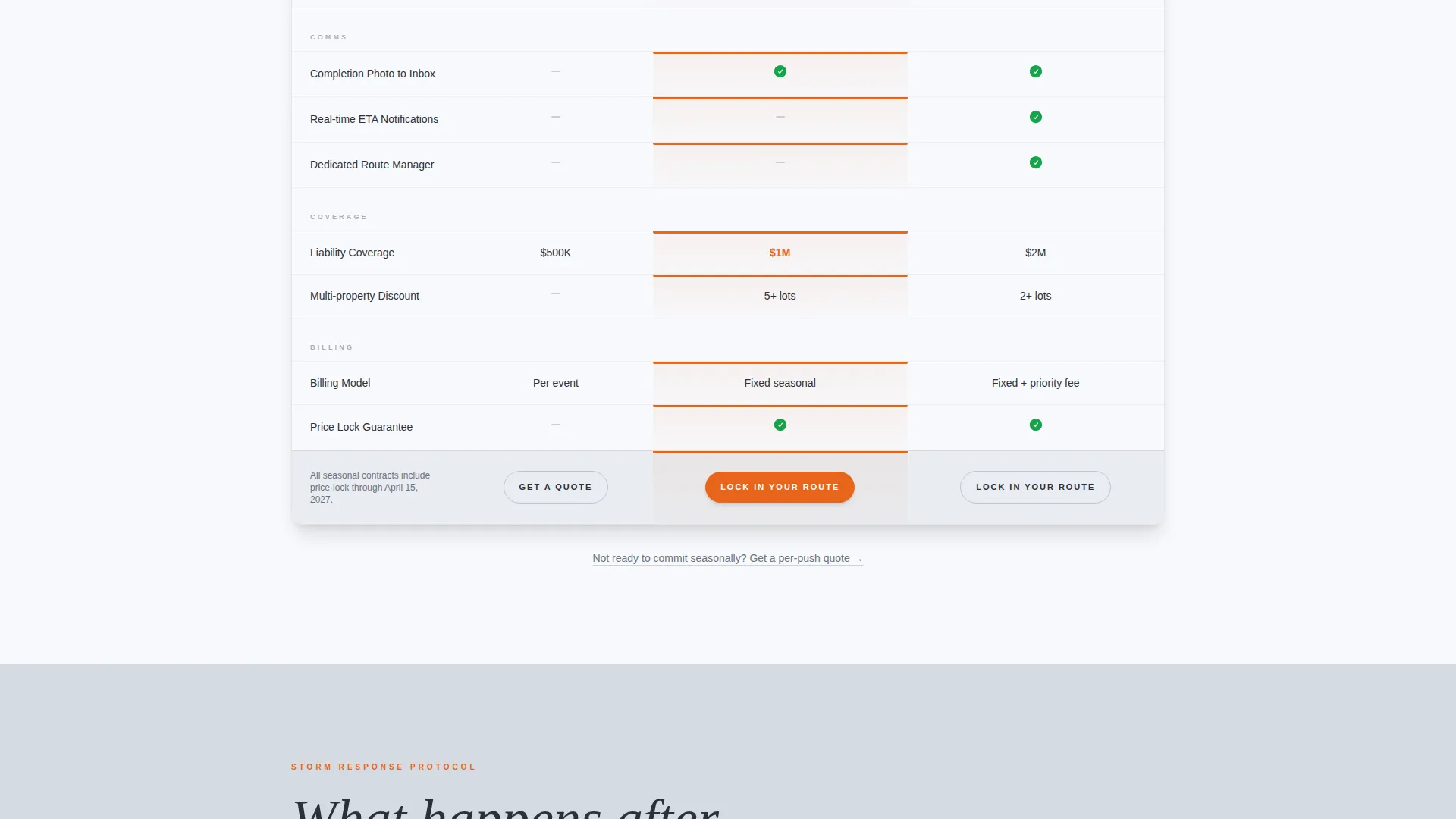
The core of the page is a structured comparison table showing per-push, seasonal contract, and priority commercial tiers side by side. Line items include trigger depth, response time windows, salt application, sidewalk clearing, and liability coverage. Visitors can see exactly what each tier includes without asking a single question.
Storm Response Visual Timeline
Below the comparison table, a sequential timeline walks through what happens from the moment a storm warning is issued. It shows when trucks stage, when blades hit pavement, and when the completion photo reaches the client's inbox. This section turns an abstract service promise into a concrete sequence of events.
Pinned Call-to-Action at Table Footer
A "Lock In Your Route" button sits pinned at the footer of the comparison table. Clicking it passes the selected service tier as a URL parameter to the seasonal contract enrollment page. This removes ambiguity and routes the right visitor to the right signup flow.
Secondary Soft-Conversion Link
A secondary text link reading "Get a Per-Push Quote" appears for visitors who are not ready to commit to a seasonal contract. It catches undecided buyers and gives them a lower-stakes next step without abandoning the page entirely.
High-Visibility call to action Repetition
The primary call to action reappears after the storm timeline section, reinforcing the offer at the moment visitors feel most confident. Repeating the call to action at two natural decision points increases the chance of capturing visitors who scroll before committing.
Page sections overview
| Section | Purpose |
|---|---|
| Trust Badge Header | Stacks credentials and live deployment status |
| Tier Comparison Table | Compares service tiers line by line |
| Storm Response Timeline | Shows exact post-warning truck sequence |
| Primary call to action Block | Pins "Lock In Your Route" at table footer |
| Post-Timeline call to action | Repeats enrollment offer after timeline |
| Secondary Quote Link | Captures undecided per-push visitors |
Design & branding system
The visual identity follows a Service Utility theme built on a Cloud Canvas color system. The palette is deliberately functional, evoking a pre-dawn parking lot under sodium lights rather than a polished marketing campaign.
- Overcast sky gray (#D5DAE0) backgrounds, asphalt charcoal (#2C3038) for text and table borders, and fresh-snowfall white (#F7F9FC) for card surfaces
- High-visibility safety orange (#E8651A) reserved for calls to action, key differentiators, and the live deployment badge
- No decorative hero imagery; the aesthetic is clean, no-nonsense, and anchored by municipal orange as the sole accent
Mobile & speed optimization
The layout is designed to stay readable and actionable on smaller screens. Comparison tables and timeline sections reflow cleanly so mobile visitors can scan tiers without horizontal scrolling.
- The pinned call-to-action button remains accessible at key scroll points on mobile viewports
- Badge clusters and timeline steps stack vertically on narrow screens without losing hierarchy or legibility
How this template helps you convert
This page earns the click by removing every question a prospect might use to delay a decision. The conversion logic is built into the layout itself, not added as an afterthought.
- The badge header establishes credibility in the first two seconds, before the visitor reads a single line of copy about the service itself.
- The comparison table eliminates the need to call for pricing details, cutting the friction that pushes buyers toward competitors.
- The URL-parameter call to action routes the selected tier directly to enrollment, so the visitor never has to repeat their choice on the next page.
Other information about this template
Plow is part of a growing library of niche-specific landing page templates built for local professional services. It is designed to work as a standalone click-through page that connects to an existing enrollment or booking flow.
- The template style is Comparison Table, making it well-suited for services with multiple pricing tiers or coverage levels
- The header concept is Award Badges, a pattern that works especially well for service businesses where trust is the primary purchase barrier
- The creative direction is Transparent Process, meaning every section is structured to answer "what exactly am I paying for" before the visitor has to ask
- This template fits the Lagos Local Services category and is purpose-built around the snow removal service niche, where speed, reliability, and clear scope are the deciding factors
Theme
Service Utility
Creative direction
Transparent Process
Color system
Cloud Canvas
Style
Comparison Table
Direction
Click-Through
Page Sections
Stacked Trust Badge Header
Three-tier Comparison Table
Storm Response Visual Timeline
Url-parameter Enrollment Call to Action
Secondary Per-push Quote Link
Repeated Call to Action After Timeline
Related questions
What type of business is this template built for?
How does the comparison table work?
How does the 'Lock In Your Route' button connect to my signup page?
Do I need a separate system to handle contracts or payments?
Can I update the badge labels and location references?



