Kids 3D Printing Landing Page Template for Parents
Maker is a single-column landing page template built for parents and educators guiding kids through their first 3D printing projects. It combines a community photo wall hero, a five-question personalized quiz, archetype-matched testimonials, and a pre-filled workshop registration form to move visitors from curious to committed in one warm, scrollable flow.
by Rocket studio
Quick summary
Maker is a warm, community-driven landing page template designed for kids 3D printing and maker education. A floating photo wall opens the experience, a personalized quiz matches each child to the right project, and a pre-filled event registration form closes the loop. The whole page feels like a friend's garage workshop, inviting and immediately useful.
Who this template is for
This template is built for adults who want to make 3D printing accessible and fun for the children in their lives. It speaks directly to people who are project-driven and a little time-constrained.
- Homeschool parents searching for structured Tuesday afternoon maker activities
- Maker-space dads who just unboxed a printer and need a clear starting point
- Elementary school teachers building affordable science, technology, engineering, and math stations
What problem this template solves
Most 3D printing resources assume the adult already knows what they are doing. This template removes that assumption entirely. It greets every visitor where they actually are and guides them forward.
- Parents feel overwhelmed by filament choices, safety questions, and age-appropriate project decisions
- Teachers and homeschoolers lack a single place that connects a child's specific interests to ready-to-use print guides
- Fence-sitters who are not ready to attend a live workshop still need a lower-commitment entry point
What you get with this template
You get a complete, ready-to-customize single-column landing page with every section already structured and connected. Nothing is left as a blank placeholder waiting for you to figure out layout.
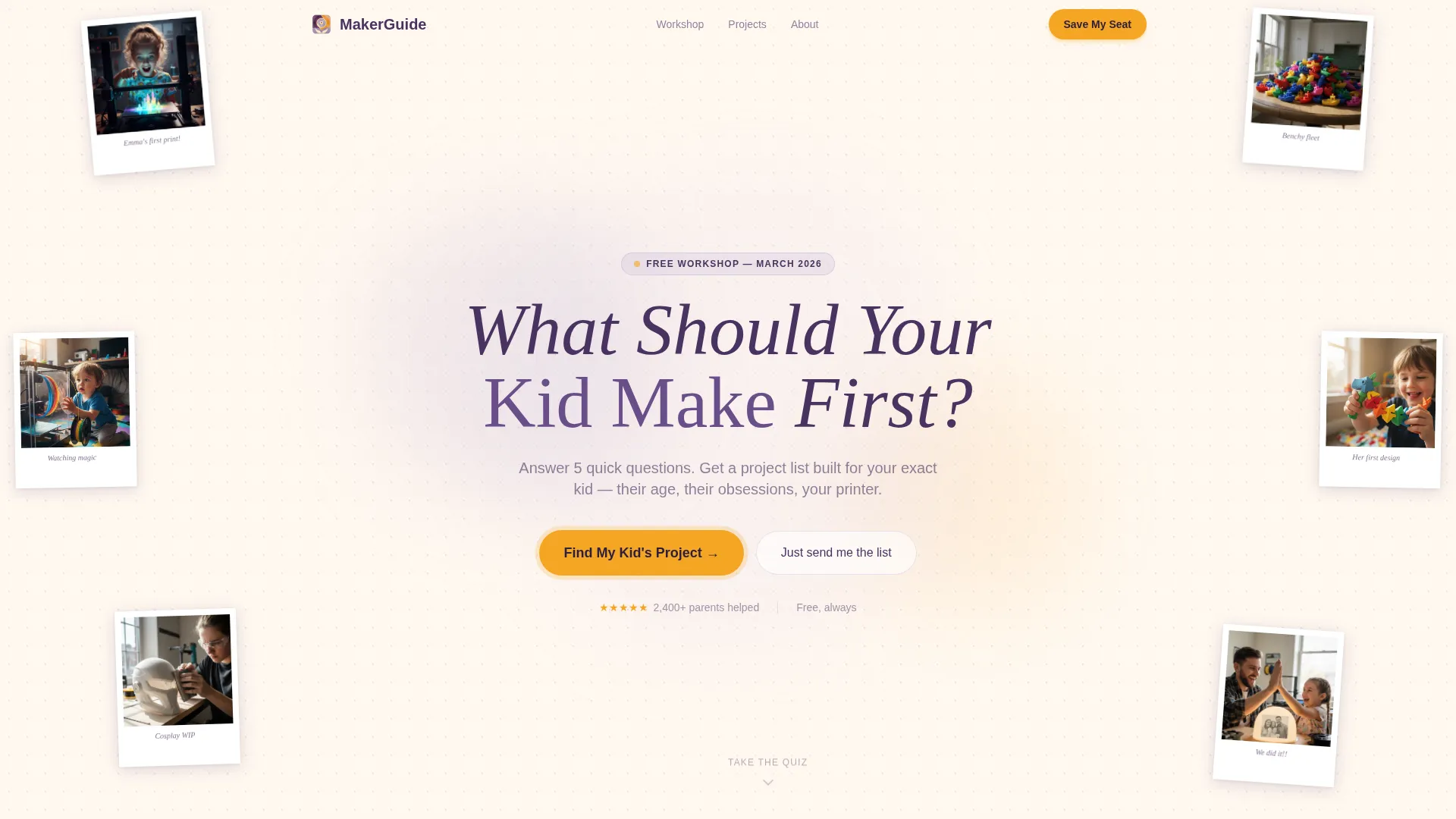
- A hero section built as a softly animated user-generated content photo mosaic with a hand-lettered central headline
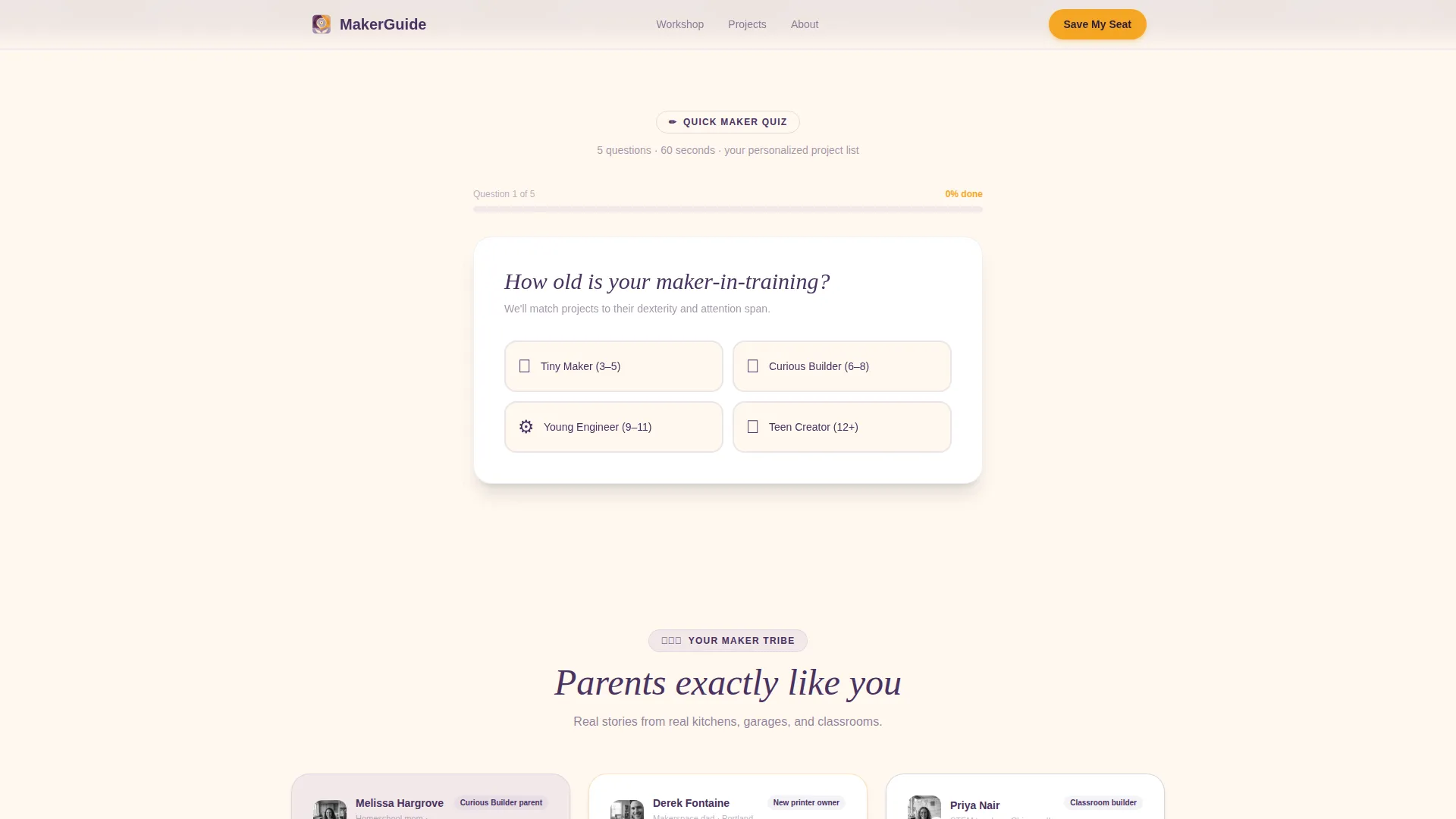
- A five-question sliding quiz that shifts the page's downstream content based on each answer
- A pre-filled workshop registration form and a separate low-friction email capture path for parents not yet ready to commit
Feature list
This template ships with six purpose-built features that work together as one cohesive experience.
Floating Polaroid Photo Wall Hero
The header is a softly animated mosaic of parent-submitted photos that drift in a slow parallax float. Images overlap like pinned Polaroids, and a hand-lettered headline emerges from the center. The section communicates community trust before a single body sentence is read.
Five-Question Personalized Quiz
A sliding quiz asks five questions one at a time: child's age, printer ownership status, interest sparks, supervision comfort level, and goal. Each answer subtly shifts the page's downstream content, surfacing matched starter prints, age-appropriate tool guides, and the specific workshop session that fits.
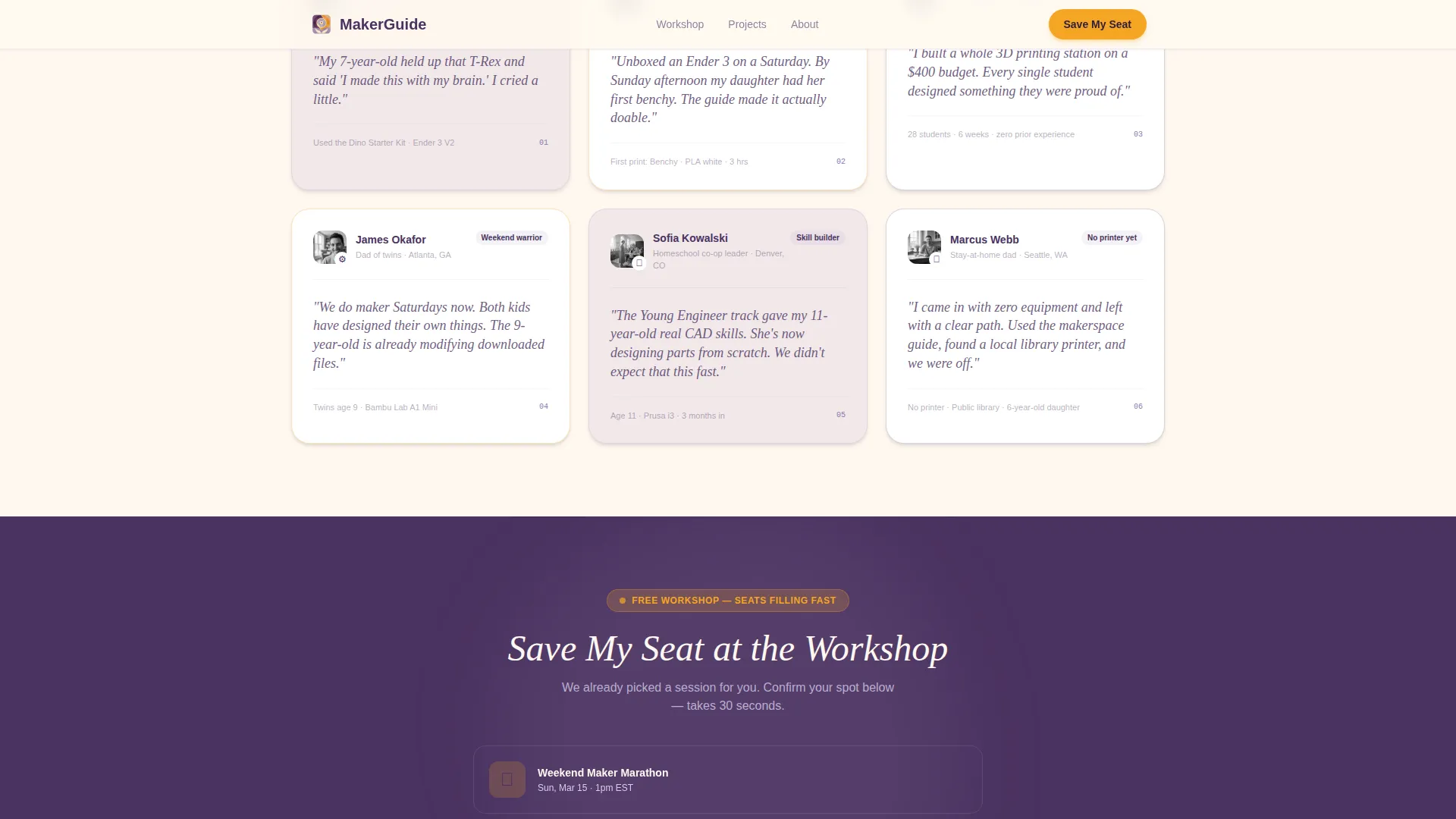
Archetype-Matched Testimonial Cards
After quiz results appear, testimonial cards from parents sharing the same profile slide into view. Each card carries a name and an archetype label. Spotlight hover effects highlight individual stories, making the visitor feel sorted into a community rather than sold to.
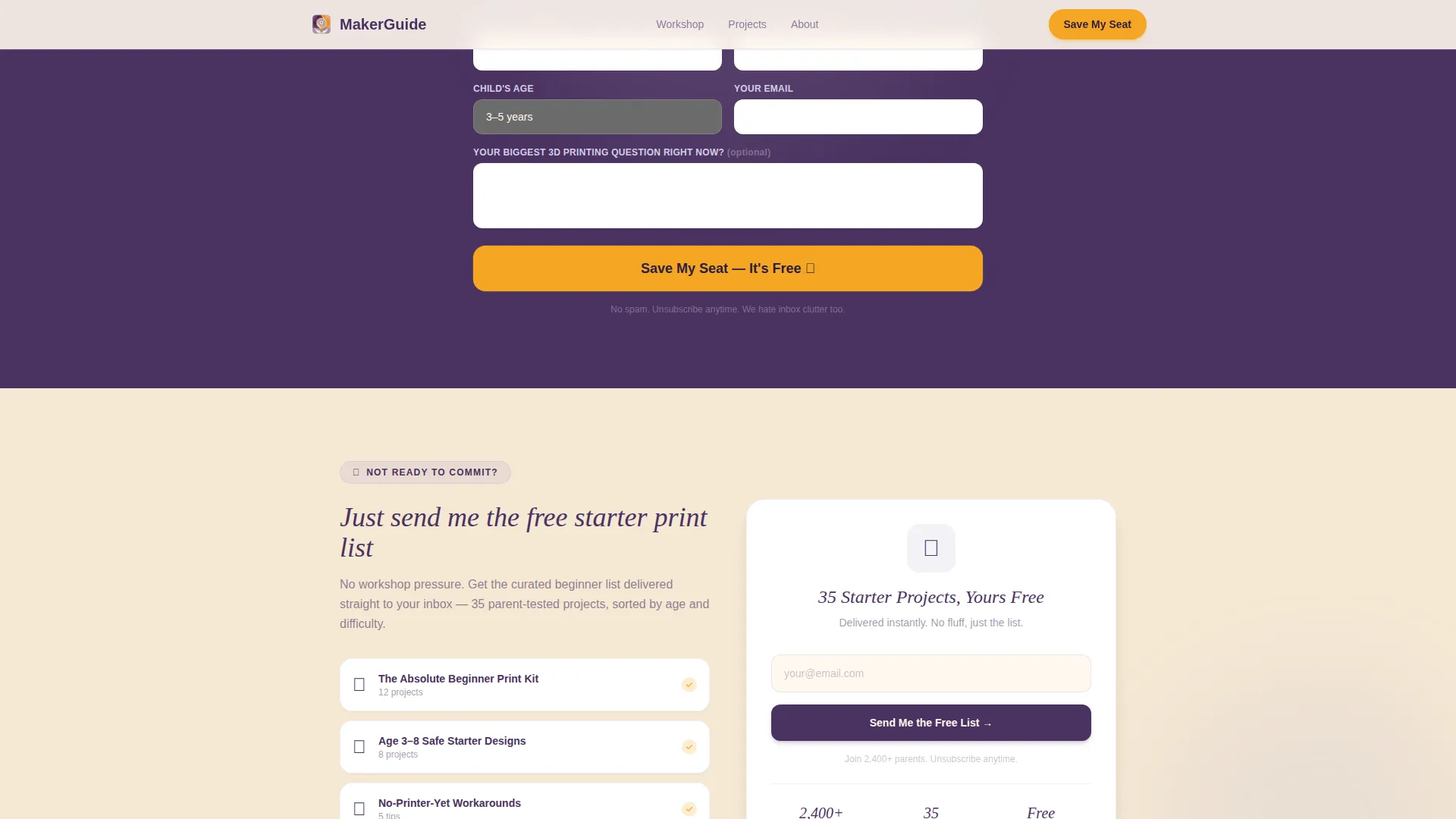
Pre-Filled Workshop Registration Form
The primary call to action appears immediately after personalized quiz results. The form pre-fills the child's age range and interest tags so the parent sees a session already chosen for them. Fields include parent first name, child's first name and age, email, and one optional open question about their biggest 3D printing challenge.
Low-Friction Email Capture Path
A secondary conversion path sits below the main registration form. It offers a free starter print list for parents who are not yet ready to commit to a live event. This path captures an email address with minimal friction and keeps the door open for future workshop registration.
Community Hearth Design System
The entire page uses a warm workshop aesthetic: lamplight tones, pegboard texture references, and Polaroid-style card treatments. Typography pairs Fraunces for headings with DM Sans for body copy, giving the page a hand-crafted feel that still reads cleanly on any screen.
Page sections overview
| Section | Purpose |
|---|---|
| Hero Photo Wall | Opens with community photos and hand-lettered headline to build instant trust |
| Personalized Quiz | Guides parents through five questions to match child's age and interests |
| Quiz Results Display | Surfaces matched starter prints, tool guides, and recommended workshop session |
| Testimonial Tribe Cards | Shows archetype-matched parent stories with spotlight hover interaction |
| Workshop Registration Form | Pre-filled primary call to action to save a seat at the matched session |
| Email Capture Path | Low-friction secondary path offering a free starter print list |
| Footer | Horizontal flow footer with supporting links and brand anchoring |
Design & branding system
The visual identity follows a Community Hearth theme built on the Lavender Dream color system. The palette feels like a child's watercolor set left open on a sunny kitchen counter.
- Core colors: soft wisteria (#B8A9D0), warm cream (#FFF8F0), deep plum (#4A3260) for headings and anchoring text, and cheerful marigold (#F5A623) for buttons and quiz interaction elements
- Typography: Fraunces for headings delivers a hand-lettered warmth, while DM Sans keeps body text clean, readable, and friendly
- Texture and motion: Polaroid-style card overlaps, staggered reveal animations driven by IntersectionObserver, and high-interactivity quiz slide transitions complete the garage workshop mood
Mobile & speed optimization
The template is built mobile-first because parents typically browse on their phones during school hours. Every interactive element is designed to work cleanly on a small screen without loss of personality.
- Quiz questions slide one at a time, keeping the mobile viewport uncluttered and the tap targets easy to hit
- CSS animations power the parallax float and staggered reveals, keeping the animation layer lightweight and smooth
- The single-column flow eliminates horizontal complexity, so the layout never breaks or requires horizontal scrolling on any phone screen size
How this template helps you convert
The page moves a visitor from curious browser to registered participant through a deliberately sequenced experience. Personalization is the engine that drives action.
- The quiz creates a sense of individual fit early in the scroll, so the visitor feels understood rather than marketed to before they reach any call to action.
- The pre-filled registration form reduces decision friction at the moment of commitment by presenting a specific, already-chosen workshop session matched to the child's profile.
- The secondary email capture path ensures that parents who are not yet ready to register still enter a nurture path, keeping conversion possible at a lower commitment level.
Other information about this template
This template is categorized under Kids & Family and specifically serves the kids 3D printing and maker parent resource guide niche. A few additional details worth knowing before you build with it.
- The template is coded for high animation and interactivity levels, including a quiz state machine, answer-driven content shifts, and spotlight card hover effects
- All copy placeholders use realistic example content drawn from the maker parent context, so customization requires replacing real scenarios, not inventing them from scratch
- The footer follows a Vercel Horizontal Flow pattern, giving the page a clean, organized close that matches the warmth of the sections above it
- The template supports English (United States) language conventions, imperial measurements, and USD pricing references throughout
Theme
Community Hearth
Creative direction
Quiz & Personalize
Color system
Lavender Dream
Style
Single Column Flow
Direction
Event Registration
Page Sections
Floating Polaroid Photo Wall Hero
Five-question Personalized Quiz
Archetype-matched Testimonials
Pre-filled Workshop Registration Form
Low-friction Email Capture Path
Community Hearth Visual Design System
Related questions
Can I use this template without hosting a live workshop?
Does the quiz require a third-party plugin to work?
Is this template a good fit for a STEM teacher building a classroom resource page?
How flexible is the color and typography system?
What happens after a parent submits the registration form?



