Kids 3D Printing & Maker Specialist Professional Website Template
Makerspot is a masonry-style landing page built for kids' 3D printing and maker equipment stores. It combines a photo-grid mosaic hero, staggered gallery sections organized by making moment, and a five-question personalized quiz that delivers age-appropriate starter bundles with email capture. Earthy botanical colors and warm typography make it feel like a real community workshop.
by Rocket studio
Quick summary
Makerspot is a warm, gallery-style landing page designed for kids' 3D printing and maker equipment stores. It leads every visitor through a curated scroll organized by making moment, from first printer picks to workbench essentials, and converts them with a personalized quiz that builds a starter bundle matched to the child's age, experience, and interests.
Who this template is for
This template is built for anyone selling maker gear to families and educators. It speaks directly to the people who shop with purpose and buy with care.
- Homeschool parents equipping a home STEM lab and looking for guided, age-safe recommendations
- Makerspace directors and after-school program coordinators sourcing project kits in bulk
- Scout troop leaders searching for merit-badge-ready project bundles for mixed-age groups
What problem this template solves
Most maker and STEM equipment stores organize their inventory by brand or product type. That layout forces parents and educators to already know what they need, which most do not. This template flips that approach entirely.
- Parents spend less time guessing by following a gallery organized around real making moments like "First Printer" and "Project Kits by Age"
- The built-in quiz removes decision fatigue by matching a child's age, experience level, interest, workspace, and budget to a recommended starter bundle
- Educators shopping for multiple kids get a direct path to age-range kits without digging through individual product pages
What you get with this template
The template delivers a complete single-page shopping experience with high interactivity and a warm visual character. Every section is purpose-built for the maker store context.
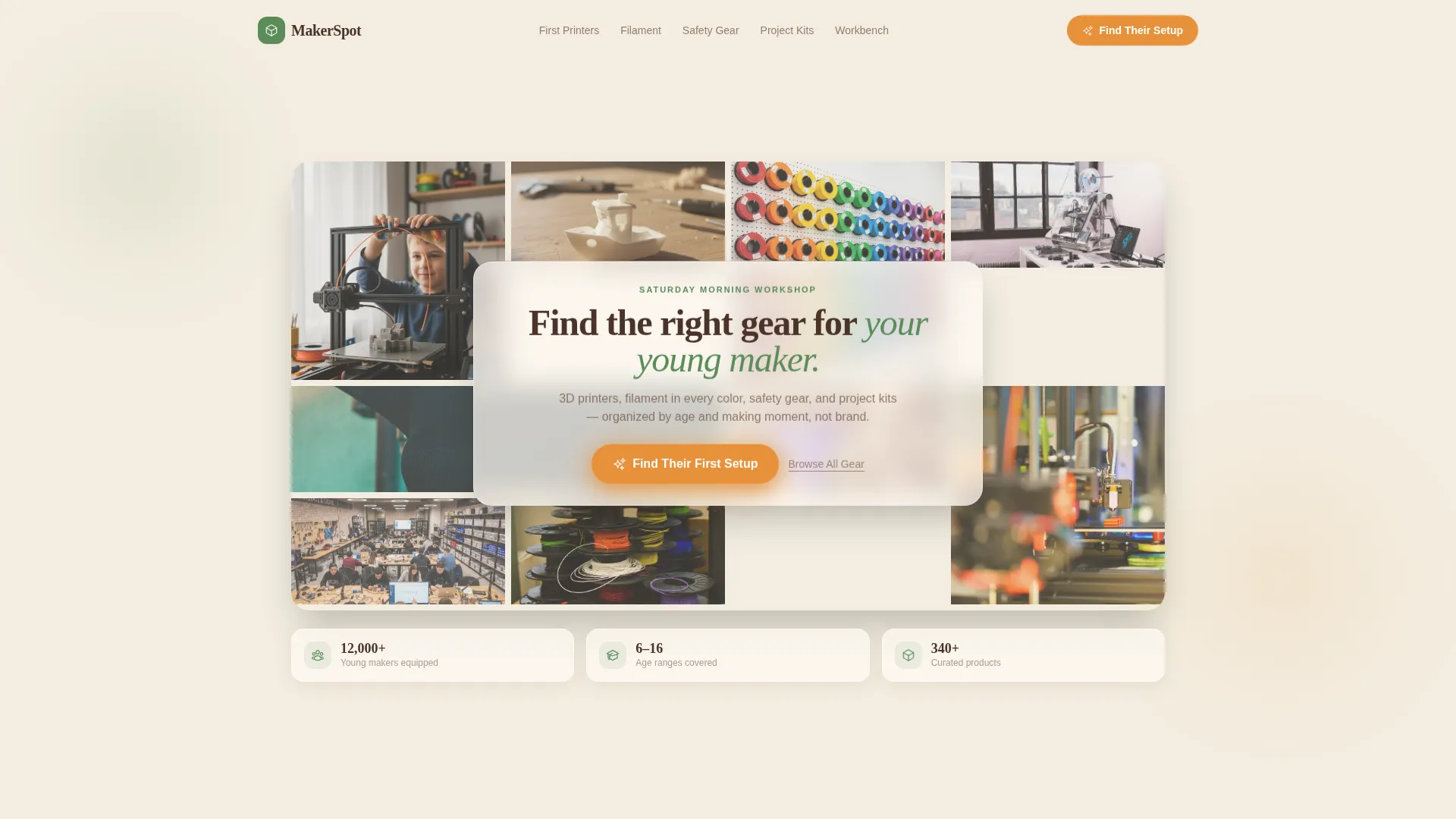
- A twelve-to-sixteen image photo grid mosaic hero with a floating hand-lettered headline and a quiz call to action
- Staggered masonry gallery sections grouped by making moment, tilt-on-hover product cards with age-range tags, full-bleed hero break images, and a community wall with testimonials
- A five-question illustrated quiz modal that outputs a personalized starter bundle, a printable checklist, and a "Save My Kit List" email capture form
Feature list
This template was designed with specific interactive and visual capabilities in mind. Here is what makes it function as more than a static storefront.
Photo Grid Mosaic Hero
The hero section is a living quilt of twelve to sixteen cropped workshop images arranged at varied scales. A hand-lettered headline floats over the center gap, and the primary quiz call to action sits inside the grid. No single image takes over the frame, so the mosaic itself communicates energy and community before a visitor reads a word.
Staggered Masonry Gallery
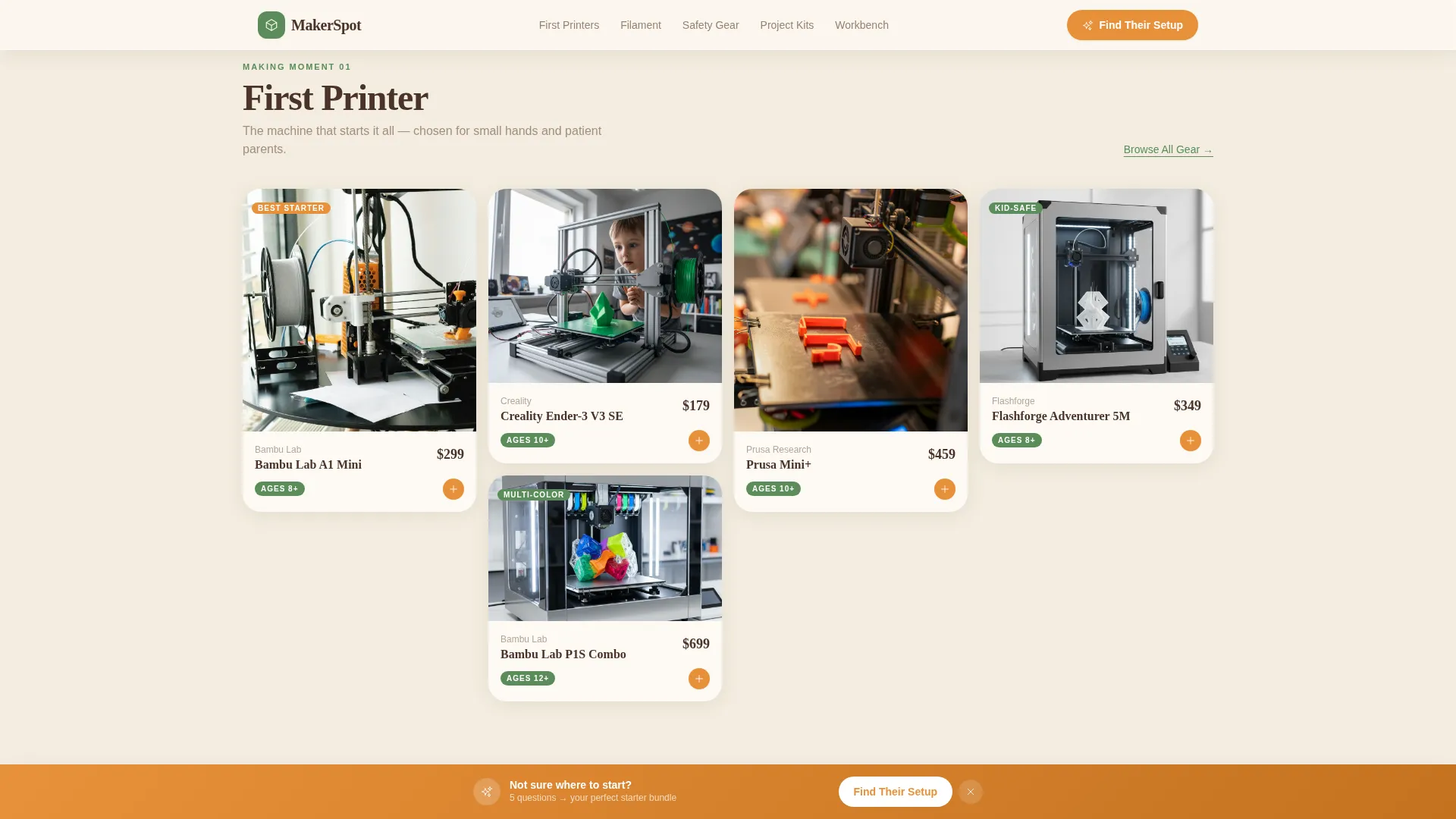
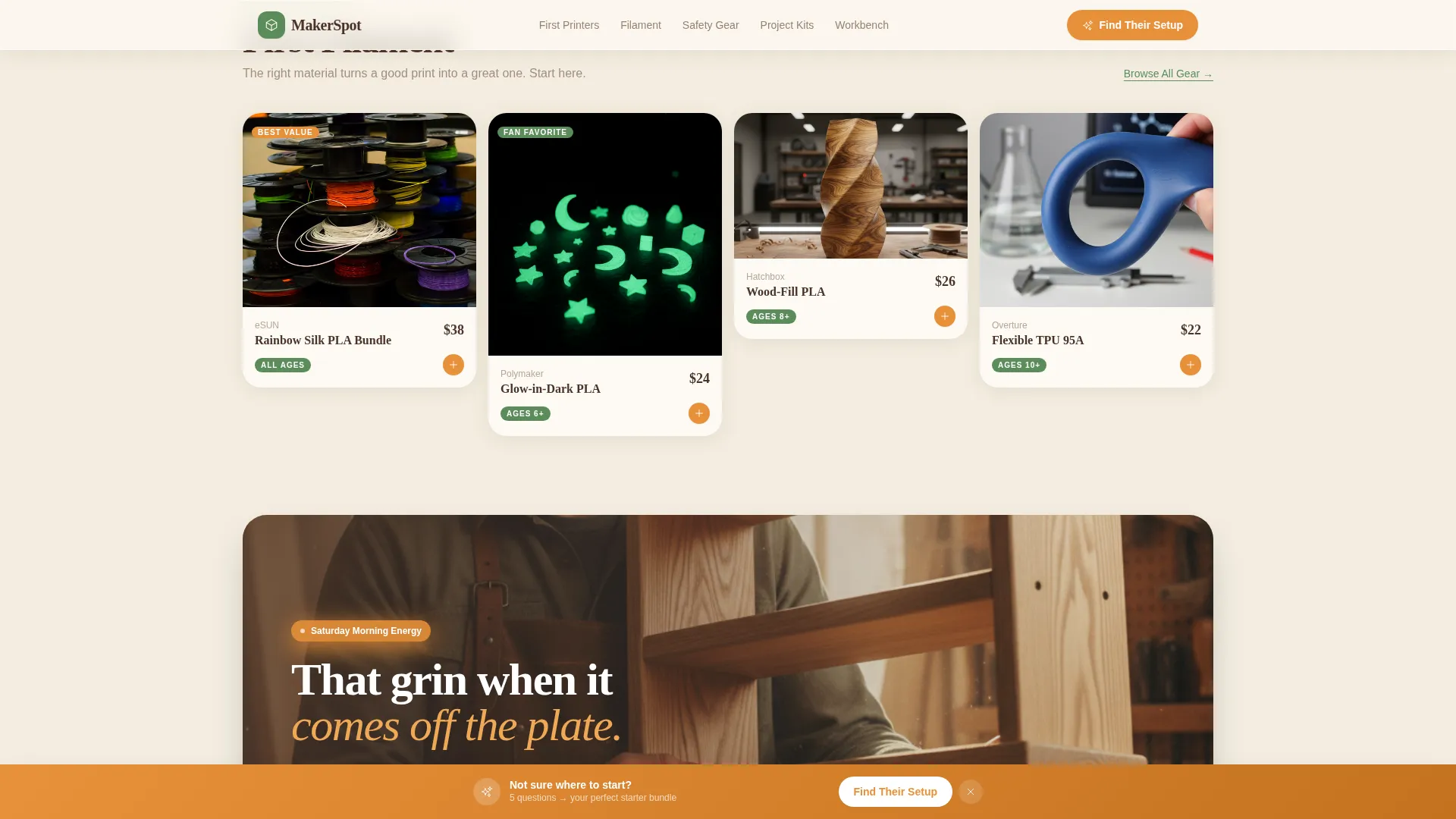
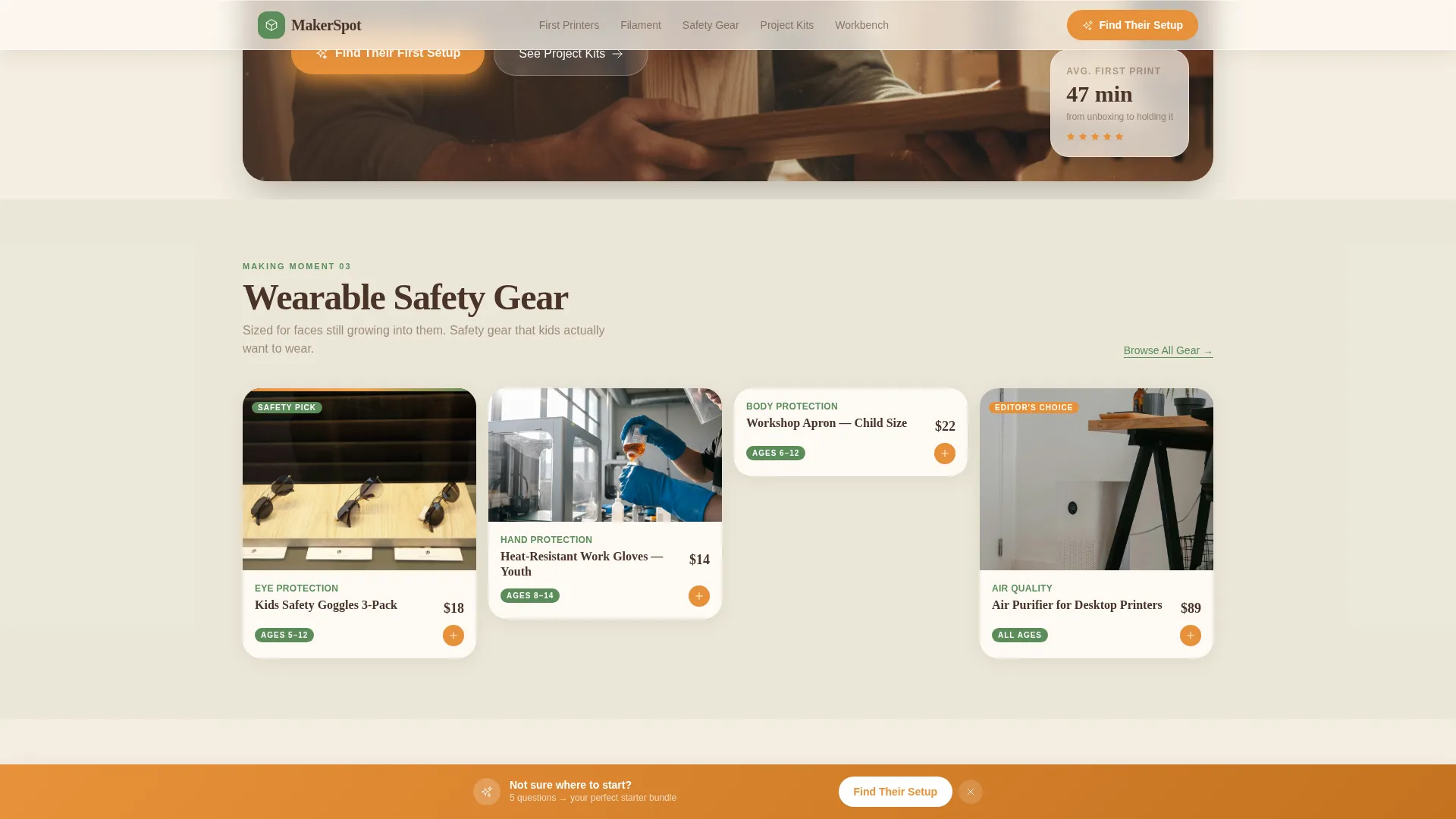
Products are grouped into making-moment categories: First Printer, First Filament, Wearable Safety Gear, Project Kits by Age, and Workbench Essentials. The layout alternates between tight four-column grids and breathing full-bleed hero break images. This rhythm makes the scroll feel like walking through a well-organized maker faire booth.
Tilt-on-Hover Product Cards
Each gallery card tilts gently when hovered, revealing a one-line descriptor and an age-range tag. This interaction encourages exploration without cluttering the resting layout. Cards use scroll-reveal animations and staggered entry timing for a polished gallery-walk feel.
Five-Question Personalized Quiz
Clicking "Find Their First Setup" opens an illustrated quiz modal. It asks five questions: the child's age range, experience level, primary interest, workspace size, and budget comfort zone. The result is a matched starter bundle with a printable checklist and an email capture prompt to save the kit list.
Sticky Quiz Call to Action Bar
After the second gallery section, the "Find Their First Setup" button in pollinator orange pins gently to the bottom of the viewport. It stays visible as the visitor scrolls, keeping the primary conversion action reachable at any point without interrupting the browsing experience.
Community Wall with Testimonials
The final content section pairs a masonry layout of real kid project photos with educator testimonials. A social proof metric showing the number of young makers equipped anchors visitor trust before they reach the footer.
Page sections overview
| Section | Purpose |
|---|---|
| Photo Grid Mosaic Hero | Opens with a quilt of workshop images, floating headline, and quiz call to action |
| First Printer Gallery | Masonry cards for beginner printer picks, tilt-on-hover with age tags |
| First Filament Gallery | Staggered filament product cards grouped by color and material type |
| Mid-Scroll Hero Break | Full-bleed kid mid-build photo with pinned quiz call to action |
| Safety Gear Grid | Tight alternating grid for wearable safety products with age-range labels |
| Project Kits by Age | Curated kit bundles organized by child age range |
| Workbench Essentials | Masonry section for tools, storage, and station setup gear |
| Community Wall | Kid project photos, educator testimonials, and social proof metric |
| Footer | Horizontal flow footer with navigation and secondary links |
Design & branding system
The visual identity follows a Community Hearth theme built on a Botanical color palette. Every color has a clear job, so the page feels organized without feeling rigid.
- Birch cream (#F3EDE0) dominates the background, giving the page a warm workshop feel; fern green (#5B8C5A) anchors section dividers and category labels; potting-soil brown (#6B4F3A) grounds all body typography
- Pollinator orange (#E8913A) appears only on buttons, badges, and hover states so every clickable element stands out naturally without competing for attention
- Fraunces is used for display headings to bring a hand-crafted, approachable warmth; DM Sans handles body text for clean readability at all sizes
Mobile & speed optimization
The template is built with a mobile-first priority because the primary audience, homeschool parents, shops most often on phones during the school day. The layout adapts thoughtfully from phone to desktop.
- The masonry grid collapses to a clean single-column or two-column view on small screens, keeping the card tilt and reveal interactions intact
- The quiz modal is designed for touch-first interaction so parents can complete all five questions comfortably on a phone without zooming or horizontal scrolling
- Image loading uses lazy rendering and Next.js Image optimization so the mosaic hero and large gallery sections do not slow the initial page load on mobile connections
How this template helps you convert
Every structural decision in this template is oriented toward turning a casual browser into a buyer or email subscriber. The conversion path has multiple entry points for different visitor types.
- The photo mosaic hero and making-moment gallery pull undecided visitors into a browsing rhythm before asking for anything, building confidence through visual storytelling and product discovery.
- The five-question quiz narrows choices for overwhelmed buyers and ends with a personalized bundle plus an email capture, creating a low-pressure path to both a sale and a subscriber relationship.
- Confident buyers who already know what they want can skip the quiz at any point using the quieter "Browse All Gear" text link placed beneath every section header, keeping their experience fast and friction-free.
Other information about this template
This template is designed to serve both individual family buyers and bulk-purchasing educators from a single page layout. A few additional details are worth noting for anyone evaluating it for their store.
- The template supports USD pricing and Imperial measurements out of the box, matching a United States market context
- The "Save My Kit List" email capture is built into the quiz results screen, so list-building happens at the moment of highest engagement
- The page uses CSS custom properties for its Botanical theme, which makes color updates straightforward when adapting the palette to a different brand identity
- Animation intensity is high across the template, including parallax mosaic movement, scroll reveals, staggered grid entries, and the quiz modal transition, giving the page an interactive, alive quality consistent with the workshop theme
- The footer follows a horizontal flow pattern with navigation links and secondary paths for visitors who scroll past all content sections
Theme
Community Hearth
Creative direction
Gallery Walk
Color system
Botanical
Style
Masonry/Pinterest
Direction
Quiz/Assessment
Page Sections
Photo Grid Mosaic Hero
Making-moment Gallery Sections
Tilt-on-hover Product Cards
Five-question Illustrated Quiz Modal
Sticky Conversion Bar
Community Wall and Social Proof
Related questions
Who is this landing page template designed for?
Can I use this template without the quiz feature?
How does the personalized quiz work?
Is this template suitable for bulk buyers like makerspace directors?
What makes the visual design feel different from a standard e-commerce template?



