Telemedicine & Health Tech Comparison Website Template
Manage is a comparison table landing page built for chronic disease management. It presents expert voices, side-by-side data comparisons, and a gated Clinical Evidence Guide download to convert endocrinologists, rheumatology nurses, and patients. The single-page layout builds a clinical argument section by section, making the case for a unified glucose, medication, and symptom timeline.
by Rocket studio
Quick summary
Manage is a single-page, comparison-table landing page template for a chronic disease management platform. It combines expert panel sections, animated counters, and structured comparison tables to guide clinicians and patients toward downloading a Clinical Evidence Guide or watching a demo. The design feels like a hospital command center: precise, readable, and trustworthy.
Who this template is for
This template is built for health tech teams that need to convert a clinical audience. It speaks directly to the people making care decisions every day and to the patients living with those decisions.
- Endocrinologists managing panels of 400 or more diabetic patients who need a fast ROI argument
- Rheumatology nurses coordinating biologic infusion schedules who need to show adherence tracking value
- Patient advocates and patients themselves who want care teams to finally see their full symptom history
What problem this template solves
Clinical buyers are skeptical. They have seen generic health apps promise much and deliver scattered data. This template solves the credibility gap by building a structured, evidence-led argument before it ever asks for an email.
- Paper logs and generic apps fail to surface patterns across months of glucose and symptom data
- Care teams lack a shared view that reconciles medications, readings, and journals in one place
- Clinical decision-makers need peer-credentialed social proof before they will engage with a new platform
What you get with this template
You get a fully structured, scroll-driven landing page that earns trust section by section. Every component is purpose-built for a clinical audience that demands precision.
- A giant headline hero with an animated count-up number showing live care decisions supported
- Three expert panel blocks with credentials and accompanying comparison tables
- A gated two-field download form and an ungated demo call to action built into the conversion section
Feature list
This template ships with six distinct functional areas, each designed to carry clinical authority and move a skeptical reader toward action.
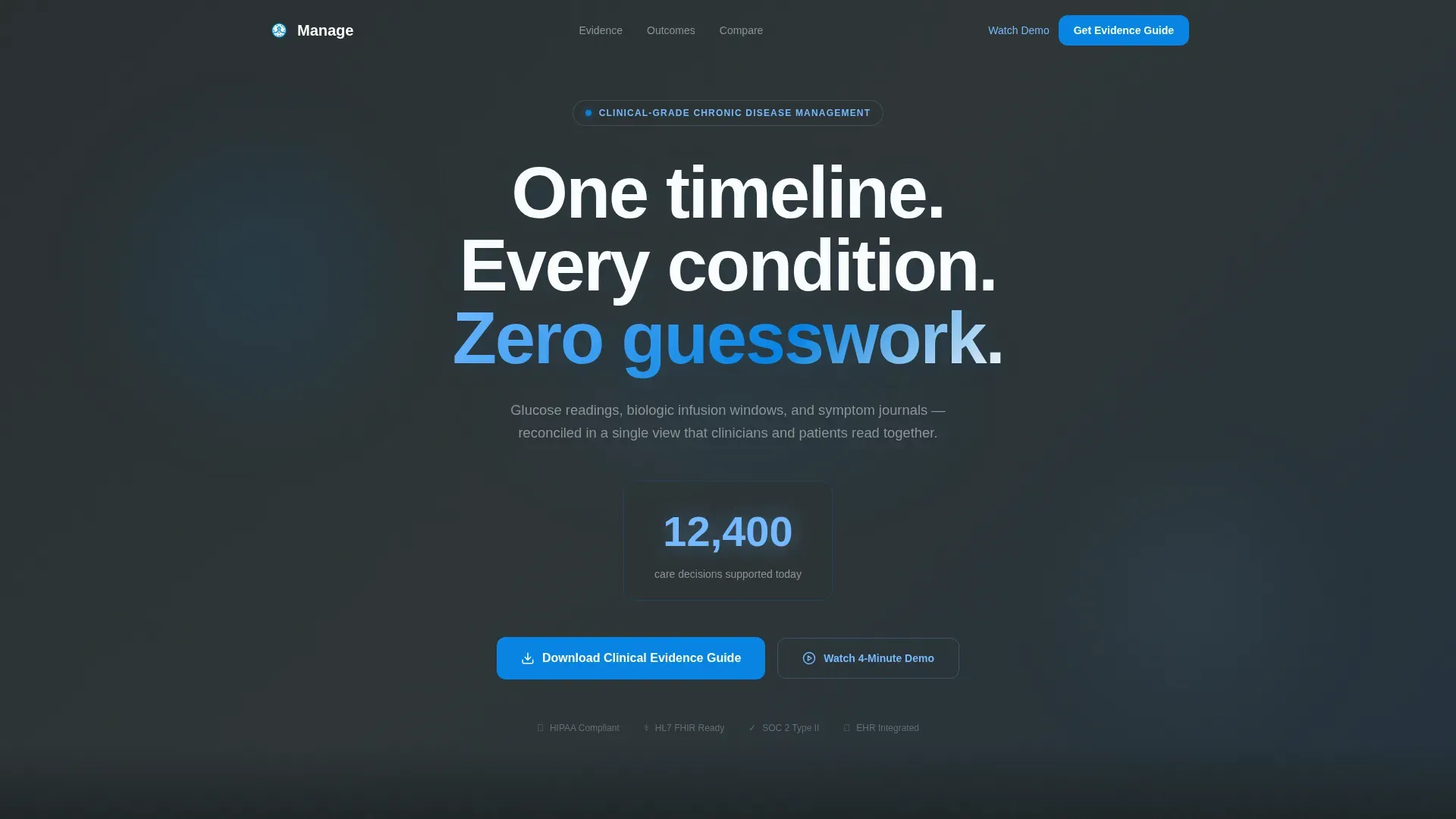
Giant Headline Hero with Animated Counter
The hero opens with white type on clinical charcoal: "One timeline. Every condition. Zero guesswork." A count-up number beneath the headline reads "12,400 care decisions supported today," giving the page a living pulse without a single hero image.
Expert Panel Scroll Sections
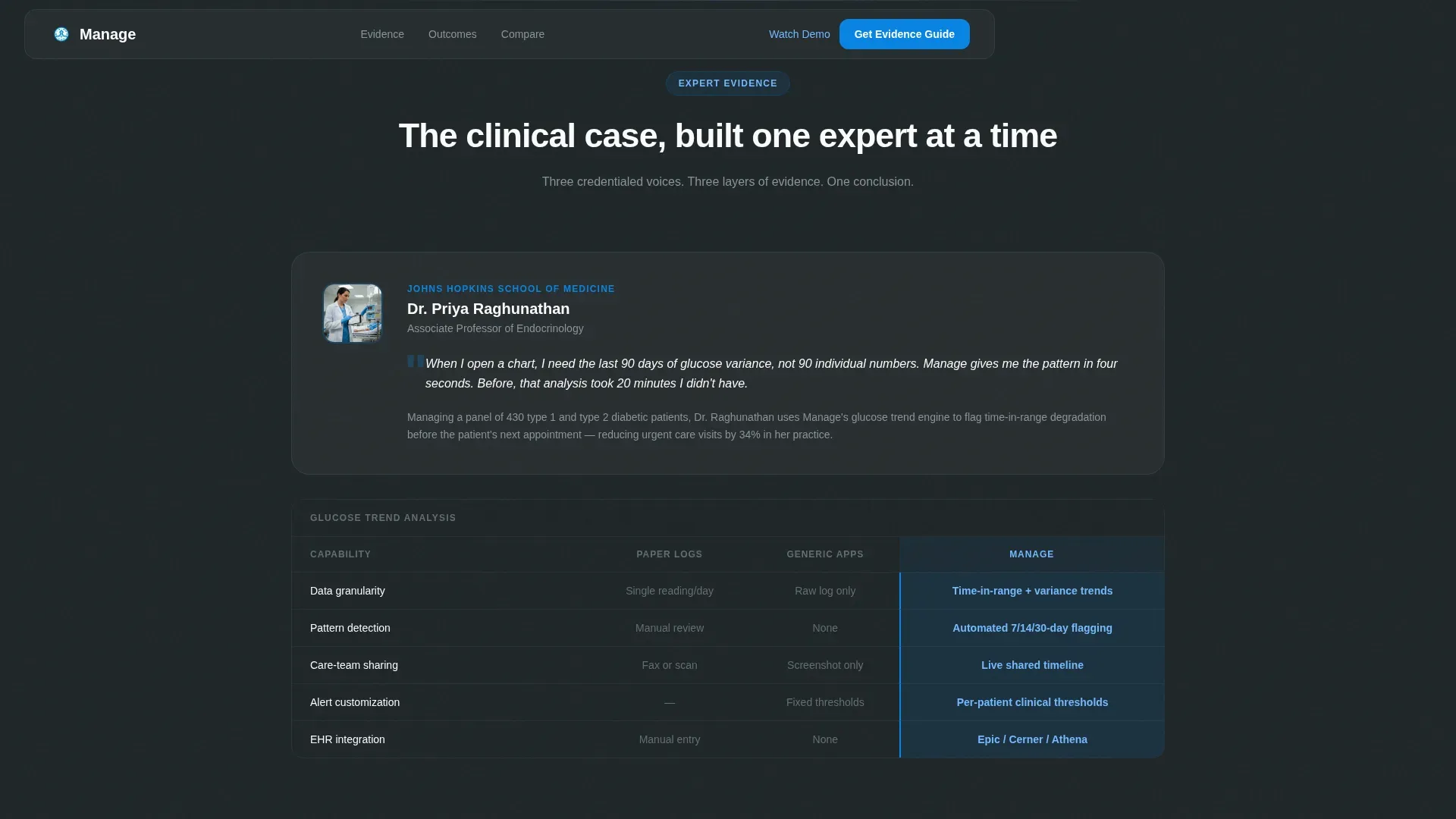
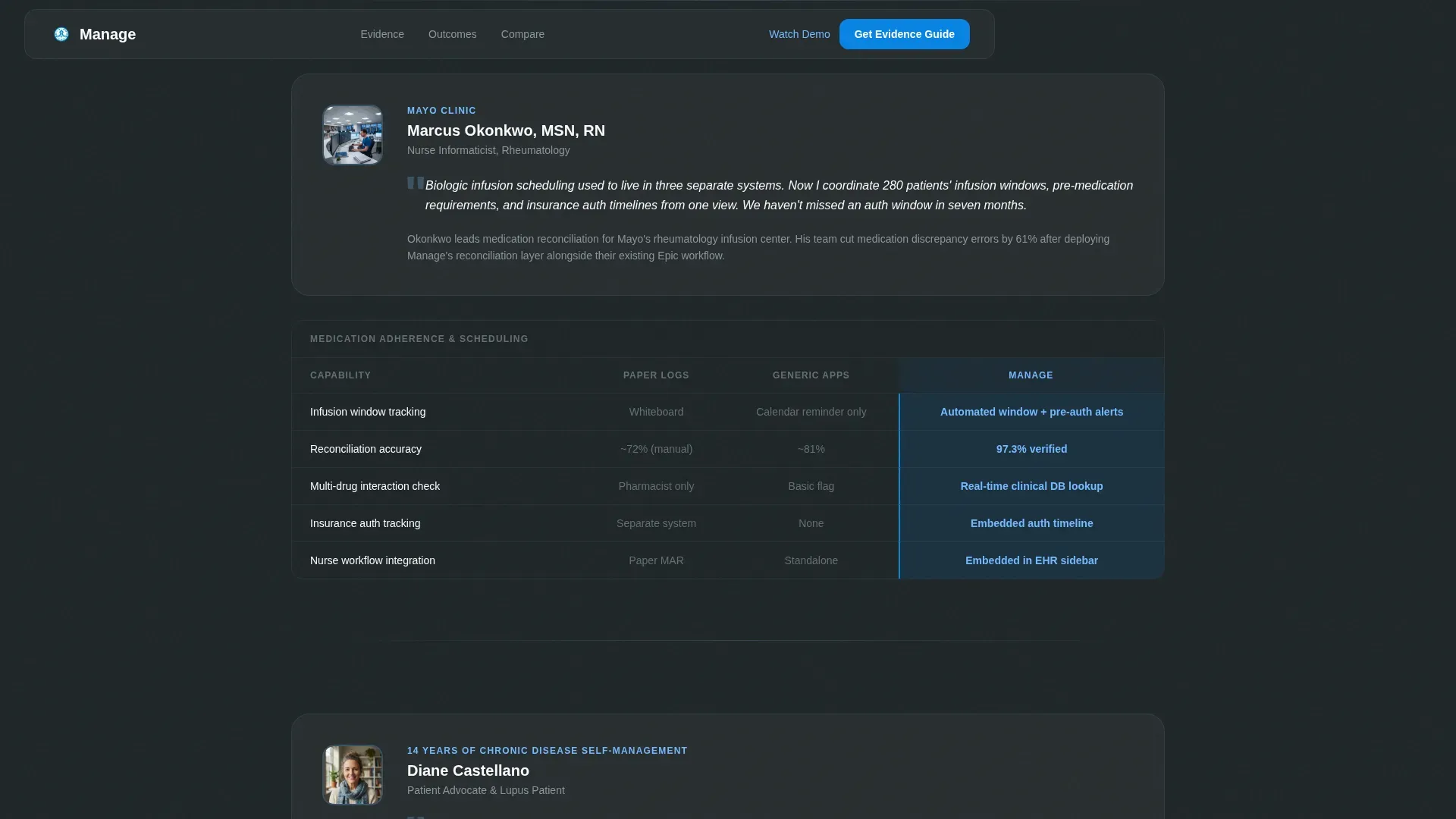
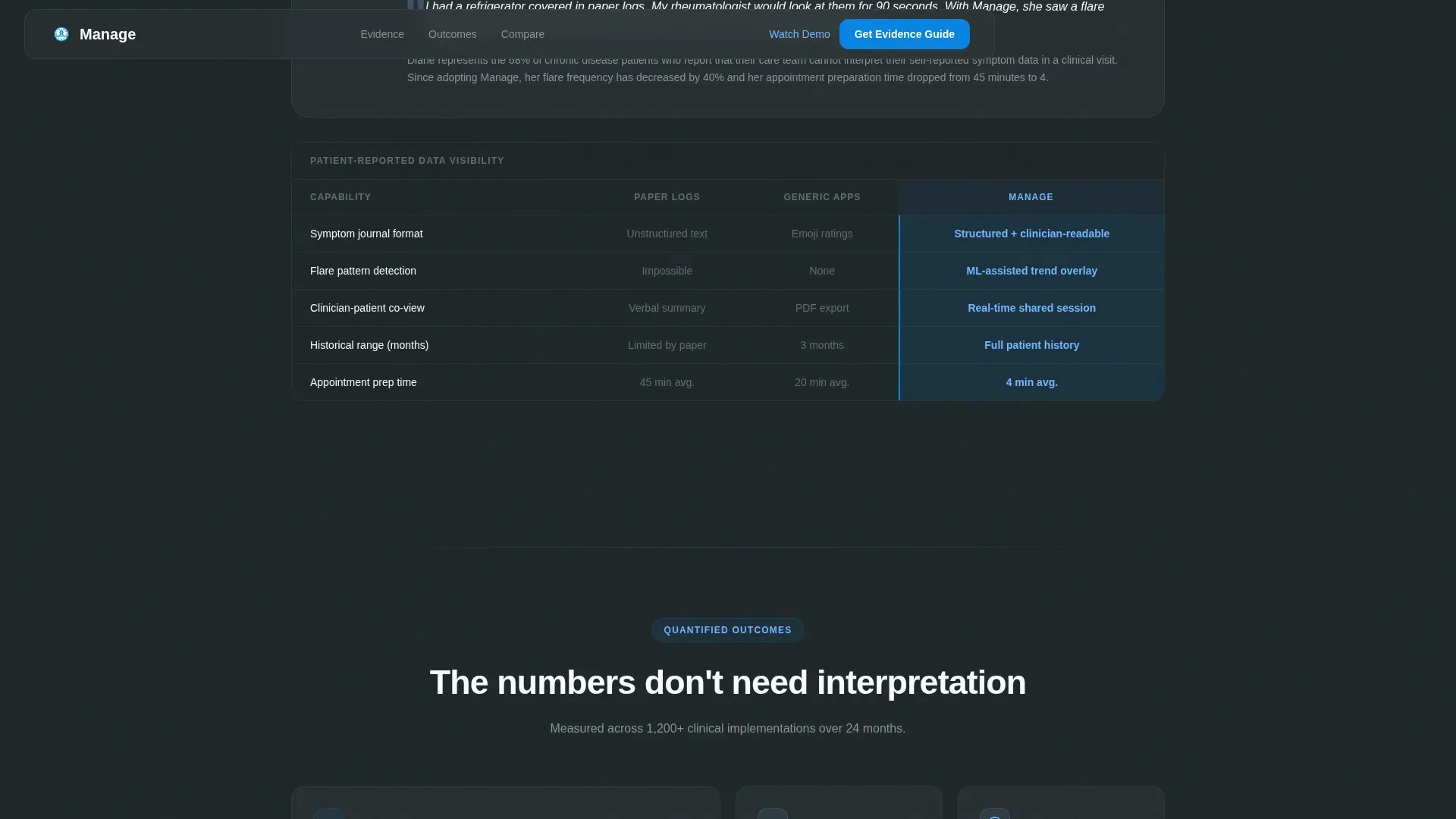
Three credentialed expert blocks scroll into view one at a time. A Johns Hopkins endocrinologist covers glucose trend analysis. A Mayo Clinic nurse informaticist walks through medication adherence tracking. A patient advocate explains what changed when her rheumatologist could finally see months of flare patterns.
Structured Comparison Tables
Each expert block is followed by a comparison table. Columns compare paper logs, generic apps, and the platform. Rows cover data granularity, care-team sharing, alert customization, and electronic health record integration. The winning column in each row is highlighted in open-sky blue.
Gated Clinical Evidence Guide Download
The primary call to action is a two-field form: work email and role. Role options include physician, nurse, administrator, and patient. The form appears only after expert credibility and quantified outcomes have been front-loaded, so readers feel the download is earned.
Ungated Demo Path
A secondary "Watch the 4-Minute Demo" button sits alongside the gated form. It captures intent through scroll-depth tracking without requiring a form submission, giving hesitant visitors a lower-commitment entry point.
Outcomes Metrics Bento Block
After the third expert panel, a bento-grid metrics section surfaces quantified outcomes. This block acts as the final layer of evidence before the conversion section, consolidating the argument built across the expert panels.
Page sections overview
| Section | Purpose |
|---|---|
| Hero headline | Establish authority with bold typography and animated live counter |
| Expert Panel 1 | Endocrinologist explains glucose trend analysis |
| Comparison Table 1 | Paper logs versus. generic apps versus. platform on data granularity |
| Expert Panel 2 | Nurse informaticist covers medication adherence tracking |
| Comparison Table 2 | Care-team sharing and alert customization compared |
| Expert Panel 3 | Patient advocate describes flare pattern visibility |
| Outcomes metrics bento | Quantified results displayed in a card grid |
| Conversion section | Gated download form plus ungated demo call to action |
| Footer | Linear single-row footer with minimal links |
Design & branding system
The visual identity follows a Corporate Precision theme. Every color choice is functional: it directs the eye, separates data layers, and signals clinical reliability without warmth or decorative noise.
- Color palette: clinical charcoal (#2D3436) for backgrounds, instrument-panel slate (#636E72) for secondary text, open-sky blue (#74B9FF) for accents, sterile white (#FAFBFC) for card surfaces, and cerulean (#0984E3) for buttons and active table headers
- Typography: DM Sans for headlines delivers tight, high-contrast weight; Manrope handles body text with clean legibility at clinical reading distances
- Interactive states use cerulean on toggle states, active table headers, and comparison table winner highlights to keep the eye moving through data
Mobile & speed optimization
The template is designed desktop-first, matching the primary use context of clinicians at workstations. Mobile parity is maintained so patients and nurses on tablets or phones receive the same structured argument.
- Scroll-reveal stagger animations and floating card effects are handled by client components, keeping static content fast to render
- Comparison tables reflow cleanly at smaller viewports so row-level data remains readable without horizontal scrolling
How this template helps you convert
This template converts by building a case before it makes an ask. Every scroll adds a layer of evidence, so by the time the form appears, the reader already trusts the platform.
- Front-loaded expert credibility from named, credentialed clinicians removes the skepticism barrier that kills clinical SaaS conversions
- The gated download form appears only after quantified outcomes and peer evidence have been presented, making the two-field ask feel proportionate to the value offered
Other information about this template
This template is categorized under Health & Medical, specifically within the Telemedicine and Health Tech subcategory, targeting the chronic disease management app niche. It is built as a Clinical SaaS landing page with a B2B2C audience structure, meaning it must speak to institutional buyers and individual patients in the same scroll.
- The template uses English copy, United States date format, and is priced in USD by default
- Animation fidelity is set to high: count-up numbers, scroll-reveal stagger, table row highlights, and floating cards all require client-side rendering
- The footer follows a Linear Single-Row pattern, keeping the close of the page clean and uncluttered
Theme
Corporate Precision
Creative direction
Expert Panel
Color system
Slate & Sky
Style
Comparison Table
Direction
Content/Resource
Page Sections
Giant Headline Hero with Live Counter
Three-block Expert Panel Scroll
Comparison Tables with Highlighted Winners
Gated Clinical Evidence Download Form
Ungated Demo Call to Action
Outcomes Metrics Bento Block
Related questions
Who is this landing page template designed for?
Can I edit the expert credentials and comparison table rows?
What makes the comparison table format effective for clinical buyers?
Is the demo button gated or open access?
What conversion paths does this template include?



