Government Consulting Landing Page Template
Mandate is a split-screen landing page template built for government digital transformation consultancies. It pairs press-wall credibility with team-driven case narratives, guiding senior public-sector buyers toward a "Schedule a Capabilities Briefing" conversation. The Corporate Precision visual system and Cloud Canvas color palette communicate institutional authority without feeling bureaucratic or cold.
by Rocket studio
Quick summary
Mandate is a single-page template designed for consultancies that modernize government operations. It uses a 50/50 split-screen layout, alternating between human faces and measurable proof, to build trust with state and federal decision-makers. The primary call to action drives visitors toward a structured briefing request, while a secondary path delivers a gated portfolio document to procurement-ready leads.
Who this template is for
This template speaks directly to government-focused consultancies that need a credible, conversion-oriented web presence. It is not a general-purpose professional services page. It is built for firms whose clients sit inside public agencies and whose sales cycle depends on trust before budget.
- Government digital transformation consultancies pitching to state and federal agency leaders
- Consulting teams whose work spans legacy system replacement, permit modernization, or agency workflow redesign
- Business development professionals targeting state Chief Information Officers, county administrators, and federal program directors
What problem this template solves
Most consulting firm pages bury their best proof inside long case study PDFs that a busy agency director will never open. The result is a page that looks professional but fails to move a qualified lead toward a real conversation. Mandate fixes that by surfacing credibility and human context before the visitor has to search for it.
- Press recognition and pull-quote excerpts appear at the very top, before any sales language
- Case narratives pair a consultant's face with a specific agency outcome, replacing vague service descriptions
- The two-step briefing form and gated portfolio download create two distinct paths for leads at different stages of readiness
What you get with this template
The template delivers a fully structured single-page layout with every section already sequenced for a public-sector B2B audience. You get a visual system, a conversion flow, and a content architecture that does the persuasion work without requiring you to start from a blank canvas.
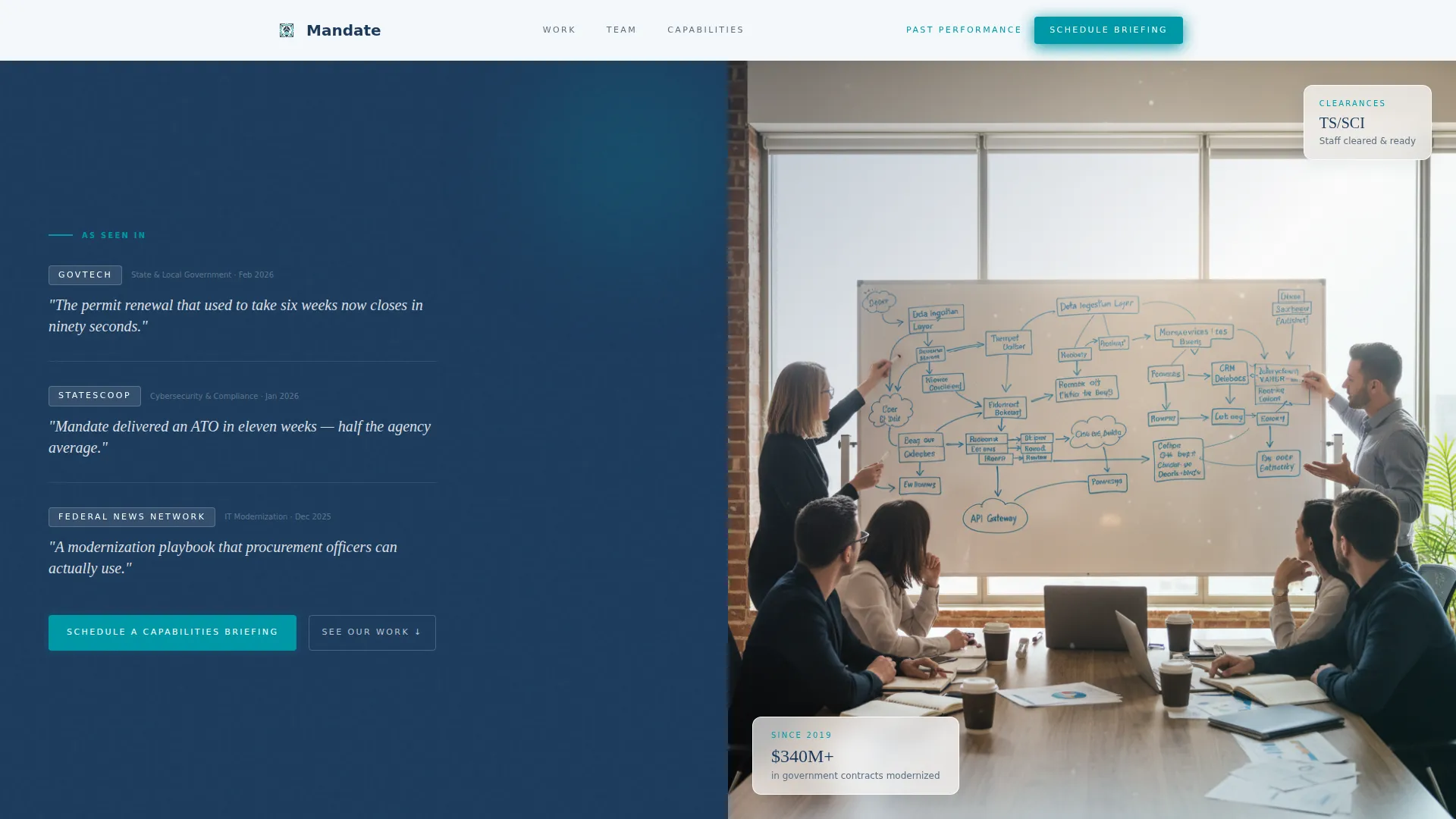
- A split-screen press wall header with space for publication logos and large-format pull quotes alongside a team photograph
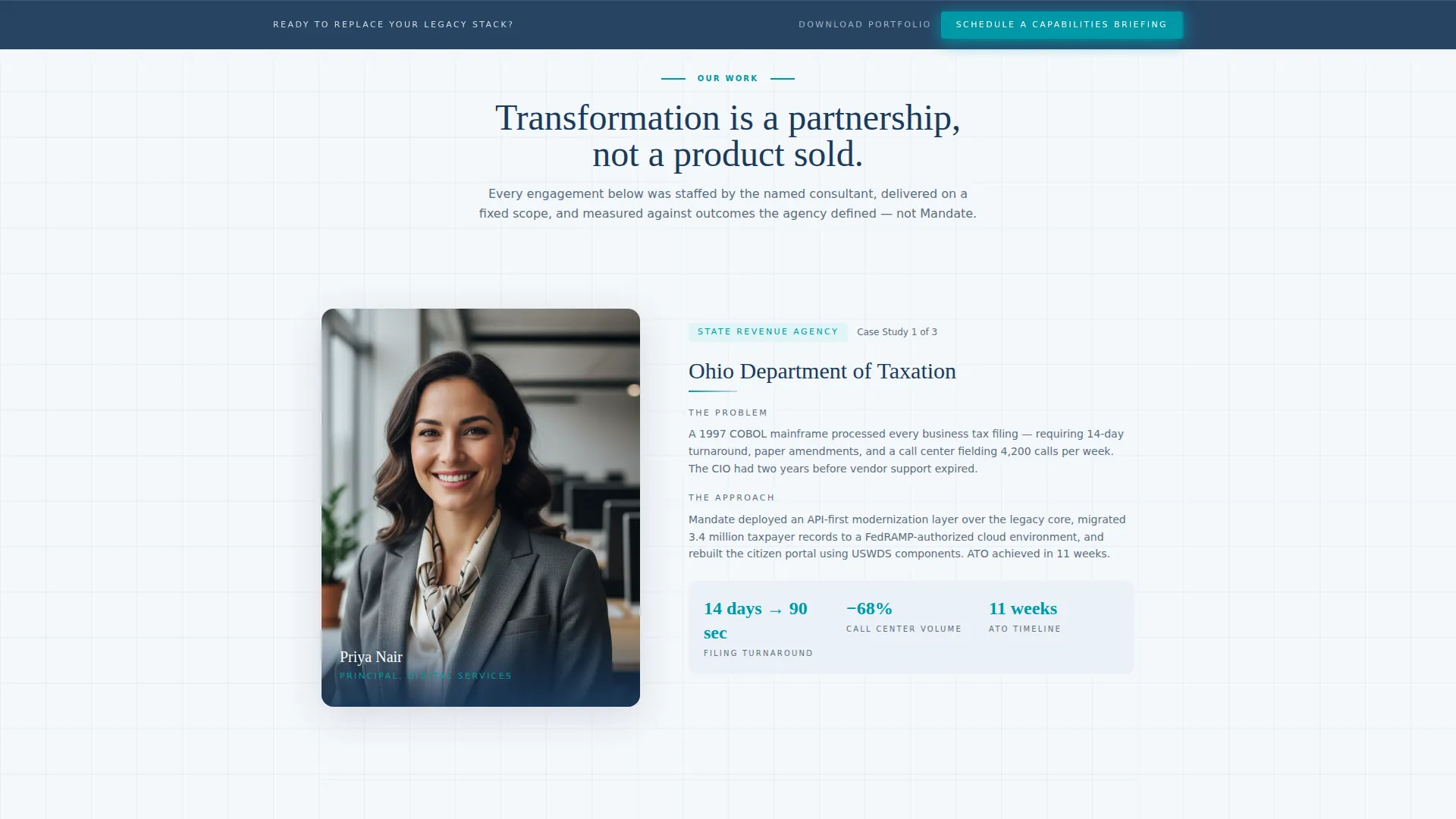
- An alternating consultant portrait and case narrative rhythm that repeats through the main body
- A full-width team grid with hover-activated role titles and personal philosophy lines
- A two-step briefing request form and a separate gated portfolio download with email field filtering
Feature list
The features below reflect what the template structure and design system directly deliver based on the source brief.
Split-Screen Press Wall Header
The header opens with a 50/50 split. The left panel holds a mosaic of press logos and publication mastheads alongside large serif pull-quote excerpts. The right panel shows a warmly lit team photograph. Visitors register credibility and humanity before reading a single service claim.
Alternating Case Narrative Sections
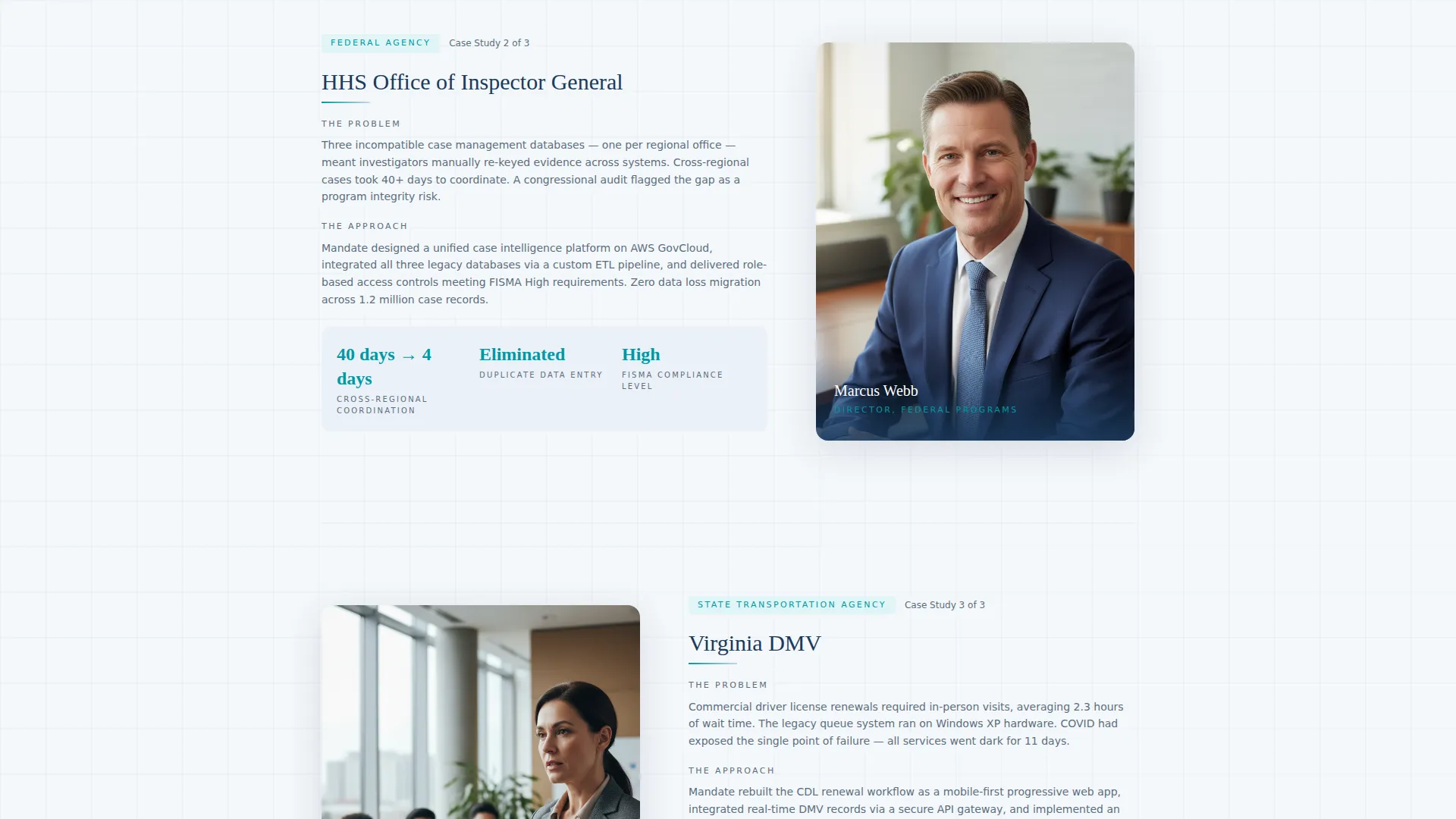
Each case study block pairs a senior consultant portrait on one side with a structured narrative on the other. The narrative covers the agency name, the legacy problem, and the measurable outcome. The left-right rhythm flips with each new case, keeping the page visually dynamic and human-centered.
Full-Width Team Grid
A dedicated team grid breaks the split-screen cadence midway through the page. Each headshot reveals a role title and a one-line personal philosophy on hover. This section grounds the consultancy in specific, named expertise rather than abstract capability claims.
Two-Step Capabilities Briefing Form
The primary call-to-action form captures agency name, role title, and mission area in step one. Step two collects the visitor's current challenge and preferred briefing week. The two-step structure reduces friction while gathering the context a consulting team needs before the first conversation.
Gated Portfolio Download
A secondary conversion path offers a Past Performance Portfolio document. Access requires only a verified government or military email address. This filters for procurement-ready visitors while giving them the artifact they need to begin an internal justification process.
Persistent Bottom Bar call to action
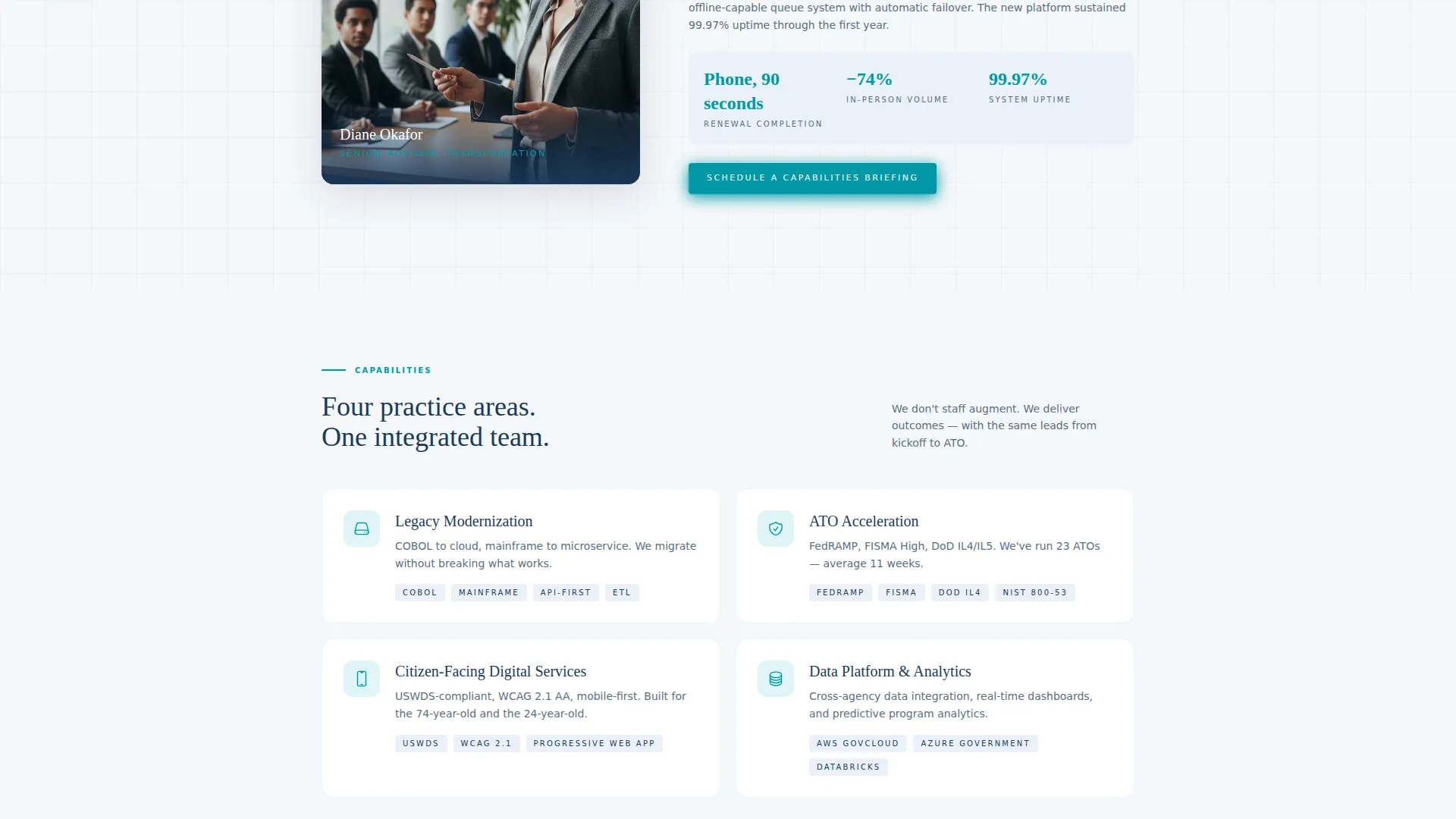
The "Schedule a Capabilities Briefing" call to action appears three times: at the header fold, after the third case study, and in a persistent bottom bar. Repeat exposure at natural decision points keeps the primary conversion path visible without interrupting the reading flow.
Page sections overview
| Section | Purpose |
|---|---|
| Split-Screen Header | Establishes press credibility and team humanity at first glance |
| Press Wall Panel | Displays publication logos and pull-quote excerpts on the left |
| Team Photo Panel | Shows a candid working-session photograph on the right |
| Case Narrative One | Pairs consultant portrait with first agency outcome story |
| Case Narrative Two | Reverses layout; presents second agency proof point |
| Case Narrative Three | Third alternating case study before repeat call to action placement |
| Repeat call to action Block | Resurfaces briefing request after third case study |
| Full-Width Team Grid | Introduces each consultant with hover-revealed role and philosophy |
| Portfolio Download | Gated secondary path for procurement-focused visitors |
| Persistent Bottom Bar | Keeps primary call to action visible throughout the entire scroll |
Design & branding system
The Corporate Precision theme uses the Cloud Canvas color system to project authority without the visual stiffness typical of government-sector design. Every color choice has a functional role, and the palette holds together across light backgrounds, dark headers, and interactive elements.
- Open-sky white (#F4F7FA) provides the base background, keeping sections airy and easy to read
- Policy-blue (#1B3A5C) anchors navigation, headers, and primary containers with institutional weight
- Civil-service slate (#5A6E80) handles body text and secondary containers, softening the palette without losing professionalism
- Decisive teal (#0098A6) activates buttons, progress indicators, and interactive highlights, signaling action clearly
Mobile & speed optimization
The split-screen layout is structured to adapt gracefully from desktop to smaller viewports. The template prioritizes clean rendering so that agency visitors on managed devices or secure networks encounter a page that loads and responds predictably.
- The 50/50 split-screen sections stack vertically on narrower screens, preserving portrait and narrative readability
- The persistent bottom bar and two-step form remain accessible without horizontal scrolling on mobile viewports
- Clean, lightweight section structures avoid unnecessary visual complexity that would slow perceived load times
How this template helps you convert
The page architecture was designed around two types of public-sector buyers: the decision-maker ready to talk and the procurement researcher building an internal case. Both paths are served without either visitor feeling pushed toward the wrong option.
- The three-point call to action placement strategy (header fold, post-case-study, persistent bar) keeps the briefing request visible at every natural pause in the reading journey, reducing the chance a qualified visitor exits without acting.
- The gated portfolio download requires only a government or military email address, creating a low-friction secondary conversion that self-selects for procurement-stage leads and delivers a shareable artifact directly into agency inboxes.
Other information about this template
This template is categorized under Professional Services, specifically Government Consulting, with a niche focus on government digital transformation. It is well suited for firms positioning themselves as partners in public-sector modernization rather than vendors selling software or subscriptions.
- The Team and People creative direction is intentional: named consultants and real case narratives are more persuasive to agency buyers than generic service grids
- The Partnership and B2B landing-page direction means every design decision prioritizes relationship initiation over immediate transaction
- The template style is Split Screen (50/50), which is particularly effective for simultaneously communicating two distinct trust signals: external validation and internal team depth
- The intersection of Corporate Precision theme, Cloud Canvas color system, and Press Mentions header concept creates a visual language that feels like a well-prepared briefing document rather than a marketing brochure
Theme
Corporate Precision
Creative direction
Team & People
Color system
Cloud Canvas
Style
Split Screen (50/50)
Direction
Partnership/B2B
Page Sections
Split-screen Press Wall Header
Alternating Case Narrative Rhythm
Full-width Team Grid with Hover Details
Two-step Capabilities Briefing Form
Gated Past Performance Portfolio
Persistent Bottom Bar Call to Action
Related questions
Who is the ideal buyer for this template?
Can I use this template if I only have one or two case studies?
What makes the two-step briefing form different from a standard contact form?
Why is the portfolio download gated behind a government email address?
Is this template suitable for a small boutique consultancy or only for large firms?



