Customs Broker FAQ Website Template
Clearance is an editorial-style landing page template built for customs brokers who need to project procedural authority and geographic coverage. It pairs a newspaper-masthead header with structured comparison tables, pull-quote FAQ sections, and a clear port-coverage call to action. The result is a page that earns trust before it asks for anything.
by Rocket studio
Quick summary
Clearance is a single-page customs broker landing page template styled after a broadsheet feature story. It opens with a press-mentions masthead, moves through investigative FAQ sections anchored by comparison tables, and closes with a full-width call to action directing visitors to a port-specific consultation intake form. Every section is built to demonstrate procedural fluency and geographic reach.
Who this template is for
This template is designed for customs brokers who need to speak directly to sophisticated import buyers. It works best when the broker handles real volume across multiple United States ports of entry and wants the page to reflect that seriousness.
- Import managers at mid-market manufacturers sourcing components internationally
- Freight forwarders seeking a reliable port-of-entry partner at specific locations
- E-commerce brands scaling into high container volumes who have encountered their first regulatory hold
What problem this template solves
Most customs broker pages read like a list of services with a phone number. That approach fails with experienced importers who already know what a broker does and need to know whether this specific broker can handle their port, their commodity, and their compliance situation.
- Visitors leave without confidence that the broker covers their exact port of entry
- Generic service pages cannot demonstrate procedural depth or geographic specificity
- No structured comparison makes it impossible for a buyer to evaluate coverage at a glance
What you get with this template
You get a fully structured editorial landing page with distinct content zones that build authority progressively. The layout moves from broad national capability down to geographic specificity, matching the way an experienced importer evaluates a new broker.
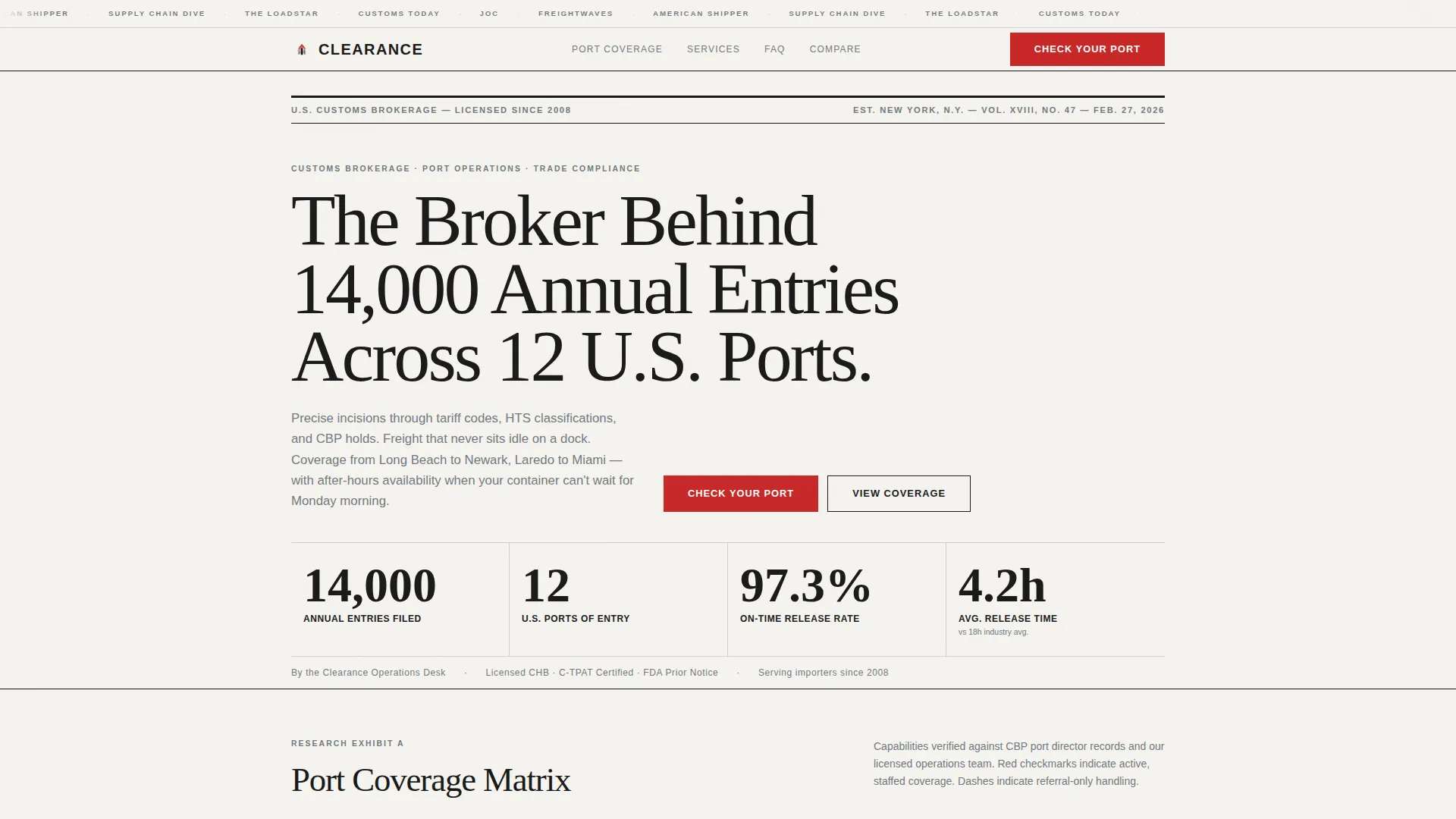
- A typographic press-mentions masthead header with publication-style branding strip and bold editorial headline
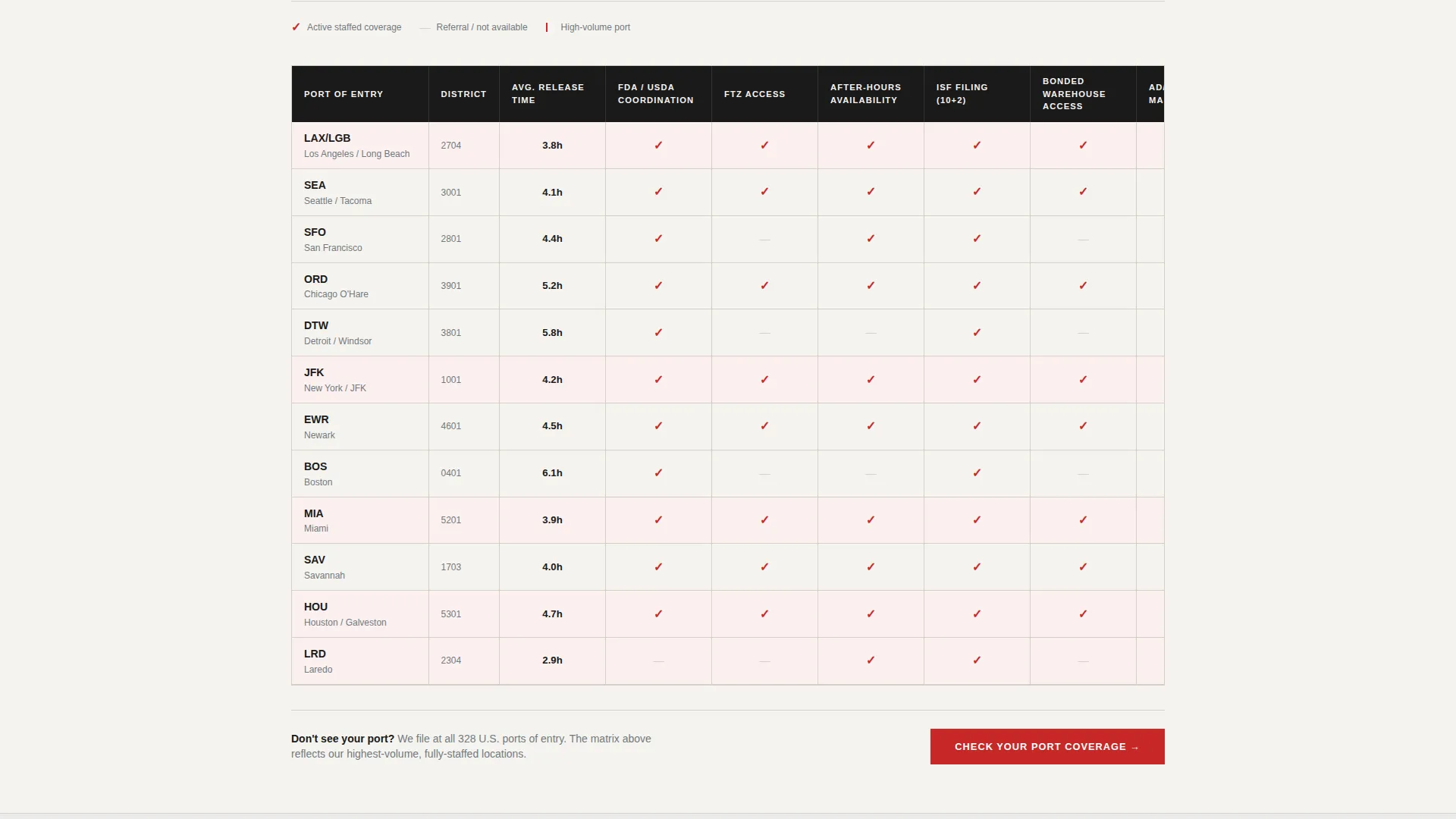
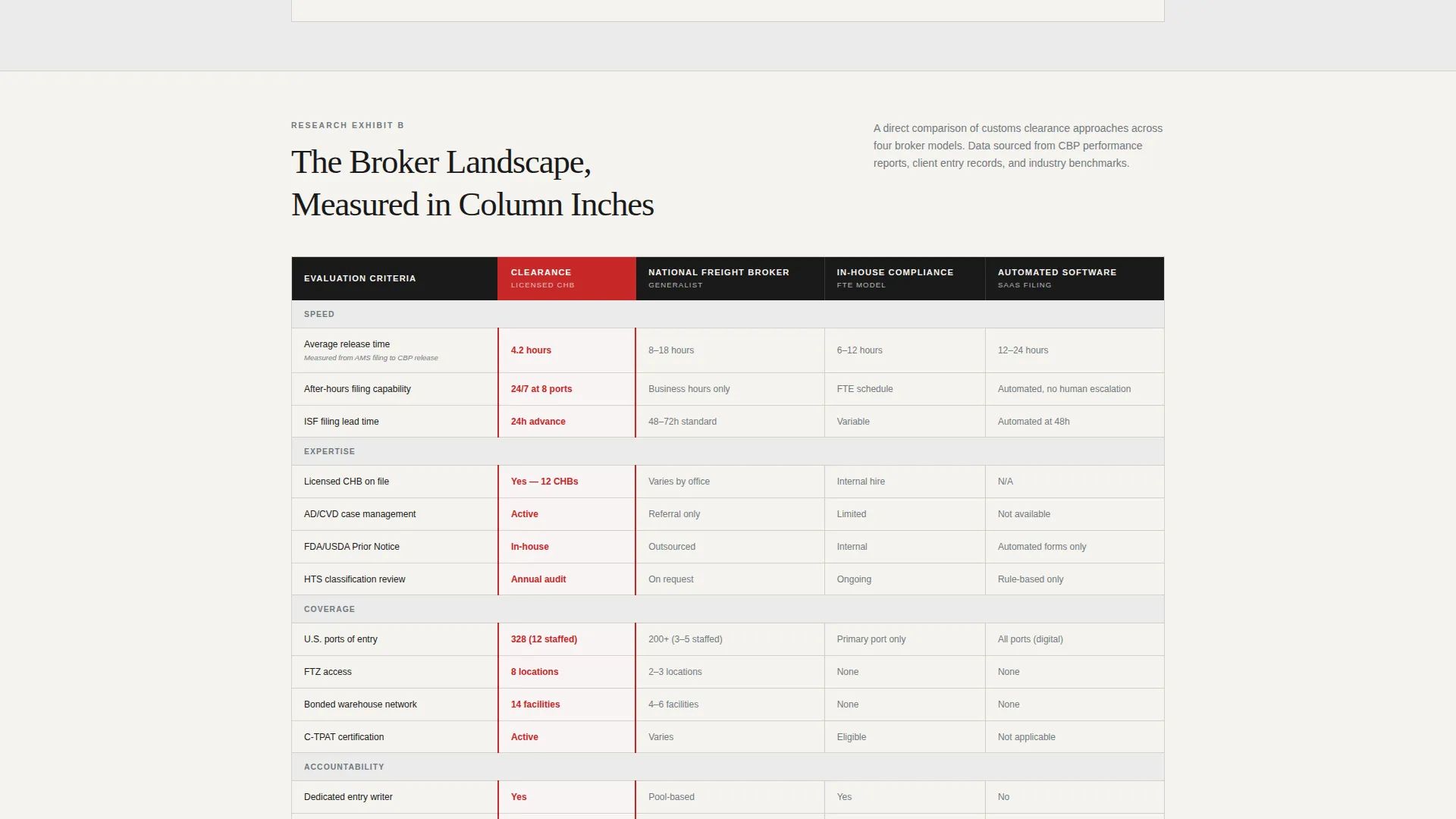
- Multi-column comparison tables comparing ports of entry across clearance metrics
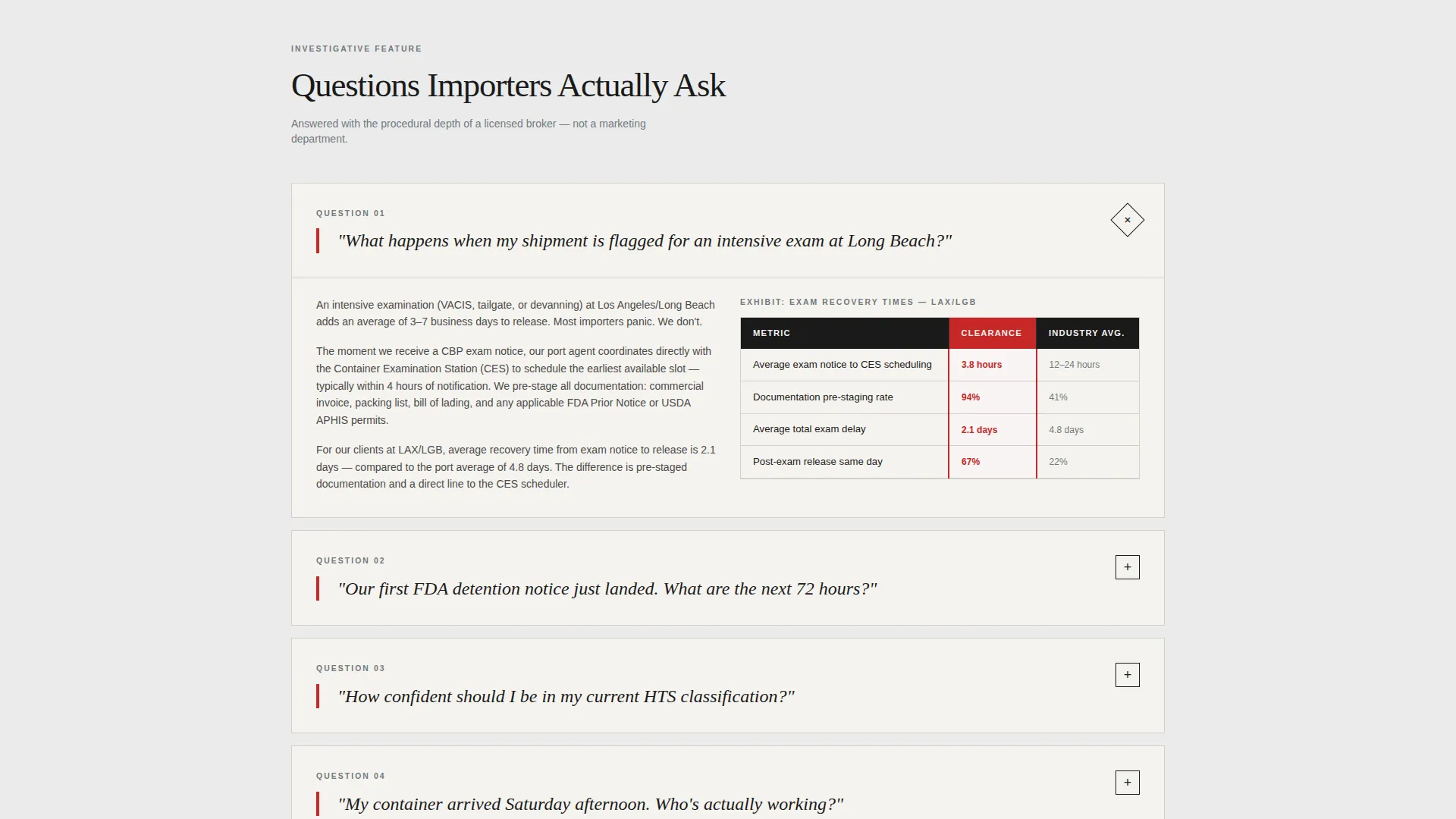
- FAQ-driven scroll sections styled as investigative pull quotes with editorial depth
- A three-placement call-to-action system directing visitors to a port-specific intake form
Feature list
The template includes the following built-in capabilities, each grounded in the brief.
Press Mentions Masthead Header
The header is composed as a newspaper masthead. A horizontal strip carries stylized publication references above a high-contrast serif headline declaring the broker's annual entry volume and port reach. A dateline-style subhead lists the service regions. No photography, no gradients, just editorial type on newsprint white.
Investigative FAQ Pull Quotes
Each content section opens with a real importer question rendered as an oversized serif italic pull quote. The answer follows with editorial depth, covering specific port procedures and average clearance timeframes. This format makes the scroll feel like reading a researched feature, not browsing a sales page.
Port Coverage Comparison Tables
The comparison tables are the structural spine of the page. Ports of entry run across columns. Metrics such as average release time, Food and Drug Administration and United States Department of Agriculture coordination, Free Trade Zone access, and after-hours availability run down rows. Steel-gray cells use a customs-stamp red checkmark to indicate active broker coverage. Empty cells signal where competitors fall short.
Three-Placement Call to Action System
The primary call to action, "Check Your Port Coverage," appears in three locations: immediately after the first comparison table, as a sticky bar on mobile viewports, and again as a full-width closing block. Each placement links to a short intake form asking for primary port of entry, commodity type, and annual entry volume.
Editorial Monochrome Color System
The entire page operates within a four-value color system. Press black is used for headlines and table headers. Rolled steel handles body text and secondary elements. Newsprint white covers all backgrounds. Customs-stamp red is reserved exclusively for calls to action and active table highlights, ensuring it carries maximum visual weight every time it appears.
Page sections overview
| Section | Purpose |
|---|---|
| Publication Strip Header | Establish authority with masthead-style press branding and bold editorial headline |
| Dateline Service Subhead | Name the service regions covered in a newspaper dateline format |
| National Capability Intro | Frame the broker's scope before narrowing to geographic detail |
| Pull Quote FAQ Block | Open each topic section with a real importer question as an oversized italic quote |
| Port Comparison Table | Compare ports of entry across clearance metrics with red-checkmark coverage indicators |
| Mid-Page call to action Block | Place the first "Check Your Port Coverage" action prompt after the initial table |
| Geographic Specificity Section | Narrow from national overview down to port-level procedural detail |
| Closing call to action Block | Full-width final call to action with link to port-specific intake form |
| Mobile Sticky Bar | Persistent bottom-bar call to action visible throughout the mobile scroll |
Design & branding system
The visual identity follows an Editorial Magazine theme built on a Monochrome Steel color system. Every design decision prioritizes ink density and typographic authority over decorative detail.
- Press black (#1A1A1A) for all headlines and table headers, rolled steel (#71797E) for body text and secondary elements, newsprint white (#F5F3EF) for all backgrounds
- Customs-stamp red (#C62828) used only on calls to action and active comparison table highlights to preserve its visual impact
- High-contrast serif typefaces sized for front-page impact, with no photography, no gradients, and no decorative elements anywhere on the page
Mobile & speed optimization
The template is structured for clean rendering across device sizes. The mobile layout preserves the editorial hierarchy without sacrificing the comparison tables or the sticky call-to-action bar.
- Comparison tables reflow for narrow viewports so coverage data remains readable on smaller screens
- The sticky bottom bar keeps the primary call to action accessible throughout the full mobile scroll
- Section-led layout keeps content zones discrete and easy to navigate without excessive scrolling depth
How this template helps you convert
The page is designed to earn the click before asking for it. Visitors move through a structured sequence that builds trust at each stage.
- The press-mentions masthead and editorial headline establish volume and credibility within the first viewport, reducing early bounce from skeptical import professionals
- Comparison tables answer the buyer's core evaluation question, does this broker cover my port and my compliance scenario, before any call to action appears
- The three-placement call-to-action system meets the visitor at the moment of readiness, whether that is mid-page after the first table or at the bottom after the full editorial scroll
Other information about this template
This template is part of a broader set of professional-services landing page templates built around specific niche use cases. A few additional points are worth noting for buyers evaluating fit.
- The template is designed for single-page use as a service area and location page, not a multi-page website
- The intake form linked from all three call-to-action placements collects primary port of entry, commodity type, and annual entry volume
- The template style is Comparison Table, and the creative direction is FAQ-Driven, making it especially useful for brokers who handle complex multi-port operations
- The header concept draws visual cues from publications such as Journal of Commerce, FreightWaves, and American Shipper in the stylized press strip
- The landing-page direction is Click-Through, meaning the page's sole conversion goal is pushing the visitor to the intake form, not capturing a lead directly on the page
Theme
Editorial Magazine
Creative direction
FAQ-Driven
Color system
Monochrome Steel
Style
Comparison Table
Direction
Click-Through
Page Sections
Press Mentions Masthead Header
Investigative FAQ Pull Quotes
Port Coverage Comparison Tables
Three-placement Call to Action System
Editorial Monochrome Color System
Related questions
What type of customs broker business is this template best suited for?
Can the comparison tables be edited to reflect my actual ports and services?
What does the call-to-action intake form collect from visitors?
Does the template work for a broker focused on a single port of entry?
Why does the template use no photography or imagery?



