Digital Government Professional Website Template
Disclose is a modular card-grid landing page template built for freedom of information portals. It gives citizens, journalists, and legal researchers a clean, organized space to file and track public records requests. The design follows a Corporate Precision visual theme with an Alpine Fresh color system, driving visitors toward workshop event registration through layered, trust-building content.
by Rocket studio
Quick summary
Disclose is a single-page, card-grid template designed for public records and freedom of information portals. It opens with an oversized search input, builds trust through principle cards and live statistics, and converts visitors through a workshop registration form. The layout is cold, clean, and archival, built for power users who take government transparency seriously.
Who this template is for
This template serves anyone who regularly files or manages public records requests in a professional or civic capacity. It is built for people who need structure, not decoration.
- Investigative journalists and media professionals seeking procurement documents, budgets, or agency correspondence
- Civic activists, watchdog organizations, and legal researchers pulling permit histories or council records
- Attorneys and academic researchers who submit formal request letters and need to track response timelines
What problem this template solves
Filing a public records request should not require a law degree. Most portals are cluttered, vague, and impossible to track. Disclose removes that friction by organizing every stage of the process into a clear, scrollable system.
- Requesters lose track of submission dates, agency contacts, and documents requested across multiple open cases
- Visitors arrive with no context about applicable laws, fees, or what records are actually available to request
- Organizations have no structured way to present their portal's credibility before asking visitors to register or submit
What you get with this template
You get a fully structured, modular card-grid landing page that walks visitors from curiosity to conversion. Each card row is a discrete chapter, earning the next scroll by delivering real value first.
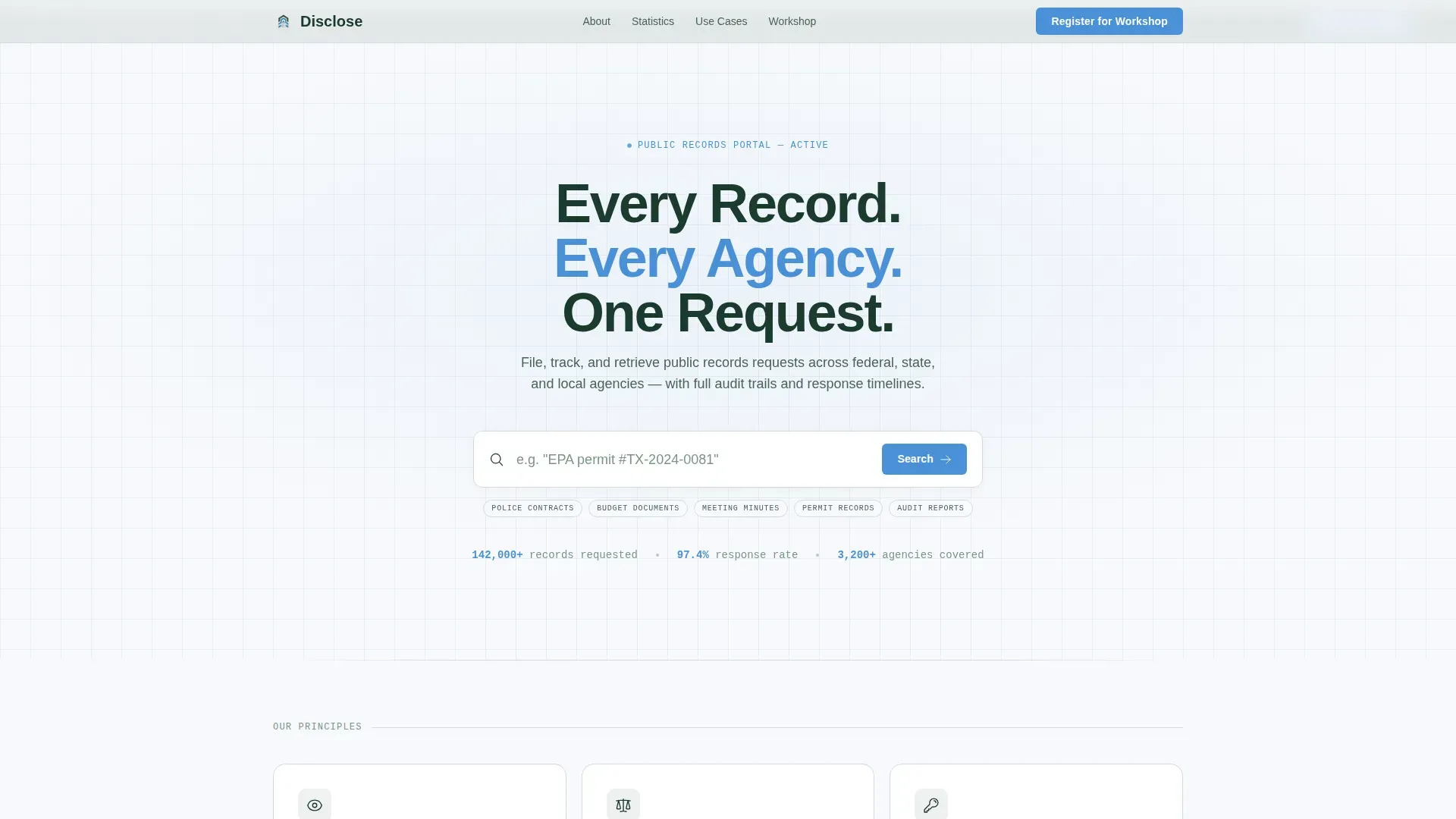
- An oversized search box hero section with a blinking cursor, ghost text, and a live social-proof stat line beneath
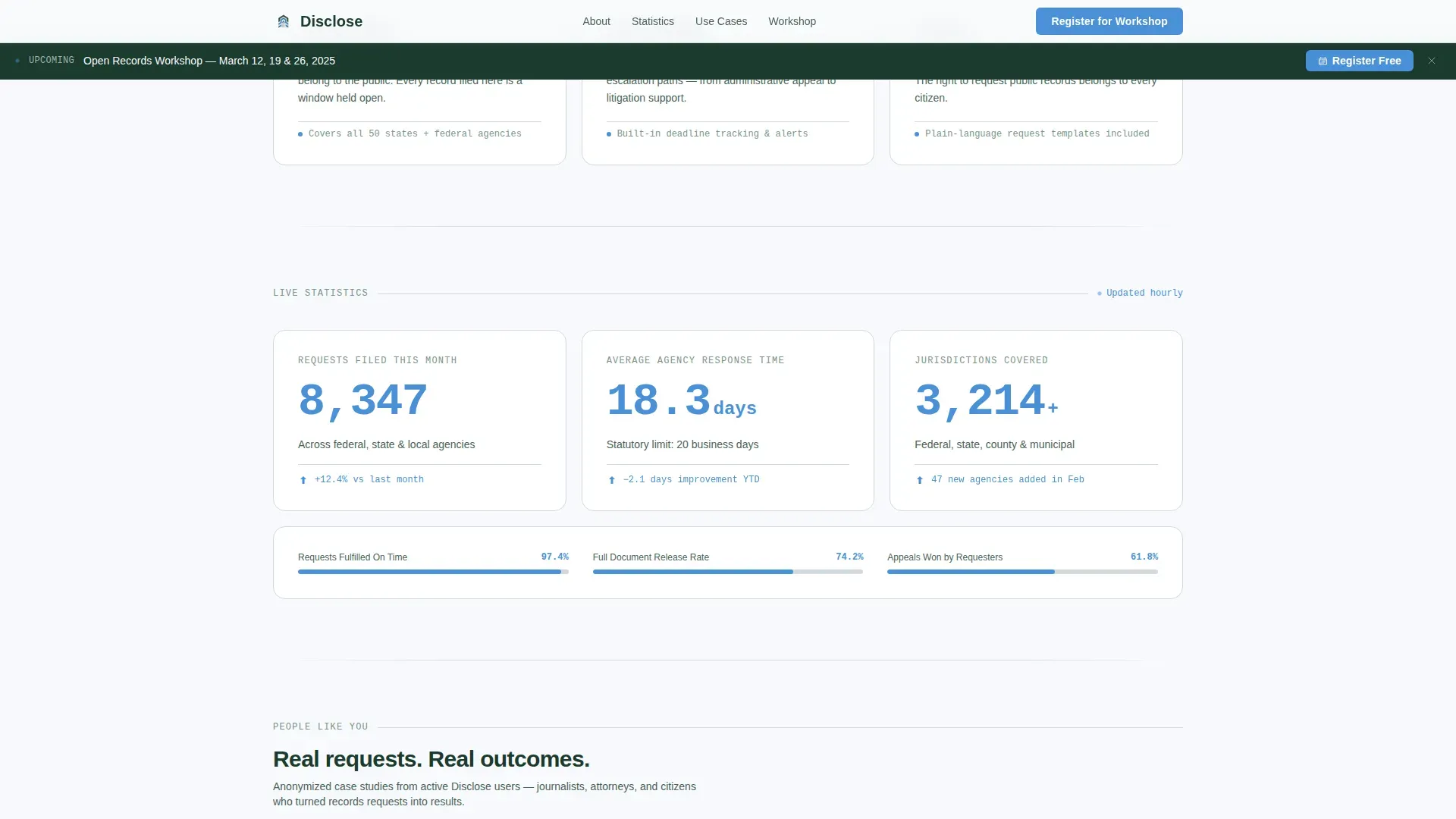
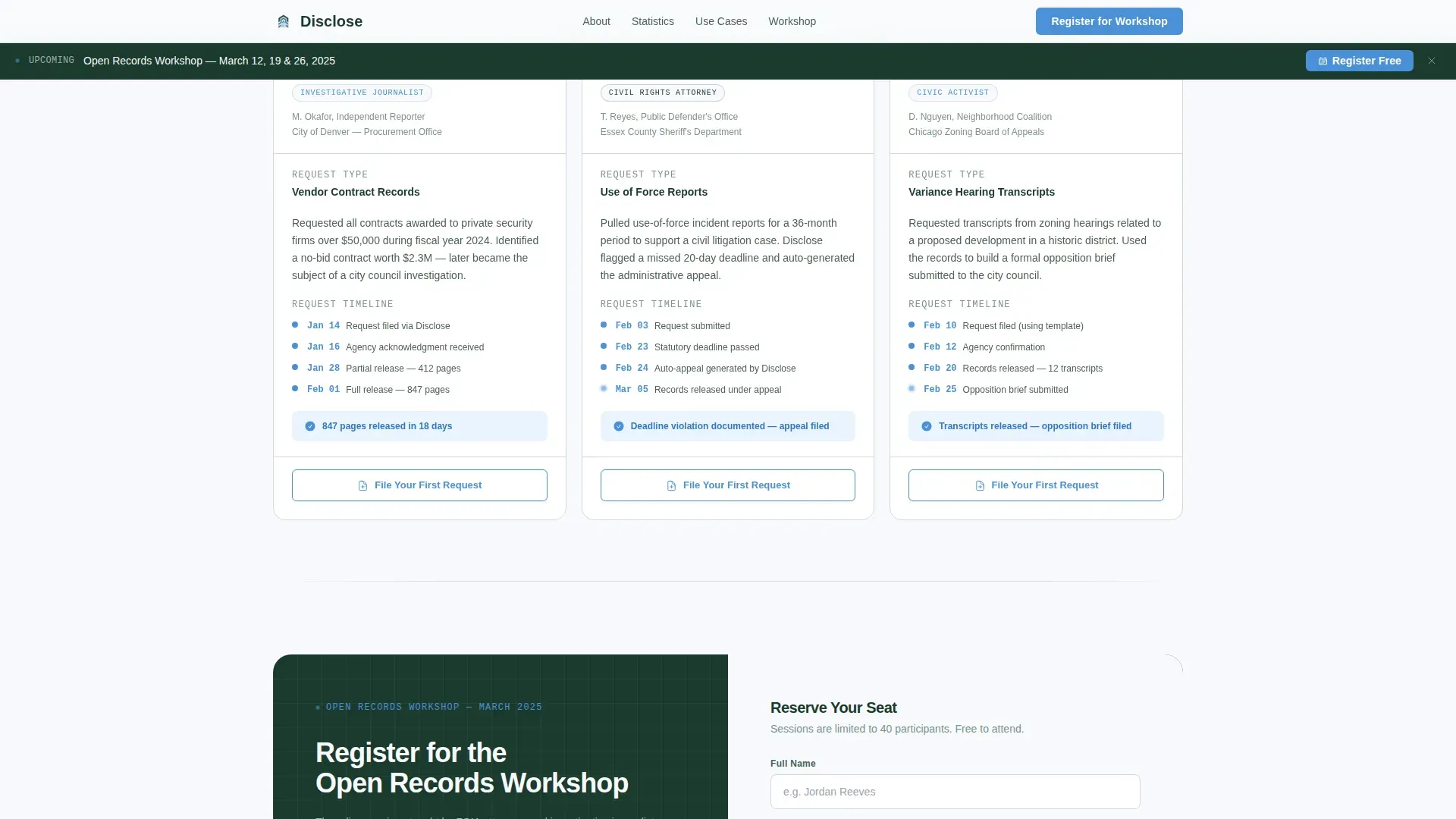
- Three principle cards (Transparency, Accountability, Access), three live statistics cards, and three use-case scenario cards
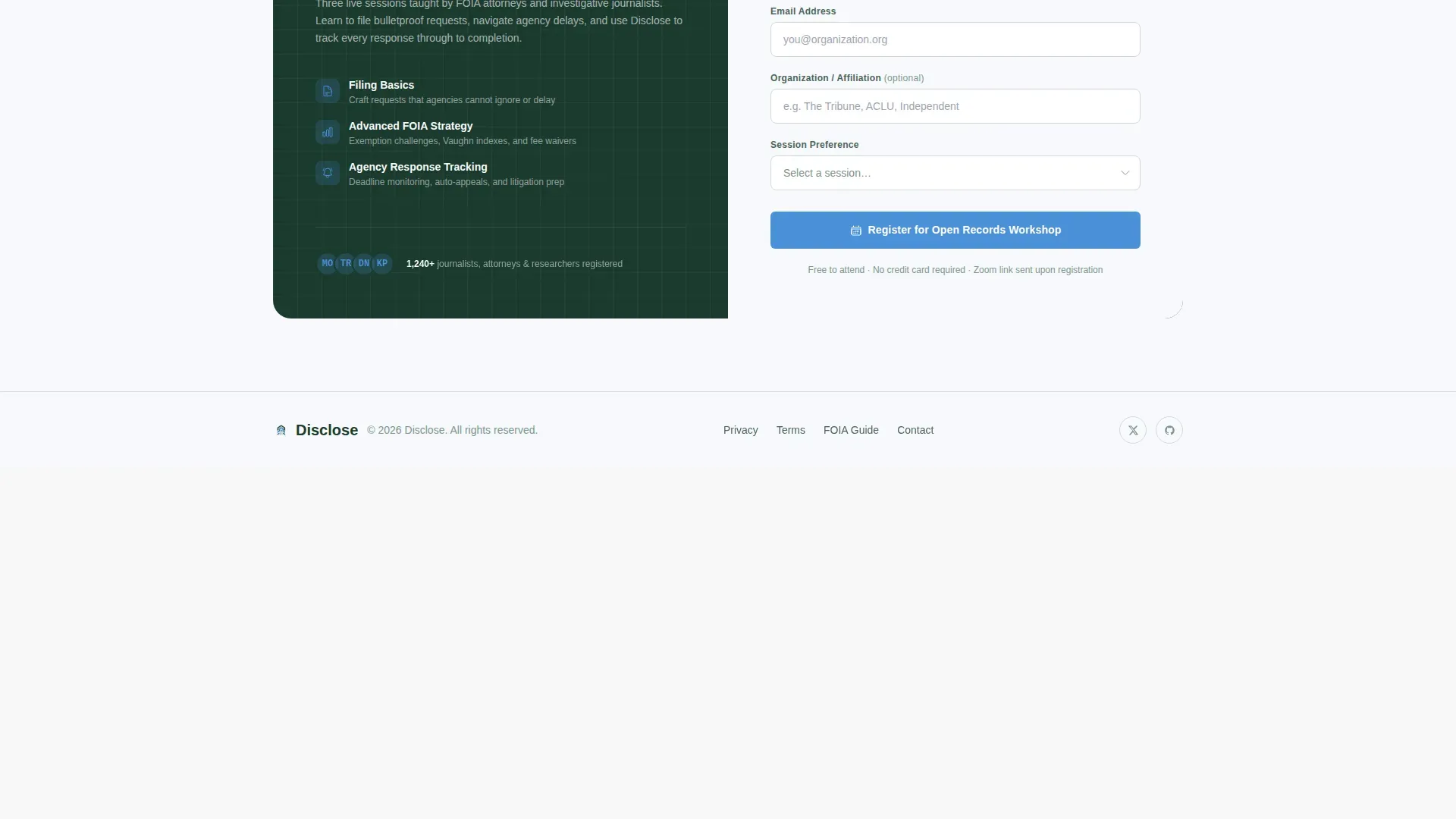
- A workshop registration form collecting name, email, organization, and session preference, plus a sticky scroll-triggered banner
Feature list
This template is built around prompt-defined components and interaction patterns. Each feature below comes directly from the source brief.
Oversized Search Box Hero
The header centers a single large input field against summit white with a glacier-blue underline. Ghost text reads "Search by agency, document type, or case number..." and a stat line beneath reinforces credibility before the visitor scrolls.
Modular Card Grid Layout
Three distinct card rows build the page narrative. The first row presents portal principles. The second row shows live ticking statistics in glacier blue. The third row shows real use-case scenarios for a journalist, attorney, and citizen, each with anonymized request timelines and a call-to-action button.
Workshop Registration Form
A structured form section collects the following information: name, email, mailing address, telephone number, and a session preference dropdown covering Filing Basics, Advanced Freedom of Information Act (FOIA) Strategy, and Agency Response Tracking. A sticky banner appears after the second card row to surface the registration offer at the right moment.
Use-Case Cards with Intake Buttons
Each use-case card includes a "File Your First Request" button in glacier blue. These secondary conversion points route directly to the portal intake form, giving visitors a fast path to submit without waiting for the workshop call to action.
Scroll-Triggered Sticky Banner
A sticky banner activates after the visitor scrolls past the second card row. It presents the workshop registration offer at the moment of maximum context, after the visitor has already seen the data, mission, and use cases.
Ticking Live Statistics Cards
Three statistics cards display live request counts, average agency response time, and jurisdictions covered. Numbers tick upward in glacier blue using JetBrains Mono, reinforcing the portal's active status and scale.
Page sections overview
| Section | Purpose |
|---|---|
| Search Box Hero | Open with utility; anchor credibility with stat line |
| Principles Card Row | Communicate portal values: Transparency, Accountability, Access |
| Live Statistics Row | Show active scale through ticking request and response data |
| Use-Case Cards | Match visitor identity to real request scenarios with calls to action |
| Workshop Registration | Collect name, email, org, and session preference via form |
| Footer | Provide single-row links, contact address, and legal references |
Design & branding system
The visual identity follows a Corporate Precision theme using the Alpine Fresh color system. Every color choice serves a function, not a mood.
- Summit white (#F7F9FC) dominates all backgrounds; snowmelt gray (#D1D9E0) defines card borders and section dividers
- Glacier blue (#4A90D9) marks all actionable elements including buttons, active states, stat numbers, and the search underline
- Deep pine (#1B3A2D) anchors headings, icon fills, and any official legal text requiring authority and weight
Typography uses DM Sans for headings and body copy. JetBrains Mono renders all statistics, case IDs, and date values, reinforcing the archival, data-accurate tone.
Mobile & speed optimization
The template is designed desktop-first for power users at workstations, with full mobile layout support included. Animation and interactivity are calibrated for medium complexity.
- Scroll reveal animations use stagger timing across card rows; the blinking cursor and ticking counters run as client-side components
- Static sections use server components for faster initial load; interactive elements like the sticky banner and counters are isolated as client components
- The card grid reflows cleanly for mobile viewports, preserving the column structure and button tap targets across breakpoints
How this template helps you convert
Disclose earns conversions by building trust before asking for anything. The page structure is intentional: utility first, mission second, social proof third, registration last.
- The search box opens with immediate utility, so visitors understand the tool's purpose in under three seconds without reading a letter of body copy
- The principle cards and live statistics establish the portal's track record, giving visitors enough context to recognize the workshop as a logical next step
- The sticky banner and use-case card buttons create two separate conversion paths, so visitors who are ready to act can do so at any point in the scroll
Other information about this template
The Disclose precision public records request landing page template is designed to support the full lifecycle of a public records act workflow, from initial search through final disclosure. Note that public records laws vary by state, and instructions on this page can be adapted to address statutes like CPRA, FOIA, or local county ordinances.
- The Freedom of Information Act (FOIA) and state-level public records act statutes define what records are accessible, which documents are exempt, and what fees an agency may charge
- A privacy act request follows a separate process: you may submit a privacy act request by mail, email, or through a secure public portal, and the agency must inform you of the actual cost before copying records
- Under the privacy act, you can request access to records about yourself, request a correction, or request an accounting of disclosures; if denied, the agency must respond in writing citing the relevant statute and the specific exemption claimed
- If a public records request is denied, include the original request identification number and date when filing an appeal; explain why the withheld documents should be released under the applicable information act
- Note that requests for commercial use may be subject to higher fees; requesters seeking a fee waiver should describe the public interest value of the disclosure in advance of submitting
- Mandatory fields in a well-structured records request form include name, email, mailing address, telephone number, and "From" and "To" date selectors to help identify the correct records with precision
- A notarized signature may be required for certain privacy act request submissions; if you are acting as a guardian for a minor, you must provide consent with your request
- Requesters should be aware that maintaining a record of past submissions, including the date sent, agency name, documents requested, and current status, helps manage timely follow-up across multiple open cases
- Any person is entitled to inspect public records during regular office hours or receive copies; the records custodian must determine if the records can be produced and respond within a reasonable date window
- Note that commercial requesters may pay the actual cost of duplication; requesters should ask for a cost estimate in advance if a large volume of material is anticipated
Theme
Corporate Precision
Creative direction
Vision & Mission
Color system
Alpine Fresh
Style
Card Grid (Modular)
Direction
Event Registration
Page Sections
Oversized Search Box Hero
Modular Three-row Card Grid
Workshop Registration Form
Use-case Cards with Intake Buttons
Ticking Live Statistics Display
Scroll-triggered Sticky Banner
Related questions
What sections are included in this landing page template?
Can I adapt the registration form fields for my portal?
How does the scroll-triggered sticky banner work?
What should a requester include when submitting a public records request?
What happens if a public records request is denied?



