Masala — Indian Cooking Landing Page Template
The Masala warm neighborhood Indian cooking class landing page template is built for intimate, home-kitchen cooking classes that sell seats through warmth and specificity. A full-bleed hero, sticky booking bar, visual calendar, and neighbor testimonials work together to turn curious visitors into paying students. It ships ready to customize with your own schedule, menu, and neighborhood story.
by Rocket studio
Quick summary
Masala is a hero-dominant landing page template designed for neighborhood Indian cooking class businesses. It pairs a sun-drenched full-bleed kitchen photo with a sticky "Save My Seat" call to action, a visual class calendar, and handwritten-style menu sections. The result feels less like a product page and more like an open invitation from someone who has lived on your block for years.
Who this template is for
This template was built for cooking instructors who teach Indian cooking in intimate, home-based settings. It works equally well for anyone launching neighborhood cooking classes focused on Indian cuisine, from a single recurring Saturday session to a multi-date seasonal series.
- Cooking instructors who want to sell class seats directly, without a third-party booking platform taking a cut
- Home cooks turned teachers who want their landing page to feel as personal and warm as their kitchen
- Gift-class sellers who need a secondary purchase path styled as a hand-addressed envelope option
What problem this template solves
Most cooking class pages feel like event-listing software. They show a date, a price, and a generic description. They do not show you who will be in the room, what you will actually cook, or why this particular class is worth choosing over a YouTube tutorial. Visitors leave without booking because the page never earned their trust.
This template fixes that problem by making the class feel real and specific before it ever asks for payment.
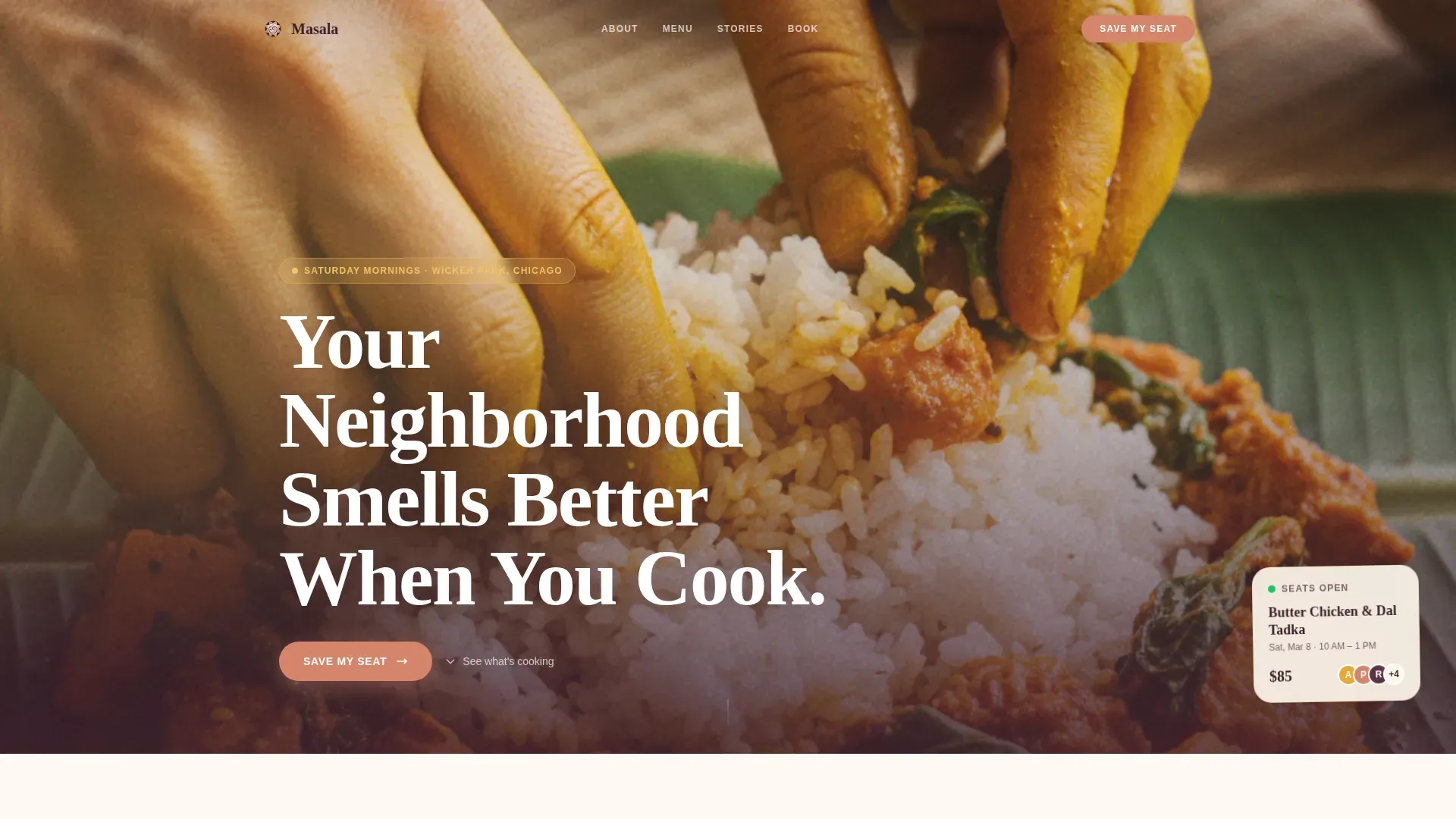
- It leads with a full-bleed overhead kitchen photo that puts the visitor inside the experience immediately, capturing attention the way a high-quality image of colorful dishes and fresh spices should
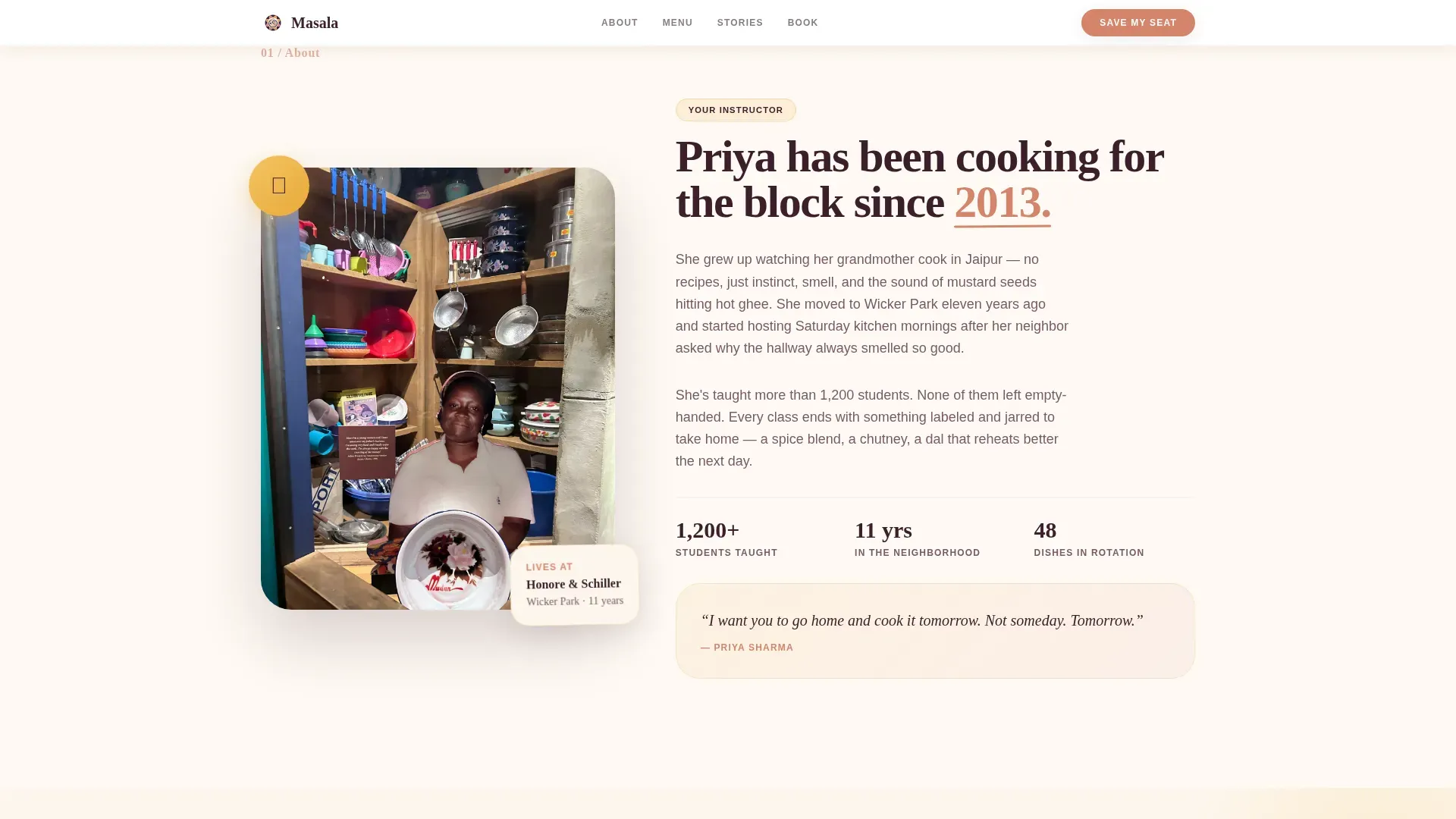
- It introduces the instructor through neighborhood identity rather than a formal biography, building the kind of trust that converts curious visitors into paying students
- It shows exactly what students will cook, who they will sit beside, and what they will carry home before presenting any booking button
What you get with this template
You get a complete, single-page booking experience that balances sensory visuals with trust-building elements. Every section is pre-structured and content-ready, so you replace placeholder copy with your own class details and go live without rebuilding anything from scratch.
- A hero section with a headline, floating "Next Class" card, and a prominent "Save My Seat" call to action button in dusted rose against deep eggplant
- A visual booking flow with a date-picker calendar showing open seats, an experience-level selector (First Timer, Comfortable, Adventurous), and a single clear total with no hidden fees
- A "Gift a Class" secondary path styled as a hand-addressed envelope, plus a sticky booking bar that reappears after the second scroll so motivated visitors never lose the call to action
Feature list
This section describes the core built-in capabilities of the Masala template as delivered.
Full-Bleed Hero with Floating Class Card
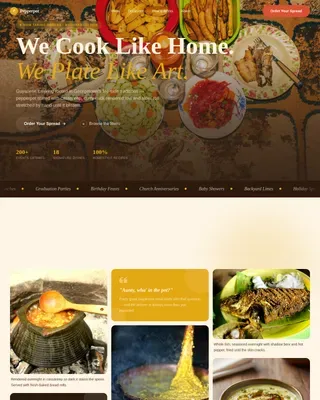
The hero fills ninety percent of the viewport with a wide overhead kitchen photo. Steam, turmeric-yellow fingertips, mismatched ceramic bowls, and natural afternoon light make the scene immediately sensory. A headline fades in over the warmth, and a floating card shows the next available class date alongside the primary "Save My Seat" call to action. This opening moment conveys the themes of community and great food before the visitor reads a single word of body copy.
Sticky Booking Bar
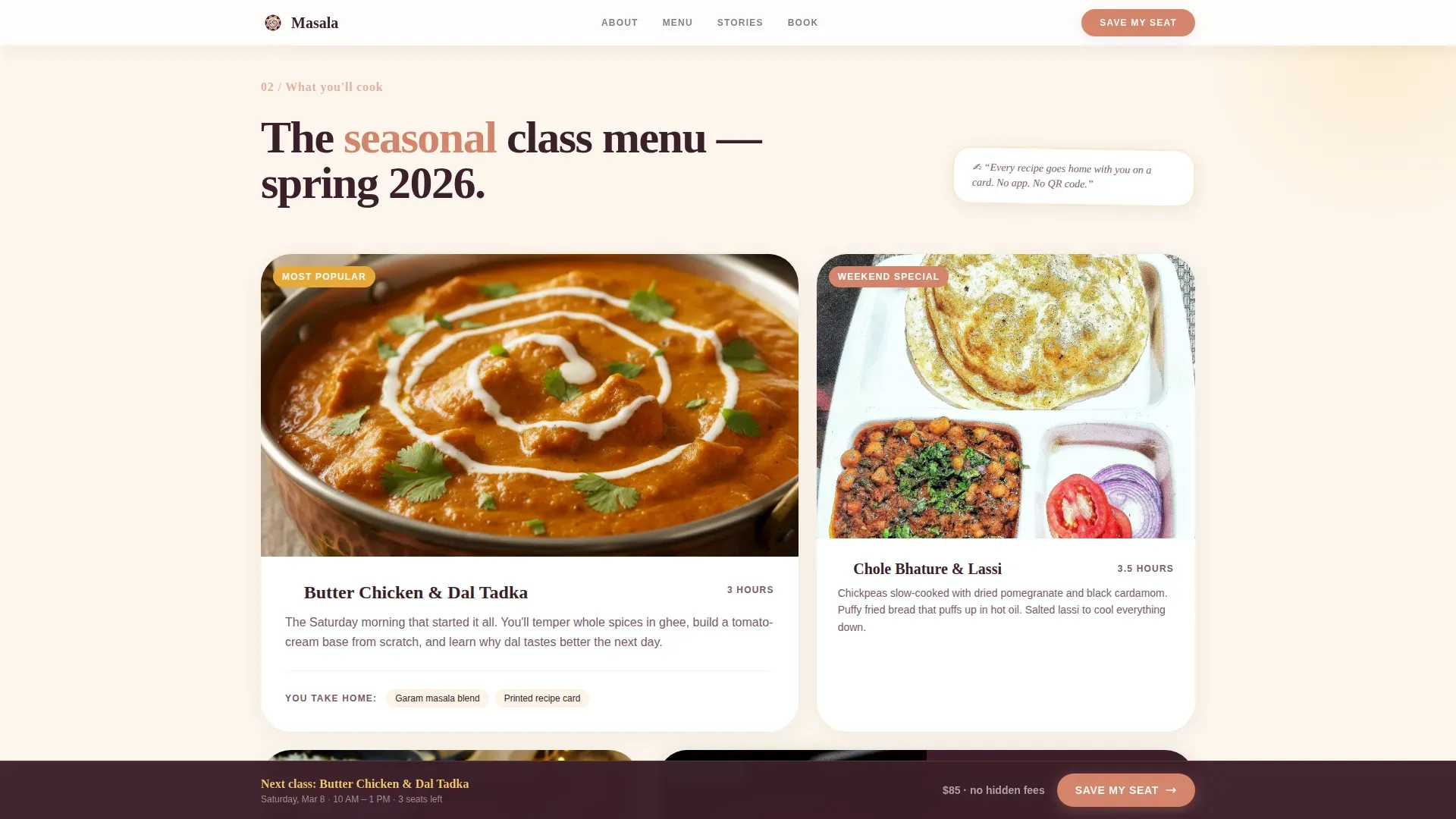
After the visitor scrolls past the second section, a compact sticky bar locks to the bottom of the screen. It repeats the call to action and the next class date so motivated visitors can book at any point in their scroll journey. The bar disappears when the full booking flow is visible, keeping the interface clean.
Visual Calendar and Experience Selector
The booking flow uses a visual calendar that displays open and closed seats by date, making preparation for class selection feel intuitive. Below the calendar, visitors choose their experience level: First Timer, Comfortable, or Adventurous. This selector helps the instructor prepare the right balance of lesson depth and keeps the group dynamic comfortable for everyone. A single session total appears clearly with no upsells.
Neighborhood-Style Instructor Section
Instead of a formal biography, the instructor section opens with a street name and years of residence. This Local and Neighborhood creative direction grounds the class in a real place and a real person. The section reads like a neighbor introducing herself over a fence, which builds the kind of personal trust that a credentials list cannot replicate.
Handwritten Community Board Menu
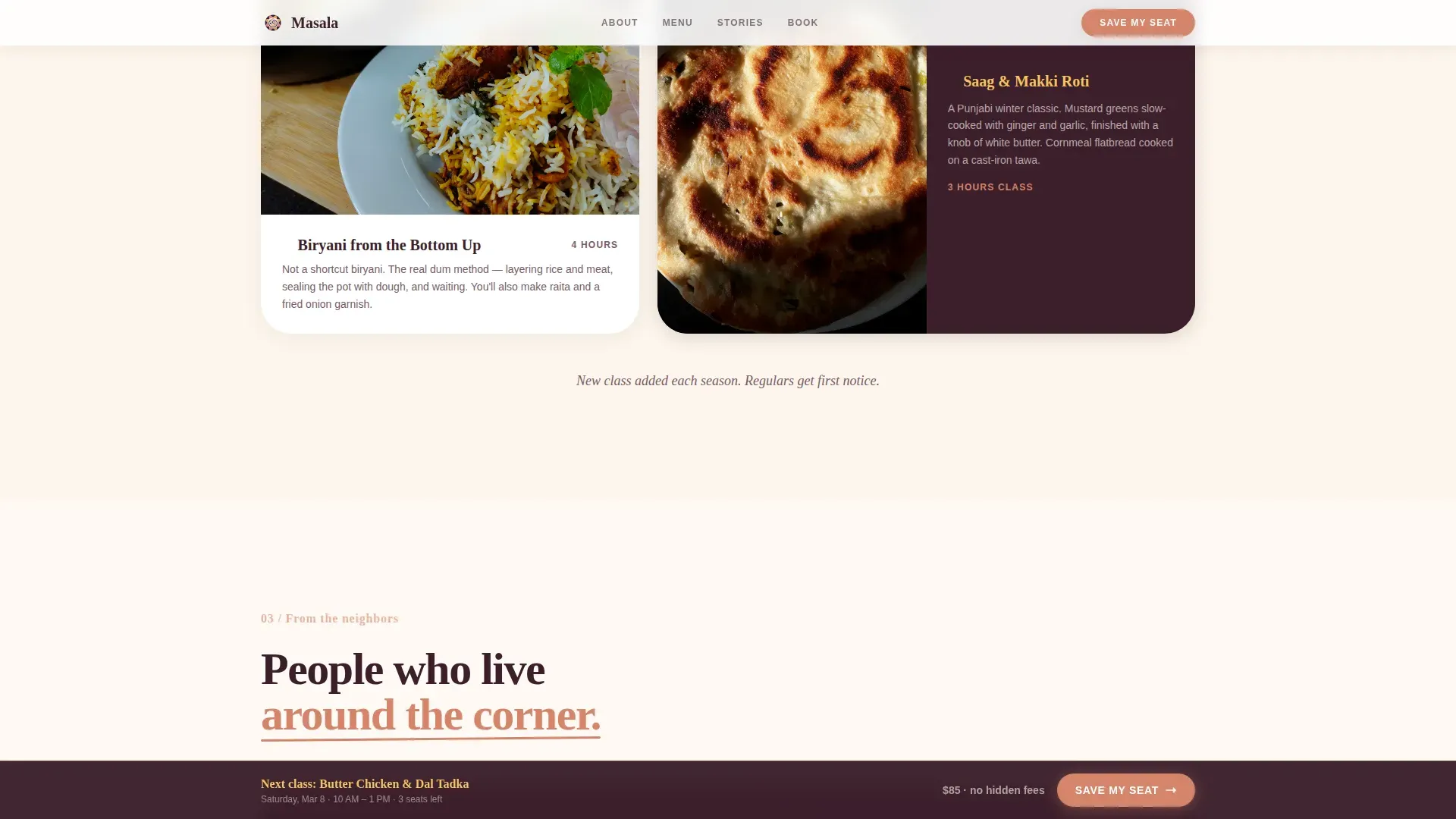
The seasonal menu section is styled as a handwritten note pinned to a community corkboard. It previews the specific dishes, spice blends, and recipes students will cook during the class. Visitors see the full menu before they reach the booking button, so they arrive with appetite, not uncertainty.
Neighbor Testimonial Blocks
Testimonials appear with first name and cross-street identifier rather than full names or company titles. This format reinforces the neighborhood spirit and makes social proof feel like a recommendation from someone who lives nearby. Each testimonial block highlights the friendly atmosphere and specific details, such as the taste of a dish or the fun of a particular lesson.
Page sections overview
| Section | Purpose |
|---|---|
| Full-Bleed Hero | Opens the page with a kitchen photo, headline, next class card, and primary call to action |
| Instructor Introduction | Presents the teacher through neighborhood identity and street-level personal framing |
| Seasonal Menu Board | Shows the handwritten-style menu of dishes and spice blends students will cook |
| Neighbor Testimonials | Displays social proof by first name and cross street to reinforce local trust |
| Visual Booking Flow | Hosts the date-picker calendar, experience selector, and single-total payment prompt |
| Gift a Class | Offers a secondary purchase path styled as a hand-addressed envelope |
| Sticky Booking Bar | Persists the call to action after the second scroll for high-intent visitors |
| Page Footer | Closes with contact, social links, and horizontal flow navigation |
Design & branding system
The visual identity follows a Pastoral Calm theme expressed through a Sunset Gradient color system. The palette feels like the last forty minutes of golden hour moving across a kitchen windowsill, soft heat fading into something intimate and violet. Every color choice supports warmth, trust, and appetite.
- Saffron (#E8A838) and ripe mango (#F4C462) wash across backgrounds in gentle gradients, evoking the color of fresh turmeric and warm oil heating in a pan
- Dusted rose (#D4856B) highlights buttons and hover states, including the primary "Save My Seat" call to action, making it visually distinct and action-oriented against the deep eggplant (#3B1F2B) typography
- Fraunces serif headlines carry the warmth of hand-lettered signage, while DM Sans body text keeps practical information clean and easy to scan on any screen size
Mobile & speed optimization
This template is built mobile-first. The target audience books on phones while commuting, so the layout, type sizes, and tap targets are all sized for one-handed use. The sticky booking bar is particularly effective on mobile, where the call to action remains reachable without scrolling back to the top.
- Static sections use server-rendered components for fast initial load, while the interactive booking flow loads as a client component only when needed
- The full-bleed hero image, calendar picker, and testimonial cards all restack gracefully at small screen widths without breaking the visual warmth of the Pastoral Calm design
- Fade-in scroll animations and staggered card reveals are set to medium intensity, adding life to the page without slowing interaction on lower-powered devices
How this template helps you convert
The Masala template earns the purchase before it asks for one. Every section is sequenced to reduce doubt and increase desire, moving the visitor from curiosity to commitment in a natural, unhurried walk down the page.
- The hero creates immediate sensory immersion through a full-bleed photo of real Indian food being cooked, a benefit-focused headline, and a visible call to action, so high-intent visitors can book on the first scroll
- The menu board, instructor section, and neighbor testimonials answer the three questions every potential student asks: What will I cook? Who is teaching me? Did people like it? These answers appear before the booking flow, so visitors arrive at the calendar ready to commit rather than still deciding
Other information about this template
This template draws on a broad range of Indian cooking class traditions and works well for instructors who teach dishes from across the subcontinent. Whether your class focuses on North Indian meals with rich gravies, lentils, and bread, or on south Indian cooking traditions featuring rice, vegetables, and coconut-based curries, the menu board section adapts to your seasonal content.
The template is a strong fit for classes that cover the basics of Indian spices and the cooking process for home cooks who have never tempered cumin seeds in hot oil before. It supports content about preparing dishes like saag paneer with wilted spinach, ginger, garlic, and tomatoes, or dal makhani built on slow-cooked lentils and whole spices. Classes that teach students to add cumin seeds to warm oil at medium heat, to balance garam masala with cardamom and ginger, and to serve hot dishes alongside fresh mint chutney, coconut chutney, or warm bread will find the menu board section especially well suited to listing those details.
The handwritten menu aesthetic works for instructors who incorporate south Indian recipes such as sambar and rice-based meals alongside north Indian dishes, or for those who explore influences that Indian cuisine shares with the broader spice-trading world, including the Middle East. Classes that feature indian sweets, masala chai as a closing ritual, or a take-home labeled jar of fresh-ground garam masala blend will find the "What You'll Carry Home" content block a natural fit.
Instructors who offer a four-class series covering 40 or more recipes, hands-on three-hour sessions open to both beginners and experienced cooks, or custom classes where students design their own menu will benefit from the experience-level selector and the calendar's open-seat display. The gift envelope path is particularly valuable for holiday seasons when cooking classes make popular presents. Engaging with your local community through social media posts that feature real moments from your class, and embedding those social snapshots in the testimonial zone, can extend the reach of the landing page beyond direct search traffic.
- The template supports single-class, series, and gift-class purchase paths out of the box
- Content sections are designed to highlight the unique aspects of Indian cuisine, from fresh spice preparation and regional diversity to the cultural traditions and stories behind each dish
- The page is highly recommended for instructors who want to convey passion for Indian cooking and community in one cohesive, scroll-driven experience
Theme
Pastoral Calm
Creative direction
Local & Neighborhood
Color system
Sunset Gradient
Style
Hero-Dominant (90/10)
Direction
Direct Sales
Page Sections
Full-bleed Hero with Sticky Call to Action
Visual Calendar and Experience Selector
Handwritten Seasonal Menu Board
Neighborhood Instructor Introduction
Neighbor Testimonial Blocks
Gift a Class Secondary Path
Related questions
Do I need coding knowledge to customize this template?
Can I use this template for a multi-class series or course?
How does the Gift a Class option work in the template?
Can visitors see what they will cook before reaching the booking section?
Is this template suitable for both beginner and more experienced home cooks?