Marriage Counselor FAQ Website Template
Mend is a split-screen marriage counselor directory landing page built for couples at a turning point. The FAQ-driven scroll dissolves shame before presenting directory functionality, guiding visitors from quiet hesitation to confident action. It pairs emotionally resonant headlines with counselor specialty filters, a match quiz, and a warm organic visual identity that feels nothing like a clinical intake form.
by Rocket studio
Quick summary
Mend is a single-page marriage counselor directory designed for couples in quiet crisis. It uses a FAQ-driven scroll to meet visitors where they are emotionally, then folds in counselor specialty cards, session format filters, and a two-minute match quiz. The result is a landing page that earns trust before it asks for a click.
Who this template is for
This template is built for anyone running or launching a marriage counselor directory that serves couples actively seeking help. It fits the moment when a visitor arrives scared, uncertain, and not yet ready to browse profiles.
- Founders and product teams building a therapy or counselor marketplace
- Licensed marriage counselors or group practices offering a curated provider search
- Health and wellness platforms expanding into relationship and couples support services
What problem this template solves
Most counselor directories open with a search bar and a grid of headshots. That approach assumes the visitor already feels ready. Couples in real distress do not feel ready. They feel ashamed, confused, and unsure whether counseling can help at all. This template solves the gap between emotional hesitation and directory action.
- Visitors arrive mid-crisis and need reassurance before they need a search filter
- One partner may be skeptical, making the first impression critical for both
- Generic directory layouts feel clinical and cold, increasing bounce before the page earns trust
What you get with this template
You get a fully structured, single-page layout built on a 50/50 split-screen format with clearly defined sections, a warm organic design system, and interactive components ready to be connected to your directory data.
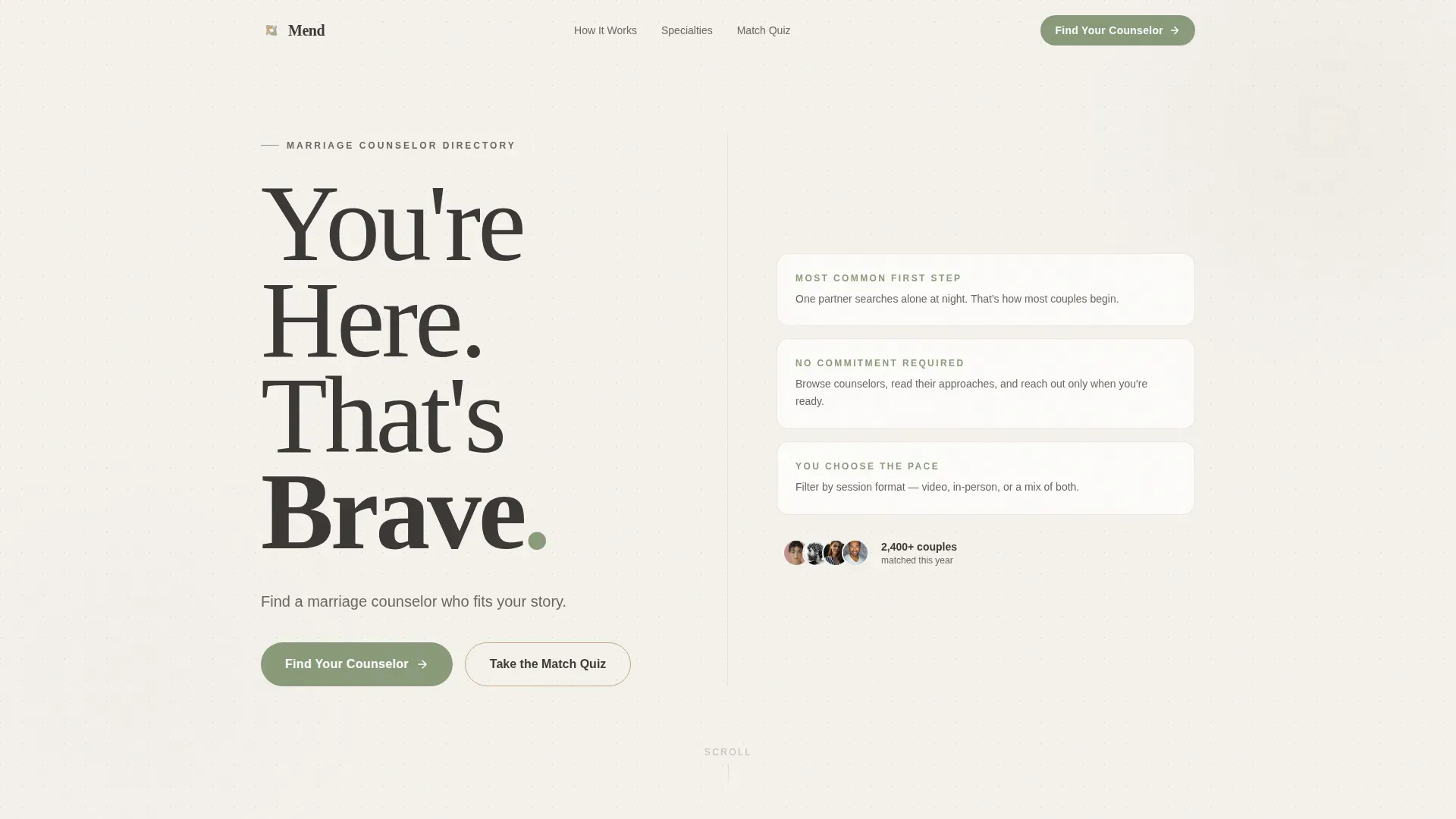
- A Stacked Type Tower hero with the headline "You're Here. That's Brave." in oversized serif typography
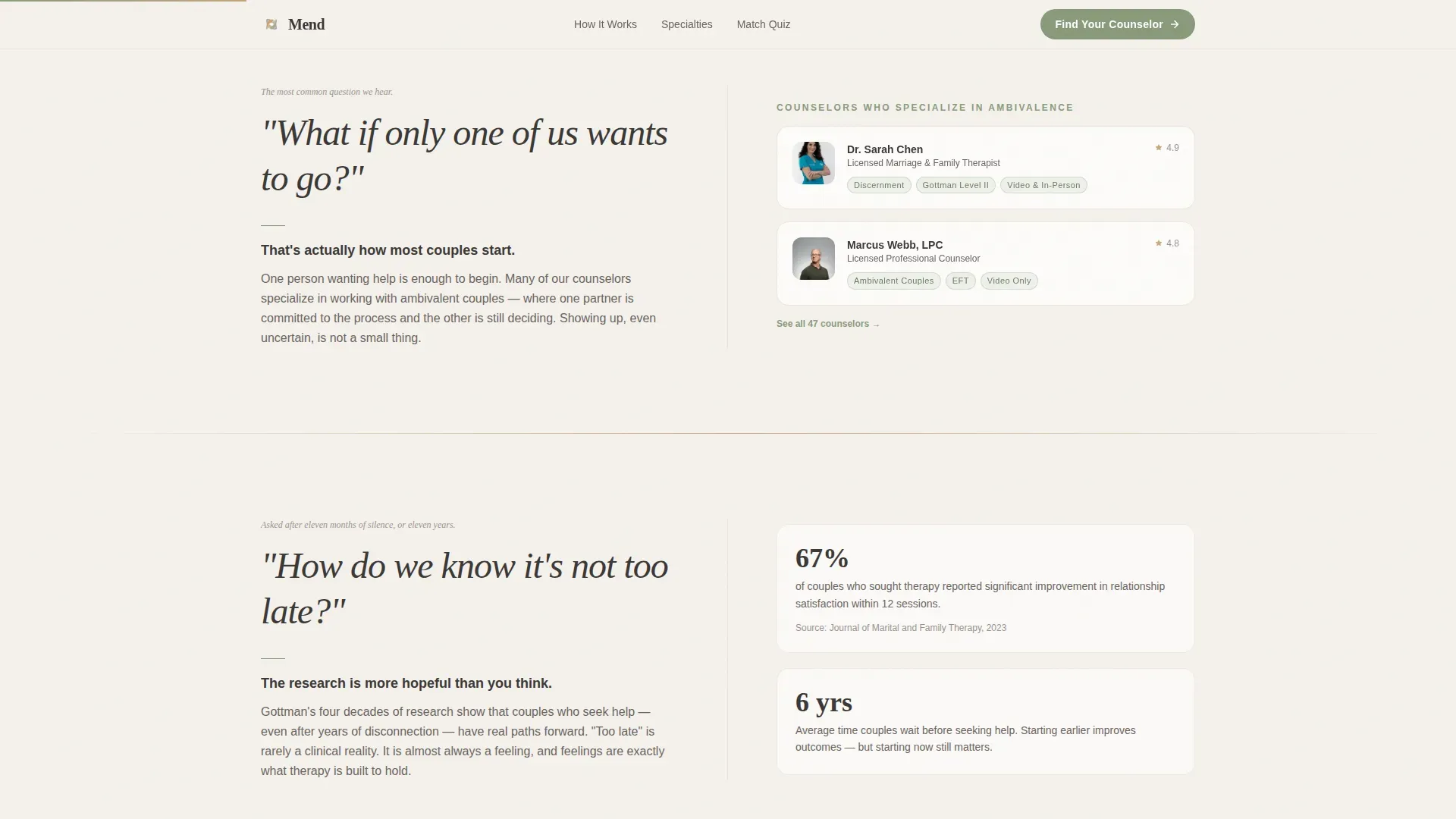
- Six FAQ pair sections that alternate between emotional questions on the left panel and calm, specific answers paired with directory features on the right
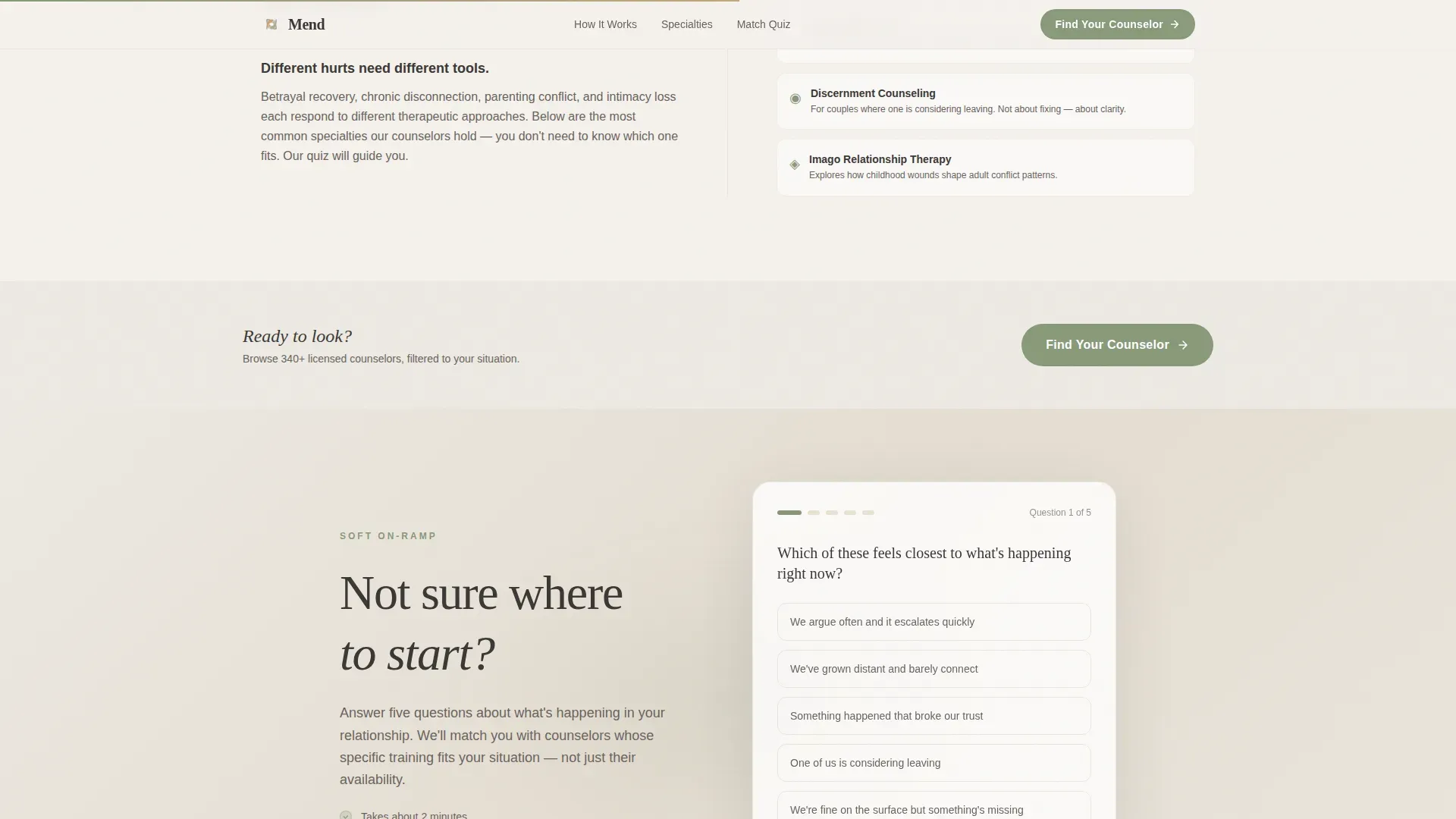
- A match quiz call-to-action interstitial, counselor specialty cards, filter chips for session format and insurance, and a counselor directory preview section
Feature list
This template includes several purpose-built features that work together to guide a distressed visitor toward a confident next step.
Stacked Type Tower Hero
The hero uses enormous Fraunces serif letters stacked vertically, each word on its own line with increasing weight from top to bottom. No stock photography. The typography carries all the emotional weight, creating an immediate sense of warmth and safety.
FAQ-Driven Split-Screen Scroll
Each scroll section pairs a real couple question in large italic type on the left panel with calm reassurance and directory functionality on the right. The layout makes the page feel like a conversation rather than a catalogue, reducing the friction that stops distressed visitors from browsing.
Counselor Specialty Cards
Specialty cards surface key counselor credentials and focus areas directly within the FAQ scroll flow. Visitors can see relevant specialties such as betrayal recovery and attachment-focused approaches without leaving the emotional context of the page.
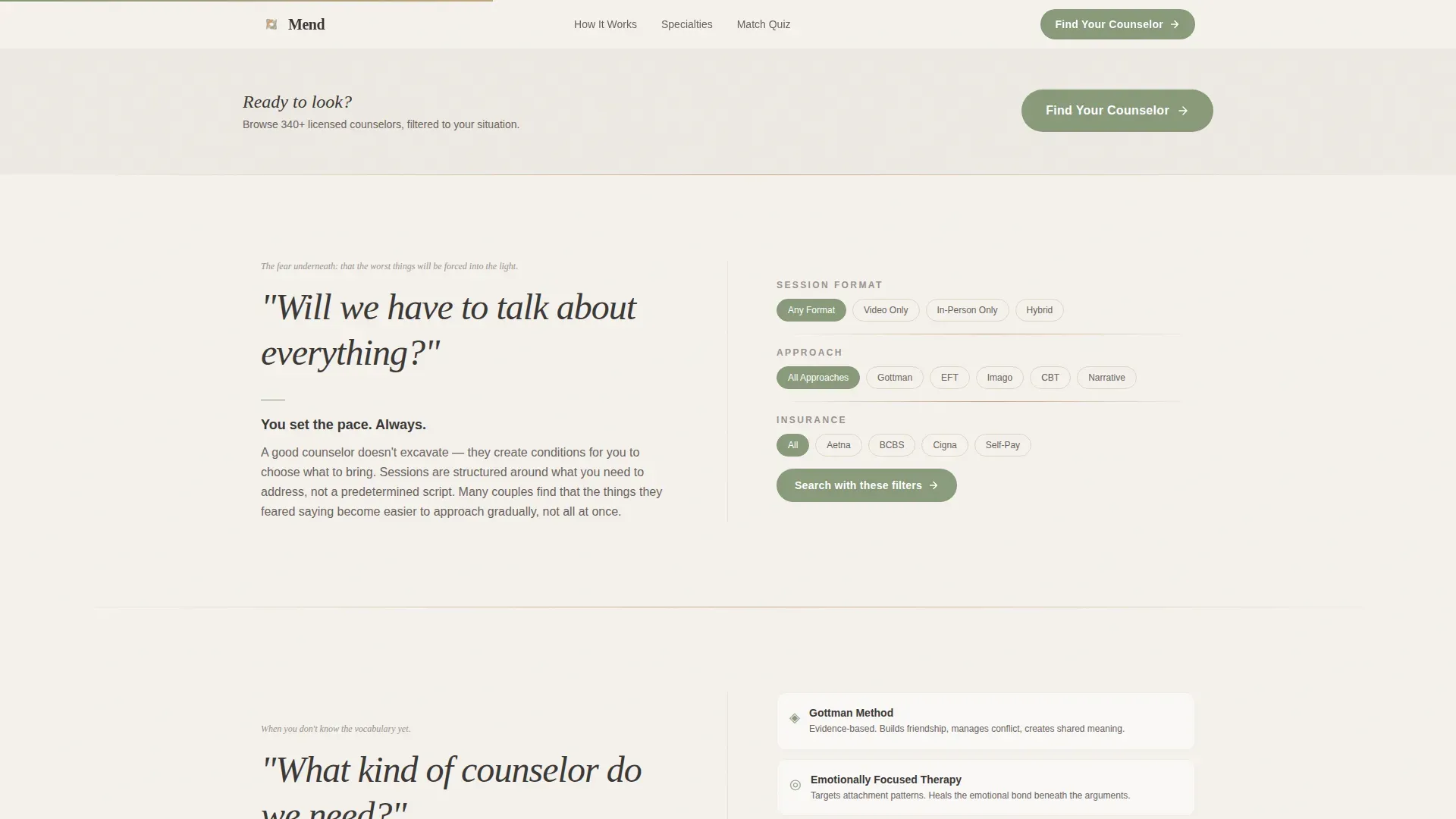
Session Filter and Insurance Chips
Interactive filter chips let visitors narrow by session format and insurance acceptance. The filters appear inline within the FAQ sections so the directory functionality feels like a natural answer, not an interruption.
Two-Minute Match Quiz Call-to-Action
A soft interstitial section midway down the page offers a gentler on-ramp for visitors not ready to browse profiles directly. The quiz call to action is positioned after the emotional groundwork has been laid, giving hesitant visitors a low-pressure next step.
Counselor Directory Preview with Credential Badges
The final FAQ section surfaces a counselor directory preview with credential badges indicating recognized training levels. The preview appears only after the visitor has moved through the emotional FAQ journey, making the browse feel earned rather than transactional.
Page sections overview
| Section | Purpose |
|---|---|
| Hero Type Tower | Establish emotional safety with bold headline typography and the primary "Find Your Counselor" call-to-action |
| FAQ Pair 1-2 | Address single-partner hesitation and urgency with specialty cards |
| FAQ Pair 3-4 | Reassure about session content and counselor fit with filter chips |
| Match Quiz call to action | Provide a soft interstitial on-ramp for undecided visitors |
| FAQ Pair 5-6 | Describe what a session feels like and how to start, with directory preview |
| Linear Footer | Close with minimal single-row footer pattern |
Design & branding system
The visual identity follows an Organic Flow theme built around the Cloud Canvas color system. Every color and type choice reinforces warmth, honesty, and quiet confidence rather than clinical professionalism.
- Fog white (#F4F1EC) as the primary background, warm clay (#C4A882) for section dividers and accent borders, muted sage (#8A9A7B) for interactive elements and hover states, and grounded charcoal (#3B3836) for body text
- Fraunces serif for all emotional headlines and FAQ questions, paired with DM Sans for body copy and filter labels, creating a clear visual hierarchy between feeling and information
- GSAP ScrollTrigger reveals and gentle dissolves animate section transitions, with a FAQ accordion handling expand and collapse interactions inline
Mobile & speed optimization
The template is designed desktop-first with a 50/50 split-screen layout, but includes a graceful mobile stacking approach so the left and right panels reflow cleanly on smaller screens.
- The split-screen columns stack vertically on mobile, with FAQ questions appearing above their paired answers and directory components
- Static structural sections use Server Components while interactive FAQ accordions and filter chips use Client Components, keeping the interactive layer lean
How this template helps you convert
Every structural and design decision in this template is built to reduce the distance between a scared first-time visitor and a confident directory click.
- The FAQ scroll answers shame and uncertainty before a single filter or profile appears, so the visitor feels understood by the time the primary call-to-action is within reach
- The "Find Your Counselor" button in sage green appears beneath the hero and repeats after every third FAQ pair, staying visible without feeling pushy
- The match quiz interstitial catches visitors who are not yet ready to browse, giving them a lower-commitment path that still moves them toward a counselor match
Other information about this template
This template is localized for English-language audiences in the United States, with pricing and session formats referenced in USD. It is built for the Health and Medical category within the marriage counselor website subcategory, and is specifically designed for the marriage counselor provider directory niche.
- Anonymized couple testimonials and counselor credential badges are included as social proof components within the layout
- The footer follows a Linear Single-Row pattern, keeping the page close cleanly without adding visual clutter after the directory preview
- The template title "Mend" sets the editorial tone for the directory and can be adapted to match a specific brand name when the template is deployed
Theme
Organic Flow
Creative direction
FAQ-Driven
Color system
Cloud Canvas
Style
Split Screen (50/50)
Direction
Click-Through
Page Sections
Stacked Type Tower Hero
Faq-driven Split-screen Scroll
Counselor Specialty Cards
Session and Insurance Filter Chips
Two-minute Match Quiz Interstitial
Directory Preview with Credential Badges
Related questions
Can I connect this template to a real counselor database?
Does the two-minute match quiz work out of the box?
Can I edit the FAQ questions to fit my directory's tone?
Is the 50/50 split-screen layout usable on smaller screens?
Is this template suitable for a group practice rather than a large directory?



