Orthopedic Surgeon Booking Website Template
Mend is a sidebar companion landing page template built for orthopedic surgery practices. It pairs a half-page hero with a persistent quiz sidebar that guides patients from pain identification to booking a consultation. The layout combines a testimonial mosaic, anatomical filters, and a procedure stats section into one calm, trust-building page designed to convert anxious visitors into booked appointments.
by Rocket studio
Quick summary
Mend is a single-page orthopedic appointment booking template with a persistent sidebar quiz. Patients identify their pain point, answer three progressive questions, and receive a personalized consultation recommendation. The design uses clinical warmth and soft gradients to replace patient anxiety with calm confidence, moving visitors toward booking without friction.
Who this template is for
This template is built for orthopedic surgery practices that want a direct, trustworthy online presence. It is especially suited to clinics that handle a mix of acute injury patients and longer-term degenerative cases.
- Orthopedic surgeons running a single-practitioner or small-group practice seeking more booked consultations
- Clinic teams serving weekend athletes with joint injuries alongside retirees managing chronic joint conditions
- Healthcare marketing teams looking for a high-interactivity landing page with a built-in patient qualification path
What problem this template solves
Patients dealing with joint pain often spend months uncertain about whether they need surgery, physiotherapy, or something else entirely. That uncertainty keeps them from booking. A generic contact form does nothing to close that gap.
- Visitors leave without booking because they do not know if their pain is serious enough to warrant a consultation
- Practices lose qualified leads who want guidance before committing to an appointment
- Standard medical pages feel cold and institutional, making anxious patients feel worse rather than reassured
What you get with this template
This template delivers a complete, single-page layout structured around a quiz-driven conversion path. Every section is designed to build trust and reduce the distance between "I hurt" and "I booked."
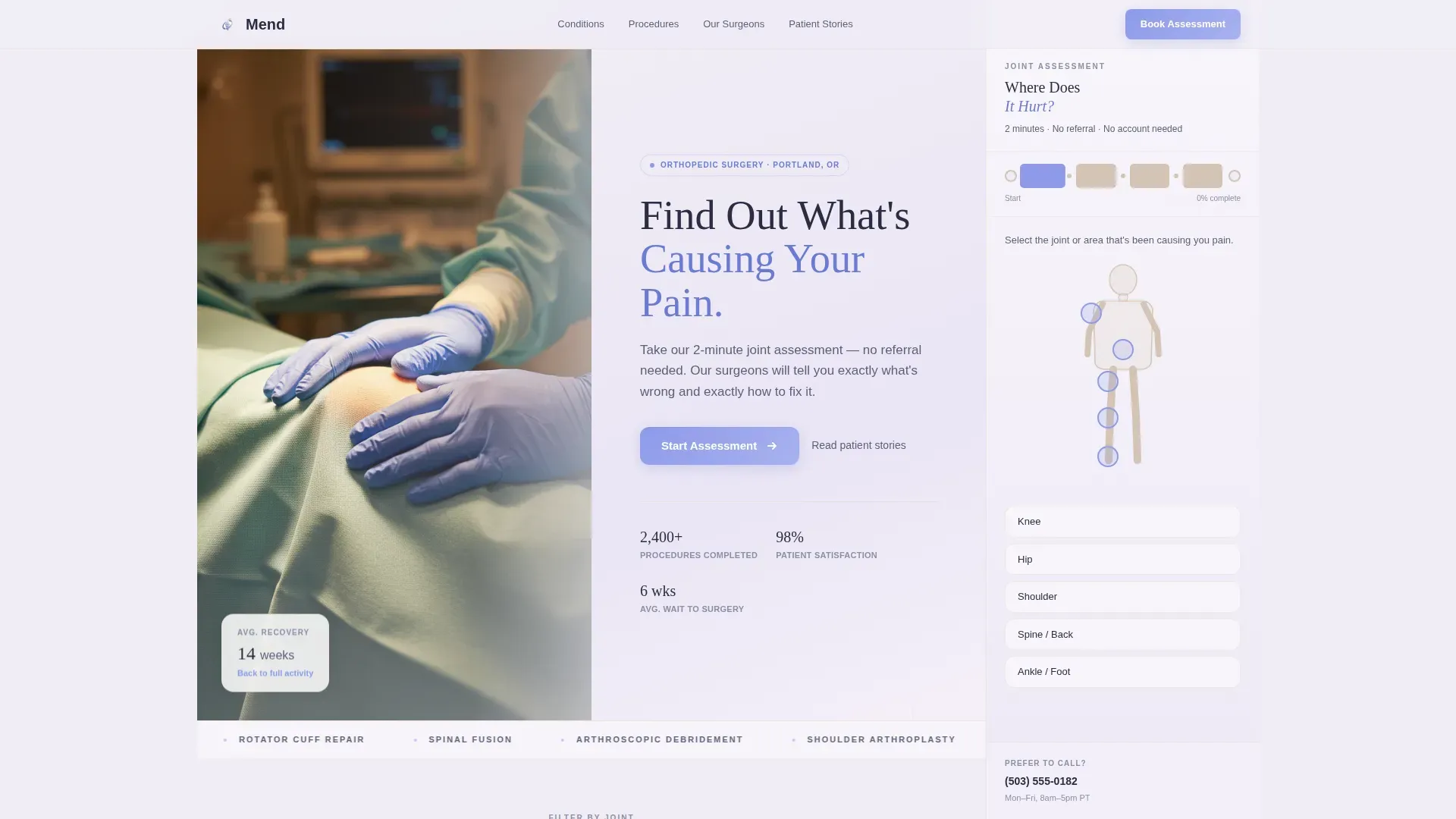
- A persistent sidebar quiz with a body map, progressive pain questions, an activity impact slider, and a personalized results frame
- A scrollable main column with a testimonial mosaic, clickable anatomical illustrations, a procedure stats bento grid, and a surgeon credentials section
- A dual call-to-action final section offering both direct booking and a PDF results download to capture visitors not yet ready to commit
Feature list
This template is built around five core functional and visual capabilities drawn directly from the design brief.
Persistent Sidebar Quiz
The sidebar stays fixed throughout scroll. It opens with a clickable body map silhouette where the patient selects their affected joint. Three progressive questions follow: pain duration, activity impact via a slider, and previous treatment history. No account or email is required until the final results step. The result is framed as a personalized recommendation tied to the practice.
Testimonial Mosaic with Joint Filter
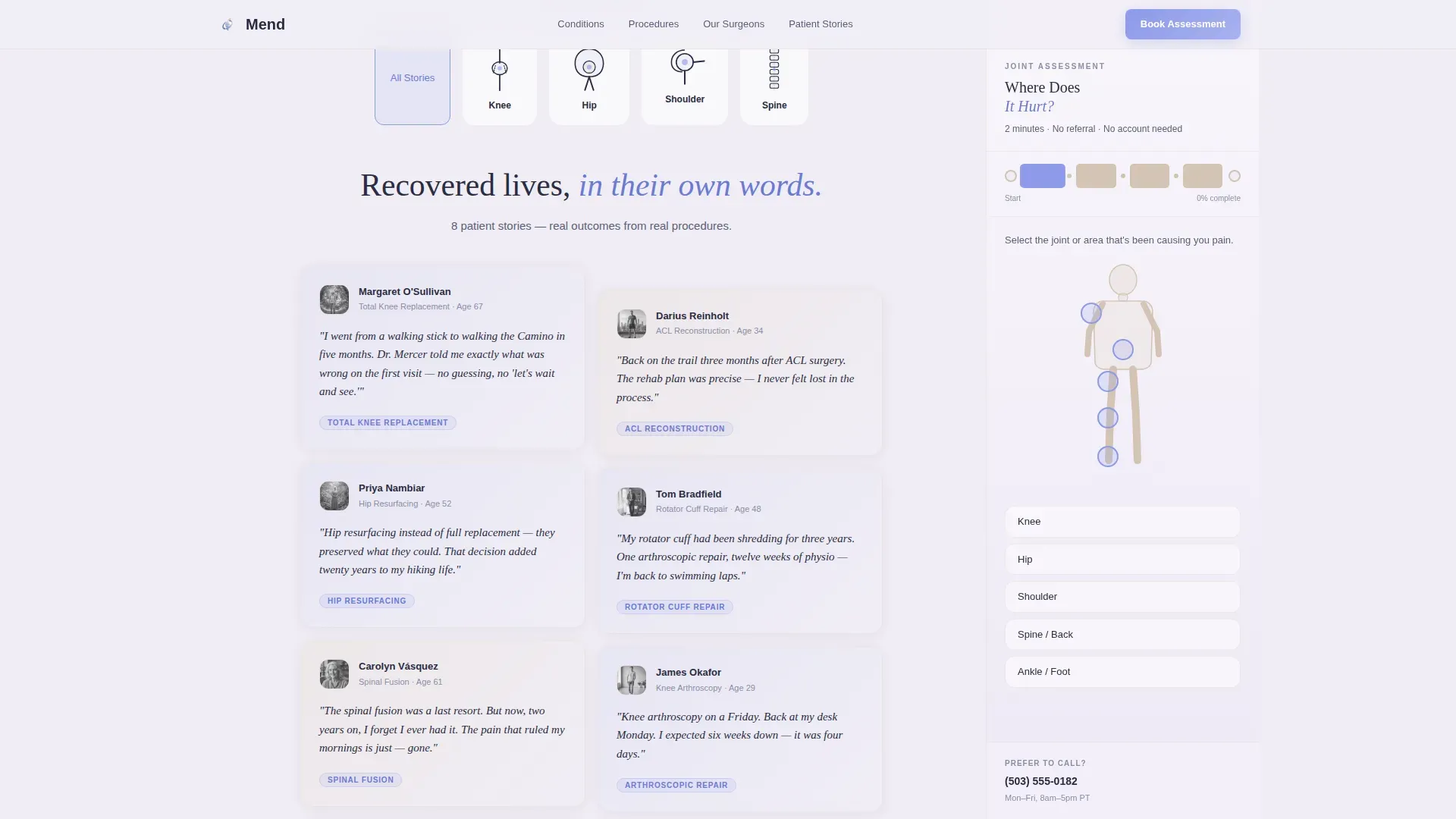
Patient story cards tile across the main content column in staggered heights. Each card shows a short patient quote, a procedure tag such as Total Knee Replacement or Arthroscopic Repair, and a soft gradient backdrop. Clickable anatomical illustrations of the hip, knee, shoulder, and spine filter the mosaic by joint, so visitors see stories relevant to their specific condition.
Half-Page Hero Section
The header splits into two equal panels. The left side holds a close-up clinical photograph of gloved hands resting on a patient's draped knee, lit by a diffused overhead surgical lamp. The right panel carries the headline and subline over a lavender-to-white gradient. The layout establishes immediate clinical credibility before the visitor reads a single word.
Procedure Stats Bento Grid
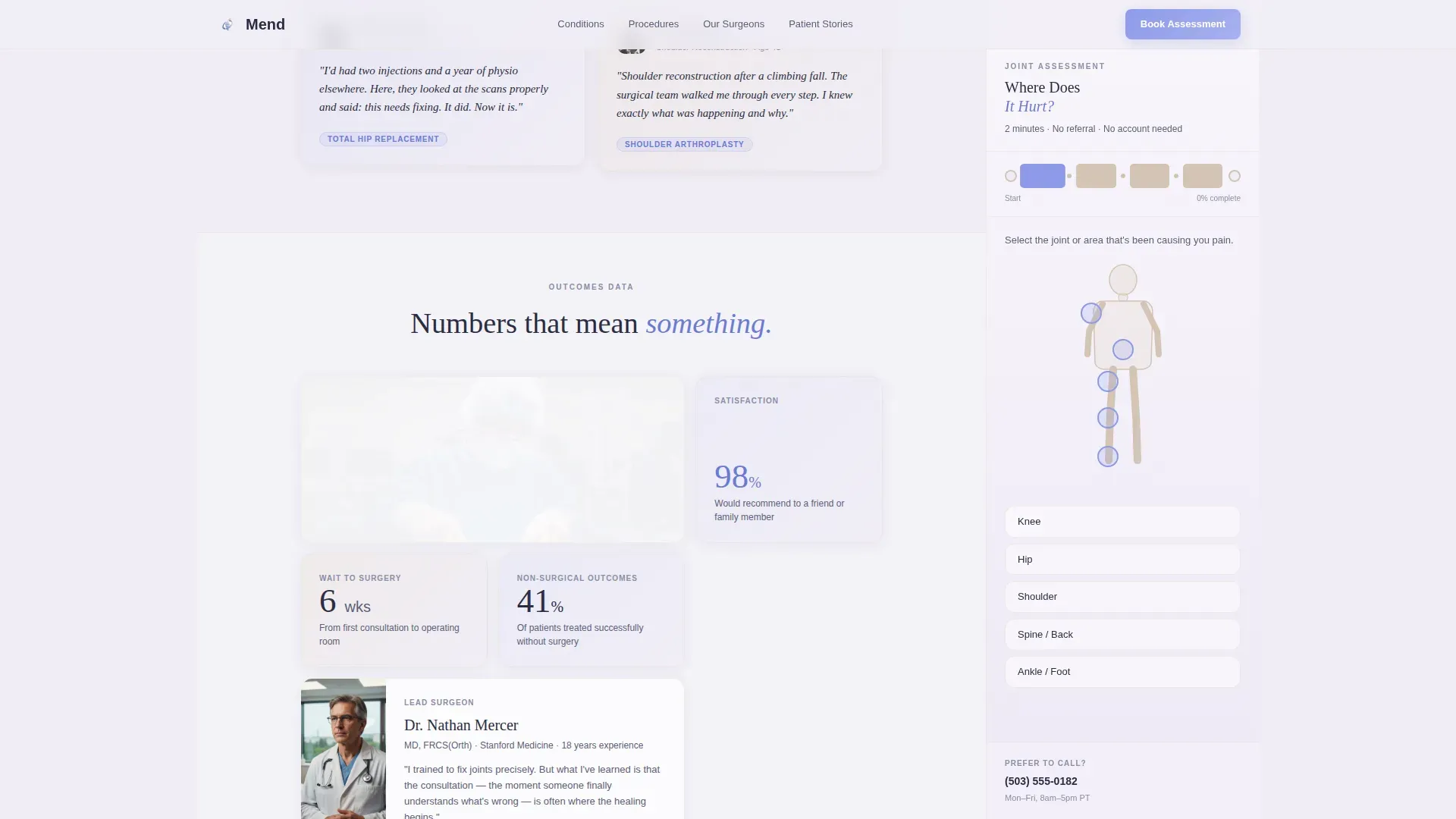
An asymmetric grid section presents key outcome data such as recovery timelines and procedure success context. The irregular layout keeps the data visually engaging rather than table-flat, helping skeptical visitors evaluate the practice with confidence before committing.
Dual Conversion Path
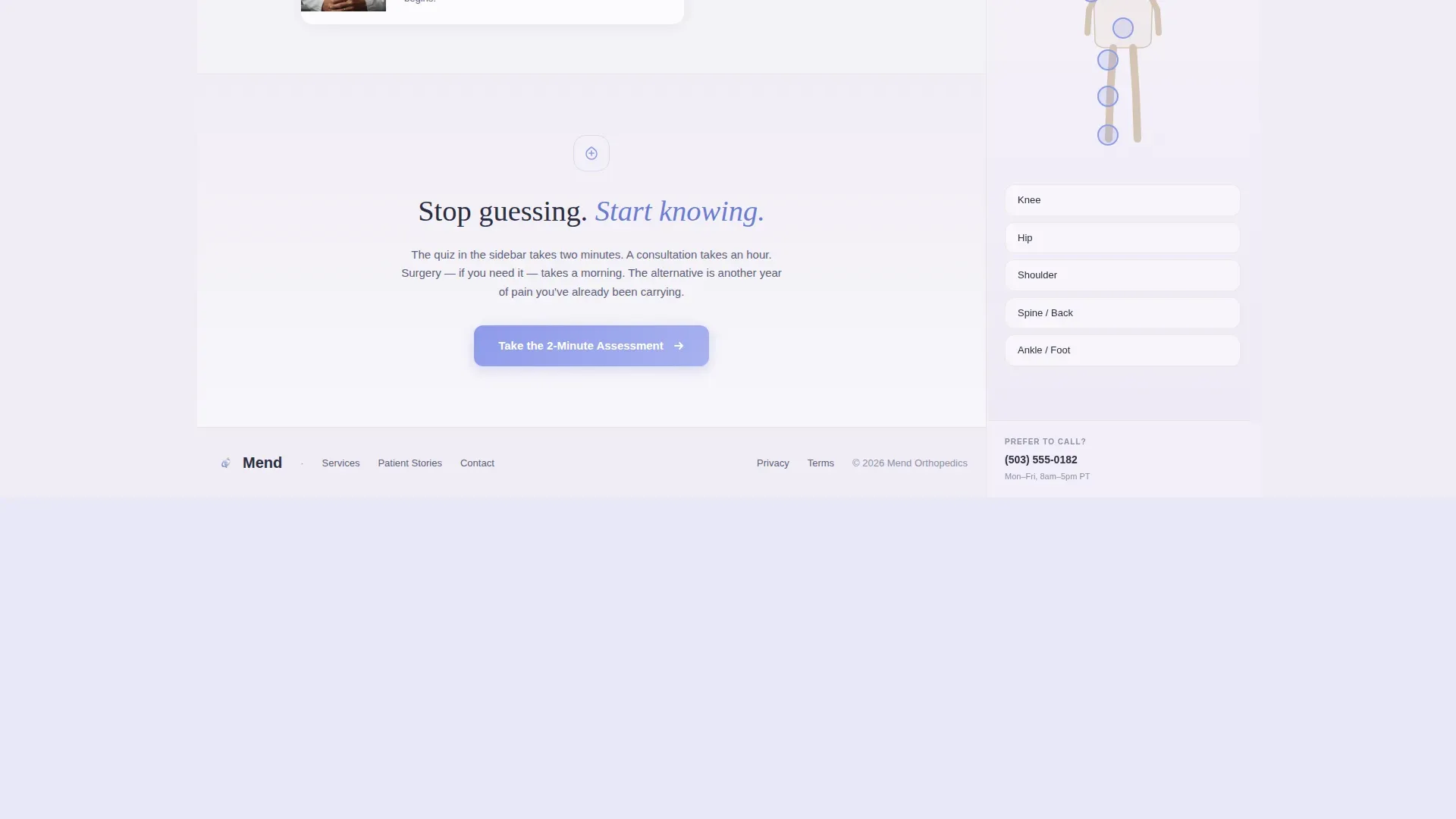
The final call-to-action section offers two options. The primary button reads "Book My Assessment" and leads to direct scheduling. A secondary text link offers a PDF download of the quiz results, giving hesitant visitors something tangible to take to their general practitioner. This two-path structure captures both ready and not-yet-ready visitors.
Page sections overview
| Section | Purpose |
|---|---|
| Hero Header | Establish clinical trust and launch sidebar quiz |
| Sidebar Quiz | Guide patient from pain to personalized recommendation |
| Anatomy Filter | Let visitors filter testimonials by affected joint |
| Testimonial Mosaic | Build social proof through staggered patient story cards |
| Procedure Stats Bento | Present outcome data in an asymmetric visual grid |
| Trust and Credentials | Display surgeon profile, certifications, and affiliations |
| Final Call to Action | Offer direct booking and PDF results download |
| Footer | Single-row linear footer with practice contact info |
Design & branding system
The visual identity follows a Soft Gradient theme built on the Cloud Canvas color system. The palette is designed to feel like morning light through frosted recovery-room glass: soft enough to lower a tense visitor's shoulders, serious enough to trust with a medical decision.
- Colors: misted lavender-white (#F0EDF5) for backgrounds, clinical periwinkle (#8E9AEB) for interactive elements and progress indicators, warm bone (#E8DDD3) for testimonial card backdrops, and deep surgical charcoal (#2B2D42) for body text
- Typography: Fraunces serif for headlines to carry warm authority, DM Sans for body copy to maintain clinical readability
- Visual details: a bone-shaped vertical progress tracker in the sidebar fills segment by segment as the quiz advances, testimonial card gradients shift hue subtly from periwinkle into bone into lavender across the mosaic
Mobile & speed optimization
The template is designed desktop-first to accommodate the persistent sidebar quiz, which requires horizontal screen space to function as intended. A responsive collapse behavior is built in for smaller screens.
- The sidebar quiz collapses gracefully on mobile, shifting from a fixed panel to an inline flow so the assessment remains usable on phones and tablets
- Animations use CSS transitions and the Intersection Observer browser interface, avoiding heavy external libraries that would slow initial load
- Scroll reveals and staggered mosaic animations are handled natively, keeping the interactive feel intact without adding rendering overhead
How this template helps you convert
Every design and layout decision in this template is oriented toward one outcome: turning a pain-aware visitor into a booked patient.
- The persistent sidebar quiz keeps the conversion action visible at every scroll position, so the visitor never has to hunt for a next step once they feel ready to act.
- The testimonial mosaic builds cumulative social proof as the visitor scrolls deeper, pairing personal patient stories with specific procedure tags so the evidence feels directly relevant rather than generic.
- The dual call-to-action path captures two types of visitors at once: those ready to book now and those who need more time, ensuring no qualified lead leaves empty-handed.
Other information about this template
This template is part of a broader library of healthcare and medical landing page templates. A few practical notes for teams evaluating it:
- The template is categorized under Health and Medical with a focus on the orthopedic surgeon appointment booking niche
- It is localized for English-language use, United States date formatting (month/day/year), and a Pacific Northwest clinic context by default
- The quiz sidebar requires no third-party form tool to render its visual flow; the interaction logic is self-contained within the template structure
- This template pairs well with practices that want to qualify patients before the first call, reducing front-desk time spent on consultations that are not yet appropriate
Theme
Soft Gradient
Creative direction
Testimonial Mosaic
Color system
Cloud Canvas
Style
Sidebar Companion
Direction
Quiz/Assessment
Page Sections
Persistent Sidebar Quiz with Body Map
Testimonial Mosaic with Joint Filter
Half-page Clinical Hero
Procedure Stats Bento Grid
Dual Conversion Path at Close
Surgeon Trust and Credentials Section
Related questions
Does the quiz sidebar require visitors to create an account?
Can the testimonial mosaic be filtered by procedure or joint type?
Is this template designed for a single surgeon or a group practice?
What does a visitor receive if they are not ready to book after completing the quiz?
What screen size works best for this template?



