Restaurant Menu Pricing SaaS Website Template
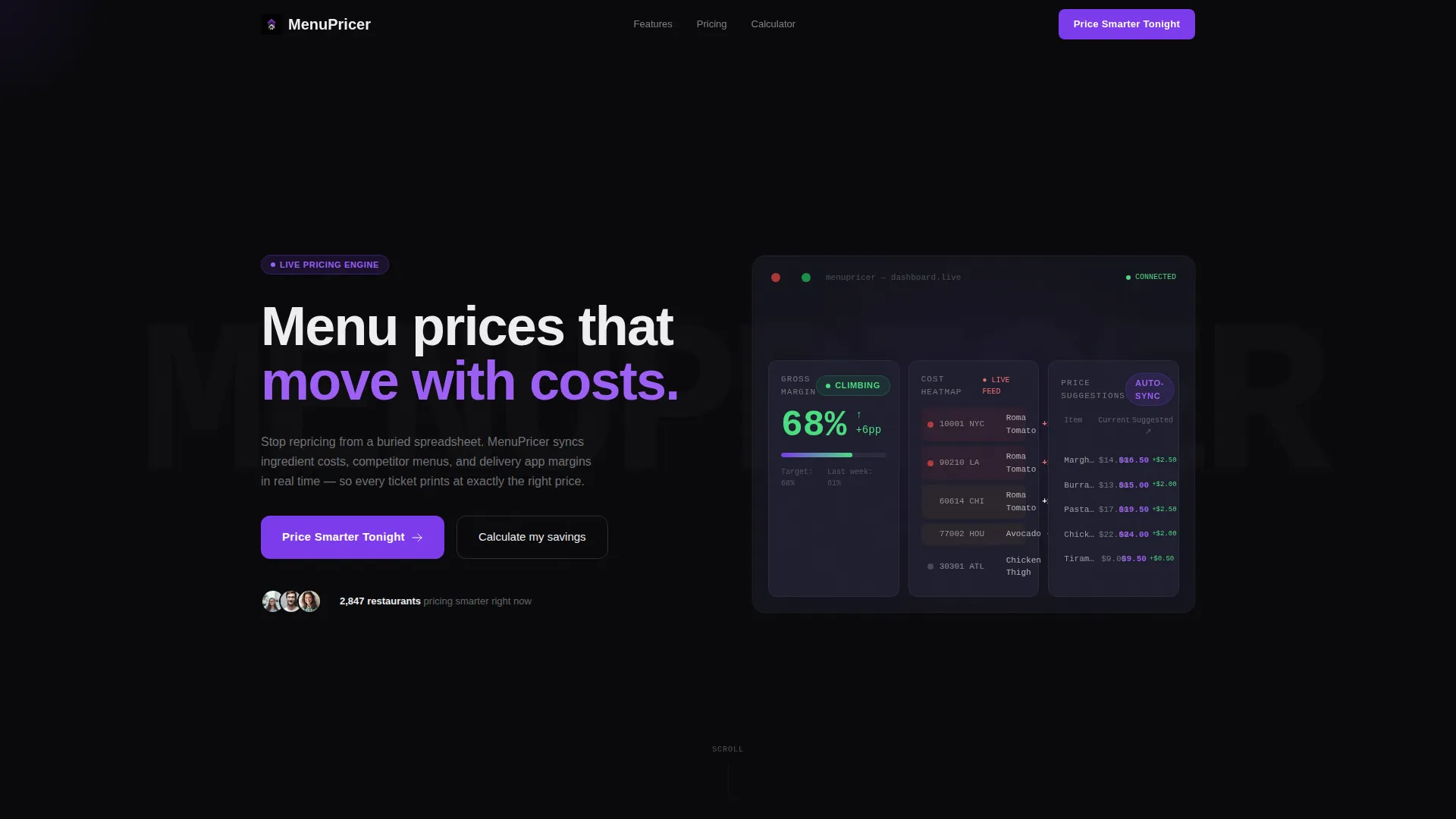
Menu is a scroll-reveal landing page template built for a restaurant menu pricing SaaS platform. It opens with an animated stats dashboard showing live margin tickers and cost heatmaps, then progressively reveals a feature matrix as visitors scroll. The primary call to action, "Price Smarter Tonight," drives app downloads through a phone-number input, App Store and Google Play badges, and a live margin savings calculator.
by Rocket studio
Quick summary
Menu is a single-page, scroll-reveal landing page template designed for a dynamic restaurant pricing platform. It leads with a live-data dashboard header, builds a progressive feature matrix through scroll triggers, and closes on a conversion-focused app download section. The Void and Violet color system gives the page a precise, digital-kitchen feel that suits a data-driven SaaS product.
Who this template is for
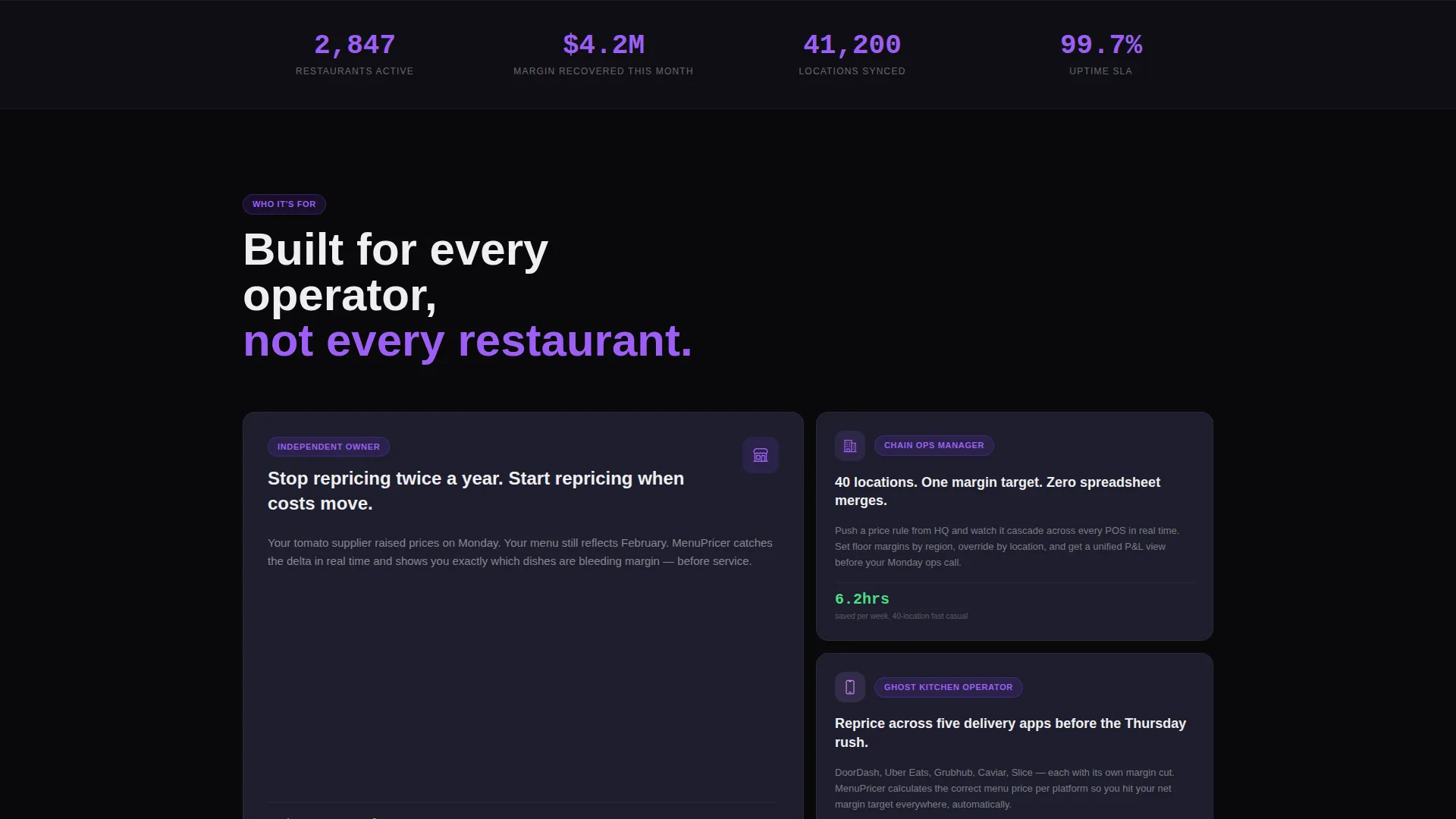
This template is built for SaaS founders and product teams launching a restaurant menu pricing platform. It speaks directly to operators who manage pricing across one location or dozens.
- Independent restaurant owners who reprice menus manually a few times per year
- Fast-casual chain operations managers syncing margin targets across 40 or more locations
- Ghost kitchen operators who need to reprice across multiple delivery apps before peak service hours
What problem this template solves
Restaurant operators lose margin every day because their pricing does not keep up with ingredient costs, seasonal shifts, or competitor moves. A static brochure page cannot communicate a live, data-driven product. This template solves that.
- It replaces flat product screenshots with animated, real-time-style dashboard components that show the platform working
- It communicates pricing tier differences through a progressive feature matrix, so visitors understand value before they commit
- It earns the app download tap with a live savings calculator before asking for any contact information
What you get with this template
You get a fully structured, single-page landing page built around three conversion stages: demonstrate value, explain capability, and capture the download. Every section is purpose-built and sequenced for a SaaS product with a restaurant operator audience.
- An animated header dashboard with a margin ticker, cost-change heatmap, and auto-adjusting suggested-price column
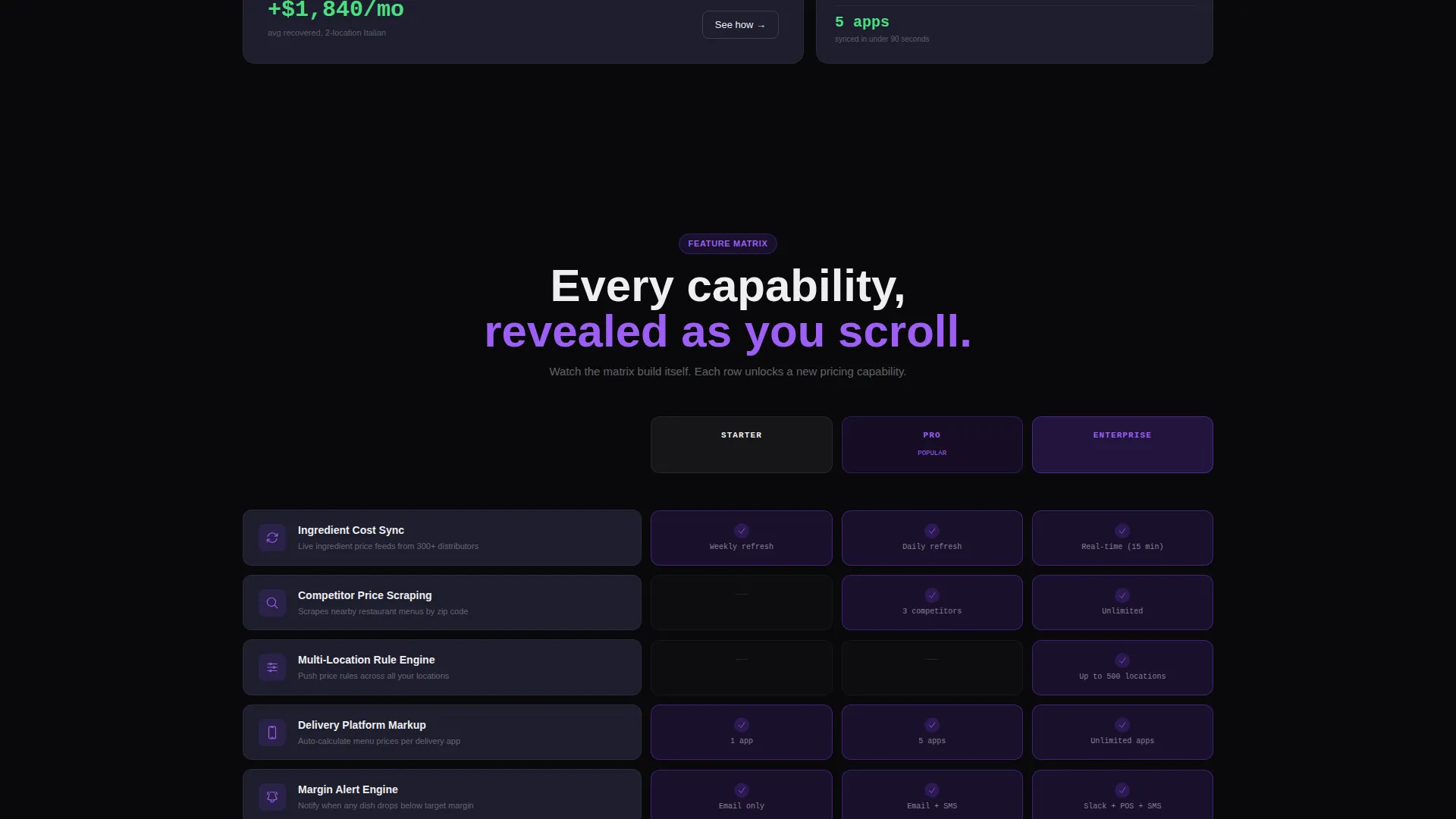
- A scroll-triggered feature matrix that reveals capabilities row by row across three pricing tiers, with cells lighting violet on appearance
- A bottom-of-page app download section with a phone-number input, App Store badge, Google Play badge, and a cuisine-type savings calculator
Feature list
This template includes a focused set of interactive and structural components drawn directly from the brief.
Animated Stats Dashboard Header
The header opens on a frozen-mid-update metrics panel. A margin ticker climbs from 62 percent to 68 percent, a cost-change heatmap highlights ingredient price spikes by zip code, and a suggested-price column adjusts beside current menu prices. All numbers animate on load using large monospace typography.
Progressive Scroll-Reveal Feature Matrix
Each scroll trigger unlocks a new capability row covering ingredient cost sync, competitor price scraping, multi-location rule engines, and delivery platform markup automation. The matrix builds column by column across three pricing tiers. Each cell lights violet as it appears, giving the page a prep-board-filling momentum.
Live Margin Savings Calculator
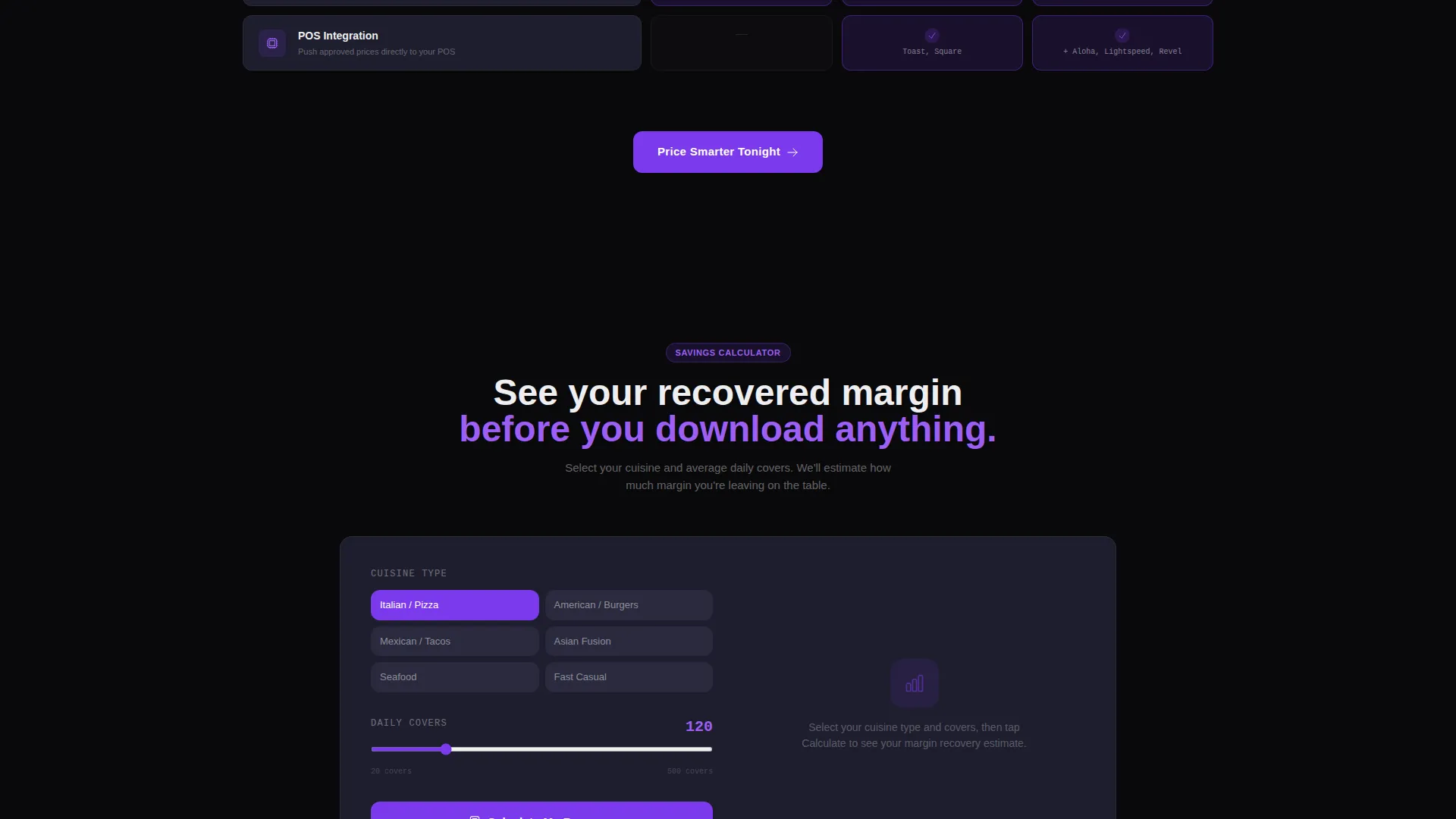
Before the download call to action, visitors select their cuisine type and average covers per service. The calculator returns an estimated recovered margin per month. This section does the persuasion work so the download tap feels earned, not pushed.
Dual-Path App Download Section
The primary call to action reads "Price Smarter Tonight" and appears first inside the header dashboard, then anchors at the bottom of the completed feature matrix. Tapping opens a phone-number input that texts a download link. App Store and Google Play badges appear as secondary download paths.
Void and Violet Interactive States
Every interactive moment, including hover states, toggle switches, and progress bars, uses electric violet (#7C3AED) against void black (#09090B). Card surfaces sit on muted graphite (#1E1E2E). Bone white (#EEEEF0) carries all body and display typography.
Page sections overview
| Section | Purpose |
|---|---|
| Dashboard Header | Opens with animated margin ticker, cost heatmap, and live suggested-price column |
| Primary call to action Block | Places "Price Smarter Tonight" call to action inside the header dashboard |
| Feature Matrix | Reveals platform capabilities row by row across three tiers as visitor scrolls |
| Savings Calculator | Lets visitors input cuisine type and covers to see estimated monthly margin recovery |
| App Download Anchor | Repeats primary call to action with phone-number input, App Store badge, and Google Play badge |
Design & branding system
The visual identity follows a Startup Velocity theme built around the Void and Violet color system. The palette is designed to feel like a point-of-sale screen glowing in a dark kitchen at midnight.
- Core colors: absolute void black (#09090B) for backgrounds, electric violet (#7C3AED) for all interactive and highlight states, muted graphite (#1E1E2E) for card surfaces, and crisp bone white (#EEEEF0) for typography
- Typography uses a monospace typeface for all data displays, counters, and metric readouts to reinforce the precision and digital-dashboard aesthetic
- Violet drives every interactive moment while the void background recedes, letting data and numbers take visual priority
Mobile & speed optimization
The layout is designed for tap-first interaction, with the app download flow built around a mobile phone-number input as the primary conversion path.
- The "Price Smarter Tonight" call to action and the phone-number input are optimized for one-thumb interaction on small screens
- App Store and Google Play badges appear as secondary paths for visitors arriving directly from a mobile device
- Scroll-reveal animations are structured to trigger progressively, so the feature matrix builds naturally on both desktop and mobile viewports
How this template helps you convert
This template is structured to move a skeptical restaurant operator from curiosity to download without friction. The sequence is deliberate.
- The animated dashboard header shows the product working before a single word of copy is read, establishing credibility in the first seconds of the visit
- The progressive feature matrix builds trust gradually, letting visitors absorb one capability at a time rather than scanning a dense, static grid
- The savings calculator delivers a personalized, specific number before the download call to action appears, replacing generic persuasion with a concrete reason to act
Other information about this template
This template is part of the Restaurant Website Templates subcategory within the broader Technology category on the marketplace. It is designed for teams building or marketing a restaurant pricing SaaS product and is not a general restaurant menu display page.
- The template style is Scroll Reveal (Progressive), meaning sections and components animate into view as the visitor scrolls rather than loading all at once
- The header concept is Stats and Metrics, using live-style data components rather than hero illustrations or stock photography
- The landing page direction is App Download, meaning the entire page structure is oriented toward getting a visitor to install the mobile application
- This template suits teams pitching to independent restaurant owners, multi-location chain operators, and ghost kitchen businesses across delivery platforms
Theme
Startup Velocity
Creative direction
Feature Matrix
Color system
Void & Violet
Style
Scroll Reveal (Progressive)
Direction
App Download
Page Sections
Animated Stats Dashboard Header
Scroll-triggered Feature Matrix
Live Margin Savings Calculator
Dual-path App Download Section
Void and Violet Interaction System
Related questions
Is this template designed for a single-page layout or a multi-page site?
Can I adapt the savings calculator inputs for different restaurant types?
Does the feature matrix support more or fewer than three pricing tiers?
Who is the primary audience this landing page is built to reach?
Does the page require real live data to function?