Industrial Warehouse Investment Landing Page Template
Mesa is a full-width immersive landing page template built for industrial warehouse investment advisory firms. It combines an asymmetric 60/40 grid, a drag-interactive Before/After header slider, scroll-animated portfolio stats, and a data-dense conviction flow that guides high-net-worth visitors straight to a gated deal room with a single clear call to action.
by Rocket studio
Quick summary
Mesa is a single-page landing page template designed for industrial warehouse investment advisory firms. It uses a 60/40 asymmetric grid, a drag-to-reveal header slider, and scroll-triggered performance metrics to build investor conviction fast. The layout drives visitors toward one outcome: clicking through to a gated deal room.
Who this template is for
Mesa is built for firms that acquire and reposition industrial warehouse assets in secondary markets. If you present deals to capital partners and need a page that earns trust before asking for a click, this template is sized for that task.
- Industrial warehouse investment advisors targeting high-net-worth individuals and family offices
- Operators managing 1031 exchange timelines or self-directed IRA investor relationships
- Real estate acquisition teams that lead with track record data rather than brand narrative
What problem this template solves
Most real estate landing pages ask visitors to trust a firm before showing them any evidence. Mesa flips that sequence. Every scroll delivers a number before a narrative, so conviction builds section by section without a single form field getting in the way.
- Visitors leave early when the value case is unclear or buried below the fold
- High-net-worth investors expect data density, not generic real estate copy
- A gated deal room click requires more earned trust than a standard lead form submission
What you get with this template
Mesa delivers a fully structured, single-page layout with every section and component defined in the design brief. Nothing is left as a placeholder concept.
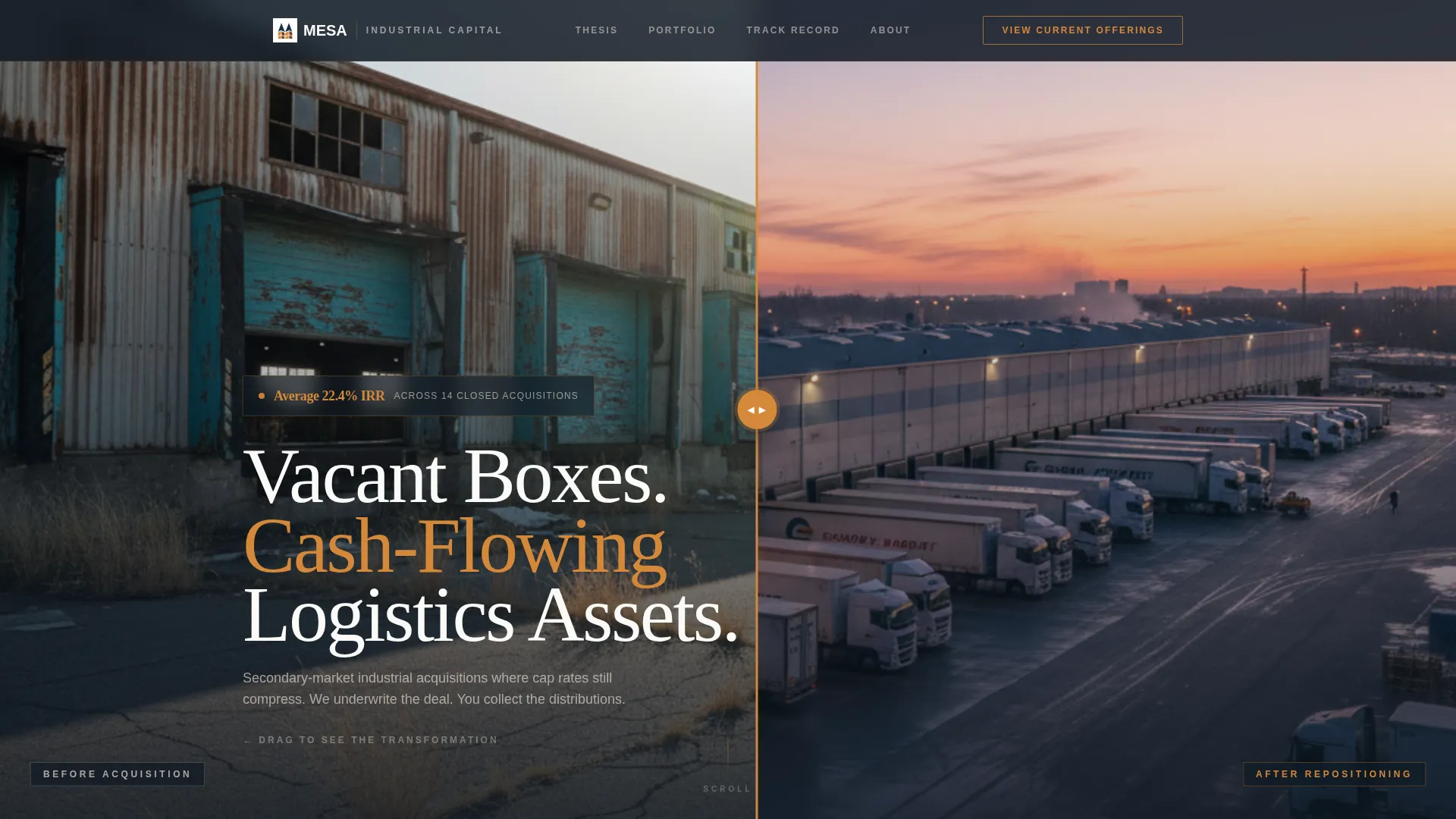
- A drag-interactive Before/After header slider splitting a drone warehouse transformation across the viewport
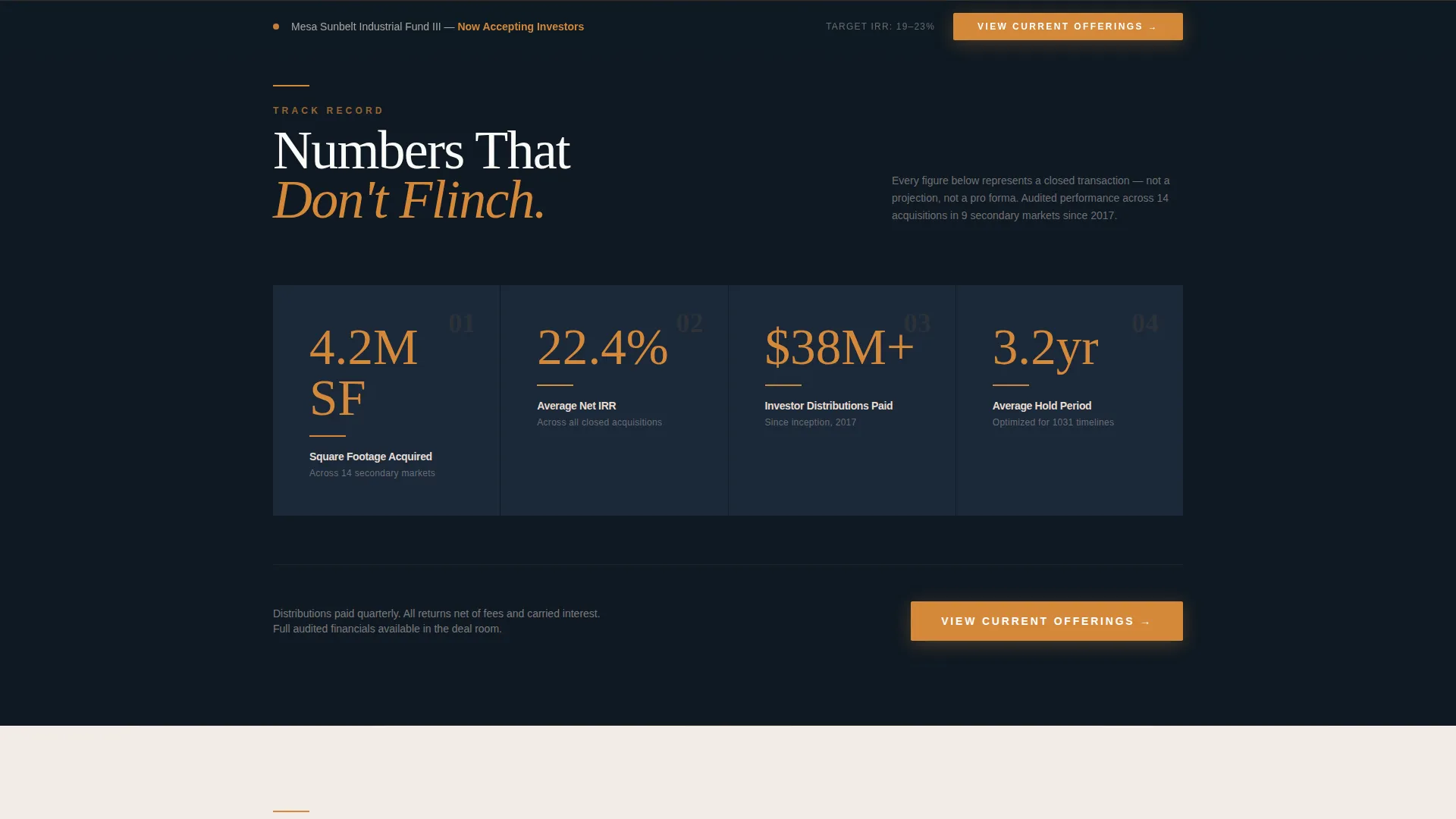
- Scroll-animated portfolio metrics rendered as oversized amber numerals on navy panels
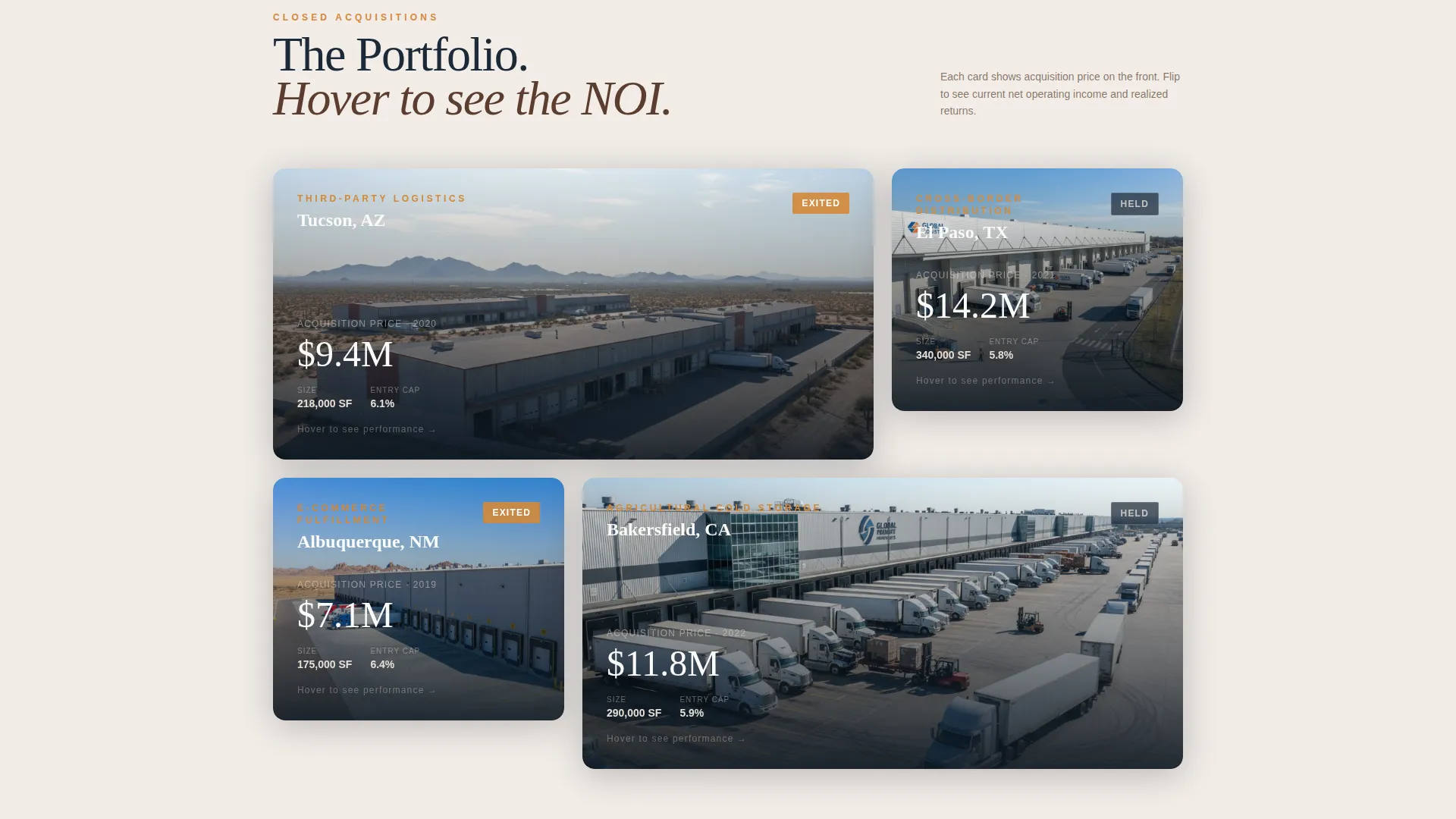
- A hover-flip case study grid, a named LP testimonial block, and a sticky bottom call to action bar that locks in after midpoint scroll
Feature list
Mesa's components are purpose-built for industrial real estate advisory. Each one is grounded in the brief and serves a specific role in the conviction sequence.
Before/After Header Slider
The header splits the viewport diagonally. Left shows a distressed warehouse with cracked asphalt and faded dock doors. Right reveals the same structure repositioned with loaded trailers and a glowing tenant marquee. Visitors drag the divider themselves, physically converting the asset on screen. A single performance stat fades in above the slider on load.
Scroll-Animated Portfolio Metrics
Section one surfaces three core performance figures: total square footage acquired, average hold period, and investor distributions paid to date. Each metric animates into view as the visitor scrolls, rendered as oversized amber numerals against deep navy panels. Numbers appear before any narrative text.
Hover-Flip Case Study Grid
Each warehouse card in the case study grid shows the acquisition price on the front face. On hover, the card flips to reveal current net operating income for that asset. The interaction makes track record data tactile rather than static.
Three-State call to action Architecture
The primary call to action, "View Current Offerings," appears in three distinct states across the page. It begins as a ghost-outlined button in the header, reappears as a full amber block after the portfolio stats section, and anchors permanently in a sticky bottom bar once the visitor passes the midpoint of the page.
Asymmetric 60/40 Grid Layout
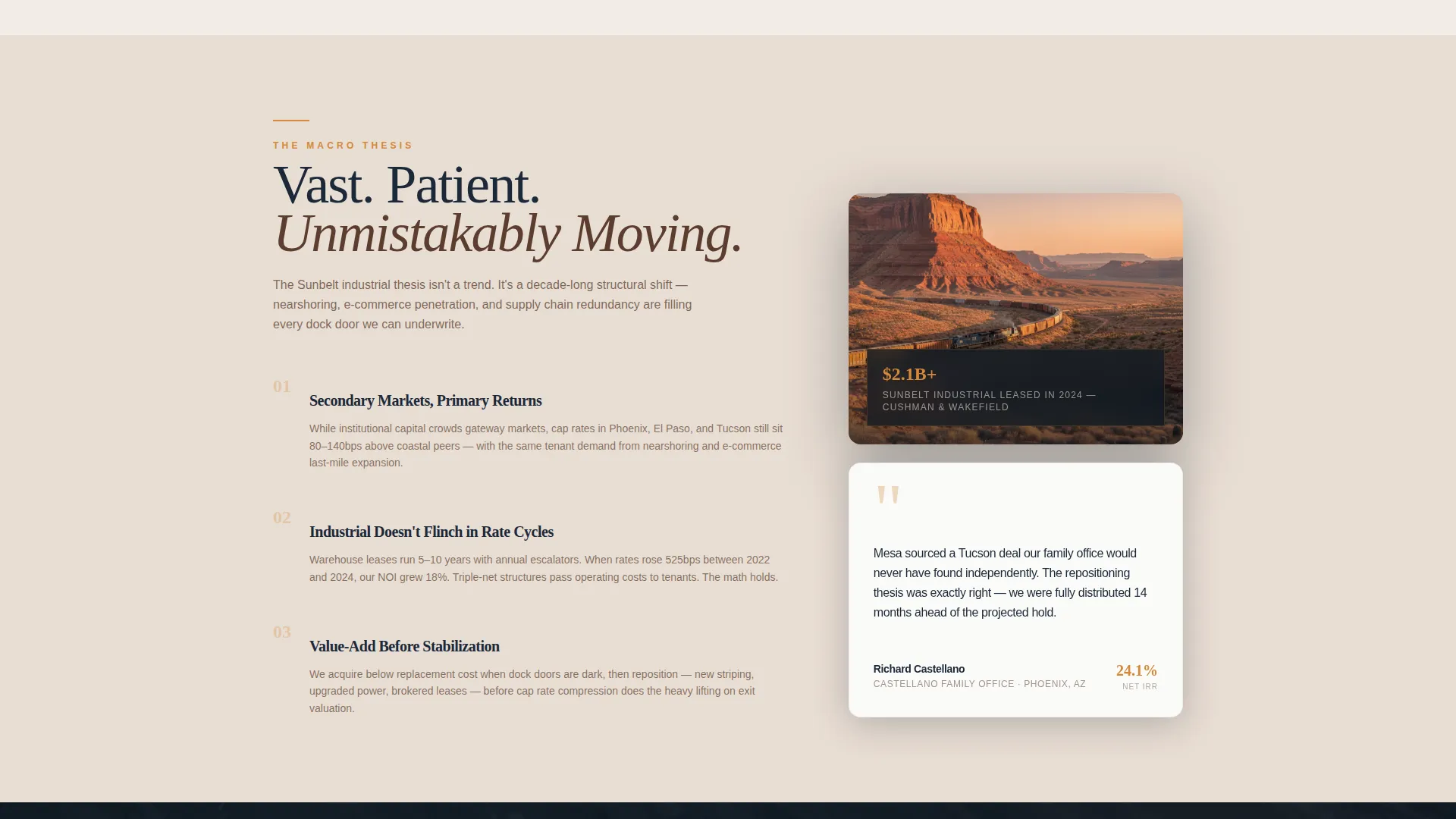
The 60-column carries imagery and data visualizations on sandstone-tinted backgrounds. The 40-column holds white card components with navy text and amber stat callouts. The split creates visual hierarchy without requiring the visitor to read everything to understand the structure.
Named LP Testimonial Block
A single testimonial from a named limited partner appears late in the conviction sequence, after the macro thesis and track record proof sections. Placement is deliberate: social proof lands only after performance evidence has already done most of the work.
Page sections overview
| Section | Purpose |
|---|---|
| Before/After Header | Drag-reveal warehouse transformation with a fading performance stat |
| Portfolio Metrics Panel | Scroll-animated oversized numerals showing core acquisition data |
| Case Study Grid | Hover-flip cards cycling from acquisition price to current NOI |
| Macro Thesis Section | Written argument for secondary-market industrial cap rate compression |
| Named LP Testimonial | Single attributed quote placed after track record proof |
| Final call to action Block | Full amber button block reinforcing the deal room click |
| Sticky Bottom Bar | Persistent call to action bar anchored after midpoint scroll |
Design & branding system
Mesa runs on the Sunset Mesa color system, a palette that reads like warm authority rather than aggressive finance. Every color decision in the brief has a specific functional role, not just an aesthetic one.
- Deep sandstone (#5C3D2E) and desert twilight navy (#1B2838) form the primary surface and text pairing across all major panels
- Sun-bleached concrete (#E8DDD3) provides the neutral card and background tone that keeps white-card components readable
- Molten amber (#D4883A) is reserved exclusively for calls to action, data highlight numerals, and hover state indicators
Mobile & speed optimization
The template is built as a full-width immersive layout with performance considerations embedded in how sections are structured. Data-heavy components are designed to load progressively rather than all at once.
- The asymmetric grid collapses cleanly for smaller screens without breaking the conviction flow sequence
- Scroll-triggered animations activate only when sections enter the viewport, avoiding unnecessary render load on initial page paint
- The sticky call to action bar is lightweight by design and does not depend on complex scripts to remain visible during scroll
How this template helps you convert
Mesa is a click-through page with one goal: move a qualified visitor from curiosity to deal room entry. The layout is sequenced to compress the decision timeline.
- The Before/After slider and fading IRR stat create immediate credibility in the first viewport, giving the visitor a reason to keep scrolling before reading a single sentence of copy.
- Scroll-animated metrics and the hover-flip case study grid layer in performance evidence progressively, so each section deepens conviction rather than repeating the same claim.
- The three-state call to action architecture means the call to action is always present but never pushy, culminating in a sticky bar that makes the deal room click feel like the natural next step.
Other information about this template
Mesa is categorized under Real Estate and Property with a subcategory focus on industrial warehouse real estate. It follows an Executive Suite theme and a Full-Width Immersive template style, consistent with how advisory firms in this asset class present to capital partners.
- The template is designed as a click-through page, not a lead capture page. There is no form on the page. The conversion event is a deal room entry click.
- The creative direction follows a Before/After Reveal approach with a Panoramic/Wide header concept, suited to drone-scale warehouse imagery.
- The intersection niche context aligns with industrial warehouse advisory and acquisition advisory services targeting secondary market assets.
- This template does not include a booking or scheduling flow by default. Its defined direction is deal room click-through.
Theme
Executive Suite
Creative direction
Before/After Reveal
Color system
Dark Emerald
Style
Full-Width Immersive
Direction
Booking/Scheduling
Page Sections
Drag-interactive Before/after Slider
Scroll-animated Portfolio Metrics
Hover-flip Case Study Cards
Three-state Call to Action Architecture
Asymmetric 60/40 Grid
Named LP Testimonial Block
Related questions
Does Mesa include a contact form or lead capture form?
Can I update the performance statistics and case study cards with my own data?
Who is this landing page template designed for?
How does the Before/After slider in the header work?
Is Mesa suitable for firms with assets across multiple secondary markets?



