Pathologist Booking Website Template
Diagnose is a sidebar companion landing page template built for board-certified pathologists who want to convert confused patients, referring physicians, and clinic managers into booked consultations. It combines a multi-step diagnostic intake form, a fixed-sidebar condition library, and two clear conversion paths, "Book a Slide Review" and "Send Your Report for Triage", inside an alpine-calm, clinically precise visual system.
by Rocket studio
Quick summary
Diagnose is a structured pathologist website template that functions as a digital reference library and booking engine in one. Patients arrive holding a lab report they cannot interpret. The template guides them through a diagnostic intake form, into a plain-language condition library, and toward a scheduled slide review, all without ever feeling clinical or cold.
Who this template is for
This template is built for pathology practices that serve more than one type of visitor. It handles the needs of patients, referring clinicians, and practice decision-makers from a single, well-organized page.
- Board-certified pathologists who want to showcase subspecialty depth across dermatopathology, hematopathology, cytology, and surgical pathology
- Referring physicians and clinic managers evaluating turnaround benchmarks and second-opinion workflows before committing to a pathology partner
- Patients holding a lab result they do not understand and looking for a trustworthy first step toward clarity
What problem this template solves
Most pathology practices either publish a generic service list or hide behind institutional language that patients cannot navigate. Neither approach builds the trust that converts a confused visitor into a booked consultation.
- Patients cannot connect their specific lab report type to the right specialist or next action
- Referring physicians have no fast way to assess turnaround benchmarks, subspecialty coverage, or second-opinion workflows before reaching out
- Clinic managers vetting pathology partners for send-out work cannot self-qualify without speaking to someone first
What you get with this template
The template delivers a full sidebar companion landing page with high interactivity and a clear conversion architecture. Every section is built to earn trust before asking for commitment.
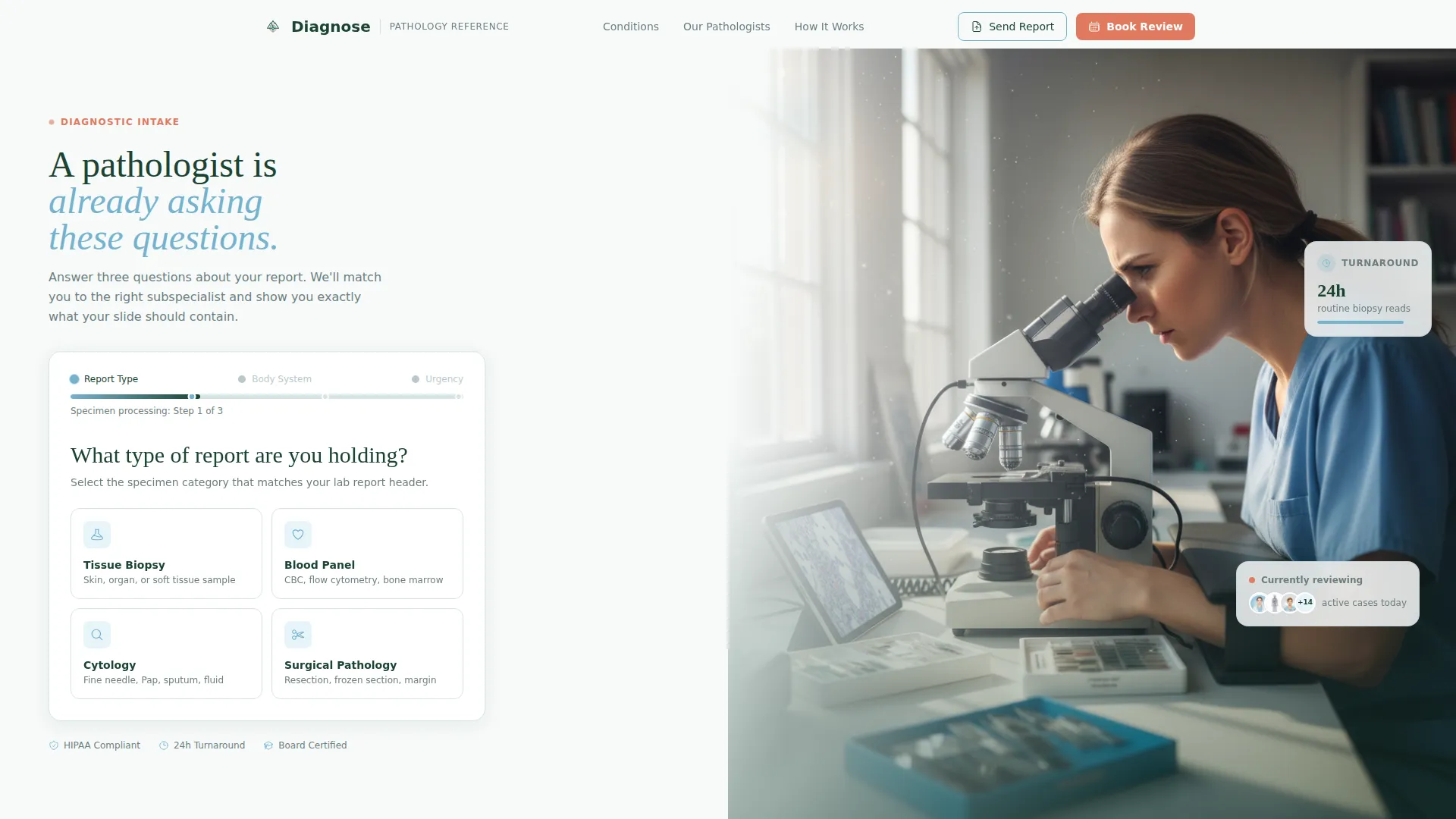
- A three-step diagnostic intake form in the header that pre-qualifies visitor intent by report type, body system, and urgency level
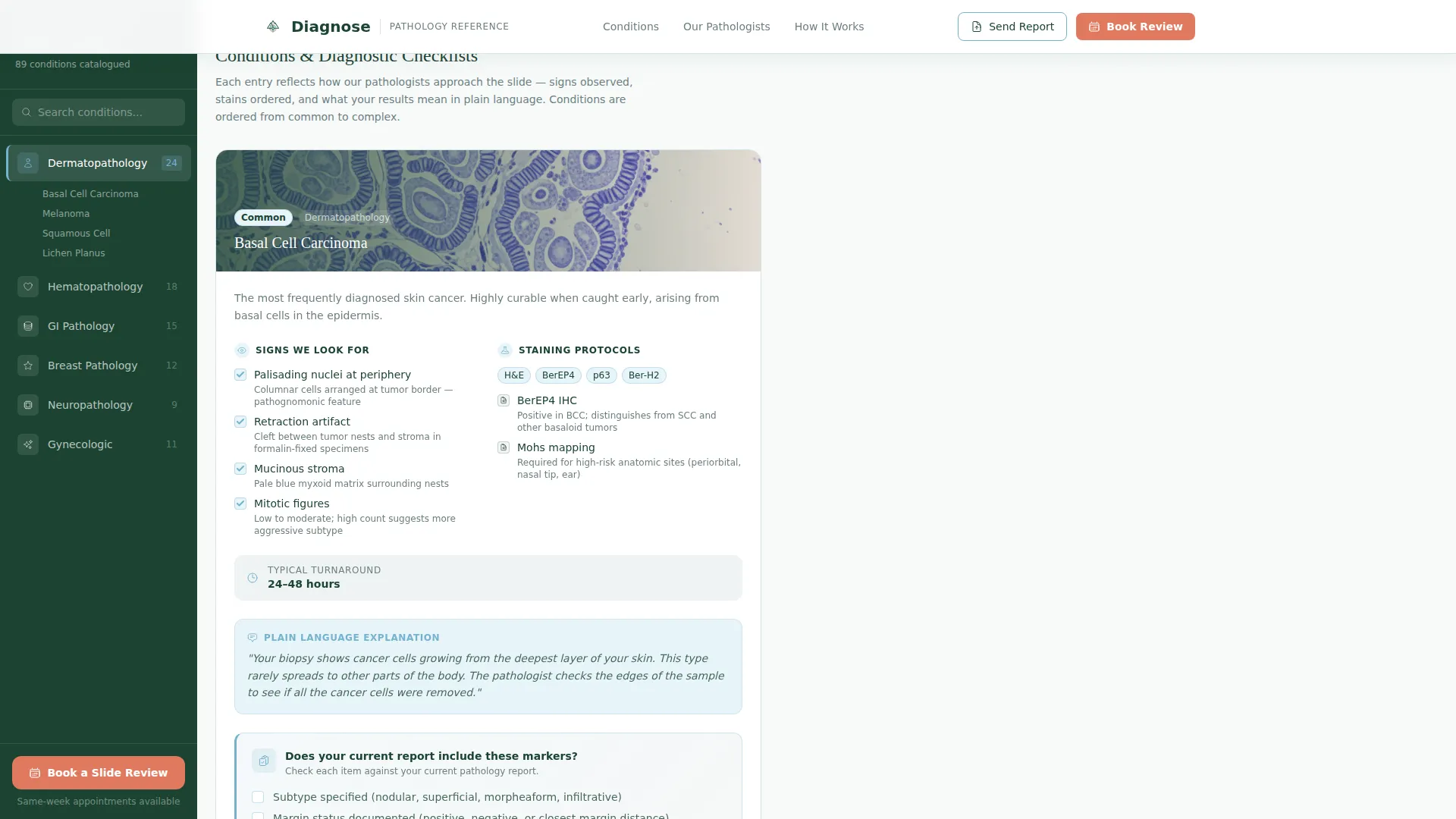
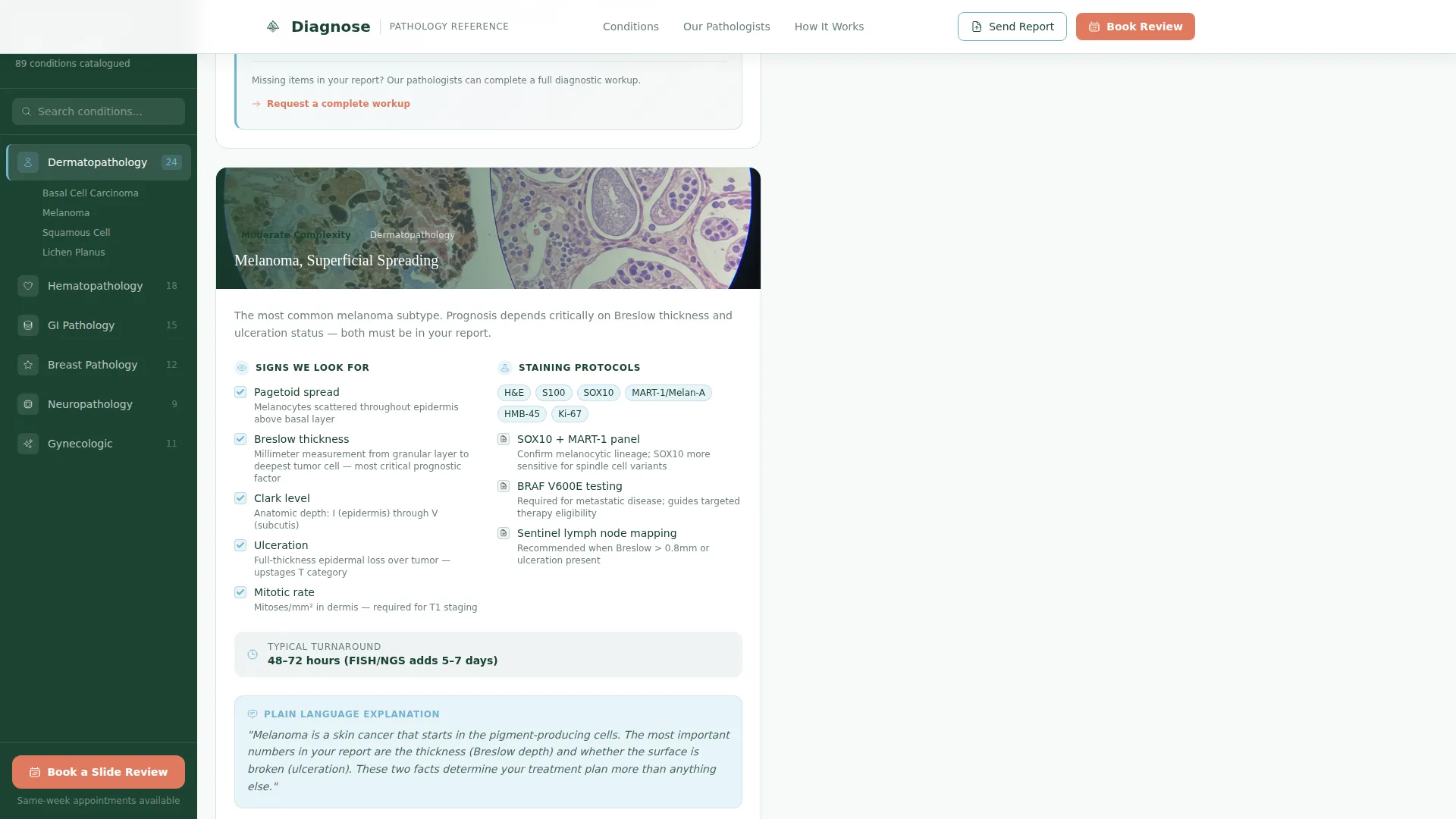
- A fixed sidebar table of contents paired with scrollable diagnostic checklist cards covering conditions from basal cell carcinoma to lymphoma subtyping
- Two conversion pathways: a primary "Book a Slide Review" booking button and a secondary "Send Your Report for Triage" upload prompt for patients and referring physicians
Feature list
This template packs structured functionality into every scroll zone. Each feature below is present in the brief and reflected directly in the design.
Multi-Step Diagnostic Intake Form
The header contains a three-step form styled as a diagnostic triage. Step one asks visitors what type of report they are holding, with illustrated icons for biopsy, blood panel, cytology, and surgical pathology. Step two narrows by body system or specimen type. Step three captures urgency. Each selection animates a progress bar styled like a specimen processing timeline.
Fixed Sidebar Condition Navigator
The evergreen-colored sidebar stays fixed on scroll and lists condition categories like a textbook table of contents. Visitors can jump directly to dermatopathology, hematopathology, cytology, or other subspecialty sections. On mobile, the sidebar collapses into a top navigation bar to preserve reading space.
Diagnostic Checklist Cards
Each condition in the library is presented as a structured checklist card. Cards surface the signs pathologists look for, staining protocols referenced, typical turnaround benchmarks, and plain-English summaries of what results mean. Every card ends with a self-audit prompt that encourages visitors to evaluate their own current report.
Dual Conversion Pathways
The primary call to action, "Book a Slide Review," appears at the end of the intake form and is pinned to the bottom of the sidebar on scroll. The secondary pathway, "Send Your Report for Triage," provides an upload route for visitors who want an assessment before committing to a full consultation.
Pathologist Authority Section
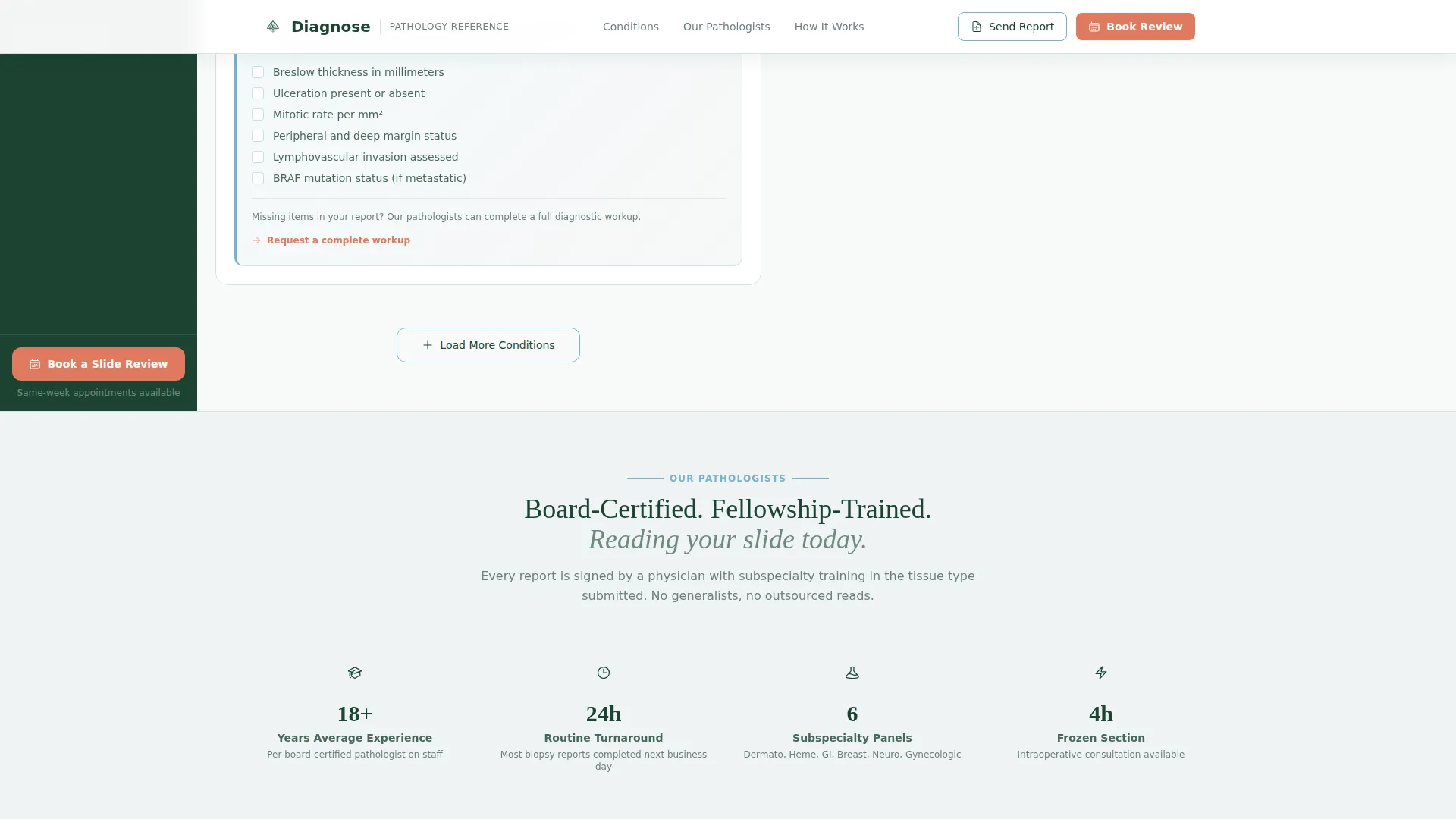
A dedicated section highlights board certification credentials, turnaround time benchmarks, and subspecialty coverage. Social proof includes referring physician quotes with practice names and patient outcome specifics, giving clinic managers and physicians the data points they need to make a referral decision.
Escalating Condition Library Architecture
Conditions are ordered deliberately from common to complex. The library opens with accessible conditions like basal cell carcinoma and progresses toward complex cases like lymphoma subtyping. This escalation builds confidence in the pathologist's range before any booking ask is made.
Page sections overview
| Section | Purpose |
|---|---|
| Hero Intake Form | Three-step diagnostic triage pre-qualifies visitor intent |
| Condition Library | Fixed sidebar plus scrollable diagnostic checklist cards |
| Pathologist Authority | Credentials, turnaround benchmarks, subspecialty coverage |
| Social Proof | Physician and patient testimonials with outcome specifics |
| Primary Call to Action | Book a Slide Review plus Send Your Report for Triage |
| Footer | Horizontal flow layout with contact and navigation links |
Design & branding system
The visual identity follows an Educational Guide theme using the Alpine Fresh color system. The design feels like a well-organized medical textbook in a sunlit mountain clinic, clinical precision softened by calm confidence.
- Summit white (#F7FAFA) provides generous reading space in the main content column; evergreen (#1B4332) anchors the persistent sidebar navigation; glacier stream blue (#74B3CE) highlights the active condition category
- Wildflower accent (#E07A5F) is reserved exclusively for active states and calls to action, drawing the eye only where action is needed
- Fraunces is used for headings to convey clinical authority; DM Sans handles body copy for clean, high-readability prose across all condition cards and form steps
Mobile & speed optimization
The template is designed desktop-first because the sidebar layout requires horizontal width to function properly. On smaller screens, the layout adapts cleanly without sacrificing usability.
- The fixed sidebar collapses into a scrollable top navigation bar on mobile, keeping condition categories accessible without consuming screen space
- Static condition cards use server components for fast initial rendering; the multi-step intake form and interactive checklist reveals are handled by client components to keep animations smooth
How this template helps you convert
The conversion architecture in this template is deliberate. Every design choice moves a hesitant visitor one step closer to a scheduled consultation.
- The three-step intake form pre-qualifies intent before any scheduling ask appears, so the final booking step, date, preferred contact method, and payment type, feels like a natural conclusion rather than a cold form
- The self-audit prompts at the end of each condition checklist reframe visitors from passive readers into active evaluators of their own care, making the "Book a Slide Review" call to action feel timely and personally relevant
Other information about this template
This section covers additional context about the template's scope, build approach, and practical usage considerations.
- The template is categorized under Health & Medical, specifically the Pathologist Website subcategory and Pathologist Condition and Treatment Library niche
- Animation intensity is set to medium: form step transitions, checklist reveal on scroll, sidebar fixed positioning, and progress bar animation are all included
- Interactivity level is high, covering the multi-step form, condition filter sidebar, and self-audit prompts throughout the condition library
- Localization defaults are English language, United States dollar pricing, and United States date format
- The footer follows a horizontal flow layout pattern suited for contact details, navigation links, and practice information
Theme
Educational Guide
Creative direction
Checklist & Audit
Color system
Alpine Fresh
Style
Sidebar Companion
Direction
Booking/Scheduling
Page Sections
Multi-step Diagnostic Intake Form
Fixed Sidebar Condition Navigator
Diagnostic Checklist Cards
Dual Conversion Pathways
Escalating Condition Library Order
Pathologist Authority and Social Proof Section
Related questions
Who is this template best suited for?
Can patients use this template without a medical background?
What are the two main ways visitors can convert on this page?
Does the template support both desktop and mobile layouts?
What types of pathology conditions does the library architecture support?



