Manufacturing Processes Professional Website Template
Mill is a split-screen landing page template built for precision CNC machining service providers. It combines a Warm Stone color system, an Exploded View header, and a Transparent Process scroll to walk procurement engineers and product designers through every machining phase. The primary call to action is a part-file upload zone, making it easy to move from browsing to quoting.
by Rocket studio
Quick summary
Mill is a single-page, split-screen (50/50) landing page template for CNC machining businesses. It uses a Transparent Process creative direction to show visitors exactly how a part gets made, from raw billet to shipping crate. The Warm Stone color palette and Exploded View header communicate precision and shop-floor credibility from the first scroll.
Who this template is for
This template is built for CNC machining service providers who need a landing page that speaks directly to technical buyers. It works best when your clients already know what tolerance they need and just want to know whether you can hold it.
- Precision machine shops offering five-axis, multi-operation work for aerospace, hydraulics, or medical applications
- Job shops targeting procurement engineers, product designers, and maintenance managers who source parts under deadline pressure
- CNC service businesses that want to replace a generic website with a process-driven, quote-ready landing page
What problem this template solves
Most CNC machining landing pages look like brochures. They list equipment and certifications, but they never show a buyer how their part actually gets made. That gap creates doubt, and doubt delays the quote request.
- Procurement engineers need evidence of process control before they send a first-article purchase order
- Product designers need to see that the shop understands fixturing, material selection, and design-for-manufacturability before Friday's deadline
- Maintenance managers dealing with obsolete parts need confidence that reverse engineering from a worn sample is a routine service, not a special favor
What you get with this template
The template delivers a structured, section-led landing page that moves a technical buyer from curiosity to quote submission without a single moment of vague marketing language.
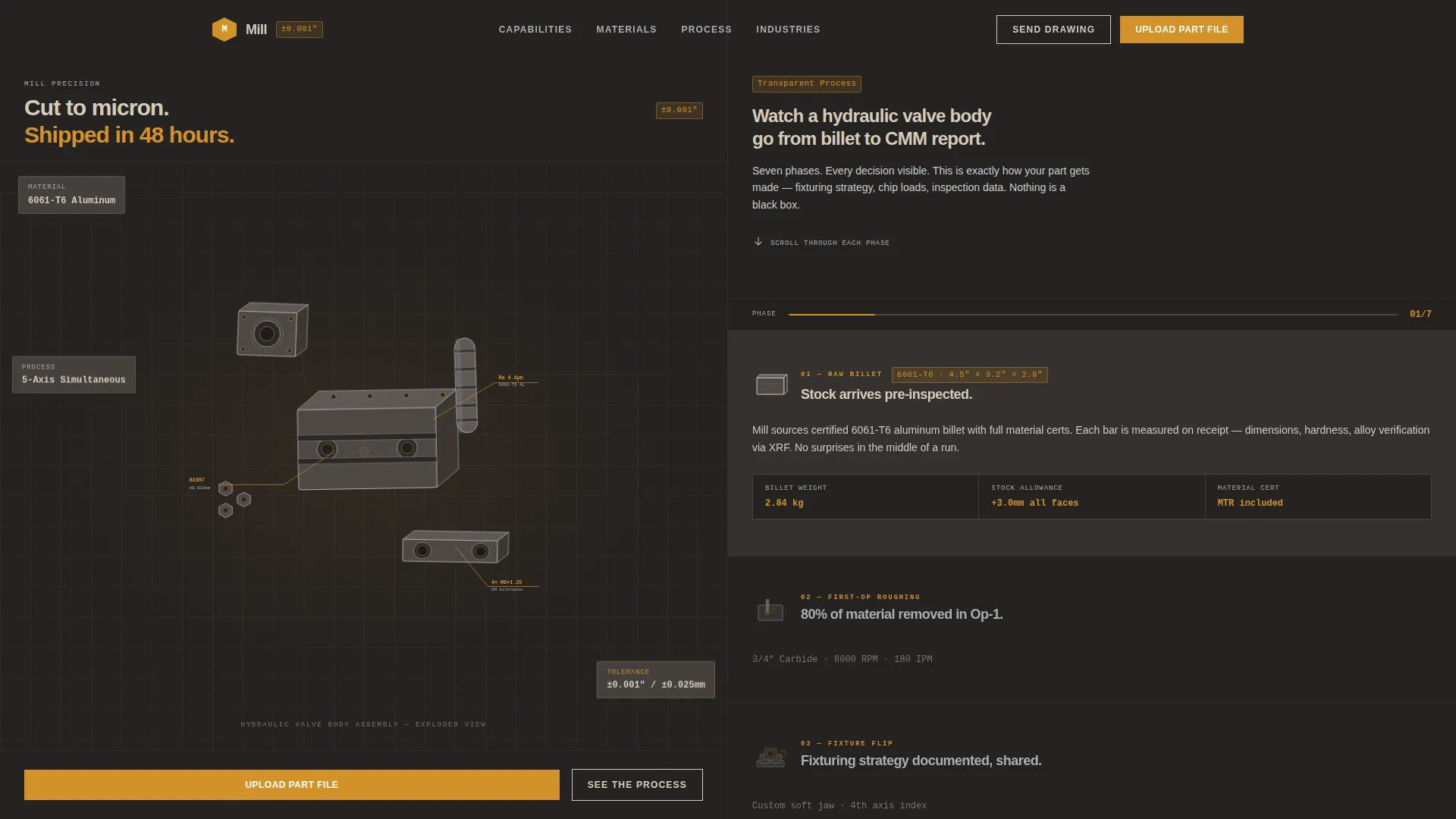
- A full split-screen (50/50) layout with a locked left panel and a scrolling right panel that walks through each machining phase
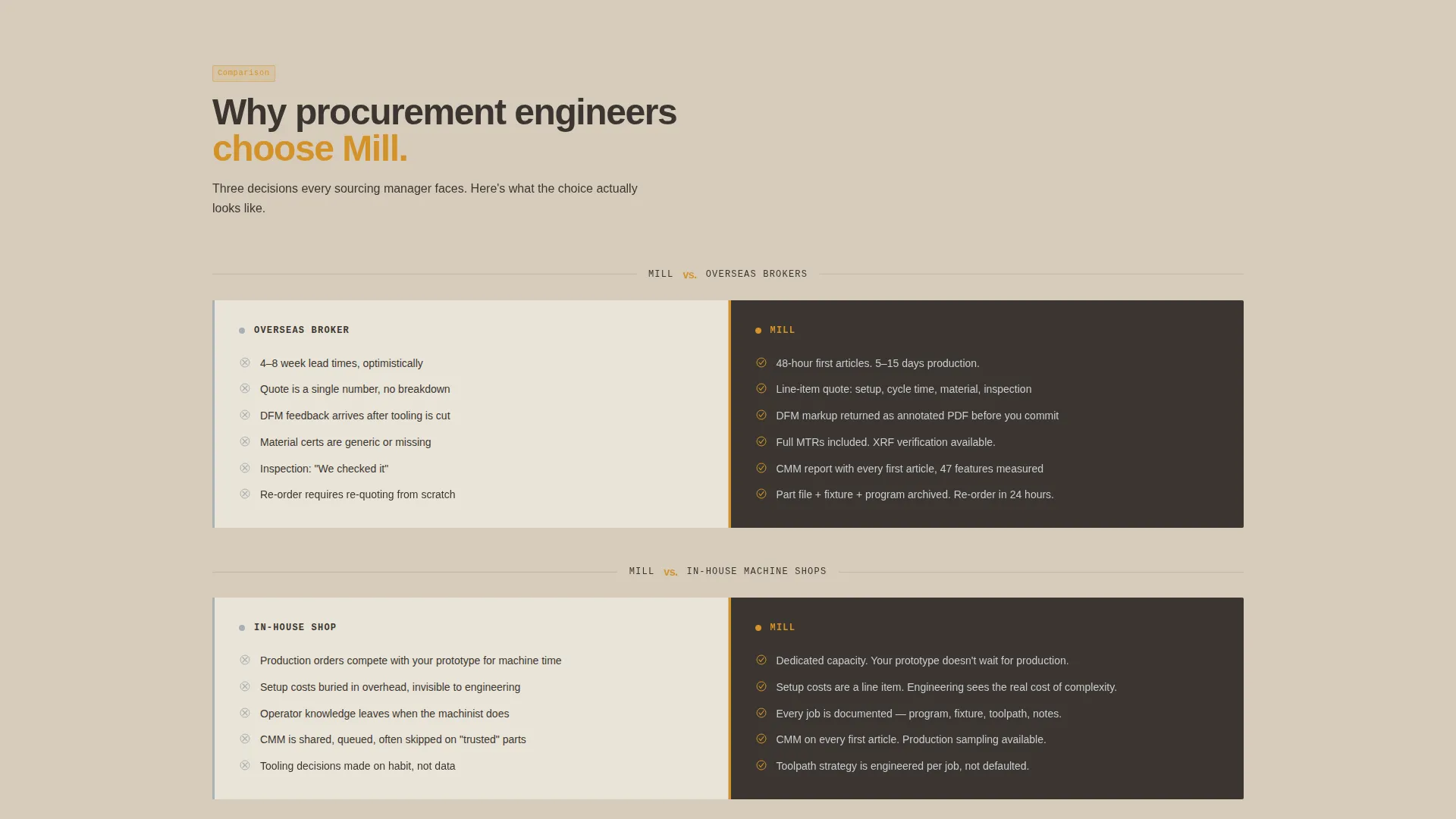
- A Comparison/Versus layout structure that puts Mill against overseas brokers, in-house machine shops, and instant-quote platforms side by side
- A primary call-to-action zone with a STEP/IGES drag-and-drop file upload field, material dropdown, quantity field, and need-by-date picker, plus a secondary "Send Us a Drawing" path for print-based clients
Feature list
This section covers the core built-in components and layout capabilities included in the Mill template.
Exploded View Header
The header renders a single complex machined assembly detonated into floating individual components, set against a workshop shadow background. Thin amber annotation lines call out tolerances, materials, and surface finishes on three key components. The camera holds a three-quarter isometric angle, close enough to see feed marks and chamfer edges.
Transparent Process Scroll
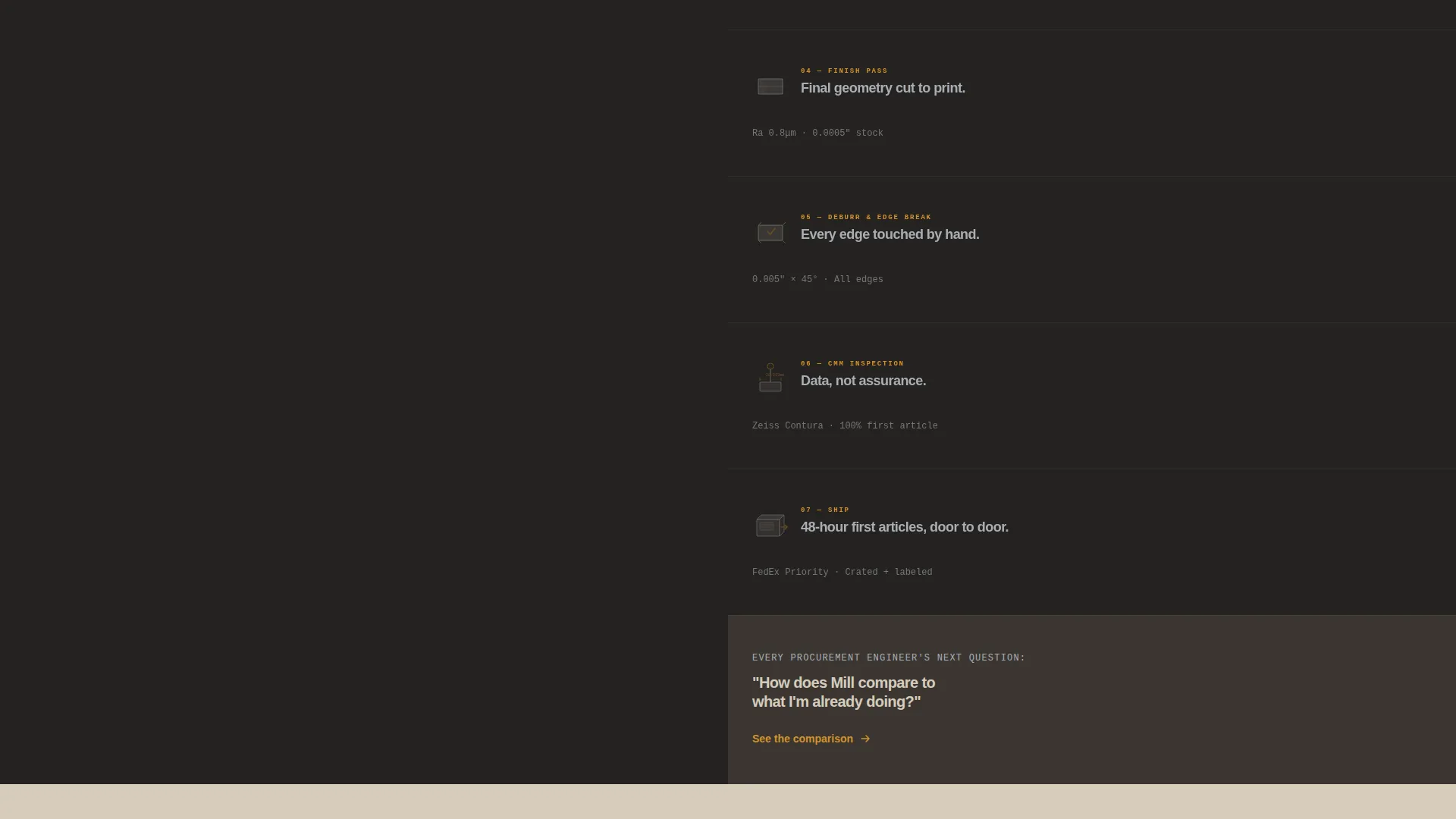
The left panel locks on a hydraulic valve body while the right panel cycles through machining phases: raw billet, first-op roughing, fixture flip, finish pass, deburr, CMM inspection report, and shipping crate. Each phase reveals fixturing strategy, chip load decisions, and inspection data. The scroll answers the tolerance-confidence question without a single line of marketing copy.
Comparison/Versus Layout
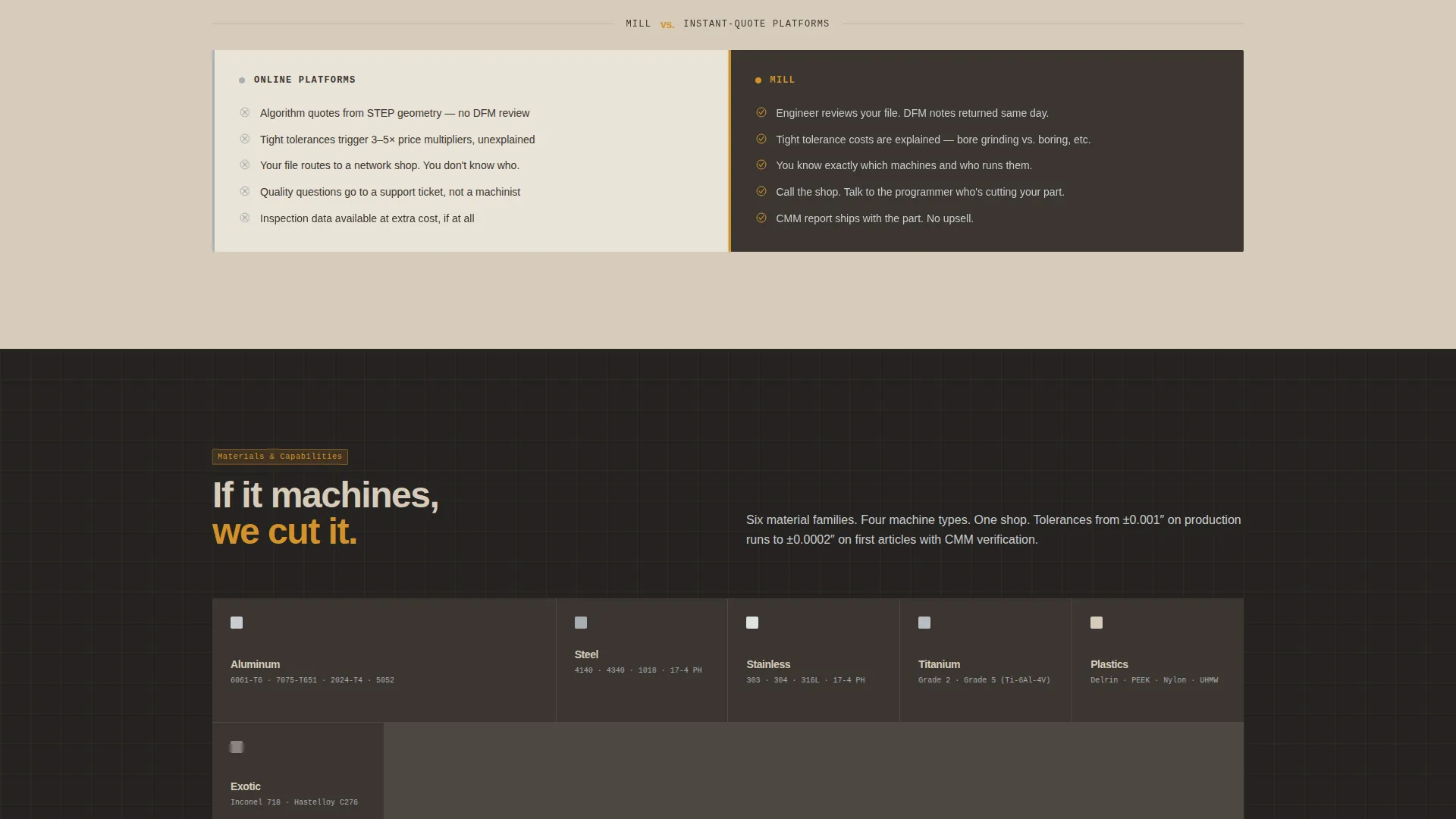
Three split-screen comparison sections place the shop's process directly against competitor experiences. Each section shows the competitor's typical pain on the left, such as weeks-long lead times and black-box quoting, and the shop's process on the right, including 48-hour first articles and line-item quoting with setup costs visible.
Part File Upload Zone
The primary call-to-action block includes a drag-and-drop zone that accepts STEP and IGES file formats. It is followed by a material dropdown, a quantity field, and a need-by-date picker. This removes friction from the quote request and signals that the shop is ready to handle serious production inquiries.
DFM Feedback Callout
The template includes a visible callout block describing the engineer-reviewed design-for-manufacturability markup process. The output is described as an annotated PDF returned to the client. This positions the shop as a technical partner, not just a cutting service.
Warm Stone Color System
The color system uses quarried limestone, workshop shadow, machined aluminum, and toolpath amber. Amber is reserved for calls to action, tolerance callouts, and interactive highlights. Backgrounds alternate between limestone and shadow, keeping the page readable and visually grounded in the shop environment.
Page sections overview
| Section | Purpose |
|---|---|
| Exploded View Header | Establish credibility through visible part geometry and tolerance annotations |
| Transparent Process Scroll | Walk visitors through each machining phase from billet to shipping |
| Comparison Block One | Mill versus overseas brokers on lead time and quoting transparency |
| Comparison Block Two | Mill versus in-house machine shops on capacity and first-article speed |
| Comparison Block Three | Mill versus instant-quote platforms on DFM feedback and engineering review |
| Part File Upload call to action | Capture quote requests via STEP/IGES upload, material, quantity, and date |
| Secondary Drawing Path | Offer a "Send Us a Drawing" route for legacy print-based clients |
Design & branding system
The Warm Stone palette is the visual foundation of the Mill template. Every color decision is tied to a functional role on the page, not just an aesthetic preference.
- Quarried limestone (#D6CCBC) and workshop shadow (#3B3632) alternate as section backgrounds, creating a natural rhythm between warm and cool zones
- Machined aluminum (#C8CDD0) runs as body text on dark sections; deep workshop brown carries text on light sections, keeping contrast clear without harsh black-on-white contrast
- Toolpath amber (#D4922A) is reserved exclusively for calls to action, tolerance annotation lines, and interactive highlights, functioning like a laser crosshair on raw stock
Mobile & speed optimization
The Mill template is structured for clarity on smaller screens without sacrificing the detail that technical buyers expect.
- The 50/50 split-screen layout reflows to a stacked single-column format on mobile, keeping the process scroll readable on any screen size
- Heavy visual sections such as the Exploded View header and the phase-by-phase scroll are designed with concise visual hierarchy so content loads in a logical order
- The part file upload zone is touch-accessible, allowing a procurement engineer to submit a file and fill in project details from a tablet or phone on the shop floor
How this template helps you convert
The Mill template is designed to reduce the hesitation that stops a technical buyer from submitting a quote request. Every section earns the click before asking for it.
- The Transparent Process scroll removes doubt by showing every machining phase, including fixturing and CMM inspection data, so a procurement engineer can assess process capability before making contact
- The Comparison/Versus sections neutralize the objections that cause buyers to default to cheaper or more familiar options, placing the shop's advantages on the same screen as competitor weaknesses
- The part file upload call to action closes the loop by making the next step concrete: drop a file, pick a material, set a date, and get a quote started in under two minutes
Other information about this template
This template is purpose-built for the CNC machining service niche within the broader Manufacturing and Industrial category. It is optimized for the Service Utility theme and the Transparent Process creative direction as specified in the matched intersection context.
- The template suits shops working across aerospace, hydraulic, and medical manufacturing niches where tolerance credibility is a direct sales factor
- The Comparison/Versus layout is flexible enough to adapt to different competitive positioning, whether a shop competes most against offshore suppliers, online platforms, or captive in-house operations
- The "Send Us a Drawing" secondary path supports legacy clients who work from two-dimensional prints rather than three-dimensional CAD files, keeping older procurement workflows covered
- The template style is classified as Split Screen (50/50), the header concept is Exploded View, the creative direction is Transparent Process, and the layout direction is Comparison/Versus, all sourced directly from the matched intersection row
Theme
Service Utility
Creative direction
Transparent Process
Color system
Warm Stone
Style
Split Screen (50/50)
Direction
Comparison/Versus
Page Sections
Exploded View Header with Tolerance Annotations
Transparent Process Scroll Panel
Comparison/versus Layout Sections
Part File Upload Call-to-action Zone
DFM Feedback Callout Block
Warm Stone Color System
Related questions
Who is the Mill landing page template designed for?
What file formats does the upload call-to-action zone support?
Can I adapt the Comparison/Versus sections for my own competitive positioning?
Does the template show actual machining process steps?
What makes this template different from a general industrial service landing page?



