ADHD Wearable Biosensor Landing Page Template
Monitor is a hub and spoke landing page template built for a wrist-worn ADHD biosensor. It tracks fidget frequency, heart rate variability, and attention cycling in real time. The page guides clinicians and individuals through a Problem to Solution arc, ending in a tiered lead generation form with role-specific fields for healthcare providers and patients.
by Rocket studio
Quick summary
Monitor is a single-page hub and spoke template for an ADHD wearable biosensor. It moves visitors from the problem of subjective symptom reporting to a complete, data-driven solution. A live waveform dashboard opens the page, and a tiered qualification form closes it. Every section earns trust before asking for a click.
Who this template is for
This template is built for teams in the medical technology and digital health space who need to generate qualified leads from two very different audiences at once. It speaks clearly to clinicians and to patients without losing either group.
- Pediatric neurologists and psychiatrists who need an alternative to parent-reported questionnaires
- Adult ADHD patients who want objective data to support their diagnosis and medication history
- Corporate wellness directors managing neurodivergent accommodation programs for employees
What problem this template solves
Presenting a clinical biosensor to both healthcare providers and individuals on one page is genuinely difficult. The tone, the evidence threshold, and the call to action are different for each group. Most templates force a single voice and lose half the audience.
- Subjective symptom reporting creates a credibility gap that one-size-fits-all templates cannot bridge
- Clinicians need peer-reviewed proof before they will engage; patients need emotional validation first
- A generic lead form cannot qualify a psychiatrist and an undiagnosed adult at the same time
What you get with this template
You get a fully structured, seven-section landing page with a persistent anchor navigation bar and two distinct conversion paths built into a single tiered form. Every section is designed to carry a specific part of the argument before handing off to the next.
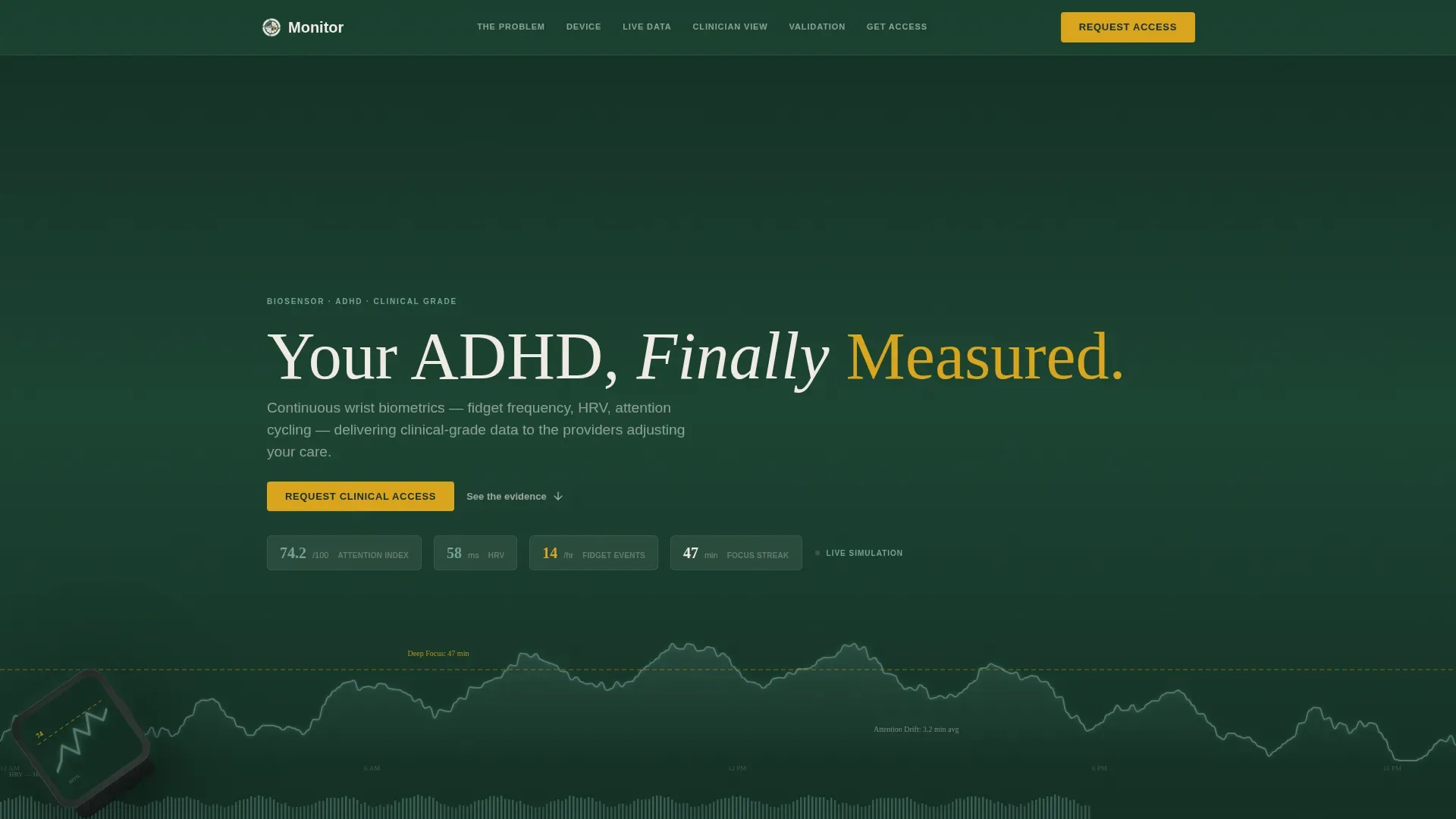
- A simulated 24-hour attention waveform header with labeled peaks, valleys, and a heart rate variability ribbon
- Five content spokes covering the problem, the device hardware, the biometric data rebuild, the clinician dashboard, and peer-reviewed validation
- A role-selector form that switches between a clinician intake view and an individual patient waitlist view
Feature list
This section describes the core built-in components that make the template functional and conversion-ready.
Live Waveform Header Dashboard
The hero section renders a simulated 24-hour attention profile as a flowing waveform. Labeled data points call out deep focus periods and attention drift averages. A heart rate variability ribbon runs beneath the waveform. The biosensor device sits in the lower-left corner at a 35-degree angle with its screen mirroring the same waveform.
Persistent Anchor Navigation
A sticky top navigation bar links to each of the five content spokes. Active navigation states highlight in gold-amber as the visitor scrolls. The primary call-to-action button follows the visitor throughout the entire page, always visible and ready to trigger the form.
Problem Visualization Spokes
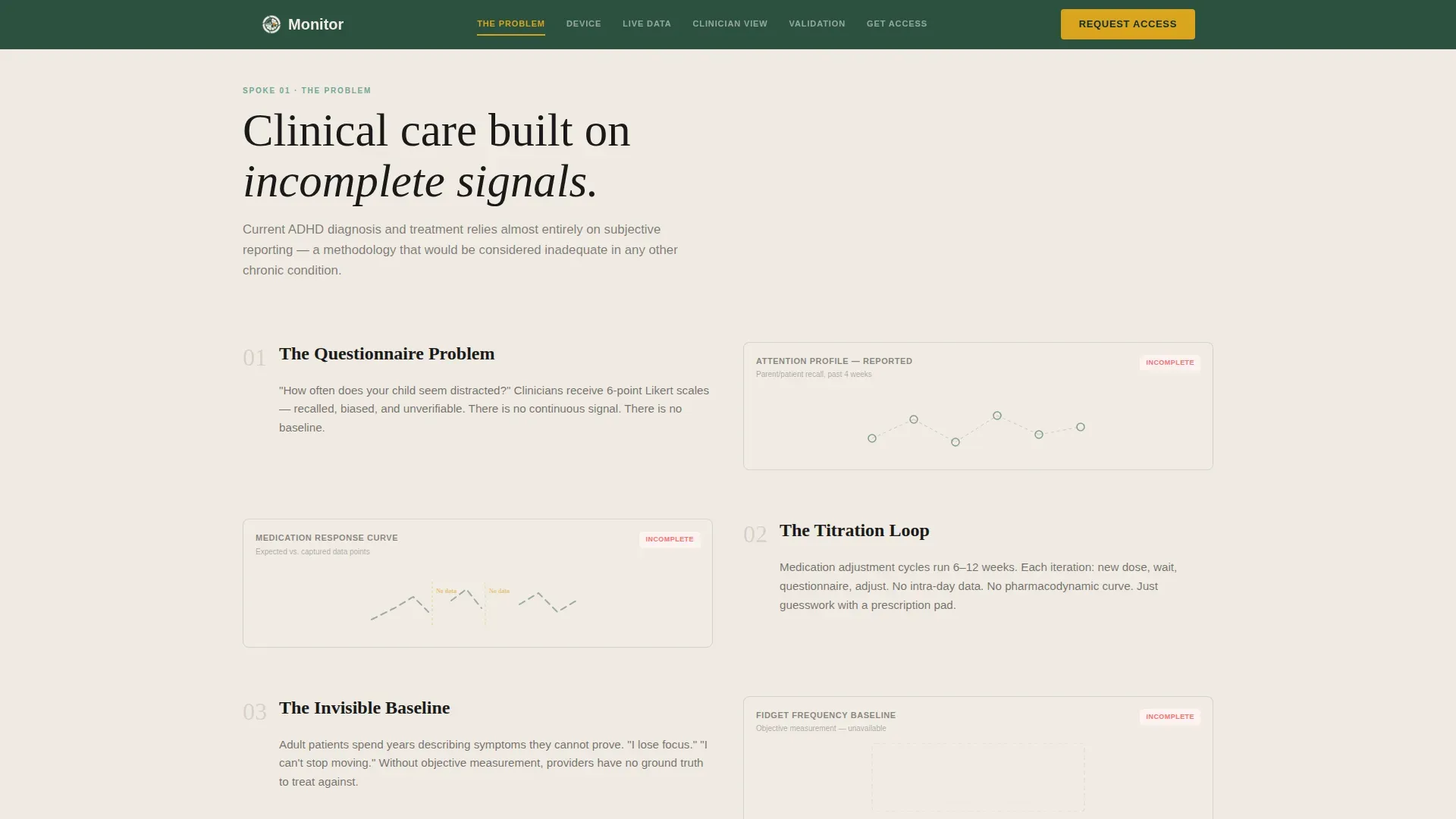
The first content spoke presents the clinical problem using broken and incomplete data chart visuals. Each pain point in the subjective reporting cycle is rendered as a gap or fracture in the data. This section sets up the contrast that the rest of the page resolves.
Biometric Data Rebuild Section
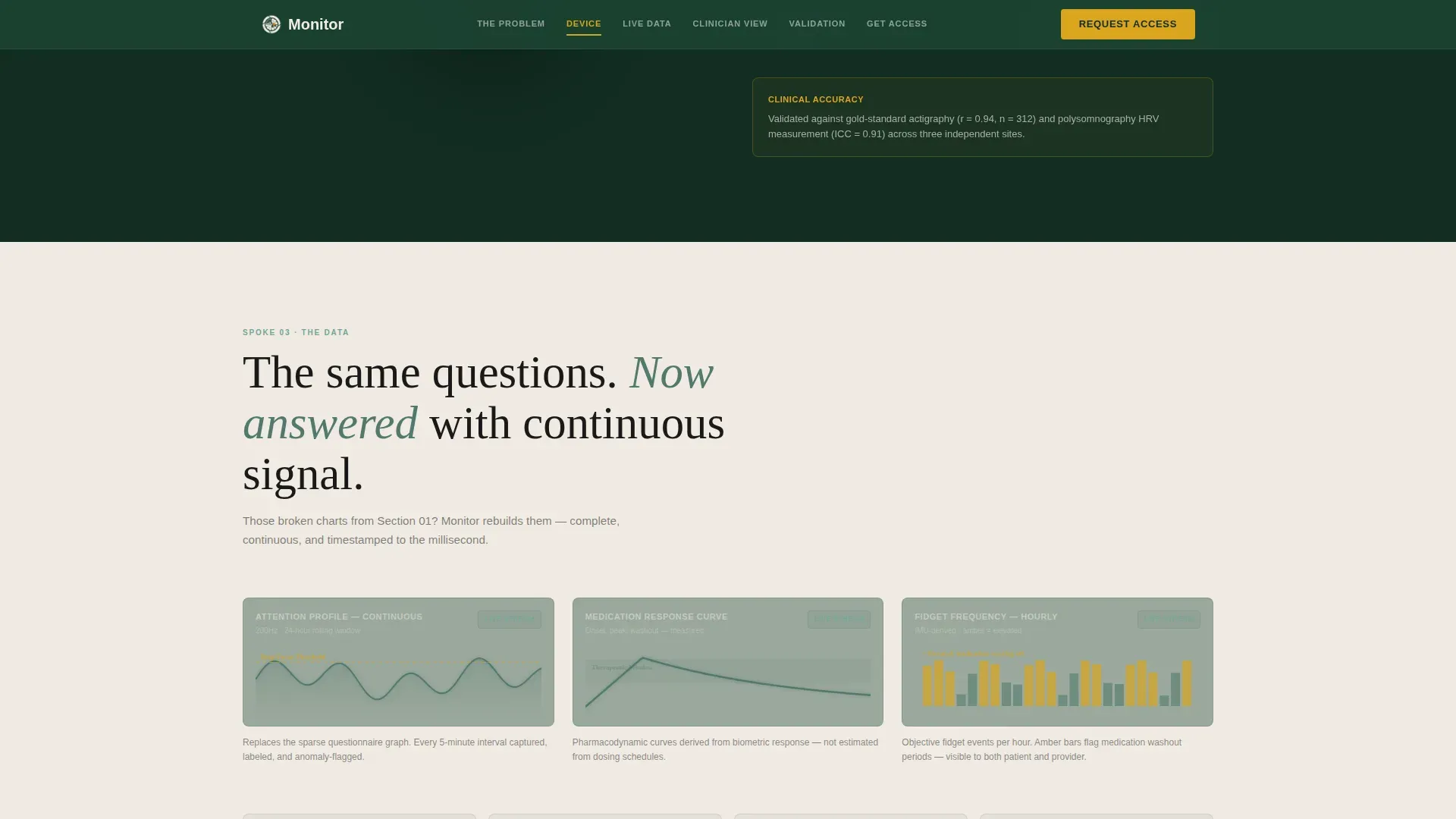
The third spoke takes the same broken charts from the problem section and reconstructs them as complete, continuous biometric streams. The visual continuity between the two states makes the value proposition immediately clear without requiring the visitor to read a paragraph.
Tiered Role-Selector Lead Form
The final spoke contains a single form with a role toggle at the top. Clinicians see fields for practice name, specialty, and average ADHD caseload per month. Individuals see fields for diagnosis status, optional medication history, and whether they have a referring provider. One form qualifies two completely different lead types.
Clinician Dashboard Spoke
The fourth spoke shows how a psychiatrist receives and interprets the biosensor feed. It presents the clinician-facing interface as a distinct view, making it easier for healthcare providers to picture the tool inside their existing workflow.
Page sections overview
| Section | Purpose |
|---|---|
| Hero Waveform Dashboard | Opens with live biometric data visualization and device display |
| The Problem Spoke | Shows failure of subjective symptom reporting with broken charts |
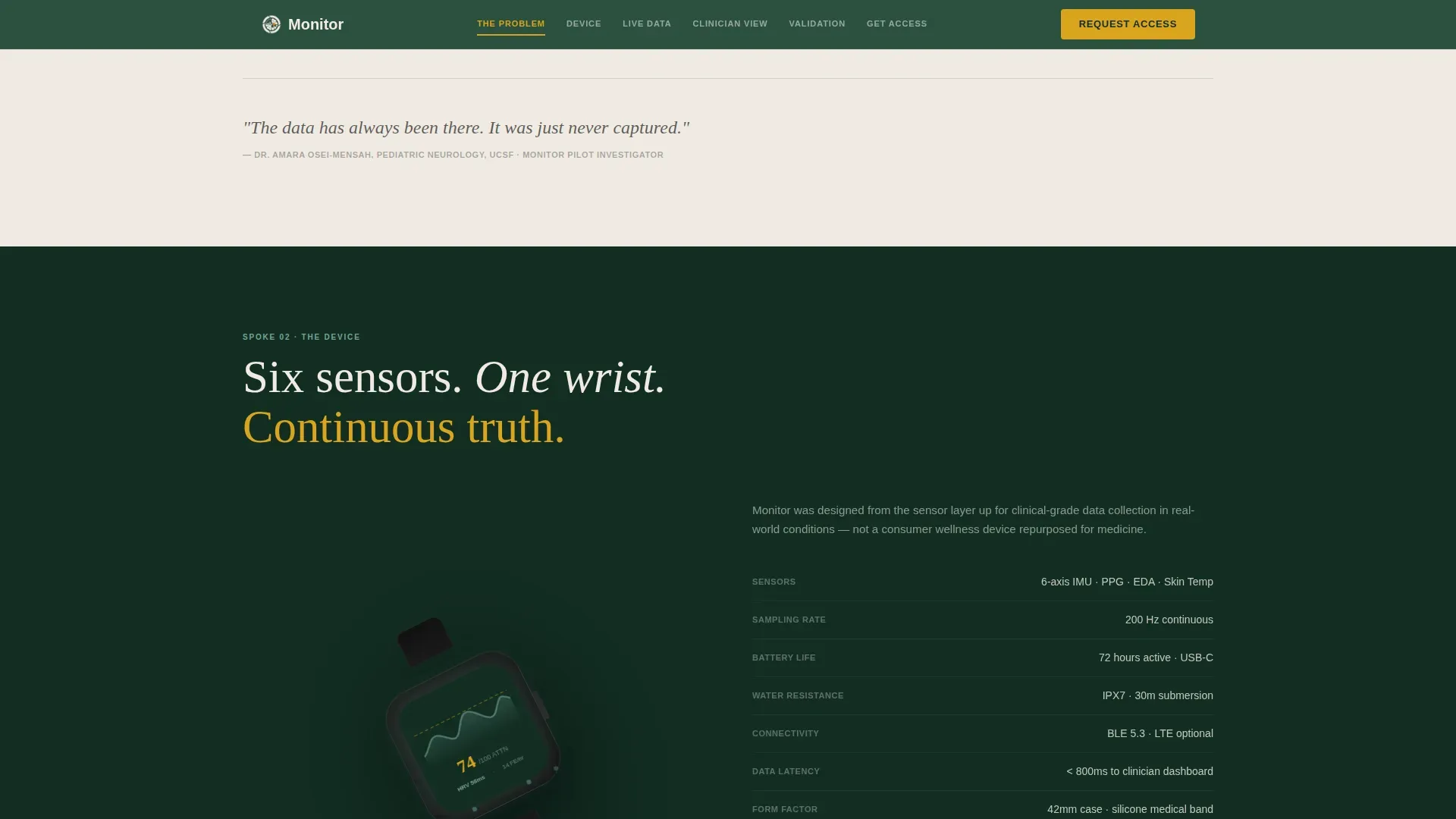
| The Device Spoke | Displays rotating hardware product view with specification grid |
| The Data Spoke | Rebuilds broken charts into complete continuous biometric streams |
| Clinician Dashboard Spoke | Shows how psychiatrists receive and interpret the biosensor feed |
| Validation Spoke | Presents peer-reviewed outcomes and pilot study statistics |
| Access Form Spoke | Delivers tiered role-selector form for clinicians and individuals |
| Footer | Single-row linear footer pattern |
Design & branding system
The template uses a Corporate Precision visual identity built on a Forest Trust color palette. The result feels like a research hospital designed inside an old-growth forest: authoritative and grounded at the same time.
- Deep evergreen (#1B4332) serves as the primary dark background; clinical birch (#F0EBE3) covers light content panels; backgrounds alternate between the two throughout the page
- Moss data-green (#52796F) is reserved exclusively for chart lines, data visualizations, and graph elements; gold-amber (#DAA520) appears only on calls to action and active navigation states
- DM Sans handles body text and interface labels; Fraunces handles display headlines; typography sits in near-black (#1A1A1A) on birch panels and birch on evergreen backgrounds
Mobile & speed optimization
The template is built desktop-first to serve the clinician audience, but it is fully responsive across all screen sizes. The animation and interactivity architecture separates static and dynamic rendering to keep the experience smooth.
- Server Components handle static content sections; Client Components manage the canvas waveform, chart transitions, and counter animations
- GSAP ScrollTrigger drives scroll-based animations including the chart rebuild transitions between the problem and data spokes
- The anchor navigation and role-selector form remain functional and readable on smaller screens without sacrificing the core data visualization experience
How this template helps you convert
The template is structured so that every section earns the visitor's trust before asking for anything. The call to action at the end feels like a natural conclusion rather than an interruption.
- The persistent amber call-to-action button stays visible throughout the entire scroll, giving clinicians and patients an early exit to the form once they have seen enough evidence
- The role-selector toggle removes friction by tailoring the form fields to the specific lead type, so a psychiatrist never has to skip past fields meant for a patient
- The Problem to Solution arc resolves visually, with the same charts appearing broken in the problem section and whole in the data section, making the core value proposition self-evident before a single word of the form is read
Other information about this template
This template is designed specifically for the ADHD wearable monitor category within health and medical digital marketing. It is well-suited to product launches, pilot program enrollment campaigns, and clinical trial recruitment pages where two-audience qualification is essential.
- The template supports social proof placement including pilot study metrics, peer-reviewed publication badges, and clinician quote blocks in the validation spoke
- All copy placeholders follow a US English locale with USD pricing references and US date format conventions
- The design direction and section architecture can support future expansion into multi-device product lines or regional clinical partnership pages without rebuilding the core structure
Theme
Corporate Precision
Creative direction
Problem→Solution Arc
Color system
Forest Trust
Style
Hub & Spoke (Anchor Nav)
Direction
Lead Generation
Page Sections
Live Waveform Hero Dashboard
Persistent Anchor Navigation Bar
Problem Visualization Spokes
Biometric Data Rebuild Section
Tiered Role-selector Lead Form
Clinician Dashboard Spoke
Related questions
Who are the two lead types this form qualifies?
Can a non-technical team customize this template?
Does the template include actual biosensor data or clinical results?
Is this template suitable for a pilot program enrollment campaign?
How does the anchor navigation work across the page?



