Geriatrics Medicine Booking Website Template
Calibrate is a precision geriatric monitoring device landing page template built for wristband-clip health technology. It uses a split-screen layout, a scroll-driven compliance audit, and a credential-first header to convert geriatric care directors, home health agencies, and adult family members into scheduled facility walkthrough bookings with confidence and clarity.
by Rocket studio
Quick summary
Calibrate is a single-page landing page template designed for a precision wristband monitoring device that tracks gait stability, medication timing, and vitals drift in patients over seventy-five. It pairs a 50/50 split-screen layout with a scroll-driven interactive audit, credential badges, and a focused booking form. The template targets elderly care professionals and adult family members who need clarity before they commit.
Who this template is for
This template serves a focused group of buyers in the geriatric health and digital health space. These are working professionals and concerned family members who evaluate technology carefully before introducing it into a care setting. They need evidence before they engage, and they need a page that respects their clinical judgment.
- Geriatric care directors managing sixty-bed facilities who need to evaluate equipment against regulatory and patient safety standards before scheduling a facility walkthrough
- Adult family members coordinating remote care for elderly parents across state lines who want clear data and straightforward access to caregiver support services
- Home health agencies running twelve-patient rosters on two-nurse shifts who need to quickly survey the device's record of accuracy and identify whether it fits their calibration schedules and workflow
What problem this template solves
Healthcare providers and elderly care teams face a persistent gap: patients deteriorate quietly, and warning signals arrive too late. Falls are a leading cause of accidental death among the elderly, resulting in significant health care costs and psychological impacts on patients, caregivers, and family members alike. Many existing health monitoring products lack a unified communication protocol, making data integration difficult and affecting comprehensive health evaluations for older adults.
Digital health software development teams often operate under incorrect assumptions about elderly users, leading to products that do not meet their specific needs. Visitors arriving at a geriatric device landing page carry real skepticism. They have seen overpromised technology fail in practice. This template solves the trust problem by making proof the first thing a visitor sees, and turning the page itself into a structured self-assessment rather than a marketing pitch.
- Care directors cannot easily verify whether a new device will reduce false alarms, maintain calibration protocol standards, or support their existing documentation process without a direct facility demonstration
- Family members lack a clear entry point to understand health status changes, evaluate equipment reliability, or request caregiver support without navigating complex clinical portals
- Agencies need a page that helps them survey their own care gaps, assess the risk of late intervention, and identify which device features close those gaps before they speak to a sales team
What you get with this template
This template delivers a complete, structured landing page ready to present a precision geriatric monitoring device to professional buyers. Every section is built to carry a specific job: credential display, guided self-assessment, data proof, outcomes summary, and conversion. The template does not require visitors to trust the brand before they trust the evidence.
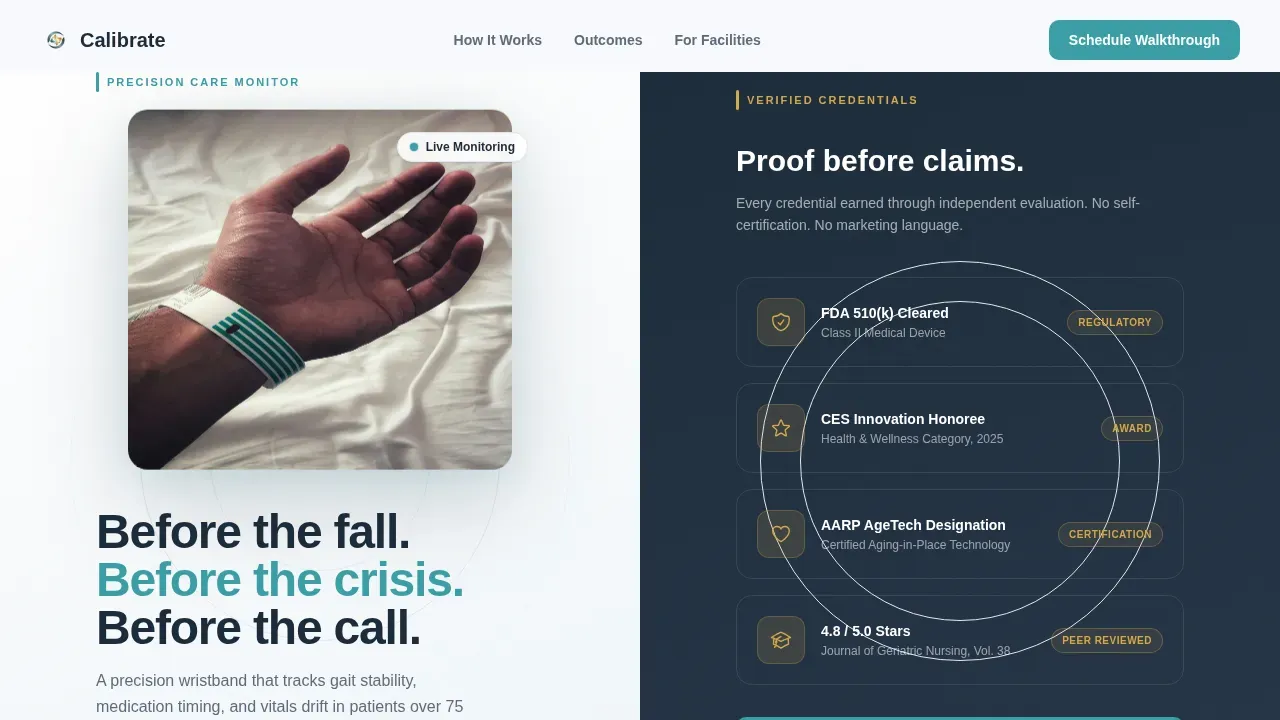
- A 50/50 split-screen layout with a hero section featuring a device photograph on the left and a vertical badge stack on the right, displaying certifications and award designations in slate and gold with no decorative clutter
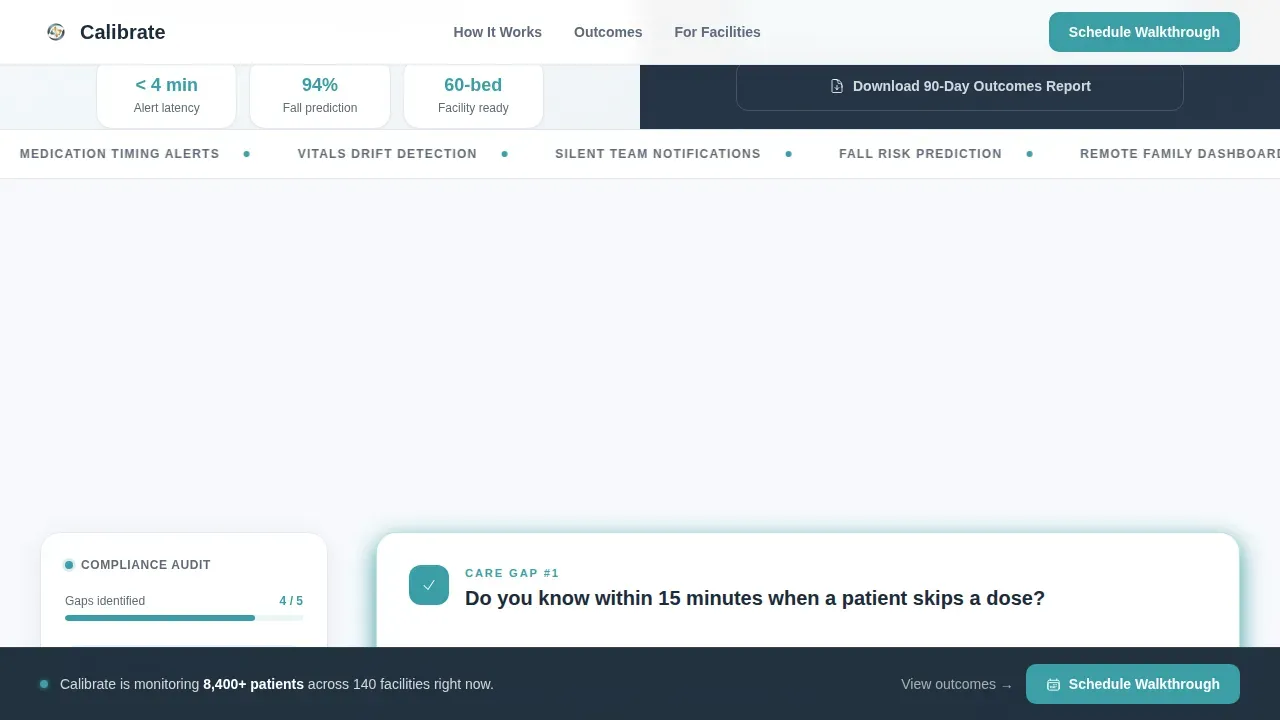
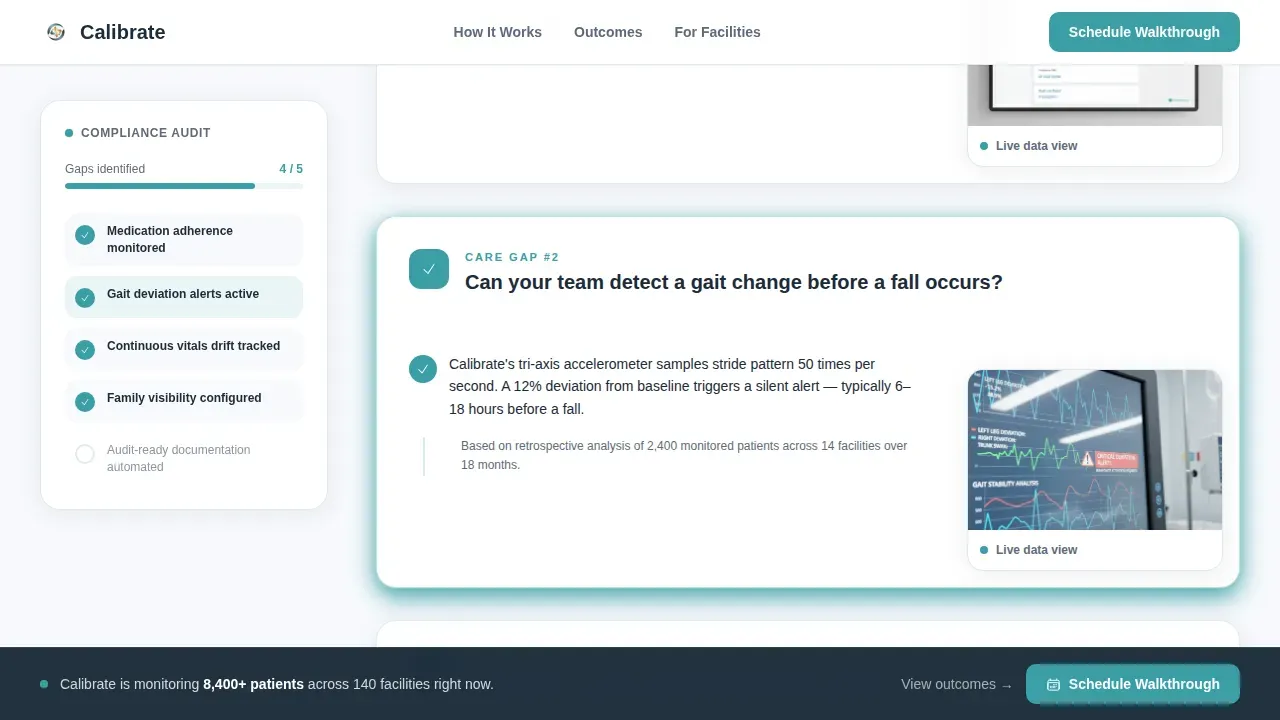
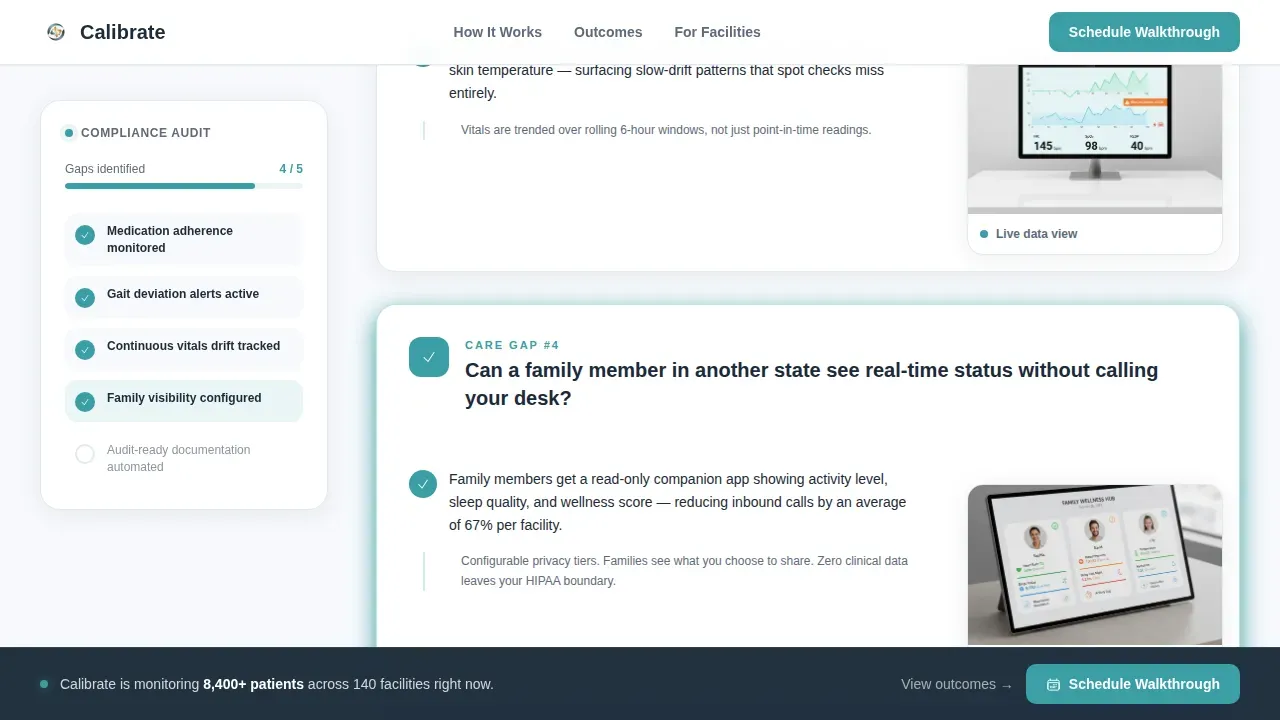
- A scroll-driven interactive audit checklist that presents plain-language questions about care gaps on the left panel, answers each question with a real device data screenshot and a teal checkmark on the right, and builds a visible compliance checklist in a sticky sidebar as the visitor scrolls
- A booking conversion section with a primary call-to-action form collecting facility name, bed count, role, and preferred date, plus a secondary email-gated download path for visitors not ready to schedule
Feature list
This template organizes its functionality around a single principle: earn trust through structure, then convert through clarity. Each feature below is grounded directly in the design and interaction brief for Calibrate.
Split-Screen Hero with Credential Badge Stack
The hero opens at a 50/50 split. The left half presents the device photographed on a white surface at a slight angle, with a single elderly hand resting beside it for scale. The right half displays a vertical stack of certification and award badges rendered in calm slate (#5E6B7C) and warm confirmation gold (#D4A84B). No marketing language appears in this section. The badges carry the credibility so the headline does not have to. This approach allows healthcare providers and geriatric care directors to evaluate the device's standing before reading a single product claim, which is precisely how clinical buyers process new equipment.
Scroll-Driven Interactive Audit Checklist
The core interactive feature is a scroll-driven compliance self-assessment. As the visitor scrolls, left-panel questions surface one at a time, each posing a direct care gap query in plain language. The right panel responds with a real data screenshot and a teal checkmark. A sticky sidebar accumulates a running compliance checklist, growing line by line as sections reveal. By the fifth section, the visitor has effectively audited their own facility's process and the checklist shows exactly which gaps this device addresses. This structure transforms the page from a passive read into an active evaluation, which is the emotional mechanism that moves cautious buyers from survey to scheduling.
Booking Form with Role-Based Fields
The primary conversion point is a scheduling form titled "Schedule a Facility Walkthrough." It collects facility name, bed count via a structured dropdown (1 to 10, 11 to 50, 51 to 150, and 150 or more), role selection (care director, family member, or agency coordinator), and a preferred date picker that defaults to the next available Thursday. This level of structure reassures clinical users that the services being offered are calibrated to their facility context, not a generic sales funnel. The form appears first beside the completed checklist, then again pinned to the bottom rail of the page.
Secondary Download Path for Lead Nurturing
A second conversion option offers a "Download the 90-Day Outcomes Report" gated behind an email field only. This path catches visitors who are not yet ready to book a facility walkthrough but are willing to record their contact details in exchange for substantive data. It acknowledges that the buying process for geriatric medical equipment typically involves multiple decision-makers, longer approval cycles, and a need to review existing research before committing to a demonstration.
Sticky Sidebar Compliance Tracker
The sticky sidebar is an always-visible checklist panel that builds as the visitor scrolls. It gives users a persistent sense of progress and helps caregivers and care directors develop a clear picture of where their current process leaves gaps. This sidebar also serves a functional role: it allows the visitor to focus on one question at a time without losing context of how far through the self-assessment they have progressed. The sidebar's visibility and real-time update behavior create a sense of organized momentum rather than passive scrolling.
90-Day Outcomes Section with Social Proof
A dedicated outcomes section presents facility-level results supported by statistics and testimonials from geriatric care directors. This section gives the page documentary weight. Healthcare providers making procurement decisions for elderly care equipment need outcome data, not only feature lists. The outcomes section supports that need by presenting verifiable performance records in a clear, readable format that reinforces the page's Medical Clarity visual identity.
Page sections overview
| Section | Purpose |
|---|---|
| Hero Split Screen | Display device and credential badges side by side |
| Badge Stack Display | Present certifications and award designations without copy |
| Interactive Audit Panel | Guide visitors through a scroll-driven care gap self-assessment |
| Sticky Sidebar Tracker | Build a visible compliance checklist in real time as visitor scrolls |
| Data Proof Screens | Show real device data screenshots with teal confirmation checkmarks |
| 90-Day Outcomes | Present facility-level results, statistics, and director testimonials |
| Booking Form Section | Collect facility details and schedule a walkthrough appointment |
| Secondary Download Path | Capture emails via outcomes report download for nurture flow |
| Bottom Rail Call-to-Action | Pin the primary booking button for persistent conversion access |
| Stripe Compact Footer | Provide compact footer navigation and closing contact information |
Design & branding system
The visual identity follows a Medical Clarity theme built on the Cloud Canvas color system. The overall impression is a well-funded clinical environment: clean linen light on every surface, muted instrument panel tones for secondary text, and one warm gold accent that marks the actions worth taking. Typography pairs DM Sans for headings and Manrope for body text, two typefaces that read cleanly on monitor-sized screens without feeling cold or institutional.
- Color palette: soft clinical white (#F7F9FC) for backgrounds, calm slate (#5E6B7C) for secondary text and badge frames, reassuring teal (#3A9EA5) as the primary interactive color for checkmarks and active links, and warm confirmation gold (#D4A84B) reserved exclusively for badges, active-state buttons, and star rating highlights
- Typography and spacing: DM Sans headings provide clean hierarchy for scanning, while Manrope body text maintains readability at smaller sizes; spacing follows a deliberate open layout that prevents visual complexity and supports the clinical clarity the target audience expects from medical equipment services
Mobile & speed optimization
The template is designed desktop-first, reflecting the reality that geriatric care directors and agency coordinators typically evaluate new health equipment on workstation screens during care planning sessions. The layout and interactive audit are built to perform cleanly on large monitor displays first, with a mobile-responsive fallback ensuring that family members accessing the page from personal devices still receive a usable, legible experience.
- Desktop-priority layout: the 50/50 split, sticky sidebar, and scroll-driven checklist are optimized for full-width monitor display so that care directors can evaluate the page without horizontal scrolling or layout collapse during a facility review session
- Responsive fallback design: the split screen stacks vertically on smaller viewports, the sticky sidebar collapses into an inline progress indicator, and the booking form fields reflow to full-width single-column layout for clean usability on mobile devices used by family members and remote coordinators
How this template helps you convert
The conversion architecture of this template is built around reducing hesitation at each stage of the buyer journey. Geriatric healthcare providers do not respond to generic urgency tactics. They respond to evidence, structure, and the feeling that the page understands their professional context. Each section of this template is designed to move a cautious, credentialed buyer one step closer to a scheduled appointment.
- The credential-first hero removes the skepticism barrier immediately. By presenting FDA clearance, award designations, and clinical journal ratings before a single product claim, the page signals institutional seriousness. Healthcare providers and elderly care directors can survey the badge stack and decide in seconds whether this device belongs in a serious evaluation process.
- The interactive audit checklist converts passive reading into active self-assessment. Visitors identify their own care gaps as they scroll, and the sticky sidebar visually confirms which gaps the device closes. By the time the booking form appears, the visitor has already concluded that this device is relevant to their facility, which significantly reduces friction at the point of scheduling.
- The dual-path conversion model captures buyers at two levels of readiness. The primary "Schedule a Facility Walkthrough" form reaches decision-makers ready to act. The secondary "Download the 90-Day Outcomes Report" email gate reaches researchers and secondary stakeholders who need to review existing data before they can support a procurement decision, ensuring that no potential buyer leaves the page without a next step.
Other information about this template
This section covers additional context relevant to buyers evaluating the Calibrate template for a geriatric medical device use case, including background on the underlying domain, supporting research, and compatibility considerations.
The growing demand for effective elderly care has never been more urgent. The global population of older adults is projected to reach approximately 2.1 billion by 2045, and this demographic shift is placing substantial pressure on care facilities, healthcare providers, home health agencies, and family members supporting aging relatives. Geriatric assessment templates help clinicians manage this growing demand by ensuring that no essential detail is missed during consultations. A Comprehensive Geriatric Assessment (CGA) is a structured tool used to evaluate an older patient's medical, functional, cognitive, and psychosocial status. CGA includes evaluating current symptoms, past medical history, cognitive and mental health status, functional and mobility assessment, social environment, and goals of care. Templates for CGA help guide clinical decision-making by capturing key domains such as memory, mobility, medication use, daily living activities, mood, and support systems.
Calibration is a critical discipline in geriatric monitoring device design. The calibration process involves comparing the device to a known, highly precise standard and adjusting it to eliminate deviations. Certified, traceable reference standards should be used for calibration, and they must be at least ten times more precise than the device's tolerance. Many devices require annual or semi-annual calibration to maintain their accuracy. Calibration activities that are logged correctly create an auditable record for regulatory and quality reviews. Documentation of calibration must include the date, results, and the ID of the technician to provide an audit trail for regulatory compliance. Worn devices must go through an initial assessment to evaluate their current performance against manufacturer specifications to identify any immediate measurement drifts. Re-testing is essential to confirm that the device meets required accuracy standards after adjustments. Calibrating a device incorrectly can necessitate removing it from service if it cannot meet accuracy standards. Calibration can prevent devices from generating false alarms, thus enhancing their reliability for geriatric patients.
Effective signal processing and adaptive threshold design are core to reducing a high false alarm rate in continuous health monitoring devices. An adaptive threshold model allows the device to adjust sensitivity based on patient-specific baseline data rather than applying a fixed parameter to all users. This improves diagnostic accuracy and helps caregivers record meaningful alerts rather than noise. Decision tree logic can further support alert triage by classifying the health status signals that sensors capture into structured response categories.
The integration of AI and IoT in elderly care can improve the efficiency and reliability of health monitoring systems. AI and IoT technologies can enhance elderly care by providing continuous health monitoring and support. AI-powered applications can help in personalizing care for elderly individuals by analyzing their health data and providing tailored recommendations. Wearable devices and smart home technologies are examples of IoT applications that can assist in monitoring the health of older adults. The use of AI and IoT in elderly care can facilitate better communication between caregivers and healthcare providers. AI technologies can help in detecting health issues early by analyzing data collected from IoT devices. The implementation of AI and IoT in elderly care can lead to improved quality of life for older adults by enabling greater independence.
Fall detection systems can be categorized into wearable sensors and external sensors, with video-based systems being favored for their versatility. Kinect technology is used for fall detection in elderly care due to its ability to recognize and detect activities while ensuring comfort and privacy. Kinect's Time of Flight (TOF) principle allows it to function effectively in low-light conditions, making it suitable for fall detection applications. The Kinect camera can capture RGB, depth, and infrared data, which are essential for accurately detecting falls and monitoring elderly individuals. Fall detection systems using this approach can provide real-time monitoring and alerts, which are crucial for preventing serious injuries in elderly individuals. The integration of IoT technologies in fall detection systems enhances their ability to monitor elderly individuals continuously and respond quickly to emergencies. Effective fall detection systems must balance accuracy, real-time performance, and user experience to be practical for elderly care. Dynamic balance monitoring is one of the primary data points that effective wearable devices track to evaluate fall risk in older adults.
Research frameworks relevant to this space include the HealthMag tool, designed to help better elicit, model, and evaluate requirements for digital health software for elderly users. Elderly HealthMag integrates HealthMag with a calibrated version of AgeMag to support the design and evaluation of mobile health software for older adults. The development of HealthMag involved interviews with domain experts to suggest and rank facets based on their patients' user experience in digital health software. The final set of HealthMag facets includes Motivation, Received Care, Tech Proficiency, Health Self-efficacy, and Trust and Privacy. The Elderly AgeMag was calibrated specifically for older adults to address software inclusivity barriers experienced by this demographic. Cognitive walkthroughs using Elderly HealthMag revealed that health characteristics significantly shape digital interaction quality for older adults. The Elderly HealthMag framework was evaluated through cognitive walkthroughs of two widely used medication-management applications to assess its utility for older adults.
Publication in IEEE Transactions on medical and biomedical engineering continues to support open access dissemination of geriatric monitoring methods, and future research directions in this area include expanding sample size diversity, refining calibration protocol standards for wearable sensors, and exploring adaptive threshold techniques that can improve performance across varied patient populations. Future directions also include developing interoperability standards so that devices can communicate health data more reliably across hospital systems, home care platforms, and agency coordination tools. Healthcare monitoring systems that record consistent, structured data over time create a foundation for future research to evaluate long-term outcomes for older adults with complex daily living needs.
This template is compatible with any development environment that supports static-first rendering with client-side interactivity for the audit and booking components. The split-screen layout and interactive checklist are the two components that require client-side JavaScript; all remaining sections are suitable for static server-rendered output. Teams developing this template should verify their build environment supports intersection observer APIs for the scroll-driven calibration activities checklist and sticky sidebar behavior.
- The calibrate precision geriatric monitoring device landing page template is designed for one-page deployment and does not include multi-page navigation by default
- Open access to the 90-Day Outcomes Report download is controlled by the email gate form; no additional authentication layer is included in this template
- Sample size and data display sections use placeholder statistics and screenshot blocks that teams should replace with real facility outcome data before publishing
- Caregiver support communication pathways, such as alert routing and team notification logic, are device-level functions and are not part of this landing page template's scope
Theme
Medical Clarity
Creative direction
Checklist & Audit
Color system
Cloud Canvas
Style
Split Screen (50/50)
Direction
Booking/Scheduling
Page Sections
Split-screen Hero with Award Badge Stack
Scroll-driven Compliance Audit Checklist
Role-based Booking Conversion Form
Email-gated Secondary Download Path
Sticky Sidebar Progress Tracker
Day Outcomes Section with Social Proof
Related questions
Who is this landing page template designed for?
Can I customize the booking form fields?
What makes the interactive audit different from a standard feature section?
Does this template include the 90-Day Outcomes Report content?
Is this template suitable for both desktop and mobile users?



