Thai Cooking Class Landing Page Template
The Mortar hands-on Thai cooking class landing page template is a gallery-walk landing page built for cooking class businesses that want to turn browsers into bookings. Rich macro dish photography, expandable detail panels, and a bold Haute Craft design system set the scene. A visual booking form, class-type cards, and a fixed mobile call-to-action bar make registration simple and immediate.
by Rocket studio
Quick summary
Mortar is a single-page Thai cooking class landing page template built around immersive gallery storytelling. Each dish is presented as an art piece with expandable detail panels covering class info, techniques, and student quotes. The "Reserve Your Station" call to action appears early and often, helping cooking class operators start filling sessions fast.
Who this template is for
This template is perfect for cooking class creators who need a landing page that sells the experience before the visitor ever reads the price. It suits operators building momentum and chefs ready to showcase their craft to the world.
- Culinary entrepreneurs running intimate Thai cooking class sessions for date-night couples or small groups
- Corporate team-building coordinators seeking a professional, polished booking page for group cooking experiences
- Home cooks and cooking instructors who have outgrown basic booking tools and want a great brand presence online
What problem this template solves
Most cooking class landing pages are static, plain, and forgettable. They display a list of dates and a contact form, nothing more. Mortar solves this by making the page itself feel like the experience, helping visitors commit before they finish scrolling.
- Visitors leave without booking because the page fails to communicate the atmosphere or hands-on nature of the class
- Generic templates cannot showcase the sensory, tactile world of Thai cooking class instruction effectively
- Operators lose time building pages from scratch instead of teaching and making great food
What you get with this template
This template gives cooking class operators a complete set of thoughtfully designed sections, ready to use out of the box. Every component is built to guide visitors toward booking a session.
- A gallery-walk layout with macro dish photography and expandable panels showing class details, techniques, and student feedback
- A visual booking form capturing date selection, class type, group size, and dietary restrictions, plus a "Gift a Class" path for instant digital vouchers
- Three class-type cards covering Date Night, Team Build, and Solo Deep-Dive, set in an asymmetric card layout
Feature list
This template is purpose-built for cooking class registration. Each feature directly supports the goal of helping users start booking and stay engaged throughout the page.
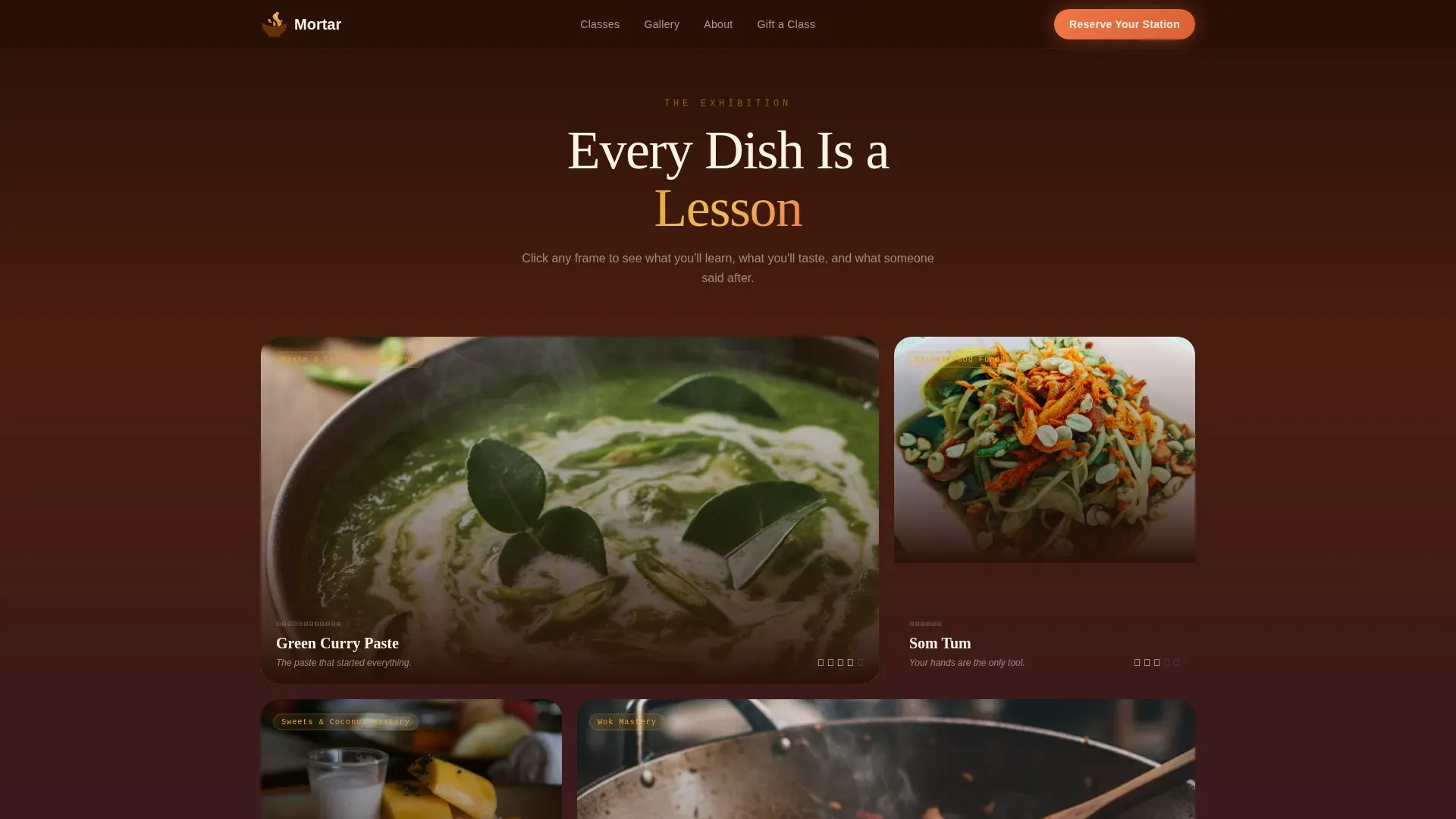
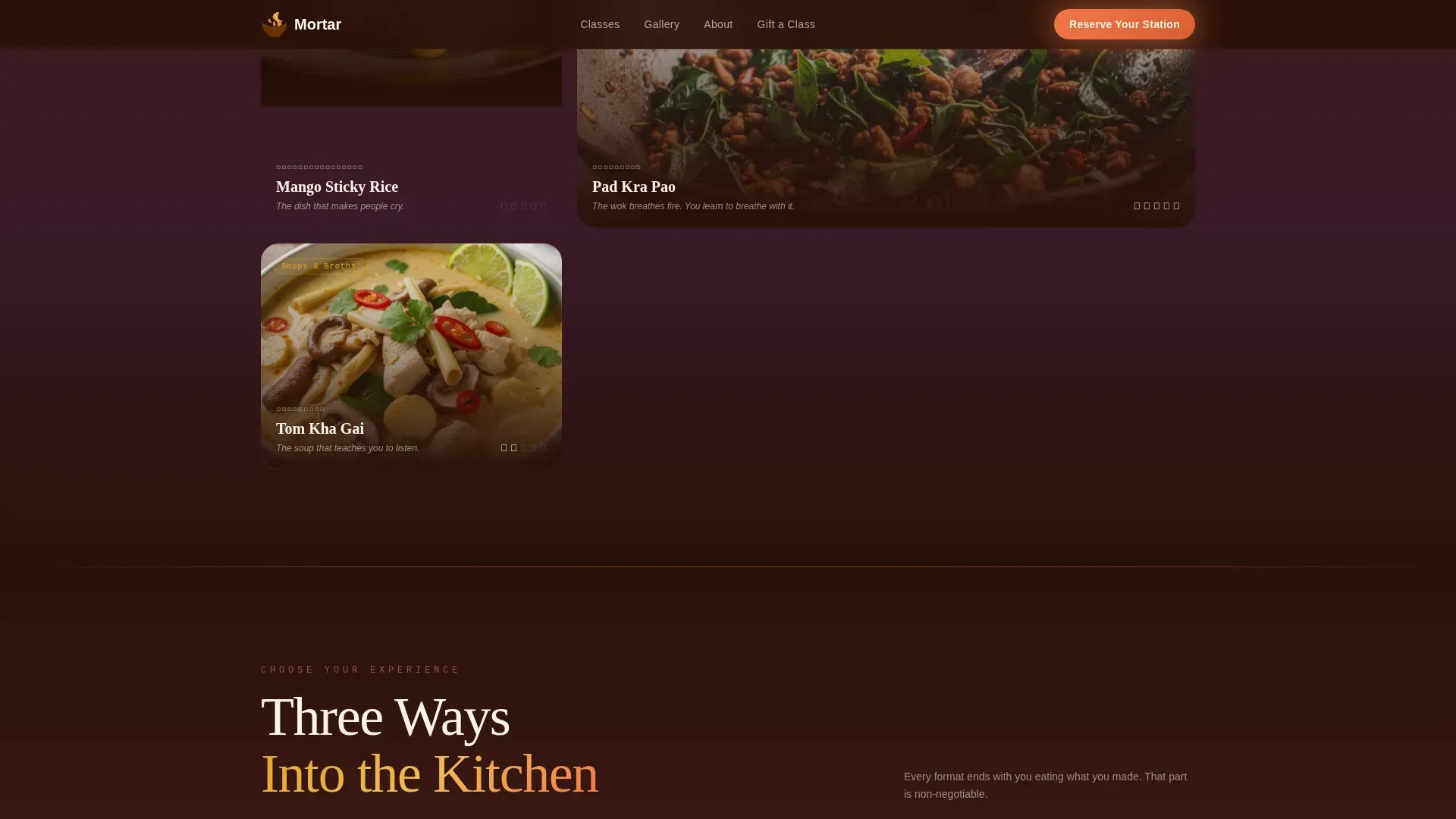
Gallery Walk with Expandable Dish Panels
Each dish is presented as a full-width art piece. Visitors click to open a detail panel revealing the cooking class, techniques covered, the ingredient list, and a real student quote. Classes include making Green Curry Paste, Som Tam (Papaya Salad), and mango sticky rice. This format naturally guides visitors through the content before they reach the booking form.
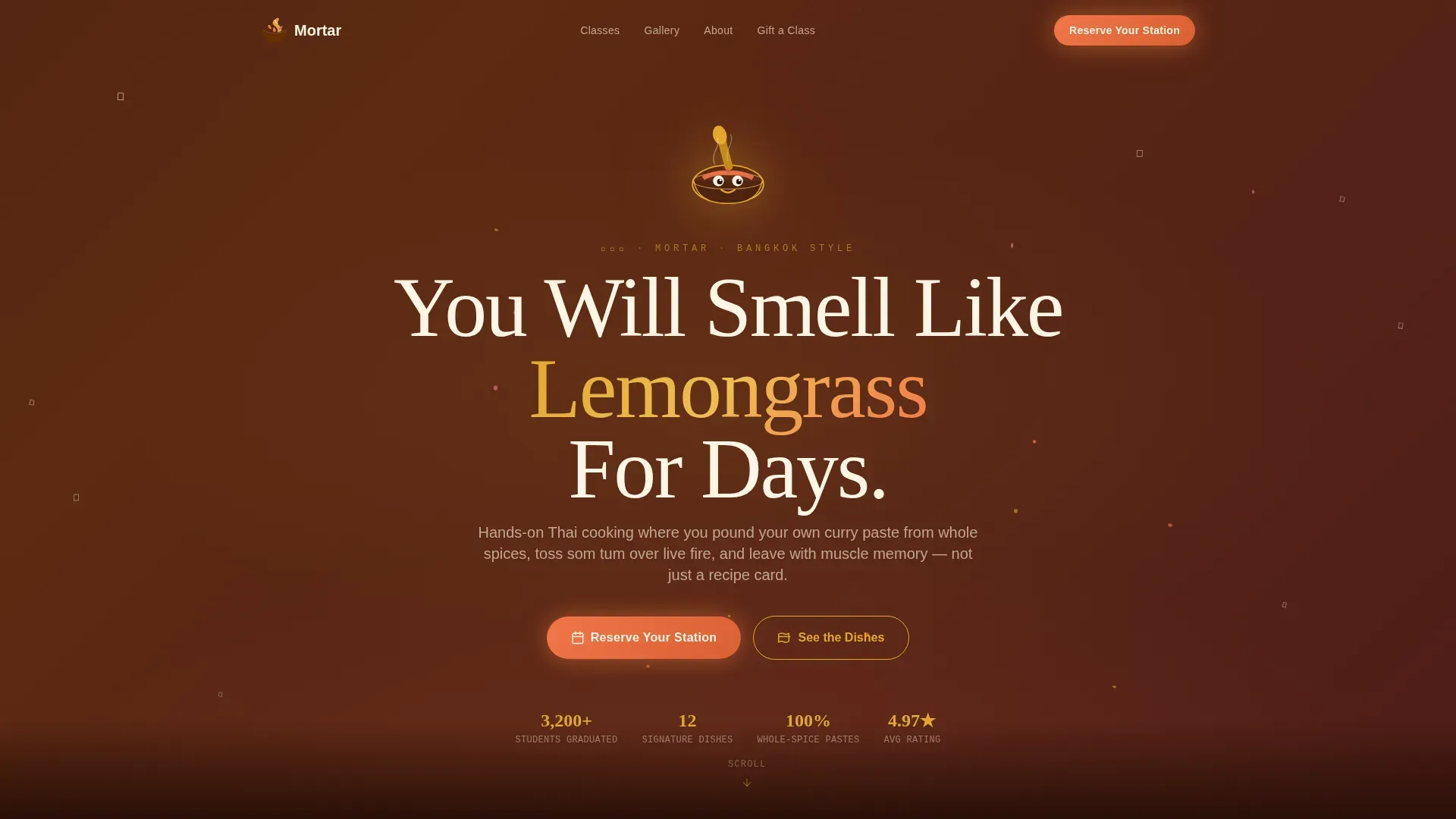
Hero Section with Mascot and Atmospheric Gradient
The header introduces a hand-illustrated mascot, a mischievous mortar-and-pestle character with expressive eyes and a chef's bandana, rendered in a textured ink style. Hand-lettered Thai script and English copy set the tone immediately. A slow-shifting gradient and floating chili-flake confetti bring the kitchen energy to life above the fold, with a prominent booking button placed for easy access.
Visual Event Registration Form
The booking form uses a visual calendar showing available sessions alongside class type selection and group size input. Urgent cues such as limited spots per class encourage immediate action. A secondary path lets visitors gift a class with instant digital voucher delivery. The form is simple, scannable, and built to reduce drop-off at the most critical conversion point.
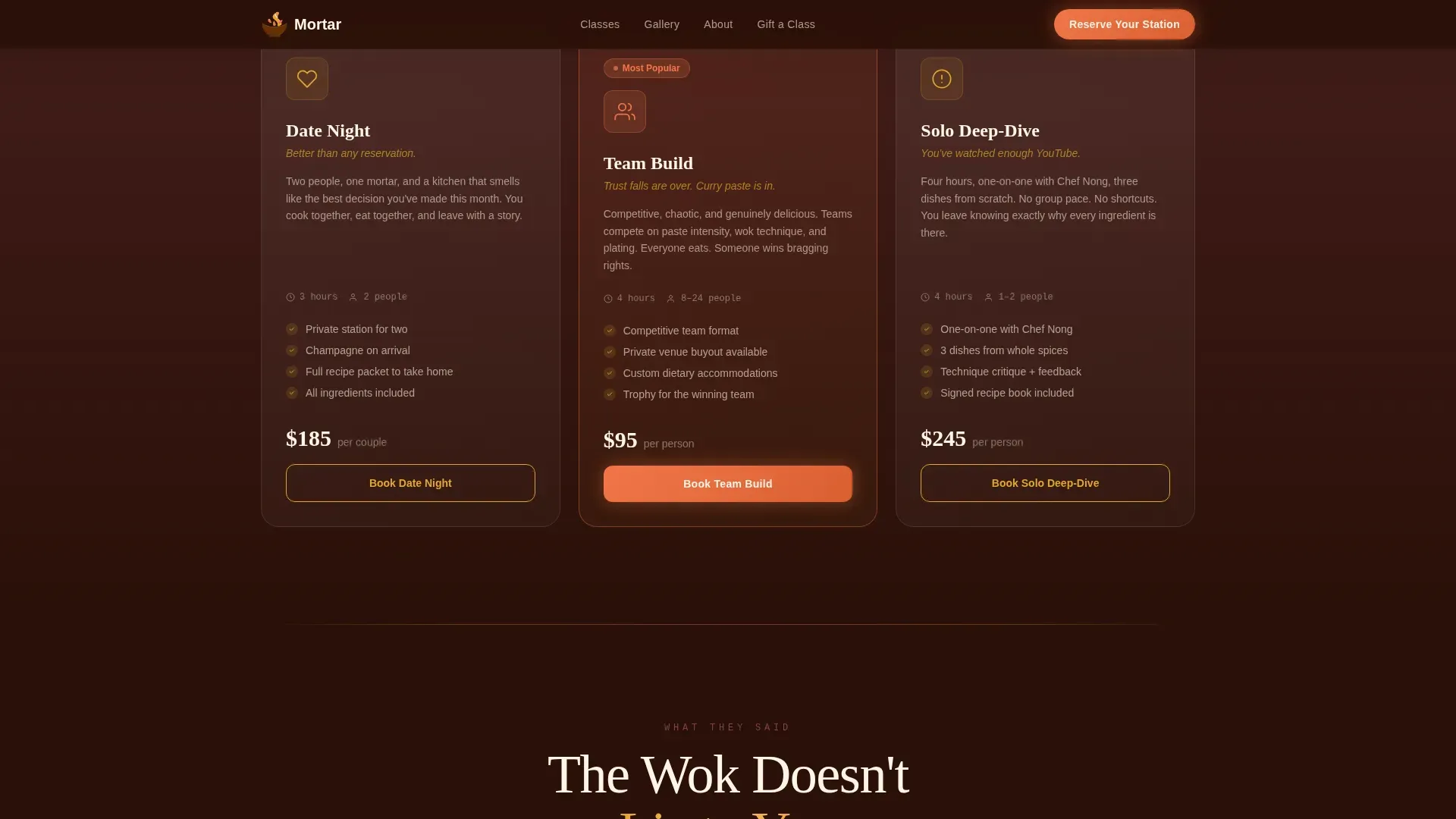
Class Type Cards
Three asymmetric cards organize the cooking class offerings: Date Night, Team Build, and Solo Deep-Dive. Each card displays the key details visitors need, including session focus, group fit, and a clear call to action. This layout makes it easy for different audience types to self-select the right class.
Social Proof and Testimonials Section
Student testimonials are tied to specific dishes and outcomes, not generic praise. Named attendees share real cooking experiences, helping build trust with new visitors. Reviews highlight the hands-on, educational, and fun nature of the class, reinforcing the brand story through authentic voices.
Mobile-First Fixed Call-to-Action Bar
On mobile devices, a fixed bottom bar keeps the "Reserve Your Station" call to action visible at all times. This ensures users on any device always have a clear path to booking without scrolling back to the top.
Page sections overview
| Section | Purpose |
|---|---|
| Hero with Mascot | Sets atmosphere, displays the booking prompt above the fold |
| Gallery Walk Panels | Showcases signature dishes with expandable class detail panels |
| Class Types Cards | Organizes three cooking class formats for easy self-selection |
| Social Proof Strip | Displays student testimonials tied to specific dish outcomes |
| Booking and Gift Form | Captures registrations and gift voucher requests |
| Footer | Provides navigation and brand contact details |
Design & branding system
The Haute Craft design system uses a Sunset Gradient color palette that feels like the last light over the Chao Phraya. Every color choice serves the atmosphere first and the brand second, creating a cooking class page that is impossible to scroll past without feeling something.
- Colors: deep tamarind (#3B1A0E) for backgrounds, turmeric gold (#E2A72E) for headlines, ripe papaya (#F27649) for calls to action, dusky orchid pink (#D4708A) in gradient transitions, and coconut cream (#FFF5E6) for body text
- Typography: Fraunces serif for headlines, DM Sans for body copy, and JetBrains Mono for accent labels, creating a layered typographic hierarchy that guides the eye naturally
- Animations include scroll-linked reveals, floating chili-flake particles, parallax layers, and hover glow states, set at high intensity to match the energy of a live kitchen
Mobile & speed optimization
This template is built mobile-first. The gallery walk, expandable panels, and booking form are all designed to work smoothly on smaller screens without losing visual impact.
- A fixed bottom call-to-action bar on mobile keeps "Reserve Your Station" accessible at all times, so users never lose the booking path mid-scroll
- Server components handle static sections for reliable rendering, while client components power the interactive gallery panels and booking calendar
How this template helps you convert
The gallery-walk structure is built specifically to earn the booking click through progressive emotional investment. By the time a visitor reaches the third dish panel, they are not deciding whether to book; they are deciding which night.
- A prominent "Reserve Your Station" button appears above the fold and beneath every dish detail panel, giving users multiple clear entry points to start the booking process at any time during the scroll
- Urgent messaging cues, such as limited spots per class, combined with named student testimonials and specific dish outcomes, build trust and create the sense of scarcity that moves people from browsing to reserving
Other information about this template
This template is well-suited for cooking class entrepreneurs who want to start building an online presence without writing code. It is equally useful for professional culinary instructors sharing their passion for Thai cooking with couples, families, and corporate groups.
- Tools like Stripe or Square are recommended for taking payments online or in person. The template's booking form section is designed to pair cleanly with payment tools when operators set up their class registration flow.
- Eventbrite is ideal for managing RSVPs for public cooking class events, and the template's visual calendar layout complements external scheduling tools like Acuity Scheduling.
- Canva is great for creating class materials and social media content to use alongside this template, helping operators build a consistent brand across platforms.
- Instagram is a powerful platform for sharing cooking class stories and driving traffic back to this landing page, especially when high-quality dish photography is already part of the template's visual content.
- The template's design system supports growth for cooking class operators at every stage, from a single-instructor kitchen running weekend sessions to a multi-format program organizing Date Night, Team Build, and Solo Deep-Dive classes at scale.
Theme
Haute Craft
Creative direction
Gallery Walk
Color system
Sunset Gradient
Style
Gallery + Detail
Direction
Event Registration
Page Sections
Gallery Walk with Expandable Dish Panels
Hero Section with Mascot and Gradient
Visual Event Registration Form
Three Class Type Cards
Student Testimonials Section
Mobile-first Fixed Call-to-action Bar
Related questions
What cooking class formats does this template support?
Does the template include a booking form?
What dishes and techniques are featured in the gallery?
Is this template suitable for mobile users?
Can I use this template to sell gift vouchers?