Wind Turbine Technician Business Reviews Website Template
Nacelle is a sidebar companion landing page built for wind turbine technician businesses. It stacks named client reviews by complexity, from routine maintenance to emergency offshore mobilization, alongside a persistent sidebar that tracks the running average score. A charcoal and amber palette signals industrial authority, and every element pushes visitors toward a service inquiry click.
by Rocket studio
Quick summary
Nacelle is a single-page, click-through landing page designed for wind turbine technician businesses. It organizes real client testimony by job complexity, pairs each review with the lead technician and turbine details, and uses a sticky sidebar to compound social proof as visitors scroll. The goal is to earn the inquiry click through specificity, not hype.
Who this template is for
This template is built for technical service businesses in the wind energy sector. It speaks the language of operations and maintenance professionals who evaluate vendors on proven field experience, not marketing language.
- Wind turbine technician companies and independent service providers seeking new project inquiries
- Operations and maintenance directors and site managers who run offshore or onshore wind farms
- Engineering, procurement, and construction contractors who need to present third-party technical credentials to prospective clients
What problem this template solves
Most professional services pages in the wind industry rely on generic capability lists. Prospective clients, such as offshore wind farm operators or independent power producers managing aging fleets, need verifiable proof before they hand over access to a turbine tower. This template closes that trust gap.
- It replaces vague service claims with named reviews tied to specific turbine models, sites, and job scopes
- It structures testimony in escalating complexity so the visitor builds confidence with every scroll
- It removes friction from the conversion path by directing visitors to a scoping questionnaire rather than a long contact form
What you get with this template
You get a fully structured, single-column review page with a persistent sidebar, designed around the wind turbine technician customer review page format. Every layout decision is made to move a skeptical operations professional toward a service inquiry.
- A press mentions header bar featuring trade publication and certification logos on matte charcoal
- A scrolling review column where each testimonial is anchored to a named technician, named client, turbine model, and location
- A sticky sidebar holding navigation anchors, a running average score, total review count, and a persistent call-to-action button
Feature list
This template is built around a small set of high-impact components. Each one earns its place by doing specific work in the conversion flow.
Press Mentions Header Bar
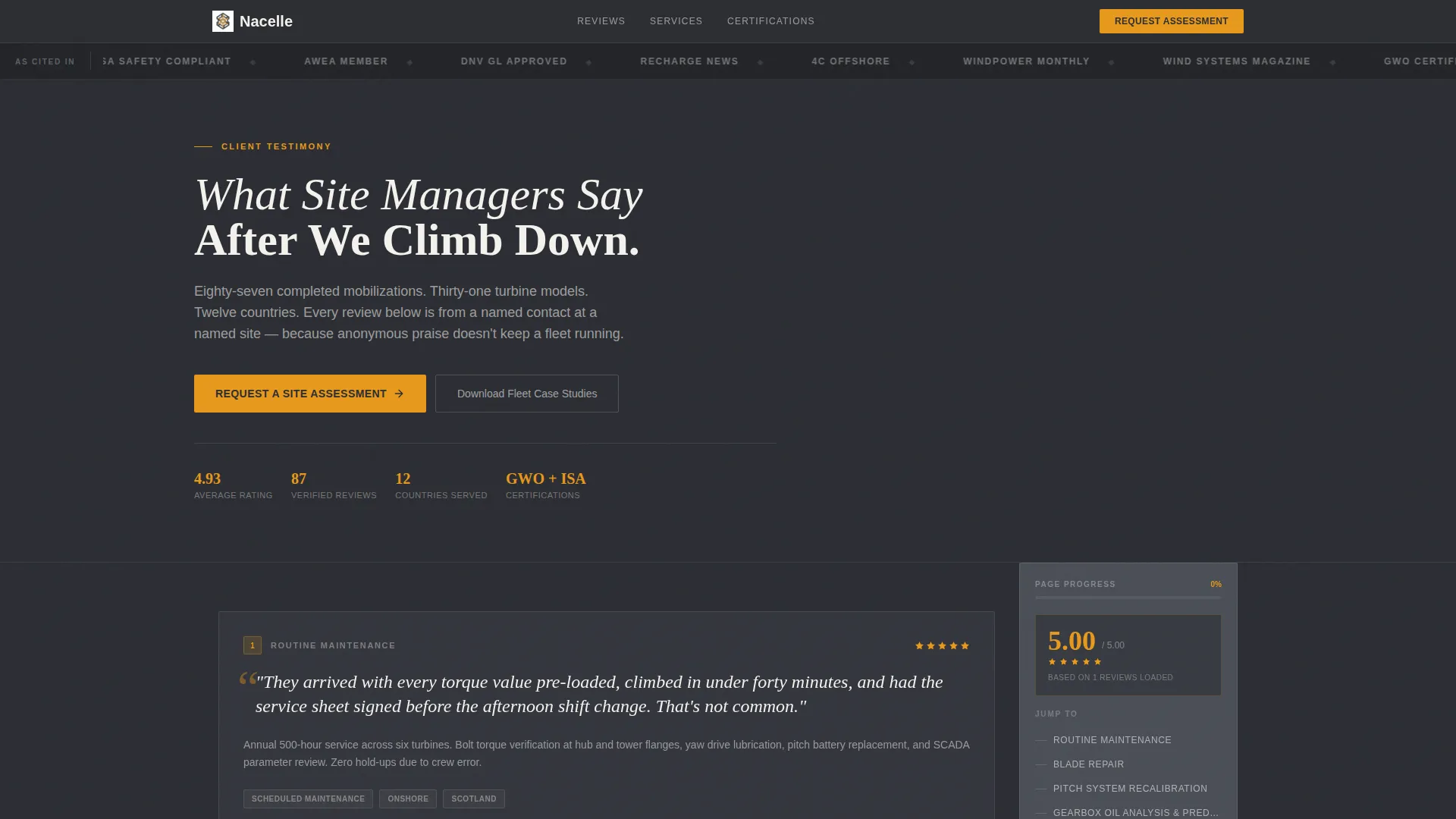
A horizontal strip of trade publication logos and industry certification marks opens the page on matte charcoal. Logos from recognized wind energy publications and safety bodies establish authority before the visitor reads a single review.
Escalating Review Scroll
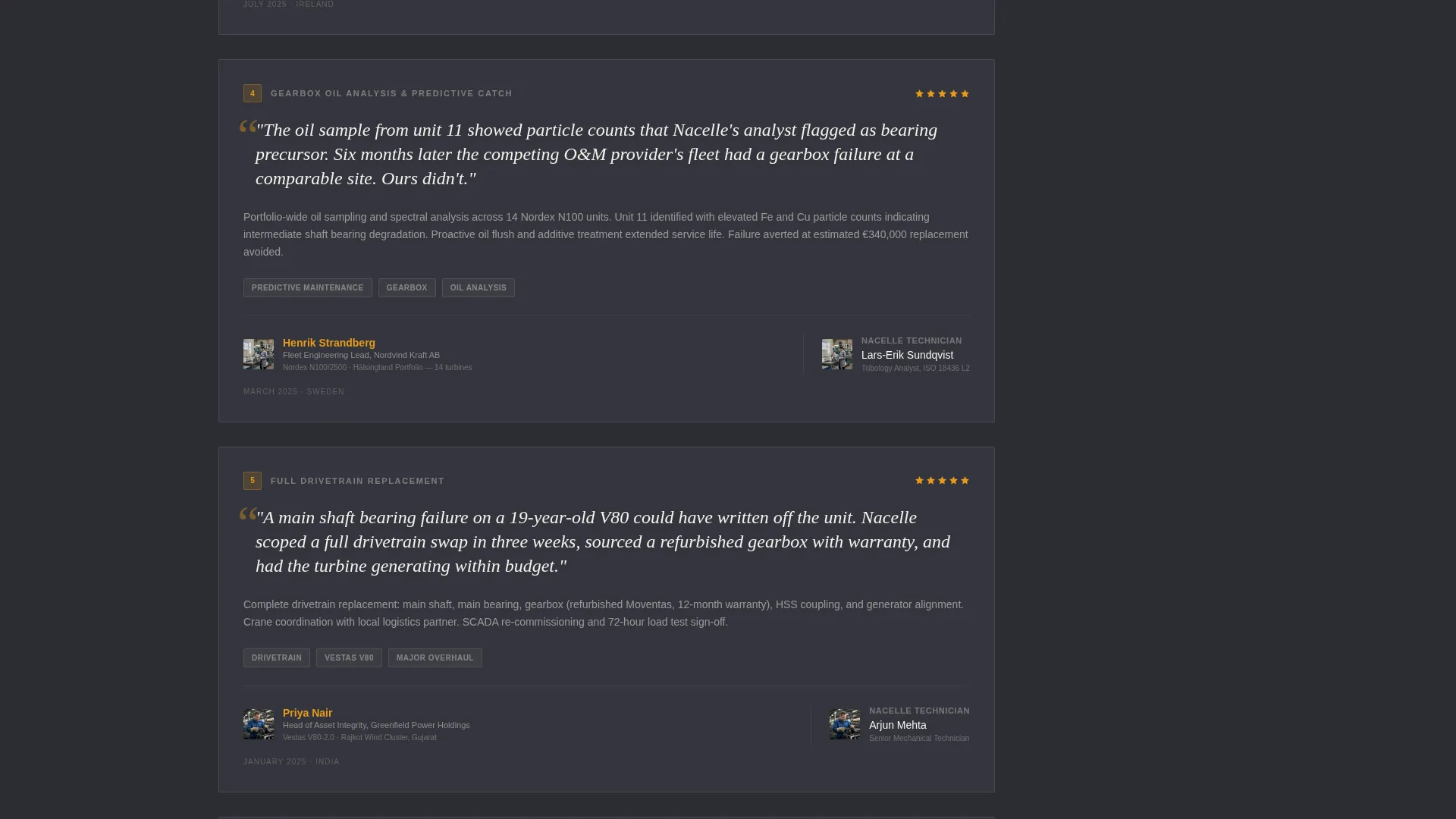
Reviews are sequenced by job complexity, starting with routine maintenance and building through blade repair, drivetrain replacement, and emergency offshore mobilization. This structure lets the social proof case build itself as the visitor scrolls.
Technician-Anchored Review Cards
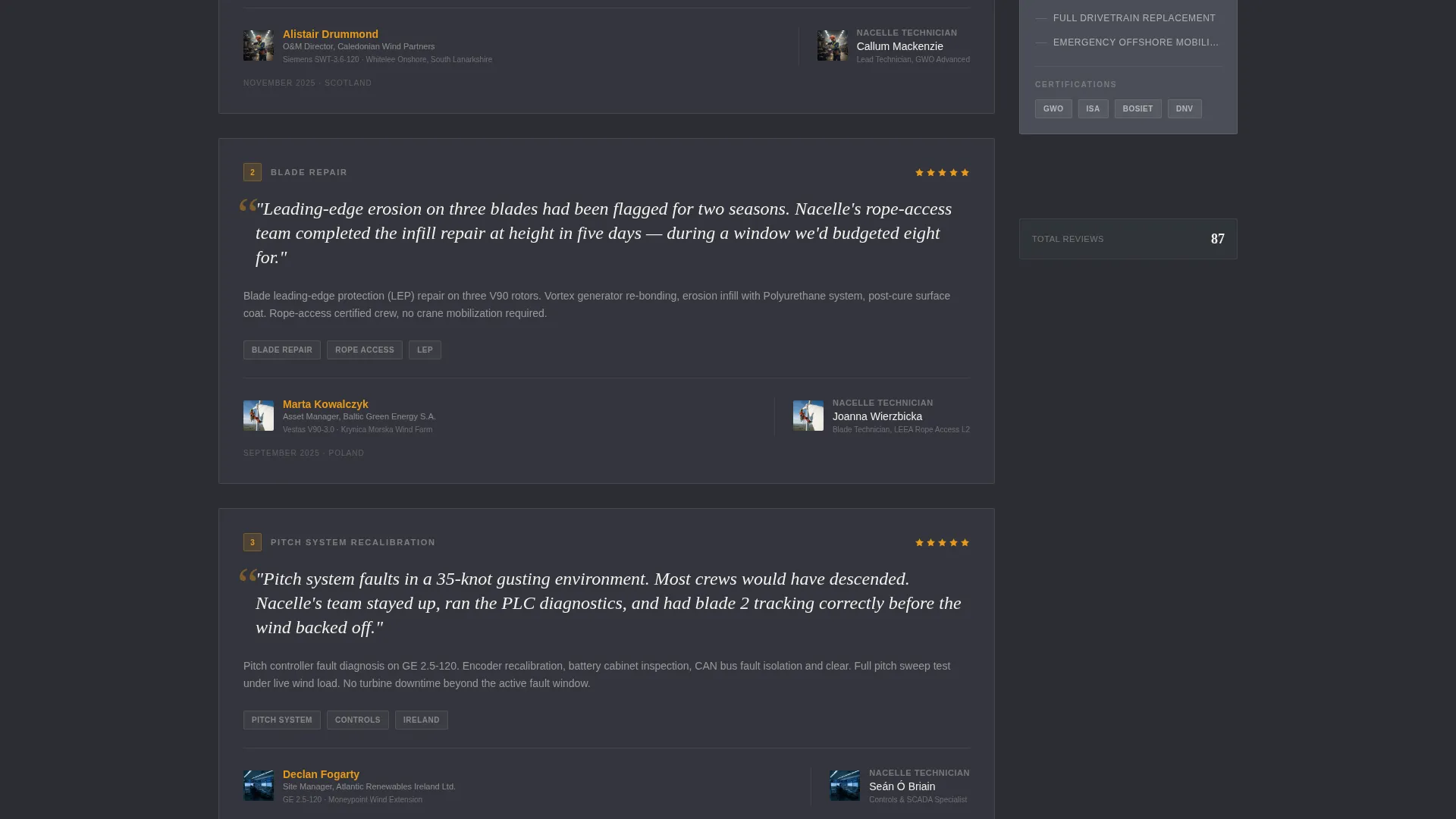
Each review card pairs a site manager quote with a small portrait of the lead technician who ran that job. The turbine model and site location appear beneath, grounding every testimonial in verifiable operational detail.
Persistent Sidebar with Trust Summary
The sidebar holds navigation anchors and a running trust summary showing the average rating and total review count. After the third review, a sticky amber call-to-action button appears and stays visible for the rest of the scroll.
Dual Conversion Paths
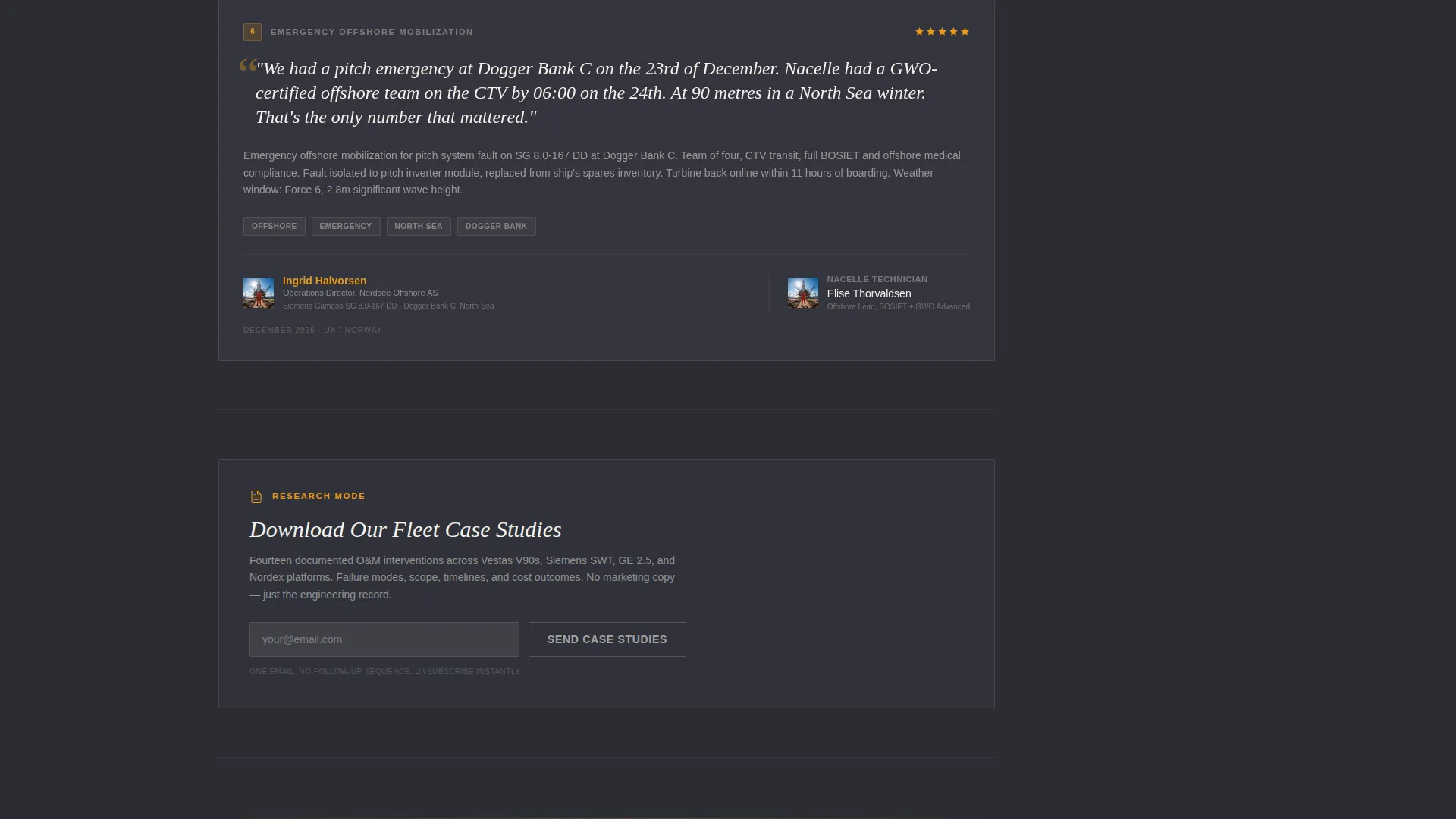
The primary call-to-action, "Request a Site Assessment," appears first beneath the press bar and again as a sticky sidebar button. A secondary path, "Download Our Fleet Case Studies," captures research-stage visitors with a single email field.
Amber-on-Charcoal call to action Treatment
The call-to-action buttons use safety-harness amber text on tower-shadow charcoal. This color pairing draws the eye without cluttering the page, keeping the visual hierarchy clear at every scroll depth.
Page sections overview
| Section | Purpose |
|---|---|
| Press mentions bar | Establishes authority via trade publication and certification logos |
| Page headline | Sets the editorial tone with a single, confident statement |
| Primary call to action block | Captures high-intent visitors immediately below the press bar |
| Review card one | Demonstrates routine maintenance capability with named details |
| Review card two | Shows blade repair scope with technician and site context |
| Review card three | Presents drivetrain replacement evidence for complex job credibility |
| Review card four | Documents emergency offshore mobilization as the authority peak |
| Sidebar trust summary | Displays running average score, total reviews, and certifications |
| Sticky sidebar call to action | Keeps the inquiry prompt visible after the third review |
| Secondary capture strip | Offers fleet case study download for research-stage visitors |
Design & branding system
The visual identity follows an Educational Guide theme using a charcoal and amber color system. The palette is designed to feel like a high-visibility vest against a gray sky: industrial, trustworthy, and impossible to ignore where it matters.
- Tower-shadow charcoal (#2B2D33) fills the primary background; turbine-housing gunmetal (#4A4E57) defines the sidebar rail; nacelle white (#F4F2ED) covers body text and review cards
- Safety-harness amber (#E8991C) appears sparingly on pull-quotes, star ratings, client names, and call-to-action elements only
- The Team and People creative direction pairs each testimonial with a technician portrait, reinforcing the human accountability behind every job
Mobile & speed optimization
The sidebar companion layout is structured to adapt cleanly across screen sizes. On smaller viewports, the fixed sidebar collapses into an inline trust strip so the review content remains the primary focus.
- The sticky call-to-action button repositions to a bottom bar on mobile so it stays accessible without covering review text
- Review cards use a single-column stack on narrow screens, keeping turbine model, location, and quote details fully readable
- The press mentions bar scrolls horizontally on mobile rather than wrapping, preserving the logo strip's visual weight
How this template helps you convert
Every layout decision on this page is optimized for a click-through to the service inquiry page, not a form fill. The page earns that click by stacking specificity until visitor skepticism has nowhere left to hide.
- The press mentions bar primes authority in the first second of the visit, before the visitor reads a word of copy
- Escalating review complexity builds a cumulative case that this team handles everything from standard servicing to emergency offshore callouts
- The persistent amber call-to-action button in the sidebar keeps the path to the scoping questionnaire visible at every scroll depth
Other information about this template
This template is categorized under Professional Services for the wind turbine technician business niche. It is designed as a sidebar companion page, meaning it is intended to sit alongside a primary service or portfolio page rather than replace it.
- The headline "What Site Managers Say After We Climb Down" is included as editable copy in the template
- The secondary lead capture path uses a single email field for the fleet case study download, keeping the form lightweight for research-stage visitors
- The no-hero-image approach is intentional; the authority of the page is built through association with recognized industry bodies and real named testimony, not photography
- This template suits independent power producers managing aging turbine fleets and engineering, procurement, and construction firms that need to present third-party technical credentials quickly
Theme
Educational Guide
Creative direction
Team & People
Color system
Charcoal & Amber
Style
Sidebar Companion
Direction
Click-Through
Page Sections
Press Mentions Header Bar
Escalating Review Scroll
Technician-anchored Review Cards
Persistent Sidebar Trust Summary
Dual Conversion Paths
Amber-on-charcoal Call to Action Treatment
Related questions
Does this template include a contact form?
Can I edit the review cards with my own client testimonials?
Is the sidebar visible throughout the entire scroll?
How many review card slots does the template include?
What is the secondary conversion path designed for?



