Transparent Logistics FAQ Landing Page Template
The Trucker frequently asked question landing page template is a sidebar companion landing page built for OTR drivers, owner-operators, and CDL students who need quick answers at any hour. Organized by real-world driving scenarios, it combines a fixed accordion frequently asked question section, a prominent search bar, and a sticky call-to-action into a polished, road-tested resource that earns repeat visits.
by Rocket studio
Quick summary
This landing page template turns a comprehensive trucker frequently asked question resource into a navigable, bookmarkable dispatch notebook. Every frequently asked question section is organized around the situations drivers actually face: Hours of Service questions at 2 AM, IFTA filing confusion, CDL endorsement prep, and roadside inspection disputes. The landing page template delivers immediate answers without runaround, styled in a Corporate Precision aesthetic that feels authoritative and approachable.
Who this template is for
This landing page template is purpose-built for trucking industry professionals who need fast, reliable information without wading through government manuals. It suits anyone managing an OTR driving operation, studying for a licensing exam, or building an online presence as a trusted fleet resource.
- OTR drivers holding a CDL-A who need quick answers to regulatory questions during overnight stops
- Owner-operators filing their first IFTA return, managing broker disputes, or tracking lumper fee reimbursements
- CDL students preparing for endorsement exams and needing clear, plain-language explanations of complex topics
What problem this template solves
Truck drivers often hit walls when they need fast regulatory guidance. They land on government portals full of dense legal language, or they dial dispatch only to wait on hold. A well-designed frequently asked question landing page closes that gap. This landing page template gives drivers a self-serve help center that stays open all night.
- There is no single central location online where drivers can quickly find answers to real scenario-based trucking questions without confusion
- Drivers lose time and money when common concerns like form-and-manner logbook violations or ELD malfunctions require a phone call to resolve
- CDL students and new owner-operators face complex issues during onboarding with no plain-language resource that avoids technical jargon
What you get with this template
This frequently asked question landing page template delivers a fully structured, section-led layout that puts every frequently asked question in its proper place. The design system is production-ready, and the content architecture is built to reduce bounce rates, lower support workload, and encourage repeat visits from drivers who bookmark it.
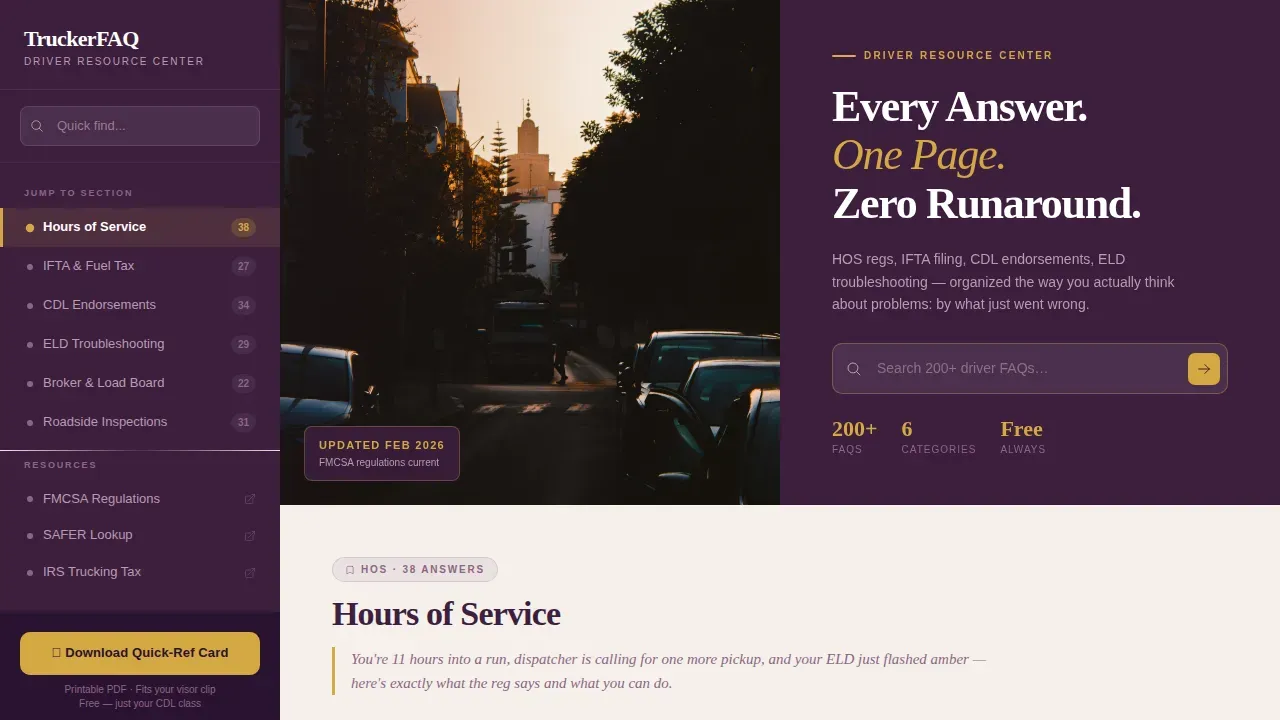
- A half-page photo-and-text hero with a headline, a live search bar, and a placeholder prompt reading "Search 200+ driver frequently asked questions"
- A fixed sidebar navigation with six category anchors that highlight progressively as the user scrolls through each frequently asked question section
- A sticky goldenrod call-to-action button tied to an email capture modal and a secondary open-text question submission field
Feature list
This landing page template is packed with purpose-built components that guide users through a comprehensive frequently asked question experience from the first scroll to the final call-to-action.
Scenario-Led Accordion frequently asked question Section
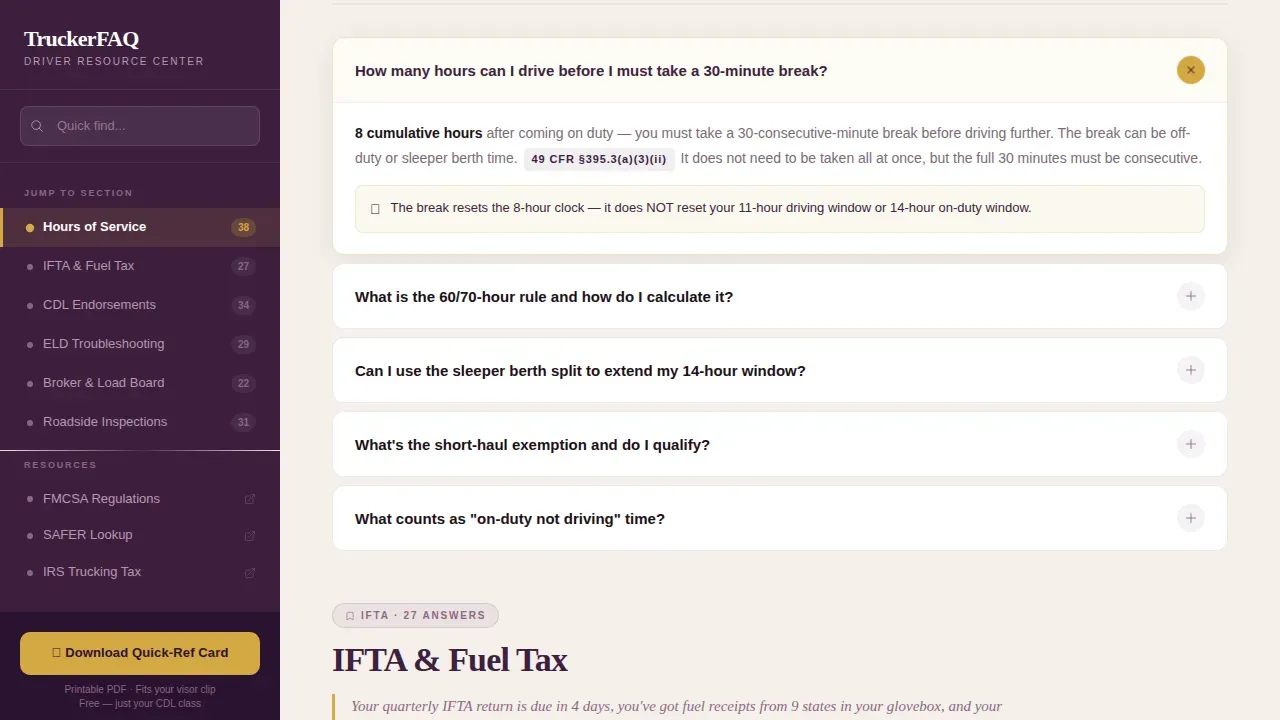
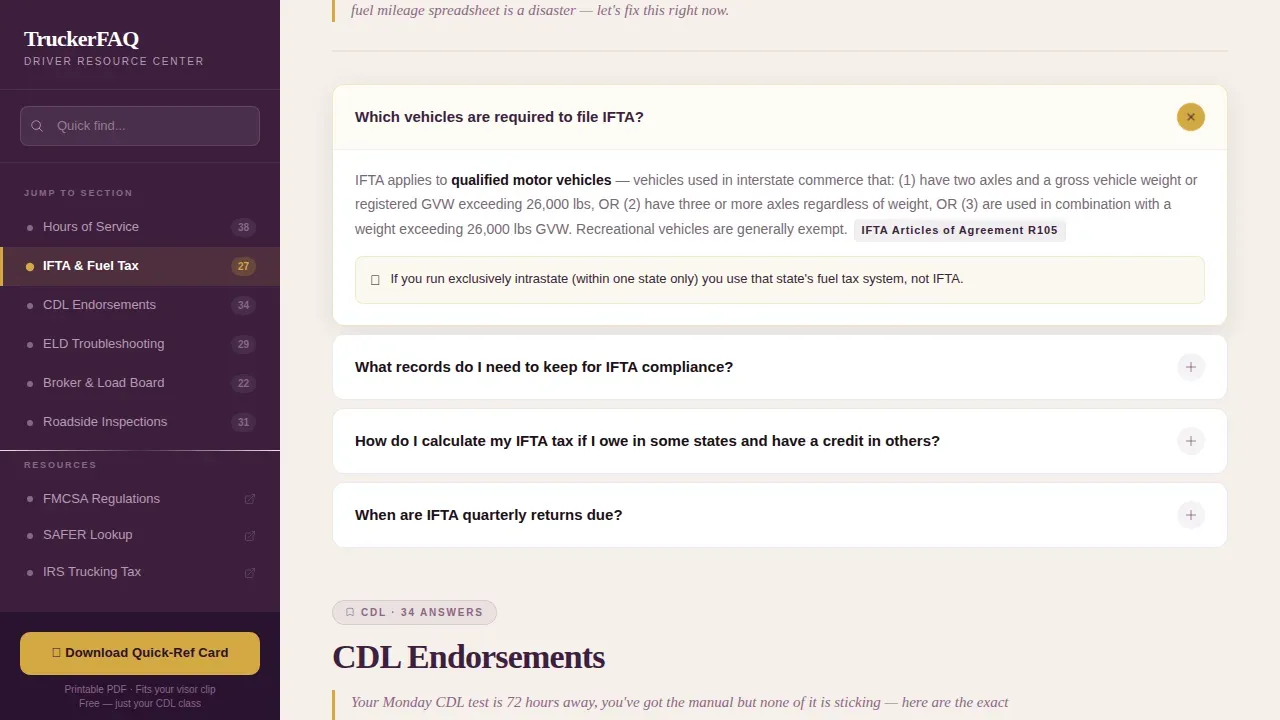
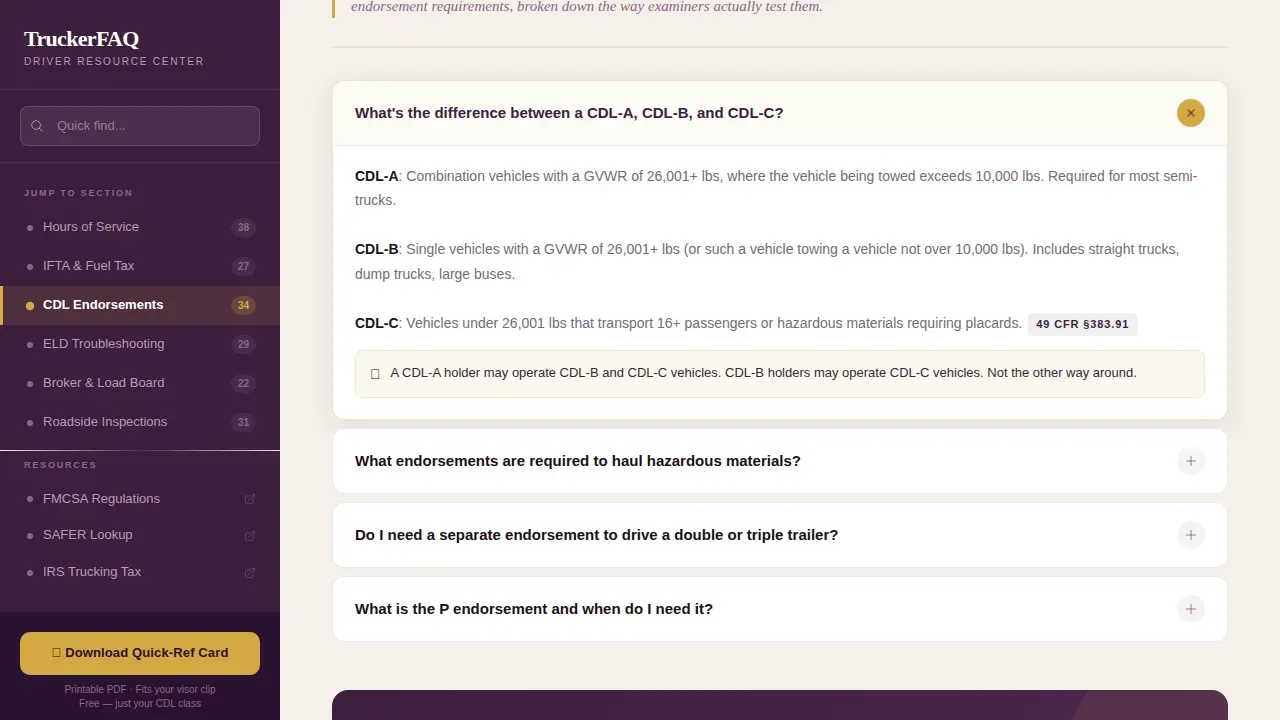
Each frequently asked question section opens with an italic scenario sentence written from the driver's perspective. For example: "You're at a scale house and the officer says your logbook has a form-and-manner violation." The accordion layout then expands into a concise answer, keeping the page clean and minimizing scrolling. This approach mirrors best-practice frequently asked question page design used by pages like Sage Intacct's frequently asked question section and Codelita's accordion sections, which organize questions by topic for maximum usability.
Fixed Sidebar with Scroll-Linked Navigation
The sidebar stays fixed as the user scrolls, listing six clickable category anchors: Hours of Service, IFTA and Fuel Tax, CDL Endorsements, ELD Troubleshooting, Broker and Load Board, and Roadside Inspections. Each anchor highlights progressively using an intersection observer, so drivers always know which frequently asked question section they are in. This mirrors the jump-to navigation approach used in pages like Mailchimp's frequently asked question page, which enhances customer experience with a sidebar overview and jump-to links for easy navigation.
Prominent Search Bar with Instant Filtering
The search bar sits directly beneath the hero headline, with goldenrod cursor styling and placeholder text that sets clear expectations. Search functionality allows users to quickly locate specific frequently asked questions without scrolling through every section. Using a search bar on a frequently asked question page is a proven best practice: it gives users immediate answers and reduces the likelihood they contact support unnecessarily.
Sticky Goldenrod Call-to-Action with Email Capture
The primary call-to-action button is a sticky goldenrod element anchored to the bottom of the sidebar. It triggers an email capture modal that asks only for an email address and current CDL class before delivering a printable quick-reference card formatted for a visor clip. This design encourages users to take a clear, low-friction conversion action without leaving the frequently asked question page.
Question Submission Field
A secondary submission path lets visitors submit a question the page has not yet answered via a single open-text field. This self-serve loop keeps frequently asked question content fresh and rooted in real driver concerns. Drawing on data from actual customer questions and support tickets is one of the most effective ways to ensure your own frequently asked question page stays relevant and useful over time.
Half-Page Photo-and-Text Hero Header
The hero uses a split-layout design: a high-contrast photograph of a driver's hands on a steering wheel at golden hour on the left, and a heavy serif headline on a deep plum background on the right. The headline reads "Every Answer. One Page. Zero Runaround." This header concept sets the tone immediately, communicating that this landing page is a no-nonsense help center built for professionals.
Page sections overview
| Section | Purpose |
|---|---|
| Hero Header | Anchors the landing page with a photo-and-text split, headline, and search bar |
| Hours of Service frequently asked question | Covers HOS regulations, driving windows, and sleeper berth rules |
| IFTA and Fuel Tax frequently asked question | Guides owner-operators through quarterly filing and mileage tracking |
| CDL Endorsements frequently asked question | Breaks down endorsement requirements for CDL-A, B, and C holders |
| ELD Troubleshooting frequently asked question | Addresses common electronic logging device malfunctions and exemptions |
| Broker and Load Board frequently asked question | Covers rate disputes, lumper fee reimbursements, and broker verification |
| Roadside Inspections frequently asked question | Explains inspection levels, form-and-manner violations, and DataQ challenges |
| Quick-Ref Card call to action | Sticky sidebar call-to-action with email capture and PDF delivery |
| Submit a Question | Open-text field for community-sourced frequently asked question content contribution |
| Footer | Linear single-row footer with contact details and navigation links |
Design & branding system
The design follows a Corporate Precision theme that evokes a polished fleet manager's office: mahogany desk, brass lamp, a framed CDL on the wall. It is authoritative without being cold, and professional without forgetting that the audience has callused hands. The frequently asked question page design uses a warm parchment content well that reads easily at any hour, contrasted against a rich plum header and sidebar.
- Deep plum (#3D1F3E) for the primary sidebar and header background; dusty mauve (#8E6585) for secondary text and category labels; warm parchment (#F5F0EB) for the main content well
- Goldenrod (#D4A843) reserved for active-state highlights, anchor links, the blinking search bar cursor, and the sticky call-to-action button
- Fraunces serif for headlines and section titles; DM Sans for body text and user interface elements throughout the frequently asked question section
Mobile & speed optimization
The landing page template is designed desktop-first, with a fully responsive layout for mobile devices. Over 60 percent of web traffic now comes from mobile devices, and a truck driver parked at a rest stop is likely browsing on a phone. The template handles this with a collapsible sidebar that converts to a top navigation bar on smaller screens, keeping the frequently asked question section fully accessible without horizontal scrolling.
- The sidebar collapses into a top navigation bar on mobile, allowing users to jump to any frequently asked question section with one tap
- The accordion layout keeps the page scannable and fast to load, reducing the amount of visible content until a user taps to expand
- The page is highly scannable, mobile-responsive, and organized to surface popular frequently asked questions first, based on real driver query patterns
How this template helps you convert
A good frequently asked question page does more than answer questions. It builds trust, reduces the friction that causes visitors to leave, and creates clear paths to action. This landing page template is engineered to do all three in a single scroll. Every design decision supports the goal of converting a curious visitor into a loyal, returning user who downloads the quick-reference card and submits their own question.
- The sticky goldenrod call-to-action remains visible throughout the entire session, so whether a user scrolls to the IFTA frequently asked question section or the Roadside Inspections frequently asked question section, the conversion path is always one click away without interrupting their reading flow.
- The question submission field at the bottom of the landing page creates a two-way relationship with the audience. It encourages users to engage beyond reading, signals that the resource is actively maintained, and feeds the frequently asked question content loop with real driver questions drawn from the same data as support tickets and recruitment calls.
Other information about this template
This landing page template is built to function as a comprehensive resource that drivers return to regularly, not a page they visit once and forget. Below are additional details about design intentions, content strategy principles, and well-known frequently asked question page examples that informed the structural approach of this template.
- The layout draws inspiration from frequently asked question page examples such as Oyster's help center page, which organizes frequently asked questions into clearly labeled categories allowing users to quickly scan and explore relevant topics, and Trivazo's frequently asked question landing page, which uses a foldable section layout that reduces visual clutter and improves scannability
- Additional frequently asked question page examples that shaped the accordion and category approach include Codelita's frequently asked question page, which features accordion sections that organize questions by topic, Arrived's frequently asked question landing page, which organizes questions into clear sections for easy browsing by topic, and ChainGPT's frequently asked question section, which uses a collapsible accordion format to simplify complex subjects
- Further frequently asked question page examples worth studying include GoCompare's frequently asked question landing page, which uses design and content structure to guide users through complex decisions; Zoom's frequently asked question page, which uses a clean two-column format that minimizes scrolling; Liquid Death's frequently asked question page design, which ensures different categories are legible and distinguishable; and Adobe Creative Cloud's frequently asked question page, which offers multiple ways to search including a search bar and a sidebar menu
- Additional frequently asked question page examples: Mailchimp's frequently asked question page enhances customer experience with a sidebar and jump-to links; Microsoft's frequently asked question page lets users navigate topics without leaving the page; WhatsApp's frequently asked question page features a table of contents with a drop-down menu; Zendesk's frequently asked question page lets users browse a help center by solution; AdEspresso's frequently asked question page guides users to more information through hyperlinks; Airbnb's frequently asked question page links to robust resource pages; Etsy's help center uses an organized format catering to different user types; Pendo's frequently asked question page segments information through tabbed content; Fora Travel's frequently asked question section uses collapsible questions for visual clarity; Adaptify's frequently asked question section addresses both general and technical topics; and Virtually Healthcare's frequently asked question page uses a visual process to explain a consultation journey
- The frequently asked question section categories are drawn from real driver inquiries, including data from support tickets and recruitment calls, ensuring the content reflects actual customer questions rather than assumed ones
- SEO optimization is built into the content architecture: relevant keywords appear naturally in frequently asked question questions and answers, structured data can be applied to each frequently asked question section to improve search results visibility, and the landing page is designed to attract organic traffic from drivers searching for specific regulatory guidance
- Google Analytics or a comparable tracking tool can be connected to monitor which frequently asked question section receives the most engagement, helping you identify popular frequently asked questions, spot gaps, and refresh content at least quarterly
- The contact page connection is handled through the footer and the sidebar: contact details are accessible in the linear single-row footer, and drivers who cannot self-serve can contact support or use the chat widget for escalation
- Internal linking between frequently asked question section anchors and the quick-reference card call-to-action keeps users moving through the landing page without bouncing to other pages
- The ticketing system reference for this template is the question submission field: it acts as a lightweight ticketing system that feeds new frequently asked questions into the content loop
- The template avoids unnecessary detail in answers; each response is designed as a concise answer limited to the essential facts a driver needs at that moment, following the principle that good frequently asked question answers should stay within roughly 100 words and avoid technical jargon wherever possible
- Using multimedia elements such as embedded images or short video clips within an frequently asked question section can cater to different learning styles and is supported by the template's warm parchment content well layout
- Direct links within frequently asked question answers can guide users to external resources such as the FMCSA registration portal or IFTA filing portals, adding value beyond what the frequently asked question section itself contains
- The trucker every answer zero runaround faq landing page template is the specific template variant described throughout this page; it is the sidebar companion build designed to sit alongside a main driver resource hub
Theme
Corporate Precision
Creative direction
FAQ-Driven
Color system
Plum Executive
Style
Sidebar Companion
Direction
Content/Resource
Page Sections
Scenario-led Accordion Frequently Asked Question Layout
Fixed Sidebar with Active Category Navigation
Search Bar with Instant Frequently Asked Question Filtering
Sticky Goldenrod Call-to-action and Email Capture
Community Question Submission Field
Half-page Hero with Photo-and-text Split
Related questions
Can I use this template to create an frequently asked question page for any trucking niche?
Does the search bar filter frequently asked question content as the user types?
How do I keep my own frequently asked question page accurate and useful over time?
What happens when a visitor submits a question through the open-text field?
Is there a way for drivers to contact support if they cannot find their answer on the frequently asked question page?



