Ayurveda & Alternative Medicine Booking Website Template
Needle is a single-column acupuncture and traditional Chinese medicine landing page built for clinics that need to earn trust before asking for a booking. A four-screen intake quiz leads the experience, condition-matched FAQs dissolve skepticism section by section, and a personalized treatment plan result guides visitors toward two clear booking paths.
by Rocket studio
Quick summary
Needle is a single-column landing page template for acupuncture and traditional Chinese medicine clinics. It opens with a guided intake quiz, filters content by the visitor's specific condition, and closes with a personalized treatment plan result. Every section is designed to convert a skeptical, referred patient into a booked consultation.
Who this template is for
This template is built for practitioners who need clinical credibility and warmth at the same time. It suits established acupuncture clinics and traditional Chinese medicine providers in urban markets where referred patients arrive informed but cautious.
- Acupuncture clinics serving chronic pain, fertility, and postpartum patients
- Traditional Chinese medicine practitioners who want to lead with education and earn the booking
- Wellness providers targeting skeptical professionals and evidence-seeking referrals
What problem this template solves
Most clinic landing pages ask for a booking before the visitor feels ready. For acupuncture especially, that gap between curiosity and commitment is wide. Patients who arrive via a physician referral want answers, not a generic contact form.
- Visitors leave without booking because their specific doubt was never addressed
- Generic hero sections fail to connect with the particular condition that brought someone to the page
- Static pages cannot give the visitor a sense of where to start or what to expect
What you get with this template
You get a fully structured single-column landing page with five primary content sections and a footer. The template is built around a multi-step intake quiz that doubles as the hero, supported by condition-filtered FAQ blocks, practitioner credentials, patient stories, and a dual call-to-action results screen.
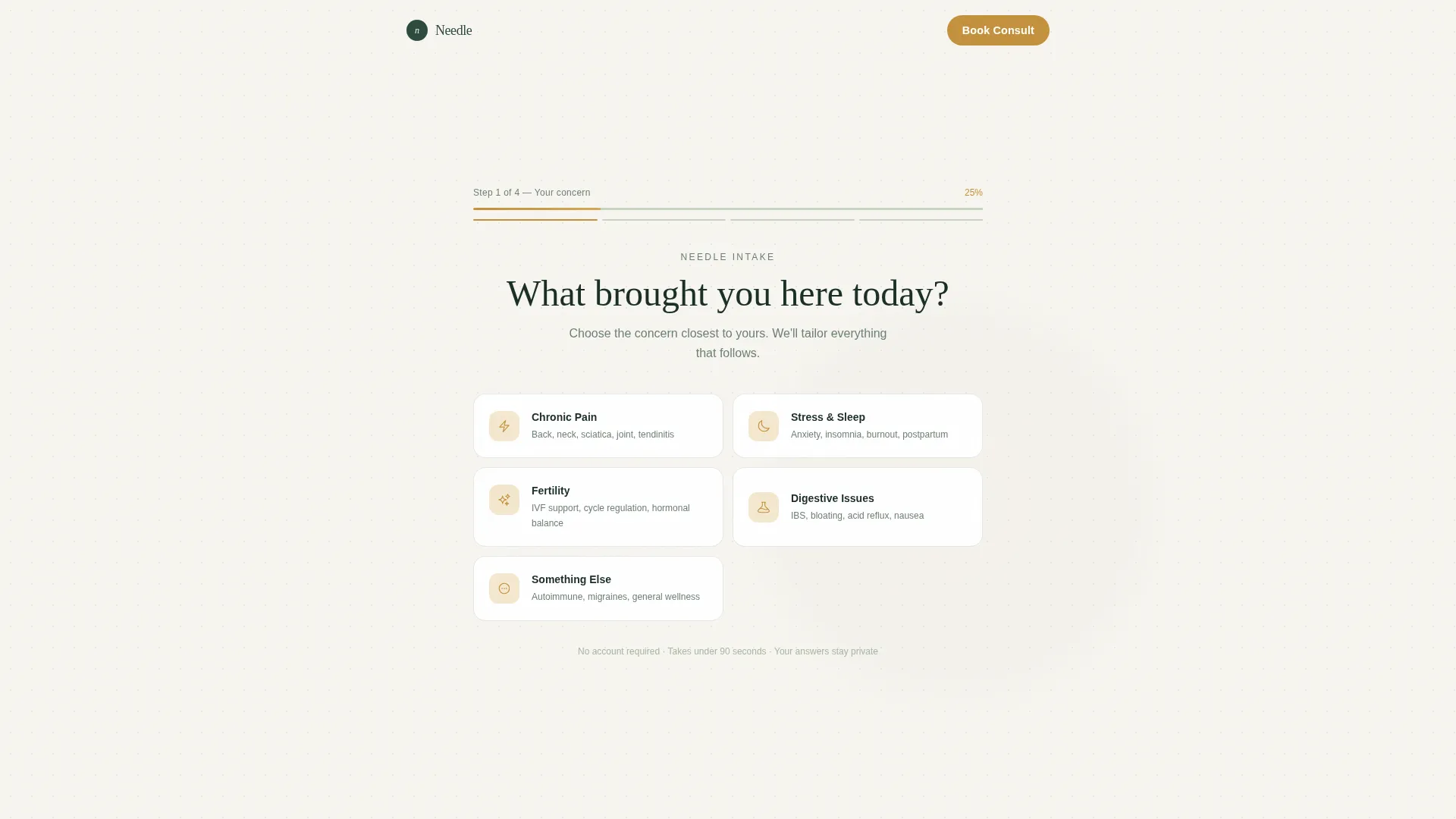
- Four-screen progressive quiz with condition-based card selection and a progress bar
- Condition-matched FAQ blocks with micro-testimonies embedded after each answer
- Personalized treatment plan results screen with two booking paths: "See Your Treatment Plan" and "Talk to a Practitioner"
Feature list
The template includes a focused set of interactive and visual features, each designed to move a cautious visitor one step closer to booking.
Four-Screen Intake Quiz
The quiz opens the page rather than sitting at the bottom. Visitors select their primary concern from five clickable cards, then complete three more focused screens covering symptom detail, treatment history, and scheduling preference. Each screen requires only one interaction, keeping the experience fast and easy on mobile.
Condition-Filtered FAQ Blocks
Once a visitor selects their concern, the FAQ section displays questions specific to that condition. Questions like "Will acupuncture interfere with my IVF medications?" or "How many sessions before I notice a difference in my sciatica?" are answered concisely with clinically grounded context. Each answer closes with a short micro-testimony from a patient with the same concern.
Personalized Treatment Plan Results
After completing the quiz, the visitor receives a results screen summarizing recommended session frequency and suggested modalities. This gives real clinical value before any commitment is required. A secondary option, "Talk to a Practitioner," opens a free ten-minute phone consult booking widget.
Practitioner Credentials Section
A dedicated section presents the practitioner's credentials, treatment approaches, and clinical trust signals. This section is positioned to reassure skeptical professionals and physician-referred patients who want to verify qualifications before booking.
Condition-Matched Patient Stories
The social proof section displays patient testimonials filtered by condition. Specificity is the priority: a story about sciatica relief appears for a visitor who selected chronic pain, not a generic five-star quote. This reinforces the sense that the clinic has seen and resolved exactly this problem before.
Forest Trust Visual System
The template uses a four-color palette: ancient evergreen, lichen stone, clean linen white, and warm amber. Amber is reserved strictly for buttons, progress indicators, and active states. Typography pairs Fraunces serif headlines with DM Sans body text, giving the page a tone that feels both clinically precise and quietly welcoming.
Page sections overview
| Section | Purpose |
|---|---|
| Quiz Hero Form | Opens the experience with a condition-selection question across four progressive screens |
| Condition FAQ Block | Displays curated, condition-specific patient questions with micro-testimonies |
| Practitioner and Modalities | Presents credentials, treatment approaches, and clinical trust signals |
| Patient Stories | Shows condition-matched social proof with specific outcomes |
| Treatment Plan Call to Action | Delivers personalized results and surfaces dual booking paths |
| Footer | Linear single-row footer with essential links |
Design & branding system
The visual identity follows a Medical Clarity theme, where clinical precision and natural warmth share the same space. The look feels like a treatment room where dried herbs sit in glass jars on white shelves and the practitioner's hands carry the faint scent of moxa.
- Four-color Forest Trust palette: ancient evergreen (#2D4A3E), lichen stone (#A8B5A2), clean linen white (#F7F5F0), and warm amber (#C4913D) used only for interactive and active elements
- Typography pairing of Fraunces serif for headlines and DM Sans for body copy, giving the page warmth without sacrificing readability
- Staggered form card reveals and GSAP ScrollTrigger section fades add motion that feels calm rather than flashy
Mobile & speed optimization
The template is built mobile-first, recognizing that most patients research clinic options on their phone, often while sitting in a waiting room or between appointments. The quiz interface is designed for single-thumb interaction throughout.
- Each quiz screen requires only one tap or selection, reducing drop-off across the four-step flow
- Server Components handle static sections while the quiz state runs as a Client Component, keeping the interactive experience smooth
- Single-column layout eliminates horizontal scrolling and keeps content readable on small screens without pinching or zooming
How this template helps you convert
The template is built around a simple principle: give clinical value first, ask for a booking second. That sequence reduces the friction that typically causes referred patients to close the tab and wait.
- The quiz hero immediately involves the visitor in their own intake process, making the session feel like it has already started before they have entered a single piece of contact information.
- Condition-filtered FAQs dissolve the specific doubts that would otherwise stall a booking decision, so each scroll down the page removes one more reason not to book.
- The personalized treatment plan result gives the visitor something genuinely useful, a recommended session frequency and modality overview, which makes clicking "See Your Treatment Plan" feel like a natural next step rather than a sales funnel entry.
Other information about this template
This template is categorized under Health and Medical, specifically within the Ayurveda and Alternative Medicine subcategory with a focus on acupuncture and traditional Chinese medicine. It is designed for the United States market, with English copy, USD pricing context, and a New York City urban professional audience in mind.
- The single-column flow structure keeps the reading path linear and undistracted, which supports longer engagement on mobile
- The dual call-to-action model, "See Your Treatment Plan" paired with "Talk to a Practitioner," accommodates visitors who want immediate information as well as those who prefer a human conversation before committing
- The template style is classified as Single Column Flow with a Quiz and Assessment landing-page direction, making it well suited to any alternative medicine or wellness clinic that benefits from an intake-style first interaction


Theme
Medical Clarity
Creative direction
FAQ-Driven
Color system
Forest Trust
Style
Single Column Flow
Direction
Quiz/Assessment
Page Sections
Four-screen Intake Quiz Hero
Condition-filtered FAQ Blocks
Personalized Treatment Plan Results
Dual Call-to-action Booking Paths
Practitioner Credentials and Trust Signals
Condition-matched Patient Stories
Related questions
Can I adapt this template for a different wellness specialty?
Does the quiz actually deliver a personalized results page?
How does the dual booking path work?
Is this template suitable for a mobile audience?
Can I use this template without the quiz feature?



