Trusted Daycare Center Landing Page Template
Nurture is a sidebar companion landing page built for daycare centers running Google Ads campaigns. It opens with a credential-forward header, walks parents through every safety detail before asking for contact information, and uses a persistent sidebar form to capture tour bookings. The Plum Executive color system and Legal Shield theme make trust visible from the first scroll.
by Rocket studio
Quick summary
Nurture is a single-page, lead-generation template designed for daycare centers targeting anxious, research-driven parents through paid search. It leads with accreditation badges, walks visitors through safety policies, staff credentials, and daily routines, then closes with a progressive sidebar form that earns the phone number only after trust is built.
Who this template is for
This template is built for daycare centers that need to convert skeptical, high-intent visitors into booked tour appointments. It speaks directly to parents and institutional buyers who need proof before they will pick up the phone.
- First-time parents returning to work who need reassurance before they can commit
- Dual-income families who have already toured multiple centers and are doing final research
- Human resources directors evaluating childcare partners for a corporate benefits package
What problem this template solves
Most daycare landing pages lead with warm photography and a general headline. Parents clicking a Google ad at 11 PM are not looking for warmth yet. They are looking for proof. This template flips that order entirely.
- It answers the hardest parent questions before they are typed into a search bar
- It removes the anxiety of not knowing what happens inside the building each day
- It gives institutional buyers the credential documentation they need to justify a partnership recommendation
What you get with this template
This template delivers a fully structured, section-led landing page that guides a visitor from initial skepticism to booked tour. Every section is purposeful and ordered around a parent's decision-making journey.
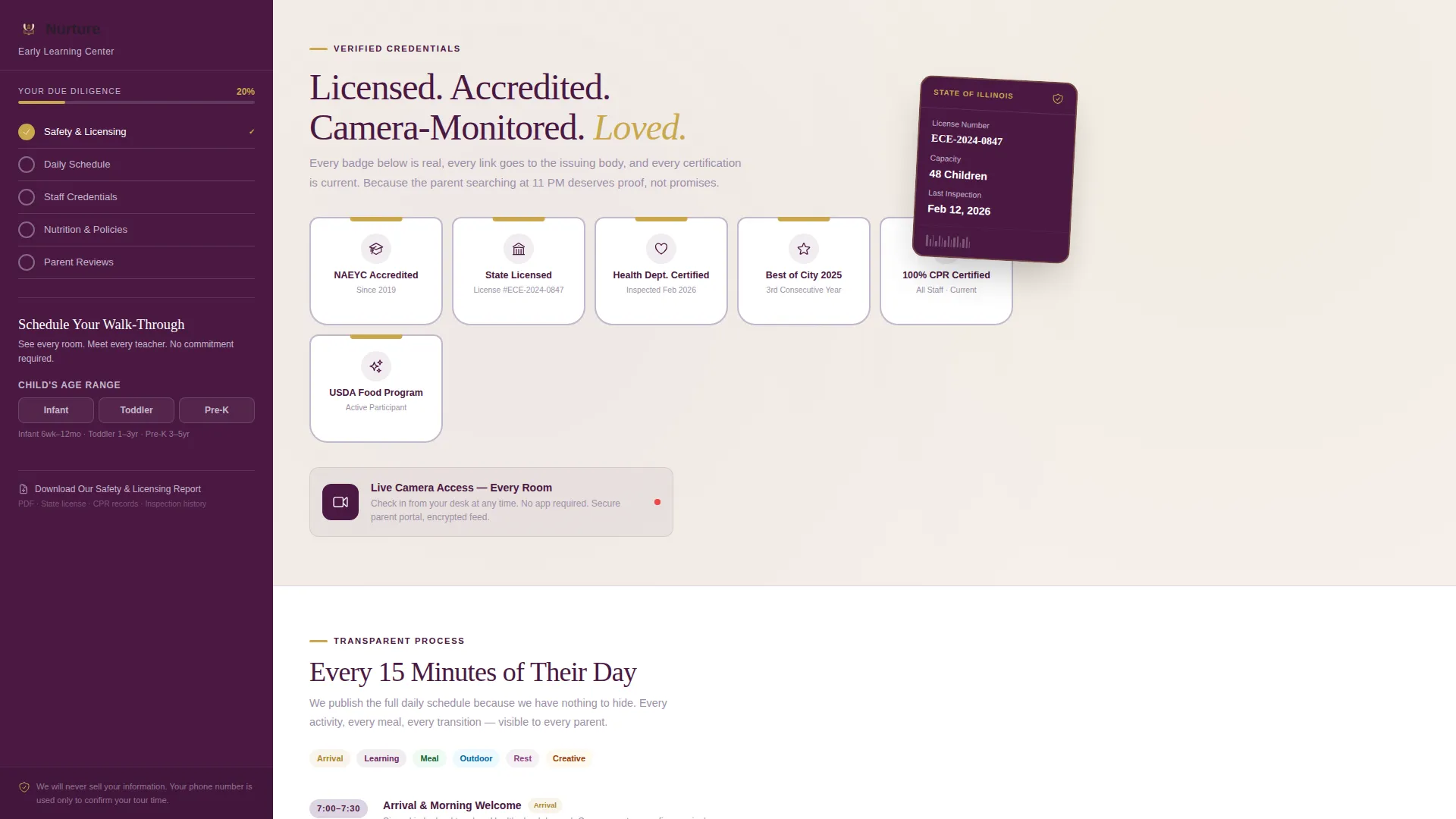
- A credential-first header band featuring accreditation shields, licensing seals, and award badges
- A transparent process scroll covering daily schedules, staff credentials, meal plans, illness policies, and camera access
- A sticky sidebar companion form with progressive field reveal and dual call-to-action options
Feature list
This template is built around six core components, each designed to reduce friction and build confidence as the visitor scrolls.
Credential Header Band
A horizontal band of accreditation shields, state licensing seals, and "Best Of" awards opens the page. Each badge is hyperlinked to its issuing body. The headline below reads "Licensed. Accredited. Camera-Monitored. Loved." No stock photography competes for attention here.
Transparent Process Scroll
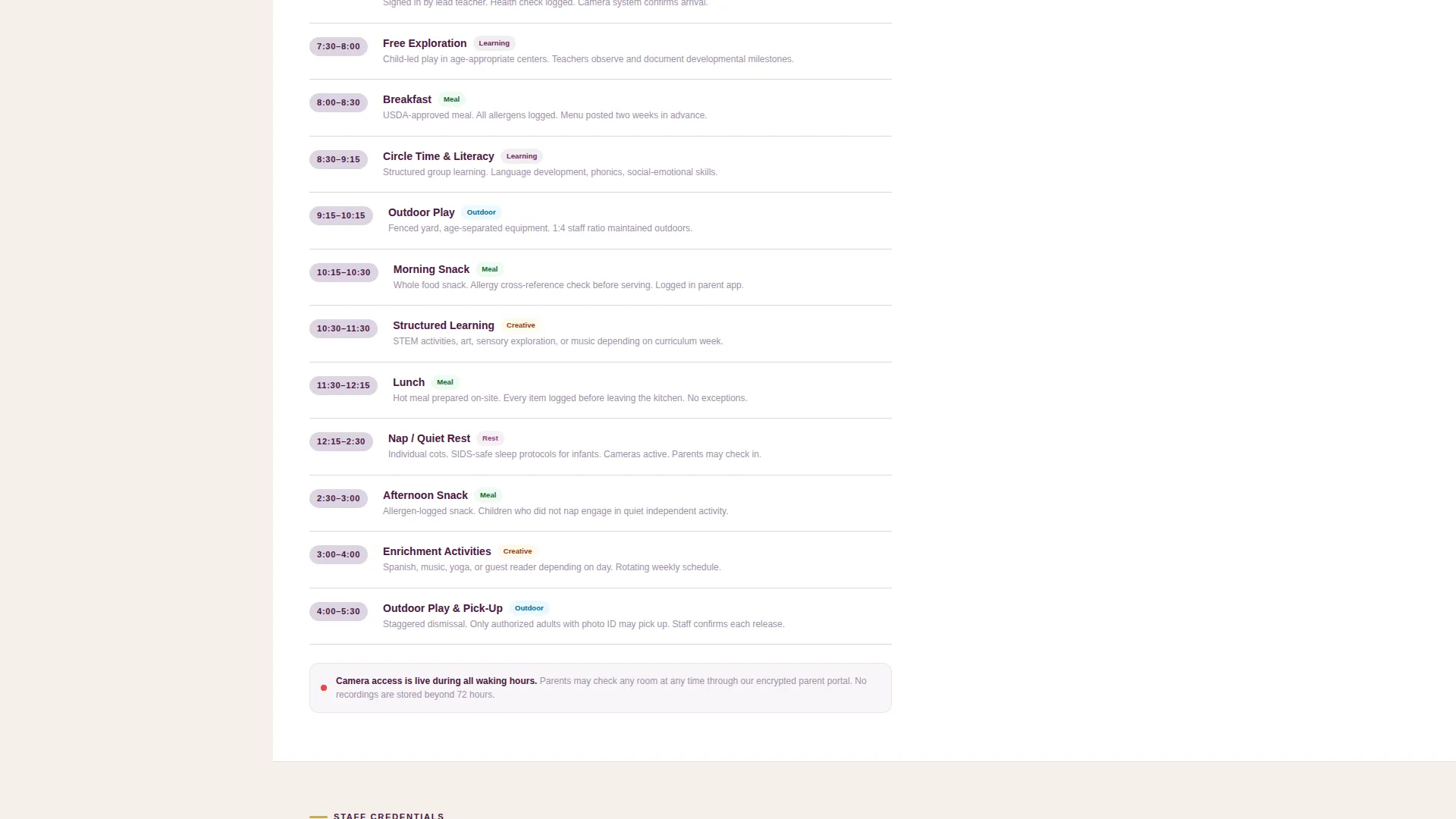
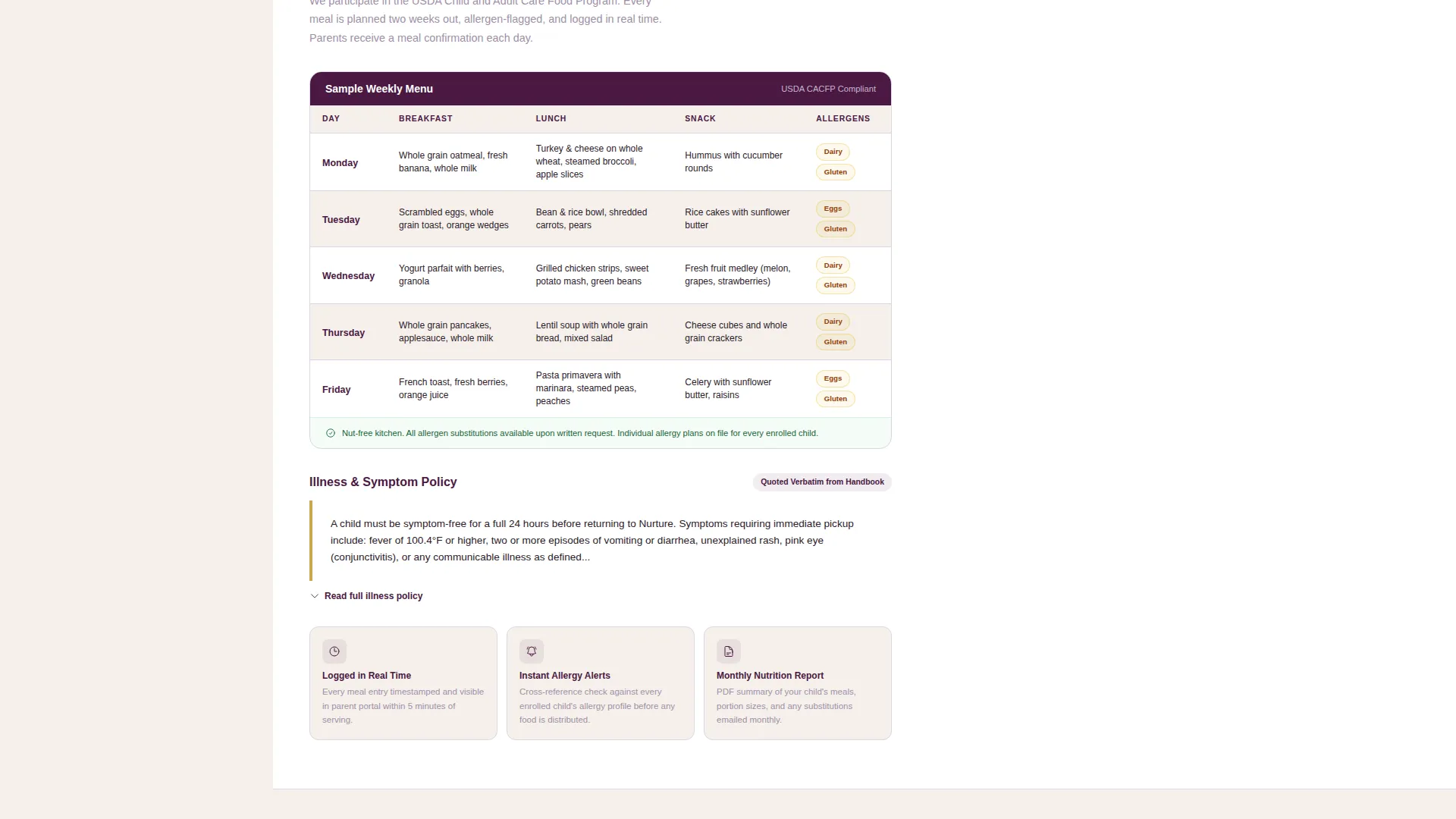
The main content area walks parents through the full interior of the daycare day. Sections cover the fifteen-minute block daily schedule, the staff credential grid with headshots and certification dates, the meal plan with allergen flags, the illness policy quoted verbatim, and a real-time camera access demonstration.
Sticky Sidebar Form
The sidebar form scrolls with the visitor throughout the entire page. Fields appear in a trust-building order: child's age range first, then preferred start date, then the parent's first name, and finally the phone number. This progressive reveal reduces form abandonment by asking for personal details only after trust content has been delivered.
Dual Call-to-Action Setup
The primary call-to-action button in confident gold reads "Book a Tour This Week." A secondary text link beneath it offers "Download Our Safety and Licensing Report" as a gated PDF option. This two-path approach accommodates parents at different stages of readiness.
Progress Checklist Sidebar
As the visitor scrolls through credential sections, the sidebar companion displays a running checklist: Safety, Credentials, Nutrition. Each item checks off as the visitor passes the relevant content. This framing positions the visit as due diligence, not a sales funnel.
Staff Credential Grid
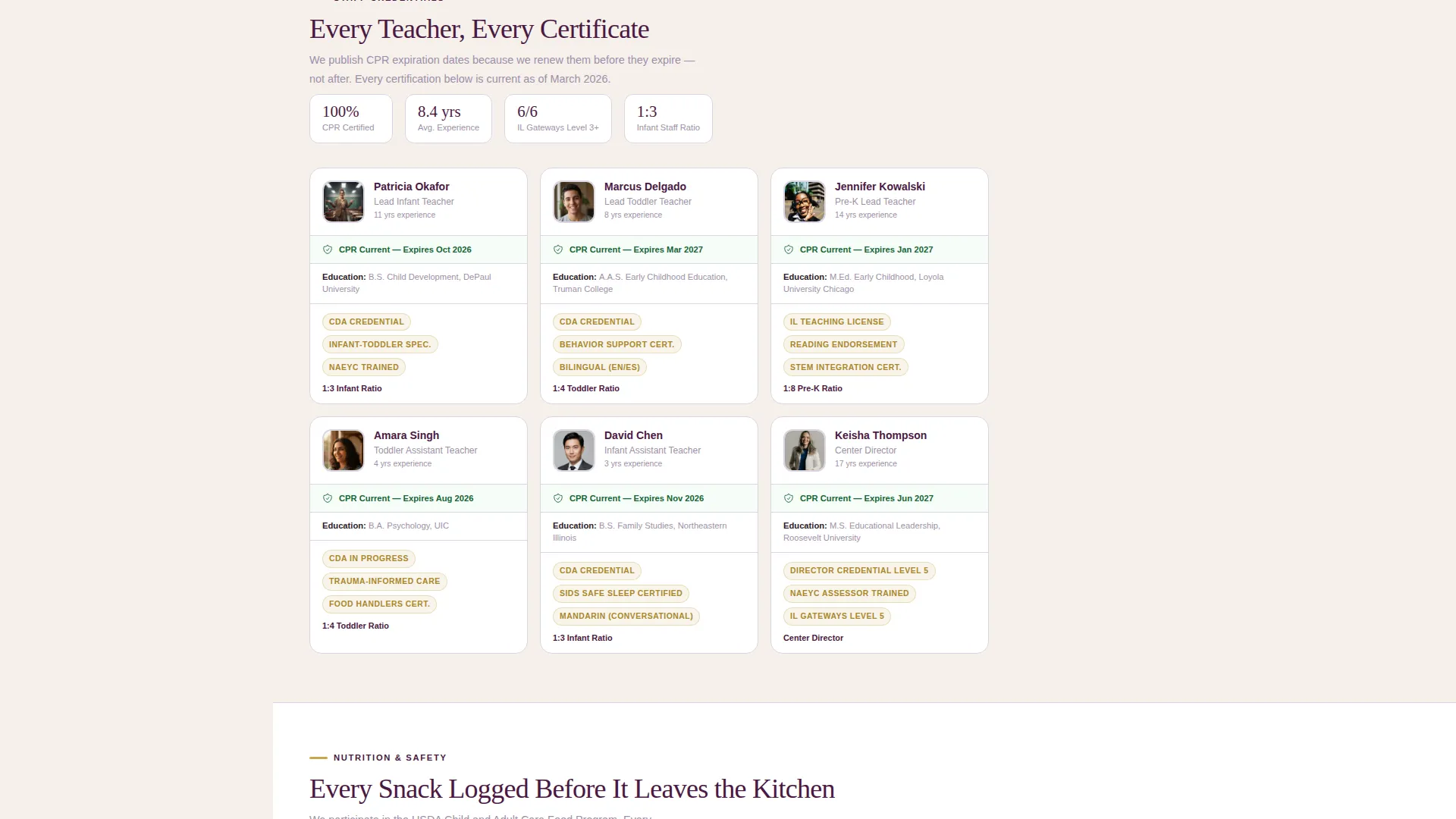
Each team member appears with a headshot, their role, and their current certification dates including CPR card status. The grid makes staff qualifications visible and verifiable at a glance rather than buried in a PDF.
Page sections overview
| Section | Purpose |
|---|---|
| Award Badge Header | Opens with proof: accreditation shields, licensing seals, and award badges with hyperlinks |
| Headline Block | Sets the credential-first message with a single plum-colored headline |
| Daily Schedule | Displays the full day in fifteen-minute blocks for full parental visibility |
| Staff Credential Grid | Shows headshots, roles, and current certification dates for every team member |
| Meal Plan Section | Lists the weekly menu with allergen flags for each item |
| Illness Policy Block | Quotes the illness policy verbatim so parents see exact language |
| Camera Access Demo | Demonstrates real-time room monitoring parents can check remotely |
| Sticky Sidebar Form | Captures tour bookings with progressive field reveal throughout the scroll |
| Primary call to action Button | Gold "Book a Tour This Week" button anchored inside the sidebar |
| Secondary Download Link | Gated PDF download of the Safety and Licensing Report for undecided visitors |
| Progress Checklist | Live sidebar checklist tracking Safety, Credentials, and Nutrition sections |
Design & branding system
The Plum Executive color system is built for institutional credibility with just enough warmth to feel human. Every color choice serves a purpose: authority, clarity, or reassurance.
- Deep plum (#4A1942) anchors the sidebar and all section headers, giving the page a grounded, credentialed feel
- Muted lavender gray (#C4B7CB) fills content section backgrounds to separate information blocks without visual noise
- Warm parchment (#F5F0EB) covers the main reading surface, keeping long-form content easy on the eyes
- Confident gold (#C9A84C) highlights trust badges, accreditation seals, and every call-to-action button
Mobile & speed optimization
The sidebar companion layout adapts for smaller screens so the form and checklist remain accessible without interrupting the content scroll. The design keeps the trust-building sequence intact regardless of device.
- On mobile, the sticky sidebar collapses into a persistent bottom bar so the call-to-action remains visible
- Section content stacks vertically in a clean single-column flow, preserving the credential-first reading order
- Progressive form fields load only as needed, keeping the mobile interface uncluttered at every step
How this template helps you convert
This template is engineered around one insight: a parent who feels informed is a parent who books. Every design and content decision moves the visitor closer to that confident, ready-to-call moment.
- The credential header answers the first and biggest question immediately, reducing bounce from high-intent paid traffic before a single line of body copy is read.
- The transparent process scroll replaces generic daycare promises with specific, verifiable details, turning a skeptical researcher into a convinced prospect.
- The progressive sidebar form delays the phone number field until trust content has been delivered, which means the contact details captured are from parents who are genuinely ready to take the next step.
Other information about this template
This template sits at the intersection of professional services marketing and daycare center advertising. It is purpose-built for paid search campaigns where the visitor arrives with high intent and high anxiety in equal measure.
- The Legal Shield theme and Plum Executive palette are designed to evoke the credibility of a licensed professional services firm while staying warm enough for a childcare context
- The sidebar companion format is distinct from a full-width single-column layout; it keeps the form in constant view without interrupting the information scroll
- The gated PDF option, "Download Our Safety and Licensing Report," creates a second lead path for parents who are still in research mode and not yet ready to book a tour
- This template is well suited for Google Ads landing page campaigns targeting searches around licensed daycare, accredited childcare programs, and infant or toddler care enrollment
Theme
Legal Shield
Creative direction
Transparent Process
Color system
Plum Executive
Style
Sidebar Companion
Direction
Lead Generation
Page Sections
Credential-first Header Band
Transparent Process Content Scroll
Sticky Sidebar Companion Form
Dual Call-to-action Design
Live Progress Checklist
Related questions
Can I update the badge links to point to my own accreditation bodies?
How does the progressive form field reveal work?
What is included in the gated PDF call-to-action?
Can I adapt this template for multiple classroom age groups?
Does the sidebar stay visible throughout the entire page scroll?



