Storm Window Installer Landing Page Template
Pane is a split-screen landing page template built for storm window installers. It combines a cinematic lifestyle header, draggable before-and-after thermal reveal sections, and a repeating click-through call to action. The Navy Authority color system and Corporate Precision theme give the page an authoritative, trust-building feel that speaks directly to homeowners, property managers, and historic-district clients.
by Rocket studio
Quick summary
Pane is a single-page, click-through landing page template for storm window installation businesses. It opens with a stormy-night lifestyle header, walks visitors through scrolling thermal before-and-after reveals, and drives them toward a free window assessment booking. The design is sharp, the color palette is deliberately minimal, and every section builds the case for one decisive action.
Who this template is for
This template is built for storm window installers who need a polished, conversion-focused online presence. It works equally well for solo crews and established companies serving residential and multi-unit properties.
- Suburban homeowners facing rising energy bills and persistent drafts
- Property managers handling tenant complaints about condensation and cold spots
- Historic-district property owners who need storm window protection without violating preservation codes
What problem this template solves
Many window installation businesses rely on generic contractor websites that fail to communicate what makes their work different. Visitors leave before they understand the value. Pane fixes that by making the energy-loss problem visible and the solution immediate.
- No compelling visual proof that storm windows actually work
- No clear, low-friction path from curiosity to a booked appointment
- No page structure that addresses multiple buyer types at once
What you get with this template
Pane delivers a fully structured, single-page layout that guides visitors from emotional resonance to confident action. Every section is purpose-built and ready to be filled with real project details.
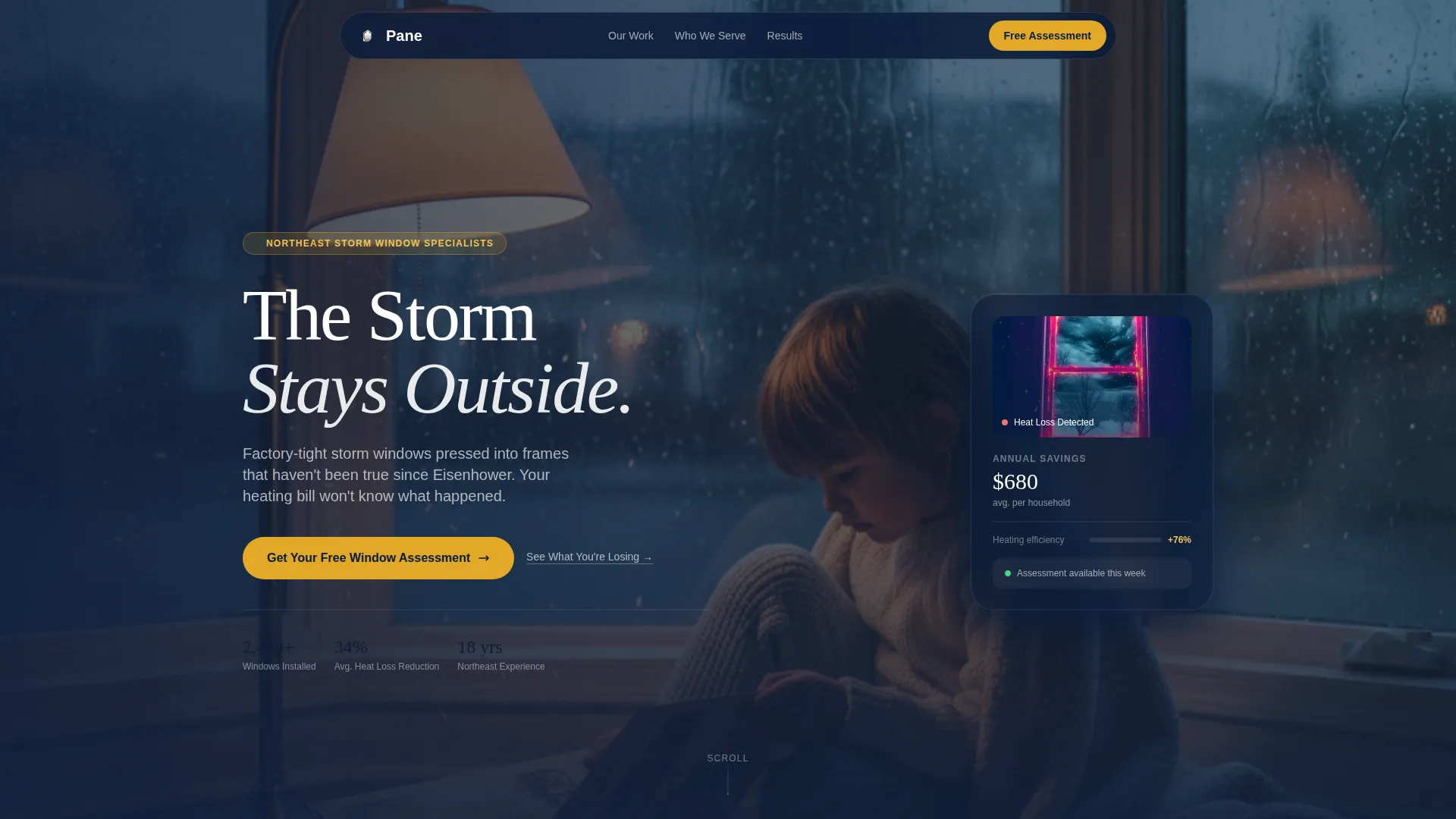
- A lifestyle header section with headline overlay and stormy-night visual framing
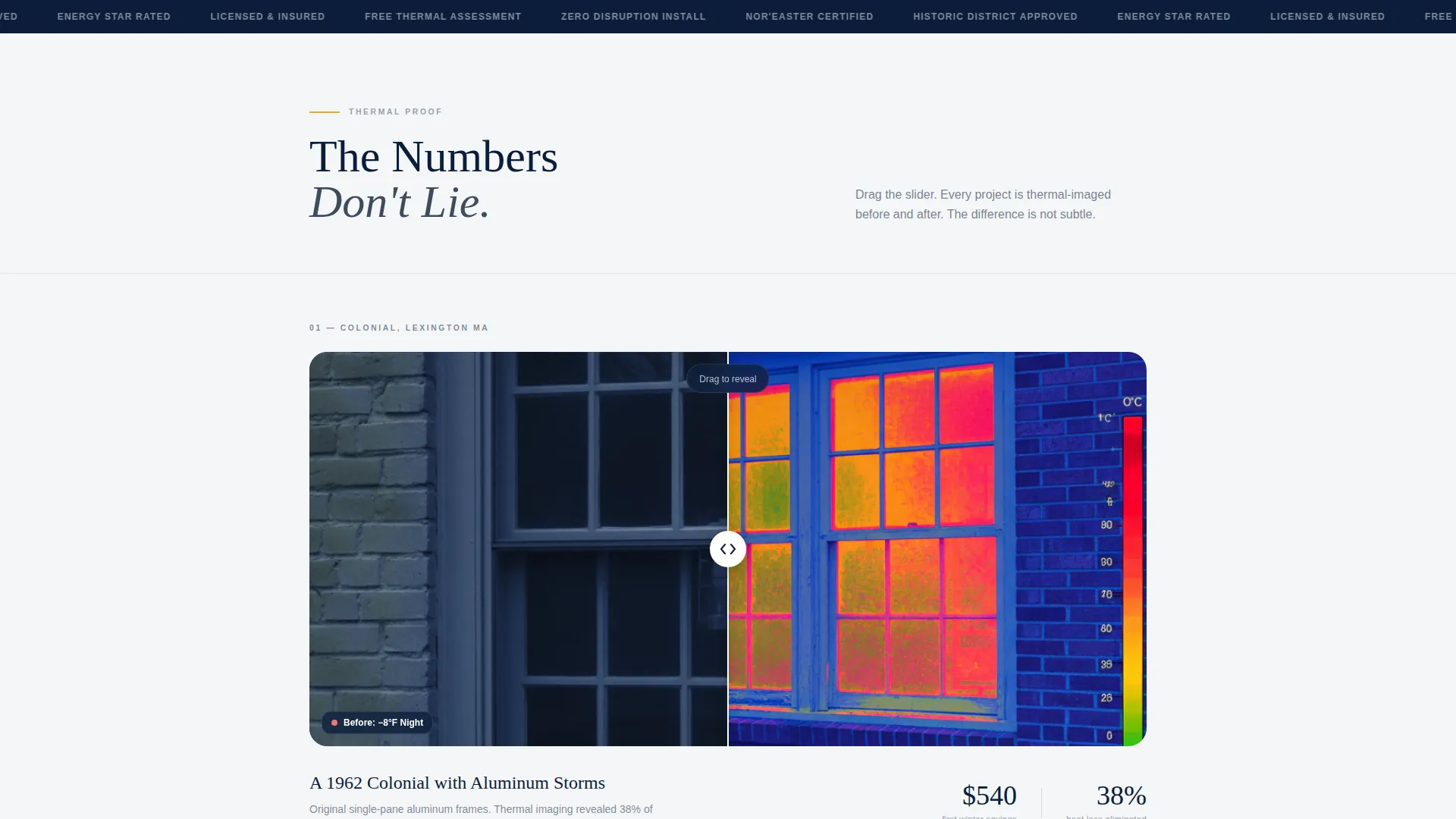
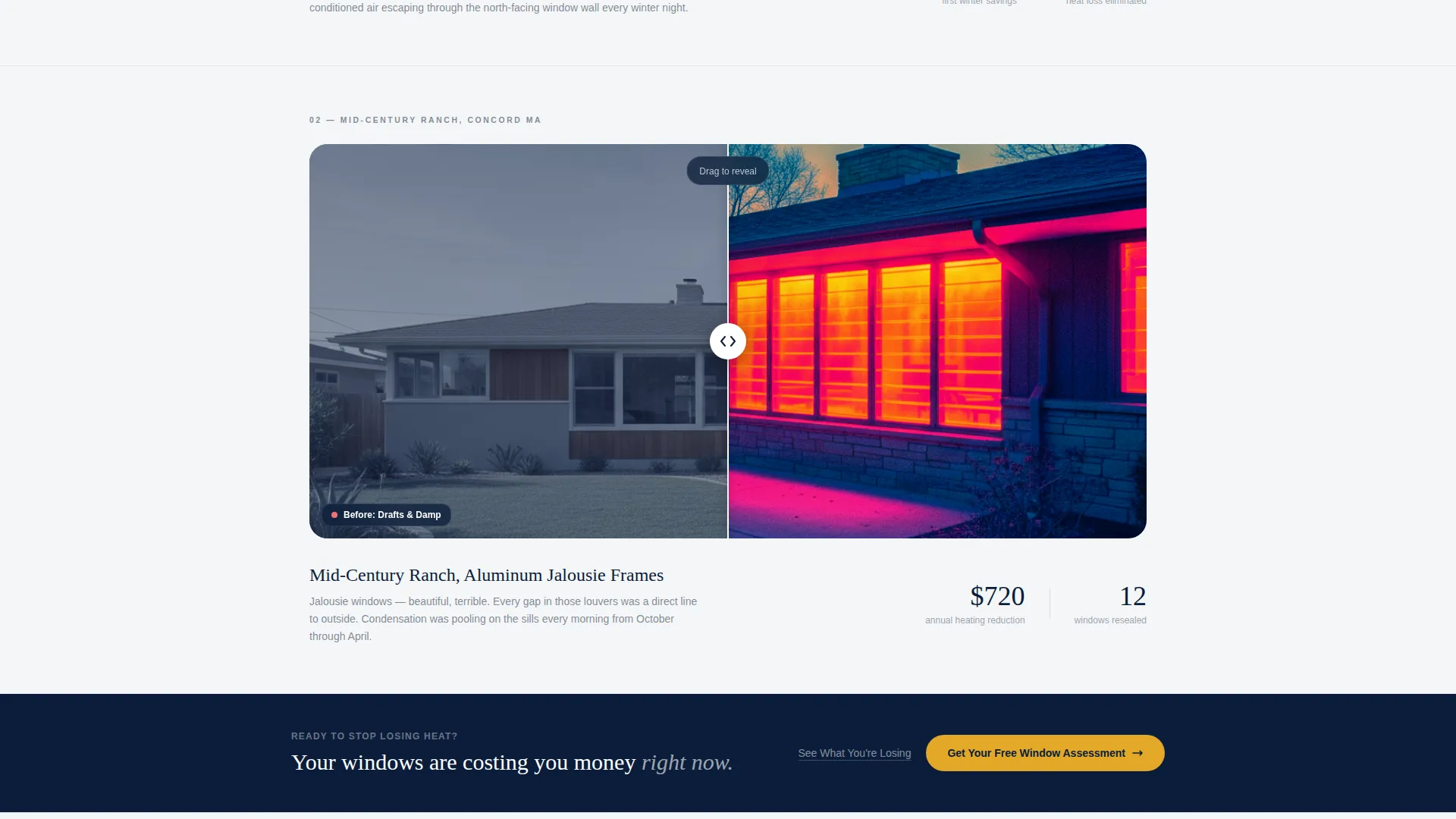
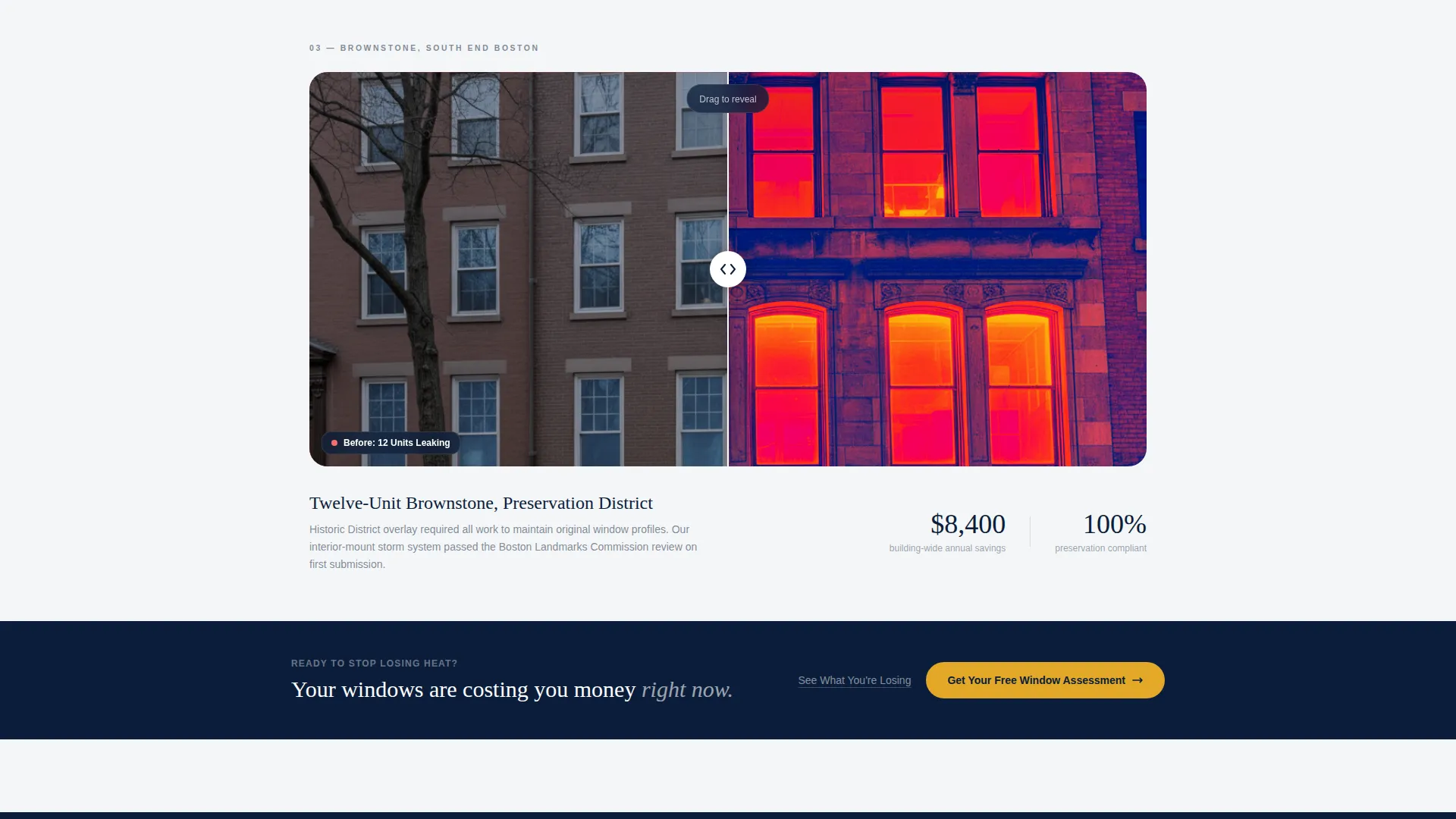
- Scrolling split-screen before-and-after thermal image reveals with escalating project examples and savings figures
- A repeating primary call-to-action button that links to a dedicated scheduling page, plus a secondary text link that keeps undecided visitors on-page
Feature list
This template is built around a focused set of visual and structural tools. Each feature directly supports the goal of turning a curious visitor into a booked appointment.
Split-Screen 50/50 Layout
The page uses a strict 50/50 split-screen format throughout. Each scroll section divides the viewport evenly, letting the before-and-after content breathe without crowding either side.
Draggable Before/After Thermal Reveal
A draggable slider sits at the center of each reveal section. Visitors can pull the divider left or right to compare thermal imaging of heat loss before installation against the sealed, uniform result after. The effect is tactile and immediate.
Escalating Project Narrative
The reveal sections build in sequence: a drafty colonial, a mid-century ranch with aluminum frames, and a twelve-unit brownstone. Savings figures grow with each project, creating an accumulating sense of proof.
Repeating Click-Through Call to Action
The primary button, "Get Your Free Window Assessment," appears below the header and repeats after every second reveal. No form is embedded on this page. The button routes to a separate scheduling page where visitors choose home type, window count range, and preferred date.
Secondary Retention Link
A text link labeled "See What You're Losing" scrolls visitors back to the thermal imaging section. It gives undecided visitors a reason to stay and re-engage rather than bounce.
Navy Authority Color System
The palette is built on four deliberate choices: deep command navy for headers and section backgrounds, gunmetal for body text, clean pane white for breathing room, and a single amber accent reserved strictly for calls to action and interactive hotspots.
Page sections overview
| Section | Purpose |
|---|---|
| Lifestyle Header | Sets emotional contrast: storm outside, calm inside |
| Hero Headline Overlay | Delivers "The Storm Stays Outside" as the opening message |
| Primary call to action Block | Anchors the first "Get Your Free Window Assessment" button |
| Colonial Reveal | Shows thermal before/after for a drafty single-family home |
| Mid-Reveal call to action | Repeats the primary call to action after the first project reveal |
| Ranch Reveal | Demonstrates sealed aluminum-frame windows on a mid-century property |
| Second Mid-Reveal call to action | Repeats the primary call to action after the second project reveal |
| Brownstone Reveal | Scales proof to a twelve-unit multi-family building with larger savings |
| Secondary Text Link | Offers "See What You're Losing" to re-engage undecided visitors |
Design & branding system
The visual identity follows a Corporate Precision theme. It is built to feel authoritative enough for a property manager's board meeting and grounded enough for a crew on a ladder.
- Navy (#0B1D3A) dominates headers and section backgrounds; gunmetal (#3E4C5E) carries body text; pane white (#F4F6F8) creates open space between sections
- Amber (#E2A829) appears only on calls to action and interactive hotspots, making every tap target unmistakable
- The overall palette is intentionally restrained: four colors, each with a single role, so nothing competes with the thermal imagery
Mobile & speed optimization
The template is designed to remain fully functional and visually coherent on smaller screens. The 50/50 split adapts cleanly so neither side of the reveal feels cramped.
- The draggable slider is touch-friendly, allowing mobile visitors to swipe through before-and-after reveals with the same ease as desktop users
- Amber call-to-action buttons maintain their visual prominence at every screen size, keeping the booking path clear on any device
How this template helps you convert
Pane is structured around a single conversion goal: a click to the scheduling page. Every design and layout decision supports that outcome.
- The lifestyle header creates immediate emotional contrast, making visitors feel the value of a sealed home before they read a single feature claim.
- Each thermal reveal adds a layer of proof. By the time visitors reach the brownstone section, three escalating projects and growing savings figures have built a strong case for action.
- The secondary "See What You're Losing" link keeps undecided visitors inside the page, cycling them back through the evidence rather than losing them to a back-button click.
Other information about this template
Pane is part of the Construction and Home category, sitting within the Window and Door Installation subcategory. It is purpose-built for the storm window installer niche and carries an intersection match score of 13, reflecting a precise alignment between template design and niche intent.
- The template style is Split Screen (50/50), the header concept is a Lifestyle Shot, the creative direction is Before/After Reveal, and the landing page direction is Click-Through
- The page is designed to hand off traffic to a separate scheduling page rather than capturing leads on-page, keeping the layout clean and the visitor's path unambiguous
- This template is a strong fit for storm window businesses that already have a booking or scheduling tool and want a high-trust front door that pre-qualifies visitors before they arrive
Theme
Corporate Precision
Creative direction
Before/After Reveal
Color system
Navy Authority
Style
Split Screen (50/50)
Direction
Click-Through
Page Sections
Split-screen 50/50 Layout
Draggable Thermal Before/after Reveal
Escalating Project Narrative
Repeating Click-through Call to Action
Secondary Retention Link
Navy Authority Color System
Related questions
Does this template include a contact form or lead capture form?
Can I use this template for a multi-family or commercial property audience?
How does the before-and-after slider work?
Is this template suitable for historic-district projects?
What does the 'See What You're Losing' link do?



