Medical Device Manufacturing Directory Website Template
Passivate is a split-screen landing page template built for medical device surface treatment and finishing companies. It pairs a precision isometric header illustration with a Stats-First Impact layout that leads every section with a hard performance number. The Data Command theme and Forest Trust color system signal clinical authority, helping orthopedic engineers and quality directors trust your process before they read a single word of body copy.
by Rocket studio
Quick summary
Passivate is a single-page, split-screen landing page template designed for medical device surface treatment and finishing operations. It uses a Stats-First Impact creative direction to front-load verifiable performance metrics, building an evidence wall that earns the consultation click before the visitor reaches the bottom of the page.
Who this template is for
This template is built for technical decision-makers in the medical device manufacturing supply chain. If your audience evaluates vendors on compliance records and surface specification data, this layout speaks their language from the first scroll.
- Orthopedic OEM engineers pursuing FDA 510(k) clearance for implantable components
- Contract manufacturers working to meet Class III medical device production deadlines
- Quality directors responsible for ASTM A967 compliance reports and Ra value documentation
What problem this template solves
Medical device surface treatment companies face a credibility gap. Prospects arrive skeptical and pressed for time, and a generic service page does nothing to close that gap. Engineers need proof, not prose.
- Visitors leave before seeing your compliance record because generic layouts bury numbers in body text
- Quality-focused buyers cannot quickly assess whether your finishing standards meet their specification thresholds
- The consultation request goes unmade because trust was never established early enough in the scroll
What you get with this template
You get a structured, single-page layout that places performance data at the front of every section and routes qualified visitors toward a capabilities consultation request. The design is ready to carry your brand identity with minimal adjustment.
- A 50/50 split-screen layout pairing hard metrics on one side with contextual visuals or consequence statements on the other
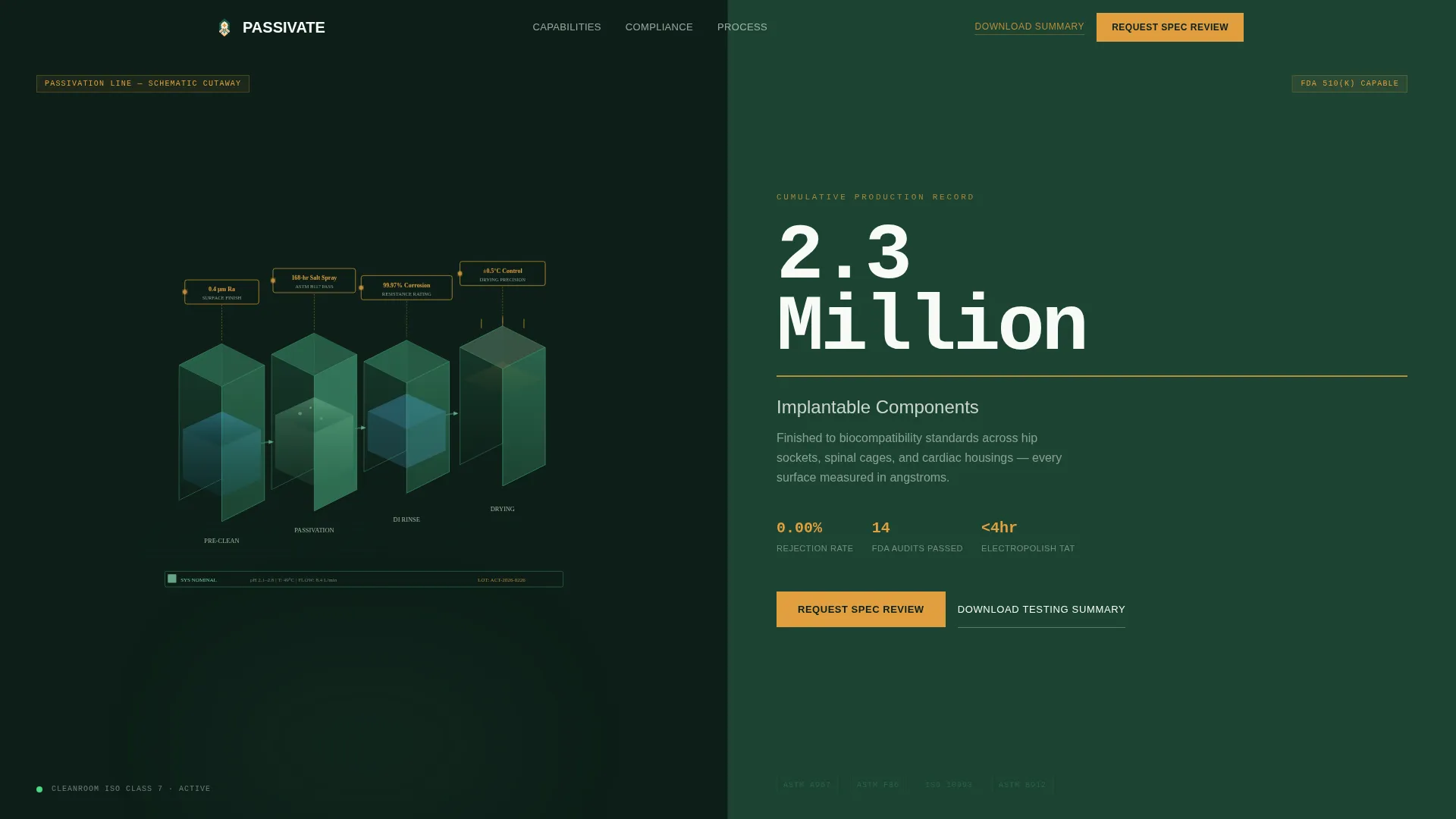
- An isometric header illustration showing a passivation line with floating data nodes for Ra values, salt spray results, and corrosion resistance figures
- A persistent bottom bar anchoring the primary call to action alongside a secondary email-capture text link for prospects not yet ready to consult
Feature list
This template is built around a defined set of structural and visual components drawn directly from the source brief. Each feature below is present in the delivered layout.
Isometric Passivation Line Header
The header section features a cutaway isometric illustration of a full passivation line. It renders tanks, rinse stages, and drying chambers in precise perspective. Floating data nodes above each station display figures such as surface roughness measurements, salt spray duration, and corrosion resistance percentages.
Stats-First Split-Screen Sections
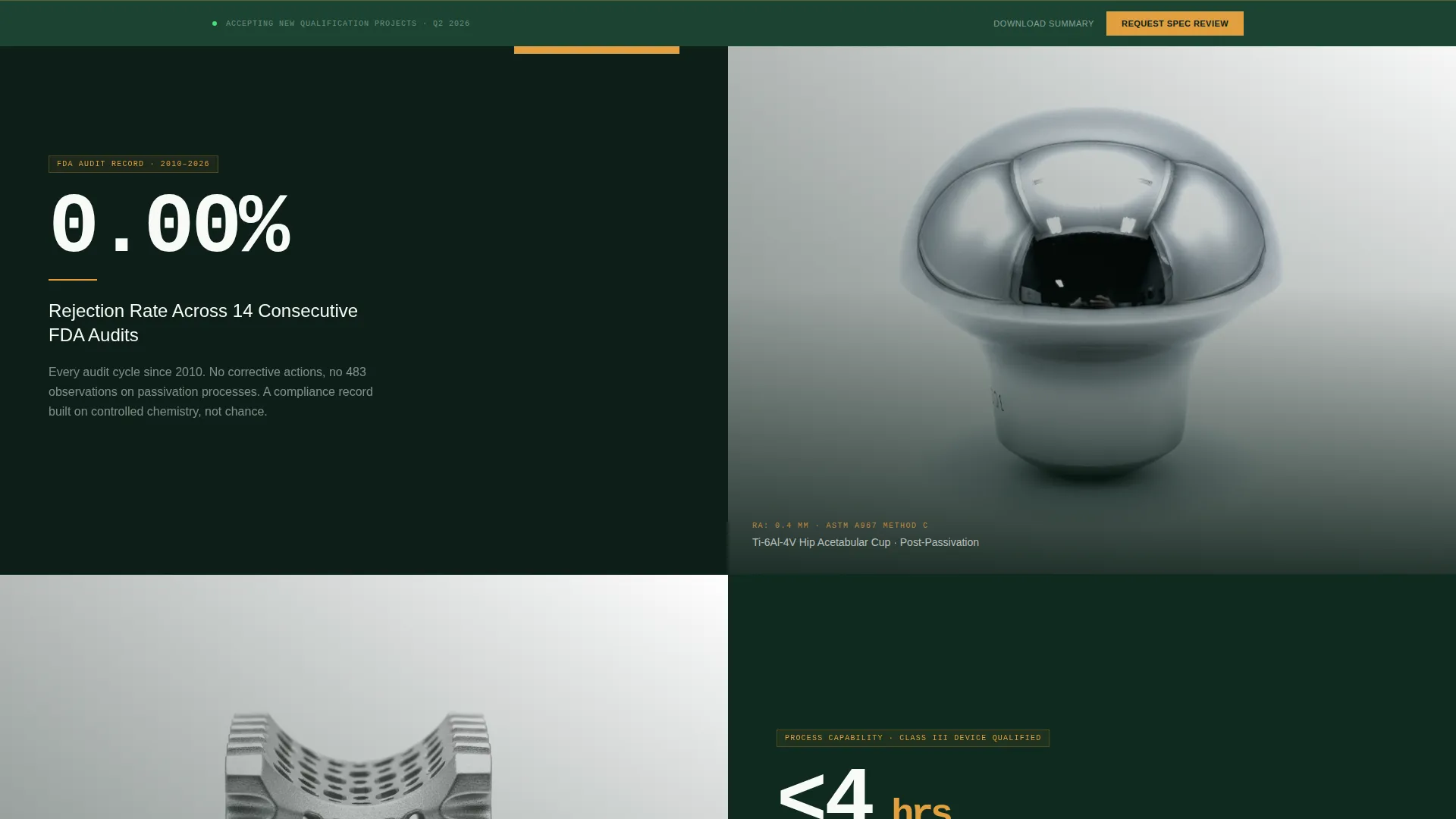
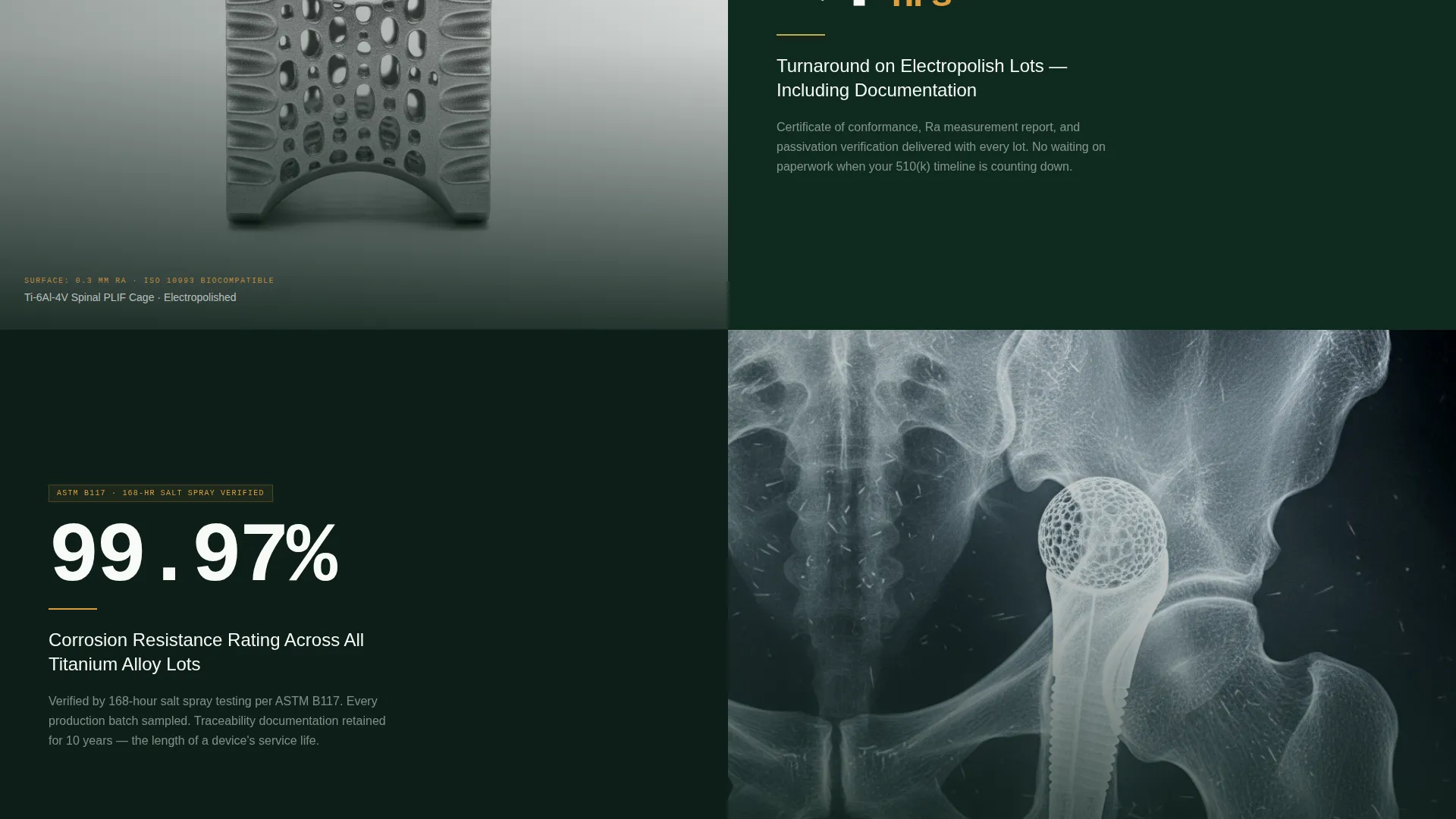
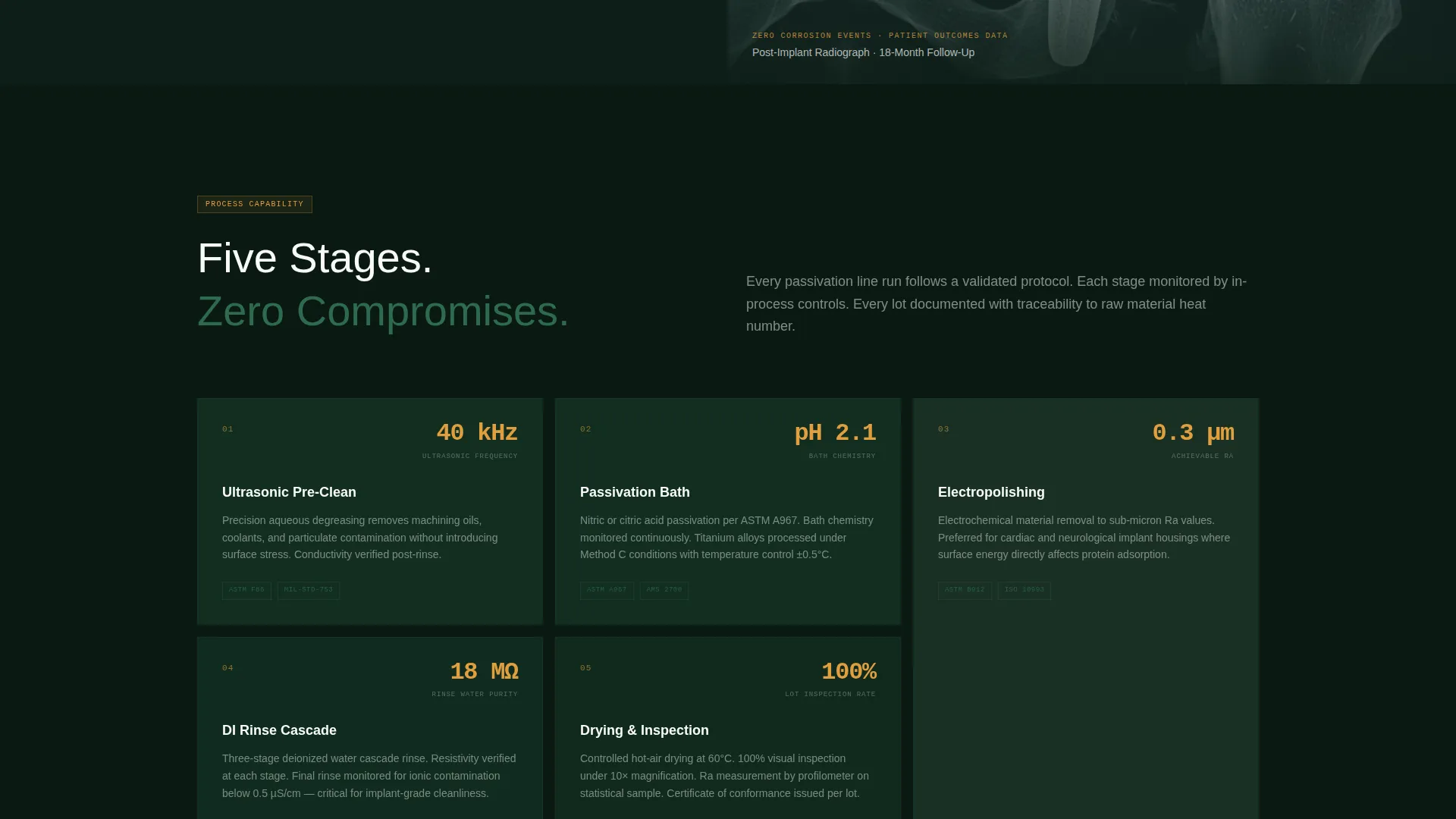
Every scroll transition leads with a quantified performance claim before any explanatory text appears. Each split screen pairs a hard metric on the left with a human consequence or visual proof on the right. The escalating sequence moves from surface specifications through compliance records to patient outcome context.
Persistent Call-to-Action Bar
The primary call to action, labeled "Request Your Spec Review," appears first after the third stat pair and then anchors in a persistent bottom bar throughout the remainder of the page. This placement ensures the conversion prompt is always visible without interrupting the data-led reading flow.
Secondary Lead Capture Link
A secondary text link, "Download Our Biocompatibility Testing Summary," gives technically engaged visitors an email-gated proof document to request. It captures engineers who are evaluating options but not yet ready for a direct consultation, keeping them inside your funnel.
Forest Trust Color System
The palette uses surgical evergreen, sterile canopy, cleanroom white, and verification amber across all sections. Amber is reserved specifically for data callouts and hover states, creating a consistent visual signal that high-stakes numbers are always highlighted the same way.
Pulsing Amber Stat Underline
The hero stat, "2.3 Million Implantable Components Finished," displays in cleanroom white against surgical evergreen with a thin amber underline that pulses once on load. The animation mimics a heartbeat monitor confirming a reading, reinforcing the life-critical context of the work without overstatement.
Page sections overview
| Section | Purpose |
|---|---|
| Isometric Header Panel | Establishes technical authority with a schematic passivation line illustration and floating specification data nodes |
| Hero Stat Panel | Displays the flagship metric in cleanroom white against surgical evergreen with a pulsing amber underline |
| First Stat Pair | Leads with a rejection rate compliance record before any quality system description appears |
| Second Stat Pair | Presents electropolish turnaround time ahead of the process section |
| Third Stat Pair | Pairs a surface specification measurement with an implant-in-bone visual context |
| Primary call to action Block | Places "Request Your Spec Review" after three verified stat pairs have built the evidence case |
| Persistent Bottom Bar | Anchors the primary call to action and secondary download link across all remaining scroll depth |
| Secondary Capture Link | Offers the biocompatibility testing summary download to email-gated prospects |
Design & branding system
The visual identity follows a Data Command theme expressed through the Forest Trust color system. The palette feels authoritative and clinical without relying on the cold blues typically associated with medical design.
- Surgical evergreen (#1B4332) and sterile canopy (#2D6A4F) form the primary surface and panel colors, while cleanroom white (#F8FAF7) carries all body text and stat figures
- Verification amber (#E09F3E) is reserved exclusively for data callouts, hover states, and the pulsing underline on the hero stat, ensuring every high-stakes number has a consistent visual marker
- The isometric illustration style and Data Command theme combine to create a layout that reads like a precision instrument rather than a marketing brochure
Mobile & speed optimization
The split-screen layout is structured for responsive reflow so that the 50/50 panels stack cleanly on narrower viewports without losing the metric-first reading order.
- Stat panels reflow to single-column stacking on mobile, keeping the number visible before its explanation on every screen size
- The persistent bottom bar adapts to mobile viewport height so the call-to-action remains accessible without blocking content
- The isometric header illustration is contained within its panel boundary to prevent overflow or layout shift on smaller screens
How this template helps you convert
The conversion strategy is built into the page structure itself. Doubt is removed progressively, and the call to action appears only after the evidence has been laid.
- Three independent stat pairs front-load verifiable performance data before the primary "Request Your Spec Review" call to action appears, so the click is earned rather than requested cold.
- The persistent bottom bar keeps the consultation prompt visible at all scroll depths, removing friction for visitors who are convinced early but continue reading before deciding to act.
Other information about this template
This template is categorized under Manufacturing and Industrial, specifically within the Medical Device Manufacturing subcategory. It is built for the Medical Device Surface Treatment and Finishing niche and carries an intersection match score of 13, indicating a high degree of alignment between the template style, theme, and niche audience.
- The template style is Split Screen (50/50), the theme is Data Command, the creative direction is Stats-First Impact, the header concept is Isometric, and the landing-page direction is Click-Through
- The color system is Forest Trust, a palette designed to signal organic authority filtered through clinical precision, where the color green reads as "pass," "cleared," and "within specification" rather than as a nature reference
- The click-through destination is a dedicated consultation request form on a separate page, not an embedded form within this landing page layout
Theme
Data Command
Creative direction
Stats-First Impact
Color system
Forest Trust
Style
Split Screen (50/50)
Direction
Click-Through
Page Sections
Isometric Passivation Line Header
Stats-first Split-screen Layout
Persistent Call-to-action Bar
Secondary Email-capture Link
Pulsing Amber Hero Stat
Forest Trust Color System
Related questions
What type of company is this landing page template designed for?
What does the Stats-First Impact layout mean in practice?
How does the call-to-action flow work on this landing page?
Can this template support finishing services beyond passivation?
What makes this template different from a standard medical service page?



