Pathology Medicine Booking Website Template
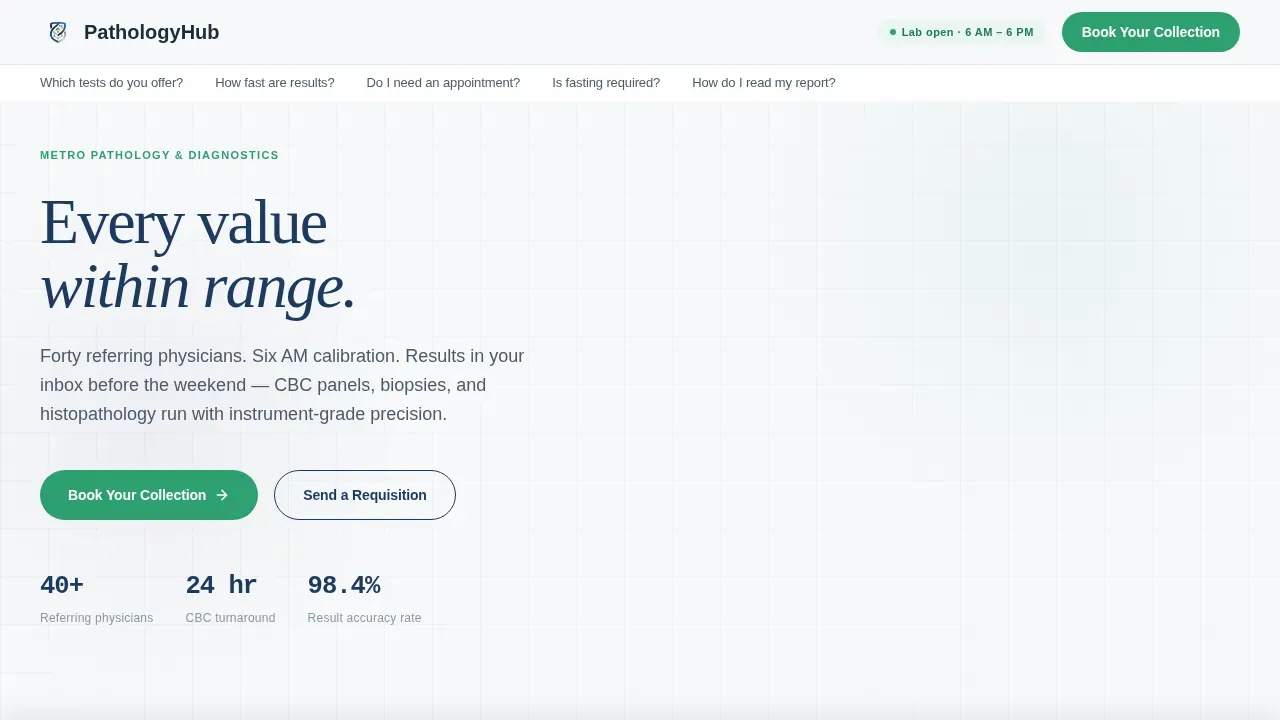
This pathology precision diagnostics booking landing page template gives clinics and diagnostic centers a single, focused page built to answer every patient and physician question before they reach for the phone. A frequently asked question-driven anchor nav, physician testimonial cards, a visual test category grid, and a persistent "Book Your Collection" bottom bar work together to convert hesitation into confirmed appointments.
by Rocket studio
Quick summary
This landing page template is purpose-built for pathology clinics and diagnostic centers that serve both patients and referring doctors. It pairs a calm, clinical visual identity with a frequently asked question-driven hub-and-spoke structure, so every visitor leaves with the confidence to book. The page keeps a single goal in focus from the first scroll to the final call to action.
Who this template is for
Pathology labs and diagnostic centers need a landing page that speaks to two very different audiences at once. This template handles both without losing clarity or purpose.
- Patients holding requisition slips who need to know fasting rules, parking details, and when results will be ready
- General practitioners and oncologists who need reliable turnaround on blood panels, biopsies, and histopathology reports
- Practice managers at clinics looking to streamline how they send referral forms and schedule collections for their doctors
What problem this template solves
Many pathology labs face the challenge of generating clicks without converting them into bookings. Potential patients land on a page, find no clear answers, and call instead or leave entirely. That friction costs the lab new clients every day.
- Patients carry anxious questions into every visit: fasting requirements, appointment availability, insurance compatibility, and how to read a report
- Referring doctors need to evaluate turnaround benchmarks quickly and send requisition forms without a lengthy back-and-forth
- A generic page with no structure forces the lab's front desk to answer the same calls repeatedly, slowing down operations
What you get with this template
This template gives your pathology lab a complete, structured landing page designed to eliminate hesitation and drive appointment bookings. Every section has a defined job, and the layout keeps users moving toward the call to action.
- A hero section with a floating physician testimonial card stack, anchor frequently asked question navigation, and a persistent sticky booking bar
- An asymmetric bento grid of test categories, a turnaround benchmark visualization, and an expandable accordion frequently asked question covering patient prep details
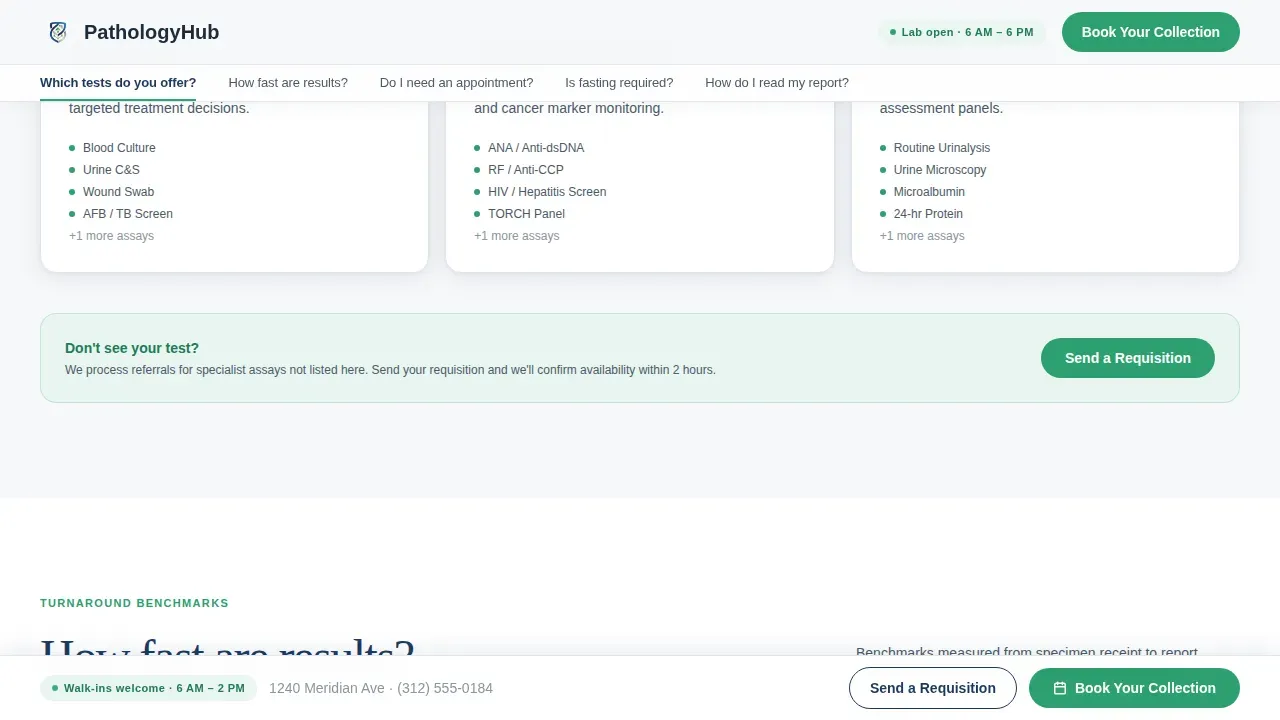
- A report guide section, a three-step booking modal with date and slot selection, and a secondary "Send a Requisition" path for healthcare providers
Feature list
This landing page design brings together several purpose-built components. Each one is crafted to communicate clearly, build trust, and move visitors toward scheduling an appointment.
frequently asked question-Driven Anchor Navigation Bar
The top of the page displays an anchor nav formatted as real patient and physician questions. Questions like "How fast are results?" and "Is fasting required?" scroll the user directly to the relevant section. This straightforward process reduces phone volume and keeps every person on the page until their concern is addressed.
Physician Testimonial Card Stack
The hero opens with an oversized testimonial card featuring a referring doctor's photograph, a two-sentence quote about turnaround reliability, and their specialty and clinic name in small caps. A second card peeks behind the first to suggest depth. Real doctor faces and real words build trust far more effectively than abstract imagery, making this one of the key benefits of the landing page design.
Visual Test Category Grid
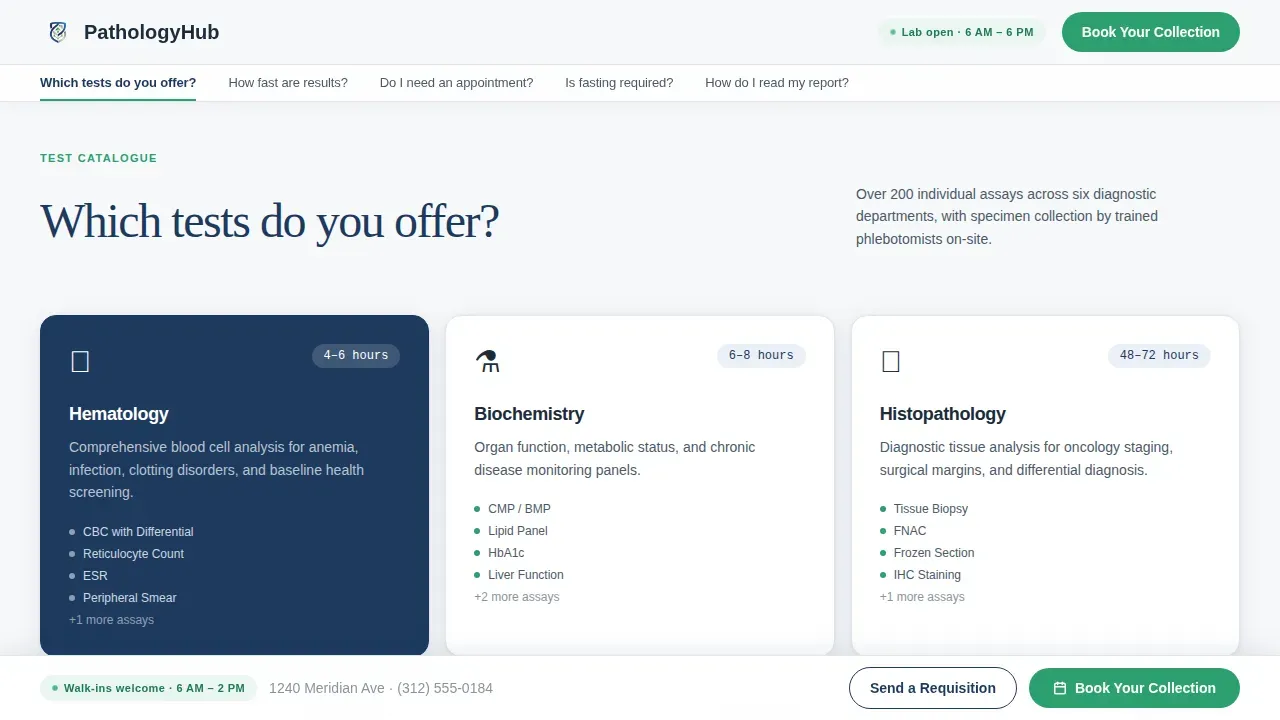
An asymmetric bento grid displays test categories clearly, helping patients and doctors identify the relevant diagnostic services at a glance. Each cell communicates the test type with enough detail to prompt immediate action. Blood panels, histopathology, and other medical tests are categorized so visitors can search and locate what they need without confusion.
Turnaround Benchmark Visualization
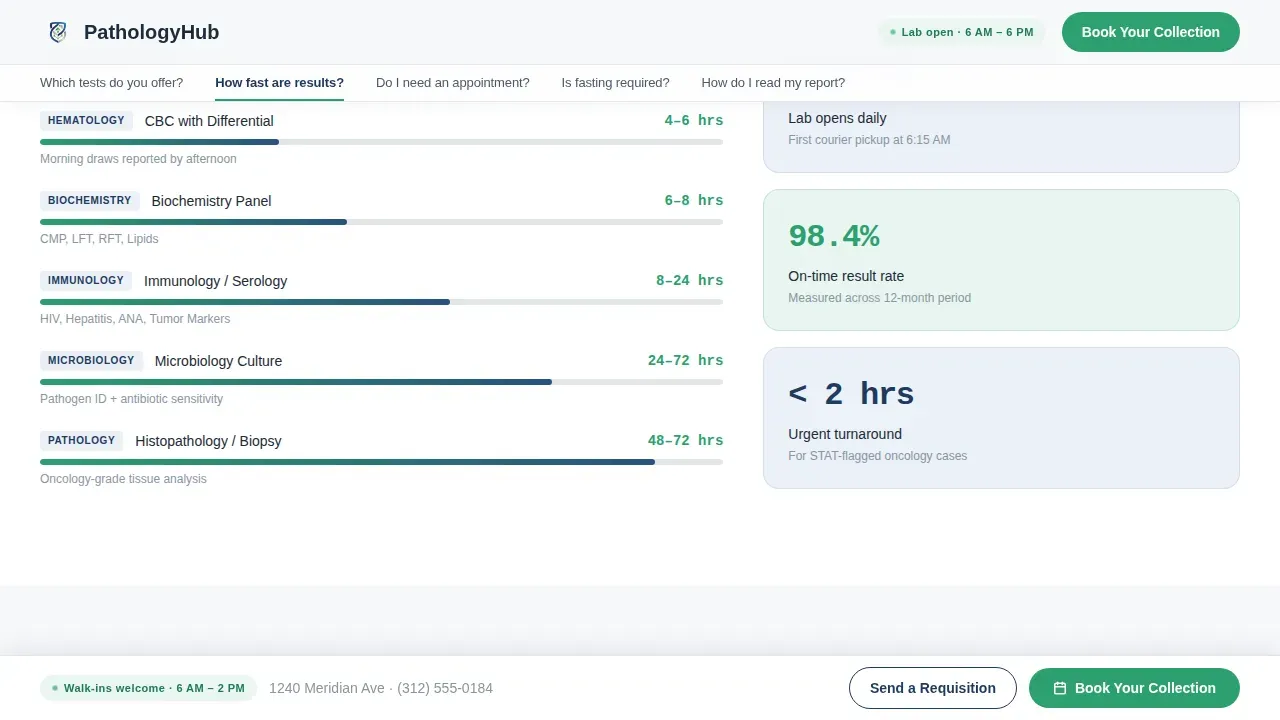
A data visualization section shows benchmark bars by test category, giving referring healthcare providers and patients concrete turnaround details. Accurate results timelines are presented clearly so doctors can plan treatment schedules and patients know when to expect their report. This section highlights the lab's expertise through real performance data rather than vague promises.
Expandable Accordion Patient Prep frequently asked question
The patient prep section uses expandable accordion panels to answer questions about appointments, fasting, insurance, and parking. Each panel reveals detailed information only when the visitor needs it, keeping the page clean and skimmable. This approach supports patient engagement by letting users access the precise details relevant to their situation without reading everything at once.
Persistent Booking Bottom Bar and Three-Step Modal
A sticky bottom bar follows the scroll on every device, anchoring the primary call to action at all times. Tapping the bar opens a three-step booking modal: select a test category, choose a date and morning or afternoon slot, then enter patient name and referring physician. A secondary path lets healthcare providers upload referral forms directly, giving doctors a fast consent-ready channel without a phone call.
Page sections overview
| Section | Purpose |
|---|---|
| Hero Testimonial Stack | Opens with physician testimonial cards and anchor frequently asked question nav bar |
| Tests Offered Grid | Bento grid of diagnostic services test categories |
| Turnaround Benchmark Bars | Data visualization of turnaround times by test type |
| Patient Prep Accordion | Expandable frequently asked question for fasting, appointment, insurance, parking |
| Report Guide and call to action | How-to-read-your-report content with sticky booking bar |
| Footer Linear Row | Single-row footer with contact details and lab information |
Design & branding system
The visual identity follows a Corporate Precision theme using a Cloud Canvas color system. The palette feels sterile without being cold, every surface communicating that nothing here is approximate. Bold colors are used with intention: the specimen blue anchors authority while verification green signals confidence at every call to action.
- Clinical white (#F7F8FA) and instrument-panel gray (#D1D5DB) form the base, keeping the page visually appealing and easy to read
- Deep specimen blue (#1E3A5F) is used for headings and structural elements to communicate professional authority
- Verification green (#2D9F6F) is reserved for call to action buttons, confirmation states, and progress indicators, guiding users toward booking
- Typography pairs DM Sans for body text, Fraunces for display numerics and quotes, and JetBrains Mono for result values and medical data
Mobile & speed optimization
This template is built desktop-first to serve doctors reviewing cases on workstations, and it scales responsively so patients checking appointment details on a phone have a smooth, frustration-free experience. The page structure prioritizes a fast, clean load so visitors stay engaged from the first second.
- The sticky booking bottom bar and all accordion forms are touch-friendly, ensuring every interactive element is easily tappable on mobile devices
- Mobile users have access to a click-to-call phone number so they can contact the lab immediately without searching for details
- Static hero rendering keeps initial load light while interactive booking modal and accordion components load only when needed by the user
How this template helps you convert
The primary goal of this landing page is to minimize anxiety, build credibility, and convert visitors into patients by simplifying the booking process. Every design and content decision supports that single conversion goal.
- The frequently asked question anchor navigation answers hesitations before they become exit reasons, so visitors arrive at the booking forms already informed and ready to schedule their appointment
- The persistent call to action button stays visible without scrolling, giving users the ability to take immediate action at any point in their visit without hunting for a contact option
- Physician testimonials and turnaround benchmark data work together to build trust with both patients and doctors, making the case for the lab's diagnostic services before a single form is filled
Other information about this template
This template is ready to tailor to your pathology lab's specific needs. It is designed to support a wide range of use cases beyond its default layout, making it a flexible business asset for clinics at different stages of growth.
- Customizable templates allow healthcare providers to highlight their specific services and communicate their lab's expertise clearly to new clients
- The landing page design can support campaign data tracking by connecting to your preferred analytics tools, helping you evaluate metrics like conversion rates and website traffic to measure effectiveness
- Incorporating educational resources and downloadable content on the page can capture leads who are not yet ready to schedule, expanding your reach within the local community
- Geo-targeting through Meta Ads paired with this landing page template lets pathology labs reach their local audience directly, since a clear and attractive offer on the landing page converts that traffic into confirmed appointments
- A/B testing different versions of the page helps refine messaging and improve engagement rates over time, giving your practice the ability to progress toward stronger results with real data
- The template's informative structure, patient-friendly language, and scannable layout address specific health concerns relevant to different demographics, supporting both your medical staff and your broader patient community
Theme
Corporate Precision
Creative direction
FAQ-Driven
Color system
Cloud Canvas
Style
Hub & Spoke (Anchor Nav)
Direction
Booking/Scheduling
Page Sections
Faq-driven Anchor Navigation
Physician Testimonial Card Stack
Visual Test Category Bento Grid
Turnaround Benchmark Visualization
Expandable Accordion Patient Prep Frequently Asked Question
Persistent Booking Bar and Three-step Modal
Related questions
Can I customize the test categories shown in the bento grid?
Does the booking modal support both patient and physician workflows?
How does the frequently asked question anchor navigation work?
Can I add or update the physician testimonial cards?
Is this template suitable for a lab that also accepts walk-in patients?



