Expert Asphalt Paving | Free Website Template | Rocket
Blacktop is a single-page landing page template built for Bay Area paving and asphalt contractors. It leads with a bold typographic header that frames a real buyer decision, then walks visitors through a comparison table, a step-by-step process breakdown, and two conversion paths: a pavement assessment form and a downloadable decision guide. The design is clean, editorial, and built on honest authority.
by Rocket studio
Quick summary
Blacktop is a content-first landing page template for paving contractors serving residential, commercial, and HOA clients. It opens with a giant centered headline that poses the core buyer question, moves through a structured comparison table and process walkthrough, then closes with two conversion paths. Typography carries the authority. The page earns trust by teaching before it sells.
Who this template is for
This template is designed for asphalt and paving contractors who want to stand out by educating their prospects rather than just listing services. It fits businesses where the buyer needs help making a decision before they can commit.
- Paving crews serving driveways, parking lots, and private roads in suburban and urban markets
- Contractors targeting property managers, homeowners, and HOA boards with larger project budgets
- Service businesses that want a resource-style page to generate qualified leads, not just clicks
What problem this template solves
Most paving company pages look identical: a hero image, a phone number, and a vague services list. None of that helps a property manager figure out whether they need an overlay, a full-depth removal, or a sealcoat. Blacktop fixes that gap.
- Buyers arrive confused about which service fits their situation and leave without contacting anyone
- Generic pages fail to build trust with commercial clients who need to justify capital spending
- No mechanism exists to collect qualified lead information like property type, square footage, or current pavement condition
What you get with this template
You get a fully structured, single-column landing page that doubles as a short buyer education course. Every section has a clear job, and the layout guides the reader from question to answer to conversion without friction.
- A giant centered headline section, a comparison table, a step-by-step process walkthrough, and two distinct conversion forms
- An Ink and Paper color system with warm newsprint white, carbon-black type, pencil-graphite gray, and construction-cone amber accents
- Two conversion paths: a pavement assessment request form with a photo upload field, and a gated PDF download behind an email capture field
Feature list
A brief overview of what makes this template work in practice, section by section.
Typographic Hero Header
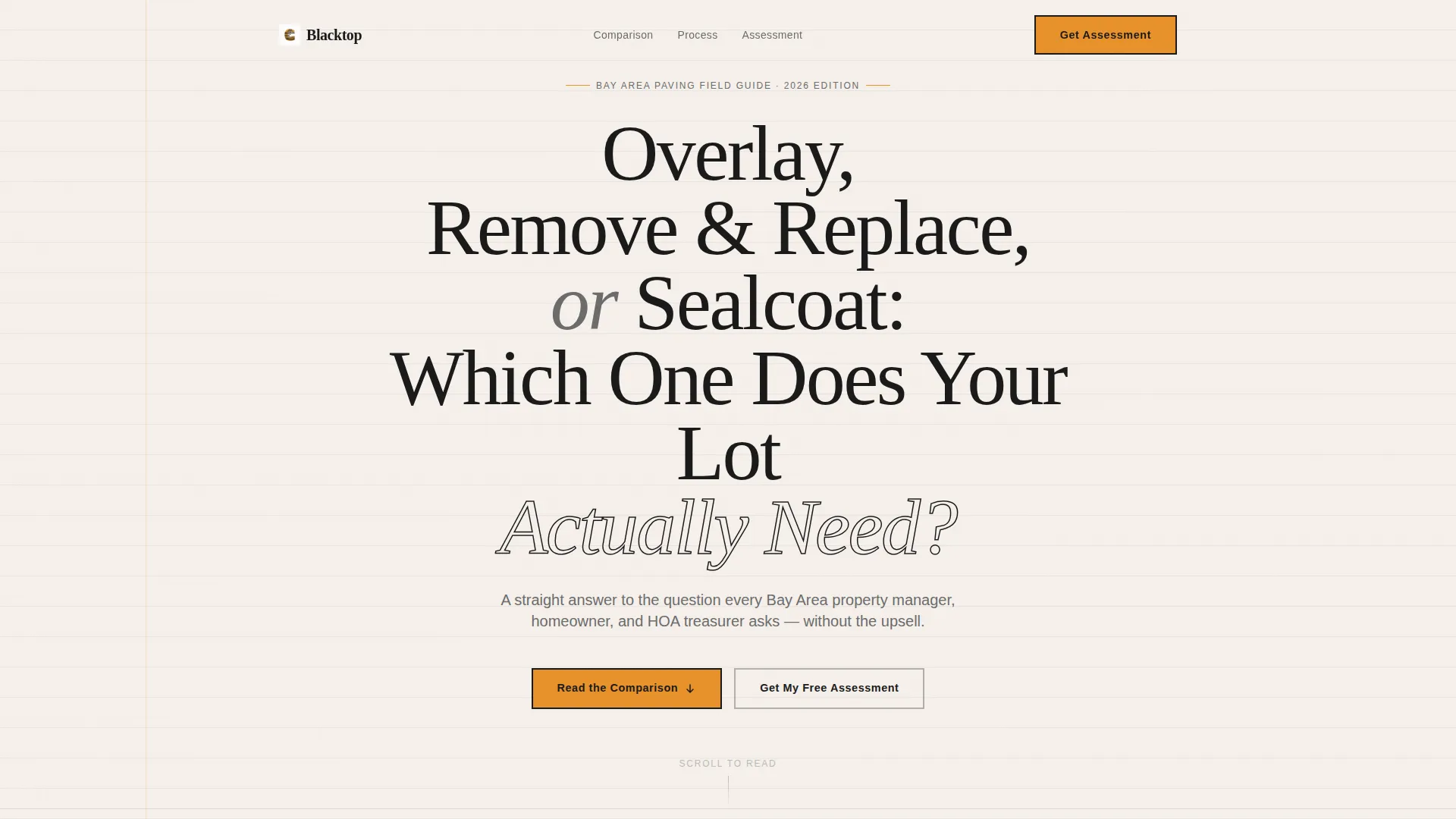
The header skips photography entirely. A large centered question fills the viewport using stark black type on warm paper-white. A single subtext line sits beneath it. Nothing competes with the headline, and the question itself pulls the reader forward.
Three-Way Comparison Table
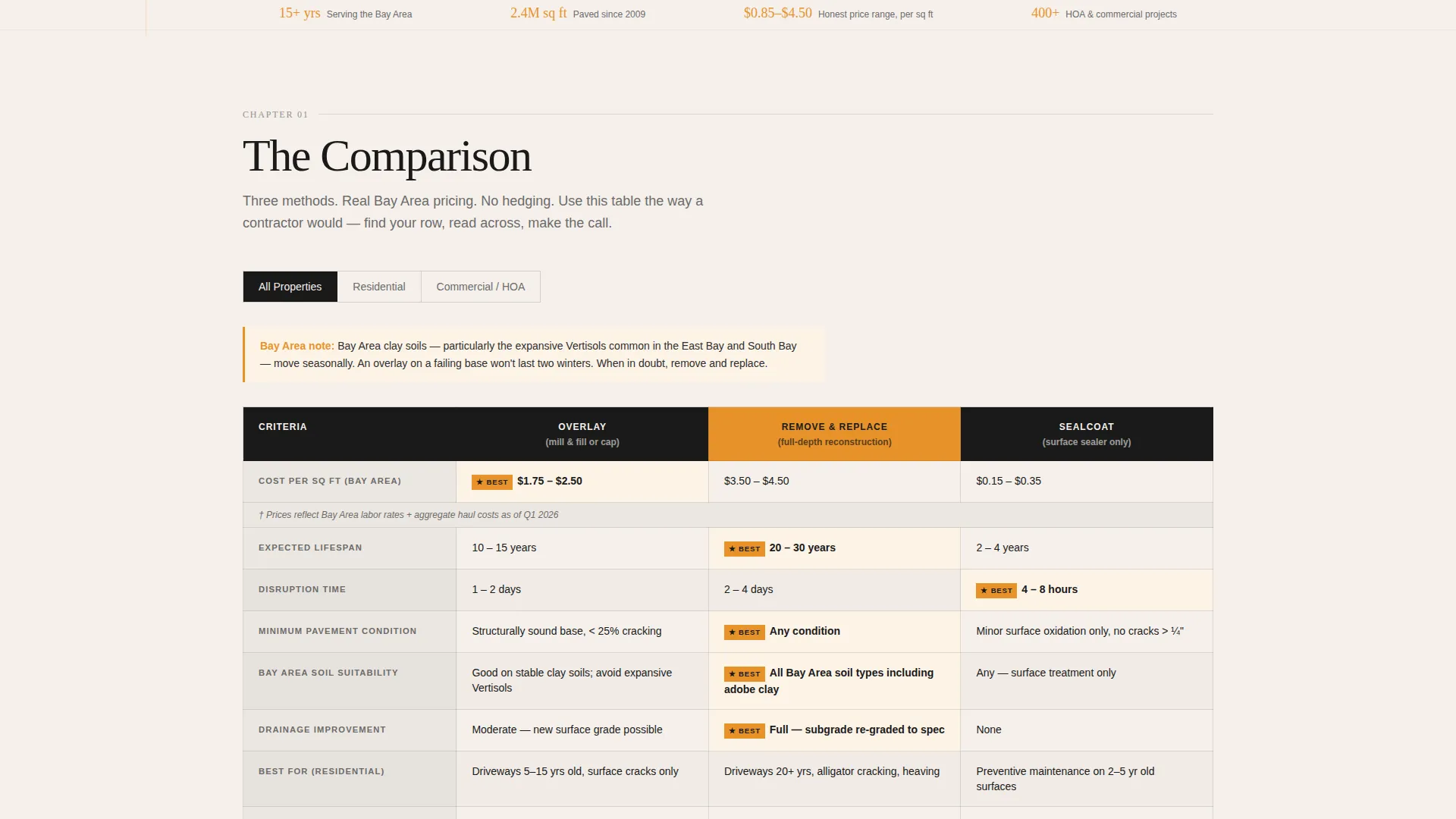
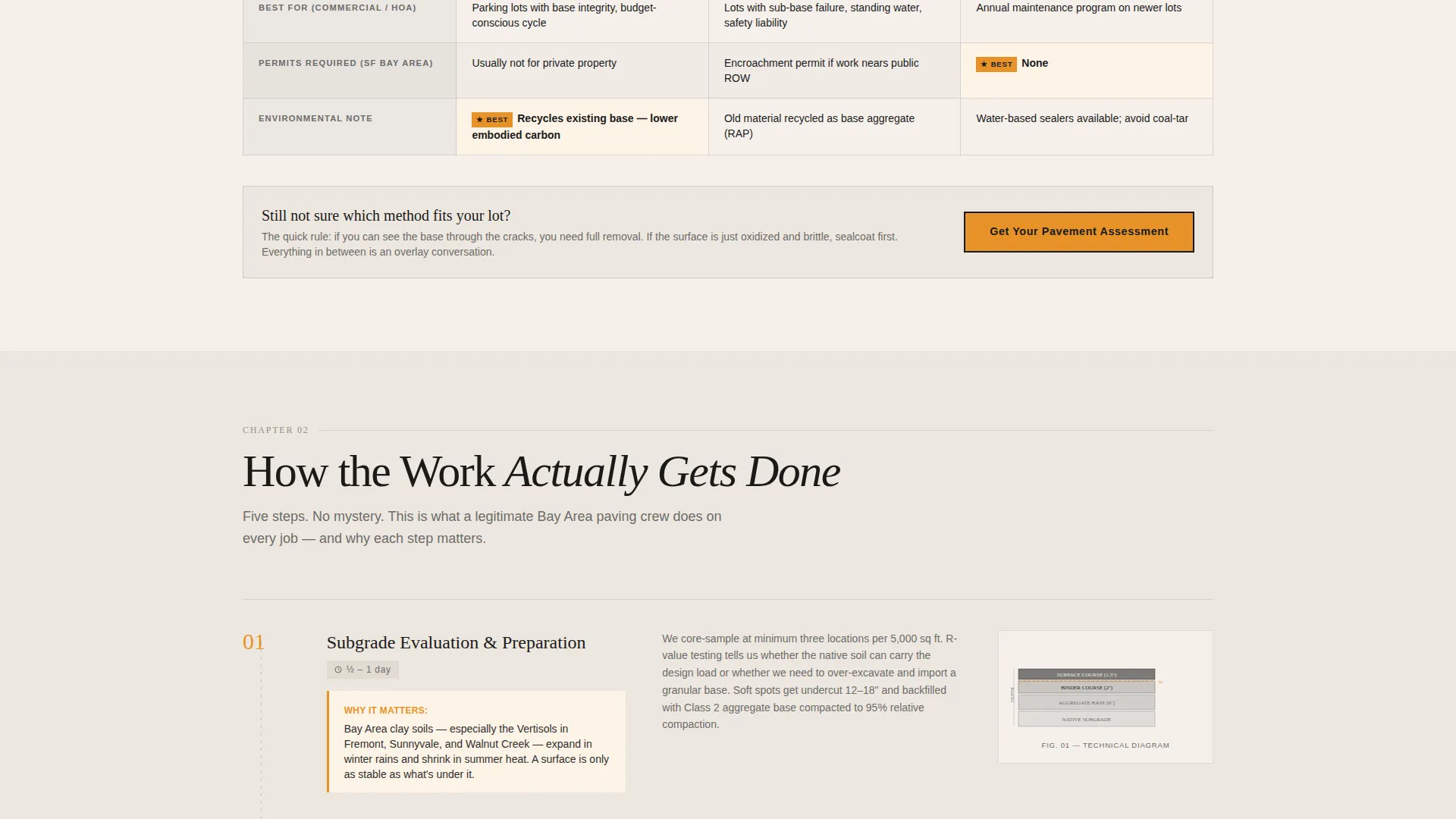
The core of the page is a structured table comparing overlay, full-depth removal and replacement, and sealcoating. Columns cover cost per square foot, expected lifespan, disruption time, and best-use scenarios. All data points are framed around Bay Area soil and climate conditions.
Step-by-Step Process Walkthrough
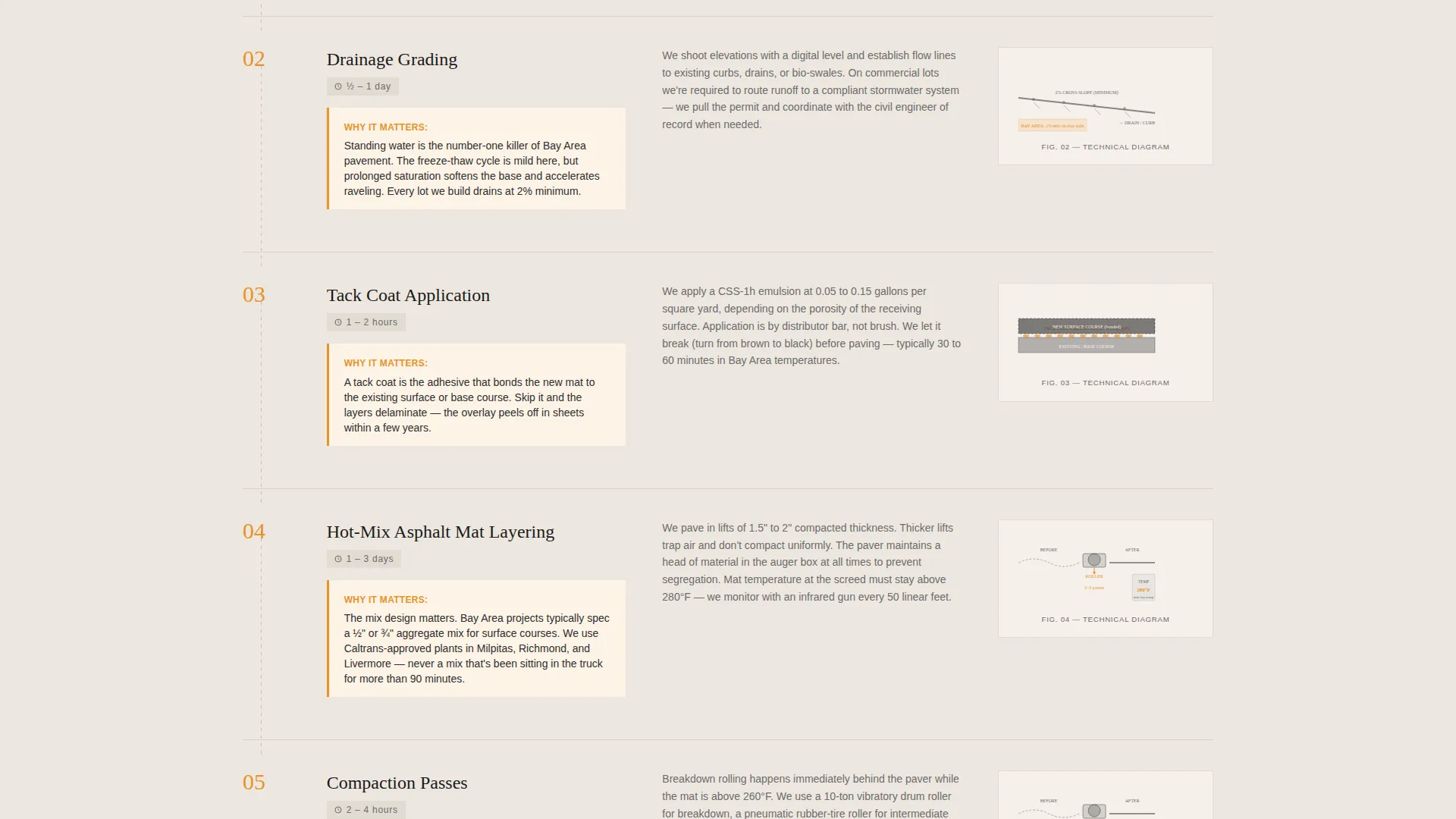
Below the table, the page breaks down the actual paving process: subgrade preparation, drainage grading, tack coat application, mat layering, and compaction passes. Each step includes a simple diagram and a short annotation explaining why that step matters.
Pavement Assessment Form
The primary call to action is a short form placed after the comparison table and again after the process section. It asks for property type via a selector, approximate square footage via a slider, and a photo upload of the current pavement condition.
Gated PDF Download
A secondary conversion path offers a downloadable resource titled "Download the Bay Area Paving Decision Guide." It is gated behind a single email field, giving visitors a low-commitment way to engage and giving the contractor a qualified lead.
Amber Callout System
Construction-cone amber is used sparingly and deliberately: table row highlights, callout boxes, and interactive elements like buttons and sliders. The restricted use of color makes every highlighted element feel intentional and draws attention without visual noise.
Page sections overview
| Section | Purpose |
|---|---|
| Centered Headline Header | Frames the core buyer decision as a direct question to stop the scroll |
| Comparison Table Block | Compares three service types across cost, lifespan, disruption, and best use |
| Assessment call to action One | First pavement assessment form placed immediately after the table |
| Process Walkthrough | Teaches the paving process step by step with diagrams and annotated reasoning |
| Assessment call to action Two | Repeated assessment form placed after the process breakdown |
| PDF Download Gate | Email-gated download offering the Bay Area Paving Decision Guide |
Design & branding system
The visual identity follows an Educational Guide theme built on an Ink and Paper color system. The palette is intentionally flat and document-like, referencing technical diagrams photocopied from an engineering handbook rather than a polished marketing brochure.
- Colors: heavy newsprint white (#F5F0EB) as the page base, carbon-black ink (#1A1A1A) for all primary type, pencil-graphite gray (#6B6B6B) for secondary labels and annotations, and construction-cone amber (#E8922A) reserved for callouts, table highlights, and interactive elements
- Typography does the heavy lifting; there are no hero images or stock photography anywhere on the page
- The overall feel is honest and utilitarian, like a field manual spread open on a tailgate
Mobile & speed optimization
The single-column layout is naturally suited to smaller screens. Vertical flow means every section stacks cleanly without requiring a separate mobile layout. The comparison table is the one component that needs careful handling on narrow viewports.
- The single-column structure removes the need for complex grid rearrangement on mobile devices
- The slider input for square footage and the photo upload field are both touch-friendly by design
- No hero images or heavy media files means the page loads with minimal visual overhead
How this template helps you convert
The conversion strategy is built on earned trust. The page gives away genuinely useful information first, which makes the request for professional help feel like a natural next step rather than a sales push.
- The comparison table answers the most common buyer question before a form is ever shown, which means visitors who scroll past it are already self-qualified and ready to act
- Two placements of the assessment form, one after the table and one after the process walkthrough, catch visitors at different points in their decision-making without feeling repetitive
- The gated PDF download creates a second conversion path for visitors who are not ready to book but are willing to share an email for a useful resource
Other information about this template
This template is built for contractors who serve a geographically defined market where local knowledge is a competitive advantage. The Bay Area framing, soil conditions, and climate references in the table are meant to be customized for any regional paving market.
- The template works well for contractors who handle both residential driveways and larger commercial or HOA parking lot projects
- The process walkthrough section can be adapted to reflect a contractor's specific method or equipment without changing the overall page structure
- The page is designed as a content and resource destination, meaning it earns organic traffic from buyers actively researching paving decisions, not just brand searches
- The downloadable guide component doubles as a lead nurturing asset that can be followed up with email outreach
Theme
Legal Shield
Creative direction
Case Study Narrative
Color system
Slate & Sky
Style
Single Column Flow
Direction
Lead Generation
Page Sections
Typographic Hero Header
Three-way Comparison Table
Step-by-step Process Walkthrough
Pavement Assessment Request Form
Gated PDF Download Path
Amber Callout Accent System
Related questions
Can I use this template for a paving company outside the Bay Area?
Does the template include the actual PDF guide file?
Is this template suitable for a residential-only paving contractor?
What information does the pavement assessment form collect?
Can I remove one of the two assessment form placements?



