Veterinary Clinic Marketing Booking Website Template
Pawprint is a split-screen veterinary landing page template built for local clinics that want to earn trust before asking for a booking. It pairs a warm editorial visual identity with an FAQ-driven scroll that answers real pet owner questions, then guides visitors toward scheduling through a persistent teal call-to-action button and a lightweight scheduling form.
by Rocket studio
Quick summary
Pawprint is a single-page veterinary clinic template built around one idea: answer the question first, then ask for the appointment. The layout uses a 50/50 split screen throughout, pairing question prompts on the left with plainspoken answers on the right. A persistent booking button and a tap-to-dial option close every visit with a clear next step.
Who this template is for
This template suits independent veterinary clinics and small animal practices that rely on local search to attract new clients. It works especially well for clinics that serve a mixed clientele and want their website to feel personal rather than corporate.
- Neighborhood veterinary clinics building a local online presence
- Solo and small-group vet practices replacing outdated or generic websites
- Clinic owners who want to convert anxious late-night searchers into booked appointments
What problem this template solves
Most pet owners arrive at a clinic's website in a state of worry. They have a question, not a buying mindset. Generic clinic pages skip straight to a booking form without earning that click. Pawprint solves this by leading with answers, then letting the visitor decide when they are ready to book.
- Visitors bounce when a page does not answer their specific concern quickly
- Generic layouts fail to communicate warmth, local presence, or clinical competence
- Urgent searchers need both a scheduling path and a direct call option in the same view
What you get with this template
You get a fully structured, single-page landing page layout designed around the real questions pet owners type into search engines. Every section is ready to populate with your clinic's actual content, staff details, and local references.
- A 50/50 split-screen layout with alternating parchment and ink backgrounds throughout
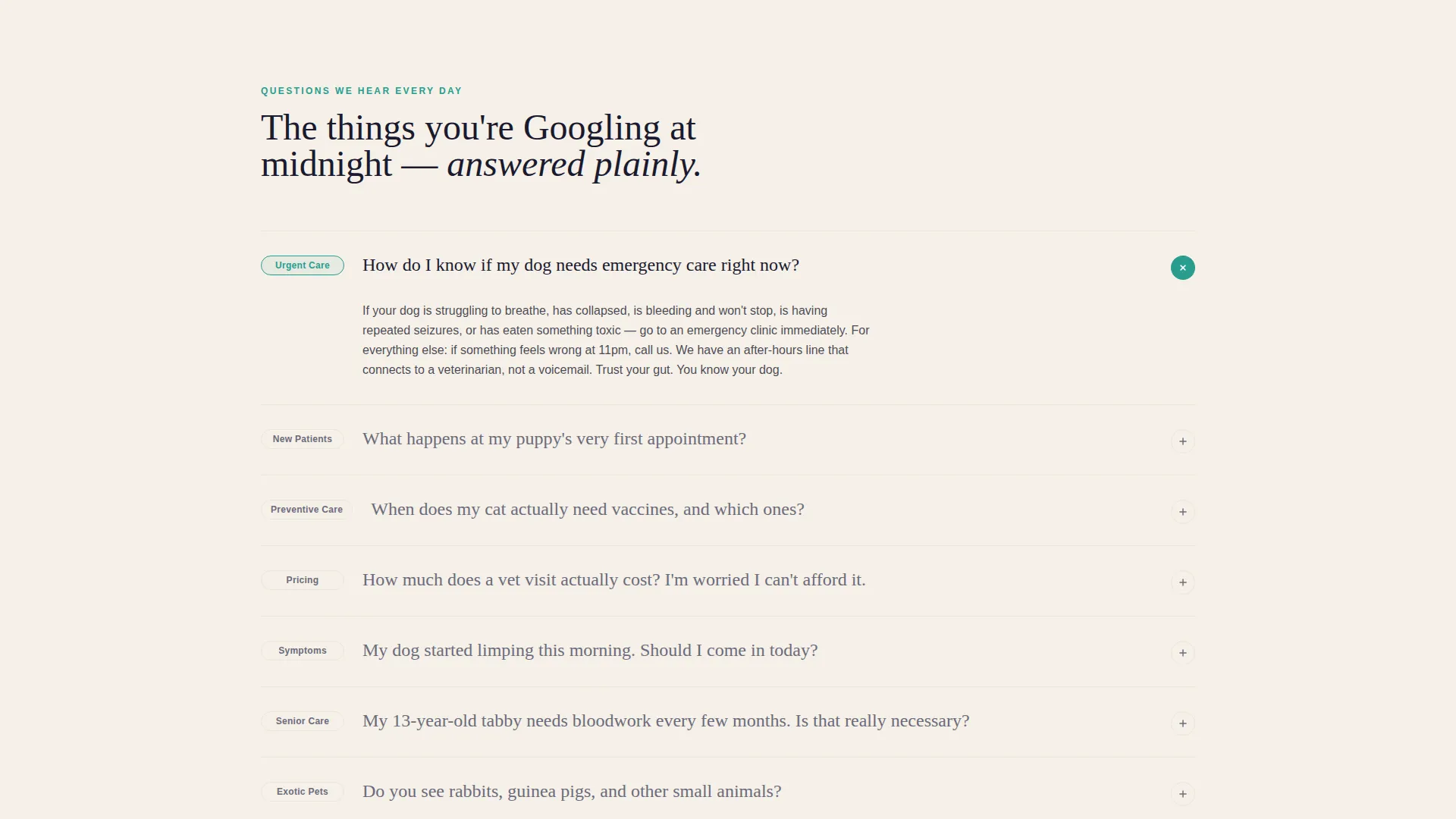
- An FAQ-driven scroll structure with expandable answer panels and a pinned booking button
- A lightweight scheduling form collecting pet type, visit reason, preferred day, and phone number
Feature list
A paragraph introducing the feature set: The features below reflect what the Pawprint template is built to deliver. Each one connects directly to a specific layout decision or interaction pattern described in the design brief.
Quote and Manifesto Header
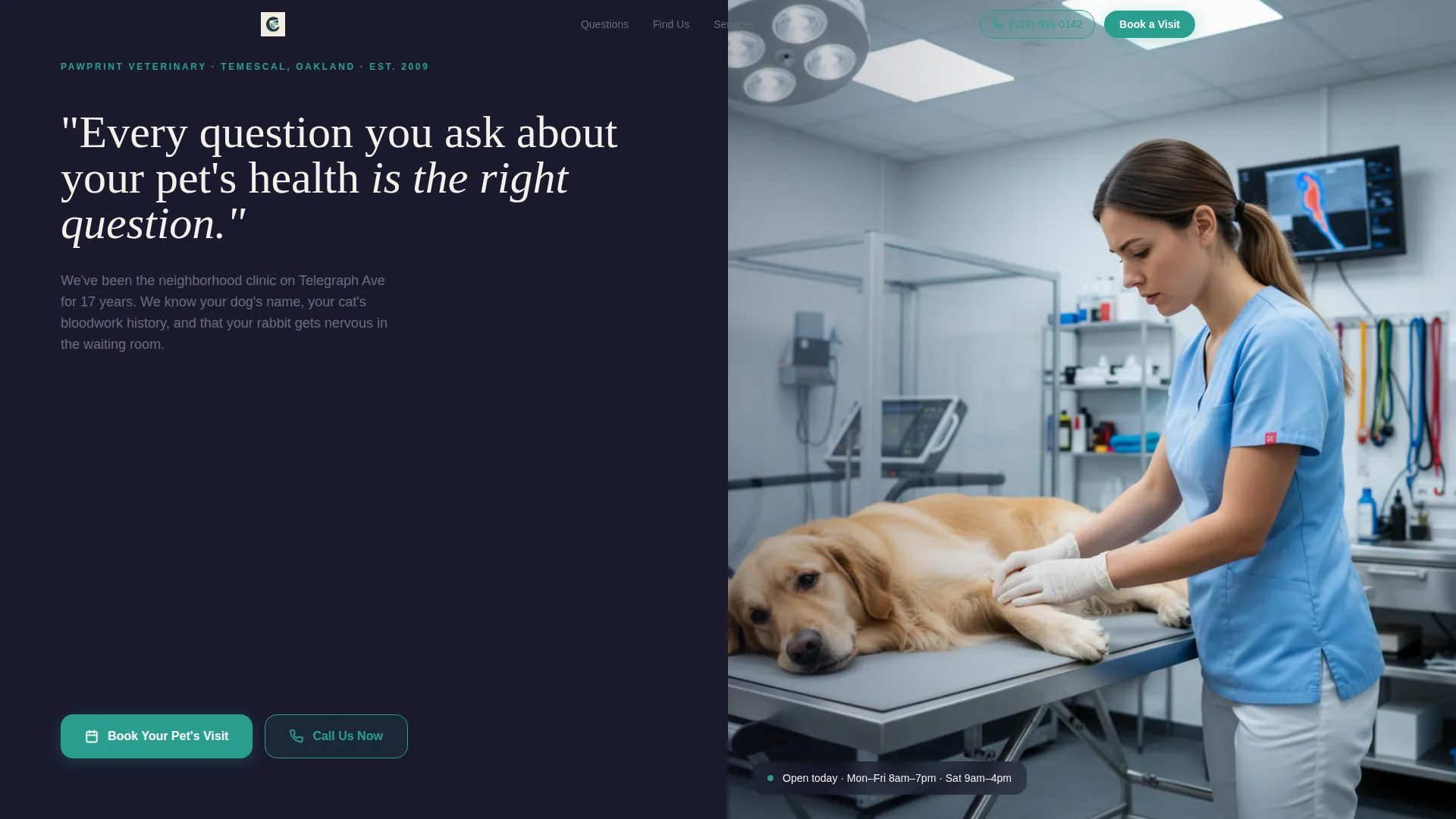
The header opens with a large serif statement on the left panel set against deep editorial ink. Below the quote, a smaller line displays the clinic name, neighborhood, and years in practice. The right panel holds a tightly cropped photograph of a vet's hands on an examination table, conveying quiet clinical confidence from the first scroll position.
FAQ-Driven Split-Screen Scroll
Each content section frames a real pet owner question in large ink-weight type on the left panel. The right panel reveals a concise, plainspoken answer that expands on click. Questions progress from common anxieties about cost and first visits through to surgical capabilities and after-hours protocols.
Persistent Booking Button
A teal "Book Your Pet's Visit" button stays pinned to the page as the visitor scrolls. It opens a lightweight scheduling form asking for pet type, reason for visit, preferred day, and a phone number. This keeps the conversion path available at every point without interrupting the reading experience.
Tap-to-Dial Secondary Path
Alongside the booking button, a "Call Us Now" link with a tap-to-dial phone number serves visitors who need immediate help. This secondary path is designed for urgent midnight searches where filling out a form is not the right solution.
Local Map and Neighborhood Anchoring
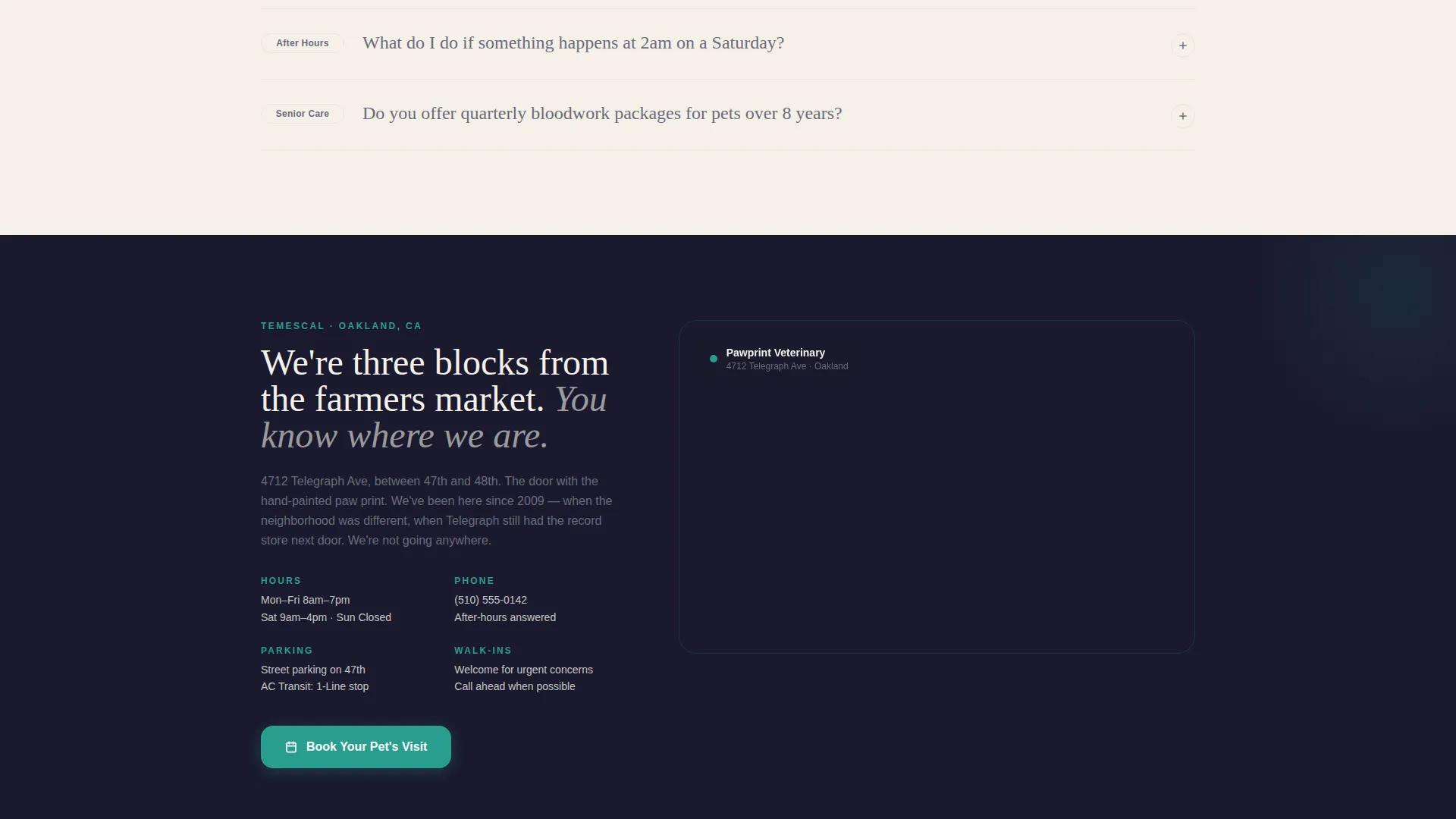
Midway through the page, a local map and neighborhood references establish the clinic's physical presence. This section distinguishes the clinic from content-farm results by grounding the page in a specific place, street, and community.
Ink and Paper Color System
The template uses warm parchment, deep editorial ink, soft pencil gray, and a single clinical teal accent. Teal appears only on interactive elements such as buttons and answer reveals, keeping the visual hierarchy clean and intentional throughout the page.
Page sections overview
| Section | Purpose |
|---|---|
| Quote Header Panel | Opens with a trust-building manifesto and clinic identity details |
| Vet Hands Photo | Anchors warmth and clinical authenticity from the first screen |
| FAQ Scroll Block | Answers real pet owner questions using expanding split-screen panels |
| Cost and Visits | Addresses pricing anxiety and what to expect on a first visit |
| Vaccinations Block | Covers vaccination schedules and common pet health concerns |
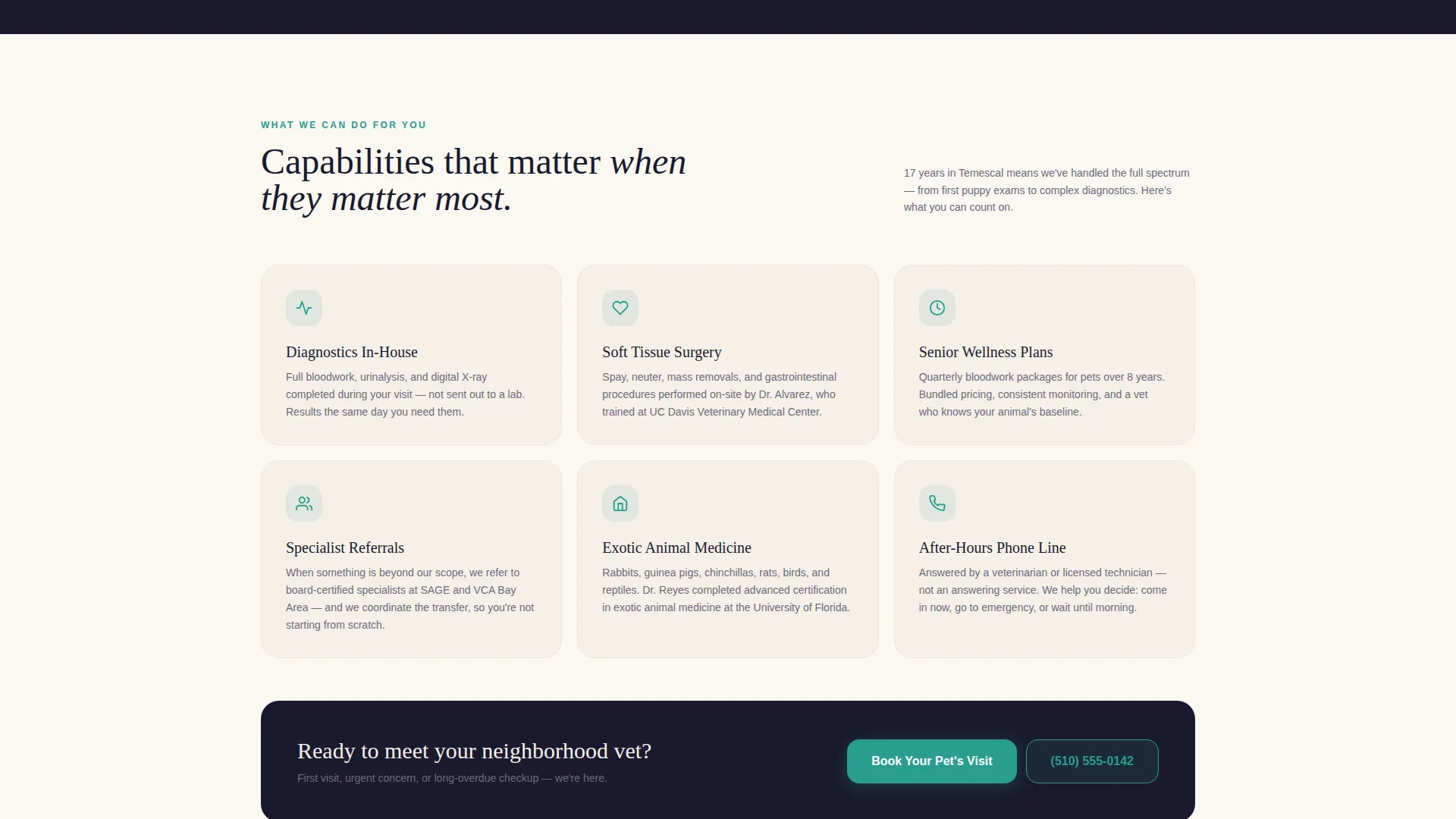
| Surgical Capabilities | Builds deeper trust by confirming clinical scope and referral protocols |
| After-Hours Protocols | Explains emergency access and after-hours contact options |
| Local Map Anchor | Places the clinic geographically with neighborhood context |
| Booking Form Section | Collects pet type, visit reason, preferred day, and phone number |
| Persistent call to action Bar | Keeps the booking button and call link visible throughout scrolling |
Design & branding system
The visual identity follows an Educational Guide theme. The palette evokes a veterinarian's personal notebook: cream pages, confident dark-ink annotations, and a single highlight color used only where action is required.
- Warm parchment (#F5F0E8) and deep editorial ink (#1A1A2E) alternate as section backgrounds, with soft pencil gray (#6B6B7B) for supporting text
- Clinical teal (#2A9D8F) appears exclusively on interactive elements including buttons and expandable answer reveals
- Large serif type anchors authority in the header; body copy uses clean, readable type for scannability across age groups
Mobile & speed optimization
The split-screen layout is designed to restack cleanly on smaller screens. Each FAQ panel and expandable answer works as a self-contained unit, making vertical mobile scrolling feel natural rather than truncated.
- The persistent booking button and tap-to-dial link remain accessible on mobile without obstructing content
- Alternating background sections maintain visual separation even when the 50/50 split collapses to a stacked single-column view
How this template helps you convert
The page earns the booking by proving clinical competence before asking for any commitment. The conversion sequence is deliberate and trust-led rather than transactional.
- Each FAQ section answers a real anxiety first, lowering resistance by the time the visitor reaches the booking form
- The persistent teal button and the tap-to-dial link give visitors two clear exit points toward action at every scroll position, accommodating both planners and urgent callers
Other information about this template
This template is suited to veterinary clinics that compete in local search and need a page that speaks directly to the community around them. The Educational Guide theme and Ink and Paper palette give it a distinct, non-generic feel that stands apart from typical clinic websites.
- The template style is Split Screen (50/50) and the landing page direction is Booking and Scheduling
- The design theme draws from an Educational Guide visual concept using the Ink and Paper color system
- This layout is particularly effective for local SEO landing pages where the goal is to convert a neighborhood searcher into a booked appointment
Theme
Executive Suite
Creative direction
Testimonial Mosaic
Color system
Monochrome Steel
Style
Split Screen (50/50)
Direction
Booking/Scheduling
Page Sections
Quote and Manifesto Header Panel
Faq-driven Split-screen Scroll
Persistent Teal Booking Button
Tap-to-dial Emergency Path
Local Map and Neighborhood Anchoring
Ink and Paper Color System
Related questions
Can I use this template for any type of veterinary clinic?
Does the scheduling form connect to an external booking system?
Can I add or remove FAQ sections from the scroll?
What makes this template different from a standard clinic website?
Can a non-designer update the colors and typography?



