Forestry & Timber Professional Website Template
Pellet is a gallery and detail landing page built for wood pellet manufacturers targeting industrial buyers. It follows a seven-stage process gallery from raw intake to finished pellet, displays blueprint-style product specifications, and drives leads through a sticky quote bar and slide-out form. The design blends engineering precision with warm organic texture across five purposeful sections.
by Rocket studio
Quick summary
Pellet is a single-page, lead-generation template for wood pellet manufacturers. It walks procurement managers and industrial buyers through the full production process, from forestry residuals to ENplus A1 certified cylinders rated at 18.5 MJ/kg. The page earns trust through transparent process data before presenting a supply quote request form.
Who this template is for
This template is built for businesses that manufacture and sell wood pellets at industrial scale. It speaks directly to the people on the buying side of large-volume biomass supply chains.
- Biomass power plant procurement managers sourcing thousands of metric tonnes per quarter
- Regional heating distributors managing silo networks across rural delivery areas
- Industrial facility engineers converting aging oil boiler systems to automated pellet feed
What problem this template solves
Industrial pellet buyers need more than a price list. They need verifiable proof that a supplier can deliver consistent quality at volume. Most manufacturer pages fail to communicate process depth, certification standing, or sustainability credentials in a way that satisfies a technical procurement review.
- No structured way to present seven-stage production data with moisture percentages and equipment specs
- Missing a clear dual lead path that captures both high-intent quote requests and lighter spec-sheet inquiries
- No visual narrative linking raw forestry material to finished, certified energy product
What you get with this template
You get a fully structured, five-section landing page that combines industrial process storytelling with direct lead capture. Every section is purpose-built for a B2B biomass audience.
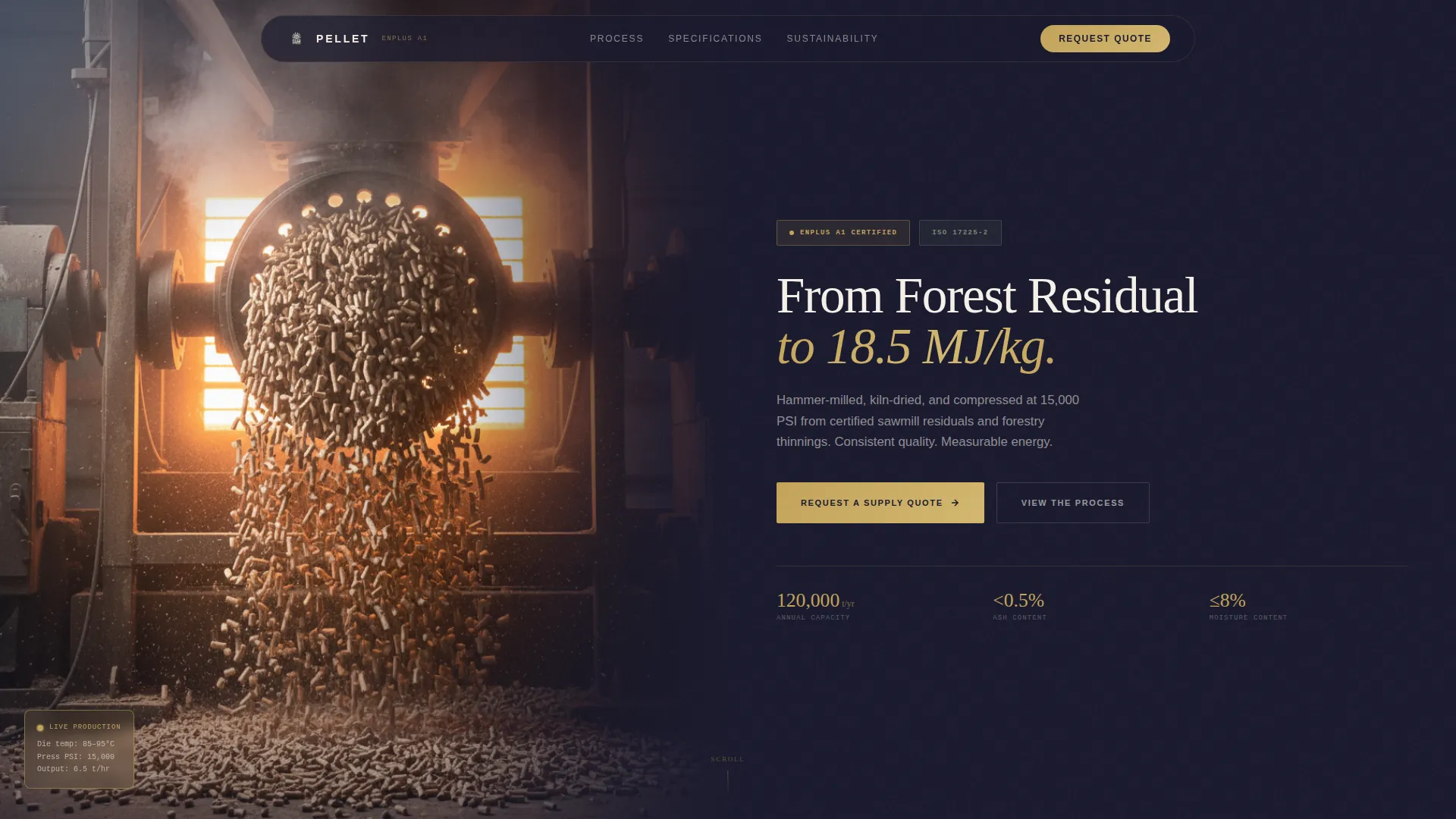
- A cinematic half-page hero with a mill interior photo and engineering headline referencing calorific value and certification
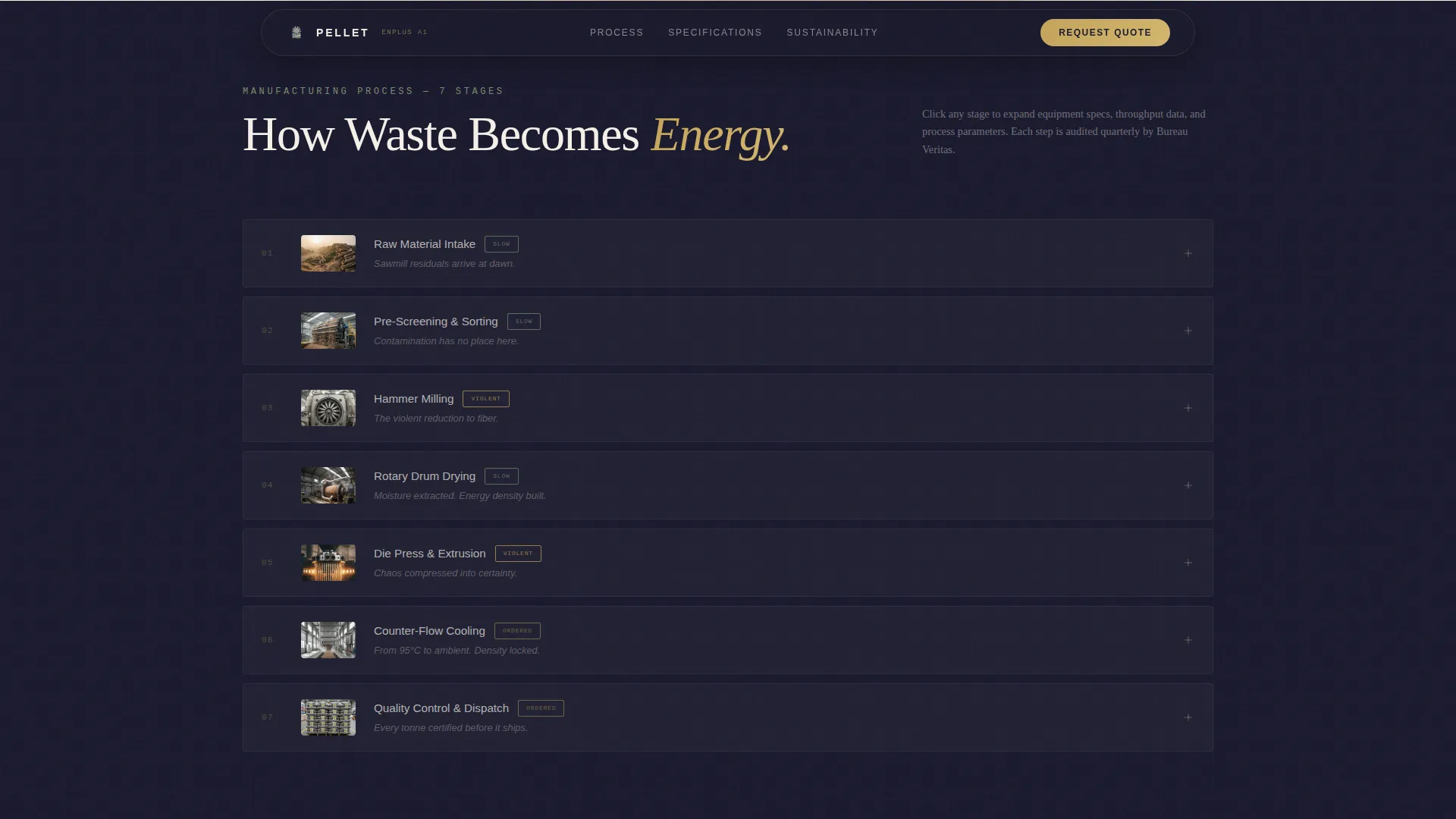
- A seven-stage expandable process gallery with blueprint-style data panels per stage
- A sticky call-to-action bar, slide-out quote form, and gated spec sheet download for dual lead capture
Feature list
This template includes the following purpose-built components and design systems.
Seven-Stage Expandable Process Gallery
Each of the seven production stages (intake, screening, hammer mill, dryer, press, cooling, and bagging) is presented as a thumbnail that expands into a detail panel. Each panel displays tonnage data, moisture percentages, and equipment specifications in blueprint-style layout.
Sticky Quote Request Bar
After the visitor scrolls past the process gallery, a sticky bar anchors to the viewport. It carries the primary call to action "Request a Supply Quote" and persists as the visitor continues reading. The bar enters with a scroll-triggered animation.
Slide-Out Lead Capture Form
The quote form opens as a slide-out panel. It collects annual volume requirement via dropdown in metric tonnes, pellet grade selection (ENplus A1, A2, or industrial), delivery region, and company email. The form is designed for procurement-level detail without friction.
Gated Spec Sheet Download
A secondary lead path captures lighter-intent visitors with a single email field. In return, they receive a gated PDF covering calorific values, ash content, bulk density, and certification documents.
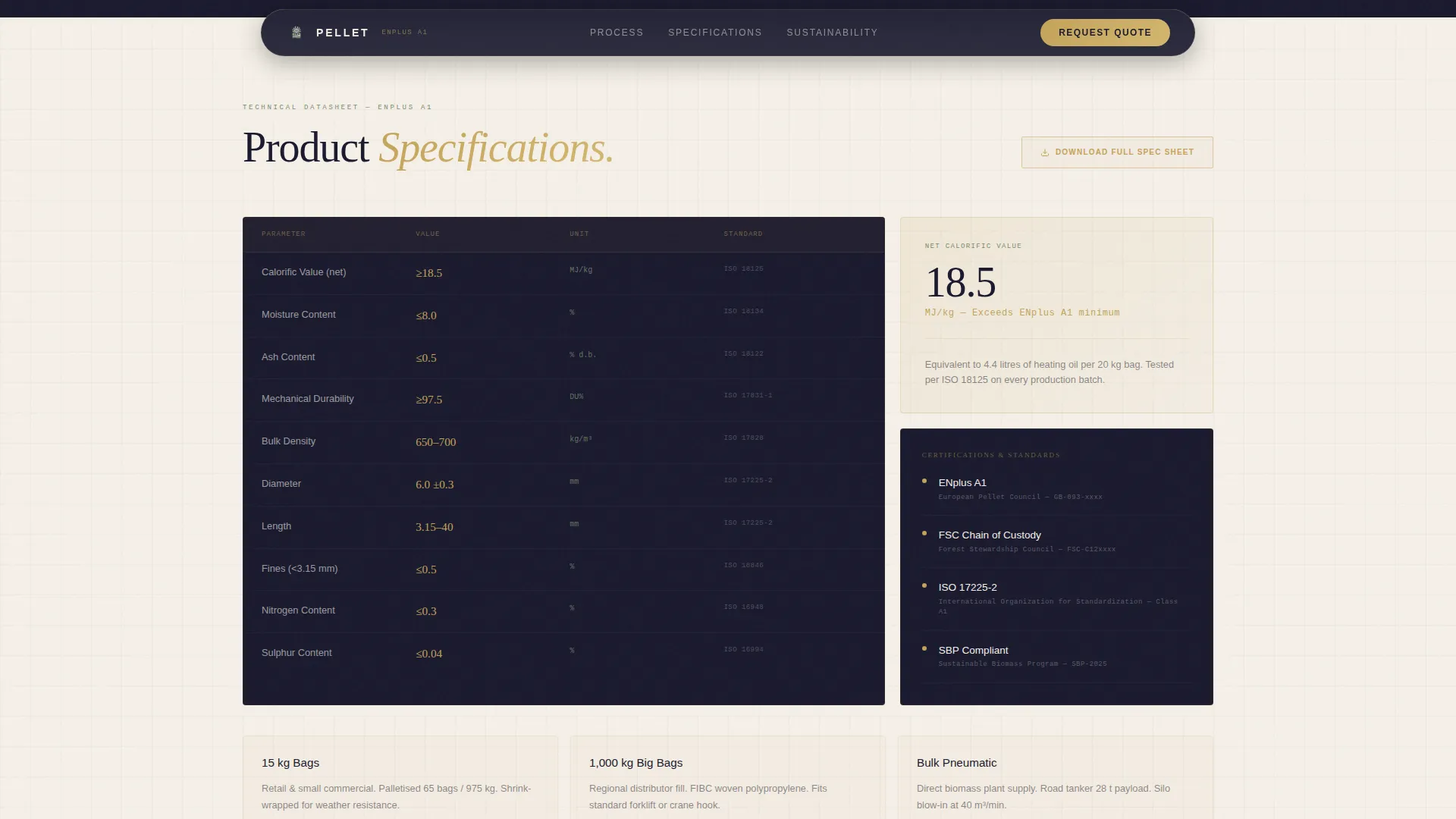
Blueprint-Style Product Specifications Grid
A bento-style data grid presents product specifications in the visual language of an engineering drawing. Data callouts use matcha green to signal sustainability metrics without overshadowing technical precision.
Sustainability and Sourcing Section
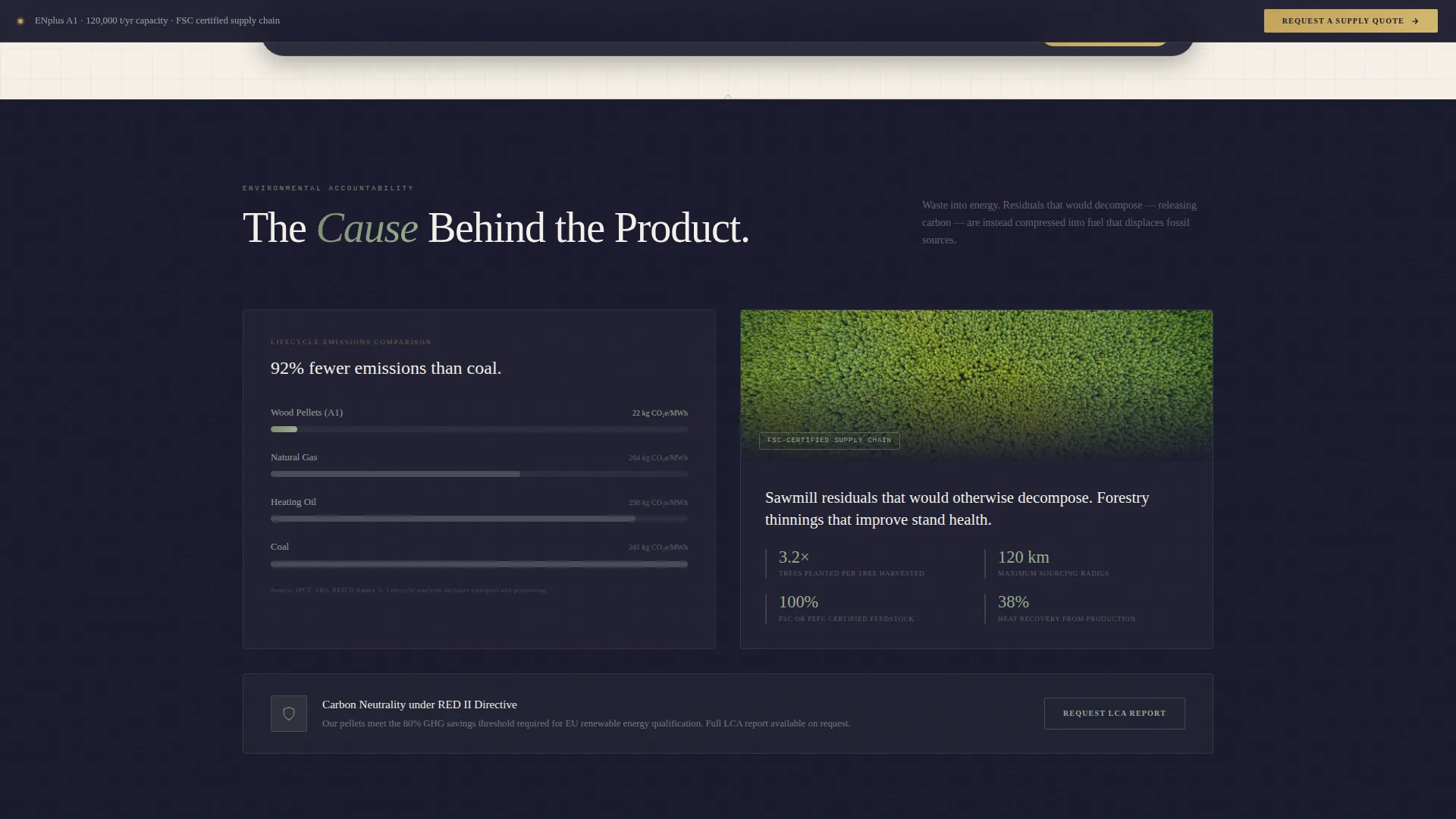
Carbon neutrality calculations and a forestry stewardship sourcing map appear below the process gallery. This section shifts the narrative from how pellets are made to why the sourcing and emissions profile matters to buyers with environmental reporting requirements.
Page sections overview
| Section | Purpose |
|---|---|
| Hero photo split | Introduce product with mill interior image and engineering headline |
| Process gallery | Seven expandable production stages with specs and tonnage data |
| Product specifications | Blueprint bento grid showing calorific value, ash, and bulk density |
| Sustainability and sourcing | Carbon calculations and forestry stewardship sourcing map |
| Lead generation bar | Sticky call-to-action bar with slide-out quote form and spec sheet gate |
| Footer | Linear single-row footer with contact and certification references |
Design & branding system
The visual identity pairs engineering blueprint precision with Japanese Zen warmth. The result feels like a technical notebook left open on a sawdust-dusted workbench: authoritative but not cold.
- Color palette: sumi ink (#1A1A2E) for deep backgrounds, washi warm white (#F5F0E8) for alternate sections, hinoki gold (#C4A35A) for call-to-action elements, and muted matcha (#7A8B6F) for sustainability data callouts
- Typography: DM Sans carries the engineering weight across headlines and data labels; Fraunces introduces serif organic warmth in narrative body copy
- Section dividers rendered as thin blueprint grid lines; backgrounds alternate between ink and washi to control reading rhythm
Mobile & speed optimization
The template is designed desktop-first to serve procurement managers working at workstations. It remains fully responsive for mobile visitors reviewing specs on-site or in the field.
- Server Components handle static sections (hero, specs grid, sustainability) to keep initial load lean
- Client Components power the interactive gallery expand/collapse, slide-out form panel, and sticky bar entrance
- GSAP scroll-reveal animations are scoped to the process gallery and lead generation bar to avoid unnecessary overhead elsewhere
How this template helps you convert
The page is structured so that proof of manufacturing quality arrives before any ask. By the time the call to action appears, the visitor has already seen the full production process and verified product specifications.
- The seven-stage process gallery builds technical credibility section by section, so procurement managers arrive at the quote form already confident in supplier capability
- The dual lead path captures both committed buyers through the slide-out quote form and early-stage researchers through the gated spec sheet, widening the conversion funnel without compromising form quality
Other information about this template
This template is categorized under Agriculture and Environment, within the Forestry and Timber subcategory. It is designed specifically for the wood pellet manufacturer niche.
- The template style is Gallery and Detail, combining visual process documentation with structured specification display
- The creative direction follows a Movement and Cause narrative: the scroll traces raw fiber becoming energy, then shifts to sustainability stakes
- The header concept is a Half-Page Photo and Text split, balancing industrial photography with a clean engineering headline
- The lead-generation direction prioritizes quote volume and spec-sheet capture as the two primary conversion outcomes
- ENplus A1 certification, 18.5 MJ/kg calorific value, and 15,000 PSI compression are referenced in the template as specific product proof points
Theme
Engineering Blueprint
Creative direction
Movement & Cause
Color system
Japanese Zen
Style
Gallery + Detail
Direction
Lead Generation
Page Sections
Seven-stage Expandable Process Gallery
Sticky Quote Request Bar
Slide-out Lead Capture Form
Gated Spec Sheet Download
Blueprint-style Specifications Grid
Sustainability and Sourcing Section
Related questions
Who is this landing page template designed for?
What lead capture options does the template include?
Can I customize the product specification data shown in the template?
Does the template support both desktop and mobile users?
What makes this template different from a generic manufacturer page?