Digital Government Services Reviews & Social Proof Website Template
The Permit landing page template turns a cluttered permit application process into a clean, guided digital experience. Built for construction professionals and development teams, it walks every applicant through upload, review, track, and approval stages with a pinned anchor nav, real-time pipeline visuals, and a focused lead-capture form. Everything feels authoritative, efficient, and ready to deploy.
by Rocket studio
Quick summary
This permit streamlined government permit application landing page template is a hub-and-spoke, anchor-nav layout purpose-built for online permit application portals. It combines a bold hero section, a scroll-linked step guide, social proof, and a dual lead-capture section into one cohesive page. Teams dealing with building permits, land-use approvals, and construction compliance will find it immediately practical.
Who this template is for
Construction and development professionals spend real money every day permits sit in review. This template speaks directly to the people carrying that cost.
- General contractors managing multiple active building projects who need bulk permit tracking across counties and jurisdictions
- Architectural firms whose junior staff spend entire working days on hold with local department offices trying to submit plans
- Commercial property developers for whom a single delayed building permit can mean thousands in daily carrying cost
What problem this template solves
In today's digital landscape, applicants still face confusing paper-based processes, unreturned calls, and no clear schedule for when approvals will occur. The template replaces that friction with a structured digital sequence.
- Construction teams cannot easily identify permit status across multiple active projects without calling each city or district office individually
- Receiving permit applications through fragmented channels forces agencies to do manual data entry, which increases risk of human error and slows reviews
- Applicants lack guidance on which document checklist to submit, which regulations apply, and what inspections are required before approvals are granted
What you get with this template
Every section of this template is designed to move an applicant from confusion to confidence. It covers the full permit journey in a single, scrollable page.
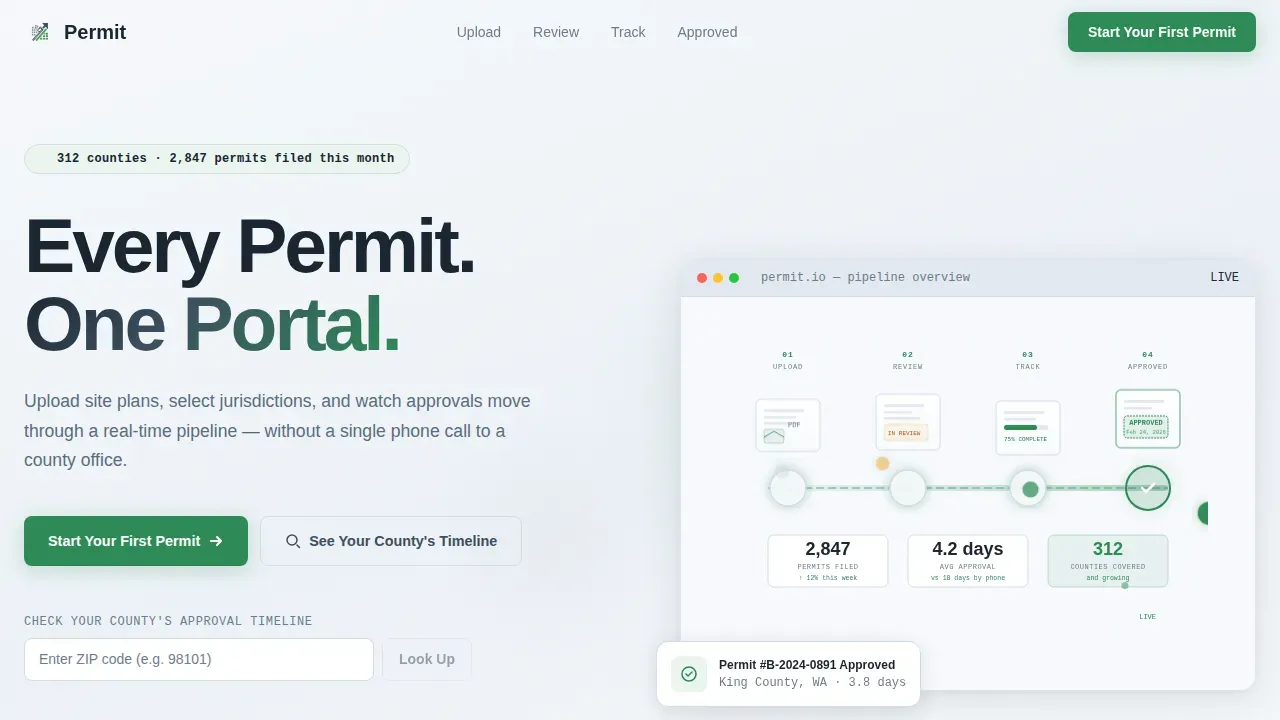
- A giant headline hero with an animated isometric pipeline illustration showing permits moving through approval stages in real time
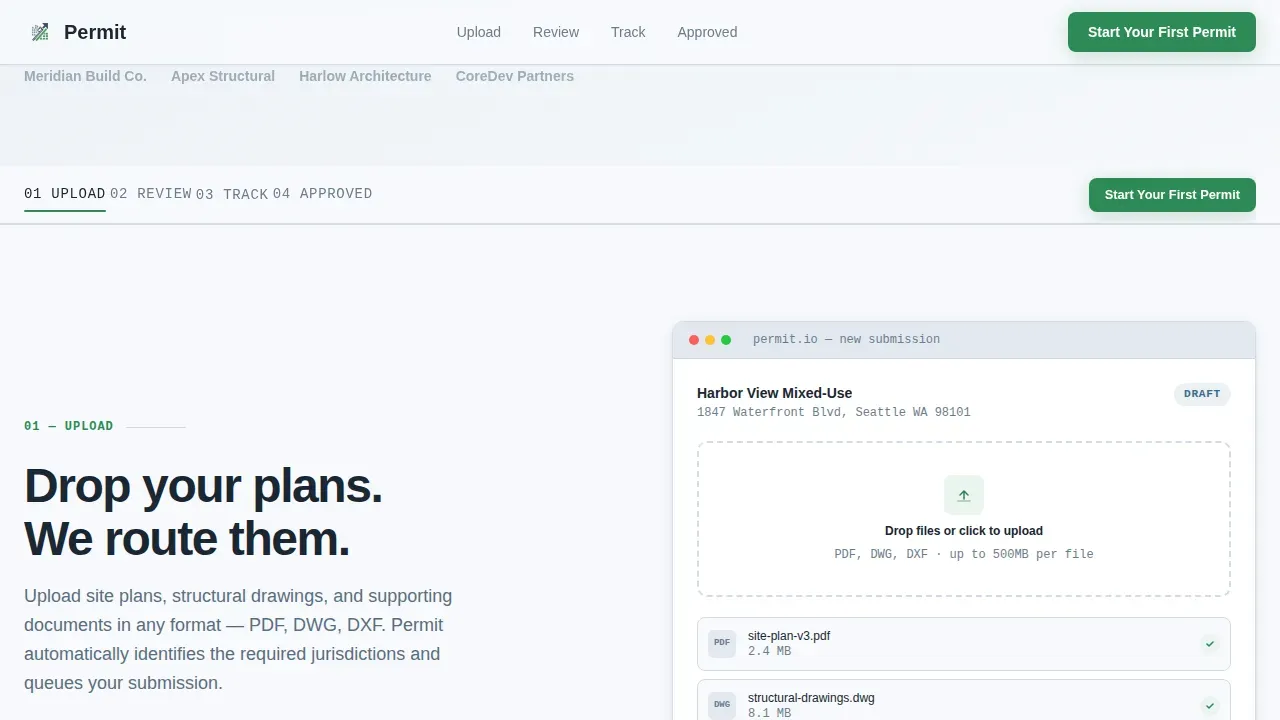
- A pinned anchor nav with four spokes: Upload, Review, Track, and Approved, each revealing an interface mockup as the user scrolls
- A dual call-to-action lead-capture section featuring a three-field form and a zip-code county timeline lookup widget
Feature list
This template includes purpose-built components that reflect real construction and compliance workflows. Each element serves a specific role in making permit applications easier to understand and act on.
Pinned Anchor Navigation
The anchor nav pins to the top of the viewport as the visitor scrolls. Each spoke links to a named permit stage: Upload, Review, Track, Approved. This structure keeps the applicant oriented through the full permit journey without losing their place.
Animated Pipeline Hero
The header pairs an oversized left-aligned headline with a minimal isometric illustration on the right. Nodes in the pipeline pulse softly in approval green, showing the system processing permits in real time. No stock photography is used; the visual communicates process, not people.
Step-by-Step Interface Mockups
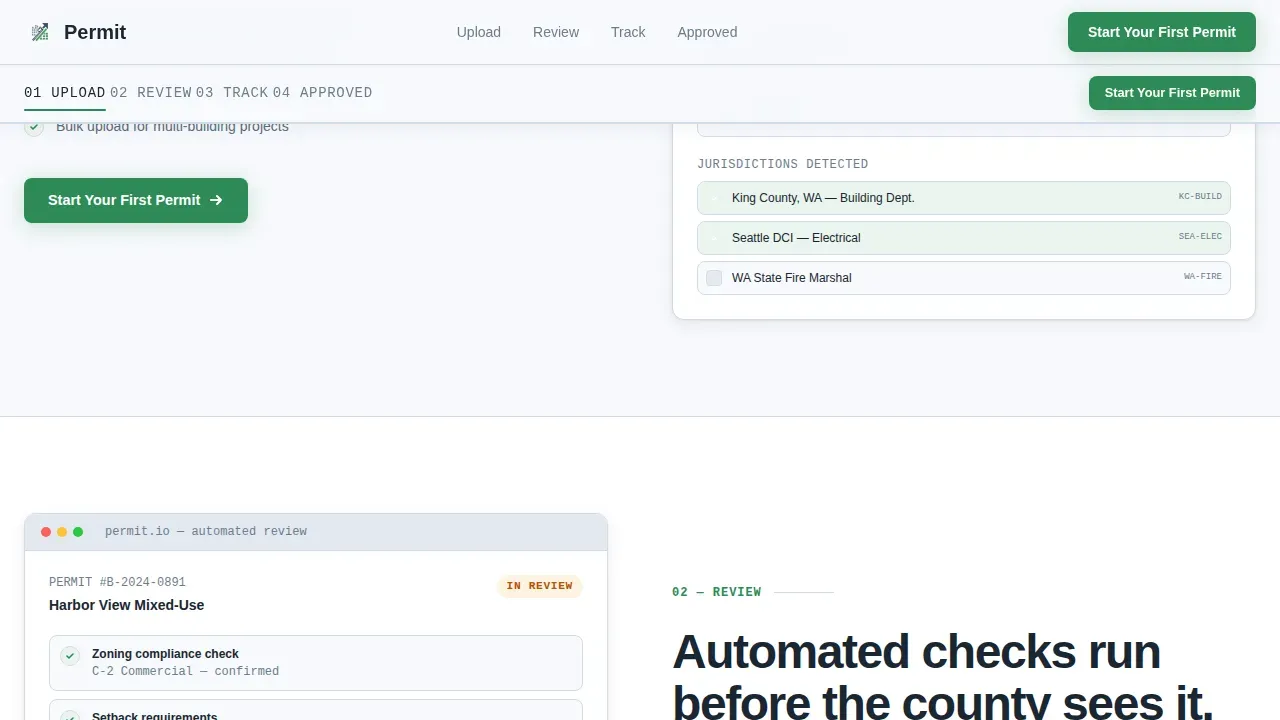
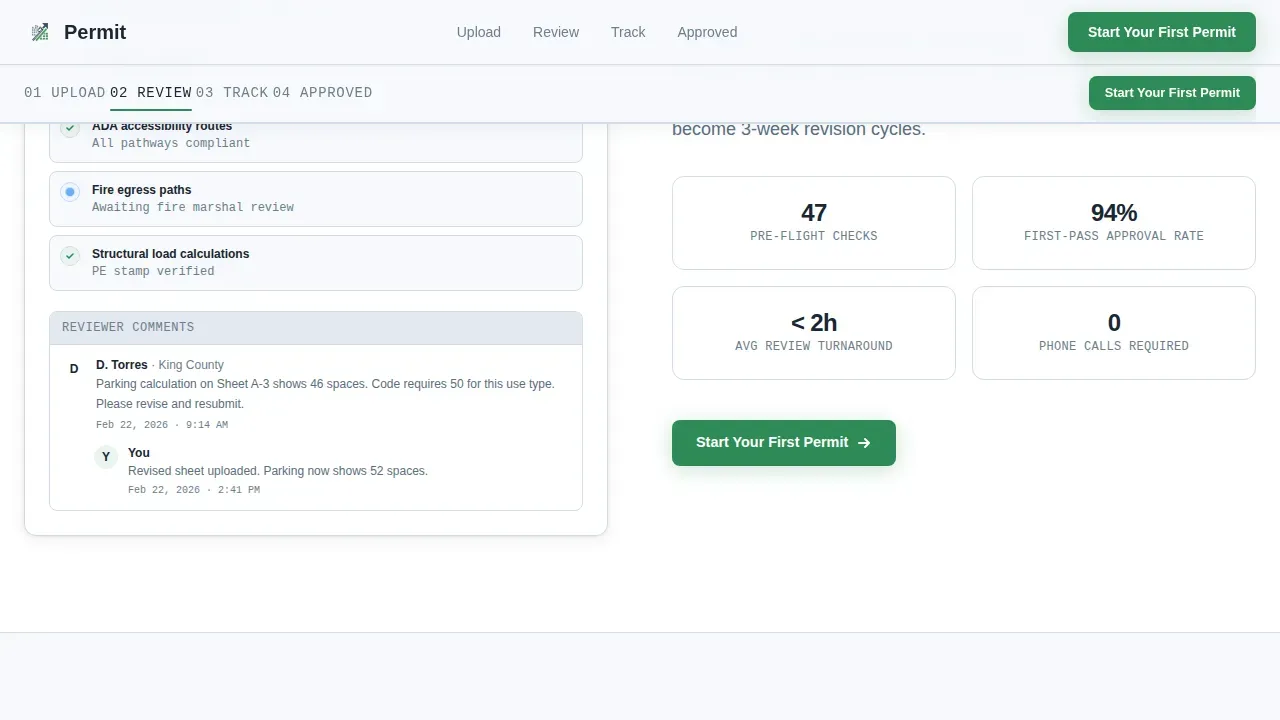
Each anchor spoke opens with a numbered step and a single-sentence promise, then reveals an actual interface screenshot: the upload screen, the status dashboard, and the notification timeline. By the final section, visitors feel they have already used the product.
Dual Lead Capture Section
The lead-gen section includes a three-field form collecting company name, average permits per month via dropdown, and work email. A secondary path offers a zip-code lookup that returns average approval days for that county, delivering immediate value before any commitment is required.
Jurisdiction and County Timeline Lookup
The zip-code widget lets an applicant enter their location and see average approval timelines for their specific district. This builds trust with local construction teams and provides concrete guidance on what to expect when they submit plans.
Recurring Primary call to action
The primary call-to-action button, "Start Your First Permit," appears in the header, repeats at each spoke section, and anchors the final lead-gen area. Consistent placement meets the applicant wherever they are ready to act.
Page sections overview
| Section | Purpose |
|---|---|
| Hero with headline | Establish value, show pipeline animation, present primary call to action |
| Anchor nav bar | Pin permit stage links (Upload, Review, Track, Approved) to viewport top |
| Upload step section | Show file upload interface mockup, explain document submission |
| Review step section | Display review status dashboard, describe agency routing |
| Track step section | Show notification timeline mockup, explain real-time tracking |
| Approved step section | Confirm completion state, repeat primary call to action |
| Social proof section | Display ROI metrics, contractor testimonials, county coverage stats |
| Lead gen form | Capture company name, permit volume, work email |
| Zip code lookup | Return county-specific approval timelines, secondary lead path |
| Footer row | Linear single-row footer with key links |
Design & branding system
The visual identity follows a Corporate Precision theme that feels like a freshly pressed government document: authoritative but breathable. Every color and type choice reinforces compliance, structure, and trust.
- Cloud Canvas color system uses open-sky white (#F7F9FC) as the background, administrative slate (#3D4F5F) for headings and body text, form-field gray (#E2E8F0) for input surfaces, and approval green (#2E8B57) reserved exclusively for progress indicators, success states, and primary call to action buttons
- Typography uses Plus Jakarta Sans for all headings and body copy, with JetBrains Mono applied to status labels and code-style elements such as permit ID strings and timeline timestamps
- No photography is used; all visuals are minimal isometric illustrations and interface screenshots that communicate process and efficiency without distraction
Mobile & speed optimization
The template is built desktop-first to match how contractors and architects work at their desks, while remaining fully responsive to tablet viewports. Layout decisions support fast comprehension and easy interaction at any screen size.
- A responsive single-column layout stacks cleanly on tablet viewports, avoiding horizontal scrolling and keeping permit stage content readable without reformatting
- Buttons and interactive elements are sized to meet minimum touch-target dimensions so the zip-code lookup and lead-gen form remain usable on touch screens
- Server Components handle static sections such as the hero and social proof block, while Client Components manage the interactive anchor nav and zip-code lookup widget for efficient rendering
How this template helps you convert
Every layout decision in this template is built around reducing the friction that stops a contractor or developer from taking the first step. The page is built to convert browsers into qualified leads.
- The primary call to action appears above the fold in the hero and repeats at every anchor spoke, so the applicant always has a clear next action whether they are skimming or reading in depth
- The zip-code timeline lookup captures a lead while returning immediate, specific value: the average approval days for their county, making the request feel like assistance rather than a gate
- The three-field lead form is minimal by design, asking only for company name, permit volume, and work email, so completion time is short and drop-off is reduced
Other information about this template
This template is well-suited to teams that create and maintain permit templates for multiple project types. Regularly reviewing and updating permit templates is essential for maintaining compliance and efficiency as regulations change. Effective version control of permit templates helps prevent confusion and ensures all stakeholders are working from the most current document.
- The EPA provides resources to help operators develop Stormwater Pollution Prevention Plans (SWPPPs) required under construction stormwater permits; templates developed by those resources help document findings for site inspections and corrective actions as required by the 2022 Construction General Permit
- Automation tools can infuse dynamic fields within permit templates that auto-populate with relevant data, reducing manual workload and minimizing human error across high-volume processes
- Federal agencies and local department offices benefit from integrating solutions that fit specific jurisdictional needs; clear guidance on applicable regulations helps every applicant submit complete, compliant plans on the first attempt
- This template supports establishing a consistent structure for receiving permit applications across multiple city or district offices, helping agencies reduce back-and-forth revisions and meet published schedule commitments
- Construction teams that obtain proper building permits, schedule required inspections, and pay applicable fees on time protect their projects from stop-work orders and costly compliance gaps
- Examples of permit types this layout can support include building permits, land development permits, environmental permits, public space permits, and utilities installation permits across various jurisdictions and counties
Theme
Corporate Precision
Creative direction
Step-by-Step Guide
Color system
Cloud Canvas
Style
Hub & Spoke (Anchor Nav)
Direction
Lead Generation
Page Sections
Pinned Anchor Navigation Bar
Animated Isometric Pipeline Hero
Scroll-linked Step Mockups
Zip-code County Timeline Lookup
Three-field Lead Capture Form
Recurring Primary Call-to-action
Related questions
What types of permits can this landing page template support?
Can applicants track their permit status after submitting?
Does the template include the zip-code county timeline lookup?
How does this template handle contractors managing high permit volumes?
Is this template suitable for agencies receiving permit applications?