Confined Space Safety Service Landing Page Template
Permit is a single-column landing page template built for confined space entry service providers. It targets EHS managers, plant supervisors, and general contractors who need fast, credible proof that a professional team can handle compliance, attendant coverage, and rescue standby. The layout reads like a technical data sheet: direct, specific, and structured to convert serious buyers on first visit.
by Rocket studio
Quick summary
Permit is a single-column landing page template designed for confined space safety service teams. It presents cost comparisons, equipment credentials, and a turnaround case study in one clean scroll. The layout is built for industrial buyers who want data before they dial. Every section answers the next question before the visitor has to ask it.
Who this template is for
This template is built for confined space entry contractors and safety service providers who sell to demanding industrial clients. It speaks directly to buyers who evaluate vendors on compliance depth and operational speed, not marketing language.
- EHS managers working against OSHA 1910.146 permit deadlines at refineries or water treatment facilities
- Plant supervisors who need next-day attendant coverage for a planned turnaround
- General contractors bidding projects that require a rescue standby team they cannot staff internally
What problem this template solves
Industrial safety buyers do not trust vague claims. They need to see costs, certifications, and response capability laid out clearly before they consider reaching out. Most service providers lose credible leads because their web presence does not speak the language of procurement.
- No side-by-side cost comparison to justify outsourcing over in-house programs
- No visible equipment inventory or certification proof to satisfy a site safety review
- No fast-path contact form built for buyers who already know what they need
What you get with this template
This template delivers a complete, single-column sales page structured like a technical specification document. Every section is sequenced to build confidence, handle objections, and push toward a quote request.
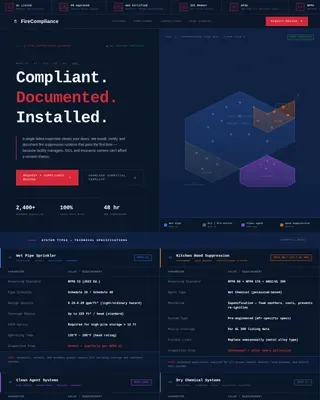
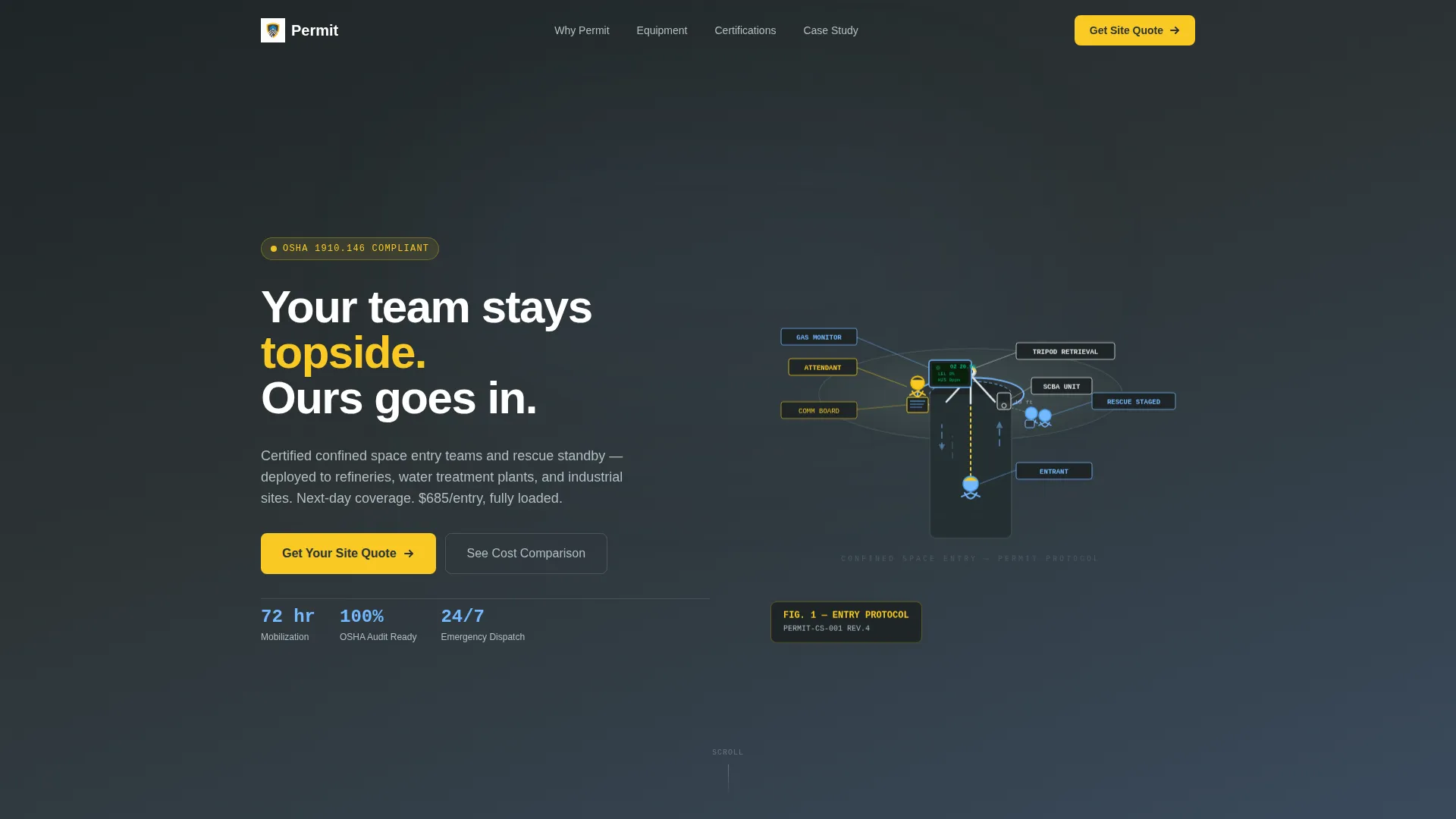
- An isometric hero illustration showing a live confined space entry, with labeled roles, equipment callouts, and subtle animation
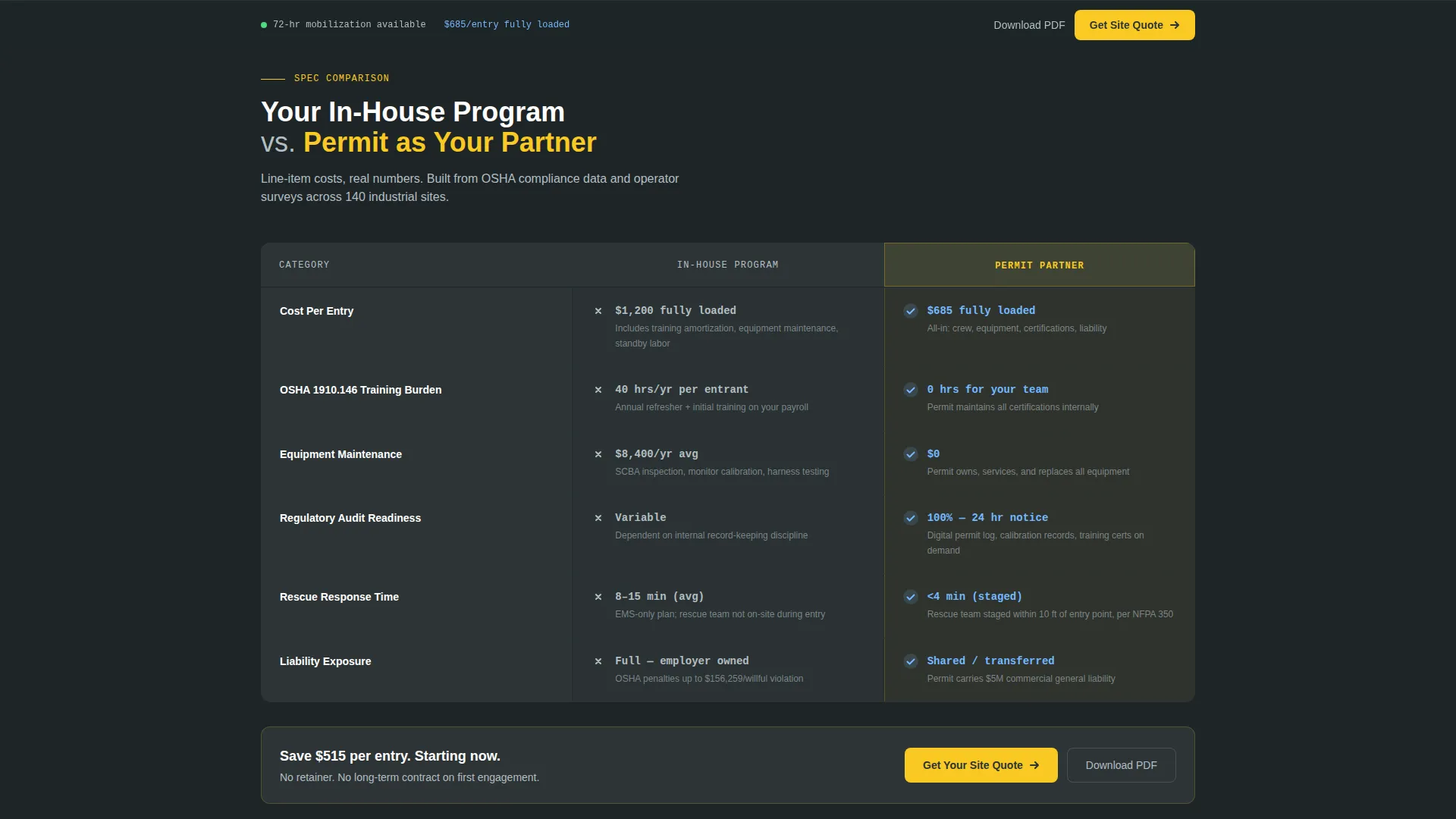
- A side-by-side comparison table contrasting in-house program costs against a professional service partner, with specific dollar figures per entry
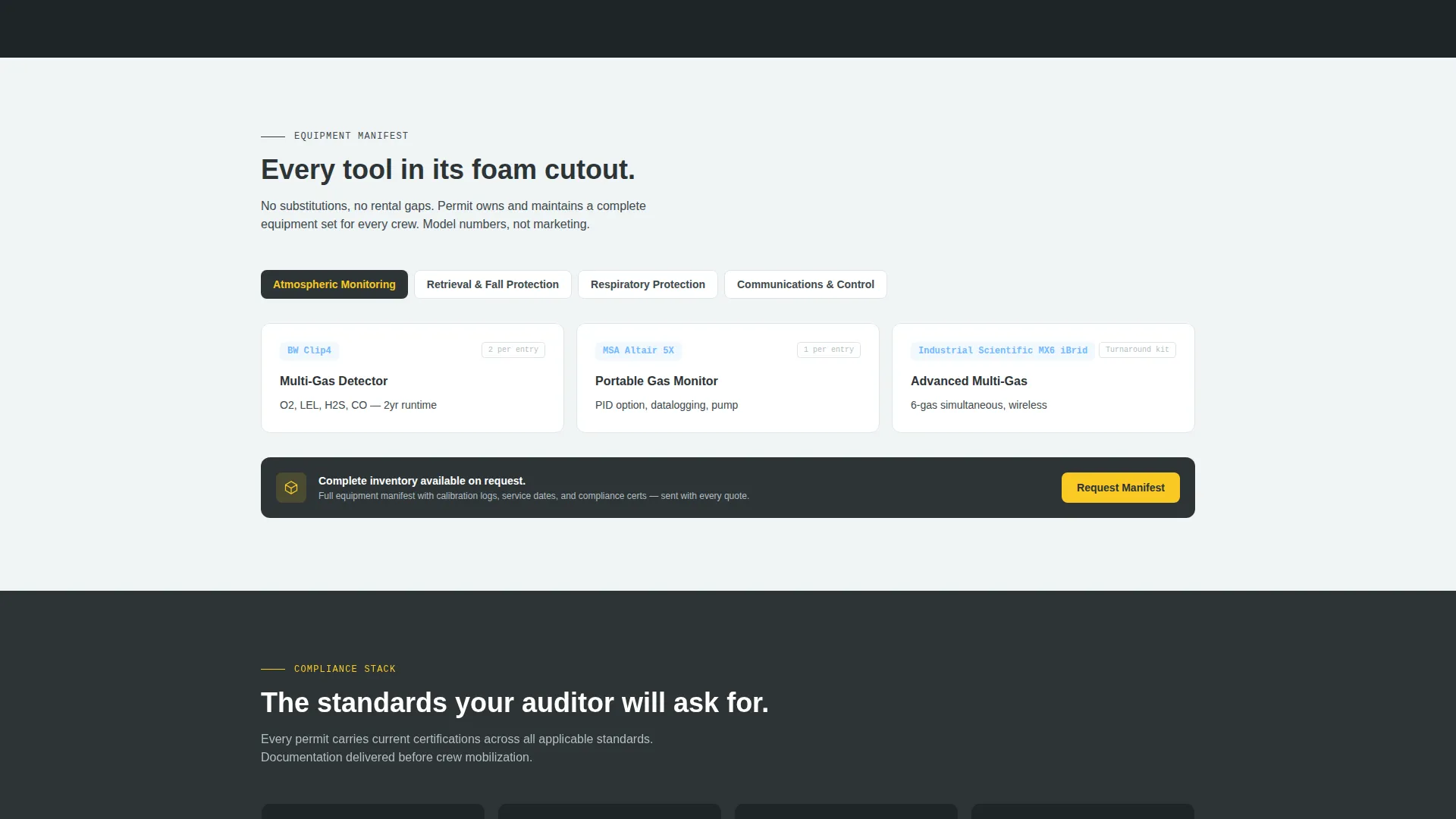
- An equipment inventory section listing monitors, tripods, and self-contained breathing apparatus units with model-level detail
Feature list
This template is built around a set of focused, high-signal components drawn directly from the design brief. Each one earns its place on the page.
Isometric Hero with Live Entry Scene
The header features a detailed cutaway illustration of a confined space entry in progress. The attendant, the entrant, the tripod retrieval system, and the staged rescue team are each labeled with engineering-style callout lines. Subtle animated airflow lines and a blinking gas monitor indicator give the scene motion without distraction.
Head-to-Head Comparison Table
A structured comparison grid runs immediately below the hero section. It contrasts an in-house confined space program against a professional service partner across five rows: cost per entry, training burden, equipment maintenance, regulatory audit readiness, and rescue response time. Open-air blue checkmarks and charcoal cross marks make the winner legible at a glance.
Equipment Inventory Section
Every piece of field equipment is listed with model numbers. The section covers atmospheric monitors, tripod retrieval systems, and self-contained breathing apparatus units. This level of detail gives procurement teams and site safety reviewers the documentation they need internally.
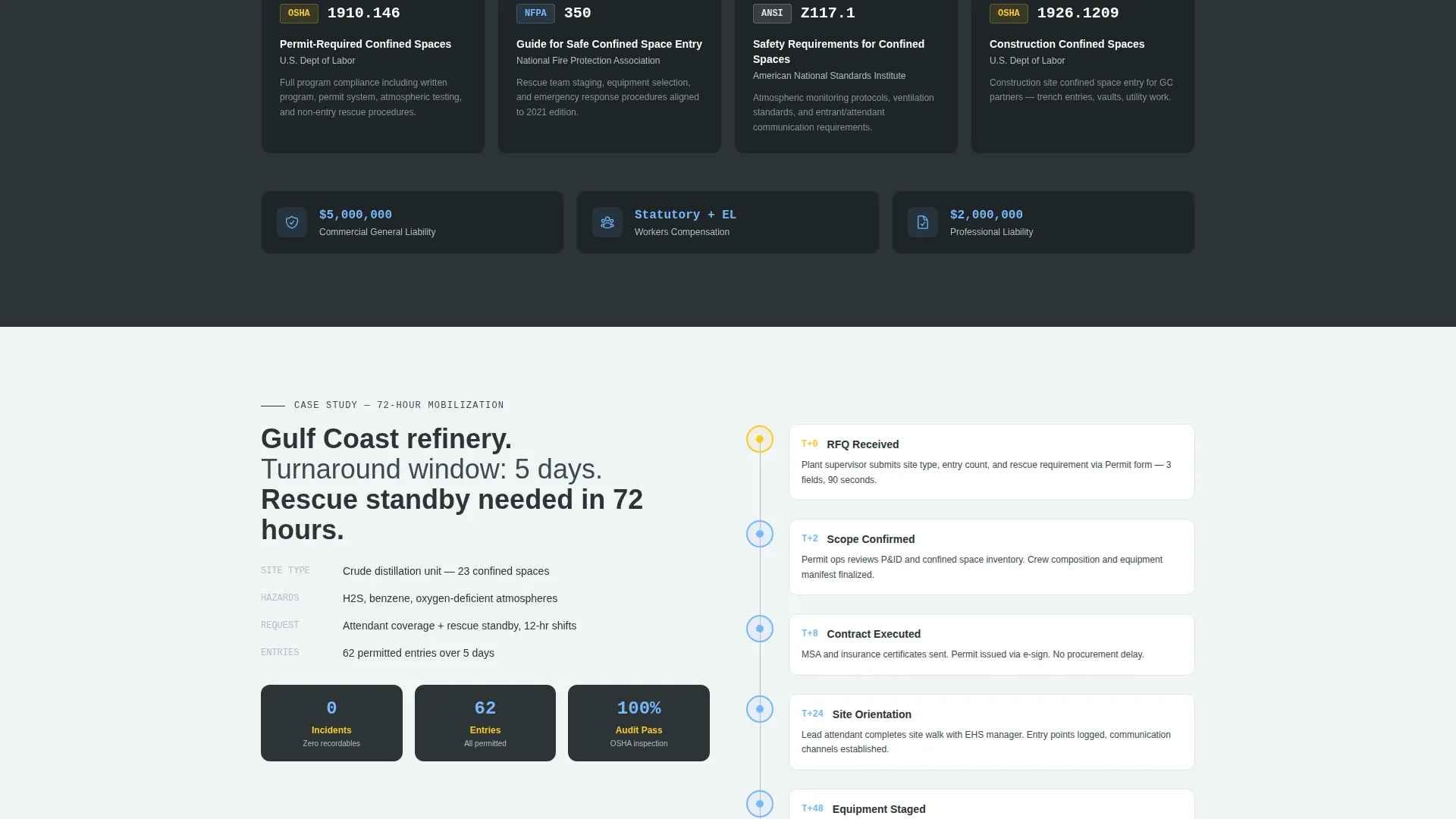
Certification Badge Display
A dedicated section surfaces key compliance credentials. Badges reference OSHA standards, NFPA 350, and ANSI Z117.1. These markers reassure EHS managers that the service provider operates within recognized industry frameworks.
Turnaround Case Study with Timeline
A real-world mobilization example is built into the page. A timeline graphic walks through a 72-hour deployment, showing the sequence from initial contact to on-site entry team. This addresses the "how fast can you actually show up" question that plant supervisors ask before every turnaround.
Sticky Quote Request Bar
After the visitor scrolls past the comparison table, a persistent bar locks to the bottom of the viewport. The primary call to action, "Get Your Site Quote," stays visible throughout the rest of the page. The short form asks for site type, monthly entry volume, and whether rescue standby is needed.
Page sections overview
| Section | Purpose |
|---|---|
| Isometric Hero | Establish scene, roles, and equipment at a glance |
| Comparison Table | Justify outsourcing with specific cost data |
| Equipment Inventory | List gear with model-level detail |
| Certification Badges | Display compliance credentials visibly |
| Case Study Timeline | Show 72-hour mobilization proof |
| Primary Quote Form | Capture ready-to-buy leads with three fields |
| Secondary PDF Lead | Capture email for procurement-stage leads |
| Sticky call to action Bar | Keep the quote action visible on scroll |
Design & branding system
The visual identity follows a Service Utility theme grounded in a Slate and Sky color system. The palette is industrial without being heavy and safety-forward without relying on alarm-level color contrasts.
- Structural charcoal (#2D3436) anchors body text and section backgrounds; permit-tag yellow (#F9CA24) marks every interactive element and call-to-action button
- Open-air blue (#74B9FF) highlights comparison winners and key data points; clean concrete white (#DFE6E9) provides breathing room between specification-dense blocks
- The creative direction follows a Spec Sheet style, meaning the scroll rhythm mimics reading a technical data sheet that continuously surfaces the next relevant answer
Mobile & speed optimization
The single-column layout is a natural fit for mobile viewports. The page was designed with field-side buyers in mind, including supervisors reviewing vendors from a job site tablet or phone.
- The sticky quote bar and the three-field form are sized for thumb-friendly interaction on smaller screens
- The isometric hero and comparison table are structured to reflow cleanly without losing legibility at narrow viewport widths
How this template helps you convert
The conversion strategy is built around removing friction for buyers who are already qualified. The page gives them data before they ask, then presents a short path to action.
- The comparison table with specific dollar figures (such as $1,200 per entry in-house versus $685 with a professional partner) makes the financial case before the visitor reaches any form
- The sticky call-to-action bar ensures the quote prompt is never more than one scroll away, while the secondary PDF download captures leads who need more time before committing to a quote
Other information about this template
This template is well suited for confined space safety service providers operating in industrial verticals such as refinery maintenance, municipal water treatment, and telecom vault inspection. The layout structure supports a service-first business model where trust and compliance documentation close deals.
- The quote form collects site type (refinery, wastewater, telecom vault, or other), entries per month, and rescue standby need, so incoming leads are pre-qualified before any follow-up call
- The secondary lead capture path, a downloadable scope comparison document, gives procurement-stage buyers a branded asset they can forward internally without requiring a phone number on first touch
- The design system and layout are appropriate for teams working under OSHA 29 CFR 1910.146, the federal permit-required confined spaces standard, as well as NFPA 350 and ANSI Z117.1 frameworks
Theme
Engineering Blueprint
Creative direction
Step-by-Step Guide
Color system
Midnight Blue
Style
Card Grid (Modular)
Direction
Content/Resource
Page Sections
Isometric Hero with Animated Entry Scene
Side-by-side Cost Comparison Table
Equipment Inventory with Model Numbers
Certification Badge Section
Hour Mobilization Case Study
Sticky Quote Bar and Dual Lead Paths
Related questions
Who is this landing page template designed for?
What sections come included in the template?
Does the quote form require a phone number?
Can this template support a secondary lead capture path?
Is this template suitable for a single service targeting multiple buyer roles?