Digital Government Cost Calculator Website Template
Permit is a split-screen landing page template built for online business license portals. It pairs a bold search input with a live stat counter wall, then layers proof through a jurisdiction map, a step-comparison panel, an approvals feed, a cost-savings calculator, and a gated PDF checklist. The result is a civic-style page that earns trust before it ever asks for a signup.
by Rocket studio
Quick summary
Permit is a single-page template designed for digital business license portals. It uses a 50/50 split-screen layout, a Monochrome Steel color system, and a Stats-First creative direction to build authority through data before asking anything of the visitor. Every section delivers one clear proof point, turning a research visit into a confident first step toward filing.
Who this template is for
This template is built for founders and operators in the GovTech and LegalTech space who need a high-trust, content-led entry point for their licensing portal. It works equally well for new product launches and redesigns of existing government-adjacent services.
- First-time sole proprietors searching for plain-language license guidance
- Seasoned limited liability company owners managing renewals across multiple states
- Immigrant small-business founders who need clear, jargon-free compliance information
What problem this template solves
Government licensing is confusing by default. Visitors arrive on most portals already overwhelmed, and a page that immediately asks for an account before explaining anything sends them straight back to Google. This template reverses that sequence entirely.
- Visitors receive free regulatory context before any signup request appears
- The step-count comparison shows the traditional 14-step process reduced to 3 steps
- Social proof elements replace the need for persuasive copy, letting numbers do the talking
What you get with this template
You get a fully structured, single-page layout with six distinct content sections and a sticky mobile call-to-action bar. Every section is designed to deliver one proof point and move the visitor one step closer to using the portal.
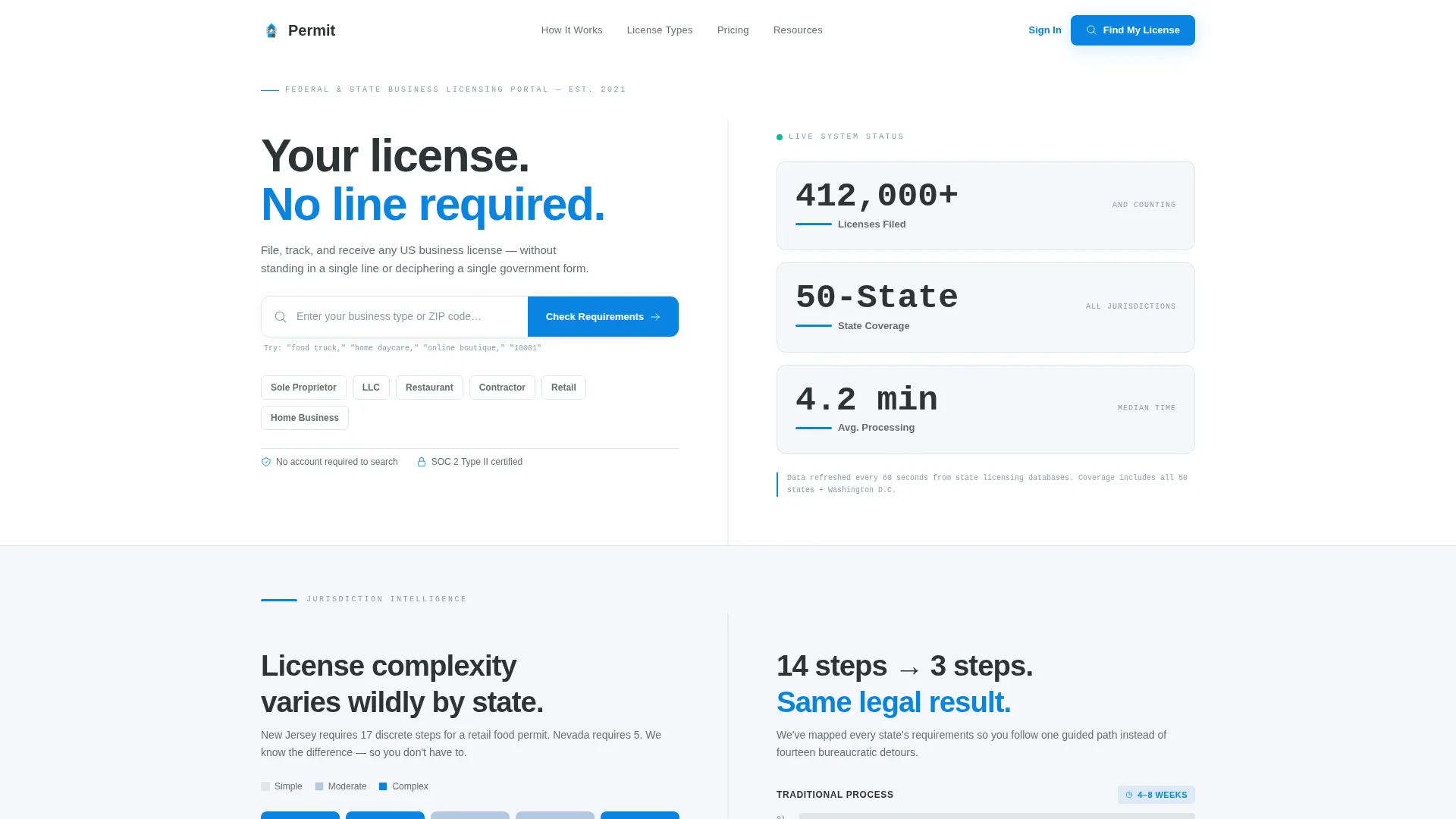
- A hero split with a search input field and a live stat counter wall
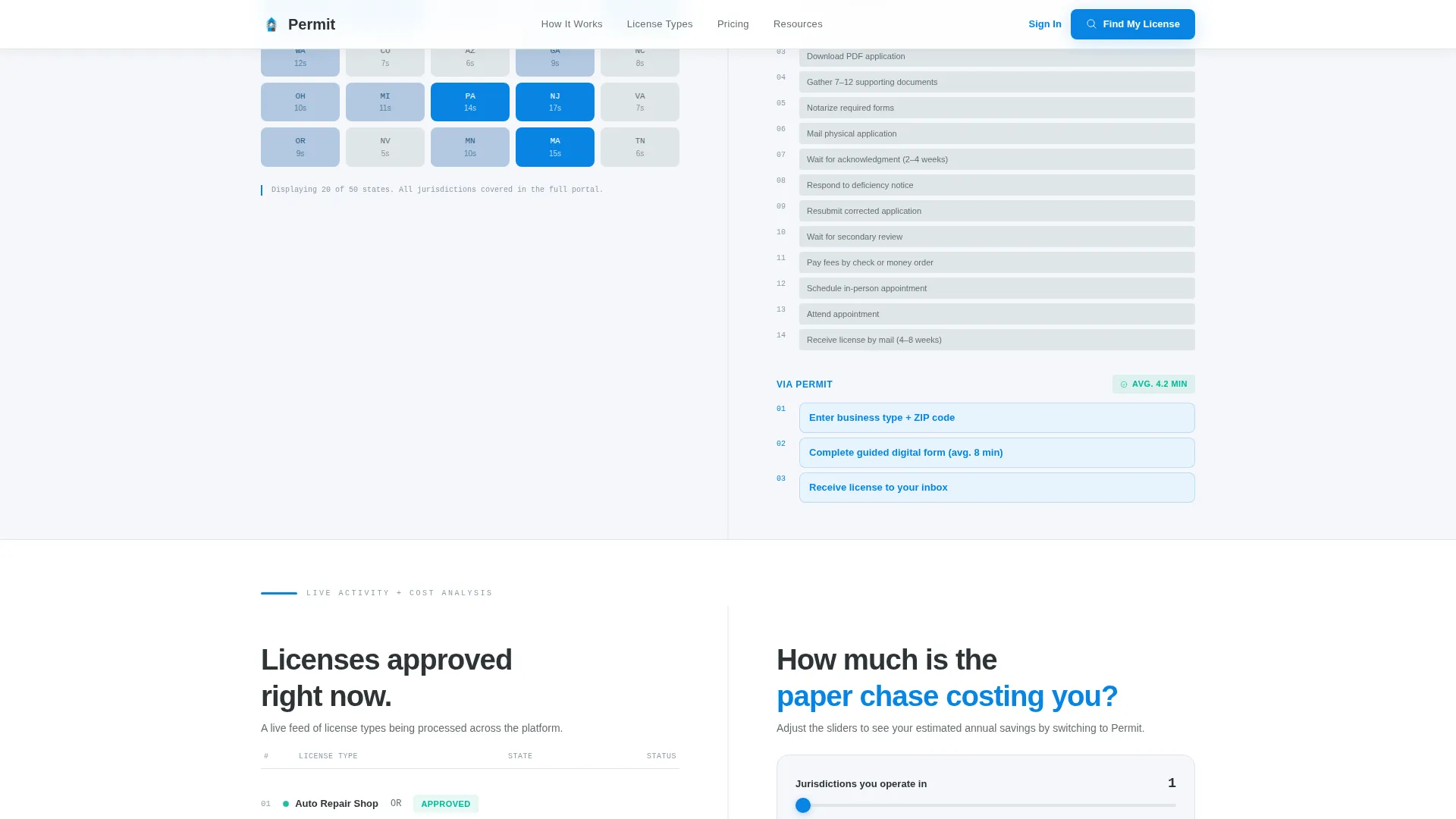
- A proof split pairing a jurisdiction complexity map with a step-count comparison
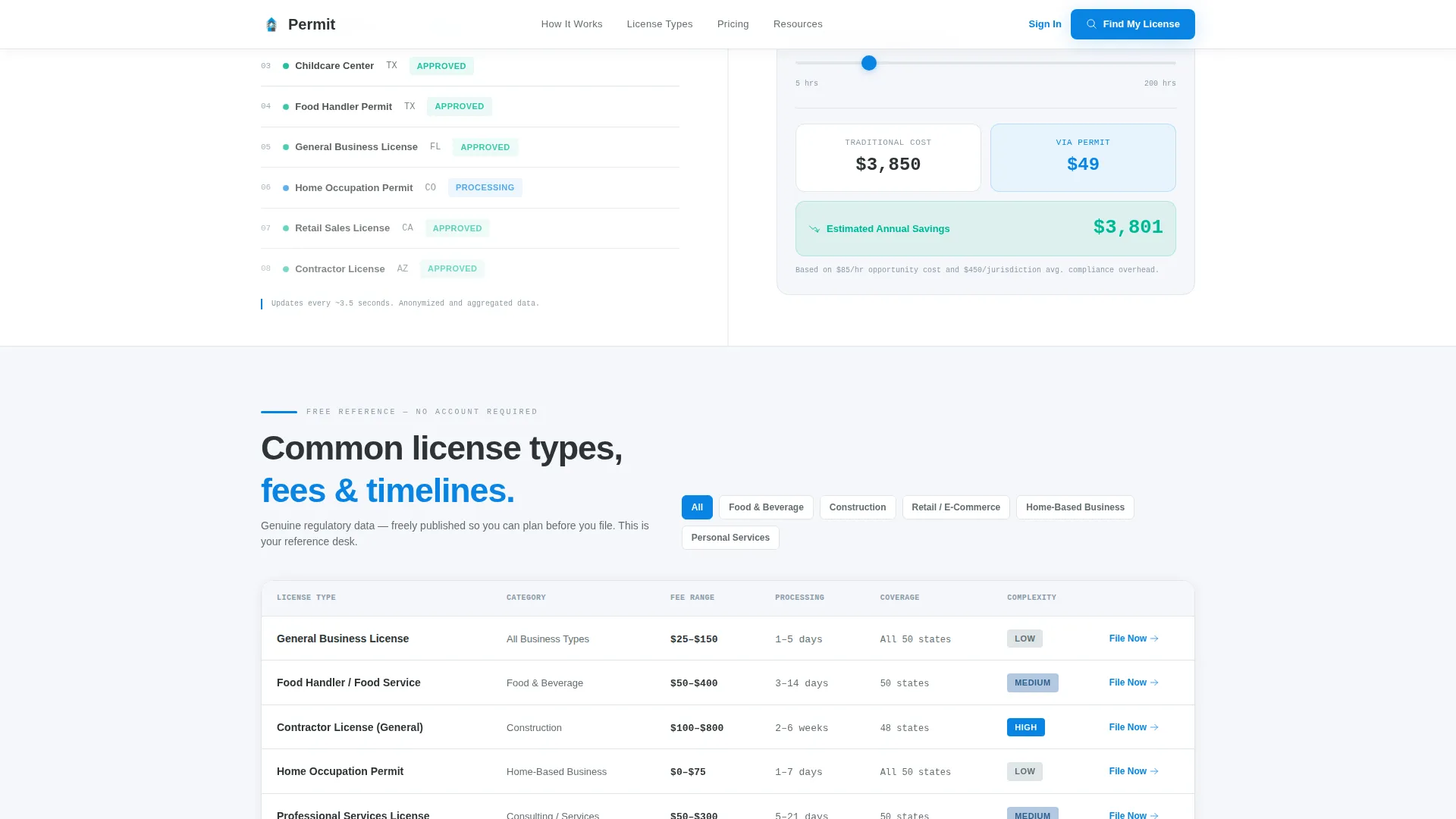
- An activity split with a recent approvals feed and a cost-savings calculator
- A license reference table showing common license types, fee ranges, and processing timelines
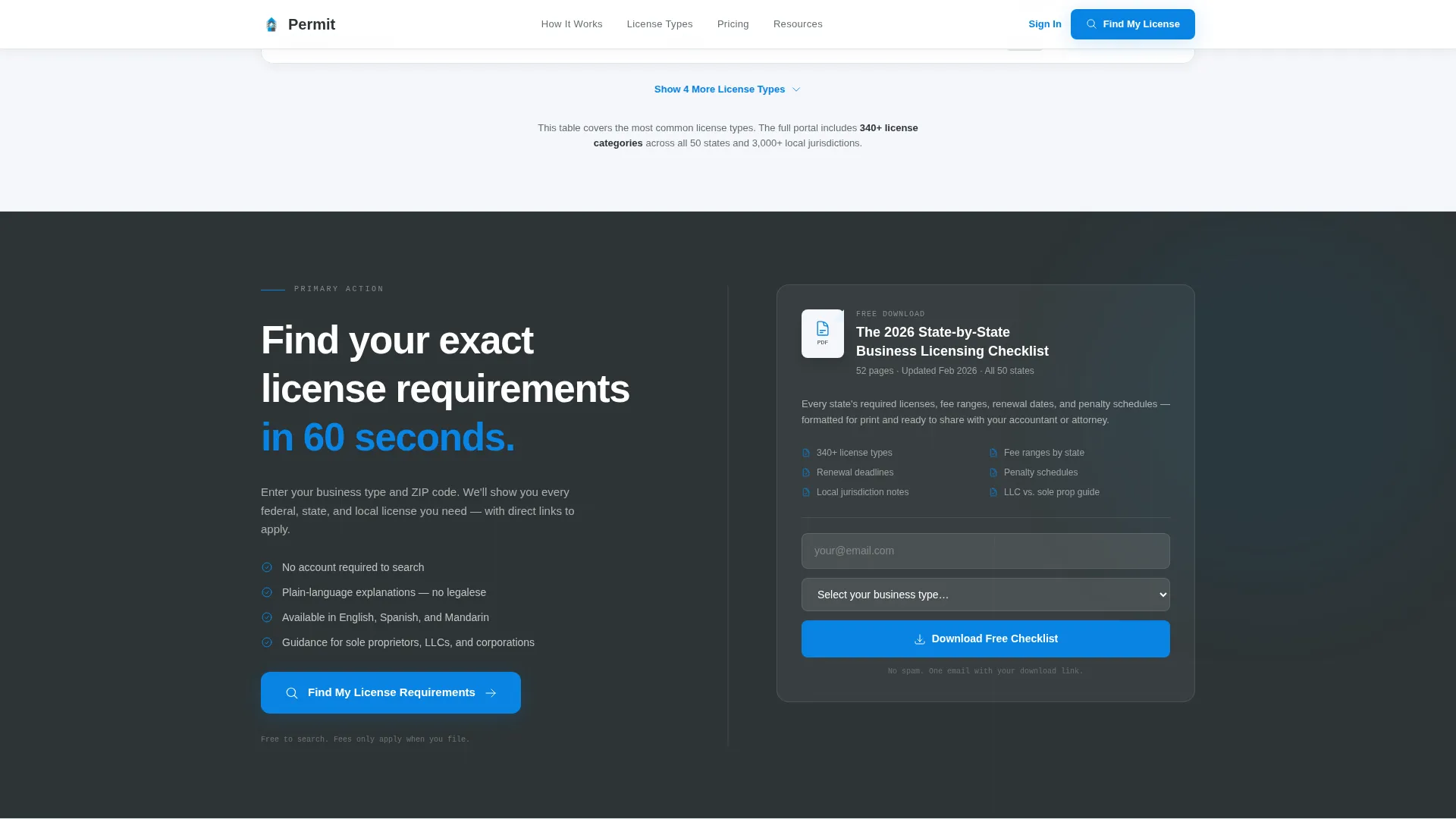
- An email-gated call-to-action section for a downloadable PDF checklist
- A linear single-row footer
Feature list
This template includes a focused set of interactive and layout components drawn directly from the project brief. Each one serves a specific role in the visitor's decision journey.
Split-Screen Search Hero
The header splits the viewport evenly. The left side holds a single search input with ghost text reading "Enter your business type or ZIP code..." and a blue "Check Requirements" button. The right side displays three animated stat blocks counting upward: licenses filed, states covered, and average processing time.
Jurisdiction Complexity Map
Below the hero, the left panel renders a map shading each US state by license complexity. This gives visitors an immediate geographic reference point before they read a single paragraph of body copy.
Step-Count Comparison Panel
The right panel in the proof section presents a side-by-side comparison. The traditional government process shows 14 steps. The portal process shows 3. The visual contrast lands the value proposition without a word of marketing language.
Live Approvals Feed
A real-time arrivals-board ticker displays recently approved license types as they scroll past. The effect reinforces that the portal is active and processing, not a static brochure.
Cost-Savings Calculator
Paired with the approvals feed, an interactive calculator lets visitors estimate what they save compared to a traditional filing route. It turns an abstract benefit into a personal, specific number.
Gated PDF Checklist
The call-to-action section offers a downloadable "2024 State-by-State Licensing Checklist" gated behind an email address and a business-type field. This secondary conversion captures leads who are not yet ready to file but are clearly in-market.
Page sections overview
| Section | Purpose |
|---|---|
| Hero Search Split | Search input left, live stat counter right |
| Jurisdiction Proof Split | State complexity map versus step-count comparison |
| Activity Feed Split | Recent approvals ticker beside cost-savings calculator |
| License Reference Table | Free display of license types, fees, and timelines |
| Checklist Call to Action | Email gate for downloadable PDF guide |
| Linear Single-Row Footer | Site links and minimal footer content |
Design & branding system
The template uses a Civic Service theme with a Monochrome Steel palette. The design deliberately avoids stock photography and illustrations, letting data and typography carry the entire visual weight. Plus Jakarta Sans is the designated typeface, chosen for its clean, modern government feel.
- Administrative charcoal (#2D3436) for primary text and structural elements
- Filing-cabinet gray (#636E72) for secondary labels and stat block backgrounds
- Permit-paper white (#F5F6FA) as the dominant page background
- Stamped-ink blue (#0984E3) reserved strictly for links, buttons, and active-state indicators
Mobile & speed optimization
The template is designed desktop-first, reflecting the research-heavy nature of a business licensing task. On smaller screens, the layout adapts with a sticky bottom bar that keeps the primary call to action visible at all times without interrupting the reading flow.
- Sticky mobile bar anchored to "Find Your License Requirements" throughout the scroll
- GSAP scroll reveals applied to each section as the visitor progresses down the page
- Count-up number animations on stat blocks and server-side rendering on static content sections
How this template helps you convert
The template follows a Content and Resource hub strategy. It gives away genuine regulatory value first and reserves the signup request for after trust is built.
- The hero search box anchors the primary call to action immediately, so visitors with high intent can act without scrolling at all.
- Each subsequent section adds one layer of proof before the next section appears, compounding credibility with every scroll.
- The gated PDF checklist captures mid-funnel visitors who need more time, turning a single-page visit into an ongoing lead relationship.
Other information about this template
This template is categorized under Government and Public services, specifically the Digital Government Services subcategory. It is positioned as a GovTech and LegalTech tool for the US market, with English-language copy, USD pricing references, and US date formatting built into the content structure.
- The intersection match score for this template's niche alignment is 13 out of a possible range, reflecting a strong fit between the civic design system and the online business license portal use case
- Animation is set to a medium intensity level using GSAP, keeping the page feeling active without becoming distracting
- Interactivity is rated high, covering the search input, the cost-savings calculator, and the FAQ toggle component
- The template supports both business-to-consumer and business-to-business audiences within the same single-page structure
Theme
Civic Service
Creative direction
Stats-First Impact
Color system
Monochrome Steel
Style
Split Screen (50/50)
Direction
Content/Resource
Page Sections
Split-screen Search Hero
Jurisdiction Complexity Map
Step-count Comparison Panel
Live Approvals Ticker
Cost-savings Calculator
Gated PDF Checklist Section
Related questions
Can I customize the stat numbers in the hero counter wall?
Does the template include the actual jurisdiction map data?
How does the gated PDF checklist work?
Is the arrivals board a real-time feed or a design component?
Who is this landing page template designed for?



