Expert House Call Vet Landing Page Template
Housecall is a sidebar companion landing page built for mobile veterinarians running Google Ads. It pairs a transparent, step-by-step trust flow with a sticky booking sidebar, guiding pet owners from first click to scheduled visit. The primary conversion path offers a downloadable Home Visit Prep Guide, while a secondary amber-highlighted call to action keeps direct booking always within reach.
by Rocket studio
Quick summary
Housecall is a single-page sidebar companion template designed for mobile veterinary practices. It leads with a ribbon of trust badges, walks visitors through every step of a home visit, and converts through two clear paths: a downloadable prep guide and a persistent booking form. The layout stays calm, credible, and action-ready throughout.
Who this template is for
This template is built for independent mobile veterinarians and small mobile vet practices that run paid search campaigns. It speaks directly to the pet owners those ads attract and gives the vet a credible, conversion-focused page to back them up.
- Mobile vets serving senior pet owners whose animals can no longer travel to a clinic
- Practitioners covering rural areas or multi-pet households where clinic visits are genuinely difficult
- Veterinarians who need a Google Ads landing page that establishes legitimacy fast
What problem this template solves
The single biggest barrier after a Google Ads click is doubt. A visitor asks: is this person real, licensed, and safe to let into my home? This template answers that question before the visitor can scroll away.
- Pet owners need proof of credentials before they will book a stranger to enter their home
- Anxiety around the unknown process of a home vet visit stops conversions before they start
- Practices without a structured trust flow lose paid traffic to better-presented competitors
What you get with this template
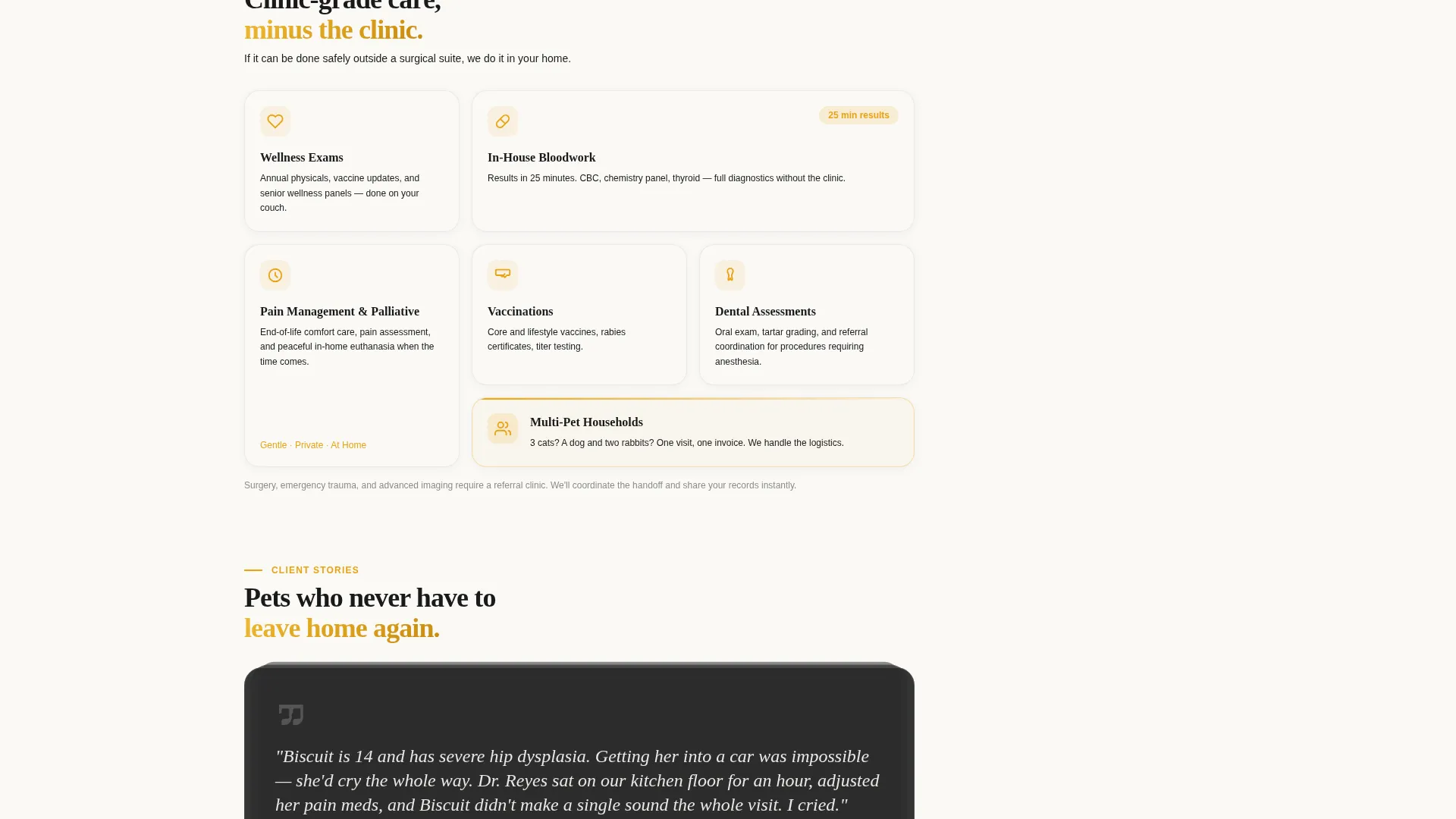
You get a fully structured landing page with a sticky sidebar companion and a layered trust architecture built into every section. Nothing here is decorative for decoration's sake.
- An award badge ribbon with credential signals placed at the very top of the page
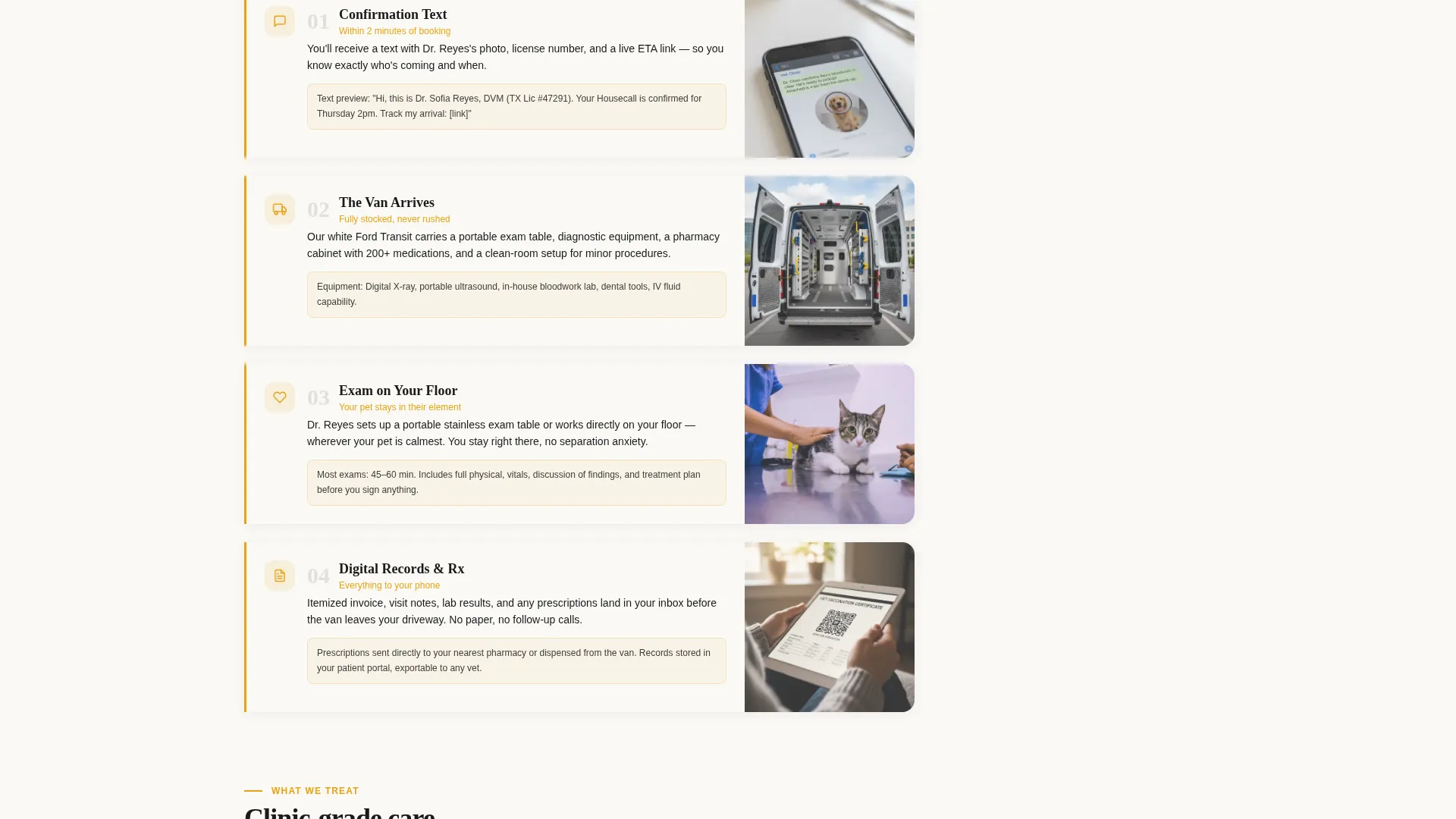
- A four-step transparent process walkthrough that shows exactly what happens after booking
- A dual-path conversion system: a gated prep guide download and a persistent sidebar booking form
Feature list
This template is built around a specific challenge: earning trust from a cold-traffic visitor who is protective of their pet and their home. Each feature below exists to reduce a real objection.
Award Badge Trust Ribbon
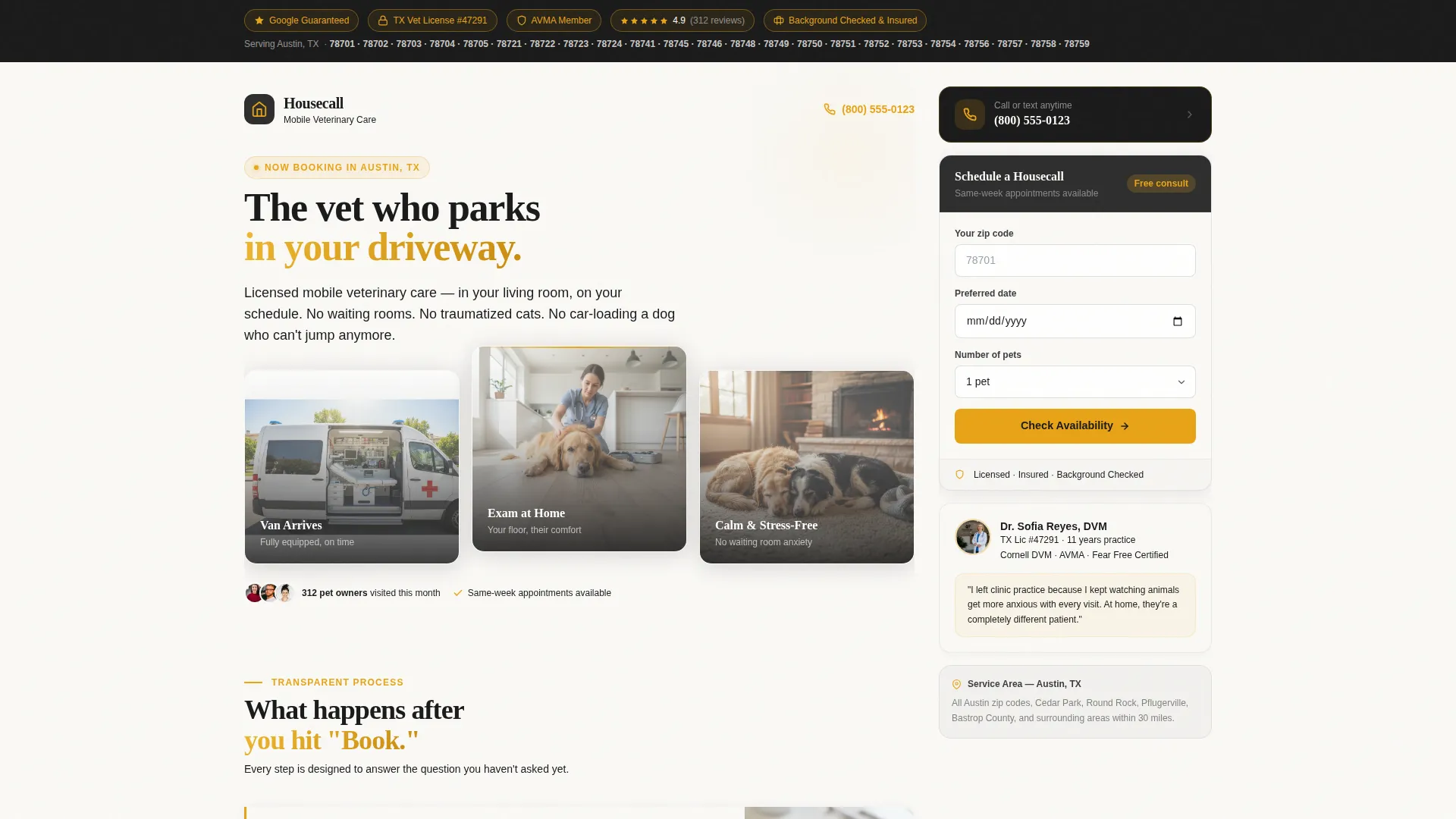
A horizontal ribbon sits at the top of the page before any other content. It displays a Google Guaranteed shield, a state veterinary board license number, an AVMA (American Veterinary Medical Association) member seal, a live star rating with review count, and a background-checked and insured badge. Each badge is rendered at full legibility against charcoal with amber micro-borders. Below the ribbon, the service area zip codes appear in bold.
Four-Step Process Walkthrough
The page scrolls through four visible steps that show what happens after a booking is made. Step 1 shows the confirmation text message including the vet's photo and license number. Step 2 shows the actual vehicle and its equipment layout. Step 3 shows a real exam in progress on a living room floor. Step 4 shows the digital invoice and prescription delivered to the owner's phone. Each step removes a layer of uncertainty.
Sticky Sidebar Booking Form
A sidebar companion follows the visitor through the entire page scroll without leaving the viewport. It holds a condensed booking form with a date picker and zip code field, plus a phone number with a tap-to-call button. The sidebar uses the charcoal and amber color system to stay visible and actionable at all times.
Gated Prep Guide Download
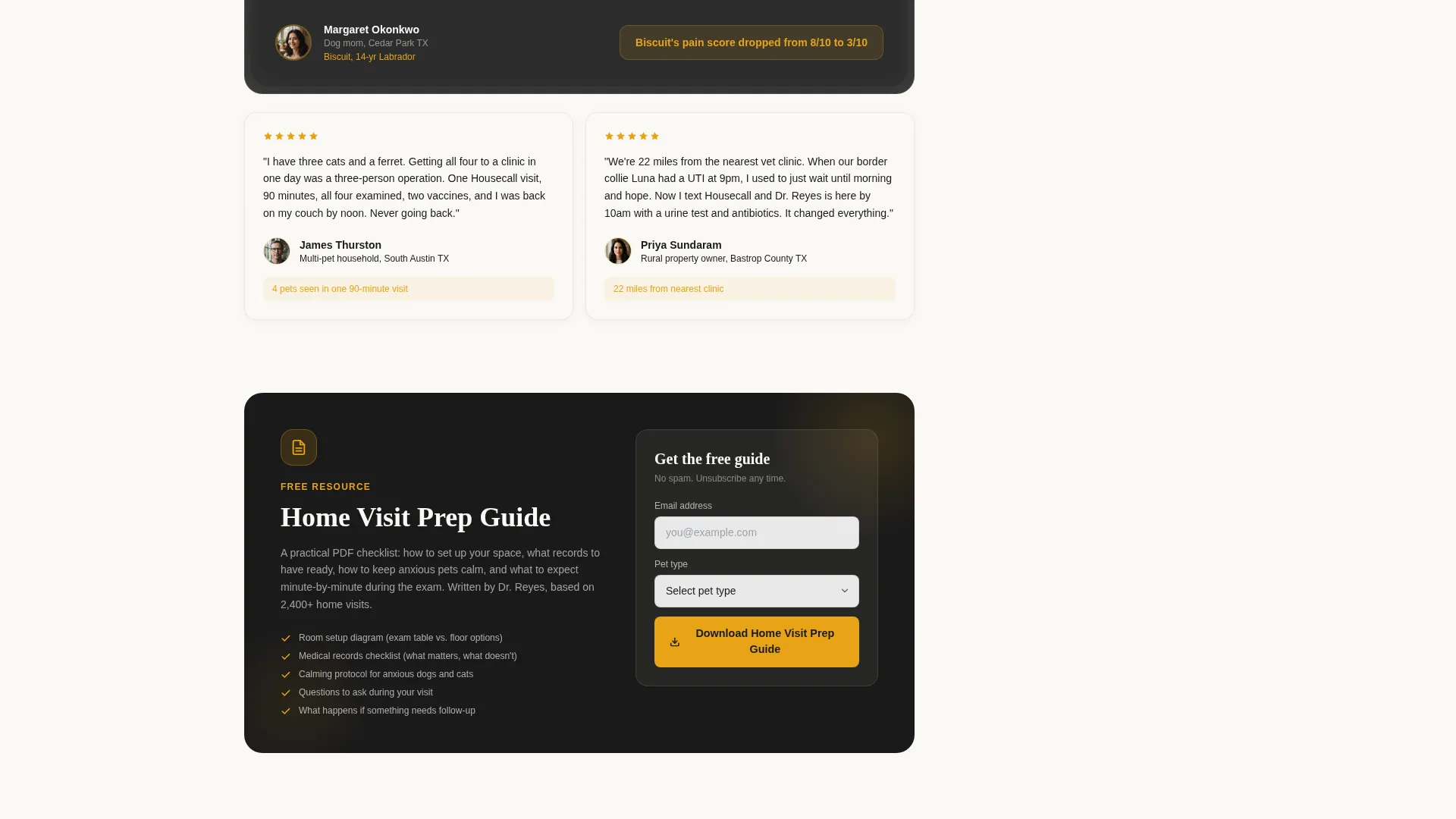
The primary conversion action is a downloadable PDF checklist called the Home Visit Prep Guide. It tells pet owners how to prepare their space, which records to have ready, and what to expect during the exam. The only form fields required are an email address and pet type (dog, cat, or exotic). The guide earns the click by delivering real utility before asking for a booking.
Service Area Zip Code Display
The service area zip codes appear in bold directly below the badge ribbon. This single line answers a high-priority question for paid traffic visitors: does this vet actually serve my location? Placing it above the fold removes one more reason to bounce.
Page sections overview
| Section | Purpose |
|---|---|
| Trust Badge Ribbon | Establishes credentials and legitimacy before the first scroll |
| Service Area Line | Confirms coverage by displaying bolded zip codes |
| Transparent Process Steps | Walks visitors through the full home visit experience step by step |
| Prep Guide Download | Captures email leads with a genuinely useful gated PDF checklist |
| Sticky Booking Sidebar | Keeps the scheduling form and tap-to-call button always visible |
Design & branding system
The visual identity follows a Service Utility theme. The palette is built to feel like a well-organized field kit: matte instruments, amber antiseptic detail, and clean sterile surfaces. Every color decision reinforces the idea that this vet is professional, prepared, and trustworthy.
- Deep veterinary charcoal (#2D2D2D) anchors the sidebar, headers, and body typography
- Warm medical-grade gray (#5C5C5C) handles supporting text and secondary user interface elements
- Amber signal light (#E8A317) highlights every call to action, badge border, and trust indicator
- Clean exam-table white (#FAF9F6) provides the content background in the main column, giving the layout clinical breathing room
Mobile & speed optimization
The layout is built with mobile visitors in mind from the start. A pet owner who clicks a Google Ad on their phone should reach a page that works immediately and completely.
- The sticky sidebar collapses into a persistent tap-to-call button and booking prompt on smaller screens
- The tap-to-call phone number is always reachable without scrolling back to the top
- The four-step process section uses real photographs sized for fast, clear rendering on mobile viewports
How this template helps you convert
This template uses two conversion paths running in parallel. The design makes sure neither path ever disappears while the visitor is reading.
- The gated Home Visit Prep Guide captures email addresses and pet type from visitors who are not yet ready to book, building a list of warm leads with low friction
- The sticky sidebar keeps the direct booking form and tap-to-call button visible at every scroll position, so visitors who are ready to act never have to hunt for the next step
Other information about this template
This template is suited to mobile vet marketing campaigns where paid search drives cold traffic that needs fast credibility signals. It is designed as a companion to a primary Google Ads landing page, functioning as a sidebar-style resource that supports the full funnel.
- Works alongside a primary mobile vet Google Ads landing page as a companion conversion asset
- The Content/Resource conversion direction means lead capture happens before any booking pressure is applied
- Pet type segmentation (dog, cat, exotic) in the prep guide form helps practices understand their incoming audience
- The template style supports a comparison-friendly content flow, making it easy for visitors to see why a home visit is the right choice for their situation
Theme
Corporate Precision
Creative direction
Team & People
Color system
Plum Executive
Style
Comparison Table
Direction
Content/Resource
Page Sections
Award Badge Trust Ribbon
Four-step Process Walkthrough
Sticky Sidebar Booking Form
Gated Prep Guide Download
Service Area Zip Code Display
Related questions
What makes this landing page different from a standard vet website?
Can I use this template without running Google Ads?
What do visitors download from the prep guide form?
Who fills in the service area zip codes on the template?
Does the sticky sidebar stay visible on mobile devices?



