Playful Family Location Tracking App Landing Page
Ping is a playful, scroll-reveal landing page template built for a family location tracking app. It guides visitors through an animated illustrated city map, interactive feature demos, and a content-led conversion flow. The template is designed to turn first-time visitors into trial signups using a free Family Safety Guide as the lead magnet.
by Rocket studio
Quick summary
Ping is a single-page, scroll-reveal landing page template for a family location sharing app. It opens with a hand-illustrated animated city map, walks visitors through interactive feature demos tied to a real family's day, and closes with a sticky trial signup and downloadable safety guide. The design is playful, geometric, and built to earn trust fast.
Who this template is for
This template is built for founders and marketers launching or promoting a family location tracking app. It fits teams that want high visual impact without a heavy development lift, and product-led brands that prefer showing over telling.
- Dual-income parent-focused app teams who need a warm, non-surveillance tone
- Freemium app brands using content-led acquisition and guide downloads
- Developers and no-code builders who want a rich, animated landing page ready to customize
What problem this template solves
Most app landing pages either feel clinical or overwhelming. For a family safety product, that tone mismatch costs trust immediately. Parents and caregivers need to feel reassured, not monitored. This template solves the tone and structure problem at the same time.
- It replaces a feature list with an interactive scroll-guided demo that lets visitors feel the product
- It frames location sharing as care rather than surveillance, protecting brand trust
- It gives the visitor a reason to convert before the signup form even appears
What you get with this template
You get a fully structured, single-page landing page with six distinct sections, a complete Dopamine Pop color system, and two typefaces pre-assigned by role. Every section is built to reveal progressively as the visitor scrolls.
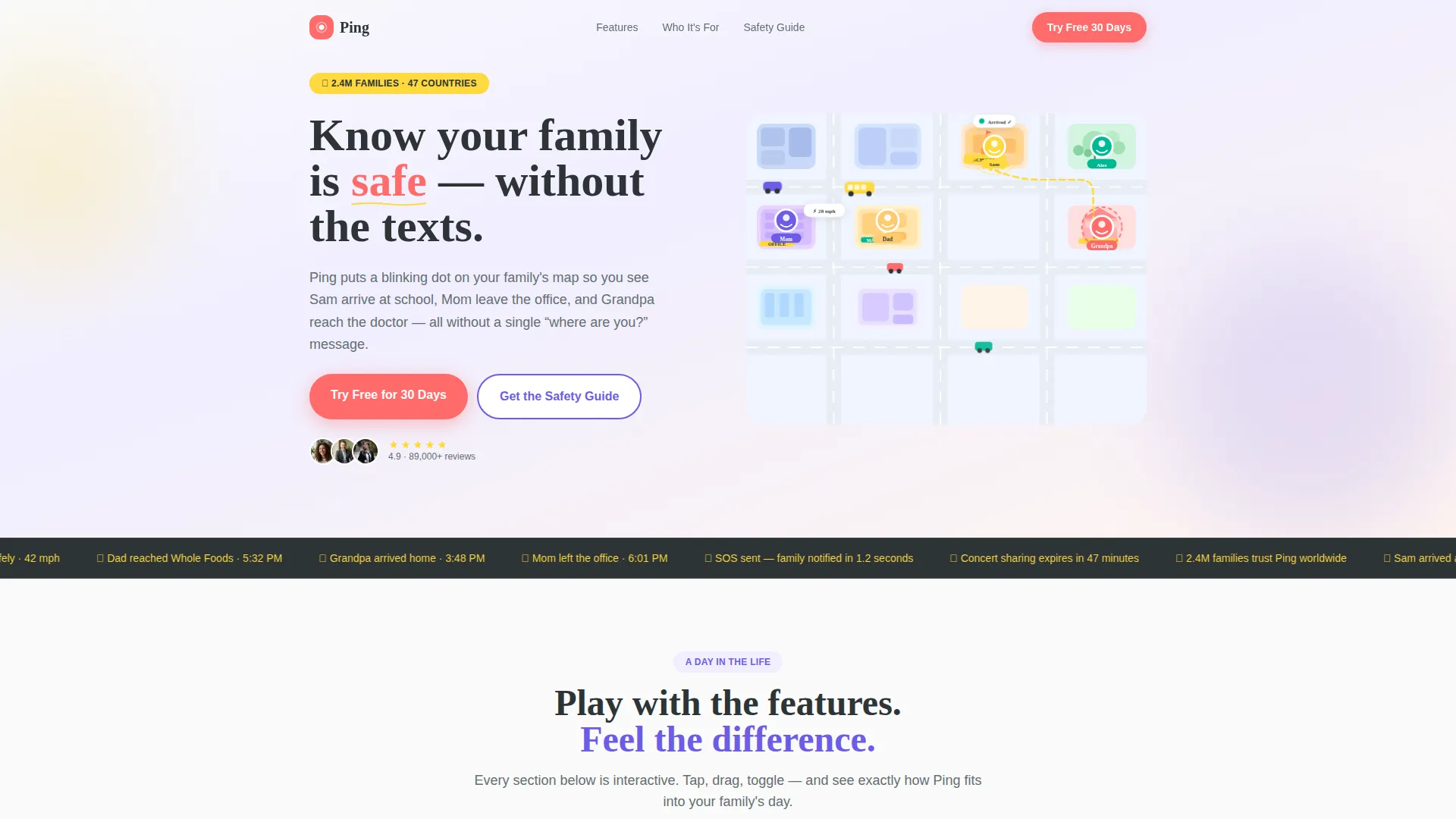
- An animated hero with a bird's-eye illustrated city map and five pulsing family avatars
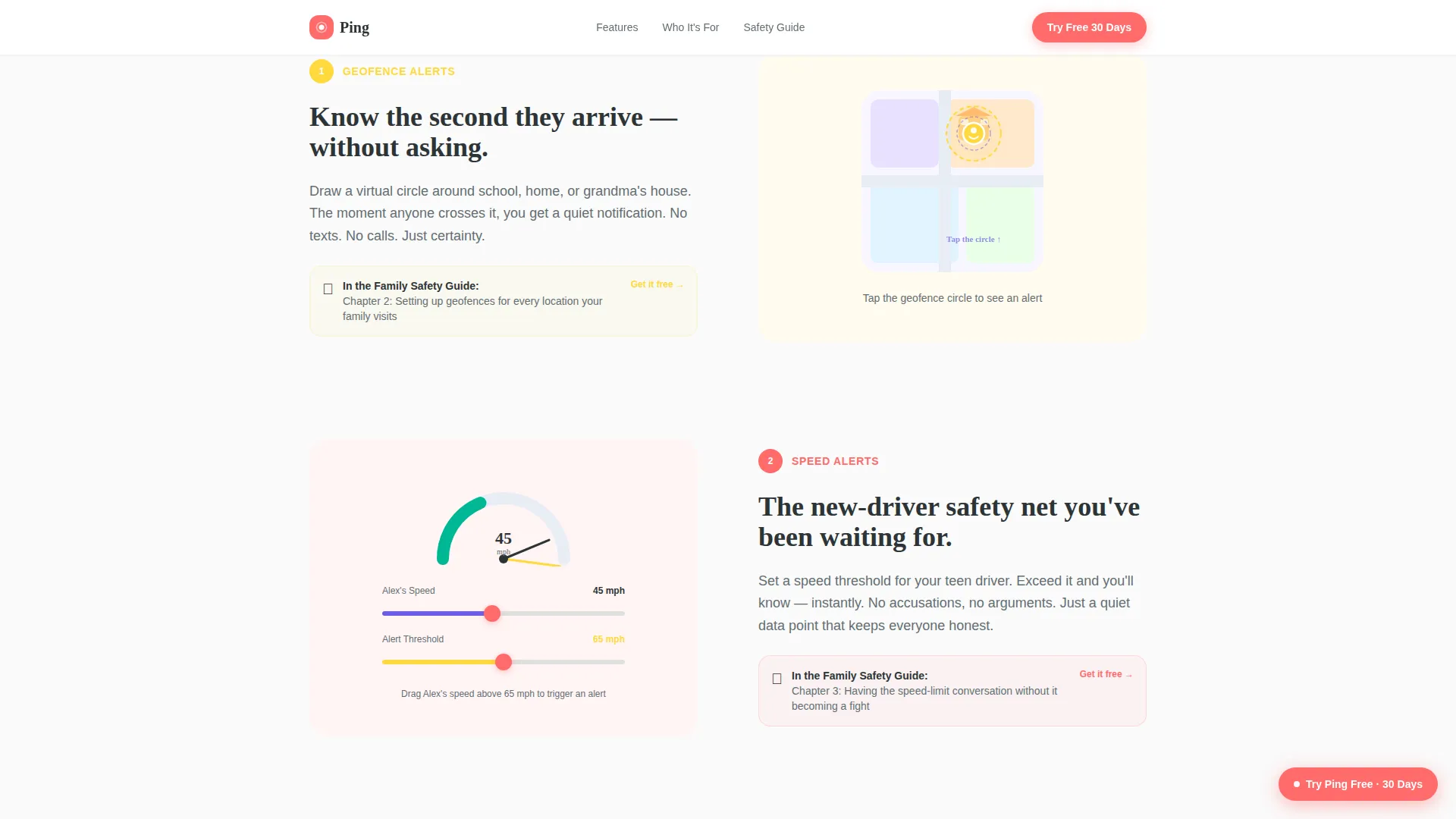
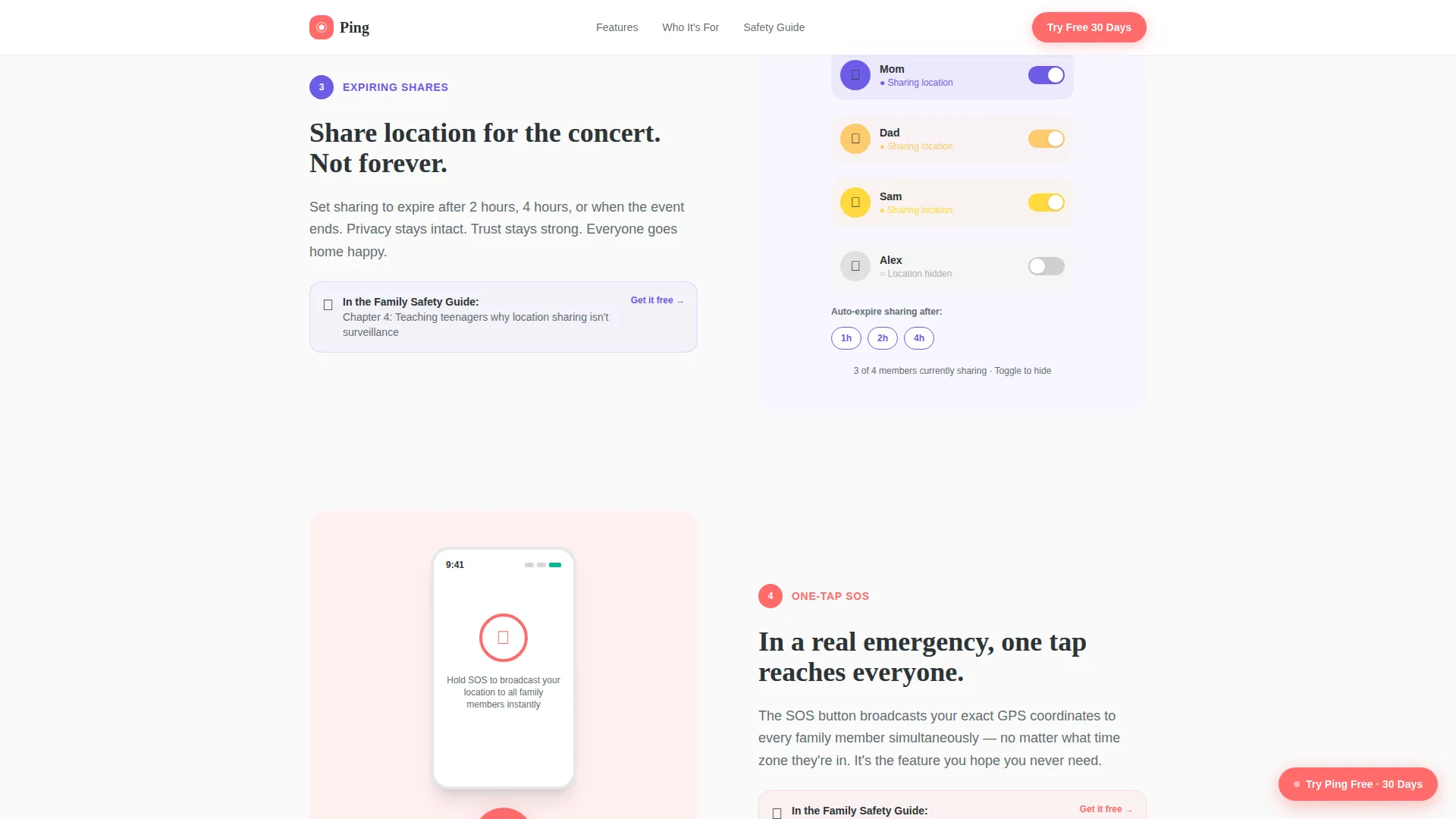
- An interactive feature tour with toggleable geofence demo, speed threshold slider, and location sharing toggle
- A sticky coral call-to-action bar and a lead magnet form for the Family Safety Guide download
Feature list
This template ships with a focused set of capabilities drawn directly from the design brief. Each one serves a specific moment in the visitor's journey.
Animated Illustrated Hero Map
The hero opens with a custom bird's-eye city map built from flat geometric shapes and rounded corners. Five family member avatars pulse at landmarks including a school, office, grocery store, park, and home. Tiny animated cars move along roads and a dotted line traces a teen's bike route in real time.
Scroll-Linked Feature Tour
As the visitor scrolls, the page zooms into each family member's location and reveals one feature at a time. Each stop covers a distinct scenario: geofence arrival alerts, driving speed notifications, expiring location shares, and a family-wide SOS broadcast. The tour builds emotional stakes from everyday convenience to genuine emergency readiness.
Interactive Micro-Interaction Demos
Each feature section includes a hands-on interaction. Visitors tap a geofence circle to watch it expand, drag a slider to set a speed threshold, and toggle location sharing on and off. These demos replace static screenshots with direct product experience.
Three Audience Persona Cards
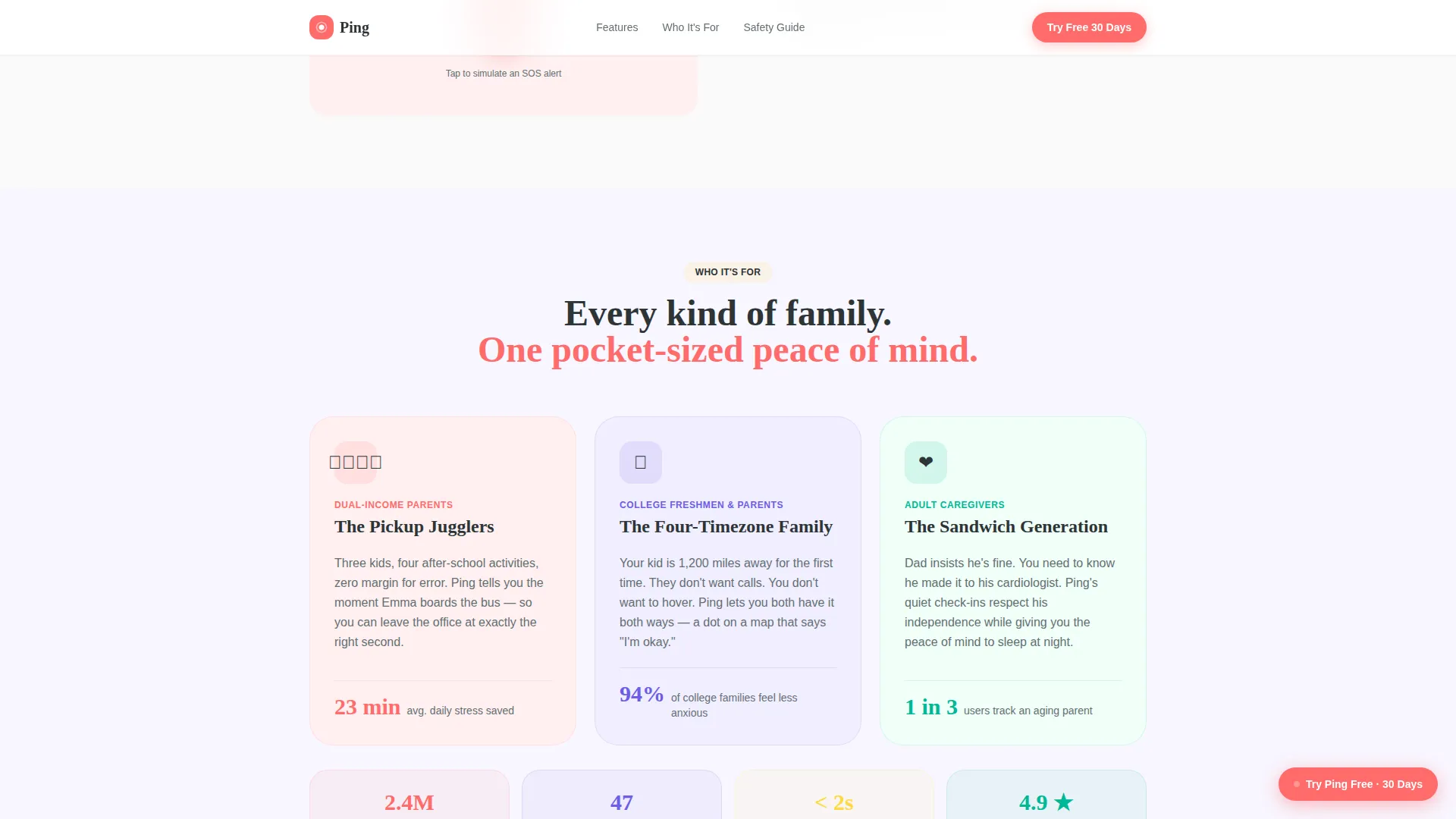
A bento-style asymmetric layout presents three audience cards covering parents managing pickups, teens checking on family, and adult caregivers tracking aging parents. Each card speaks directly to its user's emotional context.
Sticky Trial Signup Bar
A coral-colored sticky bar stays visible throughout the scroll. It holds the 30-day free trial form requiring only a first name, email address, and family size selection from a dropdown. The low-friction entry reduces abandonment.
Family Safety Guide Lead Magnet
The primary call to action links to a downloadable PDF covering location safety tips, conversation starters for talking to kids about tracking, and device setup walkthroughs. Every interactive feature demo ends with a nudge toward the guide, building desire before the form appears.
Page sections overview
| Section | Purpose |
|---|---|
| Hero Illustrated Map | Introduce the app with an animated city map and five family avatars |
| Interactive Feature Tour | Walk visitors through geofence alerts, speed notifications, SOS, and expiring shares |
| Who It's For | Present three audience persona cards in a bento asymmetric layout |
| Social Proof Testimonials | Build credibility with family quotes and key usage metrics |
| Guide Download Form | Capture email via Family Safety Guide and 30-day trial offer |
| Footer | Close with horizontal flow navigation and brand links |
Design & branding system
The visual identity follows a Playful Geometric theme with a Dopamine Pop color palette. Every color has a defined role so the page stays energetic without becoming chaotic.
- Electric coral (#FF6B6B) drives calls to action and notification badges; serotonin yellow (#FFD93D) highlights map routes and paths; trampoline blue (#6C5CE7) anchors headers and icon outlines; soft charcoal (#2D3436) keeps body text legible; cloud white (#FAFAFA) provides the background
- Fraunces handles all display headings and hero type; DM Sans handles all body copy and form labels
- The illustration style uses thick geometric shapes, flat color blocks, and rounded corners throughout, giving the page a consistent hand-crafted feel
Mobile & speed optimization
This template is designed mobile-first, reflecting the primary use case of a location tracking app used on phones throughout the day. The desktop hero carries the richest visual weight while the mobile layout prioritizes tap targets and scroll flow.
- CSS animations and GPU-accelerated transforms keep scroll-linked reveals smooth on mobile devices
- Intersection Observer drives section reveals so animations trigger only when visible, avoiding unnecessary load
- The sticky trial bar and lead magnet form are sized for thumb-friendly interaction on smaller screens
How this template helps you convert
The page uses a content-led funnel where visitors earn product understanding before being asked for anything. By the time someone reaches the form, they have already interacted with the product three or four times through demos.
- The interactive feature tour lets visitors play with geofence, speed, and sharing controls directly on the page, creating a sense of ownership before signup
- Every feature demo section ends with a "Learn more in the Guide" nudge, so the lead magnet feels like a natural next step rather than an interruption
- The low-friction trial form asks for only a first name, email, and family size, removing every barrier between interest and conversion
Other information about this template
This template is suited for app marketing teams working in the Kids and Family category, specifically within the Kids Online Safety and Tech subcategory. It supports a freemium, content-led acquisition model and is localized for English-speaking, USA-centric audiences using USD pricing references.
- Social proof is built into the template with space for testimonials, family photos, and key metrics such as 2.4 million families across 47 countries
- The scroll reveal structure is built using Intersection Observer, making each section entrance feel guided and purposeful
- The template style is classified as Scroll Reveal (Progressive), meaning content stages itself in response to the visitor's own pace
Theme
Playful Geometric
Creative direction
Interactive Explorer
Color system
Dopamine Pop
Style
Scroll Reveal (Progressive)
Direction
Content/Resource
Page Sections
Animated Illustrated City Map Hero
Scroll-linked Interactive Feature Tour
Hands-on Micro-interaction Demos
Three-persona Audience Cards
Sticky Low-friction Trial Signup
Content-led Lead Magnet Form
Related questions
What type of page is this template?
Can I customize the illustrated city map and avatar colors?
Does the template include the interactive demos out of the box?
Who are the three audience personas this template is built around?
What is the Family Safety Guide and how does it work in the template?



