Real Estate Agency Commission & Pricing Transparency Website Template
Appraise is a high-converting real estate agency pricing landing page built for full fee transparency. It presents commission tiers, marketing packages, and conveyancing add-ons in a frosted-glass, data-led layout. A live fee calculator, competitor comparison section, and two-step valuation modal turn cautious vendors into confident enquiries.
by Rocket studio
Quick summary
Appraise is a single-page pricing template for real estate agencies that want to win trust before the first phone call. It opens with a live stats dashboard, flows through three commission-tier cards, a real-time fee calculator, and a competitor comparison table, then closes with a two-step lead-capture modal. Every section is built around radical fee disclosure.
Who this template is for
This template is built for estate agencies and property professionals who compete on transparency. It suits teams tired of losing vendors to competitors who seem clearer about what they charge.
- First-time sellers nervous about hidden costs who need line-by-line fee breakdowns before committing
- Downsizers and landlords comparing multiple agencies and wanting volume-discount terms in writing
- Real estate agencies ready to make their pricing a competitive advantage rather than a guarded secret
What problem this template solves
Most agency pricing pages bury fees in footnotes or force visitors to request a quote just to learn the basics. That friction drives cautious vendors straight to a competitor tab. This template removes that friction entirely.
- Vendors can compare commission tiers, marketing packages, and conveyancing add-ons side by side without asking anyone
- The fee calculator closes the "I need to work this out myself" objection before it forms
- The competitor comparison section pre-empts the multi-tab research session that kills most conversions
What you get with this template
You get a fully structured, single-page pricing layout with a fixed anchor navigation bar and five distinct spoke sections. Every component is designed to escalate trust through disclosure.
- A stats-led header displaying live-style metrics: average selling fee, client savings, active listings, and median days-to-sale
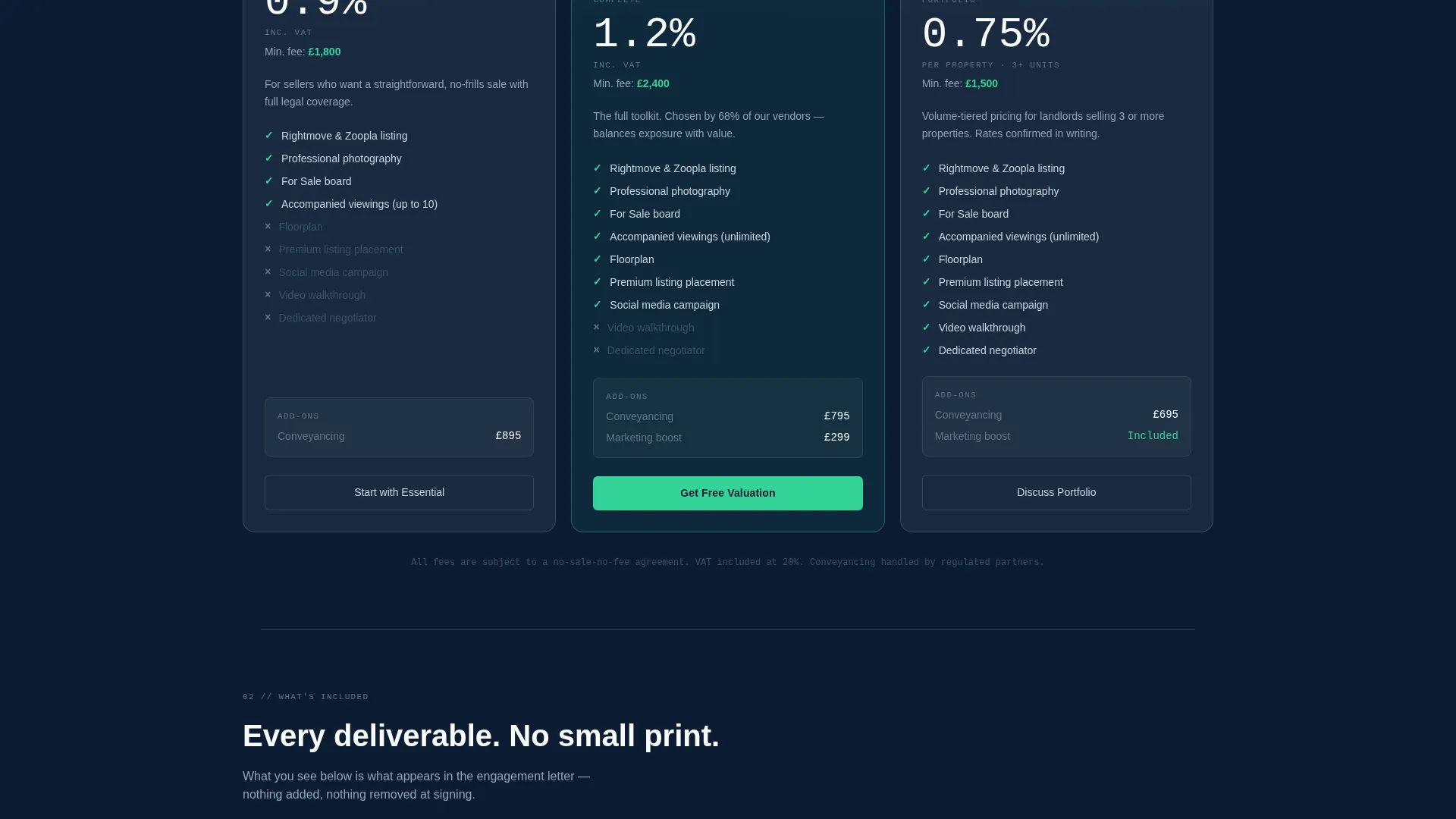
- Three frosted-glass commission-tier cards with line-item breakdowns, a real-time fee calculator spoke, and a competitor-overlay comparison section
- Two conversion paths: a two-step frosted valuation modal and a PDF fee guide email-capture form
Feature list
This template ships with six core components drawn directly from the brief. Each one serves a specific role in the vendor decision journey.
Stats Dashboard Header
Four oversized metrics sit front and centre: average UK selling fee (1.18%), total client savings (£2.4 million this quarter), active listings (1,247), and median days-to-sale (27). Each figure uses a counter animation that triggers as the section enters the viewport, giving the page an immediate sense of live data rather than static marketing copy.
Fixed Anchor Navigation
A sticky navigation bar sits just below the header and links to five spoke sections: Plan Tiers, What's Included, Fee Calculator, Compare Agents, and FAQs. It stays visible at all times so visitors can jump to any section without scrolling back to the top.
Commission Tier Cards
Three pricing models are displayed side by side in frosted-glass cards with line-item breakdowns. Each card details commission rate, marketing package inclusions, and available conveyancing add-ons so vendors can compare the full cost structure at a glance.
Real-Time Fee Calculator
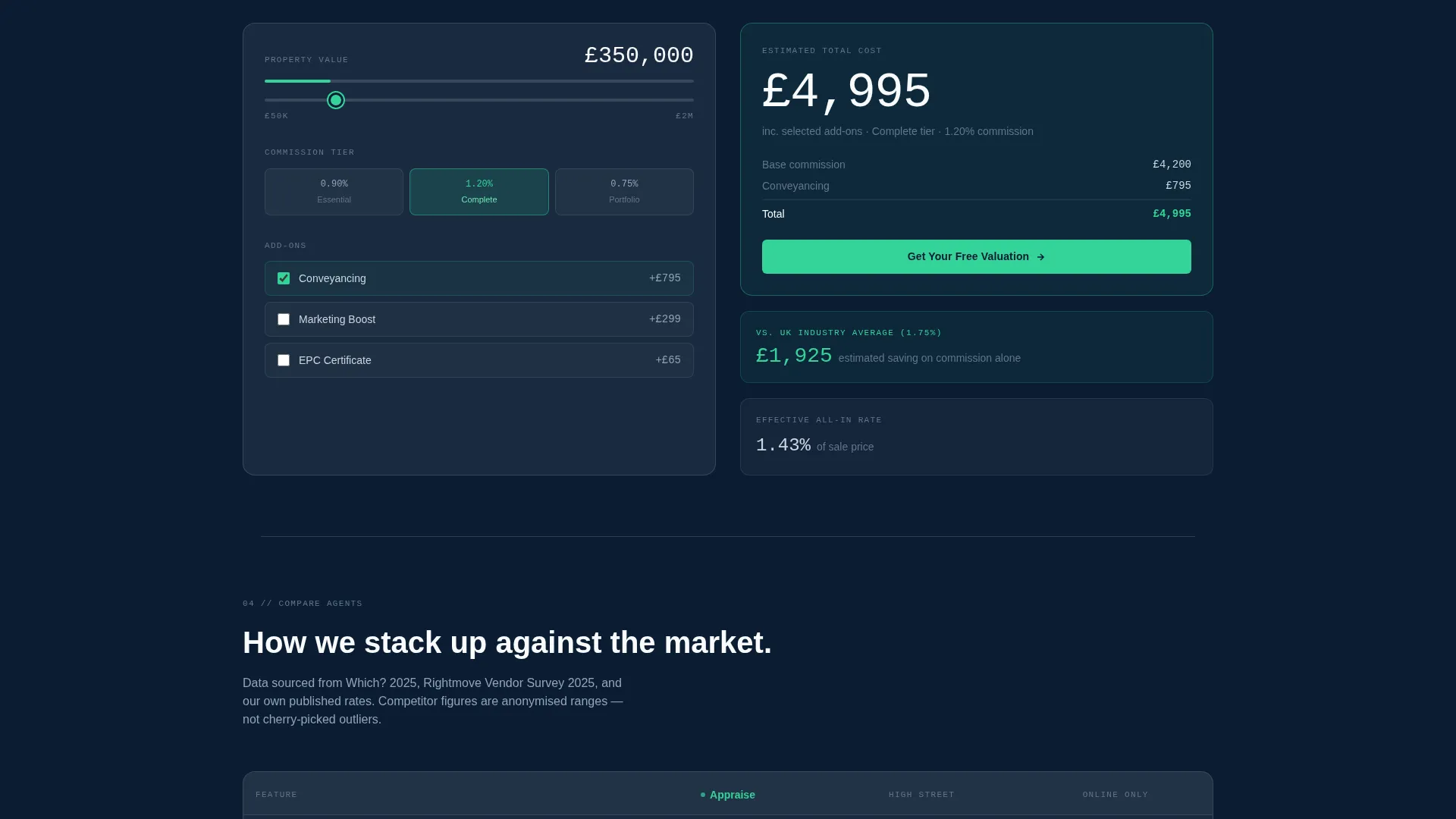
Visitors enter a property value and watch the estimated agency fee update instantly. This spoke answers the single most common pre-enquiry question without requiring any back-and-forth with the agency.
Competitor Comparison Overlay
This section places the agency's fees alongside anonymized competitor averages drawn from public data. It is the most trust-building component on the page because it lets the numbers make the argument without a single sales claim.
Two-Step Lead Capture Modal
The primary call to action, labelled "Get Your Free Valuation" in conversion-green, opens a frosted modal with two steps. Step one collects postcode and property type. Step two collects name, email, and preferred contact time. A secondary path captures email-only leads via a downloadable fee guide PDF.
Page sections overview
| Section | Purpose |
|---|---|
| Stats Dashboard Header | Opens with live-style metrics to establish credibility instantly |
| Fixed Anchor Nav | Lets visitors jump directly to any spoke section |
| Plan Tiers | Compares three commission models with full line-item detail |
| What's Included | Lists every item covered within each pricing tier |
| Fee Calculator | Lets visitors estimate real costs using their own property value |
| Compare Agents | Overlays agency fees against anonymized competitor averages |
| FAQs Section | Addresses common objections before the valuation request |
| Valuation Modal | Captures qualified leads through a two-step frosted-glass form |
| Fee Guide Download | Collects email-only leads via a PDF download offer |
Design & branding system
The visual identity follows a Directory and Discovery theme expressed through a Glassmorphic color system. Every surface feels like frosted glass held up to a deep navy sky, clean and legible without being clinical.
- Core palette: translucent card white (rgba 255, 255, 255, 0.15), deep estate navy (#0B1D33) as the base layer, soft frost border (#CBD5E1) on card edges, and conversion-green (#34D399) on every interactive price toggle and call-to-action button
- Pricing cards float above the navy base with frosted borders that sharpen on hover, adding physical depth to each tier without using drop shadows
- Typography uses a light mono weight for all stat figures, reinforcing the Industry Report creative direction and making every number feel like a data point rather than a marketing claim
Mobile & speed optimization
The layout is designed to remain legible and navigable at smaller screen sizes. The frosted-glass card system and modular spoke structure both support a clean reflow on mobile viewports.
- The fixed anchor navigation collapses cleanly so key section links remain accessible on smaller screens without covering content
- The fee calculator and commission-tier cards are structured to stack vertically, keeping comparisons readable on a single-column mobile layout
How this template helps you convert
The page is engineered to remove the hesitation that stops vendors from making first contact. It does this by giving away pricing intelligence upfront, so the call to action feels like a logical step rather than a leap of faith.
- The stats header and competitor comparison section answer the vendor's first two questions (what does it cost and how do you compare?) before they have to ask, reducing the perceived risk of enquiring
- The fee calculator and tier cards handle the arithmetic that previously required a phone call, so the only remaining reason to get in touch is to confirm details and book a valuation
Other information about this template
This template is categorized under real estate agency website templates and is specifically shaped for the real estate agency pricing page use case. It suits agencies operating in competitive urban and suburban markets where fee transparency is a genuine differentiator.
- The hub and spoke anchor navigation structure makes the page feel like a guided report rather than a scrolling brochure, which aligns with the Industry Report creative direction
- The Freemium and Trial landing page direction means the page never asks for commitment upfront; it earns the click by delivering value first
- The template is built as a single landing page, not a multi-page site, so all content and conversion paths live within one cohesive scroll experience
- Agencies can adapt the anonymized competitor data section using publicly available fee benchmarks relevant to their local market


Theme
Directory & Discovery
Creative direction
Industry Report
Color system
Glassmorphic
Style
Hub & Spoke (Anchor Nav)
Direction
Freemium/Trial
Page Sections
Live Stats Dashboard Header
Fixed Anchor Navigation Bar
Three Commission Tier Cards
Real-time Fee Calculator
Competitor Comparison Section
Two-step Lead Capture Modal
Related questions
Can I edit the commission tier figures and fee structures?
How does the two-step valuation modal work?
Is this template suited to agencies that do not currently publish their fees?
Can I adapt the competitor comparison section to my local market?
What is the secondary conversion path on this landing page?



