Aerospace Plating & Electroplating Facility Website Template
Plate is a single-column flow landing page template built for aerospace plating and electroplating facilities. It leads with a full-width data infographic, then walks procurement engineers through process capabilities, certifications, turnaround data, and case studies. The Forest Trust color system and Dashboard Pro theme give every section the credibility of a calibration document.
by Rocket studio
Quick summary
Plate is a precision-built landing page template for aerospace electroplating facilities. It opens with a metrics-driven infographic and flows through spec tables, certification cards, turnaround charts, and redacted case studies. The design feels like a quality dashboard bolted to a climate-controlled processing floor: institutional, exact, and built to earn a procurement engineer's trust before the first click.
Who this template is for
This template is written for aerospace plating facilities that serve demanding, specification-driven buyers. It speaks the language of procurement workflows, not marketing generalities.
- Aerospace plating and electroplating operations seeking Nadcap-accredited vendor status recognition
- MRO (Maintenance, Repair, and Overhaul) coordinators sourcing vendors for landing gear replate work
- Defense program managers requiring ITAR-compliant processing with full AMS and MIL-spec traceability
What problem this template solves
Aerospace procurement engineers disqualify vendors fast. A vague capabilities page with no spec data, no audit proof, and no traceable numbers gets removed from the shortlist before the first email is sent. This template solves that problem by front-loading every piece of proof a sourcing engineer needs.
- No audit credibility visible on the page, causing premature vendor disqualification
- Spec coverage unclear, forcing engineers to chase a capabilities sheet before requesting a quote
- No measurable throughput or quality data to justify moving forward in the sourcing workflow
What you get with this template
You get a fully structured single-column landing page designed specifically for aerospace plating and electroplating facilities. Every section is pre-mapped to a stage in the procurement engineer's decision process.
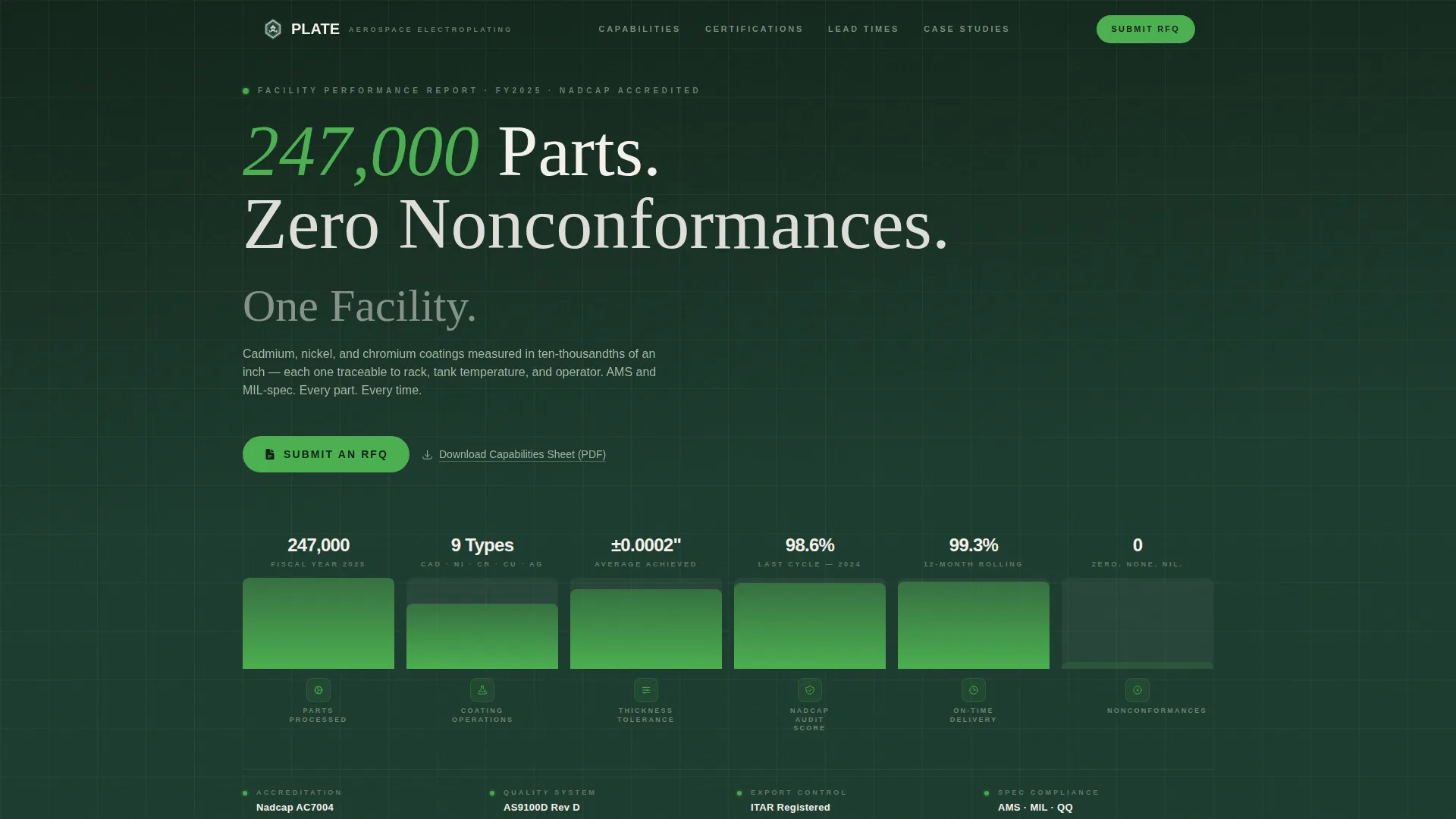
- A full-width header infographic displaying throughput metrics, coating types, tolerance data, Nadcap audit scores, and on-time delivery percentages
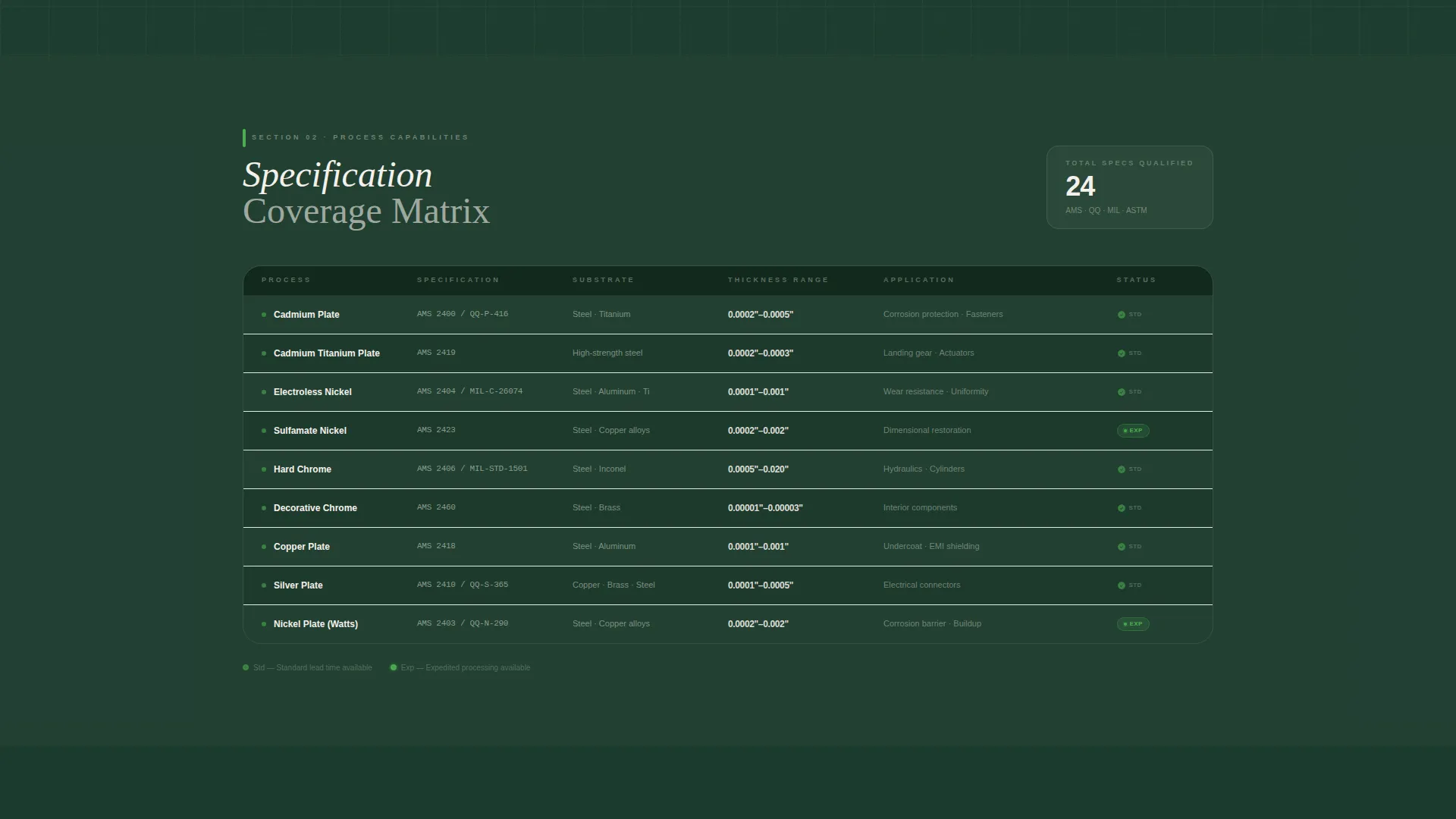
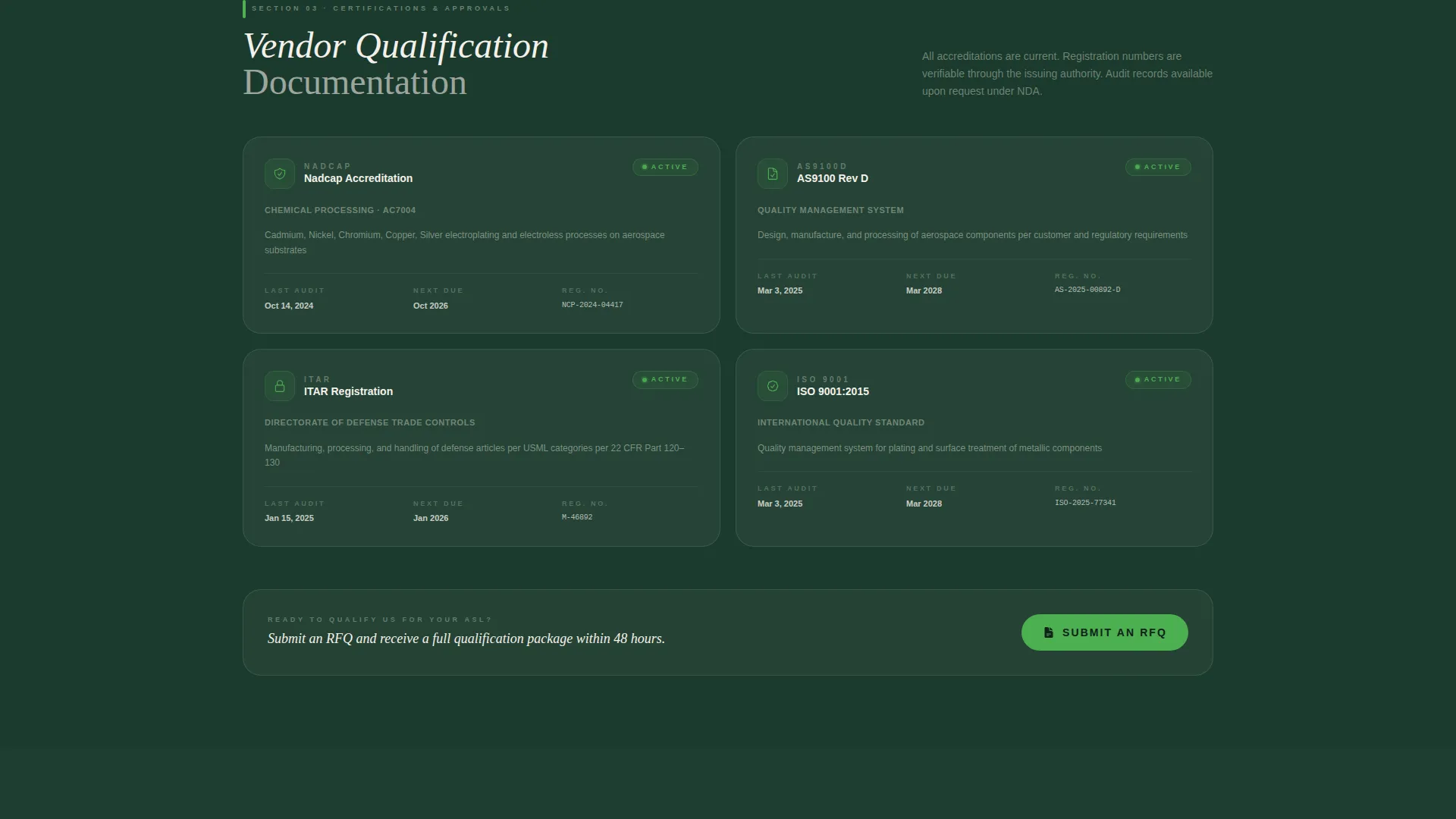
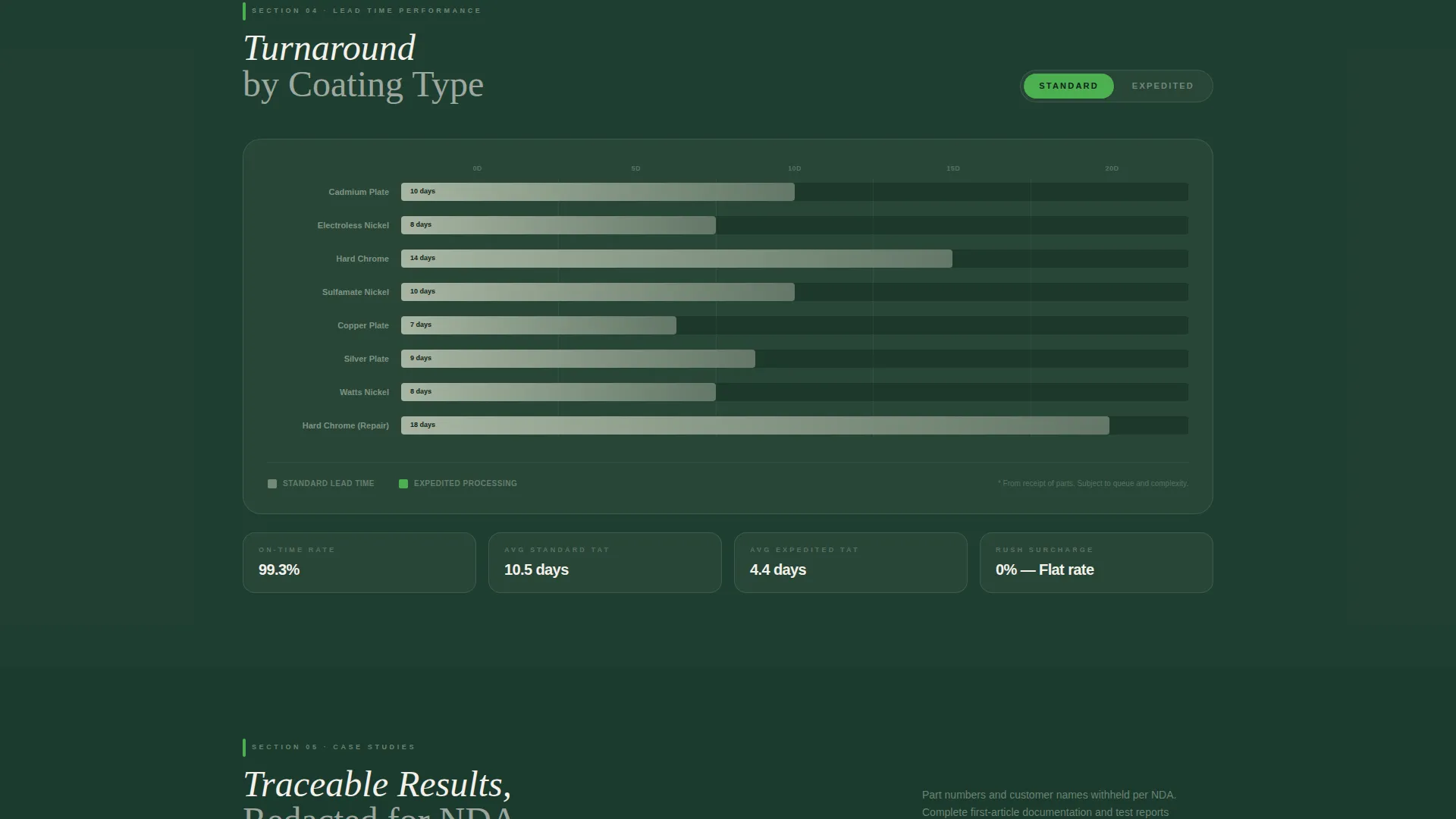
- A process capabilities table covering plating specifications from AMS 2404 through QQ-N-290, a certifications block with verification cards, a turnaround bar chart, and case study entries with before and after thickness readings
- Two primary "Submit an RFQ" calls to action placed at high-intent scroll positions, plus a secondary "Download Our Capabilities Sheet (PDF)" link for engineers still in vendor qualification
Feature list
This section outlines the core built-in components that make Plate work for aerospace plating and electroplating contexts.
Header Infographic Block
A full-width data visualization replaces the typical hero image. It displays annual parts processed, coating types performed, average thickness tolerance (plus or minus 0.0002 inches), Nadcap audit scores, and on-time delivery percentage. Clean iconographic blocks with subtly pulsing green compliance checkmarks make the numbers the headline.
Process Capabilities Table
A structured visual table lists every plating specification the facility supports, from AMS 2404 through QQ-N-290. Cadmium, nickel, and chromium coating types are represented alongside applicable aerospace and military specifications. This section lets procurement engineers confirm capability match without requesting a document.
Certifications and Approvals Cards
Each certification is rendered as a standalone verification card. Nadcap accreditation, AS9100D registration, and ITAR compliance each appear with audit dates displayed. The card format mirrors how engineers read qualification documents: one credential, one confirmation.
Turnaround Data Bar Chart
A bar chart compares standard and expedited lead times by coating type. This gives MRO coordinators and program managers the scheduling data they need at a glance, reducing back-and-forth before a quote is even submitted.
Redacted Case Study Entries
Case studies present redacted part numbers alongside before and after thickness readings and salt spray test hours survived. The redacted format respects confidentiality while still delivering the measurable proof that builds vendor confidence.
Repeating RFQ Call-to-Action
The primary "Submit an RFQ" call to action appears immediately below the header infographic and repeats after the certifications section and the case studies section. A secondary text link for PDF capabilities download captures engineers at earlier stages of vendor qualification.
Page sections overview
| Section | Purpose |
|---|---|
| Header Infographic | Display throughput metrics and quality data as the page headline |
| Process Capabilities Table | Confirm plating spec coverage for procurement review |
| Certifications and Approvals | Present Nadcap, AS9100D, and ITAR credentials as verification cards |
| Turnaround Data Chart | Show lead time comparisons by coating type |
| Case Study Block | Deliver redacted proof of real coating outcomes |
| Primary RFQ call to action | Drive qualified visitors to the Request for Quote portal |
| Capabilities Sheet Link | Capture engineers still in the vendor qualification phase |
Design & branding system
The Forest Trust color system gives this template the visual authority of an institutional quality dashboard. Every color choice reinforces credibility and readability rather than decorative style.
- Deep evergreen (#1B3A2D) dominates the header and footer, lichen gray (#A8B5A2) separates data sections like spreadsheet rows, bright chlorophyll (#4CAF50) marks compliance badges and hover states, and birch white (#F4F1EB) keeps specification text legible across every section
- The Dashboard Pro theme applies to typography, data containers, and layout spacing, producing a page that reads like a calibration certificate rendered in a browser
- No stock photography is used anywhere; the infographic, tables, charts, and cards carry all visual weight
Mobile & speed optimization
The single-column flow layout means every section stacks predictably on any screen size. Procurement engineers reviewing vendors on a tablet or mobile device get the same structured data hierarchy as desktop users.
- All data visualization blocks, tables, and bar charts are sized and spaced for comfortable reading on smaller viewports
- The vertical process flow of the infographic adapts naturally to narrow screens without losing the iconographic block structure
How this template helps you convert
Plate is designed as a Click-Through template. Its conversion logic is built into the scroll sequence itself.
- The header infographic establishes facility scale and quality proof before the visitor reads a single paragraph, eliminating early disqualification and building immediate credibility.
- The spec table and certification cards confirm capability match and remove compliance risk, so that by the time the visitor reaches the "Submit an RFQ" button, clicking it feels like the logical next step in their sourcing workflow.
Other information about this template
Plate fits within the Manufacturing and Industrial category, specifically the Aerospace Manufacturing subcategory and the Aerospace Plating and Electroplating niche. A few additional details are worth noting for teams evaluating this template.
- The template style is Single Column Flow, making it straightforward to populate with facility-specific data, real audit dates, and actual throughput figures
- The Industry Report creative direction means scroll behavior rewards attention: each section reads like a chapter in a technical white paper, deepening credibility as the visitor moves down the page
- The headline "247,000 Parts. Zero Nonconformances. One Facility." is pre-set as a placeholder in the infographic block and should be replaced with the facility's actual verified figures
- The page is purpose-built for facilities processing titanium, Inconel, and aluminum alloy parts with cadmium, nickel, and chromium coatings traceable to rack, tank temperature, and operator
Theme
Dashboard Pro
Creative direction
Industry Report
Color system
Forest Trust
Style
Single Column Flow
Direction
Click-Through
Page Sections
Header Infographic Block
Process Capabilities Spec Table
Certification Verification Cards
Turnaround Data Bar Chart
Redacted Case Study Entries
Repeating RFQ Call-to-action
Related questions
Who is this landing page template designed for?
Can I update the metrics in the header infographic?
Does the template include the PDF capabilities sheet?
What plating specifications does the process table cover?
Is this template suitable for a facility with ITAR registration?



